The FloorMaster

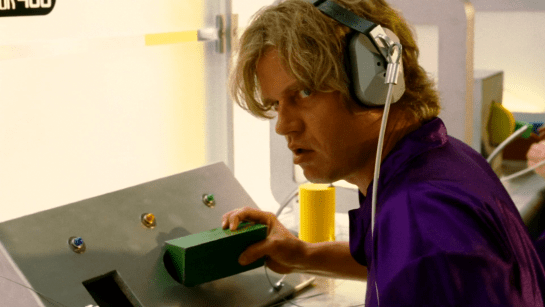
As Joe wanders through the (incredibly depressing) lobby of St. God’s Memorial Hospital, it is at once familiar but wrong. One of these wrong things is a floor cleaning robot labeled The FloorMaster. It loudly announces “YOUR FLOOR IS NOW CLEAN!” while bumping over and over into a toe kick under a cabinet. (It also displays this same phrase on a display panel.) The floor immediately below its path is, in fact, spotless, but the surrounding floor is so filthy it is opaque with dirt, as well as littered with syringes and trash lined with unsettling stains.

There are few bananas for scale, but I’m guessing it’s half meter square. It has a yellow top with green sides and highlights. It has bumpers and some greebles and an amber display screen on top. “The FloorMaster” logo is printed on its side.

Narratively awesome

The wonderful thing about this device is it quickly tells us many things at once. First, the FloorMaster is a technology that is, itself, kind of stupid. Today’s Roombas “know” to turn a bit when they bump into a wall. It’s one of the basic ways they avoid this very scenario. So this illustrates that the technology in this world is, itself, kind of stupid. (How society managed to make it this far without imploding or hell, exploding, is a mystery.)

It also shows that the people around the machines are failing to notice and do anything about the robot. They are either too dull to notice or this is just so common that it’s not worth doing anything about.

It also shows how stupid capitalism has become (it’s a running theme of St. God’s and the rest of the movie). It calls itself the floor master, but in no way has it mastered your floors. In no way are your floors clean, despite what the device itself is telling and blinking at you. And CamelCase brand names are so 1990s, much less 2505.

floornowclean

Realistically stupid

So, I wrote this whole book about agents, i.e. technologies that persistently respond to triggers with behaviors that serve people. It’s called Designing Agentive Technologies: AI That Works for People. One of my recurring examples in that book and when I speak publicly about that content is the Roomba, so I have a bookload of opinions on how this thing should be designed. I don’t want to simply copy+paste that book here. But know that Chapter 9 is all about handoff and takeback between an agent and a user, and ideally this machine would be smart enough to detect when it is stuck and reach out to the user to help.

33446295894_9b5c594a2b_k.jpg

I would be remiss not to note that, as with the The Fifth Element floor sweeping robots, safety of people around the underfoot robot is important. This is especially true in a hospital setting, where people may be in a fragile state and not as alert as they would ordinarily be. So unless this was programmed to run only when there was no one around, it seems like a stupid thing to have in a hospital. OK, chalk another point up to its narrative virtues.

Fighting US Idiocracy

Speaking of bots, there is a brilliant bot that you can sign up for to help us resist American idiocracy. It’s the resistbot, and you can find it on Facebook messenger, twitter, and telegram. It provides easy ways to find out who represents you in Congress, and deliver messages to them in under 2 minutes. It’s not as influential as an in-person visit or call, but as part of your arsenal, it helps with reminders for action. Join!

resistbot-banner.png

Talking to a Puppet

As mentioned, Johnny in the last phone conversation in the van is not talking to the person he thinks he is. The film reveals Takahashi at his desk, using his hand as if he were a sock puppeteer—but there is no puppet. His desk is emitting a grid of green light to track the movement of his hand and arm.

jm-22-puppet-call-c

The Make It So chapter on gestural interfaces suggests Takahashi is using his hand to control the mouth movements of the avatar. I’d clarify this a bit. Lip synching by human animators is difficult even when not done in real time, and while it might be possible to control the upper lip with four fingers, one thumb is not enough to provide realistic motion of the lower lip.

Instead I suggest that the same computer modifying his voice is also providing the fine mouth movements, using the same camera that must be present for the video phone calls. So what are the hand motions for? They provide cues as to how fast or slow Takahashi wants his puppet to speak, further disguising his own speech patterns. And the arm position could provide different body language for the avatar as a whole, to ensure for example that the puppet avatar does not react with surprise or anger even if Takahashi himself expresses those emotions.

We saw this avatar in a phone call once before, when Johnny dialed into an internal phone number from the phone booth. But we’ve also seen the video image of Takahashi himself when he called Street Preacher. Perhaps the avatar is an option for incoming calls, just as today we can assign custom ringtones to individual callers on our mobiles. For outgoing calls, an important person such as Takahashi would be more likely to use his true face to impress the callee.

Video phones have been predicted in science fiction fiction and film for a very long time now, but have never achieved wide scale usage. Human communication is richer and more expressive when we can see each other, so why are we resistant? One reason is that in the real world we don’t have makeup artists following us around to ensure we look our best at all times. Donald Norman suggested in chapter 8 of his book Things That Make Us Smart that real time video enhancement would solve this problem, but then if we’re all going to be presenting false avatars to each other, why bother?

A Cringing Computer

After the call ends, Anna, a personality uploaded into a mainframe, appears on the screen. Takahashi is annoyed by this and makes a sweeping arm gesture to get rid of her, detected by the green light grid. The computer screen actually sinks into the desk in response.

jm-22-puppet-call-animated

This is discussed in chapter 10 of the book as an interface handling emotional input. I’d like to add that this is also an emotional output, the computer seeming to hide itself from an angry user. Given how often current day users express the wish to beat their computers with heavy blunt objects, perhaps that is exactly what it is doing.

Computers in film and TV often have annoying personalities, which is surprising for (presumably) commercial products. Another cringing computer, emphasised by being named “Slave”, made regular appearances in season 4 of Blake’s 7. Would users feel more comfortable if their computer systems gave the appearance of being afraid every time they had to report an error? It’s worth considering.

Green Laser Scan

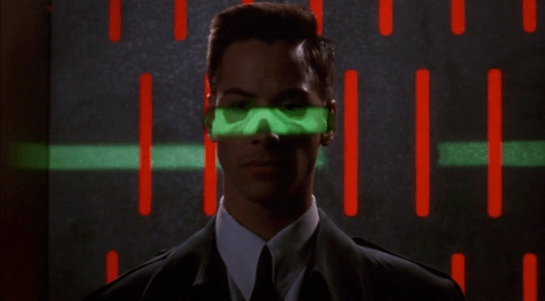
In a very brief scene, Theo walks through a security arch on his way into the Ministry of Energy. After waiting in queue, he walks towards a rectangular archway. At his approach, two horizontal green laser lines scan him from head to toe. Theo passes through the arch with no trouble.

childrenofmen-002

Though the archway is quite similar to metal detection technology used in airports today, the addition of the lasers hints at additional data being gathered, such as surface mapping for a face-matching algorithm.

We know that security mostly cares about what’s hidden under clothes or within bodies and bags, rather than confirming the surface that security guards can see, so it’s not likely to be an actual technological requirement of the scan. Rather it is a visual reminder to participants and onlookers that the scan is in progress, and moreover that this the Ministry is a secured space.

Though we could argue that the signal could be made more visible, laser light is very eye catching and human eyes are most sensitive at 555nm, and this bright green is the closest to the 808 diode laser at 532nm. So for being an economic, but eye catching signal, this green laser is a perfect choice.

High Tech Binoculars

In Johnny Mnemonic we see two different types of binoculars with augmented reality overlays and other enhancements: Yakuz-oculars, and LoTek-oculars.

Yakuz-oculars

The Yakuza are the last to be seen but also the simpler of the two. They look just like a pair of current day binoculars, but this is the view when the leader surveys the LoTek bridge.

jm-25-yakuza-binocs-adjusted

I assume that the characters here are Japanese? Anyone?

In the centre is a fixed-size green reticule. At the bottom right is what looks like the magnification factor. At the top left and bottom left are numbers, using Western digits, that change as the binoculars move. Without knowing what the labels are I can only guess that they could be azimuth and elevation angles, or distance and height to the centre of the reticule. (The latter implies some sort of rangefinder.)

So far, this is a simple uncluttered display. But why is there a brightly glowing Pharmakom logo at the top right? It blocks part of the view, and probably doesn’t help anyone trying to keep their eyes adapted for night vision.

LoTek-oculars

The LoTeks, despite their name, have more impressive binoculars. They’re first used when Johnny gets out of his airport taxi.

jm-11-lotek-binocs-a-adjusted

There’s a third tube above the optics, a rectangular inlet, and an antenna.

In these binoculars, the augmented reality overlay is much more dynamic. Instead of a fixed circle, green lines converge in a bounding box around the image of Johnny. Text slides onto the display from left to right, the last line turning yellow.

jm-11-loteks-animated

Zoomrect

The animated transition of the bounding box resembles what Classic MacOS programmers of the 1990s called “zoomrects” used for showing windows opening or closing. It’s a very effective technique to draw attention to a particular area of an image.

Animated text

Text appearing character by character is ubiquitous in film interfaces. In the 1960s and 1970s mainframe and minicomputer terminals really did display incrementally, as the characters arrived one by one over slow serial port links. On any more recent computer it actually takes extra programming to achieve this effect, as the normal display of text is so fast that we would perceive it as instantaneous. But people like to see incremental text, or have been conditioned by film to expect it, so why not?

Bioscanning

The binoculars detect Johnny’s implant. It might just be possible to detect this passively from infrared or electronic signals, but more likely the binoculars include a high resolution microwave radar as well. If there had been more than one person in view, the bounding box would indicate which one the text refers to. And note that the last line of text is a different color. What that means is unclear here, but it becomes clear (and I’ll discuss it) later.

The second time we see the LoTek binoculars is when a lookout spots Street Preacher, a very bad guy and another who wants to remove Johnny’s head. Once again the binoculars have performed more than just a visual scan.

jm-17-lotek-binocs-a-adjusted

The binocular view and overlay are being relayed to another character, the LoTek leader J-Bone who can watch on a monitor. Here the film anticipates the WiFi webcam.

jm-17-lotek-binocs-b-adjusted

The overlay text now changes.

jm-17-lotek-binocs-c-adjusted

Narrow AI?

This is interesting, because the binoculars can not only detect implants and other cyborg modifications, but are apparently able to evaluate and offer advice. It appears that the green text is used for the factual (more or less) information about what has been detected, while yellow text is uncertain or or speculative.

Does this imply a general artificial intelligence? Not necessarily. This warning could be based solely on the detected signature, in the same way that current day military passive sonars and radar warning receivers can identify threats based on identifying characteristics of a received signal. In the world of Johnny Mnemonic it would make sense to assume that anyone with full custom biomechanics is extremely dangerous. Or, since Street Preacher is a resident rather than a stranger and already feared by others, his appearance and the warning could have been entered into a LoTek facial recognition database that the binocular system uses as a reference.

These textual overlays are an excellent interface, not interfering with normal vision and providing a fast and easy-to-understand analysis. But, the user must have faith that the computer analysis is accurate. There’s no reason given as to why any of the text is displayed. If Johnny was carrying an implant in his pocket instead of his brain, would the computer know the difference?

An alternative approach would be some kind of sensor fusion or false spectrum display, with the raw infrared or radar image overlaid over the visuals and the viewer responsible for interpreting the data. The problem with such systems is that our visual system didn’t evolve to interpret such imagery, so a lot of training and practice is required to be both fast and accurate. And the overlay itself interferes with our normal visual recognition and processing. If the computer can do a better job of deciphering the meaning of non-visual data, it should do so and summarise for the human viewer.

Further advantages of this interface are that even a novice sentry will benefit from the built-in scanning and threat analysis, and the wireless transmission ensures that the information is shared rather than being limited to the person on watch. 

Airport Security

After fleeing the Yakuza in the hotel, Johnny arrives in the Free City of Newark, and has to go through immigration control. This process appears to be entirely automated, starting with an electronic passport reader.

jm-9-customs-b

After that there is a security scanner, which is reminiscent of HAL from the film 2001: A Space Odyssey.

jm-9-customs-f

The green light runs over Johnny from top to bottom.

jm-9-customs-c

Looking at the picture, we can see that this green light is somehow making Johnny’s skeleton visible. It would be possible, by having an X-ray imaging system running at the same time and then re-projecting the X-ray image back onto the body, but why? Since there don’t appear to be any actual human beings on duty, I can only suggest that it is meant to look intimidating and impressive to encourage obedience. In the film Johnny appears to be alone and cannot see this himself, but it would be much more common for there to be multiple passengers, so each could watch the others being scanned.

There is also a screen showing another scan, a blurry body image, and text appearing on the right side. A voice repeats the text content. For the first time we see a blue background, the most common color for futuristic film interfaces.

jm-9-customs-d

The scanner detects Johnny’s implant, but whatever secrecy measures are present cause the system to decide that it is a registered dyslexia aid. The popup alert below includes the registration issuer and a domain name, so perhaps this is online verification over the Internet. Presumably Johnny can see this screen himself, if he cares.

jm-9-customs-e

The voiceover helpfully informs Johnny that there is “synaptic seepage”, and he should seek medical attention within 24 hours. This shows quite high level decision making by the system and an offer of assistance. Johnny says “thanks” in reply, an anthropomorphic response to this seemingly intelligent machine.

However, there seems to be a more detailed explanation in smaller text on the right of the display, and this isn’t announced. It’s not clear in this scene whether Johnny can see this display or not, but even if he could it would be difficult to read. Perhaps this is a legacy system from the days when airport security had actual staff.

Next

At this point Johnny leaves the airport, riding in a taxi from the airport. It is a good time for the first review of a group of related interfaces, which will be the next series of posts.

Brain Upload

Once Johnny has installed his motion detector on the door, the brain upload can begin.

3. Building it

Johnny starts by opening his briefcase and removing various components, which he connects together into the complete upload system. Some of the parts are disguised, and the whole sequence is similar to an assassin in a thriller film assembling a gun out of harmless looking pieces.

jm-6-uploader-kit-a

It looks strange today to see a computer system with so many external devices connected by cables. We’ve become accustomed to one piece computing devices with integrated functionality, and keyboards, mice, cameras, printers, and headphones that connect wirelessly.

Cables and other connections are not always considered as interfaces, but “all parts of a thing which enable its use” is the definition according to Chris. In the early to mid 1990s most computer user were well aware of the potential for confusion and frustration in such interfaces. A personal computer could have connections to monitor, keyboard, mouse, modem, CD drive, and joystick – and every single device would use a different type of cable. USB, while not perfect, is one of the greatest ever improvements in user interfaces.

Why not go wireless? Wireless devices remove the need for a physical connection, but this means that anyone, not just you, could potentially connect. So instead of worrying about whether we have the right kind of cable, we now worry about the right kind of Bluetooth pairing and WiFi encryption password scheme. Mobile wireless devices also need their own batteries, which have to be charged. So wireless may seem visually cleaner, but comes with its own set of problems.

As of early 2016 we have two new standards, Lightning and USB-C, that are orientation-independent (only fifty years after audio cables), high bandwidth, and able to transmit power to peripherals as well. Perhaps by 2021 cables will have made a comeback as the usual way to connect devices.

2. Explaining it

Johnny explains the process to the scientists. He needs them to begin the upload by pushing a button, helpfully labelled “start”, on the gadget that resembles an optical disk drive. There’s a big red button as well, which is not explained but would make an excellent “cancel” button.

jm-6-uploader-kit-b

It would be simpler if Johnny just did this himself. But we will shortly discover that the upload process is apparently very painful. If Johnny had his hands near the system, he might involuntarily push another button or disturb a cable. So for them, having a single, easily differentiated button to press minimizes their chance of messing it up.

1. Making codes

He also sticks a small black disk on the hotel room’s silver remote control. The small disk is evidently is a wireless controller or camera of some kind. The scientists must watch the upload progress counter, and as it approaches the end, use this modified remote to grab three frames from the TV display, which will become the “access code” for the data. (More on this below.)

jm-6-uploader-kit-x

None of the buttons on this remote have markings or labels, but neither Johnny nor the scientist who will be using it are bothered. Perhaps this hotel chain tries to please every possible guest by not favouring any particular language? But even in that case, I’d expect there to be some kind of symbols on the buttons and a multilingual manual to explain the meaning of each. Maybe Johnny spends so much time in hotel suites that he has memorised the button layout?

Short of a mind reading remote that can translate any button press into “what the user intended”, I have to admit this is a terrible interface.

(There is a label on the black disk, but I have no idea what it means or even which script that is. Anyone?)

0. Go go go

Johnny plugs in his implant, puts on a headset with more cables, and bites down on a mouthguard. He’s ready.

jm-6-uploader-kit-d

The scientist pushes the start button and the upload begins. Johnny sees the data stream in his headset as a flood of graphics and text.

jm-7-uploading-a

Why does he need the headset when there is a direct cable connection to the implant? The movie doesn’t make it explicit. It could be related to the images used as the access code. (More on this below.) Perhaps the images need to be processed by the recipient’s own optic nerve system for more reliable storage?

Still, in the spirit of apologetics we should try to find a better explanation than “an opportunity for 1995 cutting edge computer generated graphics.” Perhaps it is a very flashy progress indicator? Older computer systems had blinking lights on disk drives to indicate activity, copied on some of today’s USB sticks. Current-day file upload or download GUIs have progress bars. As processing and graphics capabilities increase, it will be possible for software to display thumbnails or previews of the actual data being transferred without slowing down.

Unfortunately there is an argument against this, which is that the obvious upload progress indicator is a numeric display counting gigabytes down to zero, and it makes a fast chirping sound as a sonic indicator as well. The counter shows the data flowing at gigabytes per second, the entire upload lasting about a minute. There’s also the problem that it’s not Johnny who is interested in knowing whether the upload is scientific data rather than, say, a video collection; but the scientists, and they can’t see it.

jm-7-uploading-b

As the counter drops below one hundred, the scientist points the remote with black disk at the TV display, currently showing a cartoon, and presses the middle button. The image from the TV appears overlaid on the data stream to Johnny. This is a little odd, because Johnny assured the scientists that he wouldn’t know what the access codes were himself. Maybe these brief flashes are not enough time for him to remember these particular images among the gigabytes of visual content. But the way they’re shown to us, I’ll bet you can remember them when they come up again later in the plot.

jm-7-uploading-d

Two more images are grabbed before the counter stops. When the upload finishes, the three images are printed out. (In the original film this is shown upside down, so I have rotated the image.)

jm-7-uploading-f-rotated

Tagged

So what are the images for? The script isn’t clear. I suggest that the images are being used as the equivalents of very large random numbers for whatever cryptography scheme protects the data against unauthorised access. Some current day systems use the timing of key presses and mouse movements as a source of randomness because humans simply can’t move their fingers with microsecond precision. Here, the human element makes it impossible to predict exactly which frame is chosen.

Humans also find images much easier to recognise than hundred digit numbers. Anyone who has seen the printout will be able to say whether a particular image is part of the access code or not with a high degree of confidence. In computer systems today, Secure Shell, or ssh, is a widely used encrypted terminal program for secure access to servers. Recent versions of ssh have a ‘randomart’ capability which shows a small ASCII icon generated from the current cryptographic key to everyone who logs on. If this ASCII icon appears different, this alerts everyone that the server key has been changed.

There’s one potential usability problem with the whole “pick three random images” mechanism. The last frame was grabbed when the counter was very close to zero. What would have happened if he had been too slow and missed altogether? Wouldn’t it be more reliable to have the upload system automatically grab the images rather than rely on a human? Chris suggests that maybe it secretly did grab three images that could have used without human input, but privileged the human input since it was more reliably random.

Quick aside: You may be asking, if images would be so wonderful, why aren’t we using them in this way already? It’s because our current security systems need not just very large random numbers, but very large random numbers with particular mathematical properties such as being prime. But let’s cut Johnny Mnemonic some slack,  saying that by 2021 we may have new algorithms.

OK, back to the plot.

-1. Sharing the codes

The access codes are to be faxed from Beijing to Newark, although this gets interrupted by the Yakuza intruders. This is yet another device with unmarked buttons.

jm-7-uploading-g

This device makes the same beeps and screeches as a 1990s analog fax machine. Since we’ll later learn that all the fax messages and phone calls are stored digitally in cyberspace, this must be a skeuomorphism, the old familiar audio tones now serving just as progress indicators.

As with other audio output, the tones allow the user to know that the transmission is proceeding and when it ends without having to pay full attention to the device. On the other hand, there is potential for confusion here as the digital upload is (presumably) much faster. Most current day computer systems could upload three photos, even in high resolution, well before the sequence of tones would complete. Users would most likely wait longer than actually necessary before moving on to their next task.

-2. Washing up

During the upload Johnny clenches his fists and bites his mouthguard. When the upload finishes, he retreats to the bathroom in considerable pain. At one point blood flows from his nose, and he swipes his hand over the tap to wash it down the drain. The bathroom announces that the water temperature is 17 degrees. We’ll come back to this later.

jm-8-bathroom-tap

As Make It So emphasises in the chapter on brain interfaces, there is nothing in our current knowledge to suggest that writing or reading memories to or from a human brain would be painful. On the other hand, we know that information in the brain isthe shape of the neurons in the brain. Who knows what side effects will happen as those neurons are disconnected and reconnected as they need to be? We don’t know, so can’t really say whether it would hurt or not.

-3. Escaping the Yakuza

As mentioned in a prior post, while he is in the bathroom, the motion detector Johnny installed on the hotel door isn’t very effective and the Yakuza break in, kill everyone else, and acquire the second of the three access code images. Johnny escapes with the first image and flies to Newark, North America. 

Viper Launch Control

image02

The Galactica’s fighter launch catapults are each controlled by a ‘shooter’ in an armored viewing pane.  There is one ‘shooter’ for every two catapults.  To launch a Viper, he has a board with a series of large twist-handles, a status display, and a single button.  We can also see several communication devices:

  • Ear-mounted mic and speaker
  • Board mounted mic
  • Phone system in the background

These could relate to one of several lines of communication each:

  • The Viper pilot
  • Any crew inside the launch pod
  • Crew just outside the launch pod
  • CIC (for strategic status updates)
  • Other launch controllers at other stations
  • Engineering teams
  • ‘On call’ rooms for replacement operators

image05

Each row on the launch display appears to conform to some value coming off of the Viper or the Galactica’s magnetic catapults.  The ‘shooter’ calls off Starbuck’s launch three times due to some value he sees on his status board (fluctuating engine power right before launch).

We do not see any other data inputs.  Something like a series of cameras on a closed circuit could show him an exterior view of the entire Viper, providing additional information to the sensors.

When Starbuck is ready to launch on the fourth try, the ‘shooter’ twists the central knob and, at the same time and with the same hand, pushes down a green button.  The moment the ‘shooter’ hits the button, Starbuck’s Viper is launched into space.

image04

There are other twist knobs across the entire board, but these do not appear to conform directly to the act of launching the Viper, and they do not act like the central knob.  They appear instead to be switches, where turning them from one position to another locks them in place.

There is no obvious explanation for the number of twist knobs, but each one might conform to an electrical channel to the catapult, or some part of the earlier launch sequence.

Manual Everything

Nothing in the launch control interprets anything for the ‘shooter’.  He is given information, then expected to interpret it himself.  From what we see, this information is basic enough to not cause a problem and allow him to quickly make a decision.

Without networking the launch system together so that it can poll its own information and make its own decisions, there is little that can improve the status indicators. (And networking is made impossible in this show because of Cylon hackers.) The board is easily visible from the shooter chair, each row conforms directly to information coming in from the Viper, and the relate directly to the task at hand.

The most dangerous task the shooter does is actually decide to launch the Viper into space.  If either the Galactica or the Viper isn’t ready for that action, it could cause major damage to the Viper and the launch systems.

A two-step control for this is the best method, and the system now requires two distinct motions (a twist-and-hold, then a separate and distinct *click*).  This is effective at confirming that the shooter actually wants to send the Viper into space.

To improve this control, the twist and button could be moved far enough apart (reference, under “Two-Hand Controls” ) that it requires two hands to operate the control.  That way, there is no doubt that the shooter intends to activate the catapult.

If the controls are separated like that, it would take some amount of effort to make sure the two controls are visually connected across the board, either through color, or size, or layout.  Right now, that would be complicated by the similarity in the final twist control, and the other handles that do different jobs.

Changing these controls to large switches or differently shaped handles would make the catapult controls less confusing to use.


Viper Controls

image03

The Viper is the primary space fighter of the Colonial Fleet.  It comes in several varieties, from the Mark II (shown above), to the Mark VII (the latest version).  Each is made for a single pilot, and the controls allow the pilot to navigate short distances in space to dogfight with enemy fighters.

image09

Mark II Viper Cockpit

The Mark II Viper is an analog machine with a very simple Dradis, physical gauges, and paper flight plans.  It is a very old system.  The Dradis sits in the center console with the largest screen real-estate.  A smaller needle gauge under the Dradis shows fuel levels, and a standard joystick/foot pedal system provides control over the Viper’s flight systems.

image06

Mark VII Viper Cockpit

The Viper Mk VII is a mostly digital cockpit with a similar Dradis console in the middle (but with a larger screen and more screen-based controls and information).  All other displays are digital screens.  A few physical buttons are scattered around the top and bottom of the interface.  Some controls are pushed down, but none are readable.  Groups of buttons are titled with text like “COMMS CIPHER” and “MASTER SYS A”.

Eight buttons around the Dradis console are labeled with complex icons instead of text.

image07 image08

When the Mk VII Vipers encounter Cylons for the first time, the Cylons use a back-door computer virus to completely shut down the Viper’s systems.  The screens fuzz out in the same manner as when Apollo gets caught in an EMP burst.

The Viper Mk VII is then completely uncontrollable, and the pilot’s’ joystick-based controls cease to function.

Overall, the Viper Mk II is set up similarly to a WWII P-52 Mustang or early production F-15 Eagle, while the Viper Mk VII is similar to a modern-day F-16 Falcon or F-22 Raptor .


Usability Concerns

The Viper is a single seat starfighter, and appears to excel in that role.  The pilots focus on their ship, and the Raptor pilots following them focus on the big picture.  But other items, including color choice, font choice, and location are an issue.

Otherwise, Items appear a little small, and it requires a lot of training to know what to look for on the dashboards. Also, the black lines radiating from the large grouper labels appear to go nowhere and provide no extra context or grouping.  Additionally, the controls (outside of the throttle and joystick) require quite a bit of reach from the seat.

Given that the pilots are accelerating at 9+ gs, reaching a critical control in the middle of a fight could be difficult.  Hopefully, the designers of the Vipers made sure that ‘fighting’ controls are all within arms reach of the seat, and that the controls requiring more effort are secondary tasks.

Similarly, all-caps text is the hardest to read at a glance, and should be avoided for interfaces like the Viper that require quick targeting and actions in the middle of combat.  The other text is very small, and it would be worth doing a deeper evaluation in the cockpit itself to determine if the font size is too small to read from the seat.

If anyone reading this blog has an accurate Viper cockpit prop, we’d be happy to review it! 

Fighter pilots in the Battlestar Galactica universe have quick reflexes, excellent vision, and stellar training.  They should be allowed to use all of those abilities for besting Cylons in a dogfight, instead of being forced to spend time deciphering their Viper’s interface.

Damage Control

image04

After the Galactica takes a nuclear missile hit to its port launch bay, part of the CIC goes into Damage Control mode.  Chief Tyrol and another officer take up a position next to a large board with a top-down schematic of the Galactica.  The board has various lights in major sections of the ship representing various air-tight modules in the ship.  

image03

After the nuclear hit, the port launch bay is venting to space, bulkheads are collapsing in due to the damage, and there are uncontrolled fires.  In those blocks, the lights blink red.

image05

Colonel Tigh orders the red sections sealed off and vented to space.  When Tigh turns his special damage control key in the “Master Vent” control, the lights disappear until the areas are sealed off again.  When the fires go out and the master vents are closed, the lights return to a green state.

On the board then, the lights have three states:

  • Green: air-tight, healthy
  • Blinking Red: Fire
  • Off: Intentional Venting

There does not appear to be any indications of the following states:

  • Damage Control Teams in the area
  • Open to space/not air-tight

We also do not see how sections are chosen to be vented.

Why it works

The most effective pieces here are the red lights and the “vent” key.  Chief Tyrol has a phone to talk to local officers managing the direct crisis, and can keep a basic overview of the problems on the ship (with fire being the most dangerous) with the light board.  The “vent” key is likewise straightforward, and has a very clear “I’m about to do something dangerous” interaction.

What is confusing are the following items:

  • How does Chief Tyrol determine which phone/which officer he’s calling?
  • Who is the highest ranking officer in the area?
  • How does the crew determine which sections they’re going to vent?
  • How do they view more complex statuses besides “this section is on fire”?

As with other systems on the Galactica, the board could be improved with the use of more integrated systems like automatic sensors, display screens to cycle through local cameras, and tracking systems for damage control crew.  Also as with other systems on the Galactica, these were deliberate omissions to prevent the Cylons from being able to control the Galactica.

One benefit of the simplified system is that it keeps Chief Tyrol thinking of the high-level problem instead of trying to micromanage his local damage control teams.  With proper training, local teams with effective leadership and independent initiative are more effective than a large micro-managed organization.  Chief Tyrol can focus on the goals he needs his teams to accomplish:

  • Putting out fires
  • Evacuating local crew
  • Protecting the ship from secondary explosions

and allow his local teams to focus on the tactics of each major goal.

What it’s missing

A glaring omission here is the lack of further statuses.  In the middle of a crisis, Chief Tyrol could easily lose track of individual teams on his ship.  He knows the crews that are in the Port Hangar Bay, but we never hear about the other damage control teams and where they are.  Small reminders or other status indicators would keep the Chief from needing to remember everything that was happening across the ship.  Even a box of easily-grabbed sticky notes or a grease-pen board would help here and be very low-tech.

Possible indicators include:

  • Secondary lights in each section when a damage control crew was in the area
  • A third color indicator (less optimal, but would take up less space on the board)
  • A secondary board with local reports of damage crew location and progress
  • Radiation alarms
  • Extreme temperatures
  • Low oxygen states
  • High oxygen states (higher fire risk)
  • Structural damage

It is also possible that Colonel Tigh would have taken the local crews into consideration when making his decision if he could have seen where they were for himself on the board, instead of simply hearing Chief Tyrol’s protests about their existence. Reducing feedback loops can make decision making less error prone and faster, but can admittedly introduce single points of failure.

Colonel Tigh and Chief Tyrol are able to get control of the situation with the tools at hand, but minor upgrades could have lessened the stress of the situation and allowed both of them to think clearer before jumping to decisions.  Better systems would have given them all the information they needed, but the Galactica’s purpose limited them for the benefit of the entire ship.

Black & Decker Hydrator

BttF_113

Lorraine prepares the family a pizza using a hydrator. She opens a sealed foil package, branded “Pizza Hut,” and removes a tiny puck of a pizza, placing it in the center of a large pizza tray. She inserts the tray into a “hydrator” oven and closes the hinged front door. A small green light illuminates on its panel. She puts her mouth close to the device and instructs it to, “Hydrate level 4, please.” A red light illuminates as a bubbling sound is heard for a few seconds. Then a timer bell rings, and both lights extinguish. Lorraine removes a full-sized and fully-cooked pizza from the oven.

It could be improved by not having her have to remember and enter the level of hydration. There might be an argument that this helps the hydrator feel like they’re doing enough effort, like the legendary Betty Crocker egg story. While snopes tells us that the usual version of this is poppycock, but also references Ernest Dichter’s research in which yes, the first generation of homemakers using instant cake mixes felt that a preparation that was too easy was too indulgent. So, perhaps the hydrator is first generation, and later generations will be able to detect the hydration needed from the packaging.