Door Bomb and Safety Catches

Johnny leaves the airport by taxi, ending up in a disreputable part of town. During his ride we see another video phone call with a different interface, and the first brief appearance of some high tech binoculars. I’ll return to these later, for the moment skipping ahead to the last of the relatively simple and single-use physical gadgets.

Johnny finds the people he is supposed to meet in a deserted building but, as events are not proceeding as planned, he attaches another black box with glowing red status light to the outside of the door as he enters. Although it looks like the motion detector we saw earlier, this is a bomb.

jm-12-doorbomb-a-adjusted

This is indeed a very bad neighbourhood of Newark. Inside are the same Yakuza from Beijing, who plan to remove Johnny’s head. There is a brief fight, which ends when Johnny uses his watch to detonate the bomb. It isn’t clear whether he pushes or rotates some control, but it is a single quick action.

jm-12-doorbomb-b-adjusted

This demonstrates an interesting difference between interface design for the physical world and for software systems. Inside a computer, actions are just flipping bits in storage and thus easy to undo. Even supposedly destructive actions such as erasing files can often be reversed. In the real world, the effects of, for example, explosions tend to be much more permanent.

We generally don’t want destructive actions to be too easy to perform, from guns and other things that go boom to formatting computer disks.

A widely used solution in the real world is the safety catch, as with guns, or arming switch, seen in countless thriller films with nuclear weapons. Another example are the two-hand safety switches used in high voltage electrical distribution panels. Activation of these requires two individual actions, separated in time and at least a short distance in space. Some systems, both real and in film, go even further and have covers on the arming switches, so even just preparing for activation requires two separate physical actions.

While the bomb is on his belt, Johnny doesn’t have to worry about accidentally pressing the “explode” button on his watch because the bomb is not active. Only after he has armed it and placed on the door can the watch activate the bomb, so he can take his time and verify whether or not it is necessary before doing so. And when it is active, he can do so very quickly even though he is in the middle of a fight.

But safety catches and arming switches introduce modes to an interaction, which have a bad reputation in interface design. Had the watch-bomb designers followed most conventional GUI design guidelines, there would be no arming switch on the bomb. Instead the watch would have popped up a “Do you really want to explode the bomb (Y/N)?” dialog, possibly with a short delay to ensure Johnny thought about his decision before answering. He would have been decapitated.

Compare to LoTek

Later on in the film we see an example of a poorly designed system without a safety catch. The LoTeks in their bridge home have a defensive “bug dropper”, so called because it drops ancient Volkswagens from a great height.

jm-12-bugdropper-animated

The bug dropper can be activated by pushing just a single handle. Because there is no safety switch, a guard accidentally drops a flaming VW Beetle onto the lead characters, nearly killing them.

Conclusion

From the description above it would seem that safety catches are the obvious solution. But of course it’s more complicated than that. Consider what would have happened if Johnny had met friends instead of enemies and settled down for a conversation. Thirty minutes later they’ve agreed on another meeting, and Johnny taps his watch to bring up the reminders app. Oops!

Should the bomb have disarmed itself after a given time period? If it did, how would Johnny be notified of this?

Most of us do not design interfaces for lethal hardware and life or death situations. There are however an increasing number of drones and other physical devices which are now remotely controlled from phone or tablet apps rather than dedicated hardware controllers as in the past. The “Internet of Things” will bring even more real world actions under computer interface control. In the future, we will most likely see more of these safety catches and arming switches in computer interfaces, and we need to figure out how to use them properly.

Airport Security

After fleeing the Yakuza in the hotel, Johnny arrives in the Free City of Newark, and has to go through immigration control. This process appears to be entirely automated, starting with an electronic passport reader.

jm-9-customs-b

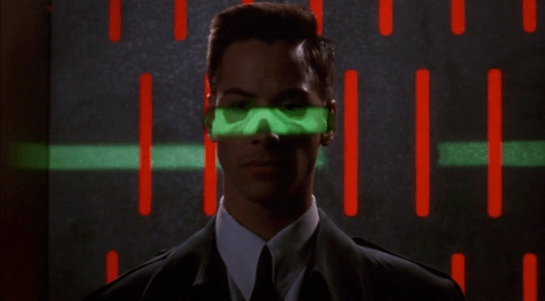
After that there is a security scanner, which is reminiscent of HAL from the film 2001: A Space Odyssey.

jm-9-customs-f

The green light runs over Johnny from top to bottom.

jm-9-customs-c

Looking at the picture, we can see that this green light is somehow making Johnny’s skeleton visible. It would be possible, by having an X-ray imaging system running at the same time and then re-projecting the X-ray image back onto the body, but why? Since there don’t appear to be any actual human beings on duty, I can only suggest that it is meant to look intimidating and impressive to encourage obedience. In the film Johnny appears to be alone and cannot see this himself, but it would be much more common for there to be multiple passengers, so each could watch the others being scanned.

There is also a screen showing another scan, a blurry body image, and text appearing on the right side. A voice repeats the text content. For the first time we see a blue background, the most common color for futuristic film interfaces.

jm-9-customs-d

The scanner detects Johnny’s implant, but whatever secrecy measures are present cause the system to decide that it is a registered dyslexia aid. The popup alert below includes the registration issuer and a domain name, so perhaps this is online verification over the Internet. Presumably Johnny can see this screen himself, if he cares.

jm-9-customs-e

The voiceover helpfully informs Johnny that there is “synaptic seepage”, and he should seek medical attention within 24 hours. This shows quite high level decision making by the system and an offer of assistance. Johnny says “thanks” in reply, an anthropomorphic response to this seemingly intelligent machine.

However, there seems to be a more detailed explanation in smaller text on the right of the display, and this isn’t announced. It’s not clear in this scene whether Johnny can see this display or not, but even if he could it would be difficult to read. Perhaps this is a legacy system from the days when airport security had actual staff.

Next

At this point Johnny leaves the airport, riding in a taxi from the airport. It is a good time for the first review of a group of related interfaces, which will be the next series of posts.

Hotel Remote

The Internet 2021 shot that begins the film ends in a hotel suite, where it wakes up lead character Johnny. This is where we see the first real interface in the film. It’s also where this discussion gets more complicated.

A note on my review strategy

As a 3D graphics enthusiast, I’d be happy just to analyze the cyberspace scenes, but when you write for Sci Fi Interfaces, there is a strict rule that every interface in a film must be subjected to inspection. And there are a lot of interfaces in Johnny Mnemonic. (Curse your exhaustive standards, Chris!)

A purely chronological approach which would spend too much time looking at trees and not enough at the forest. So I’ll be jumping back and forth a bit, starting with the gadgets and interfaces that appear only once, then moving on to the recurring elements, variations on a style or idea that are repeated during the film.

Description

The wakeup call arrives in the hotel room as a voice announcement—a sensible if obvious choice for someone who is asleep—and also as text on a wall screen, giving the date, time, and temperature. The voice is artificial sounding but pleasant rather than grating, letting you know that it’s a computer and not some hotel employee who let himself in. The wall display functions as both a passive television and an interactive computer monitor. Johnny picks up a small remote control to silence the wake up call.

jm-2-check-email-a

This remote is a small black box like most current-day equivalents, but with a glowing red light at one end. At the time of writing blue lights and indicators are popular for consumer electronics, apparently following the preference set by science fiction films and noted in Make It So. Johnny Mnemonic is an outlier in using red lights, as we’ll see more of these as the film progresses. Here the glow might be some kind of infrared or laser beam that sends a signal, or it might simply indicate the right way to orient the control in the hand for the controls to make sense.

First thing every morning: Messages

After silencing the alarm, Johnny, like so many of us today, checks his email. (In 1995 doing so before even getting out of bed might have been intended to show his detachment from humanity. Today, it seems perfectly natural!) He uses the remote to switch the display to the hotel “Message Centre”. We see his thumb move around, so the remote must have multiple buttons, but can’t tell whether this is a simple arrow keypad or something more complicated.

jm-2-check-email-b-adjusted

The message centre of the New Darwin Inn system both displays the text message visually and also speaks it aloud in the same synthesized voice that woke him up. Voiceovers are common in films so the audience doesn’t have to try to read the cinema screen, but in this case it would be genuinely useful. Guests could start doing something else without needing to pay full attention to the display.

Is it necessary for Johnny to explicitly switch to the Message Center? The system could have displayed this message automatically after the wakeup call, or shown the 2021 equivalent of his InBox.  On the other hand, this is a giant, clearly visible screen and Johnny was not alone in the suite. Johnny, and other guests, might wish to keep their communications private.

As Johnny has no messages, he uses the remote to switch the display to a TV channel.

The hotel room “phone” call

Next he uses the remote to make a phone call. He starts by using the remote to dial the number, which appears on the display. We can’t see whether he is typing numbers directly, or using arrow keys and an Enter or OK button to navigate around the onscreen keypad. It’s certainly convenient for guests to be able to make a call without getting out of bed, but a voice recognition interface might be even easier. We’ll see a phone system that accepts voice commands later on, so perhaps using the remote is just a preference.

jm-3-phone-hotel-a-adjusted

What is the strange blue window to the right of the keypad? It’s there because all phone calls in 2021 are in fact video calls. The equivalent to a busy waiting tone in this world is a video splash screen. These can be customized by the recipient, here showing the company name, Dataflow.

jm-3-phone-hotel-b-adjusted

And finally both parties can see and hear each other. Note  also the graphical reverse, stop, and play buttons at the bottom right of the keypad. These imply some sort of recording capability, but we never see them used.

jm-3-phone-hotel-c-adjusted

Next

I’ll discuss the 2021 phone system in more detail later on, so for now we just need to know that this phone call is the setup that sends Johnny to Beijing for his next, and hopefully last, job.

Military communication

All telecommunications in the film are based on either a public address or a two-way radio metaphor.

Commander Adams addresses the crew.

To address the crew from inside the ship, Commander Adams grabs the microphone from its holder on the wall. Its long handle makes it easy to grab. By speaking into the lit, transparent circle mounted to one end, his voice is automatically broadcast across the ship.

Commander Adams lets Chief Quinn know he’s in command of the ship.

Quinn listens for incoming signals.

The two-way radio on his belt is routed through the communications officer back at the ship. To use it, he unclips the small cylindrical microphone from its clip, flips a small switch at the base of the box, and pulls the microphone on its tether close to his mouth to speak. When the device is active, a small array of lights on the box illuminates.

Confirming their safety by camera, Chief Quinn gets an eyeful of Alta.

The microphone also has a video camera within it. When Chief Quinn asks Commander Adams to “activate the viewer,” he does so by turning the device such that its small end faces outwards, at which time it acts as a camera, sending a video signal back to the ship, to be viewed on the “view plate.”

The Viewplate is used frequently to see outside the ship.

Altair IV looms within view.

The Viewplate is a large video screen with rounded edges that is mounted to a wall off the bridge. To the left of it three analog gauges are arranged in a column, above two lights and a stack of sliders. These are not used during the film.

Commander Adams engages the Viewplate to look for Altair IV.

The Viewplate is controlled by a wall mounted panel with a very curious placement. When Commander Adams rushes to adjust it, he steps to the panel and adjusts a few horizontal sliders, while craning around a cowling station to see if his tweaks are having the desired effect. When he’’s fairly sure it’’s correct, he has to step away from the panel to get a better view and make sure. There is no excuse for this poor placement.