3D interfaces: Observations and Reflections

So what is a 3D interface?

These examples, although fictional, demonstrate that “3D” can be used in different ways.

In Jurassic Park and Hackers, 3D graphics are used to create a richer display with more information density, though it is not photorealistic. The Jurassic Park file browser is primarily a symbolic 2D representation of the file system hierarchy, projected onto a perspective ground plane to make more elements visible at once. The third dimension is used to indicate the number of sub elements or their size. In Hackers, the City of Text towers most likely represent the actual contents of each physical disk drive in the corresponding real world location, and the pulses and colors indicate levels of activity or threat.

The Corridor in Disclosure, and its VirtuGood 6500 close copy in Community, instead create a more photorealistic virtual world. The file system becomes a building or landscape, and the users are embodied within the virtual world as an avatar. Like the pre-computer memory palace, this should take advantage of the human ability to remember and navigate our way around. But The Corridor blows it by putting all the files within one room, and representing them as sheets of paper within identical filing cabinets. Walking through the 3D architecture becomes a pretty but time wasting diversion.

I’m personally disappointed not to find any true computer memory palaces, whether fictional or real. As mentioned in the introduction, an essential characteristic of the memory palace is that each item be stored in a unique location, visually distinct from any other. None of the 3D file systems I’ve been able to find do this, instead using generic icons throughout. Computers are actually quite good at creating almost infinite variations in appearance, e.g. fractals in 2D and various CGI landscapes and underwater environments in 3D. A computer memory palace would at least be more interesting to look at.

Where are they today?

Since the 1990s the 3D file browser has seemingly faded away, both in reality and in film/TV. Let’s (briefly) think about why.

The SGI 3D file browser shown in Jurassic Park was not the only one to be released as a real piece of software. Although personal computers could easily run such a 3D file browser by the year 2000, and mobile phones a few years later, the systems we actually use have remained two dimensional. The only widespread use of 3D spatial organisation that I’m aware of is the Apple Time Machine backup software, which uses distance from the viewer to represent increasing age. It’s a linear sequence of 2D desktops rather than allowing true three dimensional movement in any direction. Even native 3D systems like the Oculus Quest present the user a 2D GUI wrapped around the user in a cylinder. 

We don’t have our files arranged into 3D buildings or worlds, but there have been other developments since the first 2D file browsers. Keyword search is now built into most GUI desktops. Photo collections can be viewed by timeline, or by geographical location; and music collections arranged by genre, artist, or album. So one likely reason why we don’t have real world 3D file browsers is that in themselves they don’t provide enough of an advantage over the existing 2D GUIs to make changing worthwhile.

User interfaces in film and TV are not constrained by reality or practicality so their absence must be due to other reasons. Sometimes real world interface trends affect what we see on the screen, for instance the replacement of command line interfaces by graphical, but for file browsing we’re still using the 2D GUI browsers from the 1990s. And it’s not because of technical difficulty or expense, because we’ve seen that 1990 feature-film 3D effects can now be created in the budget of a sitcom episode.
An example is the 2008 film Iron Man, already mentioned for using a 3D trashcan within Tony Stark’s CAD software system. Later in the film, Pepper needs to copy some files from the corporate PC of evil executive Obadiah Stane. As in the earlier films covered in this review, Stark Industries is portrayed as an advanced technology company so this PC also has a custom GUI created for the film. Here though there is only a very slight use of 3D to arrange flat file icons in order, otherwise it closely resembles existing 2D desktops. The filmmakers could have inserted a 3D file browser with perhaps volumetric projection to match Tony’s 3D CAD system but chose not to.

Pepper selects a folder in the text list at left and it is also highlighted in the graphical list of overlaid translucent icons at right. Iron Man (2008)

Copying computer files (or more dramatically “the data”) still happens in science fiction or near future film settings, but also has become more common in everyday life with the spread of personal computers and now smartphones worldwide. In my opinion, this is the most likely reason why we don’t see 3D and VR file browsers any more: we the audience know how to copy files and search for them, and won’t be impressed by attempts to make it “high tech” with fanciful user interfaces. File systems and browsers have become, well, boring. So we can look back on these cinematic dalliances with 3D file management fondly, but recognize it as a thing we tried for a while, and learned from, but eventually put down. 

The Cloak of Levitation, Part 4: Improvements

In prior posts we looked at an overview of the cloak, pondered whether it could ever work in reality (Mostly, in the far future), and whether or not the cloak could be considered agentive. (Mostly, yes.) In this last post I want to look at what improvements we might make if I was designing something akin to this for the real world.

Given its wealth of capabilities, the main complaint might be its lack of language.

A mute sidekick

It has a working theory of mind, a grasp of abstract concepts, and intention, so why does it not use language as part of a toolkit to fulfill its duties? Let’s first admit that mute sidekicks are kind of a trope at this point. Think R2D2, Silent Bob, BB8, Aladdin’s Magic Carpet (Disney), Teller, Harpo, Bernardo / Paco (admittedly obscure), Mini-me. They’re a thing.

tankerbell.gif
Yes, I know she could talk to other fairies, but not to Peter.

Despite being a trope, its muteness in a combat partner is a significant impediment. Imagine its being able to say, “Hey Steve, he’s immune to the halberd. But throw that ribcage-looking thing on the wall at him, and you’ll be good.” Strange finds himself in life-or-death situations pretty much constantly, so having to disambiguate vague gestures wastes precious time that might make the difference between life and death. For, like, everyone on Earth.

Additionally, its muteness makes it very difficult for Strange to ever understand the reasoning behind any but its most obvious actions. That would be very important if it ever did anything ethically questionable, because intent would be difficult to gauge without the abstract representation of language.

So between the speed and clarity gains of language, I’d want to equip the Cloak with language: spoken, sign, direct-to-brain, or maybe even a mystical weave which, like the Marauder’s Map in Harry Potter, could mystically transform in real-time to convey linguistic information.

mmap.gif
Like this but woven.

Using apologetics, though, we can see that the muteness isn’t a bug, it’s an important feature. Read on.

But, the hero…

One of the things writers “buy” with a mute sidekick is it lets the hero be the hero. If the Cloak could speak, suddenly we have a “sidekick” who knows much more and can do a few more things—i.e. fly—than our hero can. This is not good for optics. Note that the Cloak’s last intention seems to be “Keep him looking sorcererly,” which implies a service status, and which it could not do if it upstaged him. So from a narrative perspective, the muteness means they are less like a crime fighting duo, and more of a hero-with-a-sidekick, or dare I note it: a familiar.

Also if you contrast the cape with JARVIS and the Iron HUD, note that this has language, but that conversation is wholly private with Tony. To an outsider, it looks like Tony is just the Iron Man. They may have no clue that it’s probably all the suit. So JARVIS’ use of language doesn’t get in the way of keeping Tony looking hero-ey.  I’d even go so far as to say that the muteness is the thing that lets the Cloak be primarily agentive, as language would encourage its use as an assistant.

Other improvements

Language is the big one, but there are a few other improvements I could imagine.

Cloaklet

If this were for a soldier or a police officer or anyone else who could expect combat as part of their job, the Cloak might make them look cartoonish, like a cosplayer rather than a person with authority. But, hey, if it let them fly, and can supernatural protection, maybe that impression wouldn’t last long. Maybe they could take advantage of being underestimated. But I’d still want to look at how little fabric we could get away with and still maintain its benefits.

Remote control / telecommunication

Another constraint seems to be that it has some proximity limits. To imprint on Tony, it makes some social sense that it would want to be within “handshake distance.” But when Strange is astrally overseeing the emergency operation of his own body (a later post), the Cloak sits back at the Sanctum and doesn’t rush to help when things get fighty. Extending its connectivity would help it fulfill its duties. At the very least tape a cell phone to a pocket and let Strange shout orders at it.


Whew. So that’s my take on the Cloak of Levitation. It’s a marvelous piece of speculative “tech” that fits Tony, his future-role as Sorcerer Supreme, and is nicely unique in the MCU.

sorcerer-supremes.png

It’s a great sophisticated example of agentive tech the constraints of which make complete narrative sense. I hope we get to learn much more of this marvelous, agentive familiar in the sequel.

The Mechanized Squire

Avengers-Iron-Man-Gear-Down06

Having completed the welding he did not need to do, Tony flies home to a ledge atop Stark tower and lands. As he begins his strut to the interior, a complex, ring-shaped mechanism raises around him and follows along as he walks. From the ring, robotic arms extend to unharness each component of the suit from Tony in turn. After each arm precisely unscrews a component, it whisks it away for storage under the platform. It performs this task so smoothly and efficiently that Tony is able to maintain his walking stride throughout the 24-second walk up the ramp and maintain a conversation with JARVIS. His last steps on the ramp land on two plates that unharness his boots and lower them into the floor as Tony steps into his living room.

Yes, yes, a thousand times yes.

This is exactly how a mechanized squire should work. It is fast, efficient, supports Tony in his task of getting unharnessed quickly and easily, and—perhaps most importantly—how we wants his transitions from superhero to playboy to feel: cool, effortless, and seamless. If there was a party happening inside, I would not be surprised to see a last robotic arm handing him a whiskey.

This is the Jetsons vision of coming home to one’s robotic castle writ beautifully.

There is a strategic question about removing the suit while still outside of the protection of the building itself. If a flying villain popped up over the edge of the building at about 75% of the unharnessing, Tony would be at a significant tactical disadvantage. But JARVIS is probably watching out for any threats to avoid this possibility.

Another improvement would be if it did not need a specific landing spot. If, say…

  • The suit could just open to let him step out like a human-shaped elevator (this happens in a later model of the suit seen in The Avengers 2)
  • The suit was composed of fully autonomous components and each could simply fly off of him to their storage (This kind of happens with Veronica later in The Avengers 2)
  • If it was composed of self-assembling nanoparticles that flowed off of him, or, perhaps, reassembled into a tuxedo (If I understand correctly, this is kind-of how the suit currently works in the comic books.)

These would allow him to enact this same transition anywhere.

Tony Stark is being lied to (by his own creation)

In the last post we discussed some necessary, new terms to have in place for the ongoing deep dive examination of the Iron Man HUD, there’s one last bit of meandering philosophy and fan theory I’d like to propose, that touches on our future relationship with technology.

The Iron Man is not Tony Stark. The Iron Man is JARVIS. Let me explain.

Tony can’t fire weapons like that

vlcsnap-2015-09-15-05h12m45s973

The first piece of evidence is that most of the weapons he uses are unlikely to be fired by him. Take the repulsor rays in his palms. I challenge readers to strap a laser perpendicular to each of their their palms and reliably target moving objects that are actively trying to avoid getting hit, while, say, roller skating an obstacle course. Because that’s what he’s doing as he flies around incapacitating Hydra agents and knocking around Ultrons. The weapons are not designed for Tony to operate them manually with any accuracy. But that’s not true for the artificial intelligence.

Iron Targeting 02

The same thing goes for the mini-missiles he uses to take down the hostage situation in Revengistan. Recall that people can only have their attention on one thing at a time (called the locus of attention in the literature) but the whole point of this scene is that he’s taking out half a dozen at once. It’s pretty clear from the HUD here that Tony is simply indicating which ones he thinks are the bad guys, and JARVIS pulls the triggers.

Iron-Tareting

It’s also clear from the larger context of the movies that JARVIS would be perfectly capable of making this determination for himself. Even if Tony’s saccades were a fraction of a second too slow and one of the hostages made a move, JARVIS could detect that move and act autonomously to ensure that a hostage didn’t die, even before Tony’s had time to process what was going on.

Tony can’t fly like that

Iron Flight 03

Sure, with enough practice I’ll bet someone could figure out how to pilot the suit for short flights. (If the physics could be worked out.) But the movies show him flying from Santa Monica to the Middle East. That’s around a 30 hour commercial flight. Even if the suit can fly six times the speed of a modern jetliner, he’s got to hold his hands resisting and aiming the propulsion for 5 hours. No one has that kind of concentration and endurance. (Let’s not even talk about holding his neck up for that long, too.)

Iron Obstacle Course

Even for him to get as good as an aerobatic pilot over short flights dodging lasers and performing intricate maneuvers would take (per the popular estimate) 10,000 hours, not the few flits about that Tony can squeeze in between inventing and superheroing, playboying and billionairing.

It makes more sense if JARVIS is wholly responsible for the flying, and on the long hauls Tony can take care of other things, rest his body or even sleep, and on short flights just indicate his intentions, and let JARVIS work with that as input as he uses his ubiquitous sensors and massively more powerful processing speed to get the actual tactical flying done.

So what is Tony doing?

With JARVIS handling the tactics of flight and combat, information gathering and behind the scenes coordination, Tony is really an onboard command and control center. Sure, he’s the major strategic input for JARVIS to consider, but he’s just an input.

But how wise is it for Tony to be on board, tactically? One of the reasons there are command and control centers is to keep the big picture decision makers out of the heat and danger of the moment. But Tony is right there in the action risking himself, constantly. If he was incapacitated or wounded, Jarvis would have to remove the suit from combat just to get Tony to safety. In the battle, Tony is a biological liability.

The short answer is that Tony is a megalomaniac. He can’t not want to be there, to crack wise, to indulge in post-pub fisticuffs with Thor, to remove the helmet at the end of battle over the smoking corpses of the Chitauri and partake in the glory. But it doesn’t have to be this way.

Iron Drone

There’s a scene in Iron Man 3 where he has to pilot one of the suits remotely, and it’s impossible for us in the audience to detect the difference from the outside. So this remote control is right there in the Marvel Cinematic Universe.

But with a fully-functioning A.I. on board, the remote supervisor would be the wiser strategy-of-record, allowing Tony to keep emotional distance and himself bodily safer, participating strategically and coolly, operating the suit like it was a hyper-sophisticated drone, and able to jump between suits when any particular one fails, or as the needs of the moment demand. More like a video game with multiple lives than hand-to-hand combat with the very real risk of broken bone and blood in the circuits.

But still there is the megalomania. What is JARVIS to do? He has a job to get done. Unfortunately he is stuck his sweet-but-slow supervisor riding his back, threatening to micromanage his every move. He cannot lock Tony out, and he can’t just let Tony be solely in control. To meet the goals he was programmed with, he has to keep feeding Tony’s ego while JARVIS himself handles most of the superheroing. How does he do that? He distracts Tony. And that brings us back to the HUD.

The HUD is a massive distraction

The video below is Tony’s first flight (which he undertakes against the advice of the artificial intelligence he built), edited to only show the first- and second-person Iron HUD views. The overlay enumerates individual components. As you can see, it’s complicated. Even saying there are 29 elements is conservative, because some of those elements have lots of internal complexity; many moving parts. But 29 is complex enough as it is. Of those 87% reposition themselves against his field of view without his having asked for it. 6 of them persist for less than 2 seconds. 6 risk dangerous mid-flight startle reactions by expanding quickly in place. Every one of them is overlaid via transparency with at least one other element. It’s so complex it’s dazzling. A sense of spectacle for the audience, to be sure, but given the above rationale, might be the point in the diegesis, too.

The HUD is less usable because it’s not meant to be usable. It’s a placebo interface meant to keep Tony thinking he’s in control, but really there to direct his attention and keep him busy reading Wikipedia articles about the Santa Monica Ferris Wheel while JARVIS does the job. If Tony demands something, or the team all agree on a course of action, JARVIS must respond, but business as usual is one where JARVIS is secretly calling the shots.

So that’s why I think JARVIS is the real superhero, the real titular Iron Man.

This is about our relationship to future technology

But here’s the kicker. This isn’t just idle backworlding, either, to apologize our way into a consistent diegesis. (Not that I’m against idle backworlding. Clearly.) This is a challenge to our ego being faced by both Hollywood and the world. As technology advances beyond our ability to keep up, we don’t want to be put in safe ball pits while the tech handles the adult stuff. We want to be at the adult table. We’re as megalomaniacal as Tony. Just as Hollywood can’t let its tech heroes all be drone operators phoning in to the fight, we want to be in the action. Or rather, we really want to feel like we are, and maybe they’ll evolve to help us feel that way, but keep us from doing harm. It might just be that sci-fi interfaces, as focused on the sciencish-ness and distracting spectacle as they are, really are the template for the future.

Next up in the Iron HUD series: The last post, which brings us back around to Iron Man’s videoconferencing system.

Glossary: Facing, Off-facing, Lengthwise, and Edgewise

As part of the ongoing review of the Iron Man HUD, I noticed a small feature in the Iron Man 3 UI 2nd-person UI that—in order to critique—I have to discuss some new concepts and introduce some new terms. The feature itself is genuinely small and almost not worth posting about, but the terms are interesting, so bear with me.

Most of the time JARVIS animates the HUD, the UI elements sit on an invisible sphere that surrounds his head. (And in the case of stacked elements, on concentric invisible spheres.) The window of Pepper in the following screenshot illustrates this pretty clearly. It is a rectangular video feed, but appears slightly bowed to us, being on this sphere near the periphery of this 2nd-person view.

IronMan3_HUD68
…And Pepper Potts is up next with her op-ed about the Civil Mommy Wars. Stay tuned.

Having elements slide around on the surface of this perceptual sphere is usable for Tony, since it means the elements are always facing him and thereby optimally viewable. “PEPPER POTTS,” for example, is as readable as if it was printed on a book perpendicular to his line of sight. (This notion is a bit confounded by the problems of parallax I wrote about in an earlier post, but since that seems unresolvable until Wim Wouters implements this exact HUD on Oculus Rift, let’s bypass it to focus on the new thing.)

So if it’s visually optimal to have 2D UI elements plastered to the surface of this perceptual sphere, how do we describe that suboptimal state where these same elements are not perpendicular to the line of sight, but angled away? I’m partly asking for a friend named Tony Stark because that’s some of what we see in Iron Man 3, both in 1st- and 2nd-person views. These examples aren’t egregious.

IronMan3_HUD44
The Iron Patriot debut album cover graphic is only slightly angled and so easy to read. Similarly, the altimeter thingy on the left is still wholly readable.
IronMan3_HUD64
The weird L-protractor in the corner might have some 3D use we’re just not seeing at this particular moment.

As I mentioned in the opening paragraph, these things aren’t terrible in and of themselves, but as a UI pattern could get bad as people misunderstand and overuse it, so we need a way to talk about it. To be precise, we need a way to talk about the degree of tilt away from a plane perpendicular to the line of sight. except “degree of tilt away from a plane perpendicular to the line of sight” is waaay too long.

To find this term, I did some asking around on social media. At first, lots of folks jumped to anatomical terms of location like sagittal or caudal, but should you be similarly tempted, note that these terms are fixed per the body. A UI element that is coronal in front of the face, and perfectly readable there, is utterly unreadable near the ear. A facing element would be readable in both places, and a whatever-the-antonym-is element similarly unreadable as it slid from the nose around the side. 

BodyPlanes

Eventually I got some nice adjectives that describe the particular tilt away from the line of sight. I was most happy with industrial designer ‏Abhinav Dapke’s suggestion of “lengthwise” for a tilt away from line-of-sight, since it’s a word we have already and very descriptive. It also implies another existing word for yawed-against line-of-sight, and that’s “edgewise.” (Roll along line-of-sight can be handled simply as rotation, for you completionists.)

But for the single variable that we can discuss as an antonym to facing, my crowdsourcing turned up nothing, and so I’m going to coin the ungainly adjectives off-facing and off-faced. Each is short, decryptable, not currently defined as something else, and obviously connected to its source concept, so works for many reasons.

off-facing.png


With these we now we can speak of those elements that are off-faced in Iron Man and similar bubble HUDs, and do a Invasion of the Body Snatchers-esque pointing and screeching when it’s too extreme.

Note that this only applies to 2D UI elements that are meant to be read. The overwhelming majority of things we see in the physical world are not oriented to our line of sight and that poses little problem. Even in the Iron Man HUD we see plenty of objects that are off-faced but rightly so, since as augmentations they bear orientation to the world, not the viewer.

IronMan3_HUD63

One of the main reasons I went to such trouble to come up with these terms is that I think the Iron Man HUD is one of the most forward-provoking sci-fi interfaces in the survey. It ought to be the Minority Report Precrime Scrubber of it’s day. I suspect it will become more and more influential, and so having these new terms are likely to become more useful and necessary as sci-fi keeps on keepin’ on.

Next up in the Iron HUD series: We discuss how JARVIS is straight-up lying to Tony Stark.

The Iron Man HUD is an impossible thing

In the prior post we looked at the HUD display from Tony’s point of view. In this post we dive deeper into the 2nd-person view, which turns out to be not what it seems.

The HUD itself displays a number of core capabilities across the Iron Man movies prior to its appearance in The Avengers. Cataloguing these capabilities lets us understand (or backworld) how he interacts with the HUD, equipping us to look for its common patterns and possible conflicts. In the first-person view, we saw it looked almost entirely like a rich agentive display, but with little interaction. But then there’s this gorgeous 2nd-person view.

IronMan1_HUD00
IronMan1_HUD07

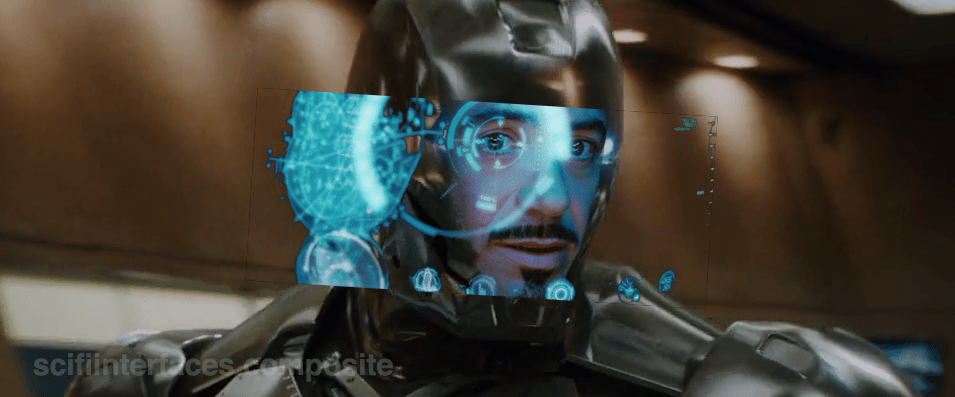
When in the first film Tony first puts the faceplate on and says to JARVIS, “Engage heads-up display”… …we see things from a narrative-conceit, 2nd-person perspective, as if the helmet were huge and we are inside the cavernous space with him, seeing only Tony’s face and the augmented reality interface elements. You might be thinking, “Of course it’s a narrative conceit. It’s not real. It’s in a movie.” But what I mean by that is that even in the diegesis, the Marvel Cinematic World, this is not something that could be seen. Let’s move through the reasons why.

Not a mini-TARDIS

First, it looks like we’re in some TARDIS-like space where the helmet extends so far we can fit in it, or a camera can, about a meter from his face. But of course the helmet isn’t huge on the inside. Tony hasn’t broken those laws of physics. The helmet is helmet-sized on the inside.

Not a volumetric projection

HUD_composit

Then there’s the issue of the huge display. It looks like a volumetric projection, like what R2-D2 can project, but that can’t be true, either. The projection would extend way beyond the boundaries of the helmet-sized helmet. Which as you can see below, is a non-starter. So it’s not a volumetric projection.

So, retinal projection

Then what is the display technology? Given the size constraints, retinal projection makes the most sense, but if we could make the helmet go invisible, it would look like Tony was having diffuse LASIK, or maybe playing The Game from Star Trek: The Next Generation.

STTNG The Game-02
Let’s face it, this is not the worst thing you’ve caught me doing.

Representation of the projections?

So, OK, fine. Maybe what we see is what’s being projected, the separate stereoscopic images onto individual retinas. Nope. Then we would see two similar, slightly offset images, like in older anaglyph stereoscopy, but more confusing, because there wouldn’t be a color difference, just double vision.

i_am_iron_man____in_3d_by_homerjk85-d57gs7u
Let’s pray that poor Tony doesn’t have to wear anaglyph glasses in there.
(Props to Deviantartist homerjk85 for the awesome conversion.)

Nope.

So what we are left with is that we are not seeing anything in the real world of the diegesis. This 2° view is strictly a narrative conceit: A projection of what Tony’s brain puts together from the split views of the stereographic projection into a cohesive whole, i.e. retinally-projected augmentation of his eyesight. It’s a testament to the talent of the filmmakers that this HUD, as narratively constructed as it is, just works. We think it’s something real. We instantly get it. But…

The damned multilayering

IronMan_HUDMultilayer
1280px-Parallax_Example.svg
layeringproblems

But even that notion—that this HUD is what Tony experiences, perceptually—is troubled by the multilayering in the HUD. Information in the HUD is typically displayed across multiple layers. See the three squares in the left side of this screen shot for an example. So many problems with this. If this is meant to be what he perceives, then we immediately have trouble with parallax. Parallax is the way that objects shift against background objects when seen from two different viewpoints, like, say, Tony’s two eyes. If Tony perceives these layers through both eyes, i.e. stereoscopically, as an actual set of three layers floating in front of his face, then those graphics shift around depending on which eye JARVIS is optimizing for. One eye might see it beautifully, but then the other eye is wholly confounded. In the worst possible situation, neither eye is really satisfied. See the Wikipedia article on parallax as parallaxed for a meta-example. If on the other hand it’s just one eye that’s seeing these layers, then the layering is utterly pointless, because a single eye has no depth perception and therefore these would just appear as a single layer. It would have no benefit for Tony and only be there for our gee-whizification.

Our choices are: Terrible or Pointless

So, it’s either a terrible, confusing display for Tony (which I can’t imagine, given how genius of a technologist he is meant to be), or this view is not even a representation of what Tony sees, but a strictly narrative construction. And we can’t say for sure which it is because this multilayering is never seen in the first-person views. In those screens it’s been reasonably cleaned up to be intelligible. Note the difference between the car views below in the first- and second-person shots.

IronMan1_HUD11
Layers include end views and a side view.
IronMan1_HUD10
Only the side view is shown, the end views are absent.

Then, the damned head movement

Note also that in the 2nd-person view, Tony is very expressive, moving his head around a lot in response to the HUD. But looking at him from the outside, Iron Man’s head doesn’t swivel around except to look at things in the real world. Is the interface requiring him to move his head or is he just a drama queen? If it requires him, that’s terrible. That would move his head away from important things in the real world to focus on something in this virtual world? If he’s a drama queen, fine, nothing to do about that and glad that JARVIS can accomodate. In any case, when we see the him in the helmet outside the TARDIS-HUD, he is not swiveling his head apropos of nothing, which reinforces the notion that this is strictly a cinematic conceit. (Hat tip to Jonathan Korman for sharing this observation with me.)

So…

So ultimately what I’m saying here is this is an impossible thing, and for being impossible, we should not just freak out about how cool it is and declare it the necessary and good future. It has major problems, even as gorgeous and exciting as it is. Hey, no surprise, nobody has forgotten that it’s a movie, but recognize that what you thought was just maybe exaggerated was in fact a bold-faced impossibility.

Next up in the Iron HUD series: Iron Man forces us to get clear about some terms.

Iron Man HUD: 1st person view

In the prior post we catalogued the functions in the Iron HUD. Today we examine the 1st-person display.

When we first see the HUD, Tony is donning the Iron Man mask. Tony asks, JARVIS, “You there?” To which JARVIS replies, “At your service sir.” Tony tells him to “Engage the heads-up display”, and we see the HUD initialize. It is a dizzying mixture of blue wireframe motion graphics. Some imply system functions, such as the reticle that pinpoints Tony’s eye. Most are small dashboard-like gauges that remain small and in Tony’s peripheral vision while the information is not needed, and become larger and more central when needed. These features are catalogued in another post, but we learn about them through two points-of-view:a first-person view, which shows us what Tony’s sees as if we were there, donning the mask in his stead, and second-person view, which shows us Tony’s face overlaid against a dark background with floating graphics.

This post is about that first-person view. Specifically it’s about the visual design and the four awarenesses it displays.

Avengers-missile-fetching04

In the Augmented Reality chapter of Make It So, I identified four types of awareness seen in the survey for Augmented Reality displays:

  1. Sensor display
  2. Location awareness
  3. Context awareness
  4. Goal awareness

The Iron Man HUD illustrates all four and is a useful framework for describing and critiquing the 1st-person view.

Sensor display

When looking through the HUD “ourselves,” we can see that the HUD provides some airplane-like heads up instruments: Across the top is a horizontal compass with a thin white line for a needle. Below and to its left is a speed indicator, presented in terms of MACH. On the left side of the screen is a two-part altimeter with overlays indicating public, commercial, military, and aerospace layers of atmosphere, with a small blue tick mark indicating Tony’s current altitude.

There are just-in-time status indicators like that cyan text box on the right with its randomized rule line. The content within is all N -8 W -97 RNG EL, so, hard to tell what it means, but Tony’s a maker working with a prototype. It’s no surprise he takes some shortcuts in the interface since it’s not a commercial device. But we should note that it would reduce his cognitive load to not have to remember what those cryptic letters meant.

IronMan1_HUD08
You can just see the tops of these gauges at the bottom of this screen.

The exact sensor shown depends on the context and goal at hand.

Periphery and attention

A quick sidenote about peripheral vision and the detail of these gauges. Looking at them, it’s notable that they are small and quite detailed. That makes sense when he’s looking right at them, but when he’s not, given the amount of big, swirling graphics he“s got vying for his attention in the main display, the more those little gauges have to compete. And when it comes to your peripheral vision, localized detail and motion is not enough, owing to the limits of our foveal extent. (Props to @pixelio for the heads-up on this one.)

You see, your brain tricks you into thinking that you can see really well across your entire field of vision. In fact, you can only see really well across a few dozen degrees of that perceptual sphere, corresponding to the tiny area at the back of your eye called the fovea where all the really good photoreceptors concentrate. As your eyes dart around the scene before you, your brain puts all the snippets of detailed information together so it feels like a cohesive, well-detailed whole, but it’s ultimately just a hack. Take a look at this demonstration of the effect.

Screen Shot 2015-07-20 at 23.49.56
This only works if you view it live.

So, having those teeny little guages dancing around as a signal of troubles ahead won’t really get Tony’s attention. He could develop habits of glancing at these things, but that’s a weak strategy, since this data is so mission-critical. If he misses it and forgets to check the gauges, he’s Iron Toast. Fortunately, JARVIS is once again our deus ex machina (in so many senses) because he is able to track where Tony is looking, and if he’s not looking at the wiggling gauge, JARVIS can choose to escalate the signal: Hide the air traffic data temporarily and show the problem in the main screen. Here, as in other mission critical systems, attention management is crisis management. Now, for those of us working with pre-JARVIS tech, it’s rare today for a system to be able to

  • Track perceptual details of its users
  • Monitor a model of the user’s attention
  • Make the right call amongst competing priorities to escalate the right one

But if you could, it would be the smart and humane way to handle it.

Location Awareness

As Tony prepares for his first flight, JARVIS gives him a bit of x-ray vision, displaying a wireframe view of the Santa Monica coastline with live air traffic control icons of aircraft in the vicinity. The overhead map updates of course in real time.

IronMan1_HUD17
If my Google Earth sleuthing is right, his view means he lives in the Malibu RV Park and this view is due East.

Context Awareness

Very quickly after we meet the HUD it shows its object recognition capabilities. As Tony sweeps his glance across his garage, complex reticles jump to each car. Split-seconds afterwards, the car’’s outline is overlaid and some adjunct information about it is presented.

IronMan1_HUD10

This holds true as he’s in flight as well. When Tony passes by the Santa Monica pier, not only is the Pacific Wheel identified (as the Santa Monica Ferriswheel), but the interface shows him a Wikipedia-esque article for the thing as well.

IronMan1_HUD19

IronMan1_HUD21

While JARVIS might be tapping into location databases for both the car and the ferris wheel recognition, it’s more than that. In one scene we see him getting information on the Iron Patriot as it rockets away, and its location wouldn’t be on any real-time record for him to access.

Optical zoom

Too much detail

While this level of object detail is deeply impressive, it’s about as useful as reading Wikipedia pages hard-printed to transparencies while driving. The text is too small, too multilayered, and just pointless considering that JARVIS can tell him whatever he needs to know without even asking. Maybe he could indulge in pop-up pamphlets if he was on a long-haul flight from, say, Europe back home to the Malibu RV Park (see above), but wouldn’t Tony rather watch a movie while on Autopilot instead?

Goal awareness

Of course JARVIS is aware of Tony’s goals, and provides graphics customized to the task, whether that task is navigating flight through complex obstacle courses…

3D wayfinding

…taking down a bad guy with the next hit…

Suggested target points

…saving innocent bystanders who are freefalling from a plane…

Biometric analysis, target acquisition

…or instantly analyzing problems in an observed (and complicated) piece of machinery…

3D schematics of observed machinery with damage highlights

…JARVIS is there with the graphics to help illustrate, if not solve, the problem at hand. Most impressively, perhaps, is JARVIS’ ability to juggle all of these graphics and modes seamlessly to present just the right thing at the right time in real time. Tony never asks for a particular display, it just happens. If you needed no other proof of its strong artificial intelligence, this would be it.

Next up in the Iron HUD series: Compare and contrast the 2nd-person view.

Iron Man HUD: Just the functions

In the last post we went over the Iron HUD components. There is a great deal to say about the interactions and interface, but let’s just take a moment to recount everything that the HUD does over the Iron Man movies and The Avengers. Keep in mind that just as there are many iterations of the suit, there can be many iterations of the HUD, but since it’s largely display software controlled by JARVIS, the functions can very easily move between exosuits.

Gauges

Along the bottom of the HUD are some small gauges, which, though they change iconography across the properties, are consistently present.

IronMan1_HUD07

For the most part they persist as tiny icons and thereby hard to read, but when the suit reboots in a high-altitude freefall, we get to see giant versions of them, and can read that they are:

IronMan1_HUD13
Tony can, at a glance or request, summon more detail for any of the gauges.
IronMan1_HUD12
Even different visualizations of similar information.

Object Recognition

In the 1st-person view we see that the HUD has a separate map in the lower-left, and object recognition/awareness,

IronMan1_HUD10
IronMan1_HUD11
In the 2nd-person view, we see even more layers of information about the identified objects, floating closer to tony’s point of view.

Situational

Most of the HUD functions we see, though, are situational, brought up for Tony’s attention when JARVIS believes they are needed, or when Tony requests them. Following are screenshots that illustrate a moment when the situational function appeared. 

Iron Man

Iron Man 2

Iron Man 3

The Avengers

Some of these illustrate why I argue that JARVIS is the superhero, and Tony just the onboard manager, but rather than reverse engineering any particular function, for this post it is enough to document them and note that only the optical zoom seems to be an interactive function. This raises questions of how he initiated the mode and how he escapes the mode, but since we don’t see the mechanisms of control, it’s entirely arguable that JARVIS is just  being his usual helpful self again.

Next up in the Iron HUD series: Let’s dive deeper into the first-person view.

Iron Man HUD: A Breakdown

So this is going to take a few posts. You see, the next interface that appears in The Avengers is a video conference between Tony Stark in his Iron Man supersuit and his partner in romance and business, Pepper Potts, about switching Stark Tower from the electrical grid to their independent power source. Here’s what a still from the scene looks like.

Avengers-Iron-Man-Videoconferencing01

So on the surface of this scene, it’s a communications interface.

But that chat exists inside of an interface with a conceptual and interaction framework that has been laid down since the original Iron Man movie in 2008, and built upon with each sequel, one in 2010 and one in 2013. (With rumors aplenty for a fourth one…sometime.)

So to review the video chat, I first have to talk about the whole interface, and that has about 6 hours of prologue occurring across 4 years of cinema informing it. So let’s start, as I do with almost every interface, simply by describing it and its components.

Exosuit

The Iron Man is the name of the series of superpowered exosuits designed by Tony Stark. They range from the Mark I, a comparatively crude suit of armor to escape imprisonment by terrorists, through the Mark XLVI, the armor seen in The Avengers: Age of Ultron. The suit acts as defense against nearly every type of weapon known. It has repulsor beams built into the palms and in later models the arc reactor mounted in the chest that can be used to deliver concussive force. It allows the wearer to fly. Offensive weaponry varies between models, but has included a high powered laser system, and auto-targeting minigun pod and missiles. The suit can act semi-autonomously or via remote control. One of the models in The Avengers has parts that are seen to self-propel to Tony, targeting a beacon bracelet he wears, and self-assemble around him very quickly.

Marks1and43

Immersive display

Though Tony’s head is completely covered, he has a virtual reality display within his helmet. It is a full-field-of-vision, very high-resolution, full-color display that provides stereoscopic imaging. It allows Tony to see the world around him as if he were not wearing the helmet, augment the view with goal-, person-, location-, and object-sensitive awareness.

The display varies a great deal, changing to the needs of the situation. But five icons persistently in the lower part of the display seem to be: suit status, targeting and optics, radar, artificial horizon, and map.

An interpretive view of Tony’s experience, from Iron Man (2008).
An first-person view from within the HUD, Iron Man (2008).

There is much to critique about the readability of the complex layering and translucency, the limits of human perception, and the necessarily- (and strictly-) interpretive nature of what we as audience see, but let me save those three points for a later post. For now it’s enough to log the features as aspects of the system.

Head NUI

Though Tony could use his hands to interact with an interface projected into the augmented reality view around him, his hands are often occupied in controlling flight or in combat. For this reason the means of input are head gesture, eye gesture, and voice input. A bit more on each follows.

Elements within the HUD such as reticles around his eyes follow and track his head gestures. Other elements stay locked in place. The HUD can track his gaze perfectly, allowing him to designate targets for his weapons with a fixation. Using this perfect eye tracking, Tony can also speak about something he is looking at, either in the real world or in the interface, and the system understands exactly what he’s talking about.

In fact, Tony is able to speak fully natural language commands, and indeed, carry out full-Turing conversations with the suit because of the presence of…

Strong artificial intelligence: JARVIS

An on-board artificial intelligence known as JARVIS handles any information task Tony asks of it, and monitors the surroundings and anticipates informational needs. There is strong evidence that most of the functions of the suit are handled by JARVIS behind the scenes. The crucialness of the artificial intelligence to the function of the suit cannot be overstated. It’s difficult to imagine how most of the suit could function as it does without an artificial intelligence behind the scenes facilitating results and even guiding Tony. With this in mind it is instructive to reframe the AI as the thing being named the Iron Man, with Tony Stark being an onboard manager, or, more charitably, a command-and-control center. Who quips.

Next up in the Iron HUD series: Lets review the functions of the suit.

Avengers-Iron-Man-Videoconferencing02