Ford Explorers

image01

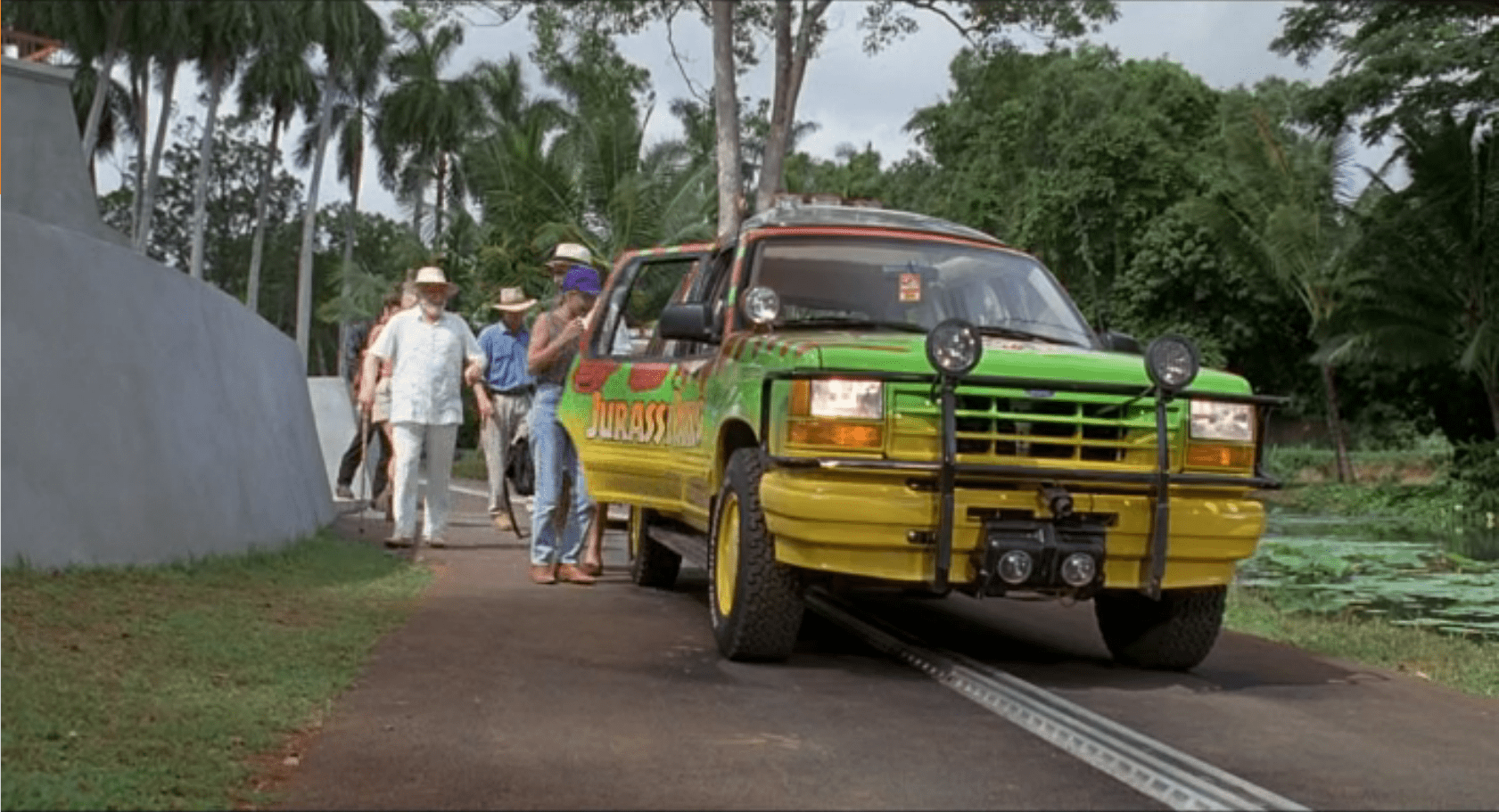
The Ford Explorer is an automated vehicle driven on an electrified track through a set route in the park.  It has protective covers over its steering wheel, and a set of cameras throughout the car:

  • Twin cameras at the steering wheel looking out the windshield to give a remote chauffeur or computer system stereoscopic vision
  • A small camera on the front bumper looking down at the track right in front of the vehicle
  • Several cameras facing into the cab, giving park operators an opportunity to observe and interact with visitors. (See the subsequent SUV Surveillance post.)

Presumably, there are protective covers over the gas/brake pedal as well, but we never see that area of the interior; evidence comes from when Dr. Grant and Dr. Saddler want to stop and look at the triceratops they don’t even bother to try and reach for the brake pedal, but merely hop out of the SUV.
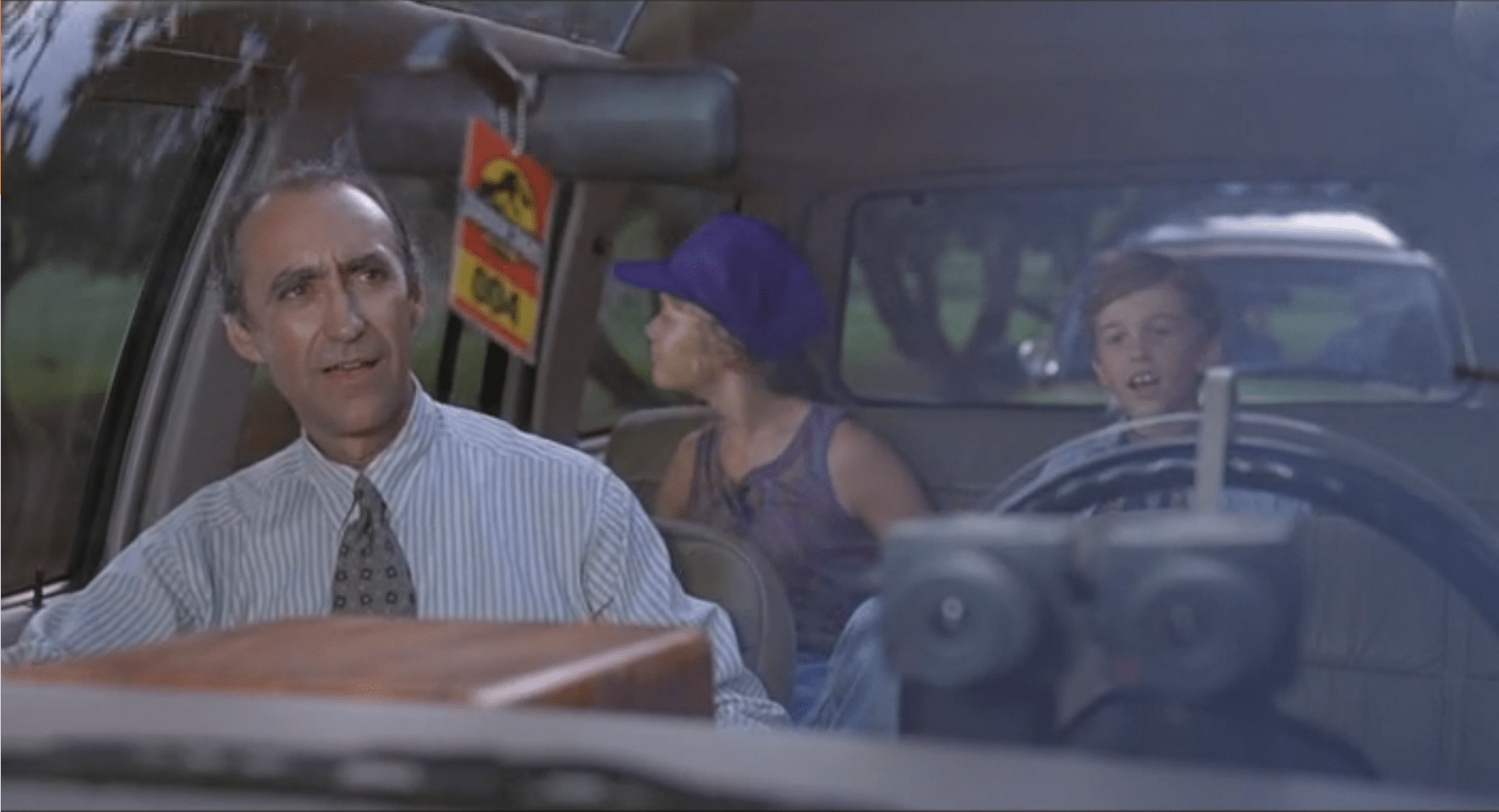
image02

The SUVs also have an interactive CD-ROM player in the center console with a touchscreen.  The CD-ROM has narrated, basic information about the park and exhibits, and has set points during the tour that it plays information about specific areas or dinosaurs.

image00

The Single, Central Screen

For what should be a focal point and value add for everyone in the car is poorly placed and in-optimally set up.  This would be the perfect situation for a second screen in the second console, at least.  If we look to more modern technology, we could start to include HUD overlays on all the windows of the Ford Explorer to track dinosaurs (so passengers would know where to look).  This could integrate with the need for better Night Vision Goggles.

A second concern is the hand-controlled interface.  Suddenly, everyone in the SUV is subservient to the two people who are within touch distance of the screen. Jurassic Park has enough location data and content in the presentation to be able to customize the play order to the tour.  This would keep an overactive kid from taking control of the screen and ruining the tour for everyone else in the car.

Steering Controls

The Ford Explorers maintain the steering wheel and gear selectors from their off-the-shelf compatriots.  This has two detriments on the passengers:

  • Cramps the person in the driver’s seat
  • Gives a false impression of control

The space is the most detrimental to the tour experience.  While the passenger has legroom, arm room, and plenty of space to turn around; the driver is forced to deal with the space hogging controls that are unusable.

By keeping the steering wheel, the SUV also implies that the driver could take control of the car.  We see no evidence of that, and Dr. Grant even climbs into the back of the Explorer instead of staying in the driver’s position.

The SUV drives itself, and shouldn’t give a false affordance that people are used to.

Comfort
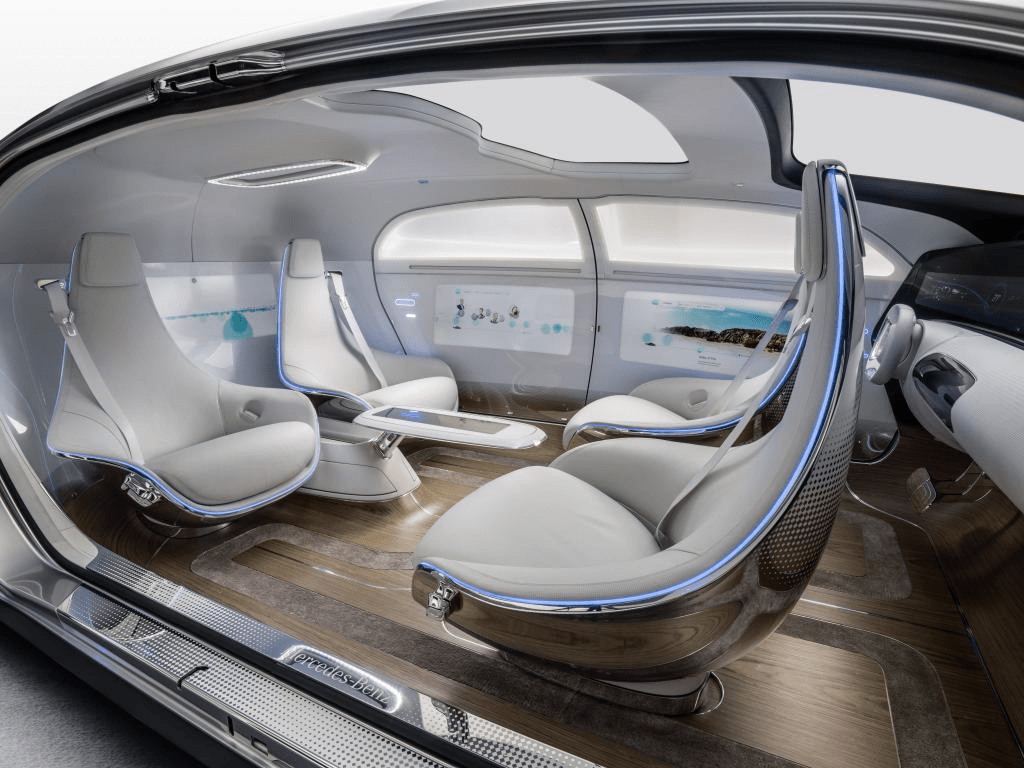
image03
The Mercedes F015 Self Driving Concept Car

A more radical concept would be completely custom vehicles.  Mercedes recently revealed a concept car focused around a lounge feel.  Other carmakers have done the same (Ford, Chevy, ect…).  It’s advantages are the increased social focus of the interior, and the easier access to all the windows.

Would this be more expensive? Yes, but as Hammond mentions frequently, they “spared no expense” to improve the experience for the guests.

The original article referenced these as Jeep Grand Cherokees… which they definitely are not.  As pointed out by Cary (http://smokeythejeep.wordpress.com/), the only Jeeps on the island are the gas powered models that the park rangers and staff use to get around the island.  These, as the article now states, are Ford Explorers ca. 1992.

Paddock Design

A number of the interfaces in Jurassic Park show a plan view map of the paddocks on the island. Some of them are quite unusual (take a look that that wraparound one in the center) and we wondered if the paddock shapes made any sense. It’s a little outside the site’s focus on interaction design, but that didn’t matter. Once we had the question, it kept tugging on our gastralia.

JurassicPark_Security_Alert03

But, we’re not zoo architects, so we reached out to one of the premier such agencies, CLR Design in Philadelphia. They specialize in designing zoo environments and have an impressive portfolio with plans and exhibits all over the United States and around the world.

Don’t see any unarmed dinosaur paddocks HERE, now do you?

“They,” we thought, “They’ll be able to give us an informed opinion.” So we shot them an email, explained the odd request, and to our nerdy delight Dan Gregory gave us the following awesome thoughts.

“In a real world zoo outdoor exhibit for large animals there are typically…

  • indoor holding facilities
  • off-exhibit yards to give the animals outdoor space away from visitors
  • the exhibit habitat (outdoor space visible to visitors)
  • visitor paths to optimal viewing vantage points
  • service paths for staff access to the holding facility and yards.

If the holding/yards are not directly adjacent to the exhibit, sometimes there are transfer chutes. Also, if multiple species share habitat space either simultaneously or in a time-share arrangement (“Hey! Round up the Apatosaurs ‘cause it’s time to let the T-Rex out!”), then the holding and chutes would surround the exhibit like spokes to a wheel hub (in concept, the reality depends a lot on the existing/desired terrain and existing exhibits). You can find some examples of our and other designers using these concepts by doing a Google search of zoo exhibit design pdf of Google Image search of zoo exhibit design.

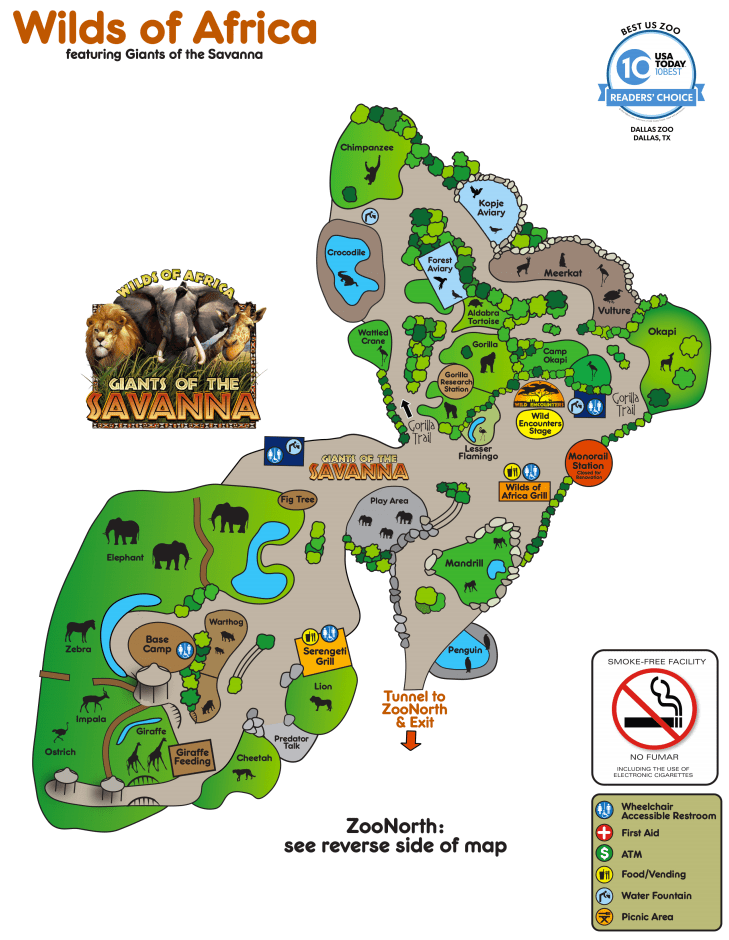
“A good example is the Giants of the Savanna area of the Dallas Zoo.

WildsofAfrica
Zoom in to more detail if you like in this PDF.

“See how in the lower left the elephants share space with zebra, impala, and ostrich, but are separated from the giraffe and distinctly separated from the lion and cheetah?

JurassicPark_Security_Alert03
Yes, this is the same image from above. We here at scifiinterfaces.com CARE.

“In at least a few scenes of Jurassic Park you saw plenty of herbivores sharing land. The small faux island exhibit map in your screen grab illustrates a potential shared habitat to the right, with visitor/service roads, and a thin perimeter buffer zone around the entire park. The ‘unarmed’ zone in the lower portion could represent an area that is allows visitor viewing but only under strict stay on the path conditions.

“So all in all it is, or at least could be, a fairly credible representation of a potential dino park.”

 Woot! So…Way to go, Jurassitechts. A passing grade. Thanks, Dan!

Abidjan Operation

Avengers_BartonCompromised

bartoncompromised

After Hawkeye is enthralled by Loki, agent Coulson has to call agent Romanoff in from the field, mid-mission. While he awaits her to extract herself from a situation, he idly glances at case file 242-56 which consists of a large video of Barton and Romanoff mid-combat, and overview profiles of the two agents. A legend in the upper right identifies this as STRIKE TEAM: DELTA, and a label at the top reads ABIDJAN OPERATION. There is some animated fuigetry on the periphery of the video, and some other fuigetry in windows that are occluded by the case file. 

Some things to note.

  • The four windows seem to be connected by content and by case file designation. But each has separate window controls in the upper right hand corner. (Not an aberration, we saw the same thing in Carrier Control.) If it’s a single case file, the layout ought to be handled automatically to save Coulson (or agent Stephen Morton, who appears per the text in the upper left to be the one actually logged in), from all that file management. It would even avoid the “error” of Barton’s profile being obscured by Romanoff’s, as in the image.
  • There are bar codes displayed on the agent profiles. Why would a computer operator need barcodes on a computer screen?
  • There is a miniature 3D rendering of a screw to the right of each of their portraits.
  • There are also three hexagrams from the I Ching on Romanoff’s profile. Each one of these is Ch’ien The Creative, which makes sense, she’s total Yang. Barton’s hexagrams are obscured by an overlap of her profile, but I really think it would be a lovely compliment if his were K’un The Receptive, or Yin. Also, OK, kind of weird that SHIELD would use the I Ching as part of official policy, but hey, crazier things have happened.
  • There is a snippet of text from a document about the fundamentals of lossy image compression in the background. It kind of makes sense given that there is clearly some face recognition going on in the video.
  • It must be hi-tech, as the container rule lines jog about semi-randomly. Nurnies to be sure.
  • The video controls along the bottom of the actual video are repeated in miniature along the bottom of the profile pictures, even though these profile images do not move. (Though if they were more like looping photographs in Harry Potter, that would have been cooler.)
  • Abidjan, you might know, is a large city on the Ivory Coast but the coordinates on the screen put this scene in the middle of the Gulf of Guinea. Which, though it’s 894 km east of Abidjan, is actually closer that I would have guessed it to be.

Weather Monitor

Jurassic Park’s weather prediction software sits on a dedicated computer. It pulls updates from some large government weather forecast (likely NOAA).  The screen is split into three sections (clockwise from top left):

  1. 3D representation of the island and surrounding ocean with cloud layers shown
  2. plan view of the island showing cloud cover
  3. A standard climate metrics along the bottom with data like wind direction (labeled Horizontal Direction), barometric pressure, etc.

We also see a section labeled “Sectors”, with “Island 1” currently selected (other options include “USA” and “Island 2”…which is suitably mysterious).

JurassicPark_weather01

Using the software, they are able to pan the views to the area of ocean with an incoming tropical storm.  The map does not show rainfall, wind direction, wind speed, or distance; but the control room seems to have another source of information for that.  They discuss the projected path of the storm while looking at the map.

JurassicPark_weather03

Missing Information

The park staff relies on the data from weather services of America and Costa Rica, but doesn’t trust their conclusions (Muldoon asks if this storm will swing out of the way at the last second despite projections, “like the last one”).  But the team at Jurassic Park doesn’t have any information on what’s actually happening with the storm.

Unlike local weather stations here in the U.S., or sites like NOAA weather maps, there is in this interface a lack of basic forecasting information like, say, precipitation amount, precipitation type, individual wind speeds inside the storm, direction, etc… Given the deadly, deadly risks inherent in the park, this seems like a significant oversight.

The software has spent a great deal of time rendering a realistic-ish cloud (which, we should note looks foreshadowingly like a human skull), but neglects to give information that is taken for granted by common weather information systems.

Prediction

When the park meteorologist isn’t on duty, or isn’t awake, or has his attention on the Utahraptor trying to smash its way into the control room, the software should provide some basic information to everyone on staff:

  • What does the weather forecast look like over the next few hours and days?

When the weather is likely to be severe, there’s more information, and it needs to urgently get the attention of the park staff.

  • What’s the prediction?
  • Which parts of the park will be hit hardest?
  • Which tours and staff are in the most dangerous areas?
  • How long will the storm be over the island?

If this information tied into mobile apps or Jurassic Park’s wider systems, it could provide alerts to individual staff, tourists, and tours about where they could take shelter.

JurassicPark_weather02

Make the Information Usable

Reorienting information that is stuck on the bottom bar and shifting it into the 3d visual would lower the cognitive load required to understand everything that’s going on.  Adding in visuals for other weather data (taken for granted in weather systems now) would bring it at least up to standard.

Finally, putting it up on the big monitor either on demand or when it is urgent would make it available to everyone in the control room, instead of just whoever happened to be at the weather monitor. Modern systems would push the information information out to staff and visitors on their mobile devices as well.

With those changes, everyone could see weather in real time to adjust their behavior appropriately (like, say, delaying the tour when there’s a tropical storm an hour south), the programmer could check the systems and paddocks that are going to get hit, and the inactive consoles could do whatever they needed to do.

Iron Welding

Avengers-Underwater_welding01

Cut to the bottom of the Hudson River where some electrical “transmission lines” rest. Tony in his Iron Man supersuit has his palm-mounted repulsor rays configured such that they create a focused beam, capable of cutting through an iron pipe to reveal power cables within. Once the pipe casing is removed, he slides a circular device onto the cabling. The cuff automatically closes, screws itself tight, and expands to replace the section of casing. Dim white lights burn brighter as hospital-green rings glow brightly around the cable’s circumference. His task done, he underwater-flies away, flying up the southern tip of Manhattan to Stark Tower.

It’s quick scene that sets up the fact that they’re using Tony’s arc reactor technology to liberate Stark Tower from the electrical grid (incidentally implying that the Avengers will never locate a satellite headquarters anywhere in Florida. Sorry, Jeb.) So, since it’s a quick scene, we can just skip the details and interaction design issues, right?

Of course not. You know better from this blog.

Avengers-Underwater_welding02

The Lines

In case you were planning on living out some elaborate cosplay fantasy to remake this scene, be aware that subsea cables don’t just sit like that inside of an air-filled pipe, waiting for a leak to short circuit the power grid. The conductive cabling is surrounded by thick plastic insulation. Even the notion of pipes underwater might have been a thing years ago, but modern subsea casings are steel cables embedded in the same insulation. But whatever, we don’t need that for the story.

Cuffing

The cuff interaction is awesome. All Tony has to do to is roughly slide it in position, and then the thing does the rest. The shape and actuators make it so he can place it roughly in the right place, and it does what it needs to do. That might have been overengineered for a single-use device, but whatever, he’s Tony Stark. He might have engineered it over breakfast, and he might already have made a handful for his other buidlings.

Avengers_Underwater_welding05

Cuff

The cuff itself is less awesome. If you were a high-profile billionaire inventor superhero putting a device in a place that’s difficult to monitor and connected directly to the electrical systems of your headquarters would you let it glow? Sure, that makes it easy to find later, but that means it’s easy for any supervillain to find, too. Much better is to camouflage it in the original pipe and keep its location secret from malefactors. Bad Tony. No glow.

Avengers-Underwater_welding01

Welding

The welding looks problematic for a couple of reasons. Does the “arc” have a fixed focal length? If so, how does he know what that length is and when he’s straying from it? We can presume it auto-adjusts using some welding subroutine of his on-board artificial intelligence, JARVIS. Then it becomes an issue of aiming. Try this: tape a three-inch pencil perpendicularly to your palm, and then try and fill out a crossword puzzle. Not exactly precise.

But using a bit of apologetics, let’s presume that he’s not using a tool so much as positioning the tool that JARVIS uses. JARVIS can use cameras situated around the suit and perfect 3D modeling to continually adjust the focus and positioning of the repulsor beam to target wherever it is that Tony is looking. Perfectly reasonable given what we know about the technology in the Marvel Cinematic Universe, and moreover, the way it ought to work for its user. He uses the thing his body is expert in, i.e. looking, to guide an agent that takes care of all the details he’s not good at, i.e. controlling the repulsor beam to cut into the pipe at a precise depth. Now it’s not problematic. It’s awesome.

Carrier Control

The second instantiation of videochat with the World Security Council that we see is  when Fury receives their order to bomb the site of the Chitauri portal. (Here’s the first.) He takes this call on the bridge, and rather than a custom hardware setup, this is a series of windows that overlay an ominous-red map of the world in an app called CARRIER CONTROL. These windows represent a built-in chat feature for discussing this very topic. There is some fuigetry on the periphery, but our focus is on these windows and the conversation happening through them.

Avengers-fury-secure-transmission01

In this version of the chat, we are assured that it is a SECURE TRANSMISSION by a legend across the top of each, but there is not the same level of assurance as in the videoconference room. If it’s still HOTP, Fury isn’t notified of it. There’s a tiny 01_AZ in the upper right of every screen, but it never changes and is the same for each participant. (An homage to Arizona? Lighter Andrew Zink? Cameraman Arthur Zajac?) Though this is a more desperate situation, you imagine that the need for security is no less dire. Having that same cypher key would be comforting if it is in fact a policy.

Different sizes of windows in the app seem to indicate a hierarchy, since the largest window is the fellow who does most of the talking in both conferences, and it does not change as others speak. Such an automated layout would spare Fury the hassle of having to manage multiple windows, though visually these look more like individual objects he’s meant to manipulate. Poor affordances.

dismiss

The only control we see is when Fury dismisses them, and to do this he just taps at the middle of the screen. The teleconference window is “push wiped” by a satellite view of New York City. Fine, he feels like punching them. But…

a) How does he actually select something in that interface without a tap?

b) A swipe would have been more meaningful, and in line with the gestural pidgin I identified in the gestural chapter of the book.

And of course, if this was the real world, you’d hope for better affordances for what can be done on this window across the board.

So though mostly effective, narratively, could use some polish.

Ground Penetrating Radar Gun

The ground penetrating radar gun is a cutting edge piece of technology used by Dr. Grant and Dr. Sattler for their field paleontology work. After firing a blank round into the ground, a second piece of equipment picks up the returning sound waves.

JurassicPark_RadarGun02

Those results are then displayed on a small CRT TV, to which they have taped a makeshift glare. A technician sits at the equipment stack with a keyboard, but no recognizable computer screen. Several buttons, dials, and a waveform monitor complement the setup.

JurassicPark_RadarGun01

After twiddling some dials, and punching a few keys, the technician makes the sonogram appear on the monitor, revealing a utahraptor velociraptor skeleton. Dr. Grant then tries to point out to eager onlookers some of the interesting features of the fossil on the screen. When he touches it, the screen fuzzes for a moment. It appears to be a very delicate piece of equipment in a very harsh part of the desert.

After Grant explains how the gun shows the fossils still in the ground, Sattler comments—foreshadowingly—that “Soon enough, we won’t even have to dig any more…” Enter Hammond and the ironic fulfillment narrative.

Iterate through the Prototype Phase

It looks like this is a very early version of the device, and still very much a prototype. This means it has a lot of issues: very delicate, obfuscated controls, and requires a small team dedicated to just making it work. It doesn’t look fully ready for the field yet…

…And that’s awesome.

This is the perfect example of a usability test: we now know that crotchety archeologists (the primary customer for this product) are going to want to poke it, prod it, and see a lot of detail.  Those are things that, at this stage, can probably still be fixed and improved.

The controls, if that’s what they really are, still have time to be iterated into a usable format.  We know they aren’t usable because even the archeology team struggles with it.

All vital information for getting back to the next iteration for making it better for actual field paleontologists. Until they’re rendered extinct, anyway.

Shadowy videoconferencing room

After Loki gets away with the crazy-powerful tesseract and a handful of S.H.I.E.L.D. (seriously that’s a pain to type) agents, Fury has a virtual meeting with members of the World Security Council—which is shadowy in appearance and details. To conduct this furtive conference Fury walks into a room custom-built for such purposes.

Avengers-Shadowy-Videoconference02

A bank of large vertically-mounted monitors forms a semicircle in the small room, each mounted above a workstation with keyboard and multiple screens overlit for maximum eyestrain. It’s quite unclear what the agents who normally work here are currently doing, or what those vertically mounted screens normally display, since they’d be a shoo-in for an OSHA lawsuit, given the amount a user would need to crane. Ergonomics, Nick, look it up.

Avengers-Shadowy-Videoconference03


Each screen dedicates most of its real estate to a waist-up view of the speaker. Overlays near the bottom assure us that DATA [is] SECURE and confirms it with a 16-character alphanumeric CYPHER KEY that is frequently changing and unique to each speaker. This is similar to an HMAC-based One-time Password Algorithm (HOTP) password algorithm, so is well-grounded in reality. It’s convincing.

The screens adhere to the trope that every screen is a camera. Nick looks at their eyes and they look right back. Ordinarily that would be a big problem, but with the translucent displays and the edge lighting of the participants, it could actually work.

There is no indication of controls for these screens, but that’s cool if the room is dedicated to this purpose. Someone else would set the call up for him, and all he has to do is walk in. He should be able to just walk out to end it. And let them know how he feels about them.

Barbasol Can

JurassicPark_Barbasol02

The Barbasol can is a camouflaged container that Nedry uses to smuggle genetic information, i.e. dinosaur embryos, off the island to an unnamed group that is willing to pay him a lot of money for this act of industrial espionage.

JurassicPark_Barbasol03

The exterior case looks identical to an off-the-shelf can of Barbasol shaving cream, and hides a metal cradle for the DNA vials. With a twist, the cradle pops up.  When twisted back, the cradle locks into place.  Dennis uses this under tight time constraints to steal the DNA samples and carry them.

JurassicPark_Barbasol01
Wait. The movie never mentioned Proceratosaurus.

Near the end of the movie, he falls and loses the can.  It rolls away into a pile of silting mud where it will be impossible to find (though Nedry doesn’t live long enough to look for it). Greed gets its comeuppance.

Would you want one of these today?

This device would prove really problematic today.  First, it would never make it past modern security at an airport. It’s too big. Given the acceptable travel-sized can, that’s like five crummy embryos at the most. That eliminates a big backup plan for Nedry and the MysteryCo if the getaway plan involves anything other than privately chartered transportation. Which, given the need for secrecy, we can presume.

Barbasol travel size

Second, the large, round shape is too big to comfortably grip and its cylindrical shape basically guarantees that it’s going to get lost if it gets dropped. You know, which is exactly what ends up happening. What was the original plan, a moistened bar of soap?

Third, anyone can open the can. There is no key. Given that Barbasol cans are actually a commonly-available diversion safe, you might want to lock that thing down with a magnetic key that’s still undetectable, but won’t let the baggage handler walk off with your millions.

Barbasol Can Diversion Safe
Admittedly, this might be a real world thing because of the movie. It’s hard to say.

Finally, since to the casual observer it has to look and function identically to a Barbasol can, it runs the grave risk of being swapped for one, accidentally or in some gritty-reboot Spy Vs. Spy fan fiction. Including a passive RFID call-and-response API would enable identification, status indication, and triangulation for, say, if the thing ever gets lost in the silt of a tropical island in the Caribbean Sea.

So, if there’s going to be any dinosaur embryo smuggling in the future, and I’m looking at you, Dodgson, it should pass modern security. So maybe a travel sized can of Barbasol and I don’t know, mousse? Does anyone still use mousse? This size will be easier to zip into a pocket. Make sure Nedry has zipping pockets. Give the can a hidden lock to deter casual unscrewers, and be able to wirelessly query for identification or loss. And maybe someone as bumbling as Nedry can fetch you the goods without getting himself turned into raptor chow.

JurassicPark_Barbasol04
Ha HA…raptor chow…classic.

Velociraptor Lock

The velociraptor pen is a concrete pit, topped with high-powered electric fences.  There are two ways into the pen: a hole at the top of the pen for feeding, and a large armored door at ground level for moving ‘raptors in and out. This armored door has the first interface seen in the film, the velociraptor lock.

JurassicPark_velociraptorlock03

 Velociraptors are brought from breeding grounds within the park to a secure facility in a large, heavily armored crate. Large, colored-light indicators beside the door indicate whether the armored cages are properly aligned with the door.  The light itself goes from red when the cage is being moved, to yellow when the cage is properly aligned and getting close to the door, to green when the cage is properly aligned and snug against the concrete walls of the velociraptor pen.  There is also a loud ‘clang’ as the light turns to green.  It isn’t clear if this is an audio indicator from the pen itself, the cage hitting the concrete wall, or locks slamming into place; but if that audio cue wasn’t there, you’d want something like it since the price for getting that wrong is quite high.

The complete interface consists of four parts (kind of, read on): The lights, the door, the lock, and the safety. More on each below.

1. The Deceiving Lights

The lights are the most obvious part of the system (aside from the cage and pen).  Everyone who is watching the cage also has a clear view of the lights – there is an identical set on the other side of the cage for the other half of the safety/moving crew.

sidelights

2. The Door

The Velociraptor pen’s door is perfectly shaped to accept the heavily armored cage, and is equipped with a rail system to keep the cage aligned properly with the door.  Though it takes eight workers to move the cage, they appear to be able to push the cage reasonably easily. When the light turns green, the workers move back to allow the gate to be manually raised on the cage, letting the caged velociraptor escape into the pen.

3. The “Lock”

JurassicPark_velociraptorlock01
Or, lack thereof…

Every indication (the lineup of the cage, the green lights, and the heavy metallic ‘clang’) gives the feeling of a secure mating between the cage and the pen.  All of the workers relax, as if they’re sure they’re as safe as they can be. But you can be certain, this is a false sense of security.

As soon as the velociraptor decides to test the lock, it is able to push the cage away from the pen wall.  The light near the door instantly changes from green back to red.

Narratively, this underscores some of the risks of the park, i.e. that it’s cheaply engineered despite appearances, and extra-diegetically sets the audience on edge since it’s not sure what it can trust. But, for us in the real world, given the many indications that the system was safe, it should have actually been safe.

4. The Safety

When the clever velociraptor knocks the cage back, a worker falls in and becomes an unscheduled snack. Attendant workers try to help using…

The Cattle Prods

When the gate master falls and gets snatched by the velociraptor in the cage, workers immediately rush in and start hitting her with cattle prods.  There are at least six prods being used, possibly more.

Since this is the first line of backup defense, the cattleprods should have been iterated until they actually deterred the ‘raptors.  Clearly, effort went into making the perimeter defenses secure against the larger dinosaurs. The same effort should have gone into making the cattle prods effective against velociraptors.

Design for Success

The Velociraptor pen door seems custom-designed for serious failure: No hard locks to keep the cage in place, horrible sight-lines, and manual controls in places that make it dangerous for workers. Even the solid feedback system only adds to the danger. It lulls the workers into thinking the system is safe.

Most, if not all, of these issues would be solved by a simple physical locking device on the cage. Something to hold the cage in place while the doors are open would maintain a secure pen and keep everyone outside safe. It would also eliminate the need for most of the support crew, who only end up getting in each other’s way.

To add to the safety, the park designers should have paid more attention to where people would be standing during the transfer process.  The armed guards (theoretically there to be a second line of defense), are placed in such a way that only a few of them are able to effectively fire.  Other guards on scene would have to fire past their fellow guards.

Presumably, this is why the armed guards don’t actually fire at the ‘raptor when Muldoon shouts to “Shoot her! Shooooooot her!!”

JurassicPark_velociraptorlock4

Keep the feedback…

The feedback systems of the cage are remarkably successful, for a placebo. The lights, sounds, and placement keep the workers and audience calm right up until things go horribly wrong.  With the addition of Muldoon’s organizational skill and animal handling skills, the feedback system is worth taking notes on.

…but make it mean something

The velociraptor pen was designed to tell the workers what state it was in, but not to actually keep them safe.  Muldoon’s precautions try to make up for the system’s failures, but only add to the problems as the workers trip over each other.