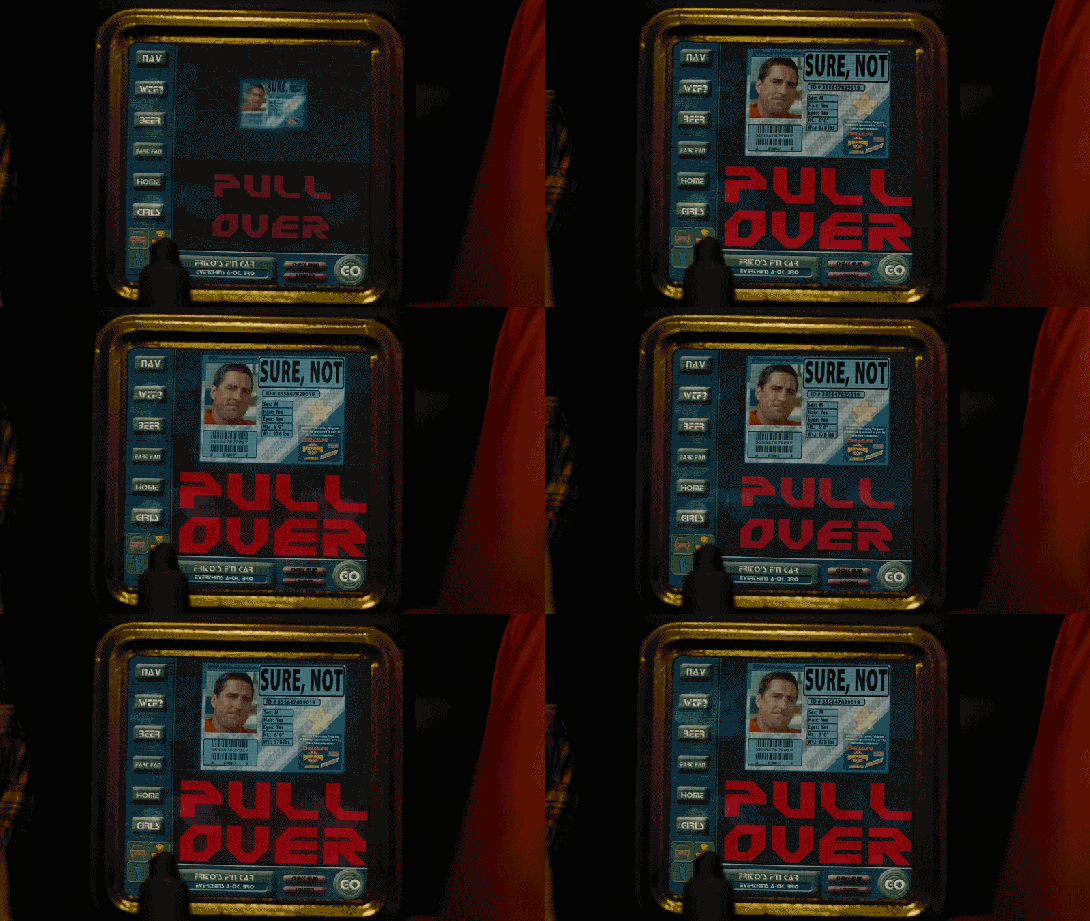
Frito’s F’n Car interface

When Frito is driving Joe and Rita away from the cops, Joe happens to gesture with his hand above the car window, where a vending machine he happens to be passing spots the tattoo. Within seconds two harsh beeps sound in the car and a voice says, “You are harboring a fugitive named NOT SURE. Please, pull over and wait for the police to incarcerate your passenger.”

Frito’s car begins slowing down, and the dashboard screen shows a picture of Not Sure’s ID card and big red text zooming in a loop reading “PULL OVER”

IDIOCRACY-fncar

The car interface has a column of buttons down the left reading:

  • NAV
  • WTF?
  • BEER
  • FART FAN
  • HOME
  • GIRLS

At the bottom is a square of icons: car, radiation, person, and the fourth is obscured by something in the foreground. Across the bottom is Frito’s car ID “FRITO’S F’N CAR” which appears to be a label for a system status of “EVERYTHING’S A-OK, BRO”, a button labeled CHECK INGN [sic], another labeled LOUDER, and a big green circle reading GO.

idiocracy-pullover

But the car doesn’t wait for him to pull over. With some tiny beeps it slows to a stop by itself. Frito says, “It turned off my battery!” Moments after they flee the car, it is converged upon by a ring of police officers with weapons loaded (including a rocket launcher pointed backward.)

Visual Design

Praise where it’s due: Zooming is the strongest visual attention-getting signals there is (symmetrical expansion is detected on the retina within 80 milliseconds!) and while I can’t find the source from which I learned it, I recall that blinking is somewhere in the top 5. Combining these with an audio signal means it’s hard to miss this critical signal. So that’s good.

comingrightatus.png
In English: It’s comin’ right at us!

But then. Ugh. The fonts. The buttons on the chrome seem to be some free Blade Runner font knock off, the text reading “PULL OVER” is in some headachey clipped-corner freeware font that neither contrasts nor compliments the Blade Jogger font, or whatever it is. I can’t quite hold the system responsible for the font of the IPPA licence, but I just threw up a little into my Flaturin because of that rounded-top R.

bladerunner

Then there’s the bad-90s skeuomorphic, Bevel & Emboss buttons that might be defended for making the interactive parts apparent, except that this same button treatment is given to the label Frito’s F’n Car, which has no obvious reason why it would ever need to be pressed. It’s also used on the CHECK INGN and LOUDER buttons, taking their ADA-insulting contrast ratios and absolutely wrecking any readability.

I try not to second-guess designer’s intentions, but I’m pretty sure this is all deliberate. Part of the illustration of a world without much sense. Certainly no design sense.

In-Car Features

What about those features? NAV is pretty standard function, and having a HOME button is a useful shortcut. On current versions of Google Maps there’s an Explore Places Near You Function, which lists basic interests like Restaurants, Bars, and Events, and has a more menu with a big list of interests and services. It’s not a stretch to imagine that Frito has pressed GIRLS and BEER enough that it’s floated to the top nav.

explore_places_near_you

That leaves only three “novel” buttons to think about: WTF, LOUDER, and FART FAN. 

WTF?

If I have to guess, the WTF button is an all-purpose help button. Like a GM OnStar, but less well branded. Frito can press it and get connected to…well, I guess some idiot to see if they can help him with something. Not bad to have, though this probably should be higher in the visual hierarchy.

LOUDER

This bit of interface comedy is hilarious because, well, there’s no volume down affordance on the interface. Think of the “If it’s too loud, you’re too old” kind of idiocy. Of course, it could be that the media is on zero volume, and so it couldn’t be turned down any more, so the LOUDER button filled up the whole space, but…

  • The smarter convention is to leave the button in place and signal a disabled state, and
  • Given everything else about the interface, that’s giving the diegetic designer a WHOLE lot of credit. (And our real-world designer a pat on the back for subtle hilarity.)

FART FAN

This button is a little potty humor, and probably got a few snickers from anyone who caught it because amygdala, but I’m going to boldly say this is the most novel, least dumb thing about Frito’s F’n Car interface.

Heart_Jenkins_960.jpg
Pictured: A sulfuric gas nebula. Love you, NASA!

People fart. It stinks. Unless you have active charcoal filters under the fabric, you can be in for an unpleasant scramble to reclaim breathable air. The good news is that getting the airflow right to clear the car of the smell has, yes, been studied, well, if not by science, at least scientifically. The bad news is that it’s not a simple answer.

  • Your car’s built in extractor won’t be enough, so just cranking the A/C won’t cut it.
  • Rolling down windows in a moving aerodynamic car may not do the trick due to something called the boundary layer of air that “clings” to the surface of the car.
  • Rolling down windows in a less-aerodynamic car can be problematic because of the Helmholtz effect (the wub-wub-wub air pressure) and that makes this a risky tactic.
  • Opening a sunroof (if you have one) might be good, but pulls the stench up right past noses, so not ideal either.

The best strategy—according to that article and conversation amongst my less squeamish friends—is to crank the AC, then open the driver’s window a couple of inches, and then the rear passenger window half way.

But this generic strategy changes with each car, the weather (seriously, temperature matters, and you wouldn’t want to do this in heavy precipitation), and the skankness of the fart. This is all a LOT to manage when one’s eyes are meant to be on the road and you’re in an nauseated panic. Having the cabin air just refresh at the touch of one button is good for road safety.

If it’s so smart, then, why don’t we have Fart Fan panic buttons in our cars today?

I suspect car manufacturers don’t want the brand associations of having a button labeled FART FAN on their dashboards. But, IMHO, this sounds like a naming problem, not some intractable engineering problem. How about something obviously overpolite, like “Fast freshen”? I’m no longer in the travel and transportation business, but if you know someone at one of these companies, do the polite thing and share this with them.

Idiocracy-car
Another way to deal with the problem, in the meantime.

So aside from the interface considerations, there are also some strategic ones to discuss with the remote kill switch, but that deserves it’s own post, next.

Jasper’s home alarm

When Theo, Kee, and Miriam flee the murderous Fishes, they take refuge in Jasper’s home for the night. They are awoken in the morning by Jasper’s sentry system.

ChildrenofMen_Jasper_alarm

A loud cacophonous alarm sounds, made up of what sounds like recorded dog barks, bells clanging, and someone banging a stick on a metal trash can lid. Jasper explains to everyone in the house that “It’s the alarm! Someone’s breaking in!”

They gather around a computer screen with large speakers on either side. The screen shows four video feeds labeled ROAD A, FOREST A, FRONT DOOR, and ROAD B. Labels reading MOTION DETECTED <> blink at the bottom of the ROAD A and ROAD B feeds, where we can see members of the Fishes removing the brush that hides the driveway to Jasper’s house.

The date overlays the upper right hand corner of the screen, 06-DEC-2027, 08:10:58.

Across the bottom is a control panel of white numbers and icons on red backgrounds.

  • A radio button control for the number of video feeds to be displayed. Though we are seeing the 4-up display, the icon does not appear to be different than the rest.
  • 16 enumerated icons, the purpose for which is unclear.
  • Video control icons for reverse, stop, play, and fast forward.
  • Three buttons with gray backgrounds and icons.
  • A wide button blinking MASTER ALARM

The scene cuts to Jasper’s rushing to the car outside the home, where none of the cacophony can be heard.

Similar to his car dashoard, it makes sense that Jasper has made this alarm himself. This might explain the clunky layout and somewhat inscrutable icons. (What do the numbers do? What about that flower on the gray background?)

The three jobs of an intruder alarm

Jasper’s alarm is OK. It certainly does the job of grabbing the household’s attention, which is the first job of an alarm, and does it without alerting the intruders, as we see in the shot outside the house.

It could do a bit better at the second job of an alarm, which is to inform the household of the nature of the problem. That they have to gather around the monitor takes precious time that could be used for making themselves safer. It could be improved by removing this requirement.

  • If Jasper had added more information to the audio alarm, even so basic as a prerecorded “Motion on the road! Motion on the road!” then they might not have needed to gather around the monitor at all.
  • If the relevant video feeds could be piped to wearable devices, phones, or their car, then they can fill in their understanding at the same time that they are taking steps to getting the hell out of there.
  • Having the artificial intelligence that we have in actual-world 2017 (much less speculative 2027), we know that narrow AI can process that video to have many more details in the broadcast message. “Motion on the road! I see three cars and at least a dozen armed men!”

There is arguably a third job of an advanced alarm, and this is to help the household understand the best course of action. This can be problematic when the confidence of the recommendation is low. But if the AI can confidently make a recommendation, it can use whatever actuators it has to help them along their way.

  • It could be informational, such as describing the best option. The audio alarm could encourage them to “Take the back road!” It could even alert the police (though in the world of Children of Men, Jasper would not trust them and they may be disinclined to care.)
  • The alarm could give some parameters and best-practice recommendations like, “You have 10 minutes to be in the car! Save only yourselves, carry nothing!”
  • It could keep updating the situation and the countdown so the household does not have to monitor it.
  • It can physically help as best it can, like remotely starting and positioning cars for them.

This can get conceptually tricky as the best course of action may be conditional, e.g. “If you can get to the car in 5 minutes, then escape is your best option, but if it takes longer or you have defenses, then securing the home and alerting the police is the better bet.” But that may be too much to process in the moment, and for a household that does not rehearse response scenarios, the simpler instruction may be safer.

Dradis Console

image09

Dradis is the primary system that the Galactica uses to detect friendly and enemy units beyond visual range.  The console appears to have a range of at least one light second (less than the distance from Earth to the Moon), but less than one light minute (one/eighth the distance from Earth to the Sun).

How can we tell?  We know that it’s less than one light minute because Galactica is shown orbiting a habitable planet around a sun-like star.  Given our own solar system, we would have at least some indication of ships on the Dradis at that range and the combat happening there (which we hear over the radios).  We don’t see those on the Dradis.

We know that it’s at least one light second because Galactica jumps into orbit (possibly geosynchronous) above a planet and is able to ‘clear’ the local space of that planet’s orbit with the Dradis

image03

The sensor readings are automatically interpreted into Friendly contacts, Enemy contacts, and missiles, then displayed on a 2d screen emulating a hemisphere. A second version of the display shows a flat 2d view of the same information.


Friendly contacts are displayed in green, while enemy units (Cylons) are displayed in red.  The color of the surrounding interface changes from orange to red when the Galactica moves to Alert Stations.

image06

The Dradis is displayed on four identical displays above the Command Table, and is viewable from any point in the CIC.  ‘Viewable’ here does not mean ‘readable’.  The small size, type, and icons shown on the screen are barely large enough to be read by senior crew at the main table, let alone officers in the second or third tier of seating (the perspective of which we see here).

It is possible that these are simply overview screens to support more specific screens at individual officer stations, but we never see any evidence of this.

Whatever the situation, the Dradis needs to be larger in order to be readable throughout the CIC and have more specific screens at officer stations focused on interpreting the Dradis.

As soon as a contact appears on the Dradis screen, someone (who appears to be the Intelligence Officer) in the CIC calls out the contact to reiterate the information and alert the rest of the CIC to the new contact.  Vipers and Raptors are seen using a similar but less powerful version of the Galactica’s sensor suite and display.  Civilian ships like Colonial One have an even less powerful or distinct radar system.


2d display of 3d information

The largest failing of the Dradis system is in its representation of the hemisphere.  We never appear to see the other half of the sphere. Missing half the data is pretty serious. Theoretically, the Galactica would be at the center of a bubble of information, instead of picking an arbitrary ‘ground plane’ and showing everything in a half-sphere above that (cutting out a large amount of available information).

The Dradis also suffers from a lack of context: contacts are displayed in 3 dimensions inside the view, but only have 2 dimensions of reference on the flat screen in the CIC.  For a reference on an effective 3d display on a 2d screen, see Homeworld’s (PC Game, THQ and Relic) Sensor Manager:

image04

In addition to rotation of the Sensor Manager (allowing different angles of view depending on the user’s wishes), the Sensor Manager can display reference lines down to a ‘reference plane’ to show height above, and distance from, a known point.  In Homeworld, this reference point is often the center of the selected group of units, but on the Dradis it would make sense for this reference point to be the Galactica herself.

image07

Dradis Contact

Overall, the crew of the Galactica never seems to be inhibited by this limitation.  The main reasons they could be able to work around this limitation include:

  • Extensive training
  • Effective communication between crew members
  • Experience operating with limited information.  

This relies heavily on the crew operating at peak efficiency during an entire combat encounter.  That is a lot to ask from anyone.  It would be better to improve the interface and lift the burden off of a possibly sleep deprived crewmember.

The Dradis itself displays information effectively about the individual contacts it sees.  This isn’t visible at the distances involved in most CIC activities, but would be visible on personal screens easily.  Additionally, the entire CIC doesn’t need to know every piece of information about each contact.

In any of those three cases, crew efficiency would be improved (and misunderstandings would be limited) by improving how the Dradis displayed its contacts on its screen.

VR Goggles

BttF_118

At the dinner table, both Marty Jr. and Marlene have VR goggles. Marty wears his continuously, but Marlene is more polite and rests hers around her neck when with the family. When she receives a call, red LEDs flash the word “PHONE” on the outside of the goggles as they ring. This would be a useful signal if the volume were turned down or the volume was baffled by ambient sounds.

BttF_120

Marty Jr’’s goggles are on, and he announces to Marty Sr. that the phone is for him and that it’s Needles.

This implies a complete wireless caller ID system (which had only just been released to market in the United States the year before the movie was released) and a single number for the household that is distributed amongst multiple communications devices simultaneously, which was not available at the time (or hey, even now), so it’s quite forward looking. Additionally, it lets the whole social circle help manage communication requests, even if it sacrifices a bit of privacy.

Night Vision Goggles

Screenshot-(248)

Genarro: “Are they heavy?”
Excited Kid: “Yeah!”
Genarro: “Then they’re expensive, put them back”
Excited Kid: [nope]

The Night Vision Goggles are large binoculars that are sized to fit on an adult head.  They are stored in a padded case in the Tour Jeep’s trunk.  When activated, a single red light illuminated in the “forehead” of the device, and four green lights appear on the rim of each lens. The green lights rotate around the lens as the user zooms the binoculars in and out. On a styling point, the goggles are painted in a very traditional and very adorable green and yellow striped dinosaur pattern.

Tim holds the goggles up as he plays with them, and it looks like they are too large for his head (although we don’t see him adjust the head support at all, so he might not have known they were adjustable).  He adjusts the zoom using two hidden controls—one on each side.  It isn’t obvious how these work. It could be that…

  • There are no controls, and it automatically focuses on the thing in the center of the view or on the thing moving.
  • One side zooms in, and the other zooms out.
  • Both controls have a zoom in/zoom out ability.
  • Each side control powers its own lens.
  • Admittedly, the last option is the least likely.

Unfortunately the movie just doesn’t give us enough information, leaving it as an exercise for us to consider.

Screenshot (241) Continue reading

Velociraptor Lock

The velociraptor pen is a concrete pit, topped with high-powered electric fences.  There are two ways into the pen: a hole at the top of the pen for feeding, and a large armored door at ground level for moving ‘raptors in and out. This armored door has the first interface seen in the film, the velociraptor lock.

JurassicPark_velociraptorlock03 Velociraptors are brought from breeding grounds within the park to a secure facility in a large, heavily armored crate. Large, colored-light indicators beside the door indicate whether the armored cages are properly aligned with the door.  The light itself goes from red when the cage is being moved, to yellow when the cage is properly aligned and getting close to the door, to green when the cage is properly aligned and snug against the concrete walls of the velociraptor pen.  There is also a loud ‘clang’ as the light turns to green.  It isn’t clear if this is an audio indicator from the pen itself, the cage hitting the concrete wall, or locks slamming into place; but if that audio cue wasn’t there, you’d want something like it since the price for getting that wrong is quite high.

The complete interface consists of four parts (kind of, read on): The lights, the door, the lock, and the safety. More on each below. Continue reading

J.D.E.M. LEVEL 5

The first computer interface we see in the film occurs at 3:55. It’s an interface for housing and monitoring the tesseract, a cube that is described in the film as “an energy source” that S.H.I.E.L.D. plans to use to “harness energy from space.” We join the cube after it has unexpectedly and erratically begun to throw off low levels of gamma radiation.

The harnessing interface consists of a housing, a dais at the end of a runway, and a monitoring screen.

Avengers-cubemonitoring-07

Fury walks past the dais they erected just because.

The housing & dais

The harness consists of a large circular housing that holds the cube and exposes one face of it towards a long runway that ends in a dais. Diegetically this is meant to be read more as engineering than interface, but it does raise questions. For instance, if they didn’t already know it was going to teleport someone here, why was there a dais there at all, at that exact distance, with stairs leading up to it? How’s that harnessing energy? Wouldn’t you expect a battery at the far end? If they did expect a person as it seems they did, then the whole destroying swaths of New York City thing might have been avoided if the runway had ended instead in the Hulk-holding cage that we see later in the film. So…you know…a considerable flaw in their unknown-passenger teleportation landing strip design. Anyhoo, the housing is also notable for keeping part of the cube visible to users near it, and holding it at a particular orientation, which plays into the other component of the harness—the monitor.

Avengers-cubemonitoring-03 Continue reading

Drone Status Feed

Oblivion-Desktop-Overview-002 Oblivion-Desktop-DroneMonitor-001

As Vika is looking at the radar and verifying visuals on the dispatched drones with Jack, the symbols for drones 166 and 172 begin flashing red. An alert begins sounding, indicating that the two drones are down.

Oblivion-Desktop-DroneCoordinates

Vika wants to send Jack to drone 166 first. To do this she sends Jack the drone coordinates by pressing and holding the drone symbol for 166 at which time data coordinates are displayed. She then drags the data coordinates with one finger to the Bubbleship symbol and releases. The coordinates immediately display on Jack’s HUD as a target area showing the direction he needs to go. Continue reading

Collision Alarm

Holy dreck this fuigetry.

After letting Captain Deladier know what’s up with the giant asteroid looming spinning ever closer, Barcalow’s attention is grabbed by a screen immediately before him. It’s the collision alarm.

Prepare your eyes.

CollisionAlarm

This is the interface equivalent of running around screaming in an Ed Wynn voice while flailing your arms over your head. Sure, it’s clear something’s wrong, but other than that, it’s not helping.

Sure, there’s the buzzing and the giant yellow, all-caps text that blinks COLLISION ALARM. There’s a pea green bar that seems to be indicating steadily decreasing distance or time or something that is running out. Those two are helpful. The rest of this information is a pile of nonsense.

  • Blinking? If the pilot has seconds to act, isn’t there a risk that when he glances at the screen for a split second, that he’ll miss something?
  • What’s with the blue waves rippling out from the representation of the ship? If it’s a collision, wouldn’t you expect something to be represented as coming toward the ship, and maybe a line describing its path, and a point illustrating point of impact?
  • Why do all of the NV need to be labeled as such? Why do they need to blink randomly? How is that useful information?
  • How do those numbers link to those labels? Isn’t that asking the navigator to do a lot of visual work in a crisis?
  • What does it mean for the ESTIMATED MASS to be changing to zero and suddenly jump again? Because that would better fit a Cthulu alarm, as the physics of the Old World no longer applied. Stell’bsna n’ghft. Y’hah.
  • What does it mean for the APPROXIMATE SPEED to start so low, rise to nearly 1000, and fall again? What outside force is acting on this mass? (Or is it a function of the mass changing? Anyone care to do the speculative math?)
  • The DISTANCE TO OBJECT does in fact decrease like you might expect it to at the beginning. But then it drops to zero. Shouldn’t they be dieing instead? Oh, but then it jumps again.
  • Why is time contained in a single number? Does the Federation use some Metric version of time?
  • How can OBJECT TRAJECTORY be a single digit? It’s a multivariate concept.
  • Why are there no units? As in, anywhere?
  • How could OBJECT BEARING change to zero and then jump back up again just like ESTIMATED
  • …wait…
  • …Are you kidding me?

And that’s when I went, frame by frame, and captured the data points. Here they are, visualized as a graph over time. Notice anything?

collision-alarm-graph-01

OK, let me just line those up for you.

collision-alarm-graph-02

I know sci-fi interfaces are often made under time pressure, but it really lets me down when they just copy and paste numbers. Like we won’t, many years later, analyze it frame-by-frame for a blog. Sheesh.

Urgency requires focus

Of course this is a narrative interface, meant to communicate to an audience in about a second that things are very very bad for the Rodger Young. Of course it’s rooted in a mechanical metaphor where dumb, fixed sensors with thresholds would go all calamity when things went pear-shaped.

We don’t live in that world anymore. Urgency requires focus, and when circumstances are dire, yes, the pilot needs to know the direness of the problem, but then they also need to focus on fixing that problem. Urgency interfaces should…

  1. Get attention, and once they have it ease up on the attention getting, since it becomes a distraction.
  2. Illustrate the problem, including time-until-anticipated.
  3. Illustrate what the computer is doing about it (if it’s agentive, which the Rodger Young is clearly not.)
  4. Illustrate the best options available and provide a means to enact those.

Note that the COLLISION ALERT does two and a half of those. It gets Barcalow’s attention, shows the problem with a label, and a green bar shows time remaining. That’s maybe a tenth of the screen. Then it tries its very, very best to distract the user from that useful information with blinking, semi-random nonsense. Was this thing designed by the bugs?

Dust Storm Alert

WallE-DustStorm04

While preparing for his night cycle, Wall-E is standing at the back of his transport/home. On the back drop door of the transport, he is cleaning out his collection cooler. In the middle of this ritual, an alert sounds from his external speakers. Concerned by the sound, Wall-E looks up to see a dust storm approaching. After seeing this, he hurries to finish cleaning his cooler and seal the door of the transport.

A Well Practiced Design

The Dust Storm Alert appears to override Wall-E’s main window into the world: his eyes. This is done to warn him of a very serious event that could damage him or permanently shut him down. What is interesting is that he doesn’t appear to register a visual response first. Instead, we first hear the audio alert, then Wall-E’s eye-view shows the visual alert afterward.

Given the order of the two parts of the alert, the audible part was considered the most important piece of information by Wall-E’s designers. It comes first, is unidirectional as well as loud enough for everyone to hear, and is followed by more explicit information.

WallE-DustStorm01

Equal Opportunity Alerts

By having the audible alert first, all Wall-E units, other robots, and people in the area would be alerted of a major event. Then, the Wall-E units would be given the additional information like range and direction that they need to act. Either because of training or pre-programmed instructions, Wall-E’s vision does not actually tell him what the alert is for, or what action he should take to be safe. This could also be similar to tornado sirens, where each individual is expected to know where they are and what the safest nearby location is.

For humans interacting alongside Wall-E units each person should have their own heads-up display, likely similar to a Google-glass device. When a Wall-E unit gets a dust storm alert, the human could then receive a sympathetic alert and guidance to the nearest safe area. Combined with regular training and storm drills, people in the wastelands of Earth would then know exactly what to do.

Why Not Network It?

Whether by luck or proper programming, the alert is triggered with just enough time for Wall-E to get back to his shelter before the worst of the storm hits. Given that the alert didn’t trigger until Wall-E was able to see the dust cloud for himself, this feels like very short notice. Too short notice. A good improvement to the system would be a connection up to a weather satellite in orbit, or a weather broadcast in the city. This would allow him to be pre-warned and take shelter well before any of the storm hits, protecting him and his solar collectors.

Other than this, the alert system is effective. It warns Wall-E of the approaching storm in time to act, and it also warns everyone in the local vicinity of the same issue. While the alert doesn’t inform everyone of what is happening, at least one actor (Wall-E) knows what it means and knows how to react. As with any storm warning system, having a connection that can provide forecasts of potentially dangerous weather would be a huge plus.