The Thanatorium: Attendant interface

The thanatorium is a speculative service for assisted suicide in Soylent Green. Suicide and death are not easy topics and I will do my best to address them seriously. Let me first take a moment to direct anyone who is considering or dealing with suicide to please stop reading this and talk to someone about it. I am unqualified to address—and this blog is not the place to work through—such issues.

There are four experiences to look at in the interface and service design of the Thanatorium: The patient, their beneficiaries, the usher to the beneficiaries, and the attendants to the patient. This post is about the attendants to the patient. Forewarning: This is the role we have the least information about. These Thanatorium personnel are there to assist the patient in their suicide, and deal with the body after the ceremony is complete.

The attendants have many goals and tasks to accomplish with each patient:

  • Help set the patient at ease so they complete the ceremony
    • Welcome the patient warmly
    • Assist them with tasks
      • Help them disrobe
      • Get them onto the gurney
      • Provide the hemlock
      • Set the patient in place for the cinerama experience
      • Press the gray buttons (which I interpret as ensuring medical monitoring, see below)
    • Set a liminal mood
  • Remove the clothes for donating and cup for cleaning
  • Leave the patient during the cinerama
  • Return to the body when the patient has passed
  • Usher the gurney through the portal

Nearly all of this is manual, with no speculative interfaces to speak of. A service design approach would look at this entire touchpoint, though. So, some quick notes.

Note their uniforms. Rather than the Guayabera shirt that the usher wears, the attendants wear vestments—white robes with goldenrod cuffs and cinctures around their waists. They even wear sandals to convey a sort of biblical, old-world holiness. It’s goofy and cheap, and kind of perfect.

Their manner is solemn, never speaking and performing their tasks with a sort of dance-like deliberateness. The behavior helps set off the space as liminal, somewhere not-quite like the world outside. No notes on the frontstage choreography.

The lighting begins a little flat, like overhead fluorescents in a school cafeteria. Maybe this is to give the patient a sense of certainty, of complete information about the room; but for my money the whole thing would seem more liminal with more dramatic lighting: A warm pool of light around the bed, maybe tiny amber incandescent bulbs flickering in a ring around the walls, like candles or stars.

A solemn scene depicting two figures dressed in ceremonial robes, standing together in a dimly lit space surrounded by candles. The woman has long hair and is wearing a veil, while the man has short hair and a decorative robe.
Yes, closer to this.

There are some things we don’t get to see about the ceremony, like where the hemlock is stored and how it is presented to Sol, or how he gets up on a bed that’s above his waist, or what they do with his clothes. Or even—and this bit really bugs me—how the light changes from white to Sol’s requested orange at that moment. It’s not the usher, who is in the foyer about to intercept Thorn, and not the attendants, whose attention is on Sol. Maybe it’s on a timer, but that makes little sense. I really have to chalk it up to another movie-making error. Anyway, we’ll get to all this in the patient’s experience post, next.

For now let’s note that after the patient drinks the hemlock and they ease him back, we finally get to the one interface.

The ominous, inscrutable gray buttons…

Before departing the chamber, one of the attendants reaches down to a small metallic panel at the head of the bed. It consists of two square pushbuttons on the right, and a dial (or a plunger?) on the left.

The attendant presses and holds both of the buttons simultaneously for about three seconds. In the movie this attendant then gives the other a knowing glance, and they depart.

What the hell is this interface meant to be?

It’s quite unclear what state change this interface is meant to make, or why it needs to be a two-handed switch, when these sorts of things are mostly used for safety. My best guess is that since the drinking of the hemlock is the point of no return, and since the observation window is closed during that sequence so grief-stricken beneficiaries can’t interrupt; the two-handed switch is the silent signal from the attendants to the usher that everything is cool and they can open the observation window for final farewells. That’s low-confidence backworlding, though, since in the movie we know the usher is not present in the observation chamber at this time, but in the foyer of the thanatorium about to intercept Thorn. So, take this with a grain of salt.

But, if that’s the usual purpose, why have one panel with the two buttons? It’s a bit silly because they are close enough to be mashed by a single palm or even hip. It would make more sense if each attendant had their own button on each side of the bed, which they had to hold down. Have each button illuminate small green bulbs, and then jump-cut to the usher’s interface where two identical green bulbs labeled READY both illuminate. Then the usher can open the window and the beneficiary interface can switch to SPEAKING PERMITTED. This would make that weird interface moment make at least some sense.

Oh, and the dial? I have no idea. It’s unlabeled. Could be to control the bed height, or audio volume, or the brightness? Why one and not the other? There’s no way to tell and nothing makes a lot of sense given the rest of this scene. Provide your best guess in the comments, if you like. Otherwise my recommendation is to remove it.

Medical monitoring

One thing that seems to be missing the scene is some acknowledgment that the attendants are the ones to ensure that medical monitoring is operational, and do some troubleshooting if not. The monitoring is important, because the usher will await the clinical death signals before ending the cinerama and opening the observation window again for final viewing by the beneficiaries.

To help signal this, I recommend adding to the scene a quick shot of the surface of the bed before Sol lays down, showing inset silver disks, hinting at something like ECG electrodes, and then adding a panel at the head of the bed that an attendant can pull out to reveal the clinical death gauges described in the usher’s interface post.

These three, but with the dials in normal ranges for living patients.

The attendant can then close the panel, give the everything is in order look to the other, and the two of them depart for their break room, or jump seats, or watercooler; wherever they go for the interim.

This makes me realize the attendants just have to kind of hang out during the cinerama, and begs some sort of Rosencrantz and Guildenstern Are Dead philosophical dialog treatment. Please enter your drafts in the comments.

A final viewing

Once the patient passes, the attendants come in and push the gurney along its track into the portal. But this is for show, as the gurney is on a track, and after it leaves the theater to the “backstage,” it is pulled along by a mechanized track in the floor. So it could just be automated. But seeing the attendants moving it along gives the beneficiaries some last bit of theater that the body will be respectfully dealt with.

Narrator: It won’t be.

Sci-fi Spacesuits: Identification

Spacesuits are functional items, built largely identically to each other, adhering to engineering specifications rather than individualized fashion. A resulting problem is that it might be difficult to distinguish between multiple, similarly-sized individuals wearing the same suits. This visual identification problem might be small in routine situations:

  • (Inside the vehicle:) Which of these suits it mine?
  • What’s the body language of the person currently speaking on comms?
  • (With a large team performing a manual hull inspection:) Who is that approaching me? If it’s the Fleet Admiral I may need to stand and salute.

But it could quickly become vital in others:

  • Who’s body is that floating away into space?
  • Ensign Smith just announced they have a tachyon bomb in their suit. Which one is Ensign Smith?
  • Who is this on the security footage cutting the phlebotinum conduit?

There a number of ways sci-fi has solved this problem.

Name tags

Especially in harder sci-fi shows, spacewalkers have a name tag on the suit. The type is often so small that you’d need to be quite close to read it, and weird convention has these tags in all-capital letters even though lower-case is easier to read, especially in low light and especially at a distance. And the tags are placed near the breast of the suit, so the spacewalker would also have to be facing you. So all told, not that useful on actual extravehicular missions.

Faces

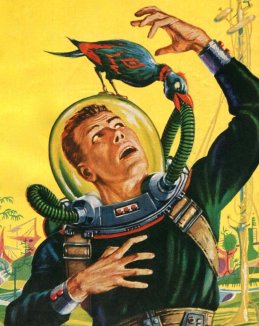
Screen sci-fi usually gets around the identification problem by having transparent visors. In B-movies and sci-fi illustrations from the 1950s and 60s, the fishbowl helmet was popular, but of course offering little protection, little light control, and weird audio effects for the wearer. Blockbuster movies were mostly a little smarter about it.

1950s Sci-Fi illustration by Ed Emshwiller
c/o Diane Doniol-Valcroze

Seeing faces allows other spacewalkers/characters (and the audience) to recognize individuals and, to a lesser extent, how their faces synch with their voice and movement. People are generally good at reading the kinesics of faces, so there’s a solid rationale for trying to make transparency work.

Face + illumination

As of the 1970s, filmmakers began to add interior lights that illuminate the wearer’s face. This makes lighting them easier, but face illumination is problematic in the real world. If you illuminate the whole face including the eyes, then the spacewalker is partially blinded. If you illuminate the whole face but not the eyes, they get that whole eyeless-skull effect that makes them look super spooky. (Played to effect by director Scott and cinematographer Vanlint in Alien, see below.)

Identification aside: Transparent visors are problematic for other reasons. Permanently-and-perfectly transparent glass risks the spacewalker getting damage from infrared lights or blinded from sudden exposure to nearby suns, or explosions, or engine exhaust ports, etc. etc. This is why NASA helmets have the gold layer on their visors: it lets in visible light and blocks nearly all infrared.

Astronaut Buzz Aldrin walks on the surface of the moon near the leg of the lunar module Eagle during the Apollo 11 mission.

Image Credit: NASA (cropped)

Only in 2001 does the survey show a visor with a manually-adjustable translucency. You can imagine that this would be more safe if it was automatic. Electronics can respond much faster than people, changing in near-real time to keep sudden environmental illumination within safe human ranges.

You can even imagine smarter visors that selectively dim regions (rather than the whole thing), to just block out, say, the nearby solar flare, or to expose the faces of two spacewalkers talking to each other, but I don’t see this in the survey. It’s mostly just transparency and hope nobody realizes these eyeballs would get fried.

So, though seeing faces helps solve some of the identification problem, transparent enclosures don’t make a lot of sense from a real-world perspective. But it’s immediate and emotionally rewarding for audiences to see the actors’ faces, and with easy cinegenic workarounds, I suspect identification-by-face is here in sci-fi for the long haul, at least until a majority of audiences experience spacewalking for themselves and realize how much of an artistic convention this is.

Color

Other shows have taken the notion of identification further, and distinguished wearers by color. Mission to Mars, Interstellar, and Stowaway did this similar to the way NASA does it, i.e. with colored bands around upper arms and sometimes thighs.

Destination Moon, 2001: A Space Odyssey, and Star Trek (2009) provided spacesuits in entirely different colors. (Star Trek even equipped the suits with matching parachutes, though for the pedantic, let’s acknowledge these were “just” upper-atmosphere suits.)The full-suit color certainly makes identification easier at a distance, but seems like it would be more expensive and introduce albedo differences between the suits.

One other note: if the visor is opaque and characters are only relying on the color for identification, it becomes easier for someone to don the suit and “impersonate” its usual wearer to commit spacewalking crimes. Oh. My. Zod. The phlebotinum conduit!

According to the Colour Blind Awareness organisation, blindness (color vision deficiency) affects approximately 1 in 12 men and 1 in 200 women in the world, so is not without its problems, and might need to be combined with bold patterns to be more broadly accessible.

What we don’t see

Heraldry

Blog from another Mog Project Rho tells us that books have suggested heraldry as space suit identifiers. And while it could be a device placed on the chest like medieval suits of armor, it might be made larger, higher contrast, and wraparound to be distinguishable from farther away.

Directional audio

Indirect, but if the soundscape inside the helmet can be directional (like a personal Surround Sound) then different voices can come from the direction of the speaker, helping uniquely identify them by position. If there are two close together and none others to be concerned about, their directions can be shifted to increase their spatial distinction. When no one is speaking leitmotifs assigned to each other spacewalker, with volumes corresponding to distance, could help maintain field awareness.

HUD Map

Gamers might expect a map in a HUD that showed the environment and icons for people with labeled names.

Search

If the spacewalker can have private audio, shouldn’t she just be able to ask, “Who’s that?” while looking at someone and hear a reply or see a label on a HUD? It would also be very useful if I’ve spacewalker could ask for lights to be illuminated on the exterior of another’s suit. Very useful if that other someone is floating unconscious in space.

Mediated Reality Identification

Lastly I didn’t see any mediated reality assists: augmented or virtual reality. Imagine a context-aware and person-aware heads-up display that labeled the people in sight. Technological identification could also incorporate in-suit biometrics to avoid the spacesuit-as-disguise problem. The helmet camera confirms that the face inside Sargeant McBeef’s suit is actually that dastardly Dr. Antagonist!

We could also imagine that the helmet could be completely enclosed, but be virtually transparent. Retinal projectors would provide the appearance of other spacewalkers—from live cameras in their helmets—as if they had fishbowl helmets. Other information would fit the HUD depending on the context, but such labels would enable identification in a way that is more technology-forward and cinegenic. But, of course, all mediated solutions introduce layers of technology that also introduces more potential points of failure, so not a simple choice for the real-world.

Oh, that’s right, he doesn’t do this professionally.

So, as you can read, there’s no slam-dunk solution that meets both cinegenic and real-world needs. Given that so much of our emotional experience is informed by the faces of actors, I expect to see transparent visors in sci-fi for the foreseeable future. But it’s ripe for innovation.

Tunnel-in-the-Sky Displays

“Tunnel in the Sky” is the name of a 1955 Robert Heinlein novel that has nothing to do with this post. It is also the title of the following illustration by Muscovite digital artist Vladimir Manyukhin, which also has nothing to do with this post, but is gorgeous and evocative, and included here solely for visual interest.

See more of Vladimir’s work here https://www.artstation.com/mvn78.

Instead, this post is about the piloting display of the same name, and written specifically to sci-fi interface designers.


Last week in reviewing the spinners in Blade Runner, I included mention and a passing critique of the tunnel-in-the-sky display that sits in front of the pilot. While publishing, I realized that I’d seen this a handful of other times in sci-fi, and so I decided to do more focused (read: Internet) research about it. Turns out it’s a real thing, and it’s been studied and refined a lot over the past 60 years, and there are some important details to getting one right.

Though I looked at a lot of sources for this article, I must give a shout-out to Max Mulder of TU Delft. (Hallo, TU Delft!) Mulder’s PhD thesis paper from 1999 on the subject is truly a marvel of research and analysis, and it pulls in one of my favorite nerd topics: Cybernetics. Throughout this post I rely heavily on his paper, and you could go down many worse rabbit holes than cybernetics. n.b., it is not about cyborgs. Per se. Thank you, Max.

I’m going to breeze through the history, issues, and elements from the perspective of sci-fi interfaces, and then return to the three examples in the survey. If you want to go really in depth on the topic (and encounter awesome words like “psychophysics” and “egomotion” in their natural habitat), Mulder’s paper is available online for free from researchgate.net: “Cybernetics of Tunnel-in-the-Sky Displays.”

What the heck is it?

A tunnel-in-the-sky display assists pilots, helping them know where their aircraft is in relation to an ideal flight path. It consists of a set of similar shapes projected out into 3D space, circumscribing the ideal path. The pilot monitors their aircraft’s trajectory through this tunnel, and makes course corrections as they fly to keep themselves near its center.

This example comes from Michael P. Snow, as part of his “Flight Display Integration” paper, also on researchgate.net.

Please note that throughout this post, I will spell out the lengthy phrase “tunnel-in-the-sky” because the acronym is pointlessly distracting.

Quick History

In 1973, Volkmar Wilckens was a research engineer and experimental test pilot for the German Research and Testing Institute for Aerospace (now called the German Aerospace Center). He was doing a lot of thinking about flight safety in all-weather conditions, and came up with an idea. In his paper “Improvements In Pilot/Aircraft-Integration by Advanced Contact Analog Displays,” he sort of says, “Hey, it’s hard to put all the information from all the instruments together in your head and use that to fly, especially when you’re stressed out and flying conditions are crap. What if we took that data and rolled it up into a single easy-to-use display?” Figure 6 is his comp of just such a system. It was tested thoroughly in simulators and shown to improve pilot performance by making the key information (attitude, flight-path and position) perceivable rather than readable. It also enabled the pilot greater agency, by not having them just follow rules after instrument readings, but empowering them to navigate multiple variables within parameters to stay on target.

In Wilckens’ Fig. 6, above, you can see the basics of what would wind up on sci-fi screens decades later: shapes repeated into 3D space ahead of the aircraft to give the pilot a sense of an ideal path through the air. Stay in the tunnel and keep the plane safe.

Mulder notes that the next landmark developments come from the work of Arthur Grunwald & S. J. Merhav between 1976–1978. Their research illustrates the importance of augmenting the display and of including a preview of the aircraft in the display. They called this preview the Flight Path Predictor, or FPS. I’ve also seen it called the birdie in more modern papers, which is a lot more charming. It’s that plus symbol in the Grunwald illustration, below. Later in 1984, Grunwald also showed that a heads-up-display increased precision adhering to a curved path. So, HUDs good.

 n.b. This is Mulder’s representation of Grunwald’s display format.

I have also seen lots of examples of—but cannot find the research provenance for—tools for helping the pilot stay centered, such as a “ghost” reticle at the center of each frame, or alternately brackets around the FPP, called the Flight Director Box, that the pilot can align to the corners of the frames. (I’ll just reference the brackets. Gestalt be damned!) The value of the birdie combined with the brackets seems very great, so though I can’t cite their inventor, and it wasn’t in Mulder’s thesis, I’ll include them as canon.

The takeaway from the history is really that these displays have a rich and studied history. The pattern has a high confidence.

Elements of an archetypical tunnel-in-the-sky display

There are lots of nuances that have been studied for these displays. Take for example the effect that angling the frames have on pilot banking, and the perfect time offset to nudge pilot behavior closer to ideal banking. For the purposes of sci-fi interfaces, however, we can reduce the critical components of the real world pattern down to four.

  1. Square shapes (called frames) extending into the distance that describe an ideal path through space
    1. The frame should be about five times the width of the craft. (The birdie you see below is not proportional and I don’t think it’s standard that they are.)
    2. The distances between frames will change with speed, but be set such that the pilot encounters a new one every three seconds.
    3. The frames should adopt perspective as if they were in the world, being perpendicular to the flight path. They should not face the display.
    4. The frames should tilt, or bank, on curves.
    5. The tunnel only needs to extend so far, about 20 seconds ahead in the flight path. This makes for about 6 frames visible at a time.
  2. An aircraft reference symbol or Flight Path Predictor Symbol (FPS, or “birdie”) that predicts where the plane will be when it meets the position of the nearest frame. It can appear off-facing in relation to the cockpit.
    1. These are often rendered as two L shapes turned base-to-base with some space between them. (See one such symbol in the Snow example above.)
    2. Sometimes (and more intuitively, imho) as a circle with short lines extending out the sides and the top. Like a cartoon butt of a plane. (See below.)
  3. Contour lines connect matching corners across frames
  4. A horizon line
This comp illustrates those critical features.

There are of course lots of other bits of information that a pilot needs. Altitude and speed, for example. If you’re feeling ambitious, and want more than those four, there are other details directly related to steering that may help a pilot.

  • Degree-of-vertical-deviation indicator at a side edge
  • Degree-of-horizontal-deviation indicator at the top edge
  • Center-of-frame indicator, such as a reticle, appearing in the upcoming frame
  • A path predictor 
  • Some sense of objects in the environment: If the display is a heads-up display, this can be a live view. If it is a separate screen, some stylized representation what the pilot would see if the display was superimposed onto their view.
  • What the risk is when off path: Just fuel? Passenger comfort? This is most important if that risk is imminent (collision with another craft, mountain) but then we’re starting to get agentive and I said we wouldn’t go there, so *crumbles up paper, tosses it*.

I haven’t seen a study showing efficacy of color and shading and line scale to provide additional cues, but look closely at that comp and you’ll see…

  • The background has been level-adjusted to increase contrast with the heads-up display
  • A dark outline around the white birdie and brackets to help visually distinguish them from the green lines and the clouds
  • A shadow under the birdie and brackets onto the frames and contours as an additional signal of 3D position
  • Contour lines diminishing in size as they extend into the distance, adding an additional perspective cue and limiting the amount of contour to the 20 second extents.
Some other interface elements added.

What can you play with when designing one in sci-fi?

Everything, of course. Signaling future-ness means extending known patterns, and sci-fi doesn’t answer to usability. Extend for story, extend for spectacle, extend for overwhelmedness. You know your job better than me. But if you want to keep a foot in believability, you should understand the point of each thing as you modify it and try not to lose that.

  1. Each frame serves as a mini-game, challenging the pilot to meet its center. Once that frame passes, that game is done and the next one is the new goal. Frames describe the near term. Having corners to the frame shape helps convey banking better. Circles would hide banking.
  2. Contour lines, if well designed, help describe the overall path and disambiguate the stack of frames. (As does lighting and shading and careful visual design, see above.) Contour lines convey the shape of the overall path and help guide steering between frames. Kind of like how you’d need to see the whole curve before drifitng your car through one, the contour lines help the pilot plan for the near future. 
  3. The birdie and brackets are what a pilot uses to know how close to the center they are. The birdie needs a center point. The brackets need to match the corners of the frame. Without these, it’s easier to drift off center.
  4. A horizon line provides feedback for when the plane is banked.
THIS BAD: You can kill the sense of the display by altering (or in this case, omitting) too much.

Since I mentioned that each frame acts as a mini-game, a word of caution: Just as you should be skeptical when looking to sci-fi, you should be skeptical when looking to games for their interfaces. The simulator which is most known for accuracy (Microsoft Flight Simulator) doesn’t appear to have a tunnel-in-the-sky display, and other categories of games may not be optimizing for usability as much as just plain fun, with the risk of crashing your virtual craft just being part of the risk. That’s not an acceptable outcome in real-world piloting. So, be cautious considering game interfaces as models for this, either.

This clip of stall-testing in the forthcoming MSFS2020 still doesn’t appear to show one. 

So now let’s look at the three examples of sci-fi tunnel-in-the-sky displays in chronological order of release, and see how they fare.

Three examples from sci-fi

So with those ideal components in mind, let’s look back at those three examples in the survey.

Alien (1976)
Blade Runner (1982)

Quick aside on the Blade Runner interface: The spike at the top and the bottom of the frame help in straight tunnels to serve as a horizontal degree-of-deviation indicator. It would not help as much in curved tunnels, and is missing a matching vertical degree-of-deviation indicator. Unless that’s handled automatically, like a car on a road, its absence is notable.

Starship Troopers (1997) We only get 15 frames of this interface in Starship Troopers, as Ibanez pilots the escape shuttle to the surface of Planet P. It is very jarring to see as a repeating gif, so accept this still image instead. 

Some obvious things we see missing from all of them are the birdie, the box, and the contour lines. Why is this? My guess is that the computational power in the 1976 was not enough to manage those extra lines, and Ridley Scott just went with the frames. Then, once the trope had been established in a blockbuster, designers just kept repeating the trope rather than looking to see how it worked in the real world, or having the time to work through the interaction logic. So let me say:

  • Without the birdie and box, the pilot has far too much leeway to make mistakes. And in sci-fi contexts, where the tunnel-in-the-sky display is shown mostly during critical ship maneuvers, their absence is glaring.
  • Also the lack of contour lines might not seem as important, since the screens typically aren’t shown for very long, but when they twist in crazy ways they should help signal the difficulty of the task ahead of the pilot very quickly.

Note that sci-fi will almost certainly encounter problems that real-world researchers will not have needed to consider, and so there’s plenty of room for imagination and additional design. Imagine helping a pilot…

  • Navigating the weird spacetime around a singularity
  • Bouncing close to a supernova while in hyperspace
  • Dodging chunks of spaceship, the bodies of your fallen comrades, and rising plasma bombs as you pilot shuttlecraft to safety on the planet below
  • AI on the ships that can predict complex flight paths and even modify them in real time, and even assist with it all
  • Needing to have the tunnel be occluded by objects visible in a heads up display, such as when a pilot is maneuvering amongst an impossibly-dense asteroid field. 

…to name a few off my head. These things don’t happen in the real world, so would be novel design challenges for the sci-fi interface designer.


So, now we have a deeper basis for discussing, critiquing, and designing sci-fi tunnel-in-the-sky displays. If you are an aeronautic engineer, and have some more detail, let me hear it! I’d love for this to be a good general reference for sci-fi interface designers.

If you are a fan, and can provide other examples in the comments, it would be great to see other ones to compare.

Happy flying, and see you back in Blade Runner in the next post.

Spinners (flying cars)

So the first Fritzes are now a thing. Before I went off on that awesome tangent, where were we? Oh that’s right. I was reviewing Blade Runner as part of a series on AI in sci-fi. I was just about to get to Spinners. Now vehicles are complicated things as they are, much less when they are navigating proper 3D space. Additionally, the police force is, ostensibly, a public service, which complicates things even further. So this will get lengthy. Still, I think I can get this down to eight or so subtopics.

In the distant future of 2019, flying cars, called “spinners,” are a reality. They’re largely for the wealthy and powerful (including law enforcement). The main protagonist, Deckard, is only ever a passenger in a few over the course of the film. His partner Gaff flies one, though, so we have enough usage to review.

Opening the skies to automobile-like traffic poses challenges, especially when those skies are as full of lightning bolts, ever-present massive flares, distracting building-sized video advertisements, and of course, other spinners.

Piloting controls

To pilot the spinner, Gaff keeps his hands on each handle of a split yoke. Within easy reach of his fingers are a few unlabeled buttons and small lights. Once we see him reach with his right thumb to press one of the buttons, but we don’t see any result, so it’s not clear what these buttons do. It’s nice that they don’t require him to take his hands off the controls. (This might seem like a prescient concept, but WP tells me the first non-horn wheel-mounted controls date back as far back as 1966.)

It is contextualizing to note the mode of agency here. That is, the controls are manual, with no AI offering assistance or acting as an agent. (The AI is in the passenger’s seat, lol fight me.) It appears to be up to Gaff to observe conditions, monitor displays, perform wayfinding, and keep the spinner on track.

Note that we never see what his feet are doing and never see him doing other things with his hands other than putting on a headset before lift-off. There are lots of other controls to the pilot’s left and in the console between seats, but we never see them in use. So, you know, approach with caution. There are a lot of unknowns here.

The Traditional Chinese characters on the window read “No entry,” for citizens outside the spinner, passing by when it is on the ground. (Hat tips for the translation to Mischa Park-Doob and Frank Chung.)

The spinner is more like a VTOL aircraft or helicopter than a spaceship. That is, it is constantly in the presence of planetary gravity and must overcome the constant resistance of air. So the standards I established in the piloting controls post are of only limited use to us here.

So let’s look at how helicopter controls work. The FAA Helicopter Flying Handbook tells us that a pilot has controls for…

  1. The vertical velocity, up or down. (Controlled by the angle of the control stick called the collective. The collective is to the left of the pilot’s hip when they are seated.)
  2. The thrust. (Controlled by the twistgrip on the collective.)
  3. Movement forward, rearward, left, and right. (Controlled with the stick in front of the pilot, called the cyclic.)
  4. Yaw of the vehicle. (Controlled with the pair of antitorque pedals at the pilot’s feet.)

Since we don’t see Gaff when the spinner is moving up and down, let’s presume that the thing he’s gripping is like a Y-shaped cyclic, with lots of little additional controls around the handles. Then, if we presume he has a collective somewhere out of sight to his left and antitorque pedals at his feet, this interface meets modern helicopter standards for control. From the outside, those appear to be well mapped (collective up = helicopter up, cyclic right = helicopter right). Twist for thrust is a little weird, but it’s a standard and certainly learnable, as I recall from my motorcycling days. So let’s say it’s complete and convincing. Is it the best it could be? I’m not enough of an aeronautical engineer (read: not at all) to imagine better options, so let’s move along. I might have more to say if it was agentive.

Dashboard

There are two large screens in the dashboard. The one directly in front of Gaff shows a stylized depiction of the 3D surfaces around him as cyan highlights on a navy blue background. Approaching red shapes describe a pill-shaped tunnel-in-the-sky display. These have been tested since 1981 and found to provide higher tracking performance to ideal paths in manual flight, lower cognitive workload, and enhanced situational awareness. (https://arc.aiaa.org/doi/abs/10.2514/3.56119) So, this is believable and well done. I’m not sure that Gaff could readily use the 3D background to effectively understand the 3D terrain, but it is tertiary, after the real world and the tunnel display.

I have to say that it’s a frustrating anti-trope to run into again, but it must be said: If the spinner knows where the ship should be, and general artificial intelligence exists in this diegesis, why exactly are humans doing the piloting? Shouldn’t the spinner fly itself? But back to the interfaces…

Above the tunnel-in-the-sky display is a cyan 7-segment LED scroll display. In the gif above it displays “MAXIMUM SPEED” and later it provides some wayfinding text. I’m not sure how many different types of information it is meant to cycle through, but it sure would be a pain to wait for vital information to appear, and distracting to have to control it to get to the one you wanted.

There is also a vertical screen in the middle of the console listing cyan labels ALT, VEL, and PTCH. These match to altitude, velocity, and pitch variables, reinforcing the helicopter model. The yellow numbers below these labels change in the scene very slowly, and—remarkably for a four-second interface from 1982—do not appear to change randomly. That’s awesome.

But then, there’s a paragraph of cyan text in the middle of the screen that appears over the course of the scene, letter by letter. This animation calls unnecessary attention to itself. There are also smaller, thin screens in the pilot’s door that also continually scroll that same teeny tiny cyan text. I’m not sure WTF all this text is supposed to be, since it would be horribly distracting to a pilot. There are also a few rows of white LEDs with cylon-eye displays traveling back and forth. They are distracting, but at least they’re regular, and might be habituate-able and act as some sort of ambient display. Anyway, if we were building this thing for real, we’d want to eliminate these.

Lastly, at the bottom of the center screen are some unlabeled bar charts depicting some variables that appear to be wiggling randomly. So, like, only the top fifth of this screen can be lauded. The rest is fuigetry. *sigh* It’s hard to escape.

Wayfinding

To help navigate the 3D space, pilots have a number of tools. First, there are windows where you expect windows to be in a car, and there are also glass panels under their feet. The movie doesn’t make a big deal out of it, but it’s clear in the scene where the spinner lifts off from the street level. These transparent panes surround pilots and passengers and allow them to track visual cues for landmarks and to identify collision threats.

It’s reflecting some neon on the street below.

The tunnel-in-the-sky display above is the most obvious wayfinding tool. Somehow Gaff has entered a destination, and the tunnel guides him where it needs to go. Since this entails a safe path through the air, it’s the most important display. Other bits of information (like the ALT, VEL, and PTCH in the center screen) should be oriented around it. This would make them glanceable, allowing Gaff glance to check them and quickly return his eyes to the windshield. In fact, we have to admit that a heads up display would allow Gaff to keep his attention where it needs to be rather than splitting it between the real world and these dashboard displays. Modern vehicle drivers are used to this split attention, and can manage it well enough. But I suspect that a HUD would be better.

It’s also at this point that you begin to wonder if these are the scout ships we see in Close Encounters.

There is also that crawling LED display above the tunnel-in-the-sky screen. In one scene it shows “SECTOR FOUR (4)…QUAD-” (we don’t get to see the end of this phrase) but it implies that one of the bits of information this scroll provides is a reminder of the name of the neighborhood you’re currently in. That really only helps if you’re way off course, and seems too low a fidelity for actual wayfinding assistance, but presuming the tunnel-in-the-sky is helping provide the rest of the wayfinding, this information is of secondary importance.

A special note about takeoff: ENVIRON CTR

The display sequence infamous for appearing in both Alien and Blade Runner happens as Gaff lifts off in a spinner early in the film. White all-cap letters label this blue screen “ENVIRON CTR,” above a grid of square characters. Then two 8-digit sequences “drop” down the center of the square grid: 92886599 | 95654085. Once they drop 3 rows, the background turns red, the grid disappears to be replaced by a big blinking label PURGE. Characters at the bottom read “24556 DR 5”, and don’t change.

After the spinner lifts off the display shows a complex diagram of a circle-within-a-circle, illustrating the increasing elevation from the ground below. The delightful worldbuilding thing about the sequence is that it is inscrutable, and legible only by a trained driver, yet gets full focus on screen. There’s not really enough information about the speculative engineering or functional constraints of the spinner to say why these screens would be necessary or useful. I have a suspicion that a live camera view would be more useful than the circle-within-a-circle view, but gosh, it sure is cool. Here’s the shot from Alien, by the way, for easy comparison.

Since people seem to be all over this one now, let me also interject that Alien is also connected to Firefly, since Mal’s anti-aircraft HUD in the pilot had a Weyland-Yutani logo. Chew on that trivia, Internet.

Intercar communication

Of special note is a scene just before his call to Sebastian’s apartment. Deckard is sitting in his parked vehicle in a call with Bryant. A police spinner glides by and we hear an announcement over his loudspeaker, directed to Deckard’s vehicle saying, “This sector’s closed to ground traffic. What are you doing here?” From inside his vehicle, Deckard looks towards his video phone in the console (we never see if there is video, but he’s looking in that direction rather than out the window) and without touching a thing, responds defensively, “I’m working. What are you doing?” The policeman’s reply comes through the videophone’s speakers, “Arresting you, that’s what I’m doing.”

Note that Deckard did not have to answer the call or even put Bryant on hold. We don’t know what the police officer did on their end, but this interaction implies that the police can make an instant, intrusive audio connection with vehicles it finds suspicious. It’s so seamless it will slip by you if you don’t know to look for it, but it paints quite a picture of intercar communication. Can you imagine if our cars automatically shared an audio space with the cars around it?

External interfaces

Another aspect of the car is that it is an interface not just for the people using the car, but for the citizens observing or near the spinner as it goes about its business. There are a number of features that helps it act as an interface to the public. 

Police exist as a social service, and the 995 repeated around the outside helps remind citizens of the number they can call in case of an emergency. 

Modern patrol cars have beacons and sirens to tell other drivers to get out of the way when they are on urgent business. Police spinners are gravid with beacons, having 12 of them visible from the front alone. (See below.) As the spinner is taking off, yellow and blue beacons circle as a warning. This would be of no help to a blind person nearby, but the vehicle does make some incidental noise that serves as an audible warning.

The rich light strip makes sense because it has such a greater range of movement than ground-based cars, and needs more attention grabbing power. Another nice touch is that, since the spinner can be above people, there are also beacons on the chassis.

Upshot: Spinners do well

So, all in all, the spinner fares quite well on close inspection. It builds on known models of piloting, shows mostly-relevant data, uses known best practices for assistance, and has a lot of well-considered surface features for citizens.

Now if only I could figure out why they’re called spinners.

Colossus Computer Center

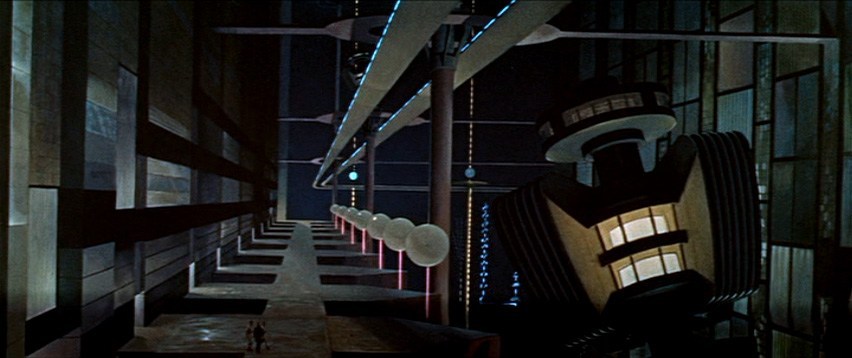
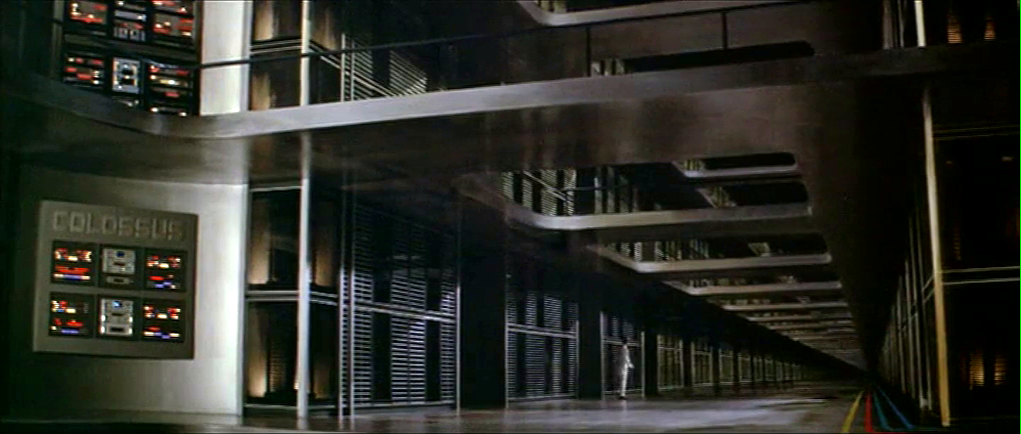
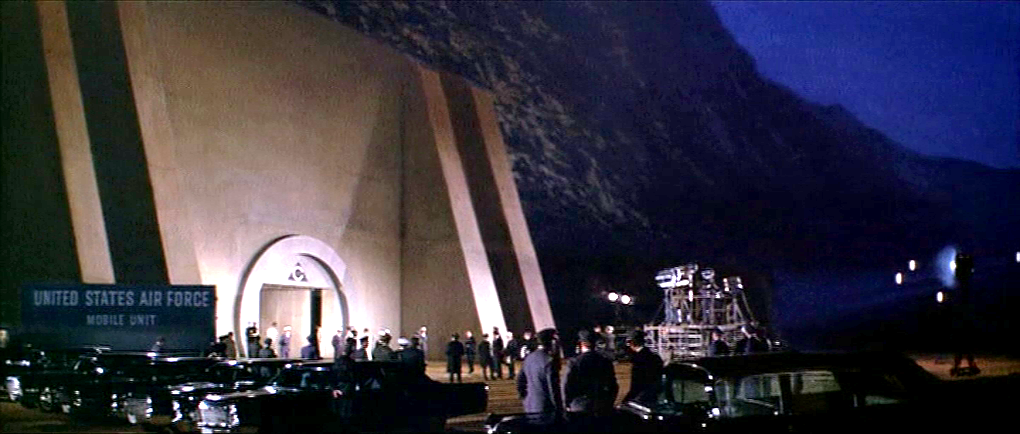
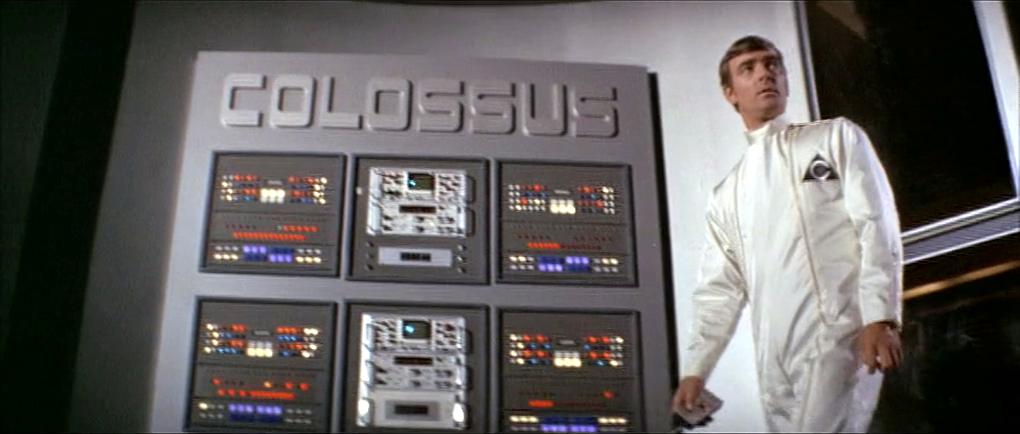
As Colossus: The Forbin Project opens, we are treated to an establishing montage of 1970’s circuit boards (with resistors), whirring doodads, punched tape, ticking Nixie tube numerals, beeping lights, and jerking control data tapes. Then a human hand breaks into frame, and twiddles a few buttons as an oscilloscope draws lines creepily like an ECG cardiac cycle. This hand belongs to Charles Forbin, who walks alone in this massive underground compound, making sure final preparations are in order. The matte paintings make this space seem vast, inviting comparisons to the Krell technopolis from Forbidden Planet.

Forbidden Planet (1956)
Colossus: The Forbin Project (1976)

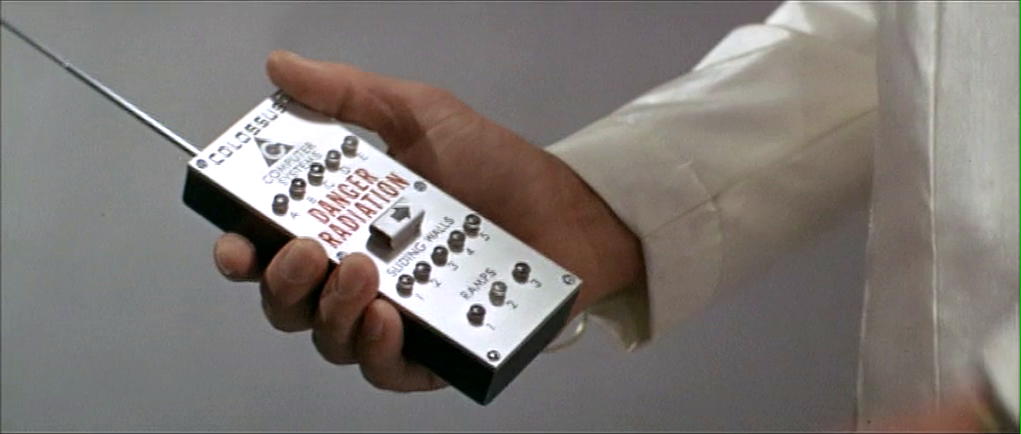
Forbin pulls out a remote control and presses something on its surface to illuminate rows and rows of lights. He walks across a drawbridge over a moat. Once on the far side, he uses the remote control to close the massive door, withdraw the bridge and seal the compound.

The remote control is about the size of a smartphone, with a long antenna extending out the top. Etched type across the top reads “COLOSSUS COMPUTER SYSTEMS.” A row of buttons is labeled A–E. Large red capital letters warn DANGER RADIATION above a safety cover. The cover has an arrow pointing right. Another row of five buttons is labeled SLIDING WALLS and numbered 1–5. A final row of three buttons is labeled RAMPS and numbered 1–3.

Forbin flips open the safety cover. He presses the red button underneath, and a blood-red light floods the bottom of the moat and turns blue-white hot, while a theremin-y whistle tells you this is no place a person should go. Forbin flips the cover back into place and walks out the sealed compound to the reporters and colleagues who await him. 

I can’t help but ask one non-tech narrative question: Why is Forbin turning lights on when he is about to abandon the compound? It might be that the illumination is a side-effect of the power systems, but it looks like he’s turning on the lights just before leaving and locking the house. Does he want to fool people into thinking there’s someone home? Maybe it should be going from fully-lit to an eerie, red low-light kinda vibe.

The Remote Control

The layout is really messy. Some rows are crowded and others have way too much space. (Honestly, it looks like the director demanded there be moar buttins make tecc! and forced the prop designer to add the A–E.) The crowding makes it tough to immediately know what labels go with what controls. Are A–E the radiation bits, and the safety cover control sliding walls? Bounding boxes or white space or some alternate layout would make the connections clear.

You might be tempted to put all of the controls in strict chronological order, but the gamma shielding is the most dangerous thing, and having it in the center helps prevent accidental activation, so it belongs there. And otherwise, it is in chronological order.

The labeling is inconsistent. Sure, maybe A–E the five computer systems that comprise Colossus. Sliding walls and ramps are well labeled, but there’s no indication about what it is that causes the dangerous radiation. It should say something like “Gamma shielding: DANGER RADIATION.” It’s tiny, but I also think the little arrow is a bad graphic for showing which way the safety cover flips open. Existing designs show that the industrial design can signal this same information with easier-to-understand affordances. And since this gamma radiation is an immediate threat to life and health, how about foregoing the red lettering in favor of symbols that are more immediately recognizable by non-English speakers and illiterate people. The IAEA hadn’t invented its new sign yet, but the visual concepts were certainly around at the time, so let’s build on that. Also, why doesn’t the door to the compound come with the same radiation warning? Or any warning?

The buttons are a crap choice of control as well. They don’t show what the status of the remotely controlled thing is. So if Charles accidentally presses a button, and, say, raises a sliding wall that’s out of sight, how would he know? Labeled rocker switches help signal the state and would be a better choice.

But really, why would these things be controlled remotely? It be more secure to have two-handed momentary buttons on the walls, which would mean that a person would be there to visually verify that the wall was slid or the ramp retracted or whatever it is national security needed them to be.

There’s also the narrative question about why this remote control doesn’t come up later in the film when Unity is getting out of control. Couldn’t they have used this to open the fortification and go unplug the thing?

So all told, not a great bit of design, for either interaction or narrative, with lots of improvement for both.

Locking yourselves out and throwing away the key

At first glance, it seems weird that there should be interfaces in a compound that is meant to be uninhabited for most of its use. But this is the first launch of a new system, and these interfaces may be there in anticipation of the possibility that they would have to return inside after a failure.  We can apologize these into believability.

But that doesn’t excuse the larger strategic question. Yes, we need defense systems to be secure. But that doesn’t mean sealing the processing and power systems for an untested AI away from all human access. The Control Problem is hard enough without humans actively limiting their own options. Which raises a narrative question: Why wasn’t there a segment of the film where the military is besieging this compound? Did Unity point a nuke at its own crunchy center? If not, siege! If so, well, maybe you can trick it into bombing itself. But I digress.

“And here is where we really screw our ability to recover from a mistake.”

Whether Unity should have had its plug pulled is the big philosophical question this movie does not want to ask, but I’ll save that for the big wrap up at the end.

Ministry of Art detector gate

ChildrenofMen-Artgate-01

Jumping back in the film a bit, we’re going to visit the Ministry of Art. When Theo goes there to visit his brother, after the car pulls to the front of the secured building, Theo steps out and walks toward a metal-detector gate.

Its quite high, about 3 meters tall. The height helps to reinforce the notion that this is a public space.

  1. This principle, that short ceilings are personal, and high ceilings are public, is I believe a well-established one in architectural design. Read the Alexandrian pattern if you’d like to read more about it.
  2. Is it a public space? It is, since it’s a Ministry. But it isn’t, since he joins his brother in what looks like a rich person’s private dining room. I was always a bit confused by what this place was meant to be. Perhaps owning to The Dark Times, Nigel has cited Minister rights and cordoned off part of the Tate Modern to live in. If anyone can explain this, please speak up.
  3. On the downside, the height makes the text more out of sight and harder to read by the people meant to be reading it.

The distance is balanced by the motion graphics of the translucent sign atop the gate. Animated red graphics point the direction of ingress, show a security stripe pattern, and provide text instructions.

Motion is a very strong attention-getting signal, and combined with the red colors, does all the attention-getting that the height risks. But even that’s not a critical issue, as there is of course a guard standing by to ensure his understanding and compliance.

ChildrenofMen-Artgate-05

Note that there is no interaction here (which is the usual filter for this blog), but since I’m publishing an interview with the designer of this and the Kubris interface soon, I thought I’d give it a quick nod.

Door Bomb and Safety Catches

Johnny leaves the airport by taxi, ending up in a disreputable part of town. During his ride we see another video phone call with a different interface, and the first brief appearance of some high tech binoculars. I’ll return to these later, for the moment skipping ahead to the last of the relatively simple and single-use physical gadgets.

Johnny finds the people he is supposed to meet in a deserted building but, as events are not proceeding as planned, he attaches another black box with glowing red status light to the outside of the door as he enters. Although it looks like the motion detector we saw earlier, this is a bomb.

jm-12-doorbomb-a-adjusted

This is indeed a very bad neighbourhood of Newark. Inside are the same Yakuza from Beijing, who plan to remove Johnny’s head. There is a brief fight, which ends when Johnny uses his watch to detonate the bomb. It isn’t clear whether he pushes or rotates some control, but it is a single quick action.

jm-12-doorbomb-b-adjusted

This demonstrates an interesting difference between interface design for the physical world and for software systems. Inside a computer, actions are just flipping bits in storage and thus easy to undo. Even supposedly destructive actions such as erasing files can often be reversed. In the real world, the effects of, for example, explosions tend to be much more permanent.

We generally don’t want destructive actions to be too easy to perform, from guns and other things that go boom to formatting computer disks.

A widely used solution in the real world is the safety catch, as with guns, or arming switch, seen in countless thriller films with nuclear weapons. Another example are the two-hand safety switches used in high voltage electrical distribution panels. Activation of these requires two individual actions, separated in time and at least a short distance in space. Some systems, both real and in film, go even further and have covers on the arming switches, so even just preparing for activation requires two separate physical actions.

While the bomb is on his belt, Johnny doesn’t have to worry about accidentally pressing the “explode” button on his watch because the bomb is not active. Only after he has armed it and placed on the door can the watch activate the bomb, so he can take his time and verify whether or not it is necessary before doing so. And when it is active, he can do so very quickly even though he is in the middle of a fight.

But safety catches and arming switches introduce modes to an interaction, which have a bad reputation in interface design. Had the watch-bomb designers followed most conventional GUI design guidelines, there would be no arming switch on the bomb. Instead the watch would have popped up a “Do you really want to explode the bomb (Y/N)?” dialog, possibly with a short delay to ensure Johnny thought about his decision before answering. He would have been decapitated.

Compare to LoTek

Later on in the film we see an example of a poorly designed system without a safety catch. The LoTeks in their bridge home have a defensive “bug dropper”, so called because it drops ancient Volkswagens from a great height.

jm-12-bugdropper-animated

The bug dropper can be activated by pushing just a single handle. Because there is no safety switch, a guard accidentally drops a flaming VW Beetle onto the lead characters, nearly killing them.

Conclusion

From the description above it would seem that safety catches are the obvious solution. But of course it’s more complicated than that. Consider what would have happened if Johnny had met friends instead of enemies and settled down for a conversation. Thirty minutes later they’ve agreed on another meeting, and Johnny taps his watch to bring up the reminders app. Oops!

Should the bomb have disarmed itself after a given time period? If it did, how would Johnny be notified of this?

Most of us do not design interfaces for lethal hardware and life or death situations. There are however an increasing number of drones and other physical devices which are now remotely controlled from phone or tablet apps rather than dedicated hardware controllers as in the past. The “Internet of Things” will bring even more real world actions under computer interface control. In the future, we will most likely see more of these safety catches and arming switches in computer interfaces, and we need to figure out how to use them properly.

The Memory Doubler

In Beijing, Johnny steps into a hotel lift and pulls a small package out his pocket. He unwraps it to reveal the “Pemex MemDoubler”.

jm-4-memdoubler-a

Johnny extends the cable from the device and plugs it into the implant in his head. The socket glows red once the connection is made.

jm-4-memdoubler-b-adjusted
jm-4-memdoubler-c-adjusted

Analysis: The jack

The jack looks like an audio plug, and like most audio plugs is round and has no coronal-orientation requirement. It also has a bulbous rather than pointed tip. Both of these are good design, as Johnny can’t see the socket directly and while accidentally poking yourself with a headphone style point is unlikely to be harmful, it would certainly be irritating.

The socket’s glow would be a useful indicator that the thing is working, but Johnny can’t see it! Probably these sockets and jacks are produced and used for other devices as well, as red status lights are common in this world.

There are easier and more convenient fictional brain plug interfaces, such as the neck plugs previously discussed on this website for Ghost In The Shell. But Johnny doesn’t want his implant to be too obvious, so this not so convenient plug may be a deliberate choice. Perhaps he tells inquisitive people that it’s for his Walkman.

Analysis: The device

The product name got a few chuckles from audiences in the 1990s, as the name is similar to a common classic Macintosh extension at the time, the Connectix RAM Doubler. This applied in-memory lossless data compression techniques to allow more or larger programs to run within the existing RAM.

The MemDoubler is apparently a software or firmware updater, modifying Johnny’s implant to use brain tissue twice as efficiently as before. It has voice output, again a slightly artificial sounding but not unpleasant voice. This announces that Johnny’s current capacity is 80 gigabytes. As the update is applied, a glowing progress bar gradually fills until the voice announces the new capacity of 160G.

jm-4-memdoubler-d

(Going from 80G to 160G seems quaint today. But we should remember that the value of a mnemonic courier is secrecy, not quantity.)

Why does the MemDoubler need voice output? For such a simple task, the progress bar and a three digit numeric counter would seem adequate. But if there are complications—which for something wired into the brain might have an all too literal meaning for “fatal error”—a voice announcement would be able to include much more detail about the problem, or even alert bystanders if Johnny is rendered unconscious by the problem. (Given how current software installers operate, Johnny is fortunate that the MemDoubler did not insist on reciting the entire end user license agreement and warranty before the update could start.) Maybe the visual should be the default (to respect his professional need for secrecy), and the voice announcement adopted in an alert mode.

It’s also interesting that Johnny installs this immediately before he needs it, in the lift that is taking him to the hotel room where he will receive the data to be stored. Suppose someone else had been in the lift with him? In this world of routine body implants doubling your memory is probably not a crime, but at the time of writing diabetics will inject themselves in private even though that is harmless and necessary. Perhaps body-connected technology will be common enough in 2021 that public operation is considered normal, just as we have become accustomed to mobile phone conversations being carried out in public.

Bulkhead Doors

image09

At every major intersection, and at the entrance to each room, the Battlestar Galactica has very large pressure doors.  These doors each have a handle and a large wheel on each side.  During regular operation crewmembers open the door with the handle and close it firmly, but do not spin the wheel.  Occasionally, we see crew using the wheel as a leverage point to close the door.


Sealing it off

We never directly see a crewmember spin the wheel on the door after it closes.  While Chief Tyrol is acting as head of damage control, he orders all bulkheads in a section of the ship sealed off.  This order is beyond the typical door closing that we witness day-to-day.

image14

This implies that the door has three modes: Open, Closed, and Sealed.

image08

Crewmembers could use the door most of their day in an open or closed mode, where an easy pull of the handle unlatches the door and allows them to enter or leave quickly.  In an emergency, a closed door could be sealed by spinning the valve wheel on one side of the door.


Danger?

As with other parts of the Galactica, the doors are completely manual, and cannot be activated remotely. (Because Cylon hacking made them go network-less.) Someone has to run up to the door in an emergency and seal it off.

One worry is that, because there is a valve wheel on both sides, an untrained crewmember might panic and try to unseal the door by turning it in the wrong direction.  This would endanger the entire crew.

image13  image10

The other worry is that the valve spins along a single axis (we see no evidence either way during the show), requiring the crew to know which side of the door they were on to seal it against a vacuum.  “Righty Tighty, Lefty Loosey” would fail in this instance, and might cause hesitation or accidental unsealing in an actual emergency.

Ideally, the doors would have wheels that spun identically on either side, so that a clockwise spin always sealed the door, and a counter-clockwise spin always unsealed it.

image15

Current water-tight doors have two sides, the ‘important’ side and the ‘unimportant’ side.  The important side faces towards the ‘center’ of the vessel, or the core of the larger block of the ship, and can be sealed off quickly from that side with a wheel and heavy ‘dogs’.

Weathertight doors have a handle-latch on both sides that is connected (much like a doorknob), and can seal/unseal the door from either side.

If there is a technical limitation to that mechanism (unlikely, but possible), then a large and obvious graphic on the door (a clockwise or counterclockwise arrow) could serve to remind the crew which direction of turn sealed the door.  In this case, sealing the door is the primary action to call out because it is the action done under a panic situation, and the action most easily forgotten in the heat of the moment.

Otherwise, the doors could be a danger to the crew: the crew on the ‘safe’ side could seal the door against depressurization, but crew on the ‘unsafe’ side might try to unseal it to save themselves in a panic.

Air pressure might keep the door properly closed in this instance, but it is still a risk.


Effective?

image12

We see during the damage control incident that the doors are quickly closed and sealed by the crew, even in an emergency, making the rest of the ship airtight.  This either shows that the doors are effective at their job, or the crew is very well trained for such a situation.

Like the rest of the Galactica, the technology relies on people to work.  A couple hints or minor tweaks to that technology could make the crew’s lives much easier without putting them at danger from the Cylons or the empty void of space.

Viper Launch Control

image02

The Galactica’s fighter launch catapults are each controlled by a ‘shooter’ in an armored viewing pane.  There is one ‘shooter’ for every two catapults.  To launch a Viper, he has a board with a series of large twist-handles, a status display, and a single button.  We can also see several communication devices:

  • Ear-mounted mic and speaker
  • Board mounted mic
  • Phone system in the background

These could relate to one of several lines of communication each:

  • The Viper pilot
  • Any crew inside the launch pod
  • Crew just outside the launch pod
  • CIC (for strategic status updates)
  • Other launch controllers at other stations
  • Engineering teams
  • ‘On call’ rooms for replacement operators

image05

Each row on the launch display appears to conform to some value coming off of the Viper or the Galactica’s magnetic catapults.  The ‘shooter’ calls off Starbuck’s launch three times due to some value he sees on his status board (fluctuating engine power right before launch).

We do not see any other data inputs.  Something like a series of cameras on a closed circuit could show him an exterior view of the entire Viper, providing additional information to the sensors.

When Starbuck is ready to launch on the fourth try, the ‘shooter’ twists the central knob and, at the same time and with the same hand, pushes down a green button.  The moment the ‘shooter’ hits the button, Starbuck’s Viper is launched into space.

image04

There are other twist knobs across the entire board, but these do not appear to conform directly to the act of launching the Viper, and they do not act like the central knob.  They appear instead to be switches, where turning them from one position to another locks them in place.

There is no obvious explanation for the number of twist knobs, but each one might conform to an electrical channel to the catapult, or some part of the earlier launch sequence.

Manual Everything

Nothing in the launch control interprets anything for the ‘shooter’.  He is given information, then expected to interpret it himself.  From what we see, this information is basic enough to not cause a problem and allow him to quickly make a decision.

Without networking the launch system together so that it can poll its own information and make its own decisions, there is little that can improve the status indicators. (And networking is made impossible in this show because of Cylon hackers.) The board is easily visible from the shooter chair, each row conforms directly to information coming in from the Viper, and the relate directly to the task at hand.

The most dangerous task the shooter does is actually decide to launch the Viper into space.  If either the Galactica or the Viper isn’t ready for that action, it could cause major damage to the Viper and the launch systems.

A two-step control for this is the best method, and the system now requires two distinct motions (a twist-and-hold, then a separate and distinct *click*).  This is effective at confirming that the shooter actually wants to send the Viper into space.

To improve this control, the twist and button could be moved far enough apart (reference, under “Two-Hand Controls” ) that it requires two hands to operate the control.  That way, there is no doubt that the shooter intends to activate the catapult.

If the controls are separated like that, it would take some amount of effort to make sure the two controls are visually connected across the board, either through color, or size, or layout.  Right now, that would be complicated by the similarity in the final twist control, and the other handles that do different jobs.

Changing these controls to large switches or differently shaped handles would make the catapult controls less confusing to use.