VID-PHŌN

At around the midpoint of the movie, Deckard calls Rachel from a public videophone in a vain attempt to get her to join him in a seedy bar. Let’s first look at the device, then the interactions, and finally take a critical eye to this thing.

The panel

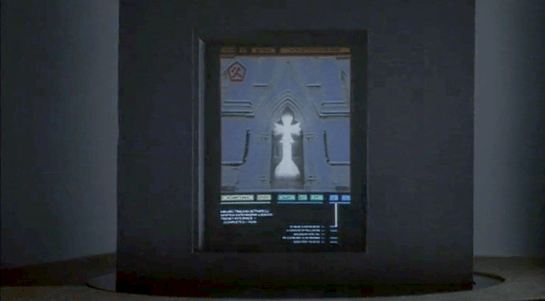
The lower part of the panel is a set of back-lit instructions and an input panel, which consists of a standard 12-key numeric input and a “start” button. Each of these momentary pushbuttons are back-lit white and have a red outline.

In the middle-right of the panel we see an illuminated orange logo panel, bearing the Saul Bass Bell System logo and the text reading, “VID-PHŌN” in some pale yellow, custom sans-serif logotype. The line over the O, in case you are unfamiliar, is a macron, indicating that the vowel below should be pronounced as a long vowel, so the brand should be pronounced “vid-phone” not “vid-fahn.”

In the middle-left there is a red “transmitting” button (in all lower case, a rarity) and a black panel that likely houses the camera and microphone. The transmitting button is dark until he interacts with the 12-key input, see below.

At the top of the panel, a small cathode-ray tube screen at face height displays data before and after the call as well as the live video feed during the call. All the text on the CRT is in a fixed-width typeface. A nice bit of worldbuilding sees this screen covered in Sharpie graffiti.

The interaction

His interaction is straightforward. He approaches the nook and inserts a payment card. In response, the panel—including its instructions and buttons—illuminates. A confirmation of the card holder’s identity appears in the in the upper left of the CRT, i.e. “Deckard, R.,” along with his phone number, “555-6328” (Fun fact: if you misdialed those last four numbers you might end up talking to the Ghostbusters) and some additional identifying numbers.

A red legend at the bottom of the CRT prompts him to “PLEASE DIAL.” It is outlined with what look like ASCII box-drawing characters. He presses the START button and then dials “555-7583” on the 12-key. As soon as the first number is pressed, the “transmitting” button illuminates. As he enters digits, they are simultaneously displayed for him on screen.

His hands are not in-frame as he commits the number and the system calls Rachel. So whether he pressed an enter key, #, or *; or the system just recognizes he’s entered seven digits is hard to say.

After their conversation is complete, her live video feed goes blank, and TOTAL CHARGE $1.25, is displayed for his review.

Chapter 10 of the book Make It So: Interaction Design Lessons from Science Fiction is dedicated to Communication, and in this post I’ll use the framework I developed there to review the VID-PHŌN, with one exception: this device is public and Deckard has to pay to use it, so he has to specify a payment method, and then the system will report back total charges. That wasn’t in the original chapter and in retrospect, it should have been.

Ergonomics

Turns out this panel is just the right height for Deckard. How do people of different heights or seated in a wheelchair fare? It would be nice if it had some apparent ability to adjust for various body heights. Similarly, I wonder how it might work for differently-abled users, but of course in cinema we rarely get to closely inspect devices for such things.

Activating

Deckard has to insert a payment card before the screen illuminates. It’s nice that the activation entails specifying payment, but how would someone new to the device know to do this? At the very least there should be some illuminated call to action like “insert payment card to begin,” or better yet some iconography so there is no language dependency. Then when the payment card was inserted, the rest of the interface can illuminate and act as a sort of dial-tone that says, “OK, I’m listening.”

Specifying a recipient: Unique Identifier

In Make It So, I suggest five methods of specifying a recipient: fixed connection, operator, unique identifier, stored contacts, and global search. Since this interaction is building on the experience of using a 1982 public pay phone, the 7-digit identifier quickly helps audiences familiar with American telephone standards understand what’s happening. So even if Scott had foreseen the phone explosion that led in 1994 to the ten-digit-dialing standard, or the 2053 events that led to the thirteen-digital-dialing standard, it would have likely have confused audiences. So it would have slightly risked the read of this scene. It’s forgivable.

Page 204–205 in the PDF and dead tree versions.

I have a tiny critique over the transmitting button. It should only turn on once he’s finished entering the phone number. That way they’re not wasting bandwidth on his dialing speed or on misdials. Let the user finish, review, correct if they need to, and then send. But, again, this is 1982 and direct entry is the way phones worked. If you misdialed, you had to hang up and start over again. Still, I don’t think having the transmitting light up after he entered the 7th digit would have caused any viewers to go all hruh?

There are important privacy questions to displaying a recipient’s number in a way that any passer-by can see. Better would have been to mount the input and the contact display on a transverse panel where he could enter and confirm it with little risk of lookie-loos and identity theives.

Audio & Video

Hopefully, when Rachel received the call, she was informed who it was and that the call was coming from a public video phone. Hopefully it also provided controls for only accepting the audio, in case she was not camera-ready, but we don’t see things from her side in this scene.

Gaze correction is usually needed in video conversation systems since each participant naturally looks at the center of the screen and not at the camera lens mounted somewhere next to its edge. Unless the camera is located in the center of the screen (or the other person’s image on the screen), people would not be “looking” at the other person as is almost always portrayed. Instead, their gaze would appear slightly off-screen. This is a common trope in cinema, but one which we’re become increasingly literate in, as many of us are working from home much more and gaining experience with videoconferencing systems, so it’s beginning to strain suspension of disbelief.

Also how does the sound work here? It’s a noisy street scene outside of a cabaret. Is it a directional mic and directional speaker? How does he adjust the volume if it’s just too loud? How does it remain audible yet private? Small directional speakers that followed his head movements would be a lovely touch.

And then there’s video privacy. If this were the real world, it would be nice if the video had a privacy screen filter. That would have the secondary effect of keeping his head in the right place for the camera. But that is difficult to show cinemagentically, so wouldn’t work for a movie.

Ending the call

Rachel leans forward to press a button on her home video phone end her part of the call. Presumably Deckard has a similar button to press on his end as well. He should be able to just yank his card out, too.

The closing screen is a nice touch, though total charges may not be the most useful thing. Are VID-PHŌN calls a fixed price? Then this information is not really of use to him after the call as much as it is beforehand. If the call has a variable cost, depending on long distance and duration, for example, then he would want to know the charges as the call is underway, so he can wrap things up if it’s getting too expensive. (Admittedly the Bell System wouldn’t want that, so it’s sensible worldbuilding to omit it.) Also if this is a pre-paid phone card, seeing his remaining balance would be more useful.

But still, the point was that total charges of $1.25 was meant to future-shocked audiences of the time, since public phone charges in the United States at the time were $0.10. His remaining balance wouldn’t have shown that and not had the desired effect. Maybe both? It might have been a cool bit of worldbuilding and callback to build on that shock to follow that outrageous price with “Get this call free! Watch a video of life in the offworld colonies! Press START and keep your eyes ON THE SCREEN.”

Because the world just likes to hurt Deckard.

Colossus Video Phones

Throughout Colossus: The Forbin Project, characters talk to one another over video phones. This is a favorite sci-fi interface trope of mine. And though we’ve seen it many times, in the interest of completeness, I’ll review these, too.

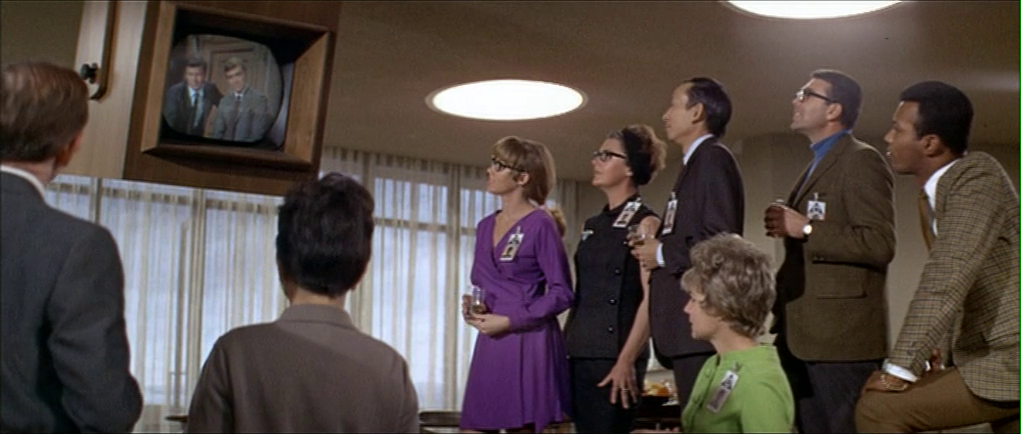
The first time we see one in use is early in the film when Forbin calls his team in the Central Programming Office (Forbin calls it the CPO) from the Presidential press briefing (remember those?) where Colossus is being announced to the public. We see an unnamed character in the CPO receiving a telephone call, and calling for quiet amongst the rowdy, hip party of computer scientists. This call is received on a wall-tethered 2500 desk phone

We cut away to the group reaction, and by the time the camera is back on the video phone, Forbin’s image is peering through the glass. We do not get to see the interactions which switched the mode from telephony to videotelephony.

Forbin calls the team from Washington.

But we can see two nice touches in the wall-mounted interface.

First, there is a dome camera mounted above the screen. Most sci-fi videophones fall into the Screen-Is-Camera trope, so this is nice to see. It could mounted closer to the screen to avoid gaze misalignment that plagues such systems.

One of the illustrations from the book I’m still quite proud of, for its explanatory power and nerdiness. Chapter 4, Volumetric Projection, Page 83.

Second, there is a 12-key numeric keypad mounted to the wall below the screen. (0–9 as well as an asterisk and octothorp.) This keypad is kind-of nice in that it hints that there is some interface for receiving calls, making calls, and ending an ongoing call. But it bypasses actual interaction design. Better would be well-labeled controls that are optimized for the task, and that don’t rely on the user’s knowledge of directories and commands.

The 2500 phone came out in 1968, introducing consumers to the 12-key pushbutton interface rather than the older rotary dial on the 500 model. The 12-key is the filmmakers’ building on interface paradigms that audiences knew. This shortcutting belongs to the long lineage of sci-fi videophones that goes all the way back to Metropolis (1927) and Buck Rogers (1939).

Also, it’s worth noting that the ergonomics of the keypad are awkward, requiring users to poke at it in an error-prone way, or to seriously hyperextend their wrists. If you’re stuck with a numeric keypad as a wall mounted input, at least extend it out from the wall so it can be angled to a more comfortable 30°

Is it still OK to reference Dreyfuss? He hasn’t been Milkshake Ducked, has he?

There is another display in the CPO, but it lacks a numeric keypad. I presume it is just piping a copy of the feed from the main screen. (See below.)

Looking at the call from Forbin’s perspective, he has a much smaller display. There there is still a bump above the monitor for a camera, another numeric keypad below it, and several 2500 telephones. Multiple monitors on the DC desks show the same feed.

After Dr. Markham asks Dr. Forbin to steal an ashtray, he ends the call by pressing the key in the lower right-hand corner of the keypad.

Levels adjusted to reveal details of the interface.

After Colossus reveals that THERE IS ANOTHER SYSTEM, Forbin calls back and asks to be switched to the CPO. We see things from Forbin’s perspective, and we see the other fellow actually reach offscreen to where the numeric keypad would be, to do the switching. (See the image, below.) It’s likely that this actor was just staring at a camera, so this bit of consistency is really well done.

When Forbin later ends the call with the CPO, he presses the lower-left hand key. This is inconsistent with the way he ended the call earlier, but it’s entirely possible that each of the non-numeric keys perform the same function. This also a good example why well-labeled, specific controls would be better, like, say, one for “end call.”

Other video calls in the remainder of the movie don’t add any more information than these scenes provide, and introduce a few more questions.


The President calls to discuss Colossus’ demand to talk to Guardian.

Note the duplicate feed in the background in the image above. Other scenes tell us all the monitors in the CPO are also duplicating the feed. I wondered how users might tell the system which is the one to duplicate. In another scene we see that the President’s monitor is special and red, hinting that there might be a “hotseat” monitor, but this is not the monitor from which Dr. Forbin called at the beginning of the film. So, it’s a mystery. 

The red “phone.”
Chatting with CIA Director Grauber.
Bemusedly discussing the deadly, deadly FOOM with the President.
The President ends his call with the Russian Chairman, which is a first of sorts for this blog.
In a multi-party conference call, The Chairman and Dr. Kuprin speak with the President and Forbin. No cameras are apparent here. This interface is managed by the workers sitting before it, but the interaction occurs off screen.

In the last video conference of the film, everyone listens to Unity’s demands. This is a multiparty teleconference between at least three locations, and it is not clear how it is determined whose face appears on the screen. Note that the CPO (the first in the set) has different feeds on display simultaneously, which would need some sort of control.


Plug: For more about the issues involved in sci-fi communications technology, see chapter 10 of Make It So: Interaction Design Lessons from Science Fiction. (Though it’s affordably only available in digital formats as of this post.)

Snitch phone

If you’re reading these chronologically, let me note here that I had to skip Bea Arthur’s marvelous turn as Ackmena, as she tends the bar and rebuffs the amorous petitions of the lovelorn, hole-in-the-head Krelman, before singing her frustrated patrons out of the bar when a curfew is announced. To find the next interface of note, we have to forward to when…

Han and Chewie arrive, only to find a Stormtrooper menacing Lumpy. Han knocks the blaster out of his hand, and when the Stormtrooper dives to retrieve it, he falls through the bannister of the tree house and to his death.

SWHS_generalalert-09.png
Why aren’t these in any way affiiiiixxxxxxeeeeeeed?

Han enters the home and wishes everyone a Happy Life Day. Then he bugs out.

SWHS_generalalert-12.png
But I still have to return for the insane closing number. Hold me.

Then Saun Dann returns to the home just before a general alert comes over the family Imperial Issue Media Console.

SWHS_generalalert-07.png

This is a General Alert. Calling Officer B4711. Officer B4711. We are unable to reach you on your comlink. Is there a problem. [sic] You are instructed to turn on your comlink immediately.

Dann tells the family he can handle it. He walks to the TV and pulls a card out of his wallet. He inserts it into the console, mashes a few buttons and turns his attention to the screen. After a moment of op-art static, General Alert person appears. He says, “We have two way communication, traitor Saun Dann. Is this a report about the missing trooper?”

Dann (like so many rebels) lies, saying the stormtrooper robbed the house and fled for the hills. GA says, “Very well, we’ll send out a search party.” Sean thanks him and the exchange is over. Sean hits a button, pulls his card out of the console, and returns it to his wallet.

Sadly I must bypass the plot questions about the body of the Stormtrooper that is still lying in the forest floor beneath them that will surely be found, or that GA will eventually not find B4711 in the forest and return demanding answers, or why everyone is acting like welp that’s fixed. For this blog is about interfaces.

Whether the card was meant as identification or payment, the interaction is pretty decent. Saun has no trouble fitting it in the slot, and apparently he has no trouble recalling the number to dial the Empire. The same guy in the message answers the call quickly. After the exchange, it’s quick to wrap up. Pull out card, and call is over. Seriously, that’s as short and simple as we could make it.

What was the card for?

If it was payment, we would expect some charges to appear during and after the fact, so let’s just presume it was an identification card for the Empire to track. Since the Empire is evil, they might hide or not provide feedback that the caller has been identified. So it’s not diegetically surprising to note that there’s none.

For all the interfaces that are utter crap in this show, this one actually passes muster. It tempts me to establish some sort of law—that the more mundane interfaces in a show will always be the more believable ones. I’ll think on that. It would need a name.

rat-prompt.png

If I was to add any improvement, it would be to not burden the citizen’s memory with remembering the general alert or how to act on it. What if you’d just caught the end of it? Rather than burdening memory, the Empire could add a crawl to the feed, that persistently repeats the call to action including contact information. Persuasively, it would be an annoyance that would cause citizens watching TV to really want B4711 to hurry up and turn his damn comlink on, or for someone to rat him out.

There are probably some fascist tactics for incentivizing either the Stormtrooper or a snitch’s compliance, but I’m not a fascist, so let’s not go there.

Instead let’s rejoice that there is but one more interface to review, and we can stop with the Star Wars Holiday Special.

Talking to a Puppet

As mentioned, Johnny in the last phone conversation in the van is not talking to the person he thinks he is. The film reveals Takahashi at his desk, using his hand as if he were a sock puppeteer—but there is no puppet. His desk is emitting a grid of green light to track the movement of his hand and arm.

jm-22-puppet-call-c

The Make It So chapter on gestural interfaces suggests Takahashi is using his hand to control the mouth movements of the avatar. I’d clarify this a bit. Lip synching by human animators is difficult even when not done in real time, and while it might be possible to control the upper lip with four fingers, one thumb is not enough to provide realistic motion of the lower lip.

Instead I suggest that the same computer modifying his voice is also providing the fine mouth movements, using the same camera that must be present for the video phone calls. So what are the hand motions for? They provide cues as to how fast or slow Takahashi wants his puppet to speak, further disguising his own speech patterns. And the arm position could provide different body language for the avatar as a whole, to ensure for example that the puppet avatar does not react with surprise or anger even if Takahashi himself expresses those emotions.

We saw this avatar in a phone call once before, when Johnny dialed into an internal phone number from the phone booth. But we’ve also seen the video image of Takahashi himself when he called Street Preacher. Perhaps the avatar is an option for incoming calls, just as today we can assign custom ringtones to individual callers on our mobiles. For outgoing calls, an important person such as Takahashi would be more likely to use his true face to impress the callee.

Video phones have been predicted in science fiction fiction and film for a very long time now, but have never achieved wide scale usage. Human communication is richer and more expressive when we can see each other, so why are we resistant? One reason is that in the real world we don’t have makeup artists following us around to ensure we look our best at all times. Donald Norman suggested in chapter 8 of his book Things That Make Us Smart that real time video enhancement would solve this problem, but then if we’re all going to be presenting false avatars to each other, why bother?

A Cringing Computer

After the call ends, Anna, a personality uploaded into a mainframe, appears on the screen. Takahashi is annoyed by this and makes a sweeping arm gesture to get rid of her, detected by the green light grid. The computer screen actually sinks into the desk in response.

jm-22-puppet-call-animated

This is discussed in chapter 10 of the book as an interface handling emotional input. I’d like to add that this is also an emotional output, the computer seeming to hide itself from an angry user. Given how often current day users express the wish to beat their computers with heavy blunt objects, perhaps that is exactly what it is doing.

Computers in film and TV often have annoying personalities, which is surprising for (presumably) commercial products. Another cringing computer, emphasised by being named “Slave”, made regular appearances in season 4 of Blake’s 7. Would users feel more comfortable if their computer systems gave the appearance of being afraid every time they had to report an error? It’s worth considering.

Video Phone Calls

The characters in Johnny Mnemonic make quite a few video phone calls throughout the film, enough to be grouped in their own section on interfaces.

The first thing a modern viewer will note is that only one of the phones resembles a current day handheld mobile. This looks very strange today and it’s hard to imagine why we would ever give up our beloved iPhones and Androids. I’ll just observe that accurately predicting the future is difficult (and not really the point) and move on.

More interesting is the variety of phones used. In films from the 1950s to the 1990s, everyone uses a desk phone with a handset. (For younger readers: that is the piece you picked up and held next to your ear and mouth. There’s probably one in your parents’ house.) The only changes were the gradual replacement of rotary dials by keypads, and some cordless handsets. In 21st century films everyone uses a small sleek handheld box. But in Johnny Mnemonic every phone call uses a different interface.

New Darwin

First is the phone call Johnny makes from the New Darwin hotel.

jm-3-phone-hotel-c-adjusted

As previously discussed, Johnny is lying in bed using a remote control to select numbers on the onscreen keypad. He is facing a large wall mounted TV/display screen, with what looks like a camera at the top. The camera is realistic but unusual: as Chapter 10 of Make It So notes, films very rarely show the cameras used in visual communication.

Taxi

The second phone call takes place in Newark, as Johnny rides in a taxi from the airport. Since this is a moving vehicle rather than a room, it shows that wireless videophones also exist. We don’t see how the call is made, just the conversation. Johnny is looking at and speaking into a small screen in front of his seat.

jm-10-taxi-a-adjusted

Quick aside: The blue lines at the bottom of the screen are a street map, with the glowing dot being the taxi. While it’s not the focus of this particular interface, it’s interesting that this map seems to be fixed with the indicator moving sideways. Aircraft and now car navigators use a moving map with the indicator moving up for forward. But this is for the passenger rather than the driver so doesn’t need to be particularly useful. And it’s blue, so must be advanced.

At the other end is Ralphie, who is using a desk screen with a keyboard.

jm-10-taxi-b-adjusted

We get to see things from Ralphie’s end. His keyboard only has ten keys in two rows of five. Ralphie touches the middle key in the bottom row to end the call.

Is this a dedicated phone rather than a computer? The only full-sized keyboards we see in Johnny Mnemonic are part of systems implied to be outdated or salvaged. Perhaps by 2021 voice recognition is good enough to handle most input. Or perhaps by 2021 status indicators have changed and once again nobody who considers themselves important would have a QWERTY keyboard on their desk, leaving others to do the more “menial” typing.

Shinji’s mobile

There is a cyberspace sequence (discussed in a separate post) during which there is a conversation between a Pharmakom tracker and Shinji, the leader of the Yakuza searching for Johnny, who is in en route by car. Shinji’s phone seems to be just like a current day mobile, if perhaps a little smaller than we’re used to.

jm-12-1-car-phone

Takahashi’s desk phone

Takahashi, head of Pharmakom in Newark, has a desktop screen too. This is a general purpose computer which at various times displays video of his daughter and a corporate database entry about Anna, the Pharmakom founder.

jm-15-takahashi-a-adjusted

There is no keyboard, but later we will see that the desk surface has hand gesture tracking capability. Here the screen displays an onscreen video phone window and numeric keypad, similar to what we saw in the New Darwin sequence, but Takahashi doesn’t use that interface. Instead he just says “Get me Karl” and the phone dials the recipient automatically.

Takahashi doesn’t prefix his command with a control phrase such as“Siri” or “Computer” which would imply that the computer is always listening. For an executive with a private office this would be reasonable: who else could he be addressing? A second possibility is that the computer does voice recognition and would not respond to commands from anyone else.

Street Preacher’s Phone

As before, the recipient has chosen to show a video splash screen on connection instead of a live video feed.

jm-15-takahashi-b-adjusted

“Karl” is more commonly known as Street Preacher and works within a church of sorts. We don’t know whether this is genuine religion belief on his part or a cover operation. His phone system is built into a large book, which I thought was intended to be a Bible but Chris identifies as a 16th century ecclesiastical history. There are no controls visible, but we see Karl “pick up” by opening the book so perhaps he “hangs up” by closing it again. Otherwise it could be operated purely by voice.

jm-15-takahashi-c-adjusted

Public phone

Earlier in the film, Johnny picked up an “Infobahn 3000” handset with built in phone keypad.

jm-16-phonebooth-a

His next phone call is from a public phone booth. On screen we see the now familiar videophone keypad. (Apparently this time in cyan, although it’s a very minor color shift.). To the right of the screen are physical buttons, some of which are labelled “start” “stop” and “pause” so perhaps duplicate the onscreen controls. Johnny begins by borrowing Jane’s phone card and swiping it through the payment slot.

jm-16-phonebooth-b-adjusted

The red Infobahn handset is connected to Jane’s card by a cable, although we don’t see Johnny doing this. Johnny types on the handset keypad rather than using the onscreen controls, presumably doing some hacking through the interface.

At first sight it seems unlikely that the phone system could be hacked through an EFTPOS card reader. However there is a long and unhappy history of programmers leaving backdoors and unused functionality in products, often excused with “Well, nobody else knows about it”, which are then exploited. Payment cards themselves often have embedded integrated circuits. This particular hack is not completely implausible.

jm-16-phonebooth-c

When the Pharmakom splash screen appears, Johnny types again on the handset. He is manipulating the internal company phone system to gain access to a number that normally would not be available to the public.

jm-16-phonebooth-e-adjusted

The new number connects Johnny to a surprised corporate type who wants to know how Johnny got through.

jm-16-phonebooth-g-adjusted

We’ll learn later on that this gentleman is not at all who he seems to be. For now, note that Johnny talks and listens directly to the screen and speakers in the phone booth, not the handset he is holding.

Spider phone

Just before his brain is scanned by Spider, Johnny tries to make another call. This time he uses a typical 1990s computer CRT display and keyboard. He wears a conventional looking earpiece and microphone, and there is a small camera mounted on top of the display. He types the number on the keyboard and reaches a Pharmakom receptionist, but Johnny is interrupted.

jm-19-old-phonecall-adjusted

Van call

The last phone call is made by Johnny to Pharmakom again. This time he is in Spider’s van, which doesn’t have a built in phone like the taxi we saw earlier. He uses the handset for audio and a small portable screen for video. There must be a wireless transmitter and receiver somewhere, but it isn’t obvious.

jm-22-puppet-call-a-adjusted
jm-22-puppet-call-b-adjusted

Johnny doesn’t realise that he is actually talking to Takahashi, the head of Pharmakom, through a puppet avatar, which I’ll talk about in the next post. 

Hotel Remote

The Internet 2021 shot that begins the film ends in a hotel suite, where it wakes up lead character Johnny. This is where we see the first real interface in the film. It’s also where this discussion gets more complicated.

A note on my review strategy

As a 3D graphics enthusiast, I’d be happy just to analyze the cyberspace scenes, but when you write for Sci Fi Interfaces, there is a strict rule that every interface in a film must be subjected to inspection. And there are a lot of interfaces in Johnny Mnemonic. (Curse your exhaustive standards, Chris!)

A purely chronological approach which would spend too much time looking at trees and not enough at the forest. So I’ll be jumping back and forth a bit, starting with the gadgets and interfaces that appear only once, then moving on to the recurring elements, variations on a style or idea that are repeated during the film.

Description

The wakeup call arrives in the hotel room as a voice announcement—a sensible if obvious choice for someone who is asleep—and also as text on a wall screen, giving the date, time, and temperature. The voice is artificial sounding but pleasant rather than grating, letting you know that it’s a computer and not some hotel employee who let himself in. The wall display functions as both a passive television and an interactive computer monitor. Johnny picks up a small remote control to silence the wake up call.

jm-2-check-email-a

This remote is a small black box like most current-day equivalents, but with a glowing red light at one end. At the time of writing blue lights and indicators are popular for consumer electronics, apparently following the preference set by science fiction films and noted in Make It So. Johnny Mnemonic is an outlier in using red lights, as we’ll see more of these as the film progresses. Here the glow might be some kind of infrared or laser beam that sends a signal, or it might simply indicate the right way to orient the control in the hand for the controls to make sense.

First thing every morning: Messages

After silencing the alarm, Johnny, like so many of us today, checks his email. (In 1995 doing so before even getting out of bed might have been intended to show his detachment from humanity. Today, it seems perfectly natural!) He uses the remote to switch the display to the hotel “Message Centre”. We see his thumb move around, so the remote must have multiple buttons, but can’t tell whether this is a simple arrow keypad or something more complicated.

jm-2-check-email-b-adjusted

The message centre of the New Darwin Inn system both displays the text message visually and also speaks it aloud in the same synthesized voice that woke him up. Voiceovers are common in films so the audience doesn’t have to try to read the cinema screen, but in this case it would be genuinely useful. Guests could start doing something else without needing to pay full attention to the display.

Is it necessary for Johnny to explicitly switch to the Message Center? The system could have displayed this message automatically after the wakeup call, or shown the 2021 equivalent of his InBox.  On the other hand, this is a giant, clearly visible screen and Johnny was not alone in the suite. Johnny, and other guests, might wish to keep their communications private.

As Johnny has no messages, he uses the remote to switch the display to a TV channel.

The hotel room “phone” call

Next he uses the remote to make a phone call. He starts by using the remote to dial the number, which appears on the display. We can’t see whether he is typing numbers directly, or using arrow keys and an Enter or OK button to navigate around the onscreen keypad. It’s certainly convenient for guests to be able to make a call without getting out of bed, but a voice recognition interface might be even easier. We’ll see a phone system that accepts voice commands later on, so perhaps using the remote is just a preference.

jm-3-phone-hotel-a-adjusted

What is the strange blue window to the right of the keypad? It’s there because all phone calls in 2021 are in fact video calls. The equivalent to a busy waiting tone in this world is a video splash screen. These can be customized by the recipient, here showing the company name, Dataflow.

jm-3-phone-hotel-b-adjusted

And finally both parties can see and hear each other. Note  also the graphical reverse, stop, and play buttons at the bottom right of the keypad. These imply some sort of recording capability, but we never see them used.

jm-3-phone-hotel-c-adjusted

Next

I’ll discuss the 2021 phone system in more detail later on, so for now we just need to know that this phone call is the setup that sends Johnny to Beijing for his next, and hopefully last, job.

Rebel videoscope

Talking to Luke

Hidden behind a bookshelf console is the family’s other comm device. When they first use it in the show, Malla and Itchy have a quick discussion and approach the console and slide two panels aside.

SWHS-rebelcomms-02

The device is small and rectangular, like an oscilloscope, sitting on a shelf about eye level. It has a small, palm sized color cathode ray tube on the left. On the right is an LED display strip and an array of red buttons over an array of yellow buttons. Along the bottom are two dials.

SWHS-rebelcomms-03

Without any other interaction, the screen goes from static to a direct connection to a hangar where Luke Skywalker is working with R2-D2 to repair some mechanical part. He simply looks up to the camera, sees Malla and Itchy, and starts talking. He does nothing to accept the call or end it. Neither do they.

We also see the conversation from Luke’s perspective as well. It’s even more oscillioscopey, with lots of dials, switches, and sliders to either side.

SWHS-rebelcomms-06

So this all might be intriguing (and right in line with agentive design) but before we start to investigate, we need to look at another instance of its use. Just like the Imperial-issie Media Console, this functions differently later in the same show.

Talking to Leia

SWHS-rebelcomms-08

After Itchy’s SFW living room masturbation chair sequence, the camera cuts to Leia and C-3PO in an unspecified office somewhere. The droid works at a console for a moment and finally turns a dial. In the Wookie household, a loud dee-DEEP dee-DEEP sounds until Malla rushes to the console, and slides the panels aside. C-3PO sees Malla’s face, and turns to Leia saying, “Ah. I have made the connection. You may speak now if you wish.

SWHS-rebelcomms-10

They do, and when the conversation is over, the feed just shuts off, with neither party doing anything to make it happen.

So. Yeaaaaah.

Activation

How is it turned on? One possibility is an architectural switch activated by sliding the panels. It would be a good design decision, as it is an action that needs to be undertaken anyway to use it. But that doesn’t explain Luke’s use.

Connection

How does Malla’s device know to call Luke once it’s on? It could be that it’s a fixed connection, like an intercom, that only calls that one other device. But it’s a Rebel garage. That doesn’t make sense. Why would Malla need to only call there? And of course they receive a call from Leia, who isn’t in that same garage, so it’s not exactly fixed.

Security

The device contains incriminating evidence, i.e. the direct connection to the Rebel base, and so it needs some sort of security. Why is that not in evidence?

Secret agent?

One technological concept that would answer a lot of these questions is that of agentive technology, i.e. artificial narrow intelligence that does things on behalf of its users.

It could explain how the device turns on and (some of) the security: the camera has hairy face recognition and persistently watches for authorized users, turning on when it sees one of them. Conceptually that would be far beyond common sci-fi tropes of the time, but in keeping with the New Criticism stance of the blog, should be considered.

It could explain how it knew to call Luke: It understands Shyriiwook and listened to the conversation that Itchy and Malla had before they opened the panel, knew they wanted to call Luke, and found him in the garage.

It could explain how it turns off: It’s smart enough to understand the linguistic, social, and physical cues that the conversation has ended.

The world of Star Wars even has this technology in evidence. The droids all exhibit artificial general intelligence, and it is only a failure of imagination that this intelligence should not be incorporated into important devices, or spaceships, or architecture.

This would also explain why c-3PO is managing the interface on his end but nobody else has to bother: An AI does not need another AI, just an API.

It would even explain why the damned thing rings. Take a moment to appreciate that. This is an illegal device on the Empire-controlled Kazook. We know this because it’s deliberately hidden, and our protagonists really work to avoid the Empire’s finding it. Yet when an unexpected call comes in, it shrilly announces the fact of itself to everyone within screeching range. The only way this is not the most moronic feature possible of an illegal object is if it can scan the surroundings and verify that it’s OK to ring. Because otherwise, it would be the most stupid feature of a stupidly stupid technology made in haste for a stupid show slopped together in haste and without any respect for a logical or consistent diegesis.

Whew.

Thank The Maker for apologetics.

Dianthus calling

Barbarella-022

Alphy’’s first action in the film is to announce a call from Dianthus, President of Earth and Rotating Premier of the Sun System. During Alphy’’s announcement, a free-standing mock-classical sculpture of a woman shifts to enlarge the crescent frame she holds above her shoulder. This becomes the organically-shaped view screen for the videophone conference between Barbarella and the President.

Barbarella-017

When it is fully extended, the frame fills with the video feed from Dianthus. No camera mechanism is seen. The gaze matching (see Chapter 4, Volumetric Projection) is handled somewhat mysteriously. For an early part of the conversation Dianthus is looking directly at her breasts rather than her eyes. Barbarella was steeped in the sexual freedom utopia tropes of its day, but this actually seems to be an error in presentation, since neither acknowledges it. Also Dianthus appears at several distances and heights during the course of the fall, sometimes sitting and sometimes standing. He must have had a cameraman. This isn’t inconceivable for a President of Earth, but not yet scalable for mass market use.

Barbarella-Dianthus-gaze

When during the call Barbarella gets upset at the possibility of “archaic insecurity,” she crosses to the far side of the statue. This reveals that the display surface is two-dimensional, and displays perfectly from both sides. During her movement, Dianthus follows her and turns around to talk with her from the other side of the statue. We do see at the beginning of the conversation that his camera moves, so he has some kind of different setup than hers. This raises some curious questions about what Dianthus is seeing from his side of the exchange, but alas, we are never shown, so it is an exercise left for the designer/fan.

As with the Purple Drank, controls are never seen for this communication. Alphy handles absolutely everything.

Joh’s Videophone

One of the most impressive interfaces seen in the film is Joh’’s wall-mounted videophone. It is a marvel of special effects for 1927, and an ideal example that no matter how far sci-fi wants to look into the future, it must base its interfaces on the paradigms familiar to the audiences. Note in Joh’’s use of the interface how the videophone is an awkward blend of early 20th century technology metaphors.

The videophone is a large device, easily as tall as Joh himself, mounted to the wall of his office. At its center is a large vertically-oriented video screen that is angled upwards for easy downward viewing. To the right and left of the screen are large tuning dials. A series of knobs and controls sit below the dials.

Joh checks the recent activity of the video phone.

When he first approaches the device, he checks the tickertape dangling from an overhung box on the left. Not seeing anything of interest, he drops the paper and approaches the screen.

Joh tunes in the channel he needs to speak to Grot.

Reaching up to the right dial, he turns its hand counterclockwise from pointing at the number 10 to the number 6. Then he turns the left hand dial to 4, and the screen comes to life. It first displays the legend “HM 2” at the top. Some video appears below this, but rather than a clear feed of a single camera, it is a shifting blend of different cameras. Joh must fiddle with a few controls to clear the reception.

This moment seems quite strange to viewers familiar with modern video technology, since their experience is rooted in VHF broadcast, cable television, or online video. With these technology metaphors, channels are discrete. But it is important to recall that television was not popularized at the time, and the media metaphor most familiar to that audience would be radio, which users do in fact have to “tune” to get a clear signal.

Joh picks up the phone and calls Grot.

Joh verifies that he’s seeing the right channel visually, by seeing Grot’s nervous pacing in camera view. Confident that he’’s calling the right place, Joh picks up a telephone handset from the device, and reaches across to repeatedly press a button on the right. In response, the light bulbs on Grot’’s videophone begin to blink and (presumably) make a sound.

Joh tells Grot to destroy the Heart Machine.

Grot rushes to his device, looks into the screen and lifts his handset. The two have a conversation, each looking directly at the face on the screen.

This moment is another telling one. Lang was familiar with cameras, and could have had his actors talking to a lens. But instead he had them do what felt right and would make sense to the audience, i.e. talking to the other “person,” not the machine. In this way Lang is involved in “bodystorming” the right feel of technology, and in so doing is setting expectations for the way the real technology——should it ever get here—should work.

His command issued, Joh hangs up on an incredulous Grot.

A final note on the interaction is that, to end the call, Joh returns the handset to its resting position, and, much like a telephone, this ends the call for both parties.

This seems to us like an overcomplicated mash-up of technology metaphors: telegraph, film, radio, and telephone. Of course hindsight is 20/20, but it’’s not that Lang lacked the vision. He easily could have made the device more “magic,” by omitting the telephone handset and have Joh speak directly to the image of Grot. But Lang was not a technologist. He was a filmmaker, and needed to take his audience on the journey with him. He spoke to them in their shared language, using understandable cues to the individual components that, when added together add up to the something new that is one of the delights and promises of science fiction.