Colossus Video Phones

Throughout Colossus: The Forbin Project, characters talk to one another over video phones. This is a favorite sci-fi interface trope of mine. And though we’ve seen it many times, in the interest of completeness, I’ll review these, too.

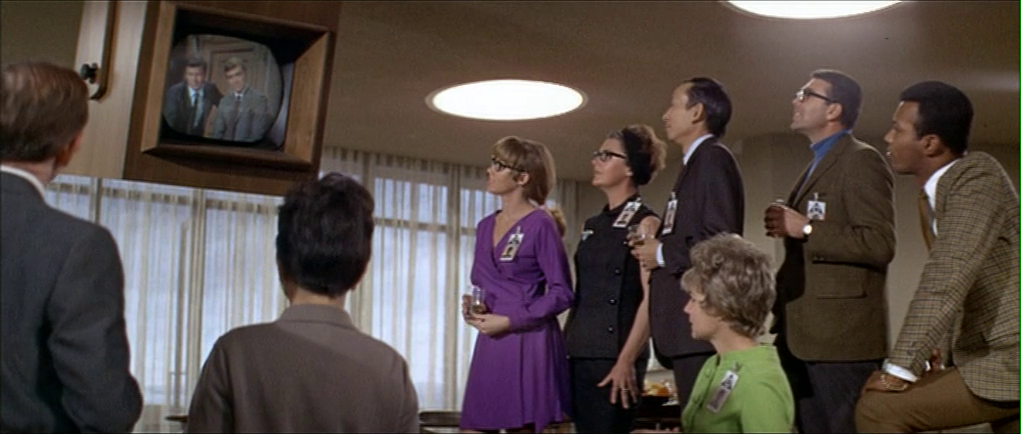
The first time we see one in use is early in the film when Forbin calls his team in the Central Programming Office (Forbin calls it the CPO) from the Presidential press briefing (remember those?) where Colossus is being announced to the public. We see an unnamed character in the CPO receiving a telephone call, and calling for quiet amongst the rowdy, hip party of computer scientists. This call is received on a wall-tethered 2500 desk phone

We cut away to the group reaction, and by the time the camera is back on the video phone, Forbin’s image is peering through the glass. We do not get to see the interactions which switched the mode from telephony to videotelephony.

Forbin calls the team from Washington.

But we can see two nice touches in the wall-mounted interface.

First, there is a dome camera mounted above the screen. Most sci-fi videophones fall into the Screen-Is-Camera trope, so this is nice to see. It could mounted closer to the screen to avoid gaze misalignment that plagues such systems.

One of the illustrations from the book I’m still quite proud of, for its explanatory power and nerdiness. Chapter 4, Volumetric Projection, Page 83.

Second, there is a 12-key numeric keypad mounted to the wall below the screen. (0–9 as well as an asterisk and octothorp.) This keypad is kind-of nice in that it hints that there is some interface for receiving calls, making calls, and ending an ongoing call. But it bypasses actual interaction design. Better would be well-labeled controls that are optimized for the task, and that don’t rely on the user’s knowledge of directories and commands.

The 2500 phone came out in 1968, introducing consumers to the 12-key pushbutton interface rather than the older rotary dial on the 500 model. The 12-key is the filmmakers’ building on interface paradigms that audiences knew. This shortcutting belongs to the long lineage of sci-fi videophones that goes all the way back to Metropolis (1927) and Buck Rogers (1939).

Also, it’s worth noting that the ergonomics of the keypad are awkward, requiring users to poke at it in an error-prone way, or to seriously hyperextend their wrists. If you’re stuck with a numeric keypad as a wall mounted input, at least extend it out from the wall so it can be angled to a more comfortable 30°

Is it still OK to reference Dreyfuss? He hasn’t been Milkshake Ducked, has he?

There is another display in the CPO, but it lacks a numeric keypad. I presume it is just piping a copy of the feed from the main screen. (See below.)
Looking at the call from Forbin’s perspective, he has a much smaller display. There there is still a bump above the monitor for a camera, another numeric keypad below it, and several 2500 telephones. Multiple monitors on the DC desks show the same feed.

After Dr. Markham asks Dr. Forbin to steal an ashtray, he ends the call by pressing the key in the lower right-hand corner of the keypad.

Levels adjusted to reveal details of the interface.

After Colossus reveals that THERE IS ANOTHER SYSTEM, Forbin calls back and asks to be switched to the CPO. We see things from Forbin’s perspective, and we see the other fellow actually reach offscreen to where the numeric keypad would be, to do the switching. (See the image, below.) It’s likely that this actor was just staring at a camera, so this bit of consistency is really well done.

When Forbin later ends the call with the CPO, he presses the lower-left hand key. This is inconsistent with the way he ended the call earlier, but it’s entirely possible that each of the non-numeric keys perform the same function. This also a good example why well-labeled, specific controls would be better, like, say, one for “end call.”

Other video calls in the remainder of the movie don’t add any more information than these scenes provide, and introduce a few more questions.


The President calls to discuss Colossus’ demand to talk to Guardian.

Note the duplicate feed in the background in the image above. Other scenes tell us all the monitors in the CPO are also duplicating the feed. I wondered how users might tell the system which is the one to duplicate. In another scene we see that the President’s monitor is special and red, hinting that there might be a “hotseat” monitor, but this is not the monitor from which Dr. Forbin called at the beginning of the film. So, it’s a mystery. 

The red “phone.”
Chatting with CIA Director Grauber.
Bemusedly discussing the deadly, deadly FOOM with the President.
The President ends his call with the Russian Chairman, which is a first of sorts for this blog.
In a multi-party conference call, The Chairman and Dr. Kuprin speak with the President and Forbin. No cameras are apparent here. This interface is managed by the workers sitting before it, but the interaction occurs off screen.

In the last video conference of the film, everyone listens to Unity’s demands. This is a multiparty teleconference between at least three locations, and it is not clear how it is determined whose face appears on the screen. Note that the CPO (the first in the set) has different feeds on display simultaneously, which would need some sort of control.


Plug: For more about the issues involved in sci-fi communications technology, see chapter 10 of Make It So: Interaction Design Lessons from Science Fiction. (Though it’s affordably only available in digital formats as of this post.)

Video Phone Calls

The characters in Johnny Mnemonic make quite a few video phone calls throughout the film, enough to be grouped in their own section on interfaces.

The first thing a modern viewer will note is that only one of the phones resembles a current day handheld mobile. This looks very strange today and it’s hard to imagine why we would ever give up our beloved iPhones and Androids. I’ll just observe that accurately predicting the future is difficult (and not really the point) and move on.

More interesting is the variety of phones used. In films from the 1950s to the 1990s, everyone uses a desk phone with a handset. (For younger readers: that is the piece you picked up and held next to your ear and mouth. There’s probably one in your parents’ house.) The only changes were the gradual replacement of rotary dials by keypads, and some cordless handsets. In 21st century films everyone uses a small sleek handheld box. But in Johnny Mnemonic every phone call uses a different interface.

New Darwin

First is the phone call Johnny makes from the New Darwin hotel.

jm-3-phone-hotel-c-adjusted

As previously discussed, Johnny is lying in bed using a remote control to select numbers on the onscreen keypad. He is facing a large wall mounted TV/display screen, with what looks like a camera at the top. The camera is realistic but unusual: as Chapter 10 of Make It So notes, films very rarely show the cameras used in visual communication.

Taxi

The second phone call takes place in Newark, as Johnny rides in a taxi from the airport. Since this is a moving vehicle rather than a room, it shows that wireless videophones also exist. We don’t see how the call is made, just the conversation. Johnny is looking at and speaking into a small screen in front of his seat.

jm-10-taxi-a-adjusted

Quick aside: The blue lines at the bottom of the screen are a street map, with the glowing dot being the taxi. While it’s not the focus of this particular interface, it’s interesting that this map seems to be fixed with the indicator moving sideways. Aircraft and now car navigators use a moving map with the indicator moving up for forward. But this is for the passenger rather than the driver so doesn’t need to be particularly useful. And it’s blue, so must be advanced.

At the other end is Ralphie, who is using a desk screen with a keyboard.

jm-10-taxi-b-adjusted

We get to see things from Ralphie’s end. His keyboard only has ten keys in two rows of five. Ralphie touches the middle key in the bottom row to end the call.

Is this a dedicated phone rather than a computer? The only full-sized keyboards we see in Johnny Mnemonic are part of systems implied to be outdated or salvaged. Perhaps by 2021 voice recognition is good enough to handle most input. Or perhaps by 2021 status indicators have changed and once again nobody who considers themselves important would have a QWERTY keyboard on their desk, leaving others to do the more “menial” typing.

Shinji’s mobile

There is a cyberspace sequence (discussed in a separate post) during which there is a conversation between a Pharmakom tracker and Shinji, the leader of the Yakuza searching for Johnny, who is in en route by car. Shinji’s phone seems to be just like a current day mobile, if perhaps a little smaller than we’re used to.

jm-12-1-car-phone

Takahashi’s desk phone

Takahashi, head of Pharmakom in Newark, has a desktop screen too. This is a general purpose computer which at various times displays video of his daughter and a corporate database entry about Anna, the Pharmakom founder.

jm-15-takahashi-a-adjusted

There is no keyboard, but later we will see that the desk surface has hand gesture tracking capability. Here the screen displays an onscreen video phone window and numeric keypad, similar to what we saw in the New Darwin sequence, but Takahashi doesn’t use that interface. Instead he just says “Get me Karl” and the phone dials the recipient automatically.

Takahashi doesn’t prefix his command with a control phrase such as“Siri” or “Computer” which would imply that the computer is always listening. For an executive with a private office this would be reasonable: who else could he be addressing? A second possibility is that the computer does voice recognition and would not respond to commands from anyone else.

Street Preacher’s Phone

As before, the recipient has chosen to show a video splash screen on connection instead of a live video feed.

jm-15-takahashi-b-adjusted

“Karl” is more commonly known as Street Preacher and works within a church of sorts. We don’t know whether this is genuine religion belief on his part or a cover operation. His phone system is built into a large book, which I thought was intended to be a Bible but Chris identifies as a 16th century ecclesiastical history. There are no controls visible, but we see Karl “pick up” by opening the book so perhaps he “hangs up” by closing it again. Otherwise it could be operated purely by voice.

jm-15-takahashi-c-adjusted

Public phone

Earlier in the film, Johnny picked up an “Infobahn 3000” handset with built in phone keypad.

jm-16-phonebooth-a

His next phone call is from a public phone booth. On screen we see the now familiar videophone keypad. (Apparently this time in cyan, although it’s a very minor color shift.). To the right of the screen are physical buttons, some of which are labelled “start” “stop” and “pause” so perhaps duplicate the onscreen controls. Johnny begins by borrowing Jane’s phone card and swiping it through the payment slot.

jm-16-phonebooth-b-adjusted

The red Infobahn handset is connected to Jane’s card by a cable, although we don’t see Johnny doing this. Johnny types on the handset keypad rather than using the onscreen controls, presumably doing some hacking through the interface.

At first sight it seems unlikely that the phone system could be hacked through an EFTPOS card reader. However there is a long and unhappy history of programmers leaving backdoors and unused functionality in products, often excused with “Well, nobody else knows about it”, which are then exploited. Payment cards themselves often have embedded integrated circuits. This particular hack is not completely implausible.

jm-16-phonebooth-c

When the Pharmakom splash screen appears, Johnny types again on the handset. He is manipulating the internal company phone system to gain access to a number that normally would not be available to the public.

jm-16-phonebooth-e-adjusted

The new number connects Johnny to a surprised corporate type who wants to know how Johnny got through.

jm-16-phonebooth-g-adjusted

We’ll learn later on that this gentleman is not at all who he seems to be. For now, note that Johnny talks and listens directly to the screen and speakers in the phone booth, not the handset he is holding.

Spider phone

Just before his brain is scanned by Spider, Johnny tries to make another call. This time he uses a typical 1990s computer CRT display and keyboard. He wears a conventional looking earpiece and microphone, and there is a small camera mounted on top of the display. He types the number on the keyboard and reaches a Pharmakom receptionist, but Johnny is interrupted.

jm-19-old-phonecall-adjusted

Van call

The last phone call is made by Johnny to Pharmakom again. This time he is in Spider’s van, which doesn’t have a built in phone like the taxi we saw earlier. He uses the handset for audio and a small portable screen for video. There must be a wireless transmitter and receiver somewhere, but it isn’t obvious.

jm-22-puppet-call-a-adjusted
jm-22-puppet-call-b-adjusted

Johnny doesn’t realise that he is actually talking to Takahashi, the head of Pharmakom, through a puppet avatar, which I’ll talk about in the next post. 

3 of 3: Brain Hacking

The hospital doesn’t have the equipment to decrypt and download the actual data. But Jane knows that the LoTeks can, so they drive to the ruined bridge that is the LoTek home base. As mentioned earlier under Door Bombs and Safety Catches the bridge guards nearly kill them due to a poorly designed defensive system. Once again Johnny is not impressed by the people who are supposed to help him.

When Johnny has calmed down, he is introduced to Jones, the LoTek codebreaker who decrypts corporate video broadcasts. Jones is a cyborg dolphin.

jm-24-jones-animated

Jones has not just an implant like Johnny or an augmented nervous system like Jane, but a full neural brain interface that gives him active control. The thing behind his eye and under the cable can rotate, and he can also direct and control an external microwave radar dish. In the background there are a lot of cables and blinking lights apparently connecting Jones to the LoTek video broadcast gear.

For his part, Johnny is sitting in a chair, upper head strapped into a helmet-like brain scanner. This one is very big and clunky, perhaps because it is salvaged old technology or perhaps because this is not just a passive scanner, so needs additional elements and power to actively modify the brain.

jm-26-download-b

When this starts operating, we see the same strobing white light flashes that the first scanner used.

J-Bone, the LoTek leader, uses a handheld camera to feed the first access code image into the system. This is yet another piece of talking technology, announcing that the first image has been loaded.

jm-26-download-c

The captured image is processed to remove the perspective keystoning, and displayed on one of three small panels on the wall, side by side. That specialised displays are made solely for displaying three images suggests that this form of access code is a standard method of data protection in 2021. The other two panels display rolling static.

jm-26-download-d-adjusted

Wait…static?

Why is there static in a 2021 system for displaying computer images? It’s not just because they’re analog: old CRT computer monitors went blank if there was nothing to display. This is a missing or scrambled signal.

Since the LoTeks rely on scavenged technology, it’s quite likely that they are the last people on the planet still using coax video cables. Another possibility is that this is a deliberate imitation, as we saw earlier with the digital fax machine that made analog sounds. Computer graphics programmers are constantly wondering whether the screen is black because they didn’t draw anything, or black because they accidently drew everything in that color. The rolling static makes it clear that there is no image to display, not that the image is blank.

The first download attempt is interrupted by the Yakuza attacking the bridge. There’s some equipment damage, but by the end of the fight Johnny and company have recovered the second access code image.

jm-26-download-f-adjusted

Still not enough, but Johnny now attempts to “hack his own brain” which is successful (discussed below). The data is finally downloaded and the LoTeks broadcast the cure for NAS worldwide.

Tech Tease

The hacking and downloading take place in another virtual reality space, the internal representation of the implant. These sequences are action-packed and filled with eye catching visuals. If we wanted, there’s much that could be written about, from the visual representations of hacking used in film and TV to the advisability of transmitting vital scientific data through a video encoder. But we never get to see the interface!

Instead, we see Johnny just sit and do nothing other than maintain a death grip on the chair armrests and try not to grind his teeth into fragments. According to the running commentary on the hack provided by J-Bone, Johnny is performing actions in VR. It’s possible that the LoTek brain scanner is a true brain interface that gives him active control by thought alone with no sound or audio experience.

But this is evidently high grade encryption, which could only be broken by an expert hacker. Without visible controls for the brain scanner, the expert hacker would need to be using a direct brain interface. And the hacker would naturally have their own avatar. The only person present who definitely meets all these requirements is not Johnny, but Jones.

Could Jones be really doing all the work? In the original short story it was Jones, and here he’s certainly doing something in virtual reality. Johnny would make a useful distraction, and J-Bone might deliberately mislead the non-LoTek bystanders to keep Jones a secret.

jm-26-download-g

Whether it’s Johnny or Jones, we only get to see what happens, not how. Rather than end on this disappointing note, I’ll now jump back to discuss the more rewarding interfaces for phone calls and cyberspace search sequence. 

Hotel Remote

The Internet 2021 shot that begins the film ends in a hotel suite, where it wakes up lead character Johnny. This is where we see the first real interface in the film. It’s also where this discussion gets more complicated.

A note on my review strategy

As a 3D graphics enthusiast, I’d be happy just to analyze the cyberspace scenes, but when you write for Sci Fi Interfaces, there is a strict rule that every interface in a film must be subjected to inspection. And there are a lot of interfaces in Johnny Mnemonic. (Curse your exhaustive standards, Chris!)

A purely chronological approach which would spend too much time looking at trees and not enough at the forest. So I’ll be jumping back and forth a bit, starting with the gadgets and interfaces that appear only once, then moving on to the recurring elements, variations on a style or idea that are repeated during the film.

Description

The wakeup call arrives in the hotel room as a voice announcement—a sensible if obvious choice for someone who is asleep—and also as text on a wall screen, giving the date, time, and temperature. The voice is artificial sounding but pleasant rather than grating, letting you know that it’s a computer and not some hotel employee who let himself in. The wall display functions as both a passive television and an interactive computer monitor. Johnny picks up a small remote control to silence the wake up call.

jm-2-check-email-a

This remote is a small black box like most current-day equivalents, but with a glowing red light at one end. At the time of writing blue lights and indicators are popular for consumer electronics, apparently following the preference set by science fiction films and noted in Make It So. Johnny Mnemonic is an outlier in using red lights, as we’ll see more of these as the film progresses. Here the glow might be some kind of infrared or laser beam that sends a signal, or it might simply indicate the right way to orient the control in the hand for the controls to make sense.

First thing every morning: Messages

After silencing the alarm, Johnny, like so many of us today, checks his email. (In 1995 doing so before even getting out of bed might have been intended to show his detachment from humanity. Today, it seems perfectly natural!) He uses the remote to switch the display to the hotel “Message Centre”. We see his thumb move around, so the remote must have multiple buttons, but can’t tell whether this is a simple arrow keypad or something more complicated.

jm-2-check-email-b-adjusted

The message centre of the New Darwin Inn system both displays the text message visually and also speaks it aloud in the same synthesized voice that woke him up. Voiceovers are common in films so the audience doesn’t have to try to read the cinema screen, but in this case it would be genuinely useful. Guests could start doing something else without needing to pay full attention to the display.

Is it necessary for Johnny to explicitly switch to the Message Center? The system could have displayed this message automatically after the wakeup call, or shown the 2021 equivalent of his InBox.  On the other hand, this is a giant, clearly visible screen and Johnny was not alone in the suite. Johnny, and other guests, might wish to keep their communications private.

As Johnny has no messages, he uses the remote to switch the display to a TV channel.

The hotel room “phone” call

Next he uses the remote to make a phone call. He starts by using the remote to dial the number, which appears on the display. We can’t see whether he is typing numbers directly, or using arrow keys and an Enter or OK button to navigate around the onscreen keypad. It’s certainly convenient for guests to be able to make a call without getting out of bed, but a voice recognition interface might be even easier. We’ll see a phone system that accepts voice commands later on, so perhaps using the remote is just a preference.

jm-3-phone-hotel-a-adjusted

What is the strange blue window to the right of the keypad? It’s there because all phone calls in 2021 are in fact video calls. The equivalent to a busy waiting tone in this world is a video splash screen. These can be customized by the recipient, here showing the company name, Dataflow.

jm-3-phone-hotel-b-adjusted

And finally both parties can see and hear each other. Note  also the graphical reverse, stop, and play buttons at the bottom right of the keypad. These imply some sort of recording capability, but we never see them used.

jm-3-phone-hotel-c-adjusted

Next

I’ll discuss the 2021 phone system in more detail later on, so for now we just need to know that this phone call is the setup that sends Johnny to Beijing for his next, and hopefully last, job.

Her: interface components (2/8)

Depending on how you slice things, the OS1 interface consists of five components and three (and a half) capabilities.

Her-earpiece

1. An Earpiece

The earpiece is small and wireless, just large enough to fit snugly in the ear and provide an easy handle for pulling out again. It has two modes. When the earpiece is in Theodore’s ear, it’s in private mode, hearable only by him. When the earpiece is out, the speaker is as loud as a human speaking at room volume. It can produce both voice and other sounds, offering a few beeps and boops to signal needing attention and changes in the mode.

Her-cameo

2. Cameo phone

I think I have to make up a name for this device, and “cameo phone” seems to fit. This small, hand-sized, bi-fold device has one camera on the outside an one on the inside of the recto, and a display screen on the inside of the verso. It folds along its long edge, unlike the old clamshell phones. The has smartphone capabilities. It wirelessly communicates with the internet. Theodore occasionally slides his finger left to right across the wood, so it has some touch-gesture sensitivity. A stripe around the outside-edge of the cameo can glow red to act as a visual signal to get its user’s attention. This is quite useful when the cameo is folded up and sitting on a nightstand, for instance.

Theodore uses Samantha almost exclusively through the earpiece and cameo phone, and it is this that makes OS1 a wearable system.

3. A beauty-mark camera

Only present for the surrogate sex scene, this small wireless (are we at the point when we can stop specifying that?) camera affixes to the skin and has the appearance of a beauty mark.

4. (Unseen) microphones

Whether in the cameo phone, the desktop screen, or ubiquitously throughout the environment, OS1 can hear Theodore speak wherever he is over the course of the film.

5. Desktop screen

Theodore only uses a large monitor for OS1 on his desktop a few times. It is simply another access point as far as OS1 is concerned. Really, there’s nothing remarkable about this screen. It is notable that there’s no keyboard. All input is provided by either voice, camera, or a touch gesture on the cameo.

Her-install01

If those are components to the interface, they provide the medium for her 3.5 capabilities.

Her capabilities

1. Voice interface

Users can speak to OS1 in fully-natural language, as if speaking to another person. OS1 speaks back with fully-human spoken articulation. Theodore’s older OS had a voice interface, but because of its lack of artificial intelligence driving it, the interactions were limited to constrained commands like, “Read email.”

2. Computer vision

Samantha can process what she sees through the camera lens of the cameo perfectly. She recognizes distinct objects, people, and gestures at the physical and pragmatic level. I don’t think we ever see things from Samatha’s perspective, but we do have a few quick close ups of the camera lens.

3. Artificial Intelligence

The most salient aspect of the interface is that OS1 is a fully realized “Strong” artificial intelligence.

It would like me to try and get to some painfully-crafted definition of what counts as either an artificial intelligence or sentience, but in this case we don’t really need a tight definition to help suss out whether or not Samantha is one. That’s the central conceit of the film, and the evidence is just overwhelming.

  • She has a human command of language.
  • She’s fully versed in the nuances of human emotion (and Theodore has a glut of them to engage).
  • She has emotions and can fairly be described as emotional. She has a sexual drive.
  • She has existential crises and a rich theory of mind. At one point she dreamily asks Theodore “What’s it like to be alive in that room right now?” as if she was a philosophical teen idly chatting with her boyfriend over the phone.
  • She commits lies of omission in hiding uncomfortable truths.
  • She changes over time. She solves problems. She learns. She creates.
  • She has a sense of humor. When Theodore tells her early on to “read email” in the weird toComputerese (my name for that 1970s dialect of English spoken only between humans and machines) grammar he had been using with his old operating system, Samantha jokingly adopts a robotic voice and replies, “OK. I will read the email for Theodore Twombly” and gets a good laugh out of him before he apologizes.

Pedants will have some fun discussing whether this is apt but I’m moving forward with it as a given. She’s sentient.

3.5 An “operating system”

This item only counts as half a thing because Theodore uses it as an operating system maaaybe twice in the film. Really, this categorization is a MacGuffin to explain why he gets it in the first place, but it has little to no other bearing on the film.

scarlettjoclippy

What’s missing?

Notably missing in OS1 is a face or any other visual anthropomorphic aspect. There’s no Samantha-faced Clippy. Notice that she’s very carefully disembodied. Jonze does not spend screen time close up on her camera lens, like Kubrick did with HAL’s unblinking eye. Had he done so, it would have given us the impression that she’s somewhere behind that eye. But she’s not. Even in the prop design, he makes sure the camera lens itself looks unremarkable, neutral, and unexpressive, and never gets a lingering focus.

Her “organs,” like the cameo and earpiece, don’t even connect together physically at all. Speaking as she does through the earpiece means she doesn’t exist as a voice from some speaker mounted to the wall. She exists across various displays and devices, in some psychological ether between them. For us, she’s a voiceover existing everywhere at once. For Theodore, she’s just a delightful voice in his head. An angel—or possibly a ghost—borne unto him.

This disembodiment (both the design and the cinematic treatment) frees Theodore and the audience from the negative associations of many other sci-fi intelligences, robots, and unfortunate experiments in commercial artificial intelligence that got trapped in the muck of the uncanny valley. One of the main reasons designers have to be careful about invoking the anthropomorphic sense in users is because it will raise expectations of human capabilities that modern technology just can’t match. But OS1 can match and exceed those expectations, since it’s an AI in a work of fiction, so Jonze is free of that constraint.

And having no visual to accompany a human-like voice allows users to imagine our own “perfect” embodiment to the voice. Relying on the imagination to provide the visuals makes the emotional engagement greater, as it does with our crushes on radio personalities, or the unseen monster in a horror movie. Movies can never create as fulfilling an image for an individual audience member as their imagination can. Theodore could picture whatever he wanted to–even if he wanted to–to accompany Samantha’s computer-generated voice. Unfortunately for the audience, Jonze cast Scarlett Johansen, a popular actress whose image we are instantly able to recall upon hearing her husky, sultry voice, so the imagined-perfection is more difficult for us.

This is just the components and capabilities. Tomorrow we’ll look at some of the key interactions with OS1.

Roach Cam

TheFifthElement-roachcam004

To learn the plans of the President, Zorg’s flunky named Right Arm infiltrates the briefing room via a remote-controlled cockroach. This adorable insect has a small parabolic receiver antenna on its back. Right Arm can watch what it sees with its eyes and listen to what it can hear through its… cerci?

TheFifthElement-roachcam001

The screen he uses is mostly full of the roachcam video. But it is unfortunately surrounded by some screen-green sciencey nonsense. A row across the top is headed “001” with rectangles labeled “MOVE”, “METHOD”, “CHECK”, and “SYSTEM.” A row just below is headed “A-B” with rectangles labeled “SPEED”, “TIMER”, “EXIT”, and “FILTERS.” A column of screen-green nonsense shapes fills the left side. A small butterfly-shaped graph at the bottom-left is labeled “CHECK.” A small box labeled “CALCULATING” is in the lower middle, which occasionally fills with scrolling nonsense. The right side of the screen is full of a circular graph showing a seizure-inducing flashing pair of green concentric circles. A green 8×8 grid on the right stays empty the whole time, though it is arguably the most likely useful thing, i.e. an overhead view of threats, say, like presidents brandishing cockroach-smashing shoes. Below the unused grid is a diagram of the roach itself, probably useful for understanding the health of the vehicle. Below that is a bit of unintelligible text reversed out of a gray background. When the roach nears the President, a bit of green nonsense text appears overlaid on the video feed, though it never changes.

I think this screen would have been less distracting and more helpful for Right Arm if you stripped away all the gunk at the top, the nonsensical overlay, trashed the column of hastily-drawn icons, saved him the constant distraction of the seizure circle by removing it, and leaving him with the two things that would actually be useful: the map (populated of course with some useful information), and the roach health diagram. Even though this screen is seen only for a few seconds at most, it reads as if it was hastily put together, unlike most other things seen in the film.

TheFifthElement-roachcam005

TheFifthElement-roachcam003

He is able to control the roach’s movement by means of a joystick with a rotating head. In contrast to the screen, this provides exactly what Right Arm needs to control the roach, and no more. He can move it forward and back by pushing the joystick forward and back. He can have it strafe right or left by moving the joystick appropriately. And when he wants to have it turn right or left, he can twist the joystick head in that direction. Pushing or twisting farther results in more motion. All told, a perfect input control for the task at hand. At least until you ask the roach.

TheFifthElement-roachcam002

Profiling “CAT” scan

fifthelement-122

After her escape from the nucleolab, Leeloo ends up on a thin ledge of a building, unsure where to go or what to do. As a police car hovers nearby, the officers use an onboard computer to try and match her identity against their database. One officer taps a few keys into an unseen keyboard, her photograph is taken, and the results displays in about 8 seconds. Not surprisingly, it fails to find a match, and the user is told so with an unambiguous, red “NO FILE” banner across the screen.

fifthelement-128

This interface flies by very quickly, so it’s not meant to be read screen by screen. Still, the wireframes present a clear illustration of what the system doing, and what the results are.

The system shouldn’t just provide dead ends like this, though. Any such system has to account for human faces changing over the time since the last capture: aging, plastic surgery, makeup, and disfiguring accidents, to name a few. Since Leeloo isn’t inhuman, it could provide some results of “closest matches,” perhaps with a confidence percentage alongside individual results. Even if the confidence number was very low, that output would help the officers understand it was an issue with the subject, and not an issue of an incomplete database or weak algorithm.

One subtle element is that we don’t see or hear the officer telling the system where the perp is, or pointing a camera. He doesn’t even have to identify her face. It automatically finds her in the camera few, identifies her face, and starts scanning. The sliding green lines tell the officer what it’s finding, giving him confidence in its process, and offering an opportunity to intervene if it’s getting things wrong.

Military communication

All telecommunications in the film are based on either a public address or a two-way radio metaphor.

Commander Adams addresses the crew.

To address the crew from inside the ship, Commander Adams grabs the microphone from its holder on the wall. Its long handle makes it easy to grab. By speaking into the lit, transparent circle mounted to one end, his voice is automatically broadcast across the ship.

Commander Adams lets Chief Quinn know he’s in command of the ship.

Quinn listens for incoming signals.

The two-way radio on his belt is routed through the communications officer back at the ship. To use it, he unclips the small cylindrical microphone from its clip, flips a small switch at the base of the box, and pulls the microphone on its tether close to his mouth to speak. When the device is active, a small array of lights on the box illuminates.

Confirming their safety by camera, Chief Quinn gets an eyeful of Alta.

The microphone also has a video camera within it. When Chief Quinn asks Commander Adams to “activate the viewer,” he does so by turning the device such that its small end faces outwards, at which time it acts as a camera, sending a video signal back to the ship, to be viewed on the “view plate.”

The Viewplate is used frequently to see outside the ship.

Altair IV looms within view.

The Viewplate is a large video screen with rounded edges that is mounted to a wall off the bridge. To the left of it three analog gauges are arranged in a column, above two lights and a stack of sliders. These are not used during the film.

Commander Adams engages the Viewplate to look for Altair IV.

The Viewplate is controlled by a wall mounted panel with a very curious placement. When Commander Adams rushes to adjust it, he steps to the panel and adjusts a few horizontal sliders, while craning around a cowling station to see if his tweaks are having the desired effect. When he’’s fairly sure it’’s correct, he has to step away from the panel to get a better view and make sure. There is no excuse for this poor placement.