Zed-Eyes

In the world of “White Christmas”, everyone has a networked brain implant called Zed-Eyes that enables heads-up overlays onto vision, personalized audio, and modifications to environmental sounds. The control hardware is a thin metal circle around a metal click button, separated by a black rubber ring. People can buy the device with different color rings, as we see alternately see metal, blue, and black versions across the episode.

To control the implant, a person slides a finger (thumb is easiest) around the rim of a tiny touch device. Because it responds to sliding across its surface, let’s say the device must use a sensor similar to the one used in The Entire History of You (2011) or the IBM Trackpoint,

A thumb slide cycles through a carousel menu. Sliding can happen both clockwise and counterclockwise. It even works through gloves.

HUD_menu.gif

The button selects or executes the selected action. The complete list of carousel menu options we see in the episode are: SearchCameraMusicMailCallMagnifyBlockMapThe particular options change across scenes, so it is context-aware or customizable. We will look at some of the particular functions in later posts. For now, let’s discuss the “platform” that is Zed-eyes.

Analysis

There’s not much to discuss about the user interface. The carousel a mature, if constrained, interface model familiar to anyone who has used an iPod. We know the constraints and benefits of such a system, and the Zed-Eyes content seems to fit this kind of interface well.

Hardware

The main question about the hardware is that is must be very very easy to lose or misplace. It would make sense for the Zed-Eyes to help you locate it when you need help, but we don’t see a hint of this in the show.

I think the little watch-battery form factor is a bad design. It’s easy to lose and hard to find and requires a lot of precision to use. Since this exists in a world with very high fidelity image recognition and visual processing, better would be to get rid of input hardware altogether.

Let the user swipe with their thumb across their index finger (or really, any available surface) and have the HUD read that as input. To distinguish real-world interactions that should not have consequence—like swiping dust off a computer—from input meant for the HUD, it could track the user’s visual focal point. When the user’s eyes focus on the empty space in the air right above where they’re swiping, the system knows swiping is meant to affect the interface.

With this kind of interaction there would be no object to lose, and of course save whatever entity provides this service the costs of the hardware and maintenance.

We must note that such a design might not play well cinematically, as viewers might not understand what was happening at first, but understanding the hardware is not critical to understanding the plot-critical effects of using the technology.

Cyborgs in social space

A last question is about the invisibility of the technology. This can cause problems when a user is known to be hearing, but functionally deaf because they are listening to music loudly, and the people around them can’t tell that. Someone could be speaking to the user and believe their non-response is disrespect. It could cause safety problems as, say, a bicyclist barrels towards them on a sidewalk, ringing their bell, expecting the user to move. This can allow privacy abuse as a user can take pictures in circumstances that should be private.

Joe, the moment he is taking a picture of Beth.

One solution would be to make the presence of the tech and interactions quite visible. Glowing pupils and large, obvious gestural control, for example. But in a world where everyone has the technology, the Zed-Eyes can simply limit the behavior of photographs to permitted places, times, and according to the preferences of the people in the photograph. If someone is listening to music and functionally deaf, a real time overlay could inform people around them. This guy is listening to music. If a place is private, the picture option could be disabled with feedback to the user of this. Sorry, pictures are not allowed here.

The visibility we want for ubiquitous technology can be virtual, and provide feedback to everyone involved.

Talking to a Puppet

As mentioned, Johnny in the last phone conversation in the van is not talking to the person he thinks he is. The film reveals Takahashi at his desk, using his hand as if he were a sock puppeteer—but there is no puppet. His desk is emitting a grid of green light to track the movement of his hand and arm.

jm-22-puppet-call-c

The Make It So chapter on gestural interfaces suggests Takahashi is using his hand to control the mouth movements of the avatar. I’d clarify this a bit. Lip synching by human animators is difficult even when not done in real time, and while it might be possible to control the upper lip with four fingers, one thumb is not enough to provide realistic motion of the lower lip.

Instead I suggest that the same computer modifying his voice is also providing the fine mouth movements, using the same camera that must be present for the video phone calls. So what are the hand motions for? They provide cues as to how fast or slow Takahashi wants his puppet to speak, further disguising his own speech patterns. And the arm position could provide different body language for the avatar as a whole, to ensure for example that the puppet avatar does not react with surprise or anger even if Takahashi himself expresses those emotions.

We saw this avatar in a phone call once before, when Johnny dialed into an internal phone number from the phone booth. But we’ve also seen the video image of Takahashi himself when he called Street Preacher. Perhaps the avatar is an option for incoming calls, just as today we can assign custom ringtones to individual callers on our mobiles. For outgoing calls, an important person such as Takahashi would be more likely to use his true face to impress the callee.

Video phones have been predicted in science fiction fiction and film for a very long time now, but have never achieved wide scale usage. Human communication is richer and more expressive when we can see each other, so why are we resistant? One reason is that in the real world we don’t have makeup artists following us around to ensure we look our best at all times. Donald Norman suggested in chapter 8 of his book Things That Make Us Smart that real time video enhancement would solve this problem, but then if we’re all going to be presenting false avatars to each other, why bother?

A Cringing Computer

After the call ends, Anna, a personality uploaded into a mainframe, appears on the screen. Takahashi is annoyed by this and makes a sweeping arm gesture to get rid of her, detected by the green light grid. The computer screen actually sinks into the desk in response.

jm-22-puppet-call-animated

This is discussed in chapter 10 of the book as an interface handling emotional input. I’d like to add that this is also an emotional output, the computer seeming to hide itself from an angry user. Given how often current day users express the wish to beat their computers with heavy blunt objects, perhaps that is exactly what it is doing.

Computers in film and TV often have annoying personalities, which is surprising for (presumably) commercial products. Another cringing computer, emphasised by being named “Slave”, made regular appearances in season 4 of Blake’s 7. Would users feel more comfortable if their computer systems gave the appearance of being afraid every time they had to report an error? It’s worth considering.

Scav dual-monoculars

As Jack searches early in the film for Drone 172, he parks his bike next to a sinkhole in the desert and cautiously peers into it. As he does so, he is being observed from afar by a sinister looking Scav through a set of asymmetrical…well, it’s not exactly right to call them binoculars.

scav_oculars_04

They look kind of binocular, but that term technically refers to a machine that displays two slighty-offset images shown independently to each eye such that the user perceives stereopsis, or a single field in 3D. But a quick shot from the Scav’s perspective shows that this is not what is shown at all.

scavnolculars

This device’s two lenses take in different spectrums of light and displays them side by side, with a little (albeit inscrutable) augmentation at the periphery. The larger display on the left appears to be visible light and the smaller on the right appears—based on the strong highlight around the bike’s engine and Jack’s body—to be infrared, or heat.

At this point in the story, the audience is meant to believe that the scavs are still the evil alien race, and this interface helps to convey that. It seems foreign, mysterious. All of its typographic elements (letters, numbers, symbols) are squeezed into little more than 4×4 grids of pixels, so we’re not even sure if this is a human language. So, fine, this interface serves its narrative purpose here. “Oh my,” we must think, “…he is being watched. But by what? And why?”

But after we find out [again, spoilers] that the scavs are the Terran survivors after the Tet attack, we can look at this again to understand that this interface is for humans, and with that in mind it does not fare well.

Yes, the periphery is augmented, so that’s good, but the information is unusably small, and forces the user to glance back and forth between the two images to put the disparate information together.

Two views reduce the amount of information

It almost goes without saying, but let’s say it—by dividing the available display into two halves, the amount of visual information provided to the Scav is roughly a quarter of what it would be with a single view. And since the purpose of the device is to magnify, this is a significant loss.

Two views add work

In this scene, which is quite barren, it’s very easy to tell that the objects that are warm in the right are the only two objects on the left, but if you imagine looking at a cityscape, where the bomb (hot) looks very much like every other thing around it, you can see where piecing those two disparate views together in your head can become problematic.

This is made worse when the views aren’t even positionally synchronized. In the gif below you’ll see that when you superimpose them, they drift away from each other, making the comparison between the two even more difficult. There are diegetic reasons why this might have happened, but rather than reverse engineering why, let’s just leave it that it makes using it more difficult.

scavnolculars_overlaid

The blur and low-contrast don’t help

Note that the thermal view is blurrier and lower-contrast. That might be an artifact of the diegetic tech, but it would confound quick mapping in a complex image. Even if it’s just a lower-res image, at least the device should perform some auto-leveling and sharpening functions on the live image to help make it easy to use.

Having one scaled makes it worse

The scaling makes the mapping of items from one screen to the other more difficult. Again, in the Oblivion example, there are two objects on the left and two objects on the right, and the “horizons” on which they walk are roughly aligned, so it’s trivial to track one to the other. But if the image is highly repetitive—say for example, a building—the scaling would make it difficult to map the useful point-of-interest on the right to the best-resolution image on the left. Quick…in which window is the sniper?

scav_oculars_buildings

A more direct solution

Better would be a live augmentation of a single, visual-light image. The visual light is the best anchor to the real world, with augmentation helping to convey specialness to the objects in the scene. In the comp below, you’ll see a single image where the “hot spots” have been augmented with a soft red and some trend lines in white. That red color is not arbitrary, by the way. It builds on the human experience with black body radiation associations of red == hot. This saves the (quite human) user both the physical work of glancing back and forth and the extra cognitive processing to recall that green/yellow == heat.

scav_oculars_comp

Piloting Controls

Firefly_piloting

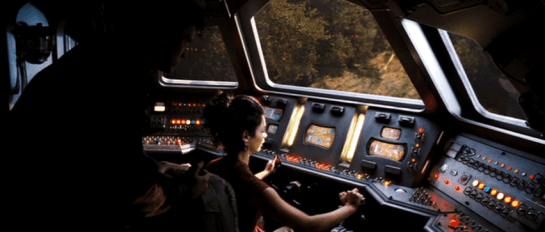
Pilot’s controls (in a spaceship) are one of the categories of “things” that remained on the editing room floor of Make It So when we realized we had about 50% too much material before publishing. I’m about to discuss such pilot’s controls as part of the review of Starship Troopers, and I realized that I’ll first need to to establish the core issues in a way that will be useful for discussions of pilot’s controls from other movies and TV shows. So in this post I’ll describe the key issues independent of any particular movie.

A big shout out to commenters Phil (no last name given) and Clayton Beese for helping point me towards some great resources and doing some great thinking around this topic originally with the Mondoshawan spaceship in The Fifth Element review.

So let’s dive in. What’s at issue when designing controls for piloting a spaceship?

BuckRogers_piloting

First: Spaceships are not (cars|planes|submarines|helicopters|Big Wheels…)

One thing to be careful about is mistaking a spacecraft for similar-but-not-the-same Terran vehicles. Most of us have driven a car, and so have these mental models with us. But a car moves across 2(.1?) dimensions. The well-matured controls for piloting roadcraft have optimized for those dimensions. You basically get a steering wheel for your hands to specify change-of-direction on the driving plane, and controls for speed.

Planes or even helicopters seem like they might be a closer fit, moving as they do more fully across a third dimension, but they’re not right either. For one thing, those vehicles are constantly dealing with air resistance and gravity. They also rely on constant thrust to stay aloft. Those facts alone distinguish them from spacecraft.

These familiar models (cars and planes) are made worse since so many sci-fi piloting interfaces are based on them, putting yokes in the hands of the pilots, and they only fit for plane-like tasks. A spaceship is a different thing, piloted in a different environment with different rules, making it a different task.

2001_piloting

Maneuvering in space

Space is upless and downless, except as a point relates to other things, like other spacecraft, ecliptic planes, or planets. That means that a spacecraft may need to be angled in fully 3-dimensional ways in order to orient it to the needs of the moment. (Note that you can learn more about flight dynamics and attitude control on Wikipedia, but it is sorely lacking in details about the interfaces.)

Orientation

By convention, rotation is broken out along the cartesian coordinates.

  • X: Tipping the nose of the craft up or down is called pitch.
  • Y: Moving the nose left or right around a vertical axis, like turning your head left and right, is called yaw.
  • Z: Tilting the left or right around an axis that runs from the front of the plane to the back is called roll.

Angles_620

In addition to angle, since you’re not relying on thrust to stay aloft, and you’ve already got thrusters everywhere for arbitrary rotation, the ship can move (or translate, to use the language of geometry) in any direction without changing orientation.

Translation

Translation is also broken out along cartesian coordinates.

  • X: Moving to the left or right, like strafing in the FPS sense. In Cartesian systems, this axis is called the abscissa.
  • Y: Moving up or down. This axis is called the ordinate.
  • Z: Moving forward or backward. This axis is less frequently named, but is called the applicate.

Translations_620

Thrust

I’ll make a nod to the fact that thrust also works differently in space when traveling over long distances between planets. Spacecraft don’t need continuous thrust to keep moving along the same vector, so it makes sense that the “gas pedal” would be different in these kinds of situations. But then, looking into it, you run into a theory of constant-thrust or constantacceleration travel, and bam, suddenly you’re into astrodynamics and equations peppered with sigmas, and you’re in way over my head. It’s probably best to presume that the thrust controls are set-point rather than throttle, meaning the pilot is specifying a desired speed rather than the amount of thrust, and some smart algorithm is handling all the rest.

Given these tasks of rotation, translation, and thrust, when evaluating pilot’s controls, we first have to ask how it is the pilot goes about specifying these things. But even that answer isn’t simple. Because you need to determine with what kind of interface agency it is built.

Max was a fully sentient AI who helped David pilot.

Max was a fully sentient AI who helped David pilot.

Interface Agency

If you’re not familiar with my categories of agency in technology, I’ll cover them briefly here. I’ll be publishing them in an upcoming book with Rosenfeld Media, which you can read there if you want to know more. In short, you can think of interfaces as having four categories of agency.

  • Manual: In which the technology shapes the (strictly) physical forces the user applies to it, like a pencil. Such interfaces optimize for good ergonomics.
  • Powered: In which the user is manipulating a powered system to do work, like a typewriter. Such interfaces optimize for good feedback.
  • Assistive: In which the system can offer low-level feedback, like a spell checker. Such interfaces optimize for good flow, in the Csikszentmihalyi sense.
  • Agentive: In which the system can pursue primitive goals on behalf of the user, like software that could help you construct a letter. This would be categorized as “weak” artificial intelligence, and specifically not the sentience of “strong” AI. Such interfaces optimize for good conversation.

So what would these categories mean for piloting controls? Manual controls might not really exist since humans can’t travel in space without powered systems. Powered controls would be much like early real-world spacecraft. Assistive controls would be might provide collision warnings or basic help with plotting a course. Agentive controls would allow a pilot to specify the destination and timing, and it would handle things until it encountered a situation that it couldn’t handle. Of course this being sci-fi, these interfaces can pass beyond the singularity to full, sentient artificial intelligence, like HAL.

Understanding the agency helps contextualize the rest of the interface.

Firefly_piloting03

Inputs

How does the pilot provide input, how does she control the spaceship? With her hands? Partially with her feet? Via a yoke, buttons on a panel, gestural control of a volumetric projection, or talking to a computer?

If manual, we’ll want to look at the ergonomics, affordances, and mappings.

Even agentive controls need to gracefully degrade to assistive and powered interfaces for dire circumstances, so we’d expect to see physical controls of some sorts. But these interfaces would additionally need some way to specify more abstract variables like goals, preferences, and constraints.

Consolidation

Because of the predominance of the yoke interface trope, a major consideration is how consolidated the controls are. Is there a single control that the pilot uses? Or multiple? What variables does each control? If the apparent interface can’t seem to handle all of orientation, translation, and thrust, how does the pilot control those? Are there separate controls for precision maneuvering and speed maneuvering (for, say, evasive maneuvers, dog fights, or dodging asteroids)?

The yoke is popular since it’s familiar to audiences. They see it and instantly know that that’s the pilot’s seat. But as a control for that pilot to do their job, it’s pretty poor. Note that it provides only two variables. In a plane, this means the following: Turn it clockwise or counterclockwise to indicate roll, and push it forward or pull it back for pitch. You’ll also notice that while roll is mapped really well to the input (you roll the yoke), the pitch is less so (you don’t pitch the yoke).

So when we see a yoke for piloting a spaceship, we must acknowledge that a) it’s missing an axis of rotation that spacecraft need, i.e. yaw. b) it’s presuming only one type of translation, which is forward. That leaves us looking about the cockpit for clues about how the pilot might accomplish these other kinds of maneuvers.

StarshipTroopers_pilotingoutput

Output

How does the pilot know that her inputs have registered with the ship? How can she see the effects or the consequences of her choices? How does an assistive interface help her identify problems and opportunities? How does as agentive or even AI interface engage the pilot asking for goals, constraints, and exceptions? I have the sense that Human perception is optimized for a mostly-two-dimensional plane with a predator’s eyes-forward gaze. How does the interface help the pilot expand her perception fully to 360° and three dimensions, to the distances relevant for space, and to see the invisible landscape of gravity, radiation, and interstellar material?

Narrative POV

An additional issue is that of narrative POV. (Readers of the book will recall this concept is came up in the Gestural Interfaces chapter.) All real-world vehicles work from a first-person perspective. That is, the pilot faces the direction of travel and steers the vehicle almost as if it was their own body.

But if you’ve ever played a racing game, you’ll recognize that there’s another possible perspective. It’s called the third-person perspective, and it’s where the camera sits up above the vehicle, slightly back. It’s less immediate than first person, but provides greater context. It’s quite popular with gamers in racing games, being rated twice as popular in one informal poll from escapist magazine. What POV is the pilot’s display? Which one would be of greater use?

MatrixREV_piloting

The consequent criteria

I think these are all the issues. This is new thinking for me, so I’ll leave it up a bit for others to comment or correct. If I’ve nailed them, then for any future piloting controls in the future, these are the lenses through which we’ll look and begin our evaluation:

  • Agency [ manual | powered | assistive | agentive | AI ]
  • Inputs
    • Affordance
    • Ergonomics
    • Mappings
      • orientation
      • translation
      • thrust
    • consolidations
  • Outputs (especially Narrative POV)

This checklist won’t magically give us insight into the piloting interface, but will be a great place to start, and a way to compare apples to apples between these interfaces.

Rotwang’s Maschinenmensch (Machine-Man)

Rotwang’s Machine-Man is the most magical technology seen in the film. This is understandable since there the only common precedent available to the audience were stories of golems and imps, soulless and wicked servants out to wreck havoc at their master’s bidding. Despite this imp paradigm, many of the interfaces around the Machine-Man are worthy of note.

Rotwang reveals the Machine-Man.

When Rotwang first reveals the Machine-Man to Joh, he does so with a dramatic yank of a curtain to the side. There sits the automaton, in a throne before a catwalk. In response to the curtain’s opening, the catwalk gradually illuminates. Did the Man-Machine turn the lights on? Was it a “curtain switch?” The movie gives no clues, but the lesson is clear. Light signals power, and the Machine-Man is imbued with a lot of it.

The Machine-Woman awaits Rotwang’s instructions.

The Machine-Man as Joh meets it is entirely machine in appearance. (Beautifully designed by Walter Schulze-Mittendorff. This piece of sci-fi is so iconic and seminal that it warrants its own Wikipedia page.) At Joh’’s instruction, Rotwang gives the Machine-Man the outward likeness of Maria. How he is actually able to accomplishing this is vague, but note that as he twists up the power, more and more bars illuminate at the foot of the table. An early establishment that, as power increases, so does light.

Rotwang powers the transformation table.

This “light = power” theme is reinforced a number of times throughout this sequence.

Some machine glows as Rotwang turns it on.

With a switch the transformation begins.

Rotwang increases the power to the transformation table.

What does the tall tank, the arcing sphere, or the large wafer switch do? We don’’t know. But with the flick of a switch, something glows, and even without any sound to tell us, we know that he’’s summoning a great deal of power for what he’s about to do next.

Machine-Maria devises her saboteur’’s scheme.

Machine-Maria looks nearly identical to the real Maria. But in seeking to make the differences clear to the audience, actress Brigitte Helm needed to supply some kind of uncanny valley a century before the term was invented. Her response, which underscores the “evil twin” nature of Machine-Maria, was to adopt sharp, precise movements, an under-the-brow stare, and asymmetry. These simple cues let us know in a few seconds that she is not human and not to be trusted.

On the pyre, Machine-Maria reverts to her original form.

Machine-Maria’s death also underscores its deeply magical roots. When burning on the pillar, Machine-Maria transforms back to her original, machine-like form for little given reason other than her spell has been somehow broken.