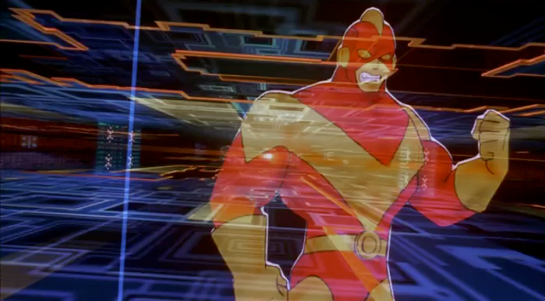
After selecting its location from a map, Johnny is now in front of the virtual entrance to the hotel. The virtual Beijing has a new color scheme, mostly orange with some red.
The “entrance” is another tetrahedral shape made from geometric blocks. It is actually another numeric keypad. Johnny taps the blocks to enter a sequence of numbers.
The tetrahedral keypad
Note that there can be more than one digit within a block. I mentioned earlier that it can be difficult to “press” with precision in virtual reality due to the lack of tactile feedback. Looking closely, here the fingers of Johnny’s “hands” cast a shadow on the pyramid, making depth perception easier.
Something is wrong, and Johnny receives an electric shock.
He reacts as if the shock is real, pulling his hands back and cursing.
In the 1980s and 1990s cyberpunk books such as Neuromancer and Hardwired and roleplaying games such as Cyberpunk and ShadowRun suggested that future virtual reality systems would be able to physically attack users, the dreaded “Black ICE”. While the more vigilant Internet copyright enforcers would probably be in favour, it seems unlikely that the liability lawyers at any computer manufacturer would allow a product that could electrocute users to be released, or that users would agree to put something like that on their hands. So this is most likely just Johnny expressing the same frustration as a current day video gamer who loses a life in a first person shooter.
The last necessary step before being granted access is, for some reason, to reshape the pyramid.
Here the pyramid serves as a combination lock or puzzle as well as a keypad. It’s not obvious, but Johnny does make a small 3D rotating gesture on the entire pyramid before pulling and pushing blocks around. You can also see a second layer of structure underneath the moving shapes.
Is this an effective security system? Not really. Two-factor authentication systems rely both on knowingsomething, here a numeric code, and either havingsomething, such as a specific mobile phone or token generator, or beingsomeone, with a specific fingerprint. Reshaping the blocks is just a second thing the would-be user must know, and is just as vulnerable to being guessed as the numeric code. On the other hand, it might be enough to keep out simple-minded attacks that only try the first step.
The floorplan
The “interior” of the hotel site is first displayed as a flat plan view. This builds up incrementally, a transition known among VR developers since the film Tron came out as “rezzing up”. The completed plan then rotates into a 3D structure.
We hear the voice feedback announce “General accounts selected” but don’t see how Johnny did this. A window expands out, and Johnny splits it in half to reveal some tabular data.
The fax and phone records are displayed in a simple tabular view, which would not look out of place on any 1995 or indeed current day desktop computer spreadsheet. There’s no need to use 3D graphics for such this.
There are new interface elements here, overlaying the tabular data in pink. At the top we can read SEARCH > FAX CHARGES: FOUND. And on the right is a set of inscrutable numbers with headings GRID, LEVEL, MENU, and XYZ. This could be some orientation within the data, but it doesn’t make sense. In the lower-left we see a label for elevation, with data as “coordinates in sector 4.”
Below that a 9-key arrangement with arrow shapes. Perhaps this is a navigation aid for people using conventional 2D desktop interfaces rather than full virtual reality equipment, allowing them to move around by clicking the onscreen arrows or pressing the equivalent keys. If the keys are similar to those used in computer games, the up and down arrow keys move forward or backwards and the left and right keys rotate, assuming movement is predominantly in the horizontal plane. The other keys might be for banking or vertical movement.
Johnny searches for the outgoing fax. He does not use any graphical gestures for this, instead specifying the search date and time ranges by speaking. Words and operators are more precise than graphic symbols for this kind of database query, but typing on a virtual keyboard would be more awkward than speech.
When the particular table cell is found, he uses the fingertips of both hands to expand the contents, one of the standard gestures described in the Make It So book.
Not surprisingly for a Beijing hotel, the internal records are not in English. Johnny again uses a voice command to ask for translation.
The hotel record is just the metadata, not the actual images he’s looking for, suggesting that “fax” system is fully digital and the faxes themselves are treated like modern email messages and deleted once sent. The metadata does tell Johnny that the images were faxed to a online copyshop in Newark. Since it is network connected, Johnny can jump straight to it in cyberspace.
In Johnny Mnemonic we see two different types of binoculars with augmented reality overlays and other enhancements: Yakuz-oculars, and LoTek-oculars.
Yakuz-oculars
The Yakuza are the last to be seen but also the simpler of the two. They look just like a pair of current day binoculars, but this is the view when the leader surveys the LoTek bridge.
I assume that the characters here are Japanese? Anyone?
In the centre is a fixed-size green reticule. At the bottom right is what looks like the magnification factor. At the top left and bottom left are numbers, using Western digits, that change as the binoculars move. Without knowing what the labels are I can only guess that they could be azimuth and elevation angles, or distance and height to the centre of the reticule. (The latter implies some sort of rangefinder.)
So far, this is a simple uncluttered display. But why is there a brightly glowing Pharmakom logo at the top right? It blocks part of the view, and probably doesn’t help anyone trying to keep their eyes adapted for night vision.
LoTek-oculars
The LoTeks, despite their name, have more impressive binoculars. They’re first used when Johnny gets out of his airport taxi.
There’s a third tube above the optics, a rectangular inlet, and an antenna.
In these binoculars, the augmented reality overlay is much more dynamic. Instead of a fixed circle, green lines converge in a bounding box around the image of Johnny. Text slides onto the display from left to right, the last line turning yellow.
Zoomrect
The animated transition of the bounding box resembles what Classic MacOS programmers of the 1990s called “zoomrects” used for showing windows opening or closing. It’s a very effective technique to draw attention to a particular area of an image.
Animated text
Text appearing character by character is ubiquitous in film interfaces. In the 1960s and 1970s mainframe and minicomputer terminals really did display incrementally, as the characters arrived one by one over slow serial port links. On any more recent computer it actually takes extra programming to achieve this effect, as the normal display of text is so fast that we would perceive it as instantaneous. But people like to see incremental text, or have been conditioned by film to expect it, so why not?
Bioscanning
The binoculars detect Johnny’s implant. It might just be possible to detect this passively from infrared or electronic signals, but more likely the binoculars include a high resolution microwave radar as well. If there had been more than one person in view, the bounding box would indicate which one the text refers to. And note that the last line of text is a different color. What that means is unclear here, but it becomes clear (and I’ll discuss it) later.
The second time we see the LoTek binoculars is when a lookout spots Street Preacher, a very bad guy and another who wants to remove Johnny’s head. Once again the binoculars have performed more than just a visual scan.
The binocular view and overlay are being relayed to another character, the LoTek leader J-Bone who can watch on a monitor. Here the film anticipates the WiFi webcam.
The overlay text now changes.
Narrow AI?
This is interesting, because the binoculars can not only detect implants and other cyborg modifications, but are apparently able to evaluate and offer advice. It appears that the green text is used for the factual (more or less) information about what has been detected, while yellow text is uncertain or or speculative.
Does this imply a general artificial intelligence? Not necessarily. This warning could be based solely on the detected signature, in the same way that current day military passive sonars and radar warning receivers can identify threats based on identifying characteristics of a received signal. In the world of Johnny Mnemonic it would make sense to assume that anyone with full custom biomechanics is extremely dangerous. Or, since Street Preacher is a resident rather than a stranger and already feared by others, his appearance and the warning could have been entered into a LoTek facial recognition database that the binocular system uses as a reference.
These textual overlays are an excellent interface, not interfering with normal vision and providing a fast and easy-to-understand analysis. But, the user must have faith that the computer analysis is accurate. There’s no reason given as to why any of the text is displayed. If Johnny was carrying an implant in his pocket instead of his brain, would the computer know the difference?
An alternative approach would be some kind of sensor fusion or false spectrum display, with the raw infrared or radar image overlaid over the visuals and the viewer responsible for interpreting the data. The problem with such systems is that our visual system didn’t evolve to interpret such imagery, so a lot of training and practice is required to be both fast and accurate. And the overlay itself interferes with our normal visual recognition and processing. If the computer can do a better job of deciphering the meaning of non-visual data, it should do so and summarise for the human viewer.
Further advantages of this interface are that even a novice sentry will benefit from the built-in scanning and threat analysis, and the wireless transmission ensures that the information is shared rather than being limited to the person on watch.
After fleeing the Yakuza in the hotel, Johnny arrives in the Free City of Newark, and has to go through immigration control. This process appears to be entirely automated, starting with an electronic passport reader.
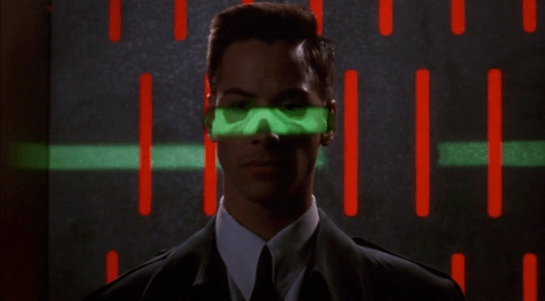
After that there is a security scanner, which is reminiscent of HAL from the film 2001: A Space Odyssey.
The green light runs over Johnny from top to bottom.
Looking at the picture, we can see that this green light is somehow making Johnny’s skeleton visible. It would be possible, by having an X-ray imaging system running at the same time and then re-projecting the X-ray image back onto the body, but why? Since there don’t appear to be any actual human beings on duty, I can only suggest that it is meant to look intimidating and impressive to encourage obedience. In the film Johnny appears to be alone and cannot see this himself, but it would be much more common for there to be multiple passengers, so each could watch the others being scanned.
There is also a screen showing another scan, a blurry body image, and text appearing on the right side. A voice repeats the text content. For the first time we see a blue background, the most common color for futuristic film interfaces.
The scanner detects Johnny’s implant, but whatever secrecy measures are present cause the system to decide that it is a registered dyslexia aid. The popup alert below includes the registration issuer and a domain name, so perhaps this is online verification over the Internet. Presumably Johnny can see this screen himself, if he cares.
The voiceover helpfully informs Johnny that there is “synaptic seepage”, and he should seek medical attention within 24 hours. This shows quite high level decision making by the system and an offer of assistance. Johnny says “thanks” in reply, an anthropomorphic response to this seemingly intelligent machine.
However, there seems to be a more detailed explanation in smaller text on the right of the display, and this isn’t announced. It’s not clear in this scene whether Johnny can see this display or not, but even if he could it would be difficult to read. Perhaps this is a legacy system from the days when airport security had actual staff.
Next
At this point Johnny leaves the airport, riding in a taxi from the airport. It is a good time for the first review of a group of related interfaces, which will be the next series of posts.
Once Johnny has installed his motion detector on the door, the brain upload can begin.
3. Building it
Johnny starts by opening his briefcase and removing various components, which he connects together into the complete upload system. Some of the parts are disguised, and the whole sequence is similar to an assassin in a thriller film assembling a gun out of harmless looking pieces.
It looks strange today to see a computer system with so many external devices connected by cables. We’ve become accustomed to one piece computing devices with integrated functionality, and keyboards, mice, cameras, printers, and headphones that connect wirelessly.
Cables and other connections are not always considered as interfaces, but “all parts of a thing which enable its use” is the definition according to Chris. In the early to mid 1990s most computer user were well aware of the potential for confusion and frustration in such interfaces. A personal computer could have connections to monitor, keyboard, mouse, modem, CD drive, and joystick – and every single device would use a different type of cable. USB, while not perfect, is one of the greatest ever improvements in user interfaces.
Why not go wireless? Wireless devices remove the need for a physical connection, but this means that anyone, not just you, could potentially connect. So instead of worrying about whether we have the right kind of cable, we now worry about the right kind of Bluetooth pairing and WiFi encryption password scheme. Mobile wireless devices also need their own batteries, which have to be charged. So wireless may seem visually cleaner, but comes with its own set of problems.
As of early 2016 we have two new standards, Lightning and USB-C, that are orientation-independent (only fifty years after audio cables), high bandwidth, and able to transmit power to peripherals as well. Perhaps by 2021 cables will have made a comeback as the usual way to connect devices.
2. Explaining it
Johnny explains the process to the scientists. He needs them to begin the upload by pushing a button, helpfully labelled “start”, on the gadget that resembles an optical disk drive. There’s a big red button as well, which is not explained but would make an excellent “cancel” button.
It would be simpler if Johnny just did this himself. But we will shortly discover that the upload process is apparently very painful. If Johnny had his hands near the system, he might involuntarily push another button or disturb a cable. So for them, having a single, easily differentiated button to press minimizes their chance of messing it up.
1. Making codes
He also sticks a small black disk on the hotel room’s silver remote control. The small disk is evidently is a wireless controller or camera of some kind. The scientists must watch the upload progress counter, and as it approaches the end, use this modified remote to grab three frames from the TV display, which will become the “access code” for the data. (More on this below.)
None of the buttons on this remote have markings or labels, but neither Johnny nor the scientist who will be using it are bothered. Perhaps this hotel chain tries to please every possible guest by not favouring any particular language? But even in that case, I’d expect there to be some kind of symbols on the buttons and a multilingual manual to explain the meaning of each. Maybe Johnny spends so much time in hotel suites that he has memorised the button layout?
Short of a mind reading remote that can translate any button press into “what the user intended”, I have to admit this is a terrible interface.
(There is a label on the black disk, but I have no idea what it means or even which script that is. Anyone?)
0. Go go go
Johnny plugs in his implant, puts on a headset with more cables, and bites down on a mouthguard. He’s ready.
The scientist pushes the start button and the upload begins. Johnny sees the data stream in his headset as a flood of graphics and text.
Why does he need the headset when there is a direct cable connection to the implant? The movie doesn’t make it explicit. It could be related to the images used as the access code. (More on this below.) Perhaps the images need to be processed by the recipient’s own optic nerve system for more reliable storage?
Still, in the spirit of apologetics we should try to find a better explanation than “an opportunity for 1995 cutting edge computer generated graphics.” Perhaps it is a very flashy progress indicator? Older computer systems had blinking lights on disk drives to indicate activity, copied on some of today’s USB sticks. Current-day file upload or download GUIs have progress bars. As processing and graphics capabilities increase, it will be possible for software to display thumbnails or previews of the actual data being transferred without slowing down.
Unfortunately there is an argument against this, which is that the obvious upload progress indicator is a numeric display counting gigabytes down to zero, and it makes a fast chirping sound as a sonic indicator as well. The counter shows the data flowing at gigabytes per second, the entire upload lasting about a minute. There’s also the problem that it’s not Johnny who is interested in knowing whether the upload is scientific data rather than, say, a video collection; but the scientists, and they can’t see it.
As the counter drops below one hundred, the scientist points the remote with black disk at the TV display, currently showing a cartoon, and presses the middle button. The image from the TV appears overlaid on the data stream to Johnny. This is a little odd, because Johnny assured the scientists that he wouldn’t know what the access codes were himself. Maybe these brief flashes are not enough time for him to remember these particular images among the gigabytes of visual content. But the way they’re shown to us, I’ll bet you can remember them when they come up again later in the plot.
Two more images are grabbed before the counter stops. When the upload finishes, the three images are printed out. (In the original film this is shown upside down, so I have rotated the image.)
Tagged:
So what are the images for? The script isn’t clear. I suggest that the images are being used as the equivalents of very large random numbers for whatever cryptography scheme protects the data against unauthorised access. Some current day systems use the timing of key presses and mouse movements as a source of randomness because humans simply can’t move their fingers with microsecond precision. Here, the human element makes it impossible to predict exactly which frame is chosen.
Humans also find images much easier to recognise than hundred digit numbers. Anyone who has seen the printout will be able to say whether a particular image is part of the access code or not with a high degree of confidence. In computer systems today, Secure Shell, or ssh, is a widely used encrypted terminal program for secure access to servers. Recent versions of ssh have a ‘randomart’ capability which shows a small ASCII icon generated from the current cryptographic key to everyone who logs on. If this ASCII icon appears different, this alerts everyone that the server key has been changed.
There’s one potential usability problem with the whole “pick three random images” mechanism. The last frame was grabbed when the counter was very close to zero. What would have happened if he had been too slow and missed altogether? Wouldn’t it be more reliable to have the upload system automatically grab the images rather than rely on a human? Chris suggests that maybe it secretly did grab three images that could have used without human input, but privileged the human input since it was more reliably random.
Quick aside: You may be asking, if images would be so wonderful, why aren’t we using them in this way already? It’s because our current security systems need not just very large random numbers, but very large random numbers with particular mathematical properties such as being prime. But let’s cut Johnny Mnemonic some slack, saying that by 2021 we may have new algorithms.
OK, back to the plot.
-1. Sharing the codes
The access codes are to be faxed from Beijing to Newark, although this gets interrupted by the Yakuza intruders. This is yet another device with unmarked buttons.
This device makes the same beeps and screeches as a 1990s analog fax machine. Since we’ll later learn that all the fax messages and phone calls are stored digitally in cyberspace, this must be a skeuomorphism, the old familiar audio tones now serving just as progress indicators.
As with other audio output, the tones allow the user to know that the transmission is proceeding and when it ends without having to pay full attention to the device. On the other hand, there is potential for confusion here as the digital upload is (presumably) much faster. Most current day computer systems could upload three photos, even in high resolution, well before the sequence of tones would complete. Users would most likely wait longer than actually necessary before moving on to their next task.
-2. Washing up
During the upload Johnny clenches his fists and bites his mouthguard. When the upload finishes, he retreats to the bathroom in considerable pain. At one point blood flows from his nose, and he swipes his hand over the tap to wash it down the drain. The bathroom announces that the water temperature is 17 degrees. We’ll come back to this later.
As Make It So emphasises in the chapter on brain interfaces, there is nothing in our current knowledge to suggest that writing or reading memories to or from a human brain would be painful. On the other hand, we know that information in the brain isthe shape of the neurons in the brain. Who knows what side effects will happen as those neurons are disconnected and reconnected as they need to be? We don’t know, so can’t really say whether it would hurt or not.
-3. Escaping the Yakuza
As mentioned in a prior post, while he is in the bathroom, the motion detector Johnny installed on the hotel door isn’t very effective and the Yakuza break in, kill everyone else, and acquire the second of the three access code images. Johnny escapes with the first image and flies to Newark, North America.
After Korben’s alarm clock starts the music and lights the lights, it also drops his daily allotment of cigarettes into place inside vertical glass tubes in a small dispensary mounted on the wall. Each tube has a purple number printed across the top, reinforcing the limit. A robotic voice tells reminds him to only have “four. a. day.”
The dispensary is loaded with warnings to get him to quit. Across the top we read 4™ REFILLS. Just below that is a white imperative, QUIT SMOKING. To the right another legend reinforces the principles spoken aloud, 4™ A DAY. A legend across the bottom, written in glittery red capitals reminds him that, TO QUIT IS MY GOAL. Behind the glass tubes is something like a Surgeon General’s warning about the dangers of smoking.
On the right is a small LCD panel with a mysterious readout at the top of 1:::1…1..1, a counter in the middle reading 00:04 (it looks like just after midnight in military time, but we know from his alarm clock it’s just after 02:00), and a temperature readout that confirms the temperature that the clock displays, 27.5° C. Below this panel is a small set of four buttons: two horizontal ones that sandwich two triangular ones pointing in opposite directions. Korben presses the lowest button to pick up the first cigarette, and the #1 cylinder of glass slides up. A smaller “vase” of glass holds the cigarette upright for Korben to grab.
The LCD panel
The top readout is a mystery, and the middle might be a counter of number of cigarettes remaining for the day or in the refill, but why it’s in 24-hour notation is another mystery. The temperature doesn’t make much sense here. Better might be the variable information that the addicted smoker really wants: How soon until I can get my next fix. A clock showing that time would be useful, and give the smoker something to fixate on instead of the cravings. A countdown clock might be information that the smoker wants, but it would focus his attention on the device rather than on his willpower.
To quit is my goal
Really, it’s beyond the scope of this blog post to try and state the authoritative psychology of quitting smoking, but it does seem like this device accomplishes one common strategy well, which is reminding smokers of their goal. There it is, in glittery red, in a first-person voice.
But it doesn’t do everything well. Another strategy to quit is for smokers to have reminders of the negative consequences of continuing to smoke, and the device only kind of does this with the warning label. The fact that it’s behind the glass tubes is nice since to get at the cigarettes the smoker wants, he is faced with that text. But, it’s only text, and easy to simply not read. The fact that the cylindrical glass distorts the text makes willful ignoring even easier, since it hinders readability. Better would be a visceral, instantly-recognizable image, like Australia mandated on their cigarette packaging in 2011. The disturbing nature of these images would be enhanced by the cylinder’s distortions.
On the other hand, one strategy is to eliminate the triggers that remind a smoker about cigarettes, and this dispensary does exactly the opposite. By being prominently displayed on the wall, being associated with waking up, and having the word “smoking” appear in high-contrast capital letters at eye level, it pretty much acts as a trigger to remind Korben about smoking. Better might be a hideaway dispensary, similar to his bed, refrigerator, or shower in the apartment, which hide themselves away when not in use.
Surgeon General’s Warning
The other problem is habituation. After repeated exposure to this device on a daily basis, Korben will begin to disregard the signal. A more persuasive system would change, such that the consequences and goals are kept fresh on Korben’s mind. To make sure it hits home at the right time, I would get rid of the extraneous buttons and have one “time-release” button, that requires him to press and hold it for a few seconds to get at the cigarette. During this enforced moment of boredom, the device can flash a new message and dissuasive image, giving Korben a moment to consider this and whether he really wants to keep pressing the button for his cigarette. The LCD panel would need to display these instructions first, and then switch to showing the time at which the next cigarette will be available.