Disclosure (1994)

Our next 3D file browsing system is from the 1994 film Disclosure. Thanks to site reader Patrick H Lauke for the suggestion.

Like Jurassic Park, Disclosure is based on a Michael Crichton novel, although this time without any dinosaurs. (Would-be scriptwriters should compare the relative success of these two films when planning a study program.) The plot of the film is corporate infighting within Digicom, manufacturer of high tech CD-ROM drives—it was the 1990s—and also virtual reality systems. Tom Sanders, executive in charge of the CD-ROM production line, is being set up to take the blame for manufacturing failures that are really the fault of cost-cutting measures by rival executive Meredith Johnson.

The Corridor: Hardware Interface

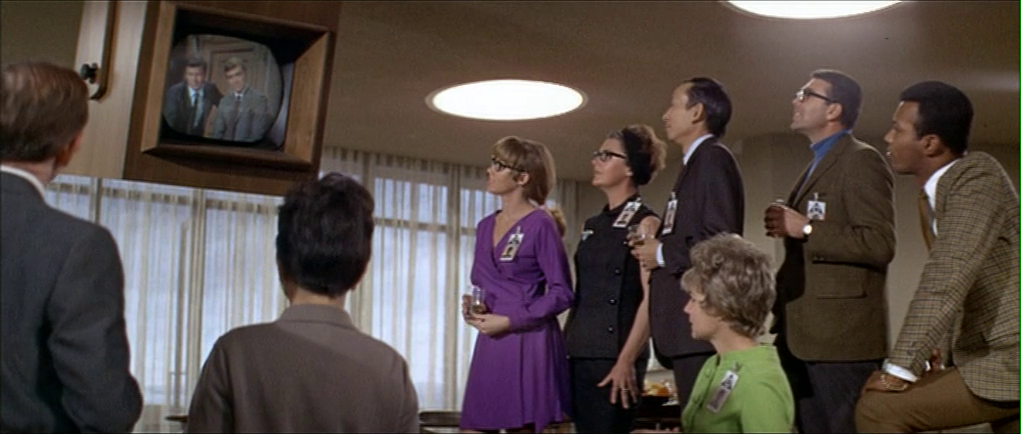
The virtual reality system is introduced at about 40 minutes, using the narrative device of a product demonstration within the company to explain to the attendees what it does. The scene is nicely done, conveying all the important points we need to know in two minutes. (To be clear, some of the images used here come from a later scene in the film, but it’s the same system in both.)

The process of entangling yourself with the necessary hardware and software is quite distinct from interacting with the VR itself, so let’s discuss these separately, starting with the physical interface.

Tom wearing VR headset and one glove, being scanned. Disclosure (1994)

In Disclosure the virtual reality user wears a headset and one glove, all connected by cables to the computer system. Like most virtual reality systems, the headset is responsible for visual display, audio, and head movement tracking; the glove for hand movement and gesture tracking. 

There are two “laser scanners” on the walls. These are the planar blue lights, which scan the user’s body at startup. After that they track body motion, although since the user still has to wear a glove, the scanners presumably just track approximate body movement and orientation without fine detail.

Lastly, the user stands on a concave hexagonal plate covered in embedded white balls, which allows the user to “walk” on the spot.

Closeup of user standing on curved surface of white balls. Disclosure (1994)

Searching for Evidence

The scene we’re most interested in takes place later in the film, the evening before a vital presentation which will determine Tom’s future. He needs to search the company computer files for evidence against Meredith, but discovers that his normal account has been blocked from access.   He knows though that the virtual reality demonstrator is on display in a nearby hotel suite, and also knows about the demonstrator having unlimited access. He sneaks into the hotel suite to use The Corridor. Tom is under a certain amount of time pressure because a couple of company VIPs and their guests are downstairs in the hotel and might return at any time.

The first step for Tom is to launch the virtual reality system. This is done from an Indy workstation, using the regular Unix command line.

The command line to start the virtual reality system. Disclosure (1994)

Next he moves over to the VR space itself. He puts on the glove but not the headset, presses a key on the keyboard (of the VR computer, not the workstation), and stands still for a moment while he is scanned from top to bottom.

Real world Tom, wearing one VR glove, waits while the scanners map his body. Disclosure (1994)

On the left is the Indy workstation used to start the VR system. In the middle is the external monitor which will, in a moment, show the third person view of the VR user as seen earlier during the product demonstration.

Now that Tom has been scanned into the system, he puts on the headset and enters the virtual space.

The Corridor: Virtual Interface

“The Corridor,” as you’ve no doubt guessed, is a three dimensional file browsing program. It is so named because the user will walk down a corridor in a virtual building, the walls lined with “file cabinets” containing the actual computer files.

Three important aspects of The Corridor were mentioned during the product demonstration earlier in the film. They’ll help structure our tour of this interface, so let’s review them now, as they all come up in our discussion of the interfaces.

  1. There is a voice-activated help system, which will summon a virtual “Angel” assistant.
  2. Since the computers themselves are part of a multi-user network with shared storage, there can be more than one user “inside” The Corridor at a time.
    Users who do not have access to the virtual reality system will appear as wireframe body shapes with a 2D photo where the head should be.
  3. There are no access controls and so the virtual reality user, despite being a guest or demo account, has unlimited access to all the company files. This is spectacularly bad design, but necessary for the plot.

With those bits of system exposition complete, now we can switch to Tom’s own first person view of the virtual reality environment.

Virtual world Tom watches his hands rezzing up, right hand with glove. Disclosure (1994)

There isn’t a real background yet, just abstract streaks. The avatar hands are rezzing up, and note that the right hand wearing the glove has a different appearance to the left. This mimics the real world, so eases the transition for the user.

Overlaid on the virtual reality view is a Digicom label at the bottom and four corner brackets which are never explained, although they do resemble those used in cameras to indicate the preferred viewing area.

To the left is a small axis indicator, the three green lines labeled X, Y, and Z. These show up in many 3D applications because, silly though it sounds, it is easy in a 3D computer environment to lose track of directions or even which way is up. A common fix for the user being unable to see anything is just to turn 180 degrees around.

We then switch to a third person view of Tom’s avatar in the virtual world.

Tom is fully rezzed up, within cloud of visual static. Disclosure (1994)

This is an almost photographic-quality image. To remind the viewers that this is in the virtual world rather than real, the avatar follows the visual convention described in chapter 4 of Make It So for volumetric projections, with scan lines and occasional flickers. An interesting choice is that the avatar also wears a “headset”, but it is translucent so we can see the face.

Now that he’s in the virtual reality, Tom has one more action needed to enter The Corridor. He pushes a big button floating before him in space.

Tom presses one button on a floating control panel. Disclosure (1994)

This seems unnecessary, but we can assume that in the future of this platform, there will be more programs to choose from.

The Corridor rezzes up, the streaks assembling into wireframe components which then slide together as the surfaces are shaded. Tom doesn’t have to wait for the process to complete before he starts walking, which suggests that this is a Level Of Detail (LOD) implementation where parts of the building are not rendered in detail until the user is close enough for it to be worth doing.

Tom enters The Corridor. Nearby floor and walls are fully rendered, the more distant section is not complete. Disclosure (1994)

The architecture is classical, rendered with the slightly artificial-looking computer shading that is common in 3D computer environments because it needs much less computation than trying for full photorealism.

Instead of a corridor this is an entire multistory building. It is large and empty, and as Tom is walking bits of architecture reshape themselves, rather like the interior of Hogwarts in Harry Potter.

Although there are paintings on some of the walls, there aren’t any signs, labels, or even room numbers. Tom has to wander around looking for the files, at one point nearly “falling” off the edge of the floor down an internal air well. Finally he steps into one archway room entrance and file cabinets appear in the walls.

Tom enters a room full of cabinets. Disclosure (1994)

Unlike the classical architecture around him, these cabinets are very modern looking with glowing blue light lines. Tom has found what he is looking for, so now begins to manipulate files rather than browsing.

Virtual Filing Cabinets

The four nearest cabinets according to the titles above are

  1. Communications
  2. Operations
  3. System Control
  4. Research Data.

There are ten file drawers in each. The drawers are unmarked, but labels only appear when the user looks directly at it, so Tom has to move his head to centre each drawer in turn to find the one he wants.

Tom looks at one particular drawer to make the title appear. Disclosure (1994)

The fourth drawer Tom looks at is labeled “Malaysia”. He touches it with the gloved hand and it slides out from the wall.

Tom withdraws his hand as the drawer slides open. Disclosure (1994)

Inside are five “folders” which, again, are opened by touching. The folder slides up, and then three sheets, each looking like a printed document, slide up and fan out.

Axis indicator on left, pointing down. One document sliding up from a folder. Disclosure (1994)

Note the tilted axis indicator at the left. The Y axis, representing a line extending upwards from the top of Tom’s head, is now leaning towards the horizontal because Tom is looking down at the file drawer. In the shot below, both the folder and then the individual documents are moving up so Tom’s gaze is now back to more or less level.

Close up of three “pages” within a virtual document. Disclosure (1994)

At this point the film cuts away from Tom. Rival executive Meredith, having been foiled in her first attempt at discrediting Tom, has decided to cover her tracks by deleting all the incriminating files. Meredith enters her office and logs on to her Indy workstation. She is using a Command Line Interface (CLI) shell, not the standard SGI Unix shell but a custom Digicom program that also has a graphical menu. (Since it isn’t three dimensional it isn’t interesting enough to show here.)

Tom uses the gloved hand to push the sheets one by one to the side after scanning the content.

Tom scrolling through the pages of one folder by swiping with two fingers. Disclosure (1994)

Quick note: This is harder than it looks in virtual reality. In a 2D GUI moving the mouse over an interface element is obvious. In three dimensions the user also has to move their hand forwards or backwards to get their hand (or finger) in the right place, and unless there is some kind of haptic feedback it isn’t obvious to the user that they’ve made contact.

Tom now receives a nasty surprise.

The shot below shows Tom’s photorealistic avatar at the left, standing in front of the open file cabinet. The green shape on the right is the avatar of Meredith who is logged in to a regular workstation. Without the laser scanners and cameras her avatar is a generic wireframe female humanoid with a face photograph stuck on top. This is excellent design, making The Corridor usable across a range of different hardware capabilities.

Tom sees the Meredith avatar appear. Disclosure (1994)

Why does The Corridor system place her avatar here? A multiuser computer system, or even just a networked file server,  obviously has to know who is logged on. Unix systems in general and command line shells also track which directory the user is “in”, the current working directory. Meredith is using her CLI interface to delete files in a particular directory so The Corridor can position her avatar in the corresponding virtual reality location. Or rather, the avatar glides into position rather than suddenly popping into existence: Tom is only surprised because the documents blocked his virtual view.

Quick note: While this is plausible, there are technical complications. Command line users often open more than one shell at a time in different directories. In such a case, what would The Corridor do? Duplicate the wireframe avatar in each location? In the real world we can’t be in more than one place at a time, would doing so contradict the virtual reality metaphor?

There is an asymmetry here in that Tom knows Meredith is “in the system” but not vice versa. Meredith could in theory use CLI commands to find out who else is logged on and whether anyone was running The Corridor, but she would need to actively seek out that information and has no reason to do so. It didn’t occur to Tom either, but he doesn’t need to think about it,  the virtual reality environment conveys more information about the system by default.

We briefly cut away to Meredith confirming her CLI delete command. Tom sees this as the file drawer lid emitting beams of light which rotate down. These beams first erase the floating sheets, then the folders in the drawer. The drawer itself now has a red “DELETED” label and slides back into the wall.

Tom watches Meredith deleting the files in an open drawer. Disclosure (1994)

Tom steps further into the room. The same red labels appear on the other file drawers even though they are currently closed.

Tom watches Meredith deleting other, unopened, drawers. Disclosure (1994)

Talking to an Angel

Tom now switches to using the system voice interface, saying “Angel I need help” to bring up the virtual reality assistant. Like everything else we’ve seen in this VR system the “angel” rezzes up from a point cloud, although much more quickly than the architecture: people who need help tend to be more impatient and less interested in pausing to admire special effects.

The voice assistant as it appears within VR. Disclosure (1994)

Just in case the user is now looking in the wrong direction the angel also announces “Help is here” in a very natural sounding voice.

The angel is rendered with white robe, halo, harp, and rapidly beating wings. This is horribly clichéd, but a help system needs to be reassuring in appearance as well as function. An angel appearing as a winged flying serpent or wheel of fire would be more original and authentic (yes, really: ​​Biblically Accurate Angels) but users fleeing in terror would seriously impact the customer satisfaction scores.

Now Tom has a short but interesting conversation with the angel, beginning with a question:

  • Tom
  • Is there any way to stop these files from being deleted?
  • Angel
  • I’m sorry, you are not level five.
  • Tom
  • Angel, you’re supposed to protect the files!
  • Angel
  • Access control is restricted to level five.

Tom has made the mistake, as described in chapter 9 Anthropomorphism of the book, of ascribing more agency to this software program than it actually has. He thinks he is engaged in a conversational interface (chapter 6 Sonic Interfaces) with a fully autonomous system, which should therefore be interested in and care about the wellbeing of the entire system. Which it doesn’t, because this is just a limited-command voice interface to a guide.

Even though this is obviously scripted, rather than a genuine error I think this raises an interesting question for real world interface designers: do users expect that an interface with higher visual quality/fidelity will be more realistic in other aspects as well? If a voice interface assistant has a simple polyhedron with no attempt at photorealism (say, like Bit in Tron) or with zoomorphism (say, like the search bear in Until the End of the World) will users adjust their expectations for speech recognition downwards? I’m not aware of any research that might answer this question. Readers?

Despite Tom’s frustration, the angel has given an excellent answer – for a guide. A very simple help program would have recited the command(s) that could be used to protect files against deletion. Which would have frustrated Tom even more when he tried to use one and got some kind of permission denied error. This program has checked whether the user can actually use commands before responding.

This does contradict the earlier VR demonstration where we were told that the user had unlimited access. I would explain this as being “unlimited read access, not write”, but the presenter didn’t think it worthwhile to go into such detail for the mostly non-technical audience.

Tom is now aware that he is under even more time pressure as the Meredith avatar is still moving around the room. Realising his mistake, he uses the voice interface as a query language.

“Show me all communications with Malaysia.”
“Telephone or video?”
“Video.”

This brings up a more conventional looking GUI window because not everything in virtual reality needs to be three-dimensional. It’s always tempting for a 3D programmer to re-implement everything, but it’s also possible to embed 2D GUI applications into a virtual world.

Tom looks at a conventional 2D display of file icons inside VR. Disclosure (1994)

The window shows a thumbnail icon for each recorded video conference call. This isn’t very helpful, so Tom again decides that a voice query will be much faster than looking at each one in turn.

“Show me, uh, the last transmission involving Meredith.”

There’s a short 2D transition effect swapping the thumbnail icon display for the video call itself, which starts playing at just the right point for plot purposes.

Tom watches a previously recorded video call made by Meredith (right). Disclosure (1994)

While Tom is watching and listening, Meredith is still typing commands. The camera orbits around behind the video conference call window so we can see the Meredith avatar approach, which also shows us that this window is slightly three dimensional, the content floating a short distance in front of the frame. The film then cuts away briefly to show Meredith confirming her “kill all” command. The video conference recordings are deleted, including the one Tom is watching.

Tom is informed that Meredith (seen here in the background as a wireframe avatar) is deleting the video call. Disclosure (1994)

This is also the moment when the downstairs VIPs return to the hotel suite, so the scene ends with Tom managing to sneak out without being detected.

Virtual reality has saved the day for Tom. The documents and video conference calls have been deleted by Meredith, but he knows that they once existed and has a colleague retrieve the files he needs from the backup tapes. (Which is good writing: the majority of companies shown in film and TV never seem to have backups for files, no matter how vital.) Meredith doesn’t know that he knows, so he has the upper hand to expose her plot.

Analysis

How believable is the interface?

I won’t spend much time on the hardware, since our focus is on file browsing in three dimensions. From top to bottom, the virtual reality system starts as believable and becomes less so.

Hardware

The headset and glove look like real VR equipment, believable in 1994 and still so today. Having only one glove is unusual, and makes impossible some of the common gesture actions described in chapter 5 of Make It So, which require both hands.

The “laser scanners” that create the 3D geometry and texture maps for the 3D avatar and perform real time body tracking would more likely be cameras, but that would not sound as cool.

And lastly the walking platform apparently requires our user to stand on large marbles or ball bearings and stay balanced while wearing a headset. Uh…maybe…no. Apologetics fails me. To me it looks like it would be uncomfortable to walk on, almost like deterrent paving.

Software

The Corridor, unlike the 3D file browser used in Jurassic Park, is a special effect created for the film. It was a mostly-plausible, near future system in 1994, except for the photorealistic avatar. Usually this site doesn’t discuss historical context (the  “new criticism” stance), but I think in this case it helps to explain how this interface would have appeared to audiences almost two decades ago.

I’ll start with the 3D graphics of the virtual building. My initial impression was that The Corridor could have been created as an interactive program in 1994, but that was my memory compressing the decade. During the 1990s 3D computer graphics, both interactive and CGI, improved at a phenomenal rate. The virtual building would not have been interactive in 1994, was possible on the most powerful systems six years later in 2000, and looks rather old-fashioned compared to what the game consoles of the 21st C can achieve.

For the voice interface I made the opposite mistake. Voice interfaces on phones and home computing appliances have become common in the second decade of the 21st C, but in reality are much older. Apple Macintosh computers in 1994 had text-to-speech synthesis with natural sounding voices and limited vocabulary voice command recognition. (And without needing an Internet connection!) So the voice interface in the scene is believable.

The multi-user aspects of The Corridor were possible in 1994. The wireframe avatars for users not in virtual reality are unflattering or perhaps creepy, but not technically difficult. As a first iteration of a prototype system it’s a good attempt to span a range of hardware capabilities.

The virtual reality avatar, though, is not believable for the 1990s and would be difficult today. Photographs of the body, made during the startup scan, could be used as a texture map for the VR avatar. But live video of the face would be much more difficult, especially when the face is partly obscured by a headset.

How well does the interface inform the narrative of the story?

The virtual reality system in itself is useful to the overall narrative because it makes the Digicom company seem high tech. Even in 1994 CD-ROM drives weren’t very interesting.

The Corridor is essential to the tension of the scene where Tom uses it to find the files, because otherwise the scene would be much shorter and really boring. If we ignore the virtual reality these are the interface actions:

  • Tom reads an email.
  • Meredith deletes the folder containing those emails.
  • Tom finds a folder full of recorded video calls.
  • Tom watches one recorded video call.
  • Meredith deletes the folder containing the video calls.

Imagine how this would have looked if both were using a conventional 2D GUI, such as the Macintosh Finder or MS Windows Explorer. Double click, press and drag, double click…done.

The Corridor slows down Tom’s actions and makes them far more visible and understandable. Thanks to the virtual reality avatar we don’t have to watch an actor push a mouse around. We see him moving and swiping, be surprised and react; and the voice interface adds extra emotion and some useful exposition. It also helps with the plot, giving Tom awareness of what Meredith is doing without having to actively spy on her, or look at some kind of logs or recordings later on.

Meredith, though, can’t use the VR system because then she’d be aware of Tom as well. Using a conventional workstation visually distinguishes and separates Meredith from Tom in the scene.

So overall, though the “action” is pretty mundane, it’s crucial to the plot, and the VR interface helps make this interesting and more engaging.

How well does the interface equip the character to achieve their goals?

As described in the film itself, The Corridor is a prototype for demonstrating virtual reality. As a file browser it’s awful, but since Tom has lost all his normal privileges this is the only system available, and he does manage to eventually find the files he needs.

At the start of the scene, Tom spends quite some time wandering around a vast multi-storey building without a map, room numbers, or even coordinates overlaid on his virtual view. Which seems rather pointless because all the files are in one room anyway. As previously discussed for Johnny Mnemonic, walking or flying everywhere in your file system seems like a good idea at first, but often becomes tedious over time. Many actual and some fictional 3D worlds give users the ability to teleport directly to any desired location.

Then the file drawers in each cabinet have no labels either, so Tom has to look carefully at each one in turn. There is so much more the interface could be doing to help him with his task, and even help the users of the VR demo learn and explore its technology as well.

Contrast this with Meredith, who uses her command line interface and 2D GUI to go through files like a chainsaw.

Tom becomes much more efficient with the voice interface. Which is just as well, because if he hadn’t, Meredith would have deleted the video conference recordings while he was still staring at virtual filing cabinets. However neither the voice interface nor the corresponding file display need three dimensional graphics.

There is hope for version 2.0 of The Corridor, even restricting ourselves to 1994 capabilities. The first and most obvious is to copy 2D GUI file browsers, or the 3D file browser from Jurassic Park, and show the corresponding text name next to each graphical file or folder object. The voice interface is so good that it should be turned on by default without requiring the angel. And finally add some kind of map overlay with a you are here moving dot, like the maps that players in 3D games such as Doom could display with a keystroke.

Film making challenge: VR on screen

Virtual reality (or augmented reality systems such as Hololens) provide a better viewing experience for 3D graphics by creating the illusion of real three dimensional space rather than a 2D monitor. But it is always a first person view and unlike conventional 2D monitors nobody else can usually see what the VR user is seeing without a deliberate mirroring/debugging display. This is an important difference from other advanced or speculative technologies that film makers might choose to include. Showing a character wielding a laser pistol instead of a revolver or driving a hover car instead of a wheeled car hardly changes how to stage a scene, but VR does.

So, how can we show virtual reality in film?

There’s the first-person view corresponding to what the virtual reality user is seeing themselves. (Well, half of what they see since it’s not stereographic, but it’s cinema VR, so close enough.) This is like watching a screencast of someone else playing a first person computer game, the original active experience of the user becoming passive viewing by the audience. Most people can imagine themselves in the driving seat of a car and thus make sense of the turns and changes of speed in a first person car chase, but the film audience probably won’t be familiar with the VR system depicted and will therefore have trouble understanding what is happening. There’s also the problem that viewing someone else’s first-person view, shifting and changing in response to their movements rather than your own, can make people disoriented or nauseated.

A third-person view is better for showing the audience the character and the context in which they act. But not the diegetic real-world third-person view, which would be the character wearing a geeky headset and poking at invisible objects. As seen in Disclosure, the third person view should be within the virtual reality.

But in doing that, now there is a new problem: the avatar in virtual reality representing the real character. If the avatar is too simple the audience may not identify it with the real world character and it will be difficult to show body language and emotion. More realistic CGI avatars are increasingly expensive and risk falling into the Uncanny Valley. Since these films are science fiction rather than factual, the easy solution is to declare that virtual reality has achieved the goal of being entirely photorealistic and just film real actors and sets. Adding the occasional ripple or blur to the real world footage to remind the audience that it’s meant to be virtual reality, again as seen in Disclosure, is relatively cheap and quick.
So, solving all these problems results in the cinematic trope we can call Extradiegetic Avatars, which are third-person, highly-lifelike “renderings” of characters, with a telltale Hologram Projection Imperfection for audience readability, that may or may not be possible within the world of the film itself.

Thanatorium: “Beneficiaries” only

In the subsequent post of the Soylent Green reviews, I’m going to talk about the design of the viewing room and the interface there. But first I need to talk about the design of something outside the viewing room. When Thorn enters the building and tells the staff there to take him to Sol, who is there to commit suicide, they pass a label on the wall reading “beneficiaries only.” This post is about the heavy worldbuilding provided by the choice of that one word, “beneficiaries.”

Here let me repeat my mantra that suicide is not an easy topic. Anyone who is considering or dealing with suicide to please stop reading this and talk to someone about it. I am unqualified to address—and this blog is not the place to work through—such issues.

It’s totally weird to call the people witnessing the suicide “beneficiaries,” right? Like their defining characteristic is that they get something out of the death? That’s crass. Shouldn’t they be called “loved ones” or something more sensitive?

To answer that question, we need to talk about Reverend Thomas Robert Malthus, seen here in a still from the movie.

Just to be clear, this is not an actual still. This is a Midjourney image.

In 1798, this clergyman anonymously published a book called An Essay on the Principle of Population, Chapter 11 of which describes what has come to be known as a Malthusian Crisis. This happens when a given population, which tends to grow exponentially, surpasses its ability to feed itself, which tends to grow linearly. The result is a period of strife, starvation, and warfare where the population numbers “correct themselves” back down to what can be sustained.

It would be irresponsible of me to invoke Malthus without pointing out that many people have taken this argument to dark and unethical conclusions—specifically almost always some sort of top-down population control with anti-poor, racist, or genocidal undertones. Sometimes overtones. Compare freely the English Poor Laws as they were curtailed by the Poor Law Amendment Act of 1834, the British government’s approach to famine in Ireland and India, social Darwinism, eugenics, the Holocaust, India’s forced sterilizations, China’s former one-child policy, and a lot of knee-jerk conservatism today. “iF We hElP ThE PoOr, It oNlY EnCoUrAgEs tHeM To hAvE MoRe cHiLdReN AnD ThErEbY ExAcErBaTe pOvErTy!” You may recognize echoes of this oversimplification from some recent indie sci-fi.

Though this gives me the opportunity to link to the Half-Earth Project. Hat tip mashable.

And I would be remiss if I didn’t make mention of the number of times Malthus has been been debunked. Scientific American did it. Forbes did it. These guys did it. Lots of people have done it. In short, we are not herds of helpless animals subject to brutal laws of nature. We think. We can invent industries and institutions and technologies that help us reduce waste, feed more, and more fairly distribute resources. We can raise people out of poverty with democracy, access to birth control, education, supply-chain citizenship, the empowerment of women, and even increasing vegetarian choices in diet. Had Malthus been able to predict Norman Borlaug and The Green Revolution, he would have quietly tossed his manuscript into the fire.

Anyway, the reason I bring all this up is because Soylent Green seems to be conceived as a Malthusian Crisis writ large. Given its timing I wouldn’t be surprised if writer Stanley R Greenberg had read himself some Paul Ehrlich, felt a panicked inspiration, and then grabbed his typewriter. The movie cites other factors, like climate change, that lead to its crisis; and illustrates contributing factors, like inequality, that exacerbate it. But with the titular green being food and the set decoration being mostly sweating extras lying about, the movie is a neon sign built to point at questions of feeding an overpopulated planet.

Which takes us back to that label outside the viewing room.


We’re all beneficiaries of that costume and set design. /s

One of the Malthusian levers to address the problem is systemically reducing the population. Speedy, public suicide services would be one of the tools by which a society could do that. And though this society does not go as far as Children of Men did (which placed ads for the suicide kits called Quietus throughout British cityscapes), characters in Soylent Green do speak about the “death benefit” several times in the movie. This points to survivors getting some payout when citizens suicide. Want to kill yourself? The government will pay your loved ones!

So though it might be seen as a poor, crass choice to refer to loved ones who are witnessing a suicide as “beneficiaries,” this framing within the diegesis helps encourage the act, by subtly implying though its choice of language that the loved ones are not there to witness an act of selfish escape as much as an act of kindness, both for their loved ones and the world.

Even the font of this wall sign—which looks like the least sci-fi typeface of all time: Clarendon—does not speak of sci-fi-ness, but of friendliness, early advertising, and 19th century broadsides. It nefariously adds a veneer of friendliness to what amounts to a murderous propaganda.

Naming is a narrative design choice, and the right name can do a lot of worldbuilding in a very small space, even if it’s misguided and driven by the popular panic of its times.

Sci-fi Spacesuits: Identification

Spacesuits are functional items, built largely identically to each other, adhering to engineering specifications rather than individualized fashion. A resulting problem is that it might be difficult to distinguish between multiple, similarly-sized individuals wearing the same suits. This visual identification problem might be small in routine situations:

  • (Inside the vehicle:) Which of these suits it mine?
  • What’s the body language of the person currently speaking on comms?
  • (With a large team performing a manual hull inspection:) Who is that approaching me? If it’s the Fleet Admiral I may need to stand and salute.

But it could quickly become vital in others:

  • Who’s body is that floating away into space?
  • Ensign Smith just announced they have a tachyon bomb in their suit. Which one is Ensign Smith?
  • Who is this on the security footage cutting the phlebotinum conduit?

There a number of ways sci-fi has solved this problem.

Name tags

Especially in harder sci-fi shows, spacewalkers have a name tag on the suit. The type is often so small that you’d need to be quite close to read it, and weird convention has these tags in all-capital letters even though lower-case is easier to read, especially in low light and especially at a distance. And the tags are placed near the breast of the suit, so the spacewalker would also have to be facing you. So all told, not that useful on actual extravehicular missions.

Faces

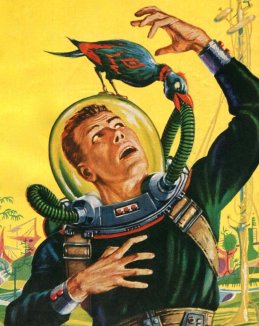
Screen sci-fi usually gets around the identification problem by having transparent visors. In B-movies and sci-fi illustrations from the 1950s and 60s, the fishbowl helmet was popular, but of course offering little protection, little light control, and weird audio effects for the wearer. Blockbuster movies were mostly a little smarter about it.

1950s Sci-Fi illustration by Ed Emshwiller
c/o Diane Doniol-Valcroze

Seeing faces allows other spacewalkers/characters (and the audience) to recognize individuals and, to a lesser extent, how their faces synch with their voice and movement. People are generally good at reading the kinesics of faces, so there’s a solid rationale for trying to make transparency work.

Face + illumination

As of the 1970s, filmmakers began to add interior lights that illuminate the wearer’s face. This makes lighting them easier, but face illumination is problematic in the real world. If you illuminate the whole face including the eyes, then the spacewalker is partially blinded. If you illuminate the whole face but not the eyes, they get that whole eyeless-skull effect that makes them look super spooky. (Played to effect by director Scott and cinematographer Vanlint in Alien, see below.)

Identification aside: Transparent visors are problematic for other reasons. Permanently-and-perfectly transparent glass risks the spacewalker getting damage from infrared lights or blinded from sudden exposure to nearby suns, or explosions, or engine exhaust ports, etc. etc. This is why NASA helmets have the gold layer on their visors: it lets in visible light and blocks nearly all infrared.

Astronaut Buzz Aldrin walks on the surface of the moon near the leg of the lunar module Eagle during the Apollo 11 mission.

Image Credit: NASA (cropped)

Only in 2001 does the survey show a visor with a manually-adjustable translucency. You can imagine that this would be more safe if it was automatic. Electronics can respond much faster than people, changing in near-real time to keep sudden environmental illumination within safe human ranges.

You can even imagine smarter visors that selectively dim regions (rather than the whole thing), to just block out, say, the nearby solar flare, or to expose the faces of two spacewalkers talking to each other, but I don’t see this in the survey. It’s mostly just transparency and hope nobody realizes these eyeballs would get fried.

So, though seeing faces helps solve some of the identification problem, transparent enclosures don’t make a lot of sense from a real-world perspective. But it’s immediate and emotionally rewarding for audiences to see the actors’ faces, and with easy cinegenic workarounds, I suspect identification-by-face is here in sci-fi for the long haul, at least until a majority of audiences experience spacewalking for themselves and realize how much of an artistic convention this is.

Color

Other shows have taken the notion of identification further, and distinguished wearers by color. Mission to Mars, Interstellar, and Stowaway did this similar to the way NASA does it, i.e. with colored bands around upper arms and sometimes thighs.

Destination Moon, 2001: A Space Odyssey, and Star Trek (2009) provided spacesuits in entirely different colors. (Star Trek even equipped the suits with matching parachutes, though for the pedantic, let’s acknowledge these were “just” upper-atmosphere suits.)The full-suit color certainly makes identification easier at a distance, but seems like it would be more expensive and introduce albedo differences between the suits.

One other note: if the visor is opaque and characters are only relying on the color for identification, it becomes easier for someone to don the suit and “impersonate” its usual wearer to commit spacewalking crimes. Oh. My. Zod. The phlebotinum conduit!

According to the Colour Blind Awareness organisation, blindness (color vision deficiency) affects approximately 1 in 12 men and 1 in 200 women in the world, so is not without its problems, and might need to be combined with bold patterns to be more broadly accessible.

What we don’t see

Heraldry

Blog from another Mog Project Rho tells us that books have suggested heraldry as space suit identifiers. And while it could be a device placed on the chest like medieval suits of armor, it might be made larger, higher contrast, and wraparound to be distinguishable from farther away.

Directional audio

Indirect, but if the soundscape inside the helmet can be directional (like a personal Surround Sound) then different voices can come from the direction of the speaker, helping uniquely identify them by position. If there are two close together and none others to be concerned about, their directions can be shifted to increase their spatial distinction. When no one is speaking leitmotifs assigned to each other spacewalker, with volumes corresponding to distance, could help maintain field awareness.

HUD Map

Gamers might expect a map in a HUD that showed the environment and icons for people with labeled names.

Search

If the spacewalker can have private audio, shouldn’t she just be able to ask, “Who’s that?” while looking at someone and hear a reply or see a label on a HUD? It would also be very useful if I’ve spacewalker could ask for lights to be illuminated on the exterior of another’s suit. Very useful if that other someone is floating unconscious in space.

Mediated Reality Identification

Lastly I didn’t see any mediated reality assists: augmented or virtual reality. Imagine a context-aware and person-aware heads-up display that labeled the people in sight. Technological identification could also incorporate in-suit biometrics to avoid the spacesuit-as-disguise problem. The helmet camera confirms that the face inside Sargeant McBeef’s suit is actually that dastardly Dr. Antagonist!

We could also imagine that the helmet could be completely enclosed, but be virtually transparent. Retinal projectors would provide the appearance of other spacewalkers—from live cameras in their helmets—as if they had fishbowl helmets. Other information would fit the HUD depending on the context, but such labels would enable identification in a way that is more technology-forward and cinegenic. But, of course, all mediated solutions introduce layers of technology that also introduces more potential points of failure, so not a simple choice for the real-world.

Oh, that’s right, he doesn’t do this professionally.

So, as you can read, there’s no slam-dunk solution that meets both cinegenic and real-world needs. Given that so much of our emotional experience is informed by the faces of actors, I expect to see transparent visors in sci-fi for the foreseeable future. But it’s ripe for innovation.

Wakandan tattoo

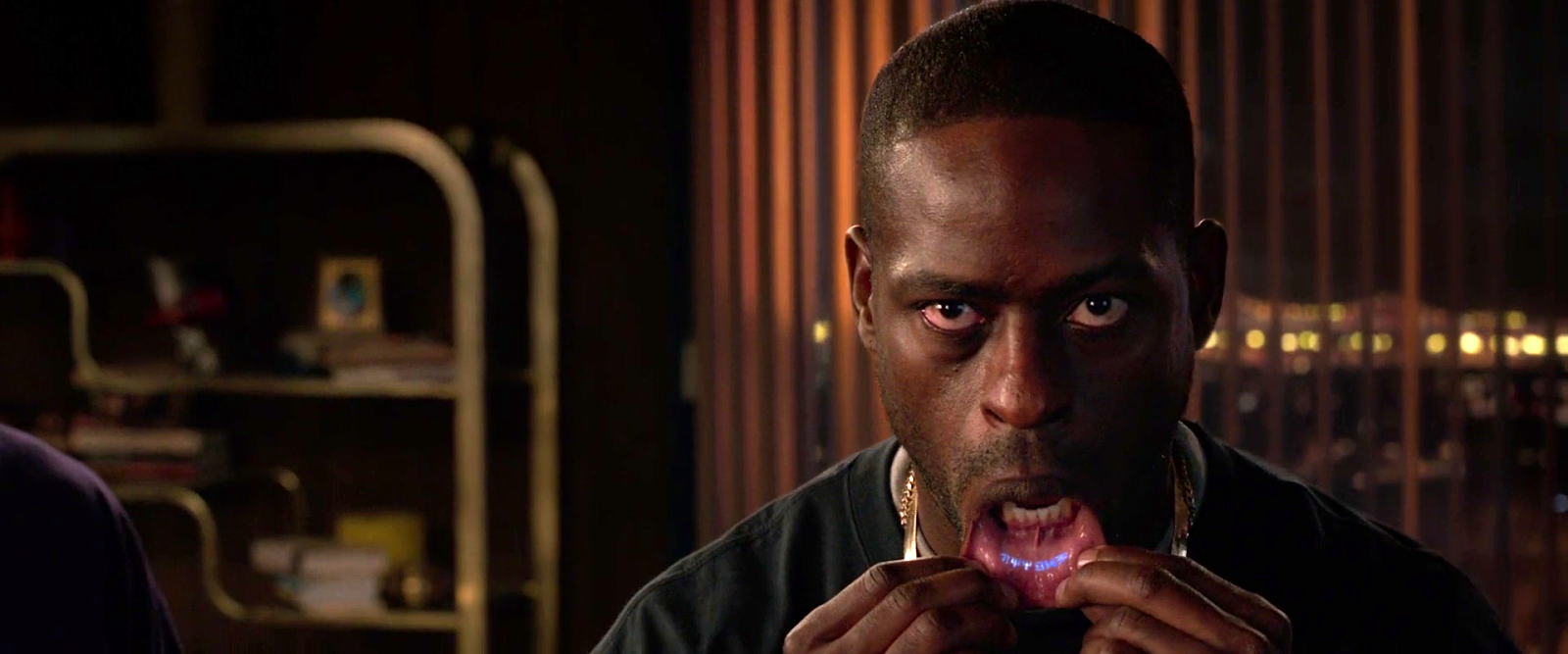
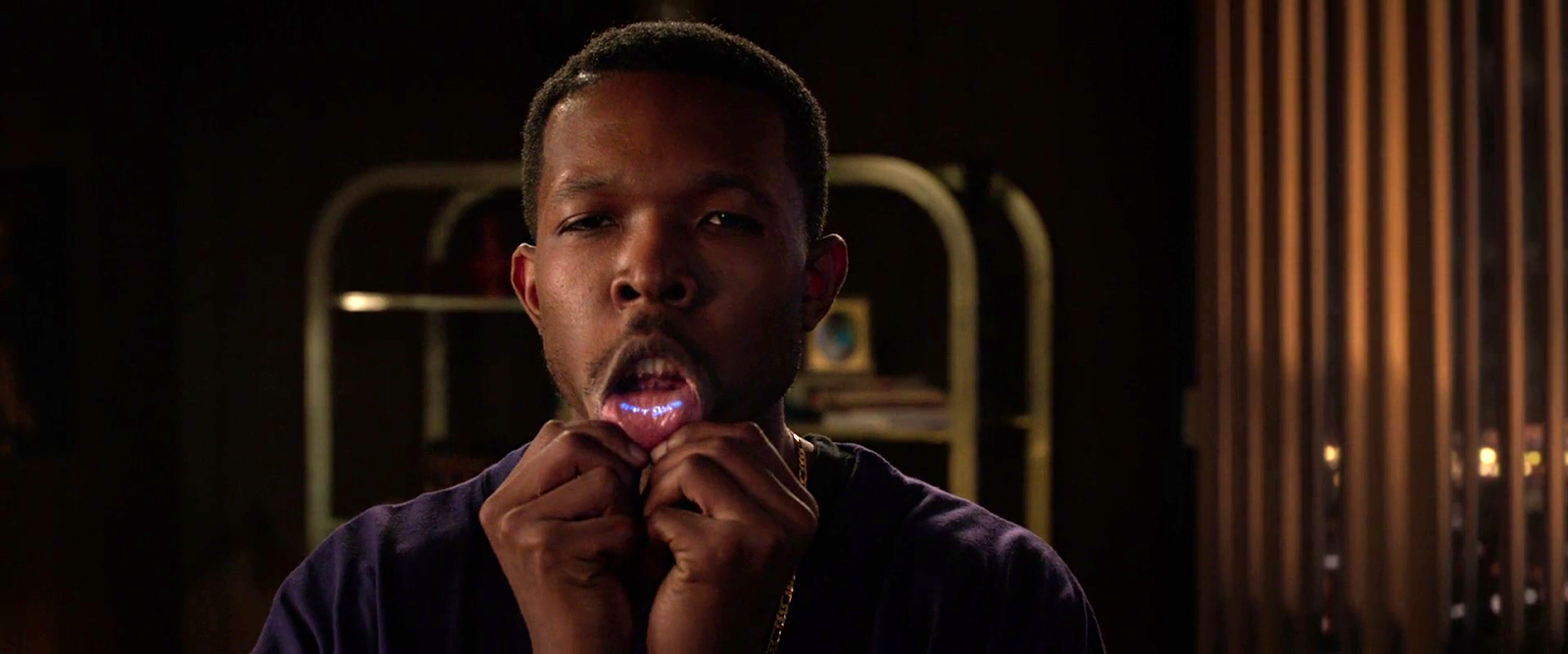
When I saw King Tchalla’s brother pull his lip down to reveal his glowing blue, vibranium-powered Wakandan tattoo, the body modification evoked for me the palpable rush of ancestral memories and spiritual longing for a Black utopia, an uncolonized land and body that Black American spirituals have envisioned (what scholars call sonic utopias.) 

The lip tattoo is a brilliant bit of worldbuilding. The Wakandan diaspora is, at this point in the movie, a sort of secret society. Having a glowing tattoo shows that the mark is genuine (one presumes it could only be produced with vibranium and therefore not easily forged). Placing it inside the lip means it is ordinarily concealed, and, because of the natural interface of the body, it is easy to reveal. Lastly, it must be a painful spot to tattoo, so shows by way of inference how badass the Wakandan culture is. But it’s more than good worldbuilding to me.

The Black Panther film tattoo electrifies my imagination because it combines both chemical augmentation and amplifies the African identity of being a Wakandan in this story. I think the film could have had even more backstory around the tattoo as a right of passage and development of it in the film. Is it embedded at birth? Or is there a coming of age ceremony associated with it? It would have been cool to see the lip tattoo as a smart tattoo with powers to communicate with other devices and even as a communication device to speak or subvocalize thoughts and desires.

How can we imagine the Wakandan tattoo for the future? I co-designed Afro-Rithms From The Future, an imagination game for creating a dynamic, engaging, and safe space for a community to imagine possible worlds using ordinary objects as inspirations to rethink existing organizational, institutional, and societal relationships. In our launch of the game at the Afrofutures Festival last year at the foresight consultancy Institute For The Future, the winner by declaration was Reina Robinson, a woman who imagined a tattoo that represented one’s history and could be scanned to receive reparation funds to redress and heal the trauma of slavery. 

Doreen Garner is a tattoo artist in Brooklyn who acknowledges that tattooing is “a violent act,” but reframes it in her work as an act of healing. She guides her client-patients through this process. Garner began the Black Panther Tattoo Project in January 2019 on MLK Day. She views the Black Panther tattoo as reclaiming pride as solidarity through a shared image. It represents Black pride and “unapologetic energy that we all need to be expressing right now.” Tattooing is a meditative exercise for her as she makes “a lot of the same marks,” and fills in the same spaces for her Black Panther Tattoo project clientele. When folx are at a concert, party, or panel—and recognize their shared image—they can link up to share their experiences. 

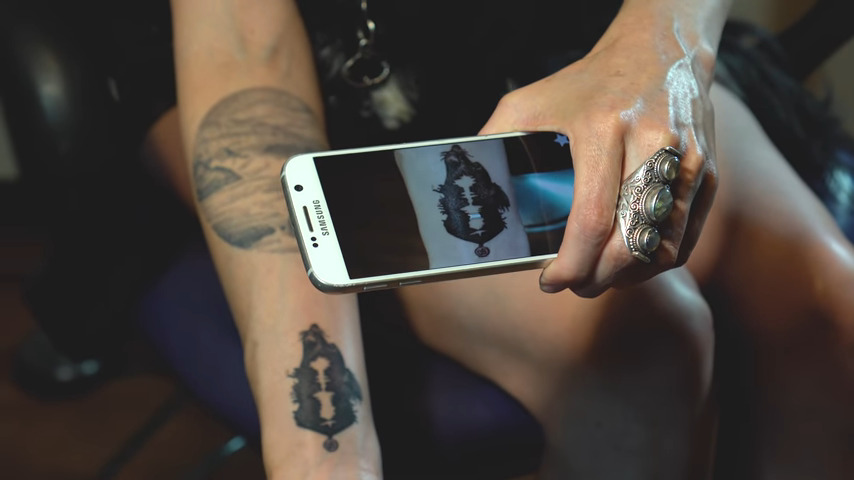
What if this were a smart tattoo where you could hear the tattoo as sound? Right now, the tech outfit Skin Motion can make your tattoo hearable “by pointing the camera on a mobile device at the tattoo,” where you’ll be able to hear the tattoo playback an audio recording. 

Garner, speaking as a Black female tattoo artist, exhorts future artists, “don’t be held back” by thinking that it is a white, male-dominated profession. “White people did not invent tattooing as a practice, because it belongs to us.” They are not the masters. There are many masters of tattooing across cultures.

One example: Yoruba tribal marks. (Apologies for the shitpic.)

The Wakandan tattoo as an ancestral marker reflects a centuries-old tradition in African culture. In Black Panther we see the tattoo as a bold, embedded pillar of Wakandan unity, powerfully inviting us to imagine how tattoos may evolve in the future.

Black Futures Matter

Each post in the Black Panther review is followed by actions that you can take to support Black lives. For this post, support the Black Speculative Arts Movement (BSAM): Sign up for their updates. The organization sends email notifications about special launches, network actions, programs, and partnerships. Being connected to the network is one way to stay unified and support BSAM work. Look out for the launch of the California BSAM regional hub network soon. Listen to the Afrofuturist Podcast with host Ahmed Best as well where Black Futures Matter.  

Upcoming BSAM event

On Aug. 17, join BSAM’s Look For Us in the Whirlwind event as it celebrates the Pan-African legacy of Marcus Garvey.

A Virtual Global Gathering of Afrofuturists and Pan-Afrikanists

This event is a global Pan-African virtual gathering to honour Marcus M. Garvey Jr.’s legacy. It will feature a keynote from Dr. Julius W. Garvey, the youngest son of Marcus and Amy Jacques Garvey.

VID-PHŌN

At around the midpoint of the movie, Deckard calls Rachel from a public videophone in a vain attempt to get her to join him in a seedy bar. Let’s first look at the device, then the interactions, and finally take a critical eye to this thing.

The panel

The lower part of the panel is a set of back-lit instructions and an input panel, which consists of a standard 12-key numeric input and a “start” button. Each of these momentary pushbuttons are back-lit white and have a red outline.

In the middle-right of the panel we see an illuminated orange logo panel, bearing the Saul Bass Bell System logo and the text reading, “VID-PHŌN” in some pale yellow, custom sans-serif logotype. The line over the O, in case you are unfamiliar, is a macron, indicating that the vowel below should be pronounced as a long vowel, so the brand should be pronounced “vid-phone” not “vid-fahn.”

In the middle-left there is a red “transmitting” button (in all lower case, a rarity) and a black panel that likely houses the camera and microphone. The transmitting button is dark until he interacts with the 12-key input, see below.

At the top of the panel, a small cathode-ray tube screen at face height displays data before and after the call as well as the live video feed during the call. All the text on the CRT is in a fixed-width typeface. A nice bit of worldbuilding sees this screen covered in Sharpie graffiti.

The interaction

His interaction is straightforward. He approaches the nook and inserts a payment card. In response, the panel—including its instructions and buttons—illuminates. A confirmation of the card holder’s identity appears in the in the upper left of the CRT, i.e. “Deckard, R.,” along with his phone number, “555-6328” (Fun fact: if you misdialed those last four numbers you might end up talking to the Ghostbusters) and some additional identifying numbers.

A red legend at the bottom of the CRT prompts him to “PLEASE DIAL.” It is outlined with what look like ASCII box-drawing characters. He presses the START button and then dials “555-7583” on the 12-key. As soon as the first number is pressed, the “transmitting” button illuminates. As he enters digits, they are simultaneously displayed for him on screen.

His hands are not in-frame as he commits the number and the system calls Rachel. So whether he pressed an enter key, #, or *; or the system just recognizes he’s entered seven digits is hard to say.

After their conversation is complete, her live video feed goes blank, and TOTAL CHARGE $1.25, is displayed for his review.

Chapter 10 of the book Make It So: Interaction Design Lessons from Science Fiction is dedicated to Communication, and in this post I’ll use the framework I developed there to review the VID-PHŌN, with one exception: this device is public and Deckard has to pay to use it, so he has to specify a payment method, and then the system will report back total charges. That wasn’t in the original chapter and in retrospect, it should have been.

Ergonomics

Turns out this panel is just the right height for Deckard. How do people of different heights or seated in a wheelchair fare? It would be nice if it had some apparent ability to adjust for various body heights. Similarly, I wonder how it might work for differently-abled users, but of course in cinema we rarely get to closely inspect devices for such things.

Activating

Deckard has to insert a payment card before the screen illuminates. It’s nice that the activation entails specifying payment, but how would someone new to the device know to do this? At the very least there should be some illuminated call to action like “insert payment card to begin,” or better yet some iconography so there is no language dependency. Then when the payment card was inserted, the rest of the interface can illuminate and act as a sort of dial-tone that says, “OK, I’m listening.”

Specifying a recipient: Unique Identifier

In Make It So, I suggest five methods of specifying a recipient: fixed connection, operator, unique identifier, stored contacts, and global search. Since this interaction is building on the experience of using a 1982 public pay phone, the 7-digit identifier quickly helps audiences familiar with American telephone standards understand what’s happening. So even if Scott had foreseen the phone explosion that led in 1994 to the ten-digit-dialing standard, or the 2053 events that led to the thirteen-digital-dialing standard, it would have likely have confused audiences. So it would have slightly risked the read of this scene. It’s forgivable.

Page 204–205 in the PDF and dead tree versions.

I have a tiny critique over the transmitting button. It should only turn on once he’s finished entering the phone number. That way they’re not wasting bandwidth on his dialing speed or on misdials. Let the user finish, review, correct if they need to, and then send. But, again, this is 1982 and direct entry is the way phones worked. If you misdialed, you had to hang up and start over again. Still, I don’t think having the transmitting light up after he entered the 7th digit would have caused any viewers to go all hruh?

There are important privacy questions to displaying a recipient’s number in a way that any passer-by can see. Better would have been to mount the input and the contact display on a transverse panel where he could enter and confirm it with little risk of lookie-loos and identity theives.

Audio & Video

Hopefully, when Rachel received the call, she was informed who it was and that the call was coming from a public video phone. Hopefully it also provided controls for only accepting the audio, in case she was not camera-ready, but we don’t see things from her side in this scene.

Gaze correction is usually needed in video conversation systems since each participant naturally looks at the center of the screen and not at the camera lens mounted somewhere next to its edge. Unless the camera is located in the center of the screen (or the other person’s image on the screen), people would not be “looking” at the other person as is almost always portrayed. Instead, their gaze would appear slightly off-screen. This is a common trope in cinema, but one which we’re become increasingly literate in, as many of us are working from home much more and gaining experience with videoconferencing systems, so it’s beginning to strain suspension of disbelief.

Also how does the sound work here? It’s a noisy street scene outside of a cabaret. Is it a directional mic and directional speaker? How does he adjust the volume if it’s just too loud? How does it remain audible yet private? Small directional speakers that followed his head movements would be a lovely touch.

And then there’s video privacy. If this were the real world, it would be nice if the video had a privacy screen filter. That would have the secondary effect of keeping his head in the right place for the camera. But that is difficult to show cinemagentically, so wouldn’t work for a movie.

Ending the call

Rachel leans forward to press a button on her home video phone end her part of the call. Presumably Deckard has a similar button to press on his end as well. He should be able to just yank his card out, too.

The closing screen is a nice touch, though total charges may not be the most useful thing. Are VID-PHŌN calls a fixed price? Then this information is not really of use to him after the call as much as it is beforehand. If the call has a variable cost, depending on long distance and duration, for example, then he would want to know the charges as the call is underway, so he can wrap things up if it’s getting too expensive. (Admittedly the Bell System wouldn’t want that, so it’s sensible worldbuilding to omit it.) Also if this is a pre-paid phone card, seeing his remaining balance would be more useful.

But still, the point was that total charges of $1.25 was meant to future-shocked audiences of the time, since public phone charges in the United States at the time were $0.10. His remaining balance wouldn’t have shown that and not had the desired effect. Maybe both? It might have been a cool bit of worldbuilding and callback to build on that shock to follow that outrageous price with “Get this call free! Watch a video of life in the offworld colonies! Press START and keep your eyes ON THE SCREEN.”

Because the world just likes to hurt Deckard.

Deckard’s Front Door Key

I’m sorry. I could have sworn in advance that this would be a very quick post. One or two paragraphs.

  • Narrator
  • It wasn’t.

Exiting his building’s elevator, Deckard nervously pulls a key to his apartment from his wallet. The key is similar to a credit card. He inserts one end into a horizontal slot above the doorknob, and it quickly *beeps*, approving the key. He withdraws the key and opens the door.

The interaction…

…is fine, mostly. This is like a regular key, i.e. a physical token that is presented to the door to be read, and access granted or denied. If the interaction took longer than 0.1 second it would be important to indicate that the system was processing input, but it happens nearly instantaneously in the scene.

A complete review would need to evaluate other use cases.

  • How does it help users recover when the card is inserted incorrectly?
  • How does it reject a user when it is not the right key or the key has degraded too far to be read?

But of what we do see: the affordance is clear, being associated with the doorknob. The constraints help him know the card goes in lengthwise. The arrows help indicate which way is up and the proper orientation of the card. It could be worse.

A better interaction might arguably be no interaction, where he can just approach the door, and a key in his pocket is passively read, and he can just walk through. It would still need a second factor for additional security, and thinking through the exception use cases; but even if we nailed it, the new scene wouldn’t give him something to nervously fumble because Rachel is there, unnerving him. That’s a really charming character moment, so let’s give it a pass for the movie.

Accessibility

A small LED would help it be more accessible to deaf users to know if the key has been accepted or rejected.

The printing

The key has some printing on it. It includes the set of five arrows pointing the direction the key must be inserted. Better would be a key that either used physical constraints to make it impossible to insert the card incorrectly or to build the technology such that it could be read in any way it is inserted.

The rest of the card has numerals printed in MICR and words printed in a derived-from-MICR font like Data70. (MICR proper just has numerals.) MICR was designed such that the blobs on the letterforms, printed in magnetic ink, would be more easily detectible by a magnetic reader. It was seen as “computery” in the 1970s and 1980s (maybe still to some degree today) but does not make a lot of sense here when that part of the card is not available to the reader.

Privacy

Also on the key is his name, R. DECKARD. This might be useful to return the key to its rightful owner, but like the elevator passphrase, it needlessly shares personally identifiable information of its owner. A thief who found this key could do some social hacking with the name and gain access to his apartment. There is another possible solution for getting the key back to him if lost, discussed below.

The numbers underneath his name are hard to read, but a close read of the still frame and correlation across various prop recreations seem to agree it reads

015 91077
VP45 66-4020

While most of this looks like nonsense, the five-digit number in the upper right is obviously a ZIP code, which resolves to Arcadia, California, which is a city in Los Angeles county, where Blade Runner is meant to take place.

Though a ZIP code describes quite a large area, between this and the surname, it’s providing a potential identity thief too much.

Return if found?

There are also some Japanese characters and numbers on the graphic beneath his thumb. It’s impossible to read in the screen grab.

If I was consulting on this, I’d recommend—after removing the ZIP code—that this be how to return they key if it is found, so that it could be forwarded, by the company, to the owner. All the company would have to do is cross-reference the GUID on the key to the owner. It would be a nice nod to the larger world.

(Repeated for easy reference.)

The holes

You can see there are also holes punched in the card. (re: the light dots in the shadow in the above still.) They must not be used in this interaction because his thumb is covering so much of them. They might provide an additional layer of data, like the early mechanical key card systems. This doesn’t satisfy either of the other aspects of multifactor authentication, though, since it’s still part of the same physical token.

This…this is altered.

I like to think this is evidence that this card works something like a Multipass from The Fifth Element, providing identity for a wide variety of services which may have different types of readers. We just don’t see it in the film.

Security

Which brings us, as so many things do in sci-fi interfaces, back to multi-factor authentication. The door would be more secure if it required two of the three factors. (Thank you Seth Rosenblatt and Jason Cipriani for this well-worded rule-of-thumb)

  • Knowledge (something the user and only the user knows)
  • Possession (something the user and only the user has)
  • Inherence (something the user and only the user is)

The key counts as a possession factor. Given the scene just before in the elevator, the second factor could be another voiceprint for inherence. It might be funny to have him say the same phrase I suggested in that post, “Have you considered life in the offworld colonies?” with more contempt or even embarrassment that he has to say something that demeaning in front of Rachel.

Now, I’d guess most people in the audience secure their own homes simply with a key. More security is available to anyone with the money, but economics and the added steps for daily usage prevent us from adopting more. So, adding second factor, while more secure, might read to the audience as an indicator of wealth, paranoia, or of living in a surveillance state, none of which would really fit Blade Runner or Deckard. But I would be remiss if I didn’t mention it.

8 Reasons The Voight-Kampff Machine is shit (and a redesign to fix it)

Distinguishing replicants from humans is a tricky business. Since they are indistinguishable biologically, it requires an empathy test, during which the subject hears empathy-eliciting scenarios and watched carefully for telltale signs such as, “capillary dilation—the so-called blush response…fluctuation of the pupil…involuntary dilation of the iris.” To aid the blade runner in this examination, they use a portable machine called the Voight-Kampff machine, named, presumably, for its inventors.

The device is the size of a thick laptop computer, and rests flat on the table between the blade runner and subject. When the blade runner prepares the machine for the test, they turn it on, and a small adjustable armature rises from the machine, the end of which is an intricate piece of hardware, housing a powerful camera, glowing red.

The blade runner trains this camera on one of the subject’s eyes. Then, while reading from the playbook book of scenarios, they keep watch on a large monitor, which shows an magnified image of the subject’s eye. (Ostensibly, anyway. More on this below.) A small bellows on the subject’s side of the machine raises and lowers. On the blade runner’s side of the machine, a row of lights reflect the volume of the subject’s speech. Three square, white buttons sit to the right of the main monitor. In Leon’s test we see Holden press the leftmost of the three, and the iris in the monitor becomes brighter, illuminated from some unseen light source. The purpose of the other two square buttons is unknown. Two smaller monochrome monitors sit to the left of the main monitor, showing moving but otherwise inscrutable forms of information.

In theory, the system allows the blade runner to more easily watch for the minute telltale changes in the eye and blush response, while keeping a comfortable social distance from the subject. Substandard responses reveal a lack of empathy and thereby a high probability that the subject is a replicant. Simple! But on review, it’s shit. I know this is going to upset fans, so let me enumerate the reasons, and then propose a better solution.

-2. Wouldn’t a genetic test make more sense?

If the replicants are genetically engineered for short lives, wouldn’t a genetic test make more sense? Take a drop of blood and look for markers of incredibly short telomeres or something.

-1. Wouldn’t an fMRI make more sense?

An fMRI would reveal empathic responses in the inferior frontal gyrus, or cognitive responses in the ventromedial prefrontal gyrus. (The brain structures responsible for these responses.) Certinaly more expensive, but more certain.

0. Wouldn’t a metal detector make more sense?

If you are testing employees to detect which ones are the murdery ones and which ones aren’t, you might want to test whether they are bringing a tool of murder with them. Because once they’re found out, they might want to murder you. This scene should be rewritten such that Leon leaps across the desk and strangles Holden, IMHO. It would make him, and other blade runners, seem much more feral and unpredictable.

(OK, those aren’t interface issues but seriously wtf. Onward.)

1. Labels, people

Controls needs labels. Especially when the buttons have no natural affordance and the costs of experimentation to discover the function are high. Remembering the functions of unlabeled controls adds to the cognitive load for a user who should be focusing on the person across the table. At least an illuminated button helps signal the state, so that, at least, is something.

 2. It should be less intimidating

The physical design is quite intimidating: The way it puts a barrier in between the blade runner and subject. The fact that all the displays point away from the subject. The weird intricacy of the camera, its ominous HAL-like red glow. Regular readers may note that the eyepiece is red-on-black and pointy. That is to say, it is aposematic. That is to say, it looks evil. That is to say, intimidating.

I’m no emotion-scientist, but I’m pretty sure that if you’re testing for empathy, you don’t want to complicate things by introducing intimidation into the equation. Yes, yes, yes, the machine works by making the subject feel like they have to defend themselves from the accusations in the ethical dilemmas, but that stress should come from the content, not the machine.

2a. Holden should be less intimidating and not tip his hand

While we’re on this point, let me add that Holden should be less intimidating, too. When Holden tells Leon that a tortoise and a turtle are the same thing, (Narrator: They aren’t) he happens to glance down at the machine. At that moment, Leon says, “I’ve never seen a turtle,” a light shines on the pupil and the iris contracts. Holden sees this and then gets all “ok, replicant” and becomes hostile toward Leon.

In case it needs saying: If you are trying to tell whether the person across from you is a murderous replicant, and you suddenly think the answer is yes, you do not tip your hand and let them know what you know. Because they will no longer have a reason to hide their murderyness. Because they will murder you, and then escape, to murder again. That’s like, blade runner 101, HOLDEN.

3. It should display history 

The glance moment points out another flaw in the interface. Holden happens to be looking down at the machine at that moment. If he wasn’t paying attention, he would have missed the signal. The machine needs to display the interview over time, and draw his attention to troublesome moments. That way, when his attention returns to the machine, he can see that something important happened, even if it’s not happening now, and tell at a glance what the thing was.

4. It should track the subject’s eyes

Holden asks Leon to stay very still. But people are bound to involuntarily move as their attention drifts to the content of the empathy dilemmas. Are we going to add noncompliance-guilt to the list of emotional complications? Use visual recognition algorithms and high-resolution cameras to just track the subject’s eyes no matter how they shift in their seat.

5. Really? A bellows?

The bellows doesn’t make much sense either. I don’t believe it could, at the distance it sits from the subject, help detect “capillary dilation” or “ophthalmological measurements”. But it’s certainly creepy and Terry Gilliam-esque. It adds to the pointless intimidation.

6. It should show the actual subject’s eye

The eye color that appears on the monitor (hazel) matches neither Leon’s (a striking blue) or Rachel’s (a rich brown). Hat tip to Typeset in the Future for this observation. His is a great review.

7. It should visualize things in ways that make it easy to detect differences in key measurements

Even if the inky, dancing black blob is meant to convey some sort of information, the shape is too organic for anyone to make meaningful readings from it. Like seriously, what is this meant to convey?

The spectrograph to the left looks a little more convincing, but it still requires the blade runner to do all the work of recognizing when things are out of expected ranges.

8. The machine should, you know, help them

The machine asks its blade runner to do a lot of work to use it. This is visual work and memory work and even work estimating when things are out of norms. But this is all something the machine could help them with. Fortunately, this is a tractable problem, using the mighty powers of logic and design.

Pupillary diameter

People are notoriously bad at estimating the sizes of things by sight. Computers, however, are good at it. Help the blade runner by providing a measurement of the thing they are watching for: pupillary diameter. (n.b. The script speaks of both iris constriction and pupillary diameter, but these are the same thing.) Keep it convincing and looking cool by having this be an overlay on the live video of the subject’s eye.

So now there’s some precision to work with. But as noted above, we don’t want to burden the user’s memory with having to remember stuff, and we don’t want them to just be glued to the screen, hoping they don’t miss something important. People are terrible at vigilance tasks. Computers are great at them. The machine should track and display the information from the whole session.

Note that the display illustrates radius, but displays diameter. That buys some efficiencies in the final interface.

Now, with the data-over-time, the user can glance to see what’s been happening and a precise comparison of that measurement over time. But, tracking in detail, we quickly run out of screen real estate. So let’s break the display into increments with differing scales.

There may be more useful increments, but microseconds and seconds feel pretty convincing, with the leftmost column compressing gradually over time to show everything from the beginning of the interview. Now the user has a whole picture to look at. But this still burdens them into noticing when these measurements are out of normal human ranges. So, let’s plot the threshold, and note when measurements fall outside of that. In this case, it feels right that replicants display less that normal pupillary dilation, so it’s a lower-boundary threshold. The interface should highlight when the measurement dips below this.

Blush

I think that covers everything for the pupillary diameter. The other measurement mentioned in the dialogue is capillary dilation of the face, or the “so-called blush response.” As we did for pupillary diameter, let’s also show a measurement of the subject’s skin temperature over time as a line chart. (You might think skin color is a more natural measurement, but for replicants with a darker skin tone than our two pasty examples Leon and Rachel, temperature via infrared is a more reliable metric.) For visual interest, let’s show thumbnails from the video. We can augment the image with degree-of-blush. Reduce the image to high contrast grayscale, use visual recognition to isolate the face, and then provide an overlay to the face that illustrates the degree of blush.

But again, we’re not just looking for blush changes. No, we’re looking for blush compared to human norms for the test. It would look different if we were looking for more blushing in our subject than humans, but since the replicants are less empathetic than humans, we would want to compare and highlight measurements below a threshold. In the thumbnails, the background can be colored to show the median for expected norms, to make comparisons to the face easy. (Shown in the drawing to the right, below.) If the face looks too pale compared to the norm, that’s an indication that we might be looking at a replicant. Or a psychopath.

So now we have solid displays that help the blade runner detect pupillary diameter and blush over time. But it’s not that any diameter changes or blushing is bad. The idea is to detect whether the subject has less of a reaction than norms to what the blade runner is saying. The display should be annotating what the blade runner has said at each moment in time. And since human psychology is a complex thing, it should also track video of the blade runner’s expressions as well, since, as we see above, not all blade runners are able to maintain a poker face. HOLDEN.

Anyway, we can use the same thumbnail display of the face, without augmentation. Below that we can display the waveform (because they look cool), and speech-to-text the words that are being spoken. To ensure that the blade runner’s administration of the text is not unduly influencing the results, let’s add an overlay to the ideal intonation targets. Despite evidence in the film, let’s presume Holden is a trained professional, and he does not stray from those targets, so let’s skip designing the highlight and recourse-for-infraction for now.

Finally, since they’re working from a structured script, we can provide a “chapter” marker at the bottom for easy reference later.

Now we can put it all together, and it looks like this. One last thing we can do to help the blade runner is to highlight when all the signals indicate replicant-ness at once. This signal can’t be too much, or replicants being tested would know from the light on the blade runner’s face when their jig is up, and try to flee. Or murder. HOLDEN.

For this comp, I added a gray overlay to the column where pupillary and blush responses both indicated trouble. A visual designer would find some more elegant treatment.

If we were redesigning this from scratch, we could specify a wide display to accomodate this width. But if we are trying to squeeze this display into the existing prop from the movie, here’s how we could do it.

Note the added labels for the white squares. I picked some labels that would make sense in the context. “Calibrate” and “record” should be obvious. The idea behind “mark” is an easy button for the blade runner to press when they see something that looks weird, like when doctors manually annotate cardiograph output.

Lying to Leon

There’s one more thing we can add to the machine that would help out, and that’s a display for the subject. Recall the machine is meant to test for replicant-ness, which happens to equate to murdery-ness. A positive result from the machine needs to be handled carefully so what happens to Holden in the movie doesn’t happen. I mentioned making the positive-overlay subtle above, but we can also make a placebo display on the subject’s side of the interface.

The visual hierarchy of this should make the subject feel like its purpose is to help them, but the real purpose is to make them think that everything’s fine. Given the script, I’d say a teleprompt of the empathy dilemma should take up the majority of this display. Oh, they think, this is to help me understand what’s being said, like a closed caption. Below the teleprompt, at a much smaller scale, a bar at the bottom is the real point.

On the left of this bar, a live waveform of the audio in the room helps the subject know that the machine is testing things live. In the middle, we can put one of those bouncy fuiget displays that clutters so many sci-fi interfaces. It’s there to be inscrutable, but convince the subject that the machine is really sophisticated. (Hey, a diegetic fuiget!) Lastly—and this is the important part—An area shows that everything is “within range.” This tells the subject that they can be at ease. This is good for the human subject, because they know they’re innocent. And if it’s a replicant subject, this false comfort protects the blade runner from sudden murder. This test might flicker or change occasionally to something ambiguous like “at range,” to convey that it is responding to real world input, but it would never change to something incriminating.

This way, once the blade runner has the data to confirm that the subject is a replicant, they can continue to the end of the module as if everything was normal, thank the replicant for their time, and let them leave the room believing they passed the test. Then the results can be sent to the precinct and authorizations returned so retirement can be planned with the added benefit of the element of surprise.

OK

Look, I’m sad about this, too. The Voight-Kampff machine is cool. It fits very well within the art direction of the Blade Runner universe. This coolness burned the machine into my memory when I saw this film the first dozen times, but despite that, it just doesn’t stand up to inspection. It’s not hopeless, but does need a lot of thinkwork and design to make it really fit to task, and convincing to us in the audience.

Colossus Video Phones

Throughout Colossus: The Forbin Project, characters talk to one another over video phones. This is a favorite sci-fi interface trope of mine. And though we’ve seen it many times, in the interest of completeness, I’ll review these, too.

The first time we see one in use is early in the film when Forbin calls his team in the Central Programming Office (Forbin calls it the CPO) from the Presidential press briefing (remember those?) where Colossus is being announced to the public. We see an unnamed character in the CPO receiving a telephone call, and calling for quiet amongst the rowdy, hip party of computer scientists. This call is received on a wall-tethered 2500 desk phone

We cut away to the group reaction, and by the time the camera is back on the video phone, Forbin’s image is peering through the glass. We do not get to see the interactions which switched the mode from telephony to videotelephony.

Forbin calls the team from Washington.

But we can see two nice touches in the wall-mounted interface.

First, there is a dome camera mounted above the screen. Most sci-fi videophones fall into the Screen-Is-Camera trope, so this is nice to see. It could mounted closer to the screen to avoid gaze misalignment that plagues such systems.

One of the illustrations from the book I’m still quite proud of, for its explanatory power and nerdiness. Chapter 4, Volumetric Projection, Page 83.

Second, there is a 12-key numeric keypad mounted to the wall below the screen. (0–9 as well as an asterisk and octothorp.) This keypad is kind-of nice in that it hints that there is some interface for receiving calls, making calls, and ending an ongoing call. But it bypasses actual interaction design. Better would be well-labeled controls that are optimized for the task, and that don’t rely on the user’s knowledge of directories and commands.

The 2500 phone came out in 1968, introducing consumers to the 12-key pushbutton interface rather than the older rotary dial on the 500 model. The 12-key is the filmmakers’ building on interface paradigms that audiences knew. This shortcutting belongs to the long lineage of sci-fi videophones that goes all the way back to Metropolis (1927) and Buck Rogers (1939).

Also, it’s worth noting that the ergonomics of the keypad are awkward, requiring users to poke at it in an error-prone way, or to seriously hyperextend their wrists. If you’re stuck with a numeric keypad as a wall mounted input, at least extend it out from the wall so it can be angled to a more comfortable 30°

Is it still OK to reference Dreyfuss? He hasn’t been Milkshake Ducked, has he?

There is another display in the CPO, but it lacks a numeric keypad. I presume it is just piping a copy of the feed from the main screen. (See below.)

Looking at the call from Forbin’s perspective, he has a much smaller display. There there is still a bump above the monitor for a camera, another numeric keypad below it, and several 2500 telephones. Multiple monitors on the DC desks show the same feed.

After Dr. Markham asks Dr. Forbin to steal an ashtray, he ends the call by pressing the key in the lower right-hand corner of the keypad.

Levels adjusted to reveal details of the interface.

After Colossus reveals that THERE IS ANOTHER SYSTEM, Forbin calls back and asks to be switched to the CPO. We see things from Forbin’s perspective, and we see the other fellow actually reach offscreen to where the numeric keypad would be, to do the switching. (See the image, below.) It’s likely that this actor was just staring at a camera, so this bit of consistency is really well done.

When Forbin later ends the call with the CPO, he presses the lower-left hand key. This is inconsistent with the way he ended the call earlier, but it’s entirely possible that each of the non-numeric keys perform the same function. This also a good example why well-labeled, specific controls would be better, like, say, one for “end call.”

Other video calls in the remainder of the movie don’t add any more information than these scenes provide, and introduce a few more questions.


The President calls to discuss Colossus’ demand to talk to Guardian.

Note the duplicate feed in the background in the image above. Other scenes tell us all the monitors in the CPO are also duplicating the feed. I wondered how users might tell the system which is the one to duplicate. In another scene we see that the President’s monitor is special and red, hinting that there might be a “hotseat” monitor, but this is not the monitor from which Dr. Forbin called at the beginning of the film. So, it’s a mystery. 

The red “phone.”
Chatting with CIA Director Grauber.
Bemusedly discussing the deadly, deadly FOOM with the President.
The President ends his call with the Russian Chairman, which is a first of sorts for this blog.
In a multi-party conference call, The Chairman and Dr. Kuprin speak with the President and Forbin. No cameras are apparent here. This interface is managed by the workers sitting before it, but the interaction occurs off screen.

In the last video conference of the film, everyone listens to Unity’s demands. This is a multiparty teleconference between at least three locations, and it is not clear how it is determined whose face appears on the screen. Note that the CPO (the first in the set) has different feeds on display simultaneously, which would need some sort of control.


Plug: For more about the issues involved in sci-fi communications technology, see chapter 10 of Make It So: Interaction Design Lessons from Science Fiction. (Though it’s affordably only available in digital formats as of this post.)

Playing the Victim Card

To specify a target for assassination or kidnapping, Orlak (or a henchman) inserts a specially designed card into a slot built into the robot’s chest, right at its heart. One of those cards is below.

The layout of the card puts the victim’s picture on the left; a node-graph diagram that looks like a constellation diagram, and some inscrutable symbols on the right. The characters discuss that this card contains a cardiogram of the victim, but it’s unclear which part of the card has this information, because they usually look something like this:

1896 Copyrighted work available under Creative Commons Attribution
only license CC BY 4.0 http://creativecommons.org/licenses/by/4.0/

Oh, it’s probably worth mentioning that one of the movie’s givens is that a cardiogram can uniquely identify a person, like a thumbprint (which isn’t as provably unique as popular culture would have us believe). But to use a cardiogram to locate a person without a ubiquitous sensing network (unthinkable in 1969) would require a very high resolution cardiogram, a wall-piercing sensors, and some shockingly advanced pattern matching on the part of the robot, and I’m not sure I’m willing to give this film that much credit.

Presuming that there are lots of technical reasons for the stuff on the right, and the robot needs the profile for visual recognition, I imagine the only thing missing is a human-readable name so these are easy for the henchmen and scientists to discuss amongst themselves. I mean, they might happen to know every single scientist in town by sight, but having the name would avoid possible misidentifications. The design of artifacts have to take into account all common scenarios of use, including production, maintenance, and storage.

Speaking of which, it’s unclear how these cards are produced. They seem like they take a lot of expert effort to produce and fabricate. Let’s give the film credit to say that this is a deliberate attempt by the enslaved scientists to…

  • Make something as irrevocable as a death sentence very difficult to order.
  • Ensure an order to the murderous robot takes time, and thereby give time to let passions subside and orders to be rescinded.
  • Serve as a bailiwick of sorts, being too difficult for a layperson to do, and thereby difficult to turn on its masters.
  • Secure their jobs.

LATE BREAKING UPDATE: Turns out these cards are a copy of cards from The Avengers (1961–1969). Check out the comparison.

Frito’s F’n Car interface

When Frito is driving Joe and Rita away from the cops, Joe happens to gesture with his hand above the car window, where a vending machine he happens to be passing spots the tattoo. Within seconds two harsh beeps sound in the car and a voice says, “You are harboring a fugitive named NOT SURE. Please, pull over and wait for the police to incarcerate your passenger.”

Frito’s car begins slowing down, and the dashboard screen shows a picture of Not Sure’s ID card and big red text zooming in a loop reading “PULL OVER”

IDIOCRACY-fncar

The car interface has a column of buttons down the left reading:

  • NAV
  • WTF?
  • BEER
  • FART FAN
  • HOME
  • GIRLS

At the bottom is a square of icons: car, radiation, person, and the fourth is obscured by something in the foreground. Across the bottom is Frito’s car ID “FRITO’S F’N CAR” which appears to be a label for a system status of “EVERYTHING’S A-OK, BRO”, a button labeled CHECK INGN [sic], another labeled LOUDER, and a big green circle reading GO.

idiocracy-pullover

But the car doesn’t wait for him to pull over. With some tiny beeps it slows to a stop by itself. Frito says, “It turned off my battery!” Moments after they flee the car, it is converged upon by a ring of police officers with weapons loaded (including a rocket launcher pointed backward.)
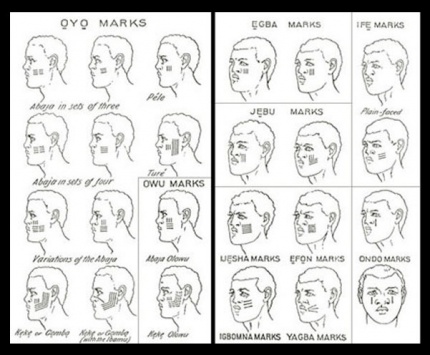
Visual Design

Praise where it’s due: Zooming is the strongest visual attention-getting signals there is (symmetrical expansion is detected on the retina within 80 milliseconds!) and while I can’t find the source from which I learned it, I recall that blinking is somewhere in the top 5. Combining these with an audio signal means it’s hard to miss this critical signal. So that’s good.

comingrightatus.png
In English: It’s comin’ right at us!

But then. Ugh. The fonts. The buttons on the chrome seem to be some free Blade Runner font knock off, the text reading “PULL OVER” is in some headachey clipped-corner freeware font that neither contrasts nor compliments the Blade Jogger font, or whatever it is. I can’t quite hold the system responsible for the font of the IPPA licence, but I just threw up a little into my Flaturin because of that rounded-top R.

bladerunner

Then there’s the bad-90s skeuomorphic, Bevel & Emboss buttons that might be defended for making the interactive parts apparent, except that this same button treatment is given to the label Frito’s F’n Car, which has no obvious reason why it would ever need to be pressed. It’s also used on the CHECK INGN and LOUDER buttons, taking their ADA-insulting contrast ratios and absolutely wrecking any readability.

I try not to second-guess designer’s intentions, but I’m pretty sure this is all deliberate. Part of the illustration of a world without much sense. Certainly no design sense.

In-Car Features

What about those features? NAV is pretty standard function, and having a HOME button is a useful shortcut. On current versions of Google Maps there’s an Explore Places Near You Function, which lists basic interests like Restaurants, Bars, and Events, and has a more menu with a big list of interests and services. It’s not a stretch to imagine that Frito has pressed GIRLS and BEER enough that it’s floated to the top nav.

explore_places_near_you

That leaves only three “novel” buttons to think about: WTF, LOUDER, and FART FAN. 

WTF?

If I have to guess, the WTF button is an all-purpose help button. Like a GM OnStar, but less well branded. Frito can press it and get connected to…well, I guess some idiot to see if they can help him with something. Not bad to have, though this probably should be higher in the visual hierarchy.

LOUDER

This bit of interface comedy is hilarious because, well, there’s no volume down affordance on the interface. Think of the “If it’s too loud, you’re too old” kind of idiocy. Of course, it could be that the media is on zero volume, and so it couldn’t be turned down any more, so the LOUDER button filled up the whole space, but…

  • The smarter convention is to leave the button in place and signal a disabled state, and
  • Given everything else about the interface, that’s giving the diegetic designer a WHOLE lot of credit. (And our real-world designer a pat on the back for subtle hilarity.)

FART FAN

This button is a little potty humor, and probably got a few snickers from anyone who caught it because amygdala, but I’m going to boldly say this is the most novel, least dumb thing about Frito’s F’n Car interface.

Heart_Jenkins_960.jpg
Pictured: A sulfuric gas nebula. Love you, NASA!

People fart. It stinks. Unless you have active charcoal filters under the fabric, you can be in for an unpleasant scramble to reclaim breathable air. The good news is that getting the airflow right to clear the car of the smell has, yes, been studied, well, if not by science, at least scientifically. The bad news is that it’s not a simple answer.

  • Your car’s built in extractor won’t be enough, so just cranking the A/C won’t cut it.
  • Rolling down windows in a moving aerodynamic car may not do the trick due to something called the boundary layer of air that “clings” to the surface of the car.
  • Rolling down windows in a less-aerodynamic car can be problematic because of the Helmholtz effect (the wub-wub-wub air pressure) and that makes this a risky tactic.
  • Opening a sunroof (if you have one) might be good, but pulls the stench up right past noses, so not ideal either.

The best strategy—according to that article and conversation amongst my less squeamish friends—is to crank the AC, then open the driver’s window a couple of inches, and then the rear passenger window half way.

But this generic strategy changes with each car, the weather (seriously, temperature matters, and you wouldn’t want to do this in heavy precipitation), and the skankness of the fart. This is all a LOT to manage when one’s eyes are meant to be on the road and you’re in an nauseated panic. Having the cabin air just refresh at the touch of one button is good for road safety.

If it’s so smart, then, why don’t we have Fart Fan panic buttons in our cars today?

I suspect car manufacturers don’t want the brand associations of having a button labeled FART FAN on their dashboards. But, IMHO, this sounds like a naming problem, not some intractable engineering problem. How about something obviously overpolite, like “Fast freshen”? I’m no longer in the travel and transportation business, but if you know someone at one of these companies, do the polite thing and share this with them.

Idiocracy-car
Another way to deal with the problem, in the meantime.

So aside from the interface considerations, there are also some strategic ones to discuss with the remote kill switch, but that deserves it’s own post, next.