Later, in the brain hacking scene, we’ll hear two more sentences spoken.
Completionists: There’s also extensive use of voice output during a cyberspace search sequence, but there Johnny is wearing a headset so he is the only one who can hear it. That is sufficiently different to be left out of this discussion.
Voice is public
Sonic output in general and voice in particular have the advantage of being omnidirectional, so the user does not need to pay visual attention to the device, and, depending on volume and ambient noise, can be understood at much greater distances than a screen can be read. These same qualities are not so desirable if the user would prefer to keep the message or information private. We can’t tell whether these systems can detect the presence or absence of people, but the hotel message centre only spoke when Johnny was alone. Later in the film we will see two medical systems that don’t talk at all. This is most likely deliberate because few patients would appreciate their symptoms being broadcast to all and sundry.
Unless you’re the only one in the room
The bathroom tap is interesting because the temperature message was in English. This is a Beijing hotel, and the scientists who booked the suite are Vietnamese, so why? It’s not because we the audience need to know this particular detail. But we do have one clue: Johnny cursed rather loudly once he was inside the bathroom. I suggest that there is a hotel computer monitoring the languages being used by guests within the room and adjusting voice outputs to match. Current day word processors, web browsers, and search engines can recognise the language of typed text input and load the matching spellcheck dictionaries, so it’s a fair bet that by 2021 our computers will be able to do the same for speech.
Luke, Chewie, the comms officer aboard the Revenge, and this orange lizard/cat thing wear similar headsets in the short. Each consists of headphones with a coronal headband and a microphone on a boom that holds it in front of their mouths.
The only time we see something resembling a control, Luke attempts to report back to the Rebel base. To do so, he uses his right hand to pinch (or hold?) the microphone as he says, “This is Y4 to base.” Then he releases the mic and continues, “He’s heading straight for a moon in…the Panna system.”
Questionable sound isolation
Part of the point of the headsets is to isolate sounds coming through the radio from the ambient noise. But Luke can hear and chat with C-3PO speaking at regular, conversational volumes, so it’s not isolating that much sound. Maybe it’s super-sophisticated noise-cancellation but that’s a lot of credit to give considering the evidence.
Additionally, when Chewie shoots across the bow at the Y-Wing, we hear the artificially-generated weapon-warning noises throughout the cockpit, so it’s a detriment to hide that noise from him. Better would be to have the audio incorporated into the cockpit, which lets him listen for the sounds of the Y-wing around him as well.
Unclear Activation
It’s not exactly clear that Luke’s touching the mic is an affectation or an actual control. If it was push-to-talk the Revenge wouldn’t have heard anything when he lifted his hands after the callsigns and spoke the actual message. Hopefully it’s not.
The Y-Wing is a combat ship, so it’s questionable to require the pilot to dedicate a hand that could be needed for complex maneuvers for the duration of speech. In fact, it seems to undo much of the benefit of wearing a headset instead of using a handset or something like a handheld CB radio microphone (like Wash’s comm system in Firefly).
A wise design would assign one of those many stay-state toggle switches on the console to keep the channel open and operate by voice activation in maneuver-heavy situations. For more casual conversation, he could switch it back to push-to-talk mode, to avoid accidental noise or interruptions on the channel.
It should be said that a wise pilot needing to communicate with his hands on the yoke might offload this task to the human-cyborg relations droid sitting right there behind him, but you know who am I to question an animated Jedi?
Semantic Controls
Having the control located at the mic is an intuitive design choice, because it means users can chunk these two things as a single thing in memory: The place for talking. It might seem a little odd because when you speak without a mic you would cover your mouth to muffle speech, but since with the headset you’re speaking with the person “in” the mic, the semantics make sense. The behavior also serves a nice social signal to others in the room to indicate that the speaker is communicating to someone not present (similar to the headset ear-touches in The Fifth Element.)
This pinch-to-talk control also appears in A New Hope, briefly, during the attack on the Death Star, so has precedent.
Questionable mic placement
Having the mic directly in front of the mouth is a poor placement. As sci-fi fans know, speech is air squirted through meat, and putting a mic in the path of that air means the plosive sounds (t, k, p, d, g, and b) can peak out. For audio purists, the proximity effect also means that the proximity of a directional mic to the mouth will over-accentuate and peak the bass responses. But, maybe the Rebels have access to omnidirectional mics that avoid the proximity effect. Still, a better placement to avoid the popping plosives would be just off of the rushing column of squirted air, say near the cheek or chin.
Security
When Luke says “Y4 to base,” it indicates that the system is a radiotelephony model, like the ham radio system. People agree to use radio to speak and listen on pre-arranged channels or sequence of channels, and anyone who knows the channel can lurk and steal important information, like, say, the location of the most wanted Rebel outlaws in the galaxy.
Modern, encrypted, one-to-one communications systems make this seem horribly not-secure, but such systems proved reasonable throughout the World Wars of the prior century. But, even back then there were lots of ways to hedge your bets towards privacy, (like using code or Selective Calling to name just a few) so its absence here is striking, especially since we’ll see in the next review how easy it is to intercept even video messages in the world of The Faithful Wookiee.
That said, extradiegetically, we can cut some slack since they probably aren’t speaking English, either, and both the common and coded Aurebesh have been translated for us.
The only flight controls we see are an array of stay-state toggle switches (see the lower right hand of the image above) and banks of lights. It’s a terrifying thought that anyone would have to fly a spaceship with binary controls, but we have some evidence that there’s analog controls, when Luke moves his arms after the Falcon fires shots across his bow.
Unfortunately we never get a clear view of the full breadth of the cockpit, so it’s really hard to do a proper analysis. Ships in the Holiday Special appear to be based on scenes from A New Hope, but we don’t see the inside of a Y-Wing in that movie. It seems to be inspired by the Falcon. Take a look at the upper right hand corner of the image below.
After fleeing the Yakuza in the hotel, Johnny arrives in the Free City of Newark, and has to go through immigration control. This process appears to be entirely automated, starting with an electronic passport reader.
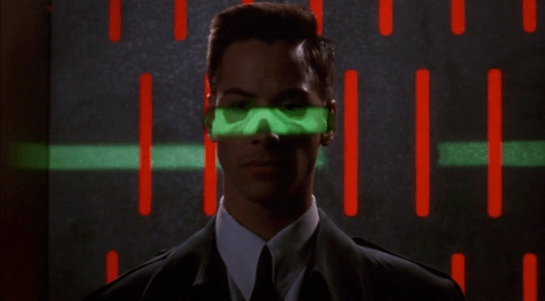
After that there is a security scanner, which is reminiscent of HAL from the film 2001: A Space Odyssey.
The green light runs over Johnny from top to bottom.
Looking at the picture, we can see that this green light is somehow making Johnny’s skeleton visible. It would be possible, by having an X-ray imaging system running at the same time and then re-projecting the X-ray image back onto the body, but why? Since there don’t appear to be any actual human beings on duty, I can only suggest that it is meant to look intimidating and impressive to encourage obedience. In the film Johnny appears to be alone and cannot see this himself, but it would be much more common for there to be multiple passengers, so each could watch the others being scanned.
There is also a screen showing another scan, a blurry body image, and text appearing on the right side. A voice repeats the text content. For the first time we see a blue background, the most common color for futuristic film interfaces.
The scanner detects Johnny’s implant, but whatever secrecy measures are present cause the system to decide that it is a registered dyslexia aid. The popup alert below includes the registration issuer and a domain name, so perhaps this is online verification over the Internet. Presumably Johnny can see this screen himself, if he cares.
The voiceover helpfully informs Johnny that there is “synaptic seepage”, and he should seek medical attention within 24 hours. This shows quite high level decision making by the system and an offer of assistance. Johnny says “thanks” in reply, an anthropomorphic response to this seemingly intelligent machine.
However, there seems to be a more detailed explanation in smaller text on the right of the display, and this isn’t announced. It’s not clear in this scene whether Johnny can see this display or not, but even if he could it would be difficult to read. Perhaps this is a legacy system from the days when airport security had actual staff.
Next
At this point Johnny leaves the airport, riding in a taxi from the airport. It is a good time for the first review of a group of related interfaces, which will be the next series of posts.
Note: In honor of the season, Rogue One opening this week, and the reviews of Battlestar Galactica: The Mini-Series behind us, I’m reopening the Star Wars Holiday Special reviews, starting with the show-within-a-show, The Faithful Wookie. Refresh yourself of the plot if it’s been a while.
On board the R.S. Revenge, the purple-skinned communications officer announces he’s picked up something. (Genders are a goofy thing to ascribe to alien physiology, but the voice actor speaks in a masculine register, so I’m going with it.)
He attends a monitor, below which are several dials and controls in a panel. On the right of the monitor screen there are five physical controls.
A stay-state toggle switch
A stay-state rocker switch
Three dials
The lower two dials have rings under them on the panel that accentuate their color.
Map View
The screen is a dark purple overhead map of the impossibly dense asteroid field in which the Revenge sits. A light purple grid divides the space into 48 squares. This screen has text all over it, but written in a constructed orthography unmentioned in the Wookieepedia. In the upper center and upper right are unchanging labels. Some triangular label sits in the lower-left. In the lower right corner, text appears and disappears too fast for (human) reading. The middle right side of the screen is labeled in large characters, but they also change too rapidly to make much sense of it.
Luke, looking over the shoulder of the comms officer at the same monitor, exclaims, “It’s the Millennium Falcon!”
Seriously, Luke, how can you tell this?
Watching the glowing dot and crosshairs blink and change position several times, the comms officer says, “They’re coming out of light speed. I can’t make contact.” An off-screen voice tells him to “Try a lower channel.” Something causes the channel to change (the comms officer’s hands do not touch anything that we can see), and then the monitor shows a video feed from the Falcon.
Video Feed
The video feed has an overlay to the upper left hand side, consisting of lines of text which appear from top to bottom in a palimpsest formation, even though the copy is left-aligned. At the top is a label with changing characters, looking something like a time stamp.
Analysis of the Map View
Since we can’t read the video overlay in the video feed, and it doesn’t interfere with the image, there’s not much to say about it. Instead I’ll focus on the map view.
Hand-drawn Inconsistency
In the side angle shot, which we see first, we see the dial colors go from top to bottom, as beige, red, yellow. In the facing shot of this interface, which immediately follows the side shot, the dials go beige, yellow, red. The red and yellow are transposed. Itʼs of course possible that the dials have a variable hue, and changed at exactly the same time the camera switches. But then we have to explain where his hand went, and why we don’t see any of the other elements changing color, and so on…
This illustrates one of the problems with reviewing hand-drawn animation (and why scifiinterfaces generally frowns upon it.) It takes a hand-drawing animator extra work to keep things consistent from screen to screen. She must have a reference when drawing the interface from any new angle, and this extra work is on top of all the other things she has to manage like color and timing. Fewer people will notice transposed dial colors than, say, the comms officer turning orange instead of purple, so the interface is low on that priority stack.
Contrast that with live-action and computer-animated interfaces. In these modes of working, it takes extra work to change interfaces from shot to shot, so you run into consistency problems much less frequently.
I’ve written about this before in the abstract, but it’s nice to have a simple and easily shown example in the blog to point to.
2Dness
Another problem with the interface is that it is 2-D, but space is 3-D.
When picking a projection to display, we have to keep in mind that it is more immediate to understand an impending collision when presented as 2-D information: Constant bearing, decreasing range = Trouble. So, perhaps the view has automatically aligned itself to be perpendicular to the Falcon’s approach, which makes it easier to monitor the decreasing distance.
If so, he would need to see that automatically-aligned status reflected somewhere in the interface, and have access to controls that let him change the view and snap back to this Most Useful View. Admittedly, this is a lot of apologetics to apply, when really, it’s most likely the old trope 2-D Space.
Attention and memory
There are some nicely designed attention cues. The crosshairs, glowing dot, and motion graphics makes it so that—even though we can’t read the language—we can tell what’s of interest on the screen. One dot moving towards another, stationary dot. We’re set up for the Falcon’s buzzing the base.
That’s probably the best thing that can be said for it.
The text is terrible, changing too fast for a human reader. (Yes, yes, put down that emerging comment. Purple-face isnʼt human, but we must evaluate interfaces considering what is useful to us, and right now that means us humans.) The text changes so much faster than the blinking, in fact, that it’s pulling attention away from it. Narratively, the rapid-fire text helps convey a sense of urgency, but it greatly costs readability. It’s not a good model for real world design.
The blinking crosshair might most accurately reflect the actual position of the detected object within the radar sweep. But it could help the officer more. As with medical signals, data points are not as interesting as information trends. As it is, it relies on his memory to piece together the information, which means he has to constantly monitor the screen to make sense. If instead the view featured an evaporating trail of data points, not only could he look away without missing too much information, but he would also notice that the speed and direction are slightly erratic, which would prove quite interesting to anyone trying to ascertain the status of the ship. One glance shows things are not as they should be. The Falcon is clearly careening.
Actual points from the animation.
Mysterious Control
When we first see the comms officer, he has his unmoving hand on one of the dials. But when we see the map switch to the video feed, none of the controls we can see are touched. This raises a possibility and a question.
The possibility is that there is control by some other mechanism. My best guess is that it is voice control, since the Rebel General says “try a lower channel” just before it switches. Maybe he was not speaking to the comms officer, but to the machine itself. And given C3PO, they clearly have the technology to recognize and act on natural language, though it’s usually associated with a full general artificial intelligence. A Rebel Siri (33 years before it came out in Apple’s iOS) makes sense from an apologetics sense.
If so, there are some aspects of the UI missing to signal to an operator that the machine is listening, and hearing, and understanding what is being said, as well as whether the speaker is authorized to control. After all, the comms officer is wearing the headset, but it was the red-bearded general who issued the command. I imagine it’s not OK for anyone on the bridge to just shout out controls.
The question then, is if the channel is controlled by voice, what are the physical controls for? They’re lacking labels of any kind. Perhaps they’re there as a backup, should voice control fail. Perhaps they are vestigial, left over from before voice control was installed. Maybe only the general has a voice override and the comms officer must use the physical controls. Any of these would be fine backworlding explanations, but my favorite idea is that the dials are for controlling nuanced variables in very fluid ways with instant feedback.
It’s easier to twiddle a dial to change the frequency of a radio to find a low-power signal than to keep saying “back…forward…no, back just a bit.” That would help explain what the comms officer was doing with his hands on the dials when he got something but not when the general voice-controls the channel.
In general
The interface shows some sophistication in styling and visual hierarchy, and if we give it lots of benefit of the doubt, might even be handling some presentation variables for the user in sophisticated ways. But the distractions of the rapid-fire text, the lack of trend lines, the lack of labels for the physical controls, and the missing affordances for projection control and voice control feedback make it a poor model for any real world design.
Once Johnny has installed his motion detector on the door, the brain upload can begin.
3. Building it
Johnny starts by opening his briefcase and removing various components, which he connects together into the complete upload system. Some of the parts are disguised, and the whole sequence is similar to an assassin in a thriller film assembling a gun out of harmless looking pieces.
It looks strange today to see a computer system with so many external devices connected by cables. We’ve become accustomed to one piece computing devices with integrated functionality, and keyboards, mice, cameras, printers, and headphones that connect wirelessly.
Cables and other connections are not always considered as interfaces, but “all parts of a thing which enable its use” is the definition according to Chris. In the early to mid 1990s most computer user were well aware of the potential for confusion and frustration in such interfaces. A personal computer could have connections to monitor, keyboard, mouse, modem, CD drive, and joystick – and every single device would use a different type of cable. USB, while not perfect, is one of the greatest ever improvements in user interfaces.
Why not go wireless? Wireless devices remove the need for a physical connection, but this means that anyone, not just you, could potentially connect. So instead of worrying about whether we have the right kind of cable, we now worry about the right kind of Bluetooth pairing and WiFi encryption password scheme. Mobile wireless devices also need their own batteries, which have to be charged. So wireless may seem visually cleaner, but comes with its own set of problems.
As of early 2016 we have two new standards, Lightning and USB-C, that are orientation-independent (only fifty years after audio cables), high bandwidth, and able to transmit power to peripherals as well. Perhaps by 2021 cables will have made a comeback as the usual way to connect devices.
2. Explaining it
Johnny explains the process to the scientists. He needs them to begin the upload by pushing a button, helpfully labelled “start”, on the gadget that resembles an optical disk drive. There’s a big red button as well, which is not explained but would make an excellent “cancel” button.
It would be simpler if Johnny just did this himself. But we will shortly discover that the upload process is apparently very painful. If Johnny had his hands near the system, he might involuntarily push another button or disturb a cable. So for them, having a single, easily differentiated button to press minimizes their chance of messing it up.
1. Making codes
He also sticks a small black disk on the hotel room’s silver remote control. The small disk is evidently is a wireless controller or camera of some kind. The scientists must watch the upload progress counter, and as it approaches the end, use this modified remote to grab three frames from the TV display, which will become the “access code” for the data. (More on this below.)
None of the buttons on this remote have markings or labels, but neither Johnny nor the scientist who will be using it are bothered. Perhaps this hotel chain tries to please every possible guest by not favouring any particular language? But even in that case, I’d expect there to be some kind of symbols on the buttons and a multilingual manual to explain the meaning of each. Maybe Johnny spends so much time in hotel suites that he has memorised the button layout?
Short of a mind reading remote that can translate any button press into “what the user intended”, I have to admit this is a terrible interface.
(There is a label on the black disk, but I have no idea what it means or even which script that is. Anyone?)
0. Go go go
Johnny plugs in his implant, puts on a headset with more cables, and bites down on a mouthguard. He’s ready.
The scientist pushes the start button and the upload begins. Johnny sees the data stream in his headset as a flood of graphics and text.
Why does he need the headset when there is a direct cable connection to the implant? The movie doesn’t make it explicit. It could be related to the images used as the access code. (More on this below.) Perhaps the images need to be processed by the recipient’s own optic nerve system for more reliable storage?
Still, in the spirit of apologetics we should try to find a better explanation than “an opportunity for 1995 cutting edge computer generated graphics.” Perhaps it is a very flashy progress indicator? Older computer systems had blinking lights on disk drives to indicate activity, copied on some of today’s USB sticks. Current-day file upload or download GUIs have progress bars. As processing and graphics capabilities increase, it will be possible for software to display thumbnails or previews of the actual data being transferred without slowing down.
Unfortunately there is an argument against this, which is that the obvious upload progress indicator is a numeric display counting gigabytes down to zero, and it makes a fast chirping sound as a sonic indicator as well. The counter shows the data flowing at gigabytes per second, the entire upload lasting about a minute. There’s also the problem that it’s not Johnny who is interested in knowing whether the upload is scientific data rather than, say, a video collection; but the scientists, and they can’t see it.
As the counter drops below one hundred, the scientist points the remote with black disk at the TV display, currently showing a cartoon, and presses the middle button. The image from the TV appears overlaid on the data stream to Johnny. This is a little odd, because Johnny assured the scientists that he wouldn’t know what the access codes were himself. Maybe these brief flashes are not enough time for him to remember these particular images among the gigabytes of visual content. But the way they’re shown to us, I’ll bet you can remember them when they come up again later in the plot.
Two more images are grabbed before the counter stops. When the upload finishes, the three images are printed out. (In the original film this is shown upside down, so I have rotated the image.)
Tagged:
So what are the images for? The script isn’t clear. I suggest that the images are being used as the equivalents of very large random numbers for whatever cryptography scheme protects the data against unauthorised access. Some current day systems use the timing of key presses and mouse movements as a source of randomness because humans simply can’t move their fingers with microsecond precision. Here, the human element makes it impossible to predict exactly which frame is chosen.
Humans also find images much easier to recognise than hundred digit numbers. Anyone who has seen the printout will be able to say whether a particular image is part of the access code or not with a high degree of confidence. In computer systems today, Secure Shell, or ssh, is a widely used encrypted terminal program for secure access to servers. Recent versions of ssh have a ‘randomart’ capability which shows a small ASCII icon generated from the current cryptographic key to everyone who logs on. If this ASCII icon appears different, this alerts everyone that the server key has been changed.
There’s one potential usability problem with the whole “pick three random images” mechanism. The last frame was grabbed when the counter was very close to zero. What would have happened if he had been too slow and missed altogether? Wouldn’t it be more reliable to have the upload system automatically grab the images rather than rely on a human? Chris suggests that maybe it secretly did grab three images that could have used without human input, but privileged the human input since it was more reliably random.
Quick aside: You may be asking, if images would be so wonderful, why aren’t we using them in this way already? It’s because our current security systems need not just very large random numbers, but very large random numbers with particular mathematical properties such as being prime. But let’s cut Johnny Mnemonic some slack, saying that by 2021 we may have new algorithms.
OK, back to the plot.
-1. Sharing the codes
The access codes are to be faxed from Beijing to Newark, although this gets interrupted by the Yakuza intruders. This is yet another device with unmarked buttons.
This device makes the same beeps and screeches as a 1990s analog fax machine. Since we’ll later learn that all the fax messages and phone calls are stored digitally in cyberspace, this must be a skeuomorphism, the old familiar audio tones now serving just as progress indicators.
As with other audio output, the tones allow the user to know that the transmission is proceeding and when it ends without having to pay full attention to the device. On the other hand, there is potential for confusion here as the digital upload is (presumably) much faster. Most current day computer systems could upload three photos, even in high resolution, well before the sequence of tones would complete. Users would most likely wait longer than actually necessary before moving on to their next task.
-2. Washing up
During the upload Johnny clenches his fists and bites his mouthguard. When the upload finishes, he retreats to the bathroom in considerable pain. At one point blood flows from his nose, and he swipes his hand over the tap to wash it down the drain. The bathroom announces that the water temperature is 17 degrees. We’ll come back to this later.
As Make It So emphasises in the chapter on brain interfaces, there is nothing in our current knowledge to suggest that writing or reading memories to or from a human brain would be painful. On the other hand, we know that information in the brain isthe shape of the neurons in the brain. Who knows what side effects will happen as those neurons are disconnected and reconnected as they need to be? We don’t know, so can’t really say whether it would hurt or not.
-3. Escaping the Yakuza
As mentioned in a prior post, while he is in the bathroom, the motion detector Johnny installed on the hotel door isn’t very effective and the Yakuza break in, kill everyone else, and acquire the second of the three access code images. Johnny escapes with the first image and flies to Newark, North America.
Johnny, with newly upgraded memory, goes straight to the hotel room where he meets the client’s scientists. Before the data upload, he quickly installs a motion detector on the hotel suite door. This is a black box that he carries clipped to his belt. He uses his thumb to activate it as he takes hold and two glowing red status lights appear.
Once placed on the door, there is just one glowing light. We don’t see exactly how Johnny controls the device, but for something this simple just one touch button would be sufficient.
A little later, after the brain upload (discussed in the next post), the motion detector goes off when four heavily armed Yakuza arrive outside the door. The single light starts blinking, and there’s a high pitched beep similar to a smoke alarm, but quieter.
Analysis
A sonic alarm is good, because it is omnidirectional. But being omnidirectional it might also notify the would-be attackers that they have been detected. Here the designers have erred too far on the side of caution. The alarm is so quiet that none of the scientists notice, and Johnny himself is lucky to be within a few metres when it goes off. The Yakuza burst in and slaughter the unaware scientists. It would almost certainly have been better for the alarm to be configured as loud as possible, ensuring everyone who needed to hear did so. And while the attackers would have been alerted, they might have been deterred by the thought of witnesses arriving.
In Beijing, Johnny steps into a hotel lift and pulls a small package out his pocket. He unwraps it to reveal the “Pemex MemDoubler”.
Johnny extends the cable from the device and plugs it into the implant in his head. The socket glows red once the connection is made.
Analysis: The jack
The jack looks like an audio plug, and like most audio plugs is round and has no coronal-orientation requirement. It also has a bulbous rather than pointed tip. Both of these are good design, as Johnny can’t see the socket directly and while accidentally poking yourself with a headphone style point is unlikely to be harmful, it would certainly be irritating.
The socket’s glow would be a useful indicator that the thing is working, but Johnny can’t see it! Probably these sockets and jacks are produced and used for other devices as well, as red status lights are common in this world.
There are easier and more convenient fictional brain plug interfaces, such as the neck plugs previously discussed on this website for Ghost In The Shell. But Johnny doesn’t want his implant to be too obvious, so this not so convenient plug may be a deliberate choice. Perhaps he tells inquisitive people that it’s for his Walkman.
Analysis: The device
The product name got a few chuckles from audiences in the 1990s, as the name is similar to a common classic Macintosh extension at the time, the Connectix RAM Doubler. This applied in-memory lossless data compression techniques to allow more or larger programs to run within the existing RAM.
The MemDoubler is apparently a software or firmware updater, modifying Johnny’s implant to use brain tissue twice as efficiently as before. It has voice output, again a slightly artificial sounding but not unpleasant voice. This announces that Johnny’s current capacity is 80 gigabytes. As the update is applied, a glowing progress bar gradually fills until the voice announces the new capacity of 160G.
(Going from 80G to 160G seems quaint today. But we should remember that the value of a mnemonic courier is secrecy, not quantity.)
Why does the MemDoubler need voice output? For such a simple task, the progress bar and a three digit numeric counter would seem adequate. But if there are complications—which for something wired into the brain might have an all too literal meaning for “fatal error”—a voice announcement would be able to include much more detail about the problem, or even alert bystanders if Johnny is rendered unconscious by the problem. (Given how current software installers operate, Johnny is fortunate that the MemDoubler did not insist on reciting the entire end user license agreement and warranty before the update could start.) Maybe the visual should be the default (to respect his professional need for secrecy), and the voice announcement adopted in an alert mode.
It’s also interesting that Johnny installs this immediately before he needs it, in the lift that is taking him to the hotel room where he will receive the data to be stored. Suppose someone else had been in the lift with him? In this world of routine body implants doubling your memory is probably not a crime, but at the time of writing diabetics will inject themselves in private even though that is harmless and necessary. Perhaps body-connected technology will be common enough in 2021 that public operation is considered normal, just as we have become accustomed to mobile phone conversations being carried out in public.
The doctor’s office is a stark, concrete room with a single desk framed under large windows and a tall vaulted ceiling. Two chairs sit on a carpet in front of the desk for patients. A couple pieces of art and personal photos line the room, but they are overwhelmed by the industrial-ness of the rest of the space.
When the doctor enters, he carries a large folder with the patient’s health information and background on paper. He then talks with the patient directly, without help from notes or his patient’s folder.
There is no visible computer in the room.
While not a traditional interface, this office is interesting because it lacks any traditional interactive features of a futuristic doctor’s office; things like holograms, giant computer screen walls, and robots are completely absent.
It is also the patient’s interface to the medical industry and its news for her. And it can use some improvement.
Authority Figure
In this situation, the Doctor is acting as an authority figure to tell Laura what her diagnosis is and how likely she is to recover. The office is setup to put all the focus on the doctor, and his method of entry adds to the power focused on him.
Even the lack of computer indicates that the doctor is alone in the final call of what the diagnosis is. There is no intermediary between caregiver and patient.
This sets up a psychological condition where the patient is not in a position to question the doctor’s advice or diagnosis. The doctor tells the patient what they have, and the patient has to deal with it.
Medical Goals
Here, the doctor’s goal should be to help the patient through the situation and give them the best chance possible to recover. Generally, this means making sure:
The patient understands their situation
Knows what their options are
and follows through on the best plan of treatment.
From the transcript:
(In a large room, looking up through a glass ceiling. Ships are flying past overhead. Camera pans down to Laura Roslin, sitting in a chair in front of a desk. She’s looking out the window, and jumps at the sound of the door. A doctor in a white coat walks in.)
Doctor: I’m afraid the tests are positive. The mass is malignant. It’s advanced well beyond our…
(Noises drown him out [Laura no longer paying attention]—we see a ship taking off and then moving through space.)
As we are shown by Laura’s reaction to the doctor’s first words, she completely fails to understand the second two points. The doctor’s emphasis on power has scared Laura so badly that she can only focus on the fact that she has cancer. She leaves without being confident in her plan of care or her chances of survival.
That means that she is unlikely to follow through on the plan of care (which is exactly what we see later on), and she is unlikely to continue trusting that doctor (which we don’t see, only because the doctor’s office is violently removed from the planet along with pretty much everything else shortly after the visit).
Help the Patient
Research is now showing (a white-paper by Samira Pasha in 2013 (http://www.ncbi.nlm.nih.gov/pubmed/24089182) does a good job of collecting previous research and showing the importance of good design in the garden) that patients do better when surrounded by greenspace and people who are willing to talk to them in ways they can understand. Doctors who explain a patient’s options well are shown to improve the rates at which patients follow through on their treatments.
Ulfelder Healing Garden, Massachusetts General Hospital, Boston, MA. Photo by Naomi Sachs
Immediate improvements could include the following:
Add plants and trees
Take more care with the patient’s state of mind
Lower the ceiling to create more personal space
Refrain from invoking authoritarian criticism
Adding in more plants and trees to the office would have an immediate benefit for both the patient (Laura) and the doctor. Explaining the options more confidently and with a greater care towards the patient’s emotional state would give Laura a better chance to actually take the doctor’s advice. Additionally, that giant binder of Laura’s medical history is impossible for a reasonable patient to read through and understand. A basic overview and history could remind Laura of the procedures she’s been through and the encounters she’s had with various doctors. This could be followed by a summary sheet with the doctor’s recommendations and links to relevant treatment information.
Don’t Intimidate
A doctor’s job should not be to intimidate their patient with the doctor’s skill and experience. Instead, they should be focused on helping their patient through a very tough time in their life. Various tools can help both the patient and doctor in this situation. By restructuring the office to be more inviting and creating effective summaries of patient encounters, both the patient and doctor can create positive outcomes for the patient’s health.
The Battlestar Galactica is a twisting and interlocking series of large hallways that provide walking access to all parts of the ship. The hallways are poorly labeled, and are almost impossible for someone without experience to navigate. Seriously, look at these images and see if you can tell where you are, or where you’re supposed to head to find…well, anything.
Billy (a young political assistant steeped in modern technology) finds this out after losing the rest of his tour group.
The hallways lack even the most basic signage that we expect in our commercial towers and office buildings. We see no indication of what deck a given corridor is on, what bulkhead a certain intersection is located at, or any obvious markings on doorways.
We do see small, cryptic alphanumerics near door handles:
Based off of current day examples, the alphanumeric would mark the bulkhead the door was at, the level it was on, and which section it was in. This would let anyone who knew the system figure out where they were on the ship.
Labeling doors like this led to Billy accidentally entering a bathroom without any clue what was behind the door.
Effective Wayfinding
People moving through labyrinthian spaces need to know two things from their environment: Where they are, how to get wherever they are going. Presumably, the Galactica has such a cryptic system because it was an active warship and didn’t want an enemy boarding team to find a “This way to the CIC!” sign.
With its transition to a museum, the Galactica should have had more effective signage added. In her introduction, Laura Roslin said she wanted to put in a fully networked system of digital signage, but this would likely be overkill for the situation.
Given its purpose as a warship, the Galactica should have been built with major corridors, minor corridors, and maintenance access. Good signage could direct people to the major corridors from anywhere in the ship, and then only the major corridors would need specific signage to get visitors to other sections of the ship. Supplemental signage could provide direct line navigation to interesting points such as the CIC.
Cryptic labeling is fine for a highly trained workforce, but is inadequate for the majority of visiting users.