The hospital doesn’t have the equipment to decrypt and download the actual data. But Jane knows that the LoTeks can, so they drive to the ruined bridge that is the LoTek home base. As mentioned earlier under Door Bombs and Safety Catches the bridge guards nearly kill them due to a poorly designed defensive system. Once again Johnny is not impressed by the people who are supposed to help him.
When Johnny has calmed down, he is introduced to Jones, the LoTek codebreaker who decrypts corporate video broadcasts. Jones is a cyborg dolphin.
Jones has not just an implant like Johnny or an augmented nervous system like Jane, but a full neural brain interface that gives him active control. The thing behind his eye and under the cable can rotate, and he can also direct and control an external microwave radar dish. In the background there are a lot of cables and blinking lights apparently connecting Jones to the LoTek video broadcast gear.
For his part, Johnny is sitting in a chair, upper head strapped into a helmet-like brain scanner. This one is very big and clunky, perhaps because it is salvaged old technology or perhaps because this is not just a passive scanner, so needs additional elements and power to actively modify the brain.
When this starts operating, we see the same strobing white light flashes that the first scanner used.
J-Bone, the LoTek leader, uses a handheld camera to feed the first access code image into the system. This is yet another piece of talking technology, announcing that the first image has been loaded.
The captured image is processed to remove the perspective keystoning, and displayed on one of three small panels on the wall, side by side. That specialised displays are made solely for displaying three images suggests that this form of access code is a standard method of data protection in 2021. The other two panels display rolling static.
Wait…static?
Why is there static in a 2021 system for displaying computer images? It’s not just because they’re analog: old CRT computer monitors went blank if there was nothing to display. This is a missing or scrambled signal.
Since the LoTeks rely on scavenged technology, it’s quite likely that they are the last people on the planet still using coax video cables. Another possibility is that this is a deliberate imitation, as we saw earlier with the digital fax machine that made analog sounds. Computer graphics programmers are constantly wondering whether the screen is black because they didn’t draw anything, or black because they accidently drew everything in that color. The rolling static makes it clear that there is no image to display, not that the image is blank.
The first download attempt is interrupted by the Yakuza attacking the bridge. There’s some equipment damage, but by the end of the fight Johnny and company have recovered the second access code image.
Still not enough, but Johnny now attempts to “hack his own brain” which is successful (discussed below). The data is finally downloaded and the LoTeks broadcast the cure for NAS worldwide.
Tech Tease
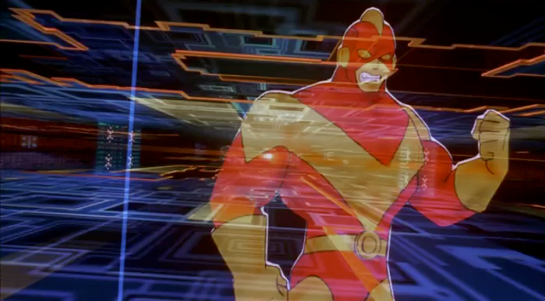
The hacking and downloading take place in another virtual reality space, the internal representation of the implant. These sequences are action-packed and filled with eye catching visuals. If we wanted, there’s much that could be written about, from the visual representations of hacking used in film and TV to the advisability of transmitting vital scientific data through a video encoder. But we never get to see the interface!
Instead, we see Johnny just sit and do nothing other than maintain a death grip on the chair armrests and try not to grind his teeth into fragments. According to the running commentary on the hack provided by J-Bone, Johnny is performing actions in VR. It’s possible that the LoTek brain scanner is a true brain interface that gives him active control by thought alone with no sound or audio experience.
But this is evidently high grade encryption, which could only be broken by an expert hacker. Without visible controls for the brain scanner, the expert hacker would need to be using a direct brain interface. And the hacker would naturally have their own avatar. The only person present who definitely meets all these requirements is not Johnny, but Jones.
Could Jones be really doing all the work? In the original short story it was Jones, and here he’s certainly doing something in virtual reality. Johnny would make a useful distraction, and J-Bone might deliberately mislead the non-LoTek bystanders to keep Jones a secret.
Whether it’s Johnny or Jones, we only get to see what happens, not how. Rather than end on this disappointing note, I’ll now jump back to discuss the more rewarding interfaces for phone calls and cyberspace search sequence.
The second half of the film is all about retrieving the data from Johnny’s implant without the full set of access codes. Johnny needs to get the data downloaded soon or he will die from the “synaptic seepage” caused by squeezing 320G of data into a system with 160G capacity. The bad guys would prefer to remove his head and cryogenically freeze it, allowing them to take their time over retrieval.
1 of 3: Spider’s Scanners
The implant cable interface won’t allow access to the data without the codes. To bypass this protection requires three increasingly complicated brain scanners, two of them medical systems and the final a LoTek hacking device. Although the implant stores data, not human memories, all of these brain scanners work in the same way as the Non-invasive, “Reading from the brain” interfaces described in Chapter 7 of Make It So.
The first system is owned by Spider, a Newark body modification specialist. Johnny sits in a chair, with an open metal framework surrounding his head. There’s a bright strobing light, switching on and off several times a second.
Nearby a monitor shows a large rotating image of his head and skull, and three smaller images on the left labelled as Scans 1 to 3.
The largest image resembles a current-day MRI or CT display. It is being drawn on a regular flat 2D display rather than as a 3D holographic type projection, so does not qualify as a volumetric projection even though a current day computer graphics programmer might call it such. The topmost Scan 1 is the head viewed from above in the same rendering style. Scan 2 in the middle shows a bright spot around the implant, and Scan 3 shows a circuit board, presumably the implant itself. The background is is blue, which so far has been common but not as predominant as it is in other science fiction interfaces. Chris suggests this is because blue LEDs were not common in 1995, so the physical lights we see are red and green and likewise the onscreen graphics use many bright colors.
Occasionally a purple bar slides across the main image. It perhaps represents some kind of processing update, but since the image is already rotating, that seems superfluous. At one point the color of the main image changes to red, with a matching red sliding bar, but we don’t know why. All the smaller images rotate or flash regularly, with faint ticking sounds as they do.
From this system, Spider is able to tell Johnny that there is a problem with his implant and it must be painful. (Understandably, Johnny is not impressed with this less than helpful diagnosis.) Unlike either the scanner at Newark Airport or the LoTek binoculars, there are no obvious messages or indicators providing this information. But this is a specialised piece of medical technology rather than a public access system, so presumably Spider has sufficient expertise to interpret the displays without needing large popup text.
2 of 3: Hospital Scanner
Spider takes Johnny to a hospital for a more thorough scan. Here the first step is attaching a black flexible strip with various cables around his head. His implant cable is also connected.
There isn’t a clear shot of the entire system, but behind Johnny is a CRT monitor and to his left, our right, is a bank of displays that look like electronic oscilloscopes. Since embedded body electronics are common in the world of Johnny Mnemonic, that is probably exactly what they are intended to be. Spider adjusts some controls on these.
The oscilloscopes show no text, just green lines and shapes. The CRT behind Johnny is now showing the same head image that we saw at the end of the previous scan.
In front of the oscilloscopes is a PC keyboard from the 1990s. In 2021 this will look even older, but this entire hospital is portrayed as a shoestring operation relying on donations and salvage. Spider types on the keyboard, and the CRT changes to show a lot of scrolling text.
This is enough for Spider to announce that the “data” is the cure for NAS, the world wide epidemic disease that Jane is showing symptoms of. Again it’s not clear how he can determine this, as the data is still protected by the access codes. Perhaps the scrolling text is unencrypted metadata in the implant that is more easily retrieved. Given the apparent hazardous life of a mnemonic courier, it would make sense to attach the equivalent of a sticky label to the implant, briefly describing the contents and who they should be delivered to.
(This is also the point where one has to ask why this valuable data is encrypted and protected to begin with. Using a mnemonic courier for distribution makes sense, to avoid content filters on the Internet. But now the data is here in Newark, with the intended recipients, so why is it so hard to get at? The best answer I can think of is that the scientists wanted to ensure that the mnemonic courier couldn’t keep the data for themselves and sell it to the highest bidder.)
The third of the three brain interfaces warrants its own post, coming up next.
In Johnny Mnemonic we see two different types of binoculars with augmented reality overlays and other enhancements: Yakuz-oculars, and LoTek-oculars.
Yakuz-oculars
The Yakuza are the last to be seen but also the simpler of the two. They look just like a pair of current day binoculars, but this is the view when the leader surveys the LoTek bridge.
I assume that the characters here are Japanese? Anyone?
In the centre is a fixed-size green reticule. At the bottom right is what looks like the magnification factor. At the top left and bottom left are numbers, using Western digits, that change as the binoculars move. Without knowing what the labels are I can only guess that they could be azimuth and elevation angles, or distance and height to the centre of the reticule. (The latter implies some sort of rangefinder.)
So far, this is a simple uncluttered display. But why is there a brightly glowing Pharmakom logo at the top right? It blocks part of the view, and probably doesn’t help anyone trying to keep their eyes adapted for night vision.
LoTek-oculars
The LoTeks, despite their name, have more impressive binoculars. They’re first used when Johnny gets out of his airport taxi.
There’s a third tube above the optics, a rectangular inlet, and an antenna.
In these binoculars, the augmented reality overlay is much more dynamic. Instead of a fixed circle, green lines converge in a bounding box around the image of Johnny. Text slides onto the display from left to right, the last line turning yellow.
Zoomrect
The animated transition of the bounding box resembles what Classic MacOS programmers of the 1990s called “zoomrects” used for showing windows opening or closing. It’s a very effective technique to draw attention to a particular area of an image.
Animated text
Text appearing character by character is ubiquitous in film interfaces. In the 1960s and 1970s mainframe and minicomputer terminals really did display incrementally, as the characters arrived one by one over slow serial port links. On any more recent computer it actually takes extra programming to achieve this effect, as the normal display of text is so fast that we would perceive it as instantaneous. But people like to see incremental text, or have been conditioned by film to expect it, so why not?
Bioscanning
The binoculars detect Johnny’s implant. It might just be possible to detect this passively from infrared or electronic signals, but more likely the binoculars include a high resolution microwave radar as well. If there had been more than one person in view, the bounding box would indicate which one the text refers to. And note that the last line of text is a different color. What that means is unclear here, but it becomes clear (and I’ll discuss it) later.
The second time we see the LoTek binoculars is when a lookout spots Street Preacher, a very bad guy and another who wants to remove Johnny’s head. Once again the binoculars have performed more than just a visual scan.
The binocular view and overlay are being relayed to another character, the LoTek leader J-Bone who can watch on a monitor. Here the film anticipates the WiFi webcam.
The overlay text now changes.
Narrow AI?
This is interesting, because the binoculars can not only detect implants and other cyborg modifications, but are apparently able to evaluate and offer advice. It appears that the green text is used for the factual (more or less) information about what has been detected, while yellow text is uncertain or or speculative.
Does this imply a general artificial intelligence? Not necessarily. This warning could be based solely on the detected signature, in the same way that current day military passive sonars and radar warning receivers can identify threats based on identifying characteristics of a received signal. In the world of Johnny Mnemonic it would make sense to assume that anyone with full custom biomechanics is extremely dangerous. Or, since Street Preacher is a resident rather than a stranger and already feared by others, his appearance and the warning could have been entered into a LoTek facial recognition database that the binocular system uses as a reference.
These textual overlays are an excellent interface, not interfering with normal vision and providing a fast and easy-to-understand analysis. But, the user must have faith that the computer analysis is accurate. There’s no reason given as to why any of the text is displayed. If Johnny was carrying an implant in his pocket instead of his brain, would the computer know the difference?
An alternative approach would be some kind of sensor fusion or false spectrum display, with the raw infrared or radar image overlaid over the visuals and the viewer responsible for interpreting the data. The problem with such systems is that our visual system didn’t evolve to interpret such imagery, so a lot of training and practice is required to be both fast and accurate. And the overlay itself interferes with our normal visual recognition and processing. If the computer can do a better job of deciphering the meaning of non-visual data, it should do so and summarise for the human viewer.
Further advantages of this interface are that even a novice sentry will benefit from the built-in scanning and threat analysis, and the wireless transmission ensures that the information is shared rather than being limited to the person on watch.
At this point there is still an hour of film and a dozen interfaces to go. Fortunately, by abandoning a strict chronological approach these can be grouped into four types of interfaces.
The LoTeks and Yakuza both use a kind of high tech binoculars.
Johnny enters cyberspace to try and find the download access codes for the data, an attempt that fails.
Retrieving the data without the codes needs two brain reading medical scanners and a final LoTek brain hacking device.
In between action scenes Johnny and others make video phone calls using a variety of different gadgets. The last of these phone calls itself demonstrates two interesting interfaces, a puppet avatar and a cringing computer.
In this remaining hour Johnny is always accompanied by Jane, the other lead character. She won’t appear in any of these discussions though, because she never uses any interfaces. Jane is a bodyguard, who relies on simple but reliable blades and throwing spikes for weapons. She has an augmented nervous system, with sockets in her arms that we briefly see connected to some electronic medical equipment, but alas we never learn the full extent of her capabilities. I suggest reading Neuromancer if you’re interested in cyberpunk body modifications, as Jane is just a renaming of Molly who appeared in the original Johnny Mnemonic short story and Neuromancer.
There is also Anna, the former CEO of Pharmakom who is now a “neural net persona” within the Pharmakom mainframe after being “imprinted” shortly before her death. She appears every so often on computer screens to both Johnny and Takahashi. I don’t consider her to be an interface, as the interaction between her and other characters is simple conversation and she is treated no differently to an intrusive video phone caller. Chris may wish to jump in and provide his own analysis though. 🙂
Johnny leaves the airport by taxi, ending up in a disreputable part of town. During his ride we see another video phone call with a different interface, and the first brief appearance of some high tech binoculars. I’ll return to these later, for the moment skipping ahead to the last of the relatively simple and single-use physical gadgets.
Johnny finds the people he is supposed to meet in a deserted building but, as events are not proceeding as planned, he attaches another black box with glowing red status light to the outside of the door as he enters. Although it looks like the motion detector we saw earlier, this is a bomb.
This is indeed a very bad neighbourhood of Newark. Inside are the same Yakuza from Beijing, who plan to remove Johnny’s head. There is a brief fight, which ends when Johnny uses his watch to detonate the bomb. It isn’t clear whether he pushes or rotates some control, but it is a single quick action.
This demonstrates an interesting difference between interface design for the physical world and for software systems. Inside a computer, actions are just flipping bits in storage and thus easy to undo. Even supposedly destructive actions such as erasing files can often be reversed. In the real world, the effects of, for example, explosions tend to be much more permanent.
We generally don’t want destructive actions to be too easy to perform, from guns and other things that go boom to formatting computer disks.
A widely used solution in the real world is the safety catch, as with guns, or arming switch, seen in countless thriller films with nuclear weapons. Another example are the two-hand safety switches used in high voltage electrical distribution panels. Activation of these requires two individual actions, separated in time and at least a short distance in space. Some systems, both real and in film, go even further and have covers on the arming switches, so even just preparing for activation requires two separate physical actions.
While the bomb is on his belt, Johnny doesn’t have to worry about accidentally pressing the “explode” button on his watch because the bomb is not active. Only after he has armed it and placed on the door can the watch activate the bomb, so he can take his time and verify whether or not it is necessary before doing so. And when it is active, he can do so very quickly even though he is in the middle of a fight.
But safety catches and arming switches introduce modes to an interaction, which have a bad reputation in interface design. Had the watch-bomb designers followed most conventional GUI design guidelines, there would be no arming switch on the bomb. Instead the watch would have popped up a “Do you really want to explode the bomb (Y/N)?” dialog, possibly with a short delay to ensure Johnny thought about his decision before answering. He would have been decapitated.
Compare to LoTek
Later on in the film we see an example of a poorly designed system without a safety catch. The LoTeks in their bridge home have a defensive “bug dropper”, so called because it drops ancient Volkswagens from a great height.
The bug dropper can be activated by pushing just a single handle. Because there is no safety switch, a guard accidentally drops a flaming VW Beetle onto the lead characters, nearly killing them.
Conclusion
From the description above it would seem that safety catches are the obvious solution. But of course it’s more complicated than that. Consider what would have happened if Johnny had met friends instead of enemies and settled down for a conversation. Thirty minutes later they’ve agreed on another meeting, and Johnny taps his watch to bring up the reminders app. Oops!
Should the bomb have disarmed itself after a given time period? If it did, how would Johnny be notified of this?
Most of us do not design interfaces for lethal hardware and life or death situations. There are however an increasing number of drones and other physical devices which are now remotely controlled from phone or tablet apps rather than dedicated hardware controllers as in the past. The “Internet of Things” will bring even more real world actions under computer interface control. In the future, we will most likely see more of these safety catches and arming switches in computer interfaces, and we need to figure out how to use them properly.
Later, in the brain hacking scene, we’ll hear two more sentences spoken.
Completionists: There’s also extensive use of voice output during a cyberspace search sequence, but there Johnny is wearing a headset so he is the only one who can hear it. That is sufficiently different to be left out of this discussion.
Voice is public
Sonic output in general and voice in particular have the advantage of being omnidirectional, so the user does not need to pay visual attention to the device, and, depending on volume and ambient noise, can be understood at much greater distances than a screen can be read. These same qualities are not so desirable if the user would prefer to keep the message or information private. We can’t tell whether these systems can detect the presence or absence of people, but the hotel message centre only spoke when Johnny was alone. Later in the film we will see two medical systems that don’t talk at all. This is most likely deliberate because few patients would appreciate their symptoms being broadcast to all and sundry.
Unless you’re the only one in the room
The bathroom tap is interesting because the temperature message was in English. This is a Beijing hotel, and the scientists who booked the suite are Vietnamese, so why? It’s not because we the audience need to know this particular detail. But we do have one clue: Johnny cursed rather loudly once he was inside the bathroom. I suggest that there is a hotel computer monitoring the languages being used by guests within the room and adjusting voice outputs to match. Current day word processors, web browsers, and search engines can recognise the language of typed text input and load the matching spellcheck dictionaries, so it’s a fair bet that by 2021 our computers will be able to do the same for speech.
After fleeing the Yakuza in the hotel, Johnny arrives in the Free City of Newark, and has to go through immigration control. This process appears to be entirely automated, starting with an electronic passport reader.
After that there is a security scanner, which is reminiscent of HAL from the film 2001: A Space Odyssey.
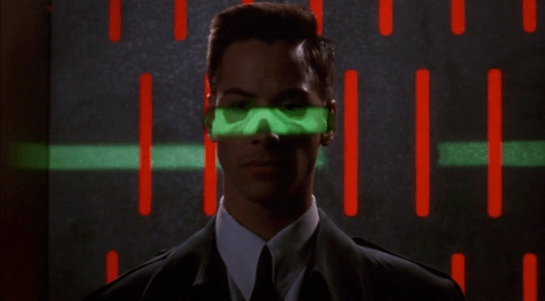
The green light runs over Johnny from top to bottom.
Looking at the picture, we can see that this green light is somehow making Johnny’s skeleton visible. It would be possible, by having an X-ray imaging system running at the same time and then re-projecting the X-ray image back onto the body, but why? Since there don’t appear to be any actual human beings on duty, I can only suggest that it is meant to look intimidating and impressive to encourage obedience. In the film Johnny appears to be alone and cannot see this himself, but it would be much more common for there to be multiple passengers, so each could watch the others being scanned.
There is also a screen showing another scan, a blurry body image, and text appearing on the right side. A voice repeats the text content. For the first time we see a blue background, the most common color for futuristic film interfaces.
The scanner detects Johnny’s implant, but whatever secrecy measures are present cause the system to decide that it is a registered dyslexia aid. The popup alert below includes the registration issuer and a domain name, so perhaps this is online verification over the Internet. Presumably Johnny can see this screen himself, if he cares.
The voiceover helpfully informs Johnny that there is “synaptic seepage”, and he should seek medical attention within 24 hours. This shows quite high level decision making by the system and an offer of assistance. Johnny says “thanks” in reply, an anthropomorphic response to this seemingly intelligent machine.
However, there seems to be a more detailed explanation in smaller text on the right of the display, and this isn’t announced. It’s not clear in this scene whether Johnny can see this display or not, but even if he could it would be difficult to read. Perhaps this is a legacy system from the days when airport security had actual staff.
Next
At this point Johnny leaves the airport, riding in a taxi from the airport. It is a good time for the first review of a group of related interfaces, which will be the next series of posts.
Once Johnny has installed his motion detector on the door, the brain upload can begin.
3. Building it
Johnny starts by opening his briefcase and removing various components, which he connects together into the complete upload system. Some of the parts are disguised, and the whole sequence is similar to an assassin in a thriller film assembling a gun out of harmless looking pieces.
It looks strange today to see a computer system with so many external devices connected by cables. We’ve become accustomed to one piece computing devices with integrated functionality, and keyboards, mice, cameras, printers, and headphones that connect wirelessly.
Cables and other connections are not always considered as interfaces, but “all parts of a thing which enable its use” is the definition according to Chris. In the early to mid 1990s most computer user were well aware of the potential for confusion and frustration in such interfaces. A personal computer could have connections to monitor, keyboard, mouse, modem, CD drive, and joystick – and every single device would use a different type of cable. USB, while not perfect, is one of the greatest ever improvements in user interfaces.
Why not go wireless? Wireless devices remove the need for a physical connection, but this means that anyone, not just you, could potentially connect. So instead of worrying about whether we have the right kind of cable, we now worry about the right kind of Bluetooth pairing and WiFi encryption password scheme. Mobile wireless devices also need their own batteries, which have to be charged. So wireless may seem visually cleaner, but comes with its own set of problems.
As of early 2016 we have two new standards, Lightning and USB-C, that are orientation-independent (only fifty years after audio cables), high bandwidth, and able to transmit power to peripherals as well. Perhaps by 2021 cables will have made a comeback as the usual way to connect devices.
2. Explaining it
Johnny explains the process to the scientists. He needs them to begin the upload by pushing a button, helpfully labelled “start”, on the gadget that resembles an optical disk drive. There’s a big red button as well, which is not explained but would make an excellent “cancel” button.
It would be simpler if Johnny just did this himself. But we will shortly discover that the upload process is apparently very painful. If Johnny had his hands near the system, he might involuntarily push another button or disturb a cable. So for them, having a single, easily differentiated button to press minimizes their chance of messing it up.
1. Making codes
He also sticks a small black disk on the hotel room’s silver remote control. The small disk is evidently is a wireless controller or camera of some kind. The scientists must watch the upload progress counter, and as it approaches the end, use this modified remote to grab three frames from the TV display, which will become the “access code” for the data. (More on this below.)
None of the buttons on this remote have markings or labels, but neither Johnny nor the scientist who will be using it are bothered. Perhaps this hotel chain tries to please every possible guest by not favouring any particular language? But even in that case, I’d expect there to be some kind of symbols on the buttons and a multilingual manual to explain the meaning of each. Maybe Johnny spends so much time in hotel suites that he has memorised the button layout?
Short of a mind reading remote that can translate any button press into “what the user intended”, I have to admit this is a terrible interface.
(There is a label on the black disk, but I have no idea what it means or even which script that is. Anyone?)
0. Go go go
Johnny plugs in his implant, puts on a headset with more cables, and bites down on a mouthguard. He’s ready.
The scientist pushes the start button and the upload begins. Johnny sees the data stream in his headset as a flood of graphics and text.
Why does he need the headset when there is a direct cable connection to the implant? The movie doesn’t make it explicit. It could be related to the images used as the access code. (More on this below.) Perhaps the images need to be processed by the recipient’s own optic nerve system for more reliable storage?
Still, in the spirit of apologetics we should try to find a better explanation than “an opportunity for 1995 cutting edge computer generated graphics.” Perhaps it is a very flashy progress indicator? Older computer systems had blinking lights on disk drives to indicate activity, copied on some of today’s USB sticks. Current-day file upload or download GUIs have progress bars. As processing and graphics capabilities increase, it will be possible for software to display thumbnails or previews of the actual data being transferred without slowing down.
Unfortunately there is an argument against this, which is that the obvious upload progress indicator is a numeric display counting gigabytes down to zero, and it makes a fast chirping sound as a sonic indicator as well. The counter shows the data flowing at gigabytes per second, the entire upload lasting about a minute. There’s also the problem that it’s not Johnny who is interested in knowing whether the upload is scientific data rather than, say, a video collection; but the scientists, and they can’t see it.
As the counter drops below one hundred, the scientist points the remote with black disk at the TV display, currently showing a cartoon, and presses the middle button. The image from the TV appears overlaid on the data stream to Johnny. This is a little odd, because Johnny assured the scientists that he wouldn’t know what the access codes were himself. Maybe these brief flashes are not enough time for him to remember these particular images among the gigabytes of visual content. But the way they’re shown to us, I’ll bet you can remember them when they come up again later in the plot.
Two more images are grabbed before the counter stops. When the upload finishes, the three images are printed out. (In the original film this is shown upside down, so I have rotated the image.)
Tagged:
So what are the images for? The script isn’t clear. I suggest that the images are being used as the equivalents of very large random numbers for whatever cryptography scheme protects the data against unauthorised access. Some current day systems use the timing of key presses and mouse movements as a source of randomness because humans simply can’t move their fingers with microsecond precision. Here, the human element makes it impossible to predict exactly which frame is chosen.
Humans also find images much easier to recognise than hundred digit numbers. Anyone who has seen the printout will be able to say whether a particular image is part of the access code or not with a high degree of confidence. In computer systems today, Secure Shell, or ssh, is a widely used encrypted terminal program for secure access to servers. Recent versions of ssh have a ‘randomart’ capability which shows a small ASCII icon generated from the current cryptographic key to everyone who logs on. If this ASCII icon appears different, this alerts everyone that the server key has been changed.
There’s one potential usability problem with the whole “pick three random images” mechanism. The last frame was grabbed when the counter was very close to zero. What would have happened if he had been too slow and missed altogether? Wouldn’t it be more reliable to have the upload system automatically grab the images rather than rely on a human? Chris suggests that maybe it secretly did grab three images that could have used without human input, but privileged the human input since it was more reliably random.
Quick aside: You may be asking, if images would be so wonderful, why aren’t we using them in this way already? It’s because our current security systems need not just very large random numbers, but very large random numbers with particular mathematical properties such as being prime. But let’s cut Johnny Mnemonic some slack, saying that by 2021 we may have new algorithms.
OK, back to the plot.
-1. Sharing the codes
The access codes are to be faxed from Beijing to Newark, although this gets interrupted by the Yakuza intruders. This is yet another device with unmarked buttons.
This device makes the same beeps and screeches as a 1990s analog fax machine. Since we’ll later learn that all the fax messages and phone calls are stored digitally in cyberspace, this must be a skeuomorphism, the old familiar audio tones now serving just as progress indicators.
As with other audio output, the tones allow the user to know that the transmission is proceeding and when it ends without having to pay full attention to the device. On the other hand, there is potential for confusion here as the digital upload is (presumably) much faster. Most current day computer systems could upload three photos, even in high resolution, well before the sequence of tones would complete. Users would most likely wait longer than actually necessary before moving on to their next task.
-2. Washing up
During the upload Johnny clenches his fists and bites his mouthguard. When the upload finishes, he retreats to the bathroom in considerable pain. At one point blood flows from his nose, and he swipes his hand over the tap to wash it down the drain. The bathroom announces that the water temperature is 17 degrees. We’ll come back to this later.
As Make It So emphasises in the chapter on brain interfaces, there is nothing in our current knowledge to suggest that writing or reading memories to or from a human brain would be painful. On the other hand, we know that information in the brain isthe shape of the neurons in the brain. Who knows what side effects will happen as those neurons are disconnected and reconnected as they need to be? We don’t know, so can’t really say whether it would hurt or not.
-3. Escaping the Yakuza
As mentioned in a prior post, while he is in the bathroom, the motion detector Johnny installed on the hotel door isn’t very effective and the Yakuza break in, kill everyone else, and acquire the second of the three access code images. Johnny escapes with the first image and flies to Newark, North America.
Johnny, with newly upgraded memory, goes straight to the hotel room where he meets the client’s scientists. Before the data upload, he quickly installs a motion detector on the hotel suite door. This is a black box that he carries clipped to his belt. He uses his thumb to activate it as he takes hold and two glowing red status lights appear.
Once placed on the door, there is just one glowing light. We don’t see exactly how Johnny controls the device, but for something this simple just one touch button would be sufficient.
A little later, after the brain upload (discussed in the next post), the motion detector goes off when four heavily armed Yakuza arrive outside the door. The single light starts blinking, and there’s a high pitched beep similar to a smoke alarm, but quieter.
Analysis
A sonic alarm is good, because it is omnidirectional. But being omnidirectional it might also notify the would-be attackers that they have been detected. Here the designers have erred too far on the side of caution. The alarm is so quiet that none of the scientists notice, and Johnny himself is lucky to be within a few metres when it goes off. The Yakuza burst in and slaughter the unaware scientists. It would almost certainly have been better for the alarm to be configured as loud as possible, ensuring everyone who needed to hear did so. And while the attackers would have been alerted, they might have been deterred by the thought of witnesses arriving.
In Beijing, Johnny steps into a hotel lift and pulls a small package out his pocket. He unwraps it to reveal the “Pemex MemDoubler”.
Johnny extends the cable from the device and plugs it into the implant in his head. The socket glows red once the connection is made.
Analysis: The jack
The jack looks like an audio plug, and like most audio plugs is round and has no coronal-orientation requirement. It also has a bulbous rather than pointed tip. Both of these are good design, as Johnny can’t see the socket directly and while accidentally poking yourself with a headphone style point is unlikely to be harmful, it would certainly be irritating.
The socket’s glow would be a useful indicator that the thing is working, but Johnny can’t see it! Probably these sockets and jacks are produced and used for other devices as well, as red status lights are common in this world.
There are easier and more convenient fictional brain plug interfaces, such as the neck plugs previously discussed on this website for Ghost In The Shell. But Johnny doesn’t want his implant to be too obvious, so this not so convenient plug may be a deliberate choice. Perhaps he tells inquisitive people that it’s for his Walkman.
Analysis: The device
The product name got a few chuckles from audiences in the 1990s, as the name is similar to a common classic Macintosh extension at the time, the Connectix RAM Doubler. This applied in-memory lossless data compression techniques to allow more or larger programs to run within the existing RAM.
The MemDoubler is apparently a software or firmware updater, modifying Johnny’s implant to use brain tissue twice as efficiently as before. It has voice output, again a slightly artificial sounding but not unpleasant voice. This announces that Johnny’s current capacity is 80 gigabytes. As the update is applied, a glowing progress bar gradually fills until the voice announces the new capacity of 160G.
(Going from 80G to 160G seems quaint today. But we should remember that the value of a mnemonic courier is secrecy, not quantity.)
Why does the MemDoubler need voice output? For such a simple task, the progress bar and a three digit numeric counter would seem adequate. But if there are complications—which for something wired into the brain might have an all too literal meaning for “fatal error”—a voice announcement would be able to include much more detail about the problem, or even alert bystanders if Johnny is rendered unconscious by the problem. (Given how current software installers operate, Johnny is fortunate that the MemDoubler did not insist on reciting the entire end user license agreement and warranty before the update could start.) Maybe the visual should be the default (to respect his professional need for secrecy), and the voice announcement adopted in an alert mode.
It’s also interesting that Johnny installs this immediately before he needs it, in the lift that is taking him to the hotel room where he will receive the data to be stored. Suppose someone else had been in the lift with him? In this world of routine body implants doubling your memory is probably not a crime, but at the time of writing diabetics will inject themselves in private even though that is harmless and necessary. Perhaps body-connected technology will be common enough in 2021 that public operation is considered normal, just as we have become accustomed to mobile phone conversations being carried out in public.