The Hover Chair

Three animated characters lounging in futuristic chairs, enjoying drinks, set in a vibrant, high-tech environment.

The Hover Chair is a ubiquitous, utilitarian, all-purpose assisting device. Each passenger aboard the Axiom has one. It is a mix of a beach-side deck chair, fashion accessory, and central connective device for the passenger’s social life. It hovers about knee height above the deck, providing a low surface to climb into, and a stable platform for travel, which the chair does a lot of.

A Universal Wheelchair

We see that these chairs are used by everyone by the time that Wall-E arrives on the Axiom. From BNL’s advertising though, this does not appear to be the original. One of the billboards on Earth advertising the Axiom-class ships shows an elderly family member using the chair, allowing them to interact with the rest of the family on the ship without issue. In other scenes, the chairs are used by a small number of people relaxing around other more active passengers.

At some point between the initial advertising campaign and the current day, use went from the elderly and physically challenged, to a device used 24/7 by all humans on-board the Axiom. This extends all the way down to the youngest children seen in the nursery, though they are given modified versions to more suited to their age and disposition. BNL shows here that their technology is excellent at providing comfort as an easy choice, but that it is extremely difficult to undo that choice and regain personal control.

But not a perfect interaction

We see failure from the passengers’ total reliance on the chairs when one of them (John) falls out of his chair trying to hand an empty drink cup to Wall-E. The chair shuts down, and John loses his entire connection to the ship. Because of his reliance on the chair, he’s not even able to pull himself back up and desperately reaches for the kiosk-bots for assistance.

A child's hand reaching out towards a colorful ice cream vendor cart surrounded by bright advertising posters.

This reveals the main flaw of the chair: Buy-N-Large’s model of distinct and complete specialization in robot roles has left the chair unable to help its passenger after the passenger leaves the chair’s seat. The first responders—the kiosk bots—can’t assist either (though this is due to programming, not capability…we see them use stasis/tractor beams in another part of the ship). Who or what robot the kiosk-bots are waiting for is never revealed, but we assume that there is some kind of specialized medical assistance robot specifically designed to help passengers who have fallen out of their chairs.

If these chairs were initially designed for infirm passengers, this would make sense; but the unintended conscription of the chair technology by the rest of the passengers was unforeseen by its original designers. Since BNL focused on specialization and fixed purpose, the ship was unable to change its programming to assist the less disabled members of the population without invoking the rest of the chair’s emergency workflow.

John reaching for help from the Kiosk-bots makes it appear that he either has seen the kiosk-bot use its beams before (so he knows it has the capability to help, if not the desire), or he pays so little attention to the technology that he assumes that any piece of the ship should be able to assist with anything he needs.

Whether he’s tech literate or tech insensitive and just wants things to work like magic as they do on the rest of the ship. The system is failing him and his mental model of the Axiom.

Make it ergonomic in every situation

Scene from animated movie featuring a small robot named Wall-E interacting with a large human character in a futuristic environment filled with entertainment screens.

Considering that the chairs already hover, and we know Buy-N-Large can integrate active tractor beams in robot design, it would have been better to have a chair variant that allowed the passenger to be in a standing position inside the chair while it moved throughout the ship. It would then look like a chariot or a full-body exo-skeleton.

This would allow people who may not be able to stand (either due to disability or medical condition) to still participate in active sports like tennis or holo-golf. It would also allow more maneuverability in the chair, allowing it to easily rotate to pick up a fallen passenger and reposition them in a more comfortable spot, even if they needed medical attention.

This would allow immobilization in the case of a serious accident, giving the medical-bot more time to arrive and preventing the passenger from injuring themselves attempting to rescue themselves.

The chair has been designed to be as appealing to a low-activity user as possible. But when technology exists, and is shown to be relatively ubiquitous across different robot types, it should be integrated at the front line where people will need it. Waiting for a medical bot when the situation doesn’t demand a medical response is overly tedious and painful for the user. By using technology already seen in wide use, the chair could be improved to assist people in living an active lifestyle even in the face of physical disabilities.

Otto’s Manual Control

WallE-Otto02

WallE-Otto06

When it refused to give up authority, the Captain wrested control of the Axiom from the artificial intelligence autopilot, Otto. Otto’s body is the helm wheel of the ship and fights back against the Captain. Otto wants to fulfil BNL’s orders to keep the ship in space. As they fight, the Captain dislodges a cover panel for Otto’s off-switch. When the captain sees the switch, he immediately realizes that he can regain control of the ship by deactivating Otto. After fighting his way to the switch and flipping it, Otto deactivates and reverts to a manual control interface for the ship.

The panel of buttons showing Otto’s current status next to the on/off switch deactivates half its lights when the Captain switches over to manual. The dimmed icons are indicating which systems are now offline. Effortlessly, the captain then returns the ship to its proper flight path with a quick turn of the controls.

One interesting note is the similarity between Otto’s stalk control keypad, and the keypad on the Eve Pod. Both have the circular button in the middle, with blue buttons in a semi-radial pattern around it. Given the Eve Pod’s interface, this should also be a series of start-up buttons or option commands. The main difference here is that they are all lit, where the Eve Pod’s buttons were dim until hit. Since every other interface on the Axiom glows when in use, it looks like all of Otto’s commands and autopilot options are active when the Captain deactivates him.

A hint of practicality…

The panel is in a place that is accessible and would be easily located by service crew or trained operators. Given that the Axiom is a spaceship, the systems on board are probably heavily regulated and redundant. However, the panel isn’t easily visible thanks to specific decisions by BNL. This system makes sense for a company that doesn’t think people need or want to deal with this kind of thing on their own.

Once the panel is open, the operator has a clear view of which systems are on, and which are off. The major downside to this keypad (like the Eve Pod) is that the coding of the information is obscure. These cryptic buttons would only be understandable for a highly trained operator/programmer/setup technician for the system. Given the current state of the Axiom, unless the crew were to check the autopilot manual, it is likely that no one on board the ship knows what those buttons mean anymore.

WallE-Otto03

Thankfully, the most important button is in clear English. We know English is important to BNL because it is the language of the ship and the language seen being taught to the new children on board. Anyone who had an issue with the autopilot system and could locate the button, would know which button press would turn Otto off (as we then see the Captain immediately do).

Considering that Buy-N-Large’s mission is to create robots to fill humans’ every need, saving them from every tedious or unenjoyable job (garbage collecting, long-distance transportation, complex integrated systems, sports), it was both interesting and reassuring to see that there are manual over-rides on their mission-critical equipment.

…But hidden

The opposite situation could get a little tricky though. If the ship was in manual mode, with the door closed, and no qualified or trained personnel on the bridge, it would be incredibly difficult for them to figure out how to physically turn the ship back to auto-pilot. A hidden emergency control is useless in an emergency.

Hopefully, considering the heavy use of voice recognition on the ship, there is a way for the ship to recognize an emergency situation and quickly take control. We know this is possible because we see the ship completely take over and run through a Code Green procedure to analyze whether Eve had actually returned a plant from Earth. In that instance, the ship only required a short, confused grunt from the Captain to initiate a very complex procedure.

Security isn’t an issue here because we already know that the Axiom screens visitors to the bridge (the Gatekeeper). By tracking who is entering the bridge using the Axiom’s current systems, the ship would know who is and isn’t allowed to activate certain commands. The Gatekeeper would either already have this information coded in, or be able to activate it when he allowed people into the bridge.

For very critical emergencies, a system that could recognize a spoken ‘off’ command from senior staff or trained technicians on the Axiom would be ideal.

Anti-interaction as Standard Operating Procedure

WallE-Otto05

The hidden door, and the obscure hard-wired off button continue the mission of Buy-N-Large: to encourage citizens to give up control for comfort, and make it difficult to undo that decision. Seeing as how the citizens are more than happy to give up that control at first, it looks like profitable assumption for Buy-N-Large, at least in the short term. In the long term we can take comfort that the human spirit–aided by an adorable little robot–will prevail.

So for BNL’s goals, this interface is fairly well designed. But for the real world, you would want some sort of graceful degradation that would enable qualified people to easily take control in an emergency. Even the most highly trained technicians appreciate clearly labeled controls and overrides so that they can deal directly with the problem at hand rather than fighting with the interface.

The Gatekeeper

WallE-Gatekeeper04

After the security ‘bot brings Eve across the ship (with Wall-e in tow), he arrives at the gatekeeper to the bridge. The Gatekeeper has the job of entering information about ‘bots, or activating and deactivating systems (labeled with “1”s and “0”s) into a pedestal keyboard with two small manipulator arms. It’s mounted on a large, suspended shaft, and once it sees the security ‘bot and confirms his clearance, it lets the ‘bot and the pallet through by clicking another, specific button on the keyboard.

The Gatekeeper is large. Larger than most of the other robots we see on the Axiom. It’s casing is a white shell around an inner hardware. This casing looks like it’s meant to protect or shield the internal components from light impacts or basic problems like dust. From the looks of the inner housing, the Gatekeeper should be able to move its ‘head’ up and down to point its eye in different directions, but while Wall-e and the security ‘bot are in the room, we only ever see it rotating around its suspension pole and using the glowing pinpoint in its red eye to track the objects its paying attention to.

When it lets the sled through, it sees Wall-e on the back of the sled, who waves to the Gatekeeper. In response, the Gatekeeper waves back with its jointed manipulator arm. After waving, the Gatekeeper looks at its arm. It looks surprised at the arm movement, as if it hadn’t considered the ability to use those actuators before. There is a pause that gives the distinct impression that the Gatekeeper is thinking hard about this new ability, then we see it waving the arm a couple more times to itself to confirm its new abilities.

WallE-Gatekeeper01

The Gatekeeper seems to exist solely to enter information into that pedestal. From what we can see, it doesn’t move and likely (considering the rest of the ship) has been there since the Axiom’s construction. We don’t see any other actions from the pedestal keys, but considering that one of them opens a door temporarily, it’s possible that the other buttons have some other, more permanent functions like deactivating the door security completely, or allowing a non-authorized ‘bot (or even a human) into the space.

An unutilized sentience

The robot is a sentient being, with a tedious and repetitive job, who doesn’t even know he can wave his arm until Wall-e introduces the Gatekeeper to the concept. This fits with the other technology on board the Axiom, with intelligence lacking any correlation to the robot’s function. Thankfully for the robot, he (she?) doesn’t realize their lack of a larger world until that moment.

So what’s the pedestal for?

It still leaves open the question of what the pedestal controls actually do. If they’re all connected to security doors throughout the ship, then the Gatekeeper would have to be tied into the ship’s systems somehow to see who was entering or leaving each secure area.

The pedestal itself acts as a two-stage authentication system. The Gatekeeper has a powerful sentience, and must decide if the people or robots in front of it are allowed to enter the room or rooms it guards. Then, after that decision, it must make a physical action to unlock the door to enter the secure area. This implies a high level of security, which feels appropriate given that the elevator accesses the bridge of the Axiom.

Since we’ve seen the robots have different vision modes, and improvements based on their function, it’s likely that the Gatekeeper can see more into the pedestal interface than the audience can, possibly including which doors each key links to. If not, then as a computer it would have perfect recall on what each button was for. This does not afford a human presence stepping in to take control in case the Gatekeeper has issues (like the robots seen soon after this in the ‘medbay’). But, considering Buy-N-Large’s desire to leave humans out of the loop at each possible point, this seems like a reasonable design direction for the company to take if they wanted to continue that trend.

It’s possible that the pedestal was intended for a human security guard that was replaced after the first generation of spacefarers retired. Another possibility is that Buy-N-Large wanted an obvious sign of security to comfort passengers.

What’s missing?

We learn after this scene that the security ‘bot is Otto’s ‘muscle’ and affords some protection. Given that the Security ‘bot and others might be needed at random times, it feels like he would want a way to gain access to the bridge in an emergency. Something like an integrated biometric scanner on the door that could be manually activated (eye scanner, palm scanner, RFID tags, etc.), or even a physical key device on the door that only someone like the Captain or trusted security officers would be given. Though that assumes there is more than one entrance to the bridge.

This is a great showcase system for tours and commercials of an all-access luxury hotel and lifeboat. It looks impressive, and the Gatekeeper would be an effective way to make sure only people who are really supposed to get into the bridge are allowed past the barriers. But, Buy-N-Large seems to have gone too far in their quest for intelligent robots and has created something that could be easily replaced by a simpler, hard-wired security system.

WallE-Gatekeeper05

Wall-E’s Audio Recorder

image00

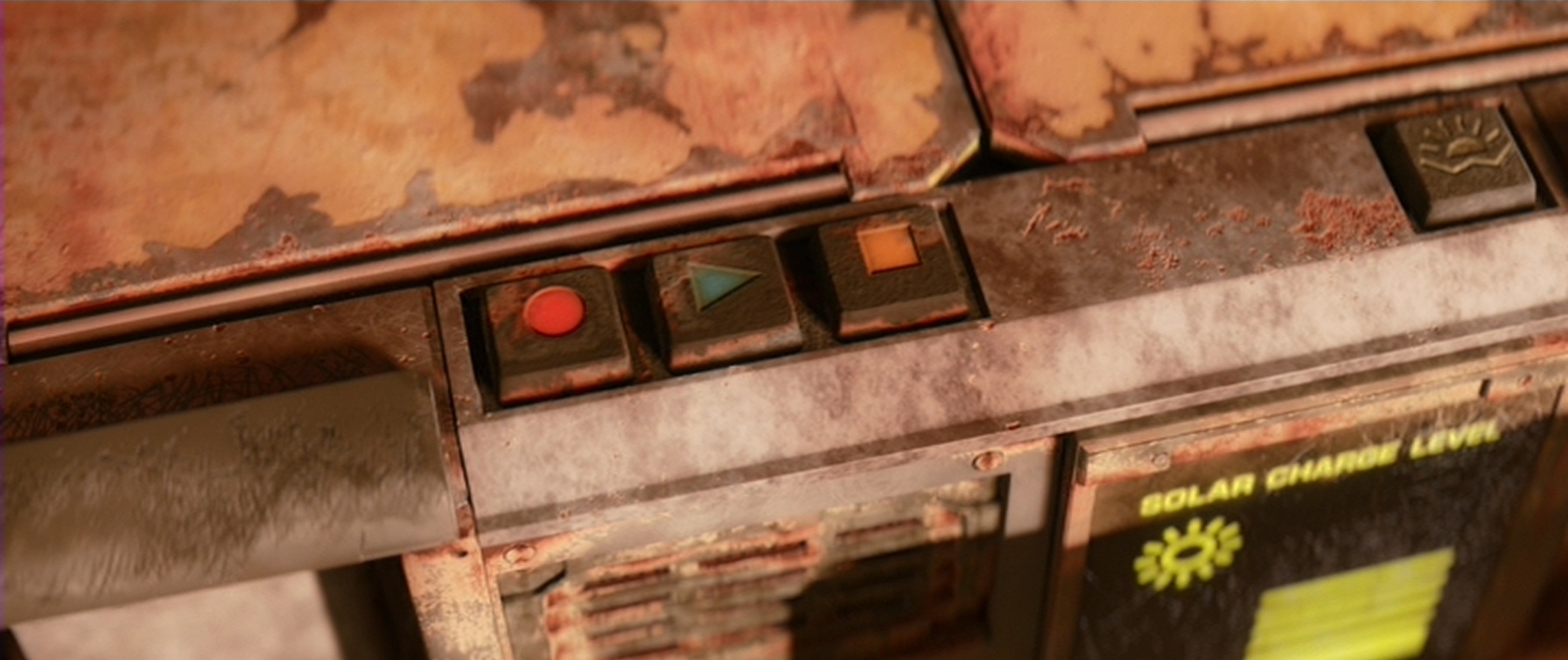
Each Wall-E unit has an integrated audio recorder with three buttons: Record, Play, and a third button with an orange square. We see Record and Play used several times, but the orange button is never visibly pressed. Reason and precedent suggest it is a stop function.

What the original purpose of this capability is unclear. Wall-E uses it to record snippets of songs or audio clips from movie that he enjoys. There is no maximum length shown. There is no visible method to rewind, fast forward, or seek along the soundbite, though the clips shown are short enough that it doesn’t affect Wall-E’s ability to hear what he wants to hear.

Simple

image02

This is a very simple interface, and Wall-E is shown being able to operate it without looking at the buttons. Since all three are relatively large, placed on the front of his chest, have physical indentions, and are physically separated, it would be possible for a person with a tactile sense to tell the buttons apart once they learned the order of buttons.

Increasing the indentation of the symbols, and adding a different texture on each would make tactile discovery even easier.

image01_520

The recording capabilities shown are also short. This means that it is excellent for a contained thought, song, or event to be referenced later. Short clips allow the user of the system (in this case Wall-E) to never need to worry about where the recording is cued up to, and play whatever it is he remembers being in memory.

The Orange Button?

Unlike the Play and Record buttons, which are shown meeting standard interface practices of today, the lineup has that odd orange button that is never shown being used (except when Eve is frantically trying to wake Wall-E up, but that tells us nothing about its intended use).

My best guess, based only on its inclusion with the other two buttons, is that it represents a pause function or stop. This conjecture isn’t 100% certain because either function could easily be co-located on the play button as a dual function. Push once to play, push a second time to pause.

So what is the orange button for?

No idea.

The lesson here is that when you’re designing an interface, make sure that each button is absolutely necessary and well placed. Given the location and tactile focus of the interface, the two most used functions (record and play) should have been larger and had distinguishable texture. The third button has a less-than-obvious purpose, meaning that any humans attempting to use it in the far future will need to use trial and error to understand what it’s for.

Two of the buttons are easy to understand. But designers for this system would want to make sure that a person with no access to documentation could quickly understand the third button through immediate feedback and a function that is non-destructive to the data stored in the audio recording.

Dust Storm Alert

WallE-DustStorm04

While preparing for his night cycle, Wall-E is standing at the back of his transport/home. On the back drop door of the transport, he is cleaning out his collection cooler. In the middle of this ritual, an alert sounds from his external speakers. Concerned by the sound, Wall-E looks up to see a dust storm approaching. After seeing this, he hurries to finish cleaning his cooler and seal the door of the transport.

A Well Practiced Design

The Dust Storm Alert appears to override Wall-E’s main window into the world: his eyes. This is done to warn him of a very serious event that could damage him or permanently shut him down. What is interesting is that he doesn’t appear to register a visual response first. Instead, we first hear the audio alert, then Wall-E’s eye-view shows the visual alert afterward.

Given the order of the two parts of the alert, the audible part was considered the most important piece of information by Wall-E’s designers. It comes first, is unidirectional as well as loud enough for everyone to hear, and is followed by more explicit information.

WallE-DustStorm01

Equal Opportunity Alerts

By having the audible alert first, all Wall-E units, other robots, and people in the area would be alerted of a major event. Then, the Wall-E units would be given the additional information like range and direction that they need to act. Either because of training or pre-programmed instructions, Wall-E’s vision does not actually tell him what the alert is for, or what action he should take to be safe. This could also be similar to tornado sirens, where each individual is expected to know where they are and what the safest nearby location is.

For humans interacting alongside Wall-E units each person should have their own heads-up display, likely similar to a Google-glass device. When a Wall-E unit gets a dust storm alert, the human could then receive a sympathetic alert and guidance to the nearest safe area. Combined with regular training and storm drills, people in the wastelands of Earth would then know exactly what to do.

Why Not Network It?

Whether by luck or proper programming, the alert is triggered with just enough time for Wall-E to get back to his shelter before the worst of the storm hits. Given that the alert didn’t trigger until Wall-E was able to see the dust cloud for himself, this feels like very short notice. Too short notice. A good improvement to the system would be a connection up to a weather satellite in orbit, or a weather broadcast in the city. This would allow him to be pre-warned and take shelter well before any of the storm hits, protecting him and his solar collectors.

Other than this, the alert system is effective. It warns Wall-E of the approaching storm in time to act, and it also warns everyone in the local vicinity of the same issue. While the alert doesn’t inform everyone of what is happening, at least one actor (Wall-E) knows what it means and knows how to react. As with any storm warning system, having a connection that can provide forecasts of potentially dangerous weather would be a huge plus.

Klaatunian interior

DtESS-034

When the camera first follows Klaatu into the interior of his spaceship, we witness the first gestural interface seen in the survey. To turn on the lights, Klaatu places his hands in the air before a double column of small lights imbedded in the wall to the right of the door. He holds his hand up for a moment, and then smoothly brings it down before these lights. In response the lights on the wall extinguish and an overhead light illuminates. He repeats this gesture on a similar double column of lights to the left of the door.

The nice thing to note about this gesture is that it is simple and easy to execute. The mapping also has a nice physical referent: When the hand goes down like the sun, the lights dim. When the hand goes up like the sun, the lights illuminate.

He then approaches an instrument panel with an array of translucent controls; like a small keyboard with extended, plastic keys. As before, he holds his hand a moment at the top of the controls before swiping his hand in the air toward the bottom of the controls. In response, the panels illuminate. He repeats this on a similar panel nearby.

Having activated all of these elements, he begins to speak in his alien tongue to a circular, strangely lit panel on the wall. (The film gives no indication as to the purpose of his speech, so no conclusions about its interface can be drawn.)

DtESS-049

Gort also operates the translucent panels with a wave of his hand. To her credit, perhaps, Helen does not try to control the panels, but we can presume that, like the spaceship, some security mechanism prevents unauthorized control.

Missing affordances

Who knows how Klaatu perceives this panel. He’s an alien, after all. But for us mere humans, the interface is confounding. There are no labels to help us understand what controls what. The physical affordances of different parts of the panels imply sliding along the surface, touch, or turning, not gesture. Gestural affordances are tricky at best, but these translucent shapes actually signal something different altogether.

Overcomplicated workflow

And you have to wonder why he has to go through this rigmarole at all. Why must he turn on each section of the interface, one by one? Can’t they make just one “on” button? And isn’t he just doing one thing: Transmitting? He doesn’t even seem to select a recipient, so it’s tied to HQ. Seriously, can’t he just turn it on?

Why is this UI even here?

Or better yet, can’t the microphone just detect when he’s nearby, illuminate to let him know it’s ready, and subtly confirm when it’s “hearing” him? That would be the agentive solution.

Maybe it needs some lockdown: Power

OK. Fine. If this transmission consumes a significant amount of power, then an even more deliberate activation is warranted, perhaps the turning of a key. And once on, you would expect to see some indication of the rate of power depletion and remaining power reserves, which we don’t see, so this is pretty doubtful.

Maybe it needs some lockdown: Security

This is the one concern that might warrant all the craziness. That the interface has no affordance means that Joe Human Schmo can’t just walk in and turn it on. (In fact the misleading bits help with a plausible diversion.) The “workflow” then is actually a gestural combination that unlocks the interface and starts it recording. Even if Helen accidentally discovered the gestural aspect, there’s little to no way she could figure out those particular gestures and start intergalactic calls for help. And remembering that Klaatu is, essentially, a space ethics reconn cop, this level of security might make sense.

Perpvision

GitS-heatvision-01

The core of interaction design is the see-think-do loop that describes the outputs, human cognition, and inputs of an interactive system. A film or TV show spends time showing inputs without describing some output, only when these users are in the background and unrelated to the plot. But there are a few examples of outputs with no apparent inputs. These are hard to evaluate in a standard way because it’s such a giant piece of the puzzle. Is it a brain input? Is the technology agentive? Is it some hidden input like Myo‘s muscle sensing? Not knowing the input, a regular review is kind of pointless. All I can do is list its effects and perhaps evaluate the outputs in terms of the apparent goals. Ghost in the Shell has several of these types of inputless systems. Today’s is Kusanagi’s heat vision.

Early in the film, Kusanagi sits atop a skyscraper, jacked in, wearing dark goggles, and eavesdropping on a conversation taking place in a building far below. As she looks down, she sees through the walls of the building in a scanline screen-green view that shows the people as bright green and furniture as a dim green, with everything else being black.

She adjusts the view by steps to zoom closer and closer until her field of vision is filled with the two men conversing in her earpiece. When she hears mention of Project 2501 she thinks the message, “Major, Section 6 is ready to move in.” She reaches up to her right temple and clicks a button, to turn the goggles off before removing them.

That’s nifty. But how did she set the depth of field and the extents (the frustum) of the display so that she only sees these people, and not everyone in the building below this? How does she tell the algorithm that she wants to see furniture and not floor? (Is it thermography? Is the furniture all slightly warm?) What is she doing to increase the zoom? If it’s jacked into her head, why must she activate it several times rather than just focusing on the object with her eyes, or specifying “that person there?” How did she set the audio? Why does the audio not change with each successive zoom? If they’re from separate systems, how did she combine them?

Squint gestures

If I had to speculate what the mechanism should be, I would try to use the natural mechanisms of the eye itself. Let Kusanagi use a slight squint gesture to zoom in, and a slight widening of the eyelids to zoom out. This would let her maintain her gaze, maintain her silence, keep her body still, and keep her hands free.

The scene implies that her tools provide a set amount of zoom for each activation, but for very long distances that seems like it would be a pain. I would have the zoom automatically set itself to make the object on which she is focusing fill her field of vision less some border, and then use squint-gestures to change the zoom to the next logical thing. For instance, if she focused on a person, that person would fill her field of vision. A single widening might zoom out to show the couch on which they are sitting. Another the room. This algorithm wouldn’t be perfect, so you’d need some mechanism for arbitrary zoom. I’d say a squint or wide-eyed gesture held for a third of a second or so would trigger arbitrary zoom for as long as the gesture was maintained, with the zoom increasing logarithmically.

As for the frustum, use the same smart algorithm to watch her gaze, and set the extents to include the whole of the subject and the context in which it sits.

Virtual 3D Scanner

GitS-3Dscanner-001

Visualization

The film opens as a camera moves through an abstract, screen-green 3D projection of a cityscape. A police dispatch voice says,

“To all patrolling air units. A 208 is in progress in the C-13 district of Newport City. The airspace over this area will be closed. Repeat:…”

The camera floats to focus on two white triangles, which become two numbers, 267 and 268. The thuck-thuck sounds of a helicopter rotor appear in the background. The camera continues to drop below the numbers, but turns and points back up at them. When the view abruptly shifts to the real world, we see that 267 and 268 represent two police helicopters on patrol.

GitS-3Dscanner-008

Color

The roads on the map of the city are a slightly yellower green, and the buildings are a brighter and more saturated green. Having all of the colors on the display be so similar certainly sets a mood for the visualization, but it doesn’t do a lot for its readability. Working with broader color harmonies would help a reader distinguish the elements and scan for particular things.

colorharmonies

Perspective

The perspective of the projection is quite exaggerated. This serves partly as a modal cue to let the audience know that it’s not looking at some sort of emerald city, but also hinders readability. The buildings are tall enough to obscure information behind them, and the extreme perspective makes it hard to understand their comparative heights or their relation to the helicopters, which is the erstwhile point of the screen.

perspectives

There are two ways to access and control this display. The first is direct brain access. The second is by a screen and keyboard.

Brain Access

Kusanagi and other cyborgs can jack in to the network and access this display. The jacks are in the back of their neck and as with most brain interfaces, there is no indication about what they’re doing with their thoughts to control the display. She also uses this jack interface to take control of the intercept van and drive it to the destination indicated on the map.

During this sequence the visual display is slightly different, removing any 3D information so that the route can be unobscured. This makes sense for wayfinding tasks, though 3D might help with a first-person navigation tasks.

GitS-3Dscanner-010

Screen and keyboard access

While Kusanagi is piloting an intercept van, she is in contact with a Section 9 control center. Though the 3D visualization might have been disregarded up to this point as a film conceit, here see that it is the actual visualization seen by people in the diegesis. The information workers at Section 9 Control communicate with agents in the field through headsets, type onto specialized keyboards, and watch a screen that displays the visualization.

GitS-3Dscanner-036

Their use is again a different mode of the visualization. The information workers are using it to locate the garbage truck. The first screens they see show a large globe with a white graticule and an overlay reading “Global Positioning System Ver 3.27sp.” Dots of different sizes are positioned around the globe. Triangles then appear along with an overlay listing latitude, longitude, and altitude. Three other options appear in the lower-right, “Hunting, Navigation, and Auto.” The “Hunting” option is highlighted with a translucent kelley green rectangle.

After a few seconds the system switches to focus on the large yellow triangle as it moves along screen-green roads. Important features of the road, like “Gate 13” are labeled in a white, rare serif font, floating above the road, in 3D but mostly facing the user, casting a shadow on the road below. The projected path of the truck is drawn in a pea green. A kelley green rectangle bears the legend “Game 121 mile/h / Hunter->00:05:22 ->Game.” The speed indicator changes over time, and the time indicator counts down. As the intercept van approaches the garbage truck, the screen displays an all-caps label in the lower-left corner reading, somewhat cryptically, “FULL COURSE CAUTION !!!”

The most usable mode

Despite the unfamiliar language and unclear labeling, this “Hunter” mode looks to be the most functional. The color is better, replacing the green background with a black one to create a clearer foreground and background for better focus. No 3D buildings are shown, and the camera angle is similar to a real-time-strategy angle of around 30 degrees from the ground, with a mild perspective that hints at the 3D but doesn’t distort. Otherwise the 3D information of the roads’ relationship to other roads is shown with shape and shadow. No 3D buildings are shown, letting the user keep her focus on the target and the path of intercept.

GitS-3Dscanner-035

Zorg bomb

TheFifthElement-ZorgBomb-001

When Zorg believes he has recovered the sacred stones, he affixes a bomb to the door of Plavalaguna’s suite. The bomb is a little larger than a credit card, with a slot at the top for a key card to be dropped in. The front of the bomb houses all the buttons and lights. The bottom and top edges are rounded back.

The interface for the bomb is quite simple. Zorg presses three large, transparent buttons along the top in order from left to right to activate the bomb. These buttons glow bright red during the countdown. Below these buttons, four red LEDs blink in succession counting off quarter seconds. At the bottom of the display a 4-character, 7-segment timer counts down from the time set: 20 minutes. The device audibly ticks off each second as it passes.

timebomb

Activation

An (adhesive? magnetic?) backing lets Zorg simply place the bomb on the wall to affix it there. Zorg presses the three large buttons in order from left to right to activate it and start the countdown.

Activation analysis

The bomber is after simple activation, but also wants very much to avoid accidental activation. Pressing the buttons in order might happen accidentally, for example from a tire or foot rolling across it. Better would be to have the activation code something much less likely to happen accidentally, like 1-3-2 or 2-3-1.

There’s also a question of whether a bomber would put giant glowing lights, reflective yellow tape, or an audible tick on the bomb (LEDs, if you didn’t know, don’t come with a ticking sound built in.) Each of these draws attention to the bomb, giving helpless victims time to evacuate, alert the authorities, or inform any explosive ordnance disposal personnel that happen to be wandering by. Yes, Zorg wants the bomb to explode, but only after a certain time, so he can get away. He should affix the bomb in some hidden place and design it with a less attention-getting display to suit his fiendish goals.

TheFifthElement-ZorgBomb-003

Deactivation

Once Zorg realizes that the box he stole was empty, he returns to the Fhloston Paradise liner to look for the stones. His first task is to deactivate the bomb. To do this he pulls out a keycard, and gingerly holds it above the bomb. His caution and nervousness implies that it has a jostle-sensitive anti-handling sensors, and that if he bumped it, it would go off. Fortunately for him, he manages to slip the card in without jostling the bomb, and sure enough, it stops with five seconds to go.

TheFifthElement-ZorgBomb-006

Deactivation analysis

The keycard is a mostly-smart deactivation strategy. As we can see, Zorg is quite nervous during the deactivation, and in such high-stress times, it’s better to rely on an object than a stressed villain’s memory for something like a password. The card is thin like a credit card and can fit in a wallet, so it’s easy to carry around. There’s a risk that the card could be misplaced, but the importance of the key will ensure that Zorg will keep track of it. There’s a risk it could be ruined and become useless, but we can presume Zorg made it with tough, ruggedized materials.

The problem with the shape is one of orientation. There are four ways a card can be oriented to a slot, and looking at the card, there is no clear indication of the correct one. The copper circuitry printed on both sides is asymmetrical, so it’s at least possible to tell the current orientation. Perhaps this is the “password” that the system requires, and the random stranger picking it up only has a one in four chance of getting it right.

Fortunately for Zorg, he remembers the correct orientation, and is able to stop the bomb.

TheFifthElement-ZorgBomb-007

Or, this bomb, anyway.

Red mics

TheFifthElement-redmike-001

We saw in an earlier post how the military uses communication headsets with red LEDs in the tips of the antennas that provide a social signal about the attention of its wearer. On board the spaceship to Fhloston Paradise, the same technique is used to signal functioning microphones.

TheFifthElement-redmike-002

TheFifthElement-redmike-003

The simple status signal of glowing signals to the speaker that the device is on and that their voice is being broadcast, listened to, or might be overheard.

These are two binary states: microphone recording/not, light on/off. and the relationship could be swapped such that the light illuminates when the device is not recording. But since the consequences for accidentally broadcasting the wrong thing are dire, it makes sense to associate the attention-getting signal with the costly state that requires attention and care.

The red appears elsewhere as a signal for microphone or antenna, even when it’s not glowing. We see it on Korben’s wireless phone at home, Zorg’s assistant’s headset, on Korben’s room phone aboard the Fhloston Paradise, on the handheld mic aboard Zorg’s ship, and on the President’s wireless phone. We can presume it’s a signal common pattern across all the commucication technology of this world. The commonality helps signal to anyone familiar with it the purpose of an otherwise unmarked and miniaturized component.