R. S. Revenge Comms

Note: In honor of the season, Rogue One opening this week, and the reviews of Battlestar Galactica: The Mini-Series behind us, I’m reopening the Star Wars Holiday Special reviews, starting with the show-within-a-show, The Faithful Wookie. Refresh yourself of the plot if it’s been a while.

Faithful-Wookiee-02

On board the R.S. Revenge, the purple-skinned communications officer announces he’s picked up something. (Genders are a goofy thing to ascribe to alien physiology, but the voice actor speaks in a masculine register, so I’m going with it.)

faithful-wookiee-01-surrounds

He attends a monitor, below which are several dials and controls in a panel. On the right of the monitor screen there are five physical controls.

  • A stay-state toggle switch
  • A stay-state rocker switch
  • Three dials

The lower two dials have rings under them on the panel that accentuate their color.

Map View

The screen is a dark purple overhead map of the impossibly dense asteroid field in which the Revenge sits. A light purple grid divides the space into 48 squares. This screen has text all over it, but written in a constructed orthography unmentioned in the Wookieepedia. In the upper center and upper right are unchanging labels. Some triangular label sits in the lower-left. In the lower right corner, text appears and disappears too fast for (human) reading. The middle right side of the screen is labeled in large characters, but they also change too rapidly to make much sense of it.

revengescreen

Luke, looking over the shoulder of the comms officer at the same monitor, exclaims, “It’s the Millennium Falcon!”

faithful-wookiee-12
Seriously, Luke, how can you tell this?

Watching the glowing dot and crosshairs blink and change position several times, the comms officer says, “They’re coming out of light speed. I can’t make contact.” An off-screen voice tells him to “Try a lower channel.” Something causes the channel to change (the comms officer’s hands do not touch anything that we can see), and then the monitor shows a video feed from the Falcon.

Video Feed

The video feed has an overlay to the upper left hand side, consisting of lines of text which appear from top to bottom in a palimpsest formation, even though the copy is left-aligned. At the top is a label with changing characters, looking something like a time stamp.

Faithful-Wookiee-03

Analysis of the Map View

Since we can’t read the video overlay in the video feed, and it doesn’t interfere with the image, there’s not much to say about it. Instead I’ll focus on the map view.

Hand-drawn Inconsistency

In the side angle shot, which we see first, we see the dial colors go from top to bottom, as beige, red, yellow. In the facing shot of this interface, which immediately follows the side shot, the dials go beige, yellow, red. The red and yellow are transposed. Itʼs of course possible that the dials have a variable hue, and changed at exactly the same time the camera switches. But then we have to explain where his hand went, and why we don’t see any of the other elements changing color, and so on…

This illustrates one of the problems with reviewing hand-drawn animation (and why scifiinterfaces generally frowns upon it.) It takes a hand-drawing animator extra work to keep things consistent from screen to screen. She must have a reference when drawing the interface from any new angle, and this extra work is on top of all the other things she has to manage like color and timing. Fewer people will notice transposed dial colors than, say, the comms officer turning orange instead of purple, so the interface is low on that priority stack.

Contrast that with live-action and computer-animated interfaces. In these modes of working, it takes extra work to change interfaces from shot to shot, so you run into consistency problems much less frequently.

I’ve written about this before in the abstract, but it’s nice to have a simple and easily shown example in the blog to point to.

2Dness

Another problem with the interface is that it is 2-D, but space is 3-D.

When picking a projection to display, we have to keep in mind that it is more immediate to understand an impending collision when presented as 2-D information: Constant bearing, decreasing range = Trouble. So, perhaps the view has automatically aligned itself to be perpendicular to the Falcon’s approach, which makes it easier to monitor the decreasing distance.

If so, he would need to see that automatically-aligned status reflected somewhere in the interface, and have access to controls that let him change the view and snap back to this Most Useful View. Admittedly, this is a lot of apologetics to apply, when really, it’s most likely the old trope 2-D Space.

Attention and memory

Faithful-Wookiee-01

There are some nicely designed attention cues. The crosshairs, glowing dot, and motion graphics makes it so that—even though we can’t read the language—we can tell what’s of interest on the screen. One dot moving towards another, stationary dot. We’re set up for the Falcon’s buzzing the base.

That’s probably the best thing that can be said for it.

The text is terrible, changing too fast for a human reader. (Yes, yes, put down that emerging comment. Purple-face isnʼt human, but we must evaluate interfaces considering what is useful to us, and right now that means us humans.) The text changes so much faster than the blinking, in fact, that it’s pulling attention away from it. Narratively, the rapid-fire text helps convey a sense of urgency, but it greatly costs readability. It’s not a good model for real world design.

The blinking crosshair might most accurately reflect the actual position of the detected object within the radar sweep. But it could help the officer more. As with medical signals, data points are not as interesting as information trends. As it is, it relies on his memory to piece together the information, which means he has to constantly monitor the screen to make sense. If instead the view featured an evaporating trail of data points, not only could he look away without missing too much information, but he would also notice that the speed and direction are slightly erratic, which would prove quite interesting to anyone trying to ascertain the status of the ship. One glance shows things are not as they should be. The Falcon is clearly careening.

tracking_assistance
Actual points from the animation.

Mysterious Control

When we first see the comms officer, he has his unmoving hand on one of the dials. But when we see the map switch to the video feed, none of the controls we can see are touched. This raises a possibility and a question.

The possibility is that there is control by some other mechanism. My best guess is that it is voice control, since the Rebel General says “try a lower channel” just before it switches. Maybe he was not speaking to the comms officer, but to the machine itself. And given C3PO, they clearly have the technology to recognize and act on natural language, though it’s usually associated with a full general artificial intelligence. A Rebel Siri (33 years before it came out in Apple’s iOS) makes sense from an apologetics sense.

If so, there are some aspects of the UI missing to signal to an operator that the machine is listening, and hearing, and understanding what is being said, as well as whether the speaker is authorized to control. After all, the comms officer is wearing the headset, but it was the red-bearded general who issued the command. I imagine it’s not OK for anyone on the bridge to just shout out controls.

faithful-wookiee-13
Just General Burnside, here.

The question then, is if the channel is controlled by voice, what are the physical controls for? They’re lacking labels of any kind. Perhaps they’re there as a backup, should voice control fail. Perhaps they are vestigial, left over from before voice control was installed. Maybe only the general has a voice override and the comms officer must use the physical controls. Any of these would be fine backworlding explanations, but my favorite idea is that the dials are for controlling nuanced variables in very fluid ways with instant feedback.

It’s easier to twiddle a dial to change the frequency of a radio to find a low-power signal than to keep saying “back…forward…no, back just a bit.” That would help explain what the comms officer was doing with his hands on the dials when he got something but not when the general voice-controls the channel.

In general

The interface shows some sophistication in styling and visual hierarchy, and if we give it lots of benefit of the doubt, might even be handling some presentation variables for the user in sophisticated ways. But the distractions of the rapid-fire text, the lack of trend lines, the lack of labels for the physical controls, and the missing affordances for projection control and voice control feedback make it a poor model for any real world design. 

Lumpy’s Brilliant Cartoon Player

I am pleased to report that with this post, we are over 50% of the way through this wretched, wretched Holiday Special.

SWHS-Cartoon-Player-07

Description

After Lumpy tries to stop stormtroopers from going upstairs, an Imperial Officer commands Malla to keep him quiet. To do so, she does what any self-respecting mother of a pre-teen in the age of technology does, and sits him down to watch cartoons. The player is a small, yellow device that sits flat on an angled tabletop, like a writing desk.

Two small silver buttons stack vertically on the left, and an upside down plug hole strainer on the right. A video screen sits above these controls. Since no one in the rest of his family wants to hear the cartoon introduction of Boba Fett, he dons a pair of headphones, which are actually kind of stylish in that the earpieces are square and perforated, but not beveled. There are some pointless animations that start up, but then the cartoon starts and Lumpy is, in fact, quiet for the duration. So, OK, point one Malla.

SWHS-Cartoon-Player-08
Why no budding DJ has glommed onto this for an album cover is beyond me.

Analysis

We only see Lumpy press down onto the surface of the device from the far side, so it’s mostly conjecture about how the interface works. The same goes for the media. But we do know the basic needs of video: Start, stop, and volume. And a single click-stop dial could handle all that, even if kind of poorly.

We also don’t know whether the device has media inserts—like a Blu-Ray player—or is more like a television with fixed streams of ongoing content to pick from, or like a Netflix requiring a search of a practically infinite on-demand catalogue. But that sink drain thing looks like it’s meant to be a channel selector, and this was 1978, so let’s presume it was a television model with a few-year prescient Walkman personal-media bent. In fact, there’s a handle visible in the shot posted below, so let’s give this thing some credit for presaging miniaturization to the point of mobility. It must have blown some kids minds back then.

And, sure, this interface could manage the task at hand, even if it’s missing some feedback for exactly which channel is being watched, and what the current volume is or what that second click-stop dial does, or why it has an affordance for turning when Lumpy clearly pushes it.

SWHS-Cartoon-Player-09.png

Apology

What I’m most interested in though is the crappy, crappy production quality of the thing. While it’s easy and admittedly fun to decry this as rushed through the prop department in about 30 minutes, I’m going to use my old friend apologetics to wonder if maybe Lumpy himself put this together. Not like a science fair project, but as an off-the shelf product. Wouldn’t it be awesome to give a kid a blank box with a video screen, let him take any object he found on top of it to use as a control device? A thimble could become the on-off switch. A jack could become the channel selector. A Matchbox car could become the volume control. This would diegetically explain the dopey sink strainer, and give Lumpy an awesome opportunity to think about the affordances of the things around him and the relationships-of-parts he could use to control abstract variables like volume, power, playback speed, etc. Maybe he could even assign objects to favorite videos. This stone in that crayon circle means that video. It would be a dream to foster interaction design thinking.

Sure, you might be thinking, but this would take cameras of an eye-like quality, and perfect image recognition attached to a near general artificial intelligence. Too bad they don’t have anything like that in Star Wars, yeah?

r2d2-and-c3po-star-wars

Of course one imagines such a device might be prohibitively expensive for a smuggler’s Life Day budget, and moreover this is giving the Star Wars Holiday Special waaaaay too much credit, but these are the truffles I actually do hope to find in rooting around all this muck for you.

Also to drop this. Contact me with demos.

DJLumpy.png

The Groomer

The groomer is a device for sale at the Wookie Planet Trading Post C by local proprietor Saun Dann. (It was named long before the evil pederast sense came to common use.) It looks like a dust brush with an OXO designed, black, easy-grip handle, with a handful of small silver pushbuttons on one side (maybe…three?), and a handful of black buttons on the other (again, maybe three). It’s kind of hard to call it exactly, since this is lower-res than a recompressed I Can Haz Cheezburger jpg.

SWHS-groomer-02

Let’s hear Saun describe it to the vaguely menacing Imperial shopper in his store.

Besides shaving and hair trimming, it’s guaranteed to lift stains off clothing, faces, and hands. Cleans teeth, fingers and toenails, washes eyes, pierces ears, calculates, modulates, syncopates life rhythms, and can repeat the Imperial Penal Code—all 17 volumes— in half the time of the old XP-21. Just the thing to keep you squeaky clean.

There are so many, many problems with this thing. On every level it’s wretched.

There are lots of product definition problems, of course, (e.g. worse feature bloat than iTunes) but these are issues for scifiproductdesign.com.

And there’s way too much ambiguity in the description, too. For instance, does it (calculate like a calculator), (modulate like a scientific calculator) and (syncopate life rhythms like a metronome)? Or does it (calculate life rhythms) and (modulate life rhythms) and (syncopate life rhythms)? What would any of that mean? Filed for scifiproductmanuals.com.

And is the Imperial Code thing supposed to be a joke? At first you think it’s a dig at this cog of the executive branch for some oppressive legislation enacted by the fascist political regime that gave him his license to menace, haha classic Saun Dann, but then he follows it with an actual performance metric comparison to a prior product version, which is named by model number. So it’s meant to be real? Scificomedywriting.com is still up for grabs, variety show writers from the 70s.

But for the interface questions…where to begin? How do the paucity of controls map to functions? Why are they undifferentiated? Where are the shaving bits? Why are the push controls covering the grip handle?

Which takes us to the darkest aspect of the product: as a single throwaway mention, hidden amongst distraction text, Saun says that it can pierce. Note that with the very poorly placed controls, there are no easy gaurds against accidental activation. It’s almost like it was meant to be a terribly designed, dangerous thing, as liable to leave a gaping hole in your tongue as prepare you for a visit to a dentist.

Because of its terrible industrial design, pointless features, and lawsuit-ready interface, I posit that this object is not something Saun has out to sell to beloved Wookie regulars. It’s something like a Chinese Finger Trap. Cruel shoes. A violent-joke product, only to be brought out when Imperial shoppers patronize the store, in the hopes that they would waste their time on pseudoscience, be forced to confront their own bureaucracy, and ultimately, accidentally pierce themselves in unspeakable places.

Way to subvert, shopkeep.

SWHS-groomer-01

Rebel videoscope

Talking to Luke

Hidden behind a bookshelf console is the family’s other comm device. When they first use it in the show, Malla and Itchy have a quick discussion and approach the console and slide two panels aside.

SWHS-rebelcomms-02

The device is small and rectangular, like an oscilloscope, sitting on a shelf about eye level. It has a small, palm sized color cathode ray tube on the left. On the right is an LED display strip and an array of red buttons over an array of yellow buttons. Along the bottom are two dials.

SWHS-rebelcomms-03

Without any other interaction, the screen goes from static to a direct connection to a hangar where Luke Skywalker is working with R2-D2 to repair some mechanical part. He simply looks up to the camera, sees Malla and Itchy, and starts talking. He does nothing to accept the call or end it. Neither do they.

We also see the conversation from Luke’s perspective as well. It’s even more oscillioscopey, with lots of dials, switches, and sliders to either side.

SWHS-rebelcomms-06

So this all might be intriguing (and right in line with agentive design) but before we start to investigate, we need to look at another instance of its use. Just like the Imperial-issie Media Console, this functions differently later in the same show.

Talking to Leia

SWHS-rebelcomms-08

After Itchy’s SFW living room masturbation chair sequence, the camera cuts to Leia and C-3PO in an unspecified office somewhere. The droid works at a console for a moment and finally turns a dial. In the Wookie household, a loud dee-DEEP dee-DEEP sounds until Malla rushes to the console, and slides the panels aside. C-3PO sees Malla’s face, and turns to Leia saying, “Ah. I have made the connection. You may speak now if you wish.

SWHS-rebelcomms-10

They do, and when the conversation is over, the feed just shuts off, with neither party doing anything to make it happen.

So. Yeaaaaah.

Activation

How is it turned on? One possibility is an architectural switch activated by sliding the panels. It would be a good design decision, as it is an action that needs to be undertaken anyway to use it. But that doesn’t explain Luke’s use.

Connection

How does Malla’s device know to call Luke once it’s on? It could be that it’s a fixed connection, like an intercom, that only calls that one other device. But it’s a Rebel garage. That doesn’t make sense. Why would Malla need to only call there? And of course they receive a call from Leia, who isn’t in that same garage, so it’s not exactly fixed.

Security

The device contains incriminating evidence, i.e. the direct connection to the Rebel base, and so it needs some sort of security. Why is that not in evidence?

Secret agent?

One technological concept that would answer a lot of these questions is that of agentive technology, i.e. artificial narrow intelligence that does things on behalf of its users.

It could explain how the device turns on and (some of) the security: the camera has hairy face recognition and persistently watches for authorized users, turning on when it sees one of them. Conceptually that would be far beyond common sci-fi tropes of the time, but in keeping with the New Criticism stance of the blog, should be considered.

It could explain how it knew to call Luke: It understands Shyriiwook and listened to the conversation that Itchy and Malla had before they opened the panel, knew they wanted to call Luke, and found him in the garage.

It could explain how it turns off: It’s smart enough to understand the linguistic, social, and physical cues that the conversation has ended.

The world of Star Wars even has this technology in evidence. The droids all exhibit artificial general intelligence, and it is only a failure of imagination that this intelligence should not be incorporated into important devices, or spaceships, or architecture.

This would also explain why c-3PO is managing the interface on his end but nobody else has to bother: An AI does not need another AI, just an API.

It would even explain why the damned thing rings. Take a moment to appreciate that. This is an illegal device on the Empire-controlled Kazook. We know this because it’s deliberately hidden, and our protagonists really work to avoid the Empire’s finding it. Yet when an unexpected call comes in, it shrilly announces the fact of itself to everyone within screeching range. The only way this is not the most moronic feature possible of an illegal object is if it can scan the surroundings and verify that it’s OK to ring. Because otherwise, it would be the most stupid feature of a stupidly stupid technology made in haste for a stupid show slopped together in haste and without any respect for a logical or consistent diegesis.

Whew.

Thank The Maker for apologetics.

The holocircus

To distract Lumpy while she tends to dinner, Malla sits him down at a holotable to watch a circus program. She leans down to one of the four control panels inset around the table’s edge, presses a few buttons, and the program begins.

SWHS-holotable02

In the program small volumetric projections of human (not Wookie) performers appear on the surface of the table and begin a dance and acrobatic performance to a soundtrack that is, frankly, ear-curdling.

Partway through the performance, Lumpy presses the second-from-the-left button, and the main dancer (who has just got to be a Radical Faerie, a full year before that august organization formed) disappears from the table only to become a life-sized projection just off the table, as if the figure had invisible legs but stood on the floor of the house.

When Lumpy is done with the performance, he presses a button, and RF guy disappears from the room and reappears in small size on the table to join the other performers on the table for a bow and curtain call before they all disappear and that ghastly, inhumane music stops.

So…yeah. This interface.

The terrible usability of tape recorders

It’s pretty clear the control panels are cassette recorders. I know that young readers won’t know what the pfassk that is,  so for due diligence, let me explain. Those devices recorded and played back audio stored on magnetic tapes wound in cartridges. The controls for it were six stay-state toggles. These types of buttons have two states. Pushing one locks it down and sets the device to a mode: Play, Rewind, or Fast Forward. One special button, Record (often colored red) had to be chorded with the Play button as a safety precaution against accidentally destroying an existing recording. Users had to press a special Stop button to release any pressed button and stop the mode. Fast forward and Rewind could be pressed while audio was playing, but in such cases they would act as a momentary button. When any of the modes reached the end of a tape, higher-end recorders would also automatically release that button.

So let’s all admit that these are pretty terrible controls. From the fact that they almost all look the same to the fact that toggles make much more sense. (Press one button to play, press that same button again to make it stop.) But toggles weren’t the consumer model of the time. And this holocircus interface, hastily put together from things that the prop department could purchase off the shelf in the one day they were given to hack it together, inherits all that unusability and piles some more confusion onto it.

For instance

When we see Lumpy press the “Make the Dancing Man Bigger” mode, no other buttons are depressed. That means Malla had to set the circus mode, start the program, and press something like a stop button that released those. In turn that means if there was nothing on the table, it could either be because this was a blank spot in the media or that it wasn’t actually playing. You couldn’t tell, though, because the neither the controls nor the media didn’t reflect the state of the thing. This is probably not a common problem because we see that the garish programs and their terrible soundtracks are pretty effing hard to miss, but from a pure usability point of view, it sucks and should be avoided.

Now, there’s probably a thought exercise that could be done to figure out what keys mapped to which functions (and how), as well as second-guess the capabilities of the media (could he have picked any performer to enlarge, or was there just this option?) but honestly, it would be a Sisyphean multithreaded process of single-function vs. combined-letter arguments made by myself in a wall of text with little to no payoff for either of us. Knock yourself out in the comments if you want, but I’d rather focus on another aspect of the interface that I think does pay off, and that’s the visual language of the VP.

You know, for kids

This volumetric projection does not have most of the visual signals common to sci-fi hologram trope:

  • Edge-lighting
  • Blue cast
  • Scan lines
  • Projection rays

It does have translucency and an unusual scale, but that’s it. This visual language was actually established in Star Wars: Episode IV – A New Hope. So its absence here is conspicuous. As I noted in Make It So, these signals make it very clear to the observer that what they are observing is media—i.e. not real. Of course the real reason these VPs lack those signals is because this show had the budget of this blog post, but can we find a diegetic reason?

Surprisingly, I think yes. Kid’s media is different than regular media. Just like we pretend that Santa Claus is real for young children until they’re old enough to start to think critically about it, perhaps special effort is taken on these VPs to make it really immersive for the hairy kiddo. He doesn’t get the it’s-not-real signals because they want him to believe that it is.

Which is some fine holiday apologetics, if I do say so myself.

Iron Welding

Avengers-Underwater_welding01

Cut to the bottom of the Hudson River where some electrical “transmission lines” rest. Tony in his Iron Man supersuit has his palm-mounted repulsor rays configured such that they create a focused beam, capable of cutting through an iron pipe to reveal power cables within. Once the pipe casing is removed, he slides a circular device onto the cabling. The cuff automatically closes, screws itself tight, and expands to replace the section of casing. Dim white lights burn brighter as hospital-green rings glow brightly around the cable’s circumference. His task done, he underwater-flies away, flying up the southern tip of Manhattan to Stark Tower.

It’s quick scene that sets up the fact that they’re using Tony’s arc reactor technology to liberate Stark Tower from the electrical grid (incidentally implying that the Avengers will never locate a satellite headquarters anywhere in Florida. Sorry, Jeb.) So, since it’s a quick scene, we can just skip the details and interaction design issues, right?

Of course not. You know better from this blog.

Avengers-Underwater_welding02

The Lines

In case you were planning on living out some elaborate cosplay fantasy to remake this scene, be aware that subsea cables don’t just sit like that inside of an air-filled pipe, waiting for a leak to short circuit the power grid. The conductive cabling is surrounded by thick plastic insulation. Even the notion of pipes underwater might have been a thing years ago, but modern subsea casings are steel cables embedded in the same insulation. But whatever, we don’t need that for the story.

Cuffing

The cuff interaction is awesome. All Tony has to do to is roughly slide it in position, and then the thing does the rest. The shape and actuators make it so he can place it roughly in the right place, and it does what it needs to do. That might have been overengineered for a single-use device, but whatever, he’s Tony Stark. He might have engineered it over breakfast, and he might already have made a handful for his other buidlings.

Avengers_Underwater_welding05

Cuff

The cuff itself is less awesome. If you were a high-profile billionaire inventor superhero putting a device in a place that’s difficult to monitor and connected directly to the electrical systems of your headquarters would you let it glow? Sure, that makes it easy to find later, but that means it’s easy for any supervillain to find, too. Much better is to camouflage it in the original pipe and keep its location secret from malefactors. Bad Tony. No glow.

Avengers-Underwater_welding01

Welding

The welding looks problematic for a couple of reasons. Does the “arc” have a fixed focal length? If so, how does he know what that length is and when he’s straying from it? We can presume it auto-adjusts using some welding subroutine of his on-board artificial intelligence, JARVIS. Then it becomes an issue of aiming. Try this: tape a three-inch pencil perpendicularly to your palm, and then try and fill out a crossword puzzle. Not exactly precise.

But using a bit of apologetics, let’s presume that he’s not using a tool so much as positioning the tool that JARVIS uses. JARVIS can use cameras situated around the suit and perfect 3D modeling to continually adjust the focus and positioning of the repulsor beam to target wherever it is that Tony is looking. Perfectly reasonable given what we know about the technology in the Marvel Cinematic Universe, and moreover, the way it ought to work for its user. He uses the thing his body is expert in, i.e. looking, to guide an agent that takes care of all the details he’s not good at, i.e. controlling the repulsor beam to cut into the pipe at a precise depth. Now it’s not problematic. It’s awesome.

Scav Reticle

The last Scav tech (and the last review of tech in the nerdsourced reviews of Oblivion) is a short one. During the drone assault on the Scav compound, we get a glimpse of the reticle used by the rebel Sykes as he tries to target a weak spot in a drone’s backside.
Scav reticle

The reticle has a lot of problems, given Sykes’ task. The data on the periphery is too small to be readable. There are some distracting lines from the augmentation boxes which, if they’re just pointing to static points along the hairline, should be removed. The grid doesn’t seem to serve much purpose. There aren’t good differentiations among the ticks to be able to quickly subitize subtensions. (Read: tell how wide a thing is compared to the tick marks.) (You know, like with a ruler.)

ruler

The reticle certainly looks sci-fi, but real-world utility seems low.

The nicest and most surprising thing though is that the bullseye is the right shape and size of the thing he’s targeting. Whatever that circle thing is on the drone (a thermal exhaust port, which seem to be ubiquitously weak in spherical tech) this reticle seems to be custom-shaped to help target it. This may be giving it a lot of credit, but in a bit of apologetics, what if it had a lot of goal awareness, and adjusted the bullseye to match the thing he was targeting? Could it take on a tire shape to disable a car? Or a patella shape to help incapacitate a human attacker? That would be a very useful reticle feature.

The Drone

A spherical robot with the number 166 in a dark, smoky environment, hovering above burning debris.

Each drone is a semi-autonomous flying robot armed with large cannons, heavy armor, and a wide array of sensor systems. When in flight mode, the weapon arms retract. The arms extend when the drone senses a threat.

A figure stands amidst debris, lifting a large spherical object that emits bright beams of light in a dark environment.

Each drone is identical in make and temperament, distinguishable only by large white numbers on its “face”. The armored shell is about a meter in diameter (just smaller than Jack). Internal power is supplied by a small battery-like device that contains enough energy to start a nuclear explosion inside of a sky-scraper-sized hydrogen distiller. It is not obvious whether the weapons are energy or projectile-based.

The HUD

The Drone Interface is a HUD that shows the drone’s vision and secondary information about its decision making process. The HUD appears on all video from the Drone’s primary camera. Labels appear in legible human English.

Video feeds from the drone can be in one of several modes that vary according to what kind of searching the drone is doing. We never see the drone use more than one mode at once. These modes include visual spectrum, thermal imaging, and a special ‘tracking’ mode used to follow Jack’s bio signature.

Occasionally, we also see the Drone’s primary objective on the HUD. These include an overlay on the main view that says “TERMINATE” or “CLEAR”.

A digital overlay displaying targeting data and identifiers, with a focus on the word 'TERMINATE', set against an orange background.

In English, the HUD displays what look to be GPS (or similar) coordinates at the top, the Drone’s number (i.e. 185), and the letters A1-XX. The second ‘X’ is greyed out, and this area remains constant between Drones regardless of what mode they are in or what their current mission is.

Additional information covers the left and right sides of the Drone’s vision. All information on the HUD changes in real time, and most appears to be status information about the drone itself or its connection to the Home Station and the Tet.

Physical Feedback

For nearby techs (or enemies), the Drones have a simple voice (tonal) language to describe queries, anger, and acknowledgement of commands. This is similar to R2-D2 from Star Wars, or to pets, like dogs and cats.

A futuristic robotic sphere with the number 166 displayed on its front, equipped with mechanical arms and a single red eye, set against a dimly lit background.

If people or Maintenance Techs are close enough to see details on the drone, the drones’ iris dilates when the drone enters an aggressive mode, then contracts when the drone determines that there is no further threat.

Post-Mission Review

As an overlay on the video feed, this looks like an attempt to more fully immerse the maintenance team in the (artificial) story that the Tet is trying to perpetuate. We never see Vika watch directly through a drone’s eye, but she accesses similar information very easily from the Tet and the Bubbleship.

The most useful situation for this kind of HUD overlay is a post-mission review of a Drone’s activity. Post-mission, the HUD would allow the team to understand how the Drone was making decisions. Given that the Drones appear to be low-level Artificial Intelligence, this would be useful for getting into the Drone’s mind. Jack knows that the drones are temperamental from his encounter at the downed NASA ship, and he would want to make sure that he understands them.

Given how quickly the drone makes decisions, there would not be enough time for Vika to notice that a Drone had made a decision (based on its HUD), then countermand that order. The drone appears to have just enough reaction time for Jack to announce himself before being eliminated.

Futuristic user interface displaying data analysis and terrain information, with orange tones and digital readouts.

If the numbers at the top do conform to the Drone’s current position on the ground, it is surprising that it doesn’t also show the altitude of the drone. The Drone’s position in 3d space would be far more useful to a team trying to understand what the Drone was up to after a mission. It is likely that this is an attempt to keep information from the maintenance team to correspond better to Vika’s 2d command console, and the Tet likely knows exactly where each drone is.

If the maintenance team is infrequently accessing the Drone HUD, more labeling of information on the active status of the Drones would make the data more useful on quick viewing. Right now, the maintenance team needs to constantly remember what each area means, and what each icon represents. The different data formats are good clues, but more labeling would make everything instantly clear and allow the team to focus on the situation instead of deciphering the interface.

At the same time, the wealth of information related to the Drone’s operational status means that a review session using freeze-frames could allow a Team to deduce any functional reasons for an unexpected or catastrophic action on the Drone’s part. Thus the suggestion is reinforced that this HUD is meant for post-operation analysis and not in-the-moment error correction.

There is a potential clue (or Tet hand-tip) for the Team here: Even a catastrophic failure that resulted in the termination of Jack is acceptable enough for Tet not to emphasize in-the-moment error correction as an option for the Team. Tet knows it has plenty of Maintenance Team members in queue. The Maintenance Team does not.

Deceptive, Effectively

The Drone HUD provides useful information to the Maintenance Team for post-mission review. This HUD also works well as a way to make the maintenance team think it has control and understanding over the drone. This deception effectively keeps critical information firmly in the hands of the Tet.

For the Maintenance Team, this deception doesn’t affect their job. What does affect their job is the lack of labels on the data. Better labeling and a more efficient use of space around the edges would make the maintenance team’s life much easier without releasing any extra information from the Tet’s hands.

Perhaps the abundance of information on the display is meant to suggest to the Maintenance Team that other humans will deal with or are dealing with that overabundance in some other setting. If so, these would be impressive lengths for Tet to go to in its serial deception of each instance of the team.

It is worth noting that Oblivion marks one of relatively few cases where an internally-facing HUD with human-readable data can be rationalized as part of the story, rather than simply material for the viewing audience.

Lessons:

  1. Clearly label Information
  2. Speak in a language your users understand
  3. Don’t use up space with unnecessary information

Bike interfaces

There is one display on the bike to discuss, some audio features, and a whole lot of things missing.

image00

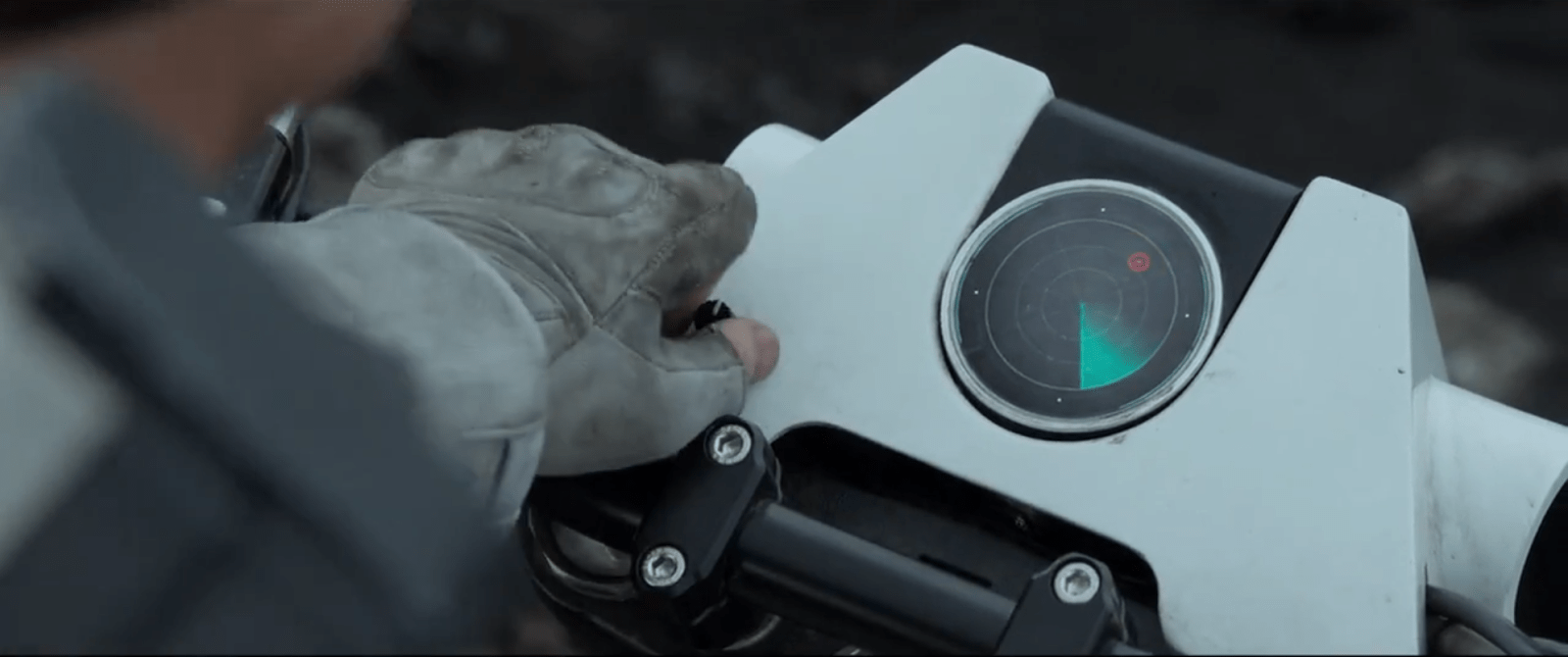
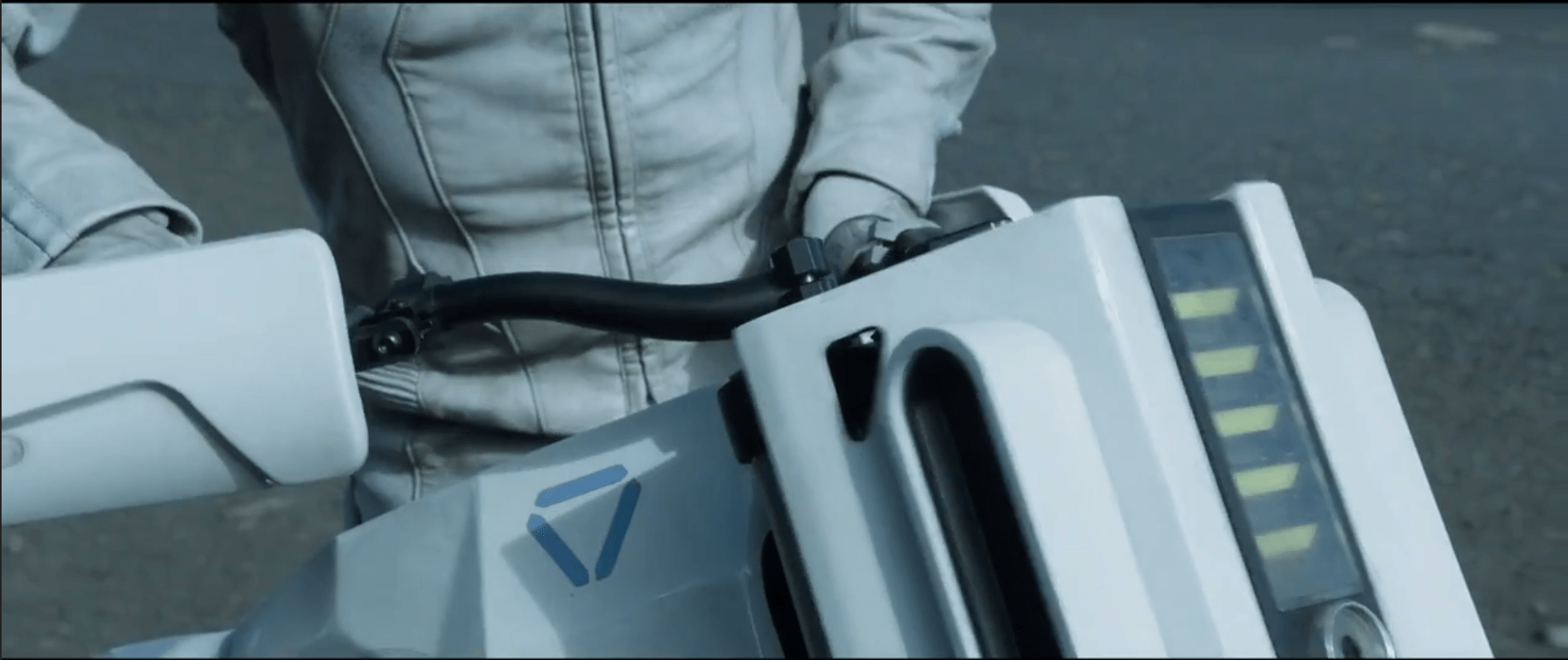
The bike display is a small screen near the front of the handlebars that displays a limited set of information to Jack as he’s riding.  It is seen used as a radar system.  The display is circular, with main content in the middle, a turquoise sweep, and a turquoise ring just inside the bezel. We never see Jack touch the screen, but we do see him work a small, unlabeled knob at the bottom left of the bike’s plates.  It is not obvious what this knob does, but Jack does fiddle with it.

While riding, the bike beeps loud enough for Jack to be able to listen to and understand changes in the screen’s status.  At slower speed and at a stop, the beeping is quieter, as if the bike adjusted the sound level to shout over the wind-noise at speed.  On screen, pulsing red dots representing targets.  After he stops, Jack removes his goggles to look at the screen, but we see him occasionally glance down at the screen while riding with goggles on.  It appears like the radar is legible in either case.

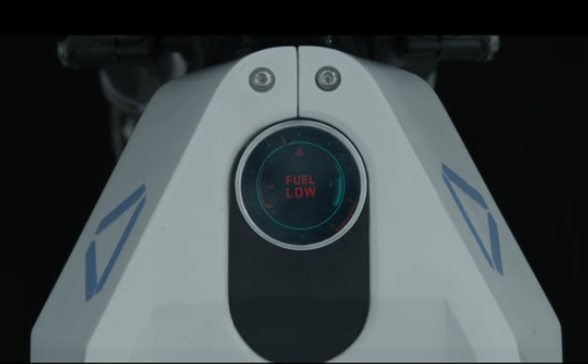
After most of the bike-related events in Oblivion, Jack gets the bike back when it has been ridden.  At one point we see an alternate display that shows large letters that says “Fuel Low”.  At that point the turquoise ring has only a sliver of thickness left.

There are several things that riders of modern motorcycles would expect to be included in a dashboard display, such as a speedometer and temperature gauge. But, we see neither an indication of speed nor some sense of whether the engine is getting too hot.  Similarly, we see no indication of running lights. Where are these things? How are they not needed?

image01

Basically useable…

Yes, the bike’s display shows very basic information that Jack needs for short range exploration and riding.  Jack is able to tell by the loud beeps which direction he should be going, and whether he’s on the right track.  These tones appear to change based on distance to target (hot/cold), with the screen acting as the directional finder.  He only needs to glance down at the display to confirm what the audio feedback is telling him and get a map view of the terrain.

…But is it enough?

This bike would not be road legal today, as it has only the most basic information Jack needs to go exploring: Where to head, and how much fuel he has left. There’s a lot missing.

The most obvious missing piece is the distance to go.  The beacon shows up on orbital scans, so Vika should have an approximate location and distance to go off of.  Jack would then know how long it would take to get there, and whether he had enough fuel for the trip.

He’s also missing a good terrain view in front of him.  On a bike, he isn’t able to traverse just anywhere.  A map and terrain display would let him plan out a route that the bike could handle, instead of guessing and hoping he doesn’t run into a sheer cliff.

Given that Jack is exploring far away from civilization, medical help, the Bubbleship, or even some kind of storage area for first aid or food would be useful.  A bike like this should also have some sort of safety gear.  Jack appears to dislike things like helmets or bulky armor, so the bike should have some indication of built-in safety systems like a deployable, wrap-around airbag.

Given the presence of Scavs, the bike should also have some kind of anti-theft mechanism on it. A lock that only allows Jack to operate the bike, or automatic locking of the wheels would make it difficult for the Scavs to steal it and use the TET technology inside.  Instead, we see that the bike is stolen after Jack descends into the cave, leaving Jack stranded.

To improve the wayfinding, the TET, Vika, or Jack could plot a general course that is relatively safe, fuel efficient, and on the way to the target for the bike.  The bike could then use Jack’s already-present communications system to guide Jack along the route using purely auditory feedback and artificial surround sound (or real surround sound if the earbud is advanced enough).

Why Waste Jack?

Jack is probably expensive in time and material to create, and giving him some protection would save the TET resources.  Even if the TET didn’t care about its crews, it should care about valuable technology that can be used against it.

Aside from the safety factor, which is probably due to the TET’s underlying lack of care about individual Jacks, Jack’s bike is able to navigate him where he needs to go and get him back.  The bike’s radar works even at full speed to point Jack in the right direction thanks to noise-adjusted audio feedback.  Only the addition of some simple anti-theft devices would make the bike more effective for both Jack and the TET.

The bike is not a good example for real-world bikes of the future, but does help set Oblivion in a world where the “employer” doesn’t care about the “employee” beyond their basic ability to get the job done.

Jack’s Bike

image03

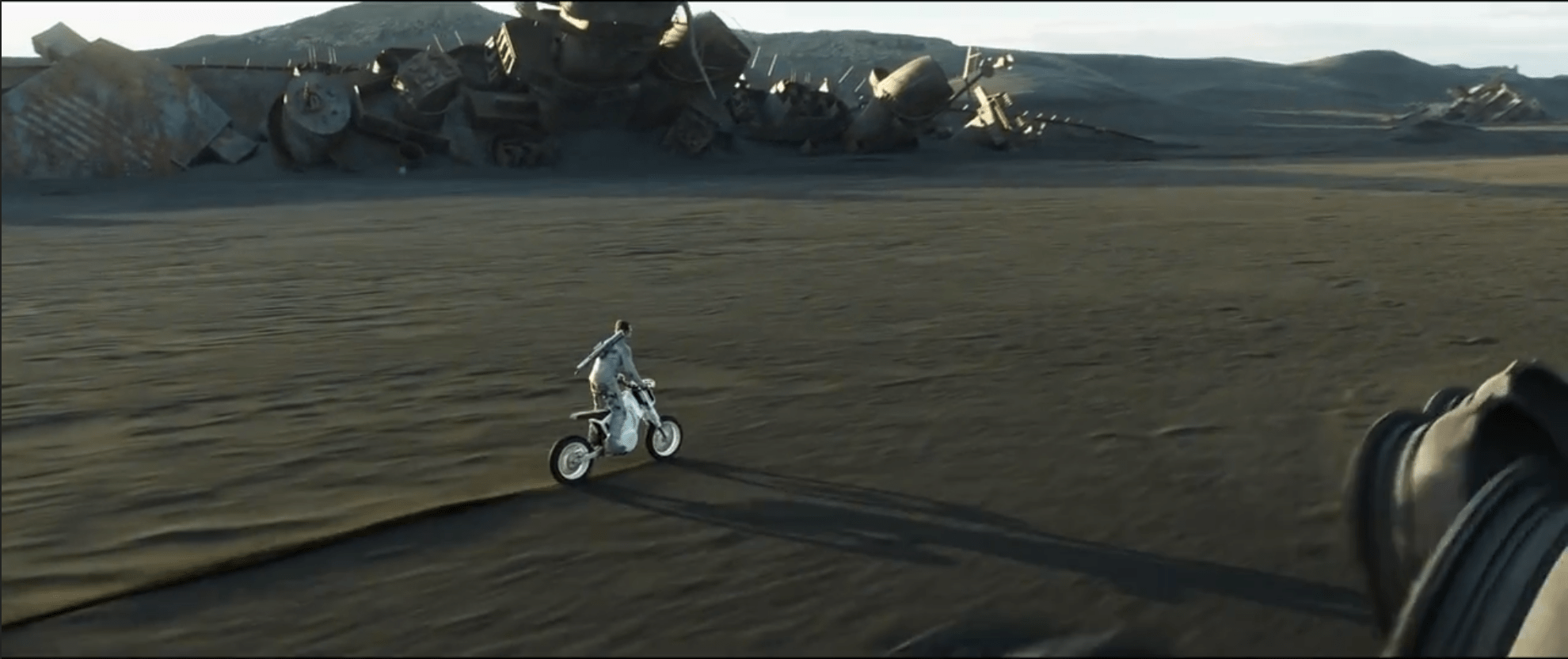
Jack’s Bike is a compact, moto-cross-like motorcycle. It’s stored folded up in a rear cargo area of the Bubbleship when not in use. To get it ready to ride Jack:

  1. Unlocks the cargo pod from a button on his wrist
  2. Pulls it out of the Bubbleship
  3. Unfolds its components (which lock automatically into place)
  4. Rides off.

When Jack mounts the bike it automatically powers on and is ready to ride.

image01

The bike is heavy, as shown by Jack’s straining to lift it out as well as the heavy sound it makes when he drops it on the ground. It is very solid, and no parts shift even when dropped from lifting height.

Purpose?

image02

There is no obvious reason for Jack to use a bike instead of the Bubbleship. The bike does contain a small radar system, but such functionality could be easily integrated into the Bubbleship. Otherwise the Bubbleship is faster, more comfortable, has longer range, ignores the problems presented by difficult terrain, and has a better connection to the rest of Jack’s support network. So there’s no obvious functional advantage.

It makes more sense that this bike is a release for Jack’s exploratory personality. We see several times that Jack goes and does something brash or dangerous, simply to do something different and make his day more interesting. It’s part of who he is and how he engages with the world.

If so, then Jack simply likes taking the bike out for a ride. He is happy when he takes it out of the Bubbleship, and he does several unnecessary jumps on the bike just for fun. Even though the Bubbleship could have found the signal quicker and easier than the Bike, the bike was a more entertaining way to spend the day. We also see that, when things get serious, Jack quickly calls for Drone backup and is happy to see the Bubbleship waiting for him at the surface.

Let’s presume the TET saw these behaviors (or lost several early Jacks to boredom when this option wasn’t available), and created the bike to make him more happy and effective.

Delight Your Users

image00

So here’s an interesting lesson: The most efficient tool for the job might not always be the most effective. A user’s experiential needs are just as important as their need to get the job done, and considering those needs may lead to a design that is satisfyingly fun.

That can be hard for designers who are focused on improving efficiency, and can be even more difficult for product teams. But if you can figure it out, it’s worth it.

After all, you don’t want to have to keep replacing your Jacks.