In the town square, Marty is quite surprised by a volumetric advertisement for JAWS 19.
The crude-geometry shape of a cartoon shark emerges from a projection space above the cinema, billed as Holomax, looms large above him, and then bends down to envelop him in its jaws before disappearing in a scattering of triangles. As a piece of interactive advertising it works well for being activated by a common urban activity, and then delivering an intense experience that is easily identified after the fact as illusory, and promising the same but more in the full volumetric moving picture experience.
Jurassic Park’s weather prediction software sits on a dedicated computer. It pulls updates from some large government weather forecast (likely NOAA). The screen is split into three sections (clockwise from top left):
A 3D representation of the island and surrounding ocean with cloud layers shown
A plan view of the island showing cloud cover
A standard climate metrics along the bottom with data like wind direction (labeled Horizontal Direction), barometric pressure, etc.
We also see a section labeled “Sectors”, with “Island 1” currently selected (other options include “USA” and “Island 2”…which is suitably mysterious).
Using the software, they are able to pan the views to the area of ocean with an incoming tropical storm. The map does not show rainfall, wind direction, wind speed, or distance; but the control room seems to have another source of information for that. They discuss the projected path of the storm while looking at the map.
Missing Information
The park staff relies on the data from weather services of America and Costa Rica, but doesn’t trust their conclusions (Muldoon asks if this storm will swing out of the way at the last second despite projections, “like the last one”). But the team at Jurassic Park doesn’t have any information on what’s actually happening with the storm.
Unlike local weather stations here in the U.S., or sites like NOAA weather maps, there is in this interface a lack of basic forecasting information like, say, precipitation amount, precipitation type, individual wind speeds inside the storm, direction, etc… Given the deadly, deadly risks inherent in the park, this seems like a significant oversight.
The software has spent a great deal of time rendering a realistic-ish cloud (which, we should note looks foreshadowingly like a human skull), but neglects to give information that is taken for granted by common weather information systems.
Prediction
When the park meteorologist isn’t on duty, or isn’t awake, or has his attention on the Utahraptor trying to smash its way into the control room, the software should provide some basic information to everyone on staff:
What does the weather forecast look like over the next few hours and days?
When the weather is likely to be severe, there’s more information, and it needs to urgently get the attention of the park staff.
What’s the prediction?
Which parts of the park will be hit hardest?
Which tours and staff are in the most dangerous areas?
How long will the storm be over the island?
If this information tied into mobile apps or Jurassic Park’s wider systems, it could provide alerts to individual staff, tourists, and tours about where they could take shelter.
Make the Information Usable
Reorienting information that is stuck on the bottom bar and shifting it into the 3d visual would lower the cognitive load required to understand everything that’s going on. Adding in visuals for other weather data (taken for granted in weather systems now) would bring it at least up to standard.
Finally, putting it up on the big monitor either on demand or when it is urgent would make it available to everyone in the control room, instead of just whoever happened to be at the weather monitor. Modern systems would push the information information out to staff and visitors on their mobile devices as well.
With those changes, everyone could see weather in real time to adjust their behavior appropriately (like, say, delaying the tour when there’s a tropical storm an hour south), the programmer could check the systems and paddocks that are going to get hit, and the inactive consoles could do whatever they needed to do.
After Loki has enthralled Selvig, enthralled-Hawkeye lets Loki know that, “This place is about to blow and drop a hundred feet of rock on us.” Selvig looks to the following screen and confirms, “He’s right. The portal is collapsing in on itself.”
This is perhaps one of the most throwaway screens in the film, given the low-rez twisty graphics that could be out of Lawnmower Man, its only-vague-resemblance to the portal itself…
c.f.
…the text box of wildly scrolling and impossible to read pink code with what looks like a layer of white code hastily slapped over it, and—notably—no trendline of data that would help Selvig quickly identify this Very Important Fact. Maybe he’s such a portal whisperer that he can just see it, but why show the screens rather than show him looking up to the blue thing itself?
There might be some other data on the left of this bank of screens seen a few seconds later in the background…
…but it has more red text overlays, so I’m disinclined to give it the blurry benefit of the doubt.
Fair enough, this is there merely to establish Selvig’s enthrallment, and the scientific certainty of the stakes for the next beat. But, we see his eyes, and the certainty is evidenced by everything collapsing. We don’t need scientific assurance. If the designers were not given time to make it passable, I wish that the beat had been handled without a view of the screens rather than shaky-cam.
The first computer interface we see in the film occurs at 3:55. It’s an interface for housing and monitoring the tesseract, a cube that is described in the film as “an energy source” that S.H.I.E.L.D. plans to use to “harness energy from space.” We join the cube after it has unexpectedly and erratically begun to throw off low levels of gamma radiation.
The harnessing interface consists of a housing, a dais at the end of a runway, and a monitoring screen.
Fury walks past the dais they erected just because.
The housing & dais
The harness consists of a large circular housing that holds the cube and exposes one face of it towards a long runway that ends in a dais. Diegetically this is meant to be read more as engineering than interface, but it does raise questions. For instance, if they didn’t already know it was going to teleport someone here, why was there a dais there at all, at that exact distance, with stairs leading up to it? How’s that harnessing energy? Wouldn’t you expect a battery at the far end? If they did expect a person as it seems they did, then the whole destroying swaths of New York City thing might have been avoided if the runway had ended instead in the Hulk-holding cage that we see later in the film. So…you know…a considerable flaw in their unknown-passenger teleportation landing strip design. Anyhoo, the housing is also notable for keeping part of the cube visible to users near it, and holding it at a particular orientation, which plays into the other component of the harness—the monitor.
The monitor
In the underground laboratory, an (unnamed?) technician warns lead scientist Selvig that, “it’s spiking again,” and the camera pans down to this monitoring interface.
Header
The header is a static barcode followed by the initialism J.D.E.M. along with its full name, the Joint Dark Energy Mission. (Sounds super cool and sci-fi, right? Turns out it is a real program between NASA and the US DOE.) Another label across the top identifies the screen as LEVEL 5 and that it belongs to PROJECT PEGASUS and NASA.
3D map
A main display shows a 3D wireframe of the tesseract, with color-coded nebula-like shapes within the cube. The wireframe (and most of the text on screen) are a bright cyan, with internal features progressing in color from the cyan through white to a blood red, all the way to lens flares near the most active areas in the cube. The color choices make for a quick read of what is “cool” and what is “hot,” so are effective for being immediate, but if the lens flares are designed into the system to indicate peakness, it’s a bad choice for obscuring other data in the display.
Note that the wireframe of the cube is also rotating slightly, which is very helpful for a user to more fully understand 3D information from a 2D screen. It might be even better mapping with less cognitive load if the display was a volumetric projection. (VPs exist within the Marvel Cinematic Universe (MCU), but so far I believe we’ve only ever seen them in Tony Stark’s possession so perhaps he has not released it to the outside world.) Hopefully in its rotation on this monitor it does not rotate in 360°, as the regularness of the cube would make it difficult to understand where an internal anomaly might exist in the real thing. Hopefully the wireframe only wavers back and forth within a few degrees, and is oriented in roughly the same way an observer glancing at the real thing would see it in the housing, to allow for instant mapping of problem areas.
Warning
Just to the left of the 3D map is a data monitoring panel. Its top label blinks a red WARNING CRITICAL ENERGY LEVELS and a percentage readout. The panel also features a key whose colors match those of the map. (As it should.) Hopefully a microinteraction allows a user to touch any part of the map, freeze the rotation, and get the percentage details of the touched point. A detail box wavers its vertical position along the key to provide a user a quick assessment of its value, and also contains a percentage readout for precision. Judging by the position of the box and the readout, it looks like the 100% mark is about halfway up the screen. Hopefully the upper part of the scale is logarithmic to accommodate massive surges in values.
Additional elements of the display include several scrolling waveforms and text boxes with inscrutable data and labels. It’s easy to imagine these as useful (say total energy values for specific electromagnetic frequencies) but they’re difficult to read, so difficult to formally evaluate.
All told, a nice display (per some assumptions) for monitoring what’s happening with the cube.
Now if only they had applied that solid design thinking to that dais vs. cage problem.
As Jack begins his preflight check in the Bubbleship, Vika touches the center of the glass surface to power up the desktop that keeps her in contact with Sally on the TET and allows her to assist and monitor Jack as he repairs the drones on the ground.
The interface components
The desktop is broken up into five main screens. The central screen is the TETVision map, which is a radar map used for communications, and monitors the Bubbleship, drones, and scav activity.
To the left of the TETVision map is a Hydro-rig status feed that keeps Vika informed of the water collection progress. Then on the right of the map is the drone status feed, which provides drone vital statistics, deployment and fuel status.
The upright section of the desktop contains two screens. The top screen is the TET system status feed, which monitors the TET’s orbit, and communications status. The second screen monitors the weather systems and wind velocity vectors, which would have an affect on the Bubbleship and drone flight safety.
Quick power-up
Powering on the desktop is virtually instantaneous and is as simple as touching the center of the table. One possible explanation for the speed is that the desktop goes into sleep mode and is in an always-on state. There are a couple of scenes in the film when the TET is able to access the desktop remotely that would support this assumption.
A possible method of power-down would be to tap and hold for a determined period of time. Sadly, there is no film footage that shows Vika shutting down the system.
Multiple versus single user
The scale of this desktop is a bit large for a single user who needs to access life-saving information quickly. The display size and setup in the film is generally used for collaborative space so that multiple people can comfortably view and manipulate the data at the same time.
This large scale causes Vika to constantly lean over the table to see information for various reasons including glare, reach and angle of the displays. This could be stressful on the body when interacting with the desktop over long periods of time each day.
A better solution
Vika is only shown interacting with the TETVision map and not with any of the other feeds. If the map is the only screen that is interactive, a more ergonomic setup could be utilized to minimize glare and reach. This would allow Vika to see the vital information at a glance and still enable her to comfortably interact with the TETVision map.
Don’t forget the user’s needs
Overall, Vika’s desktop is a beautiful piece of technology that performs its function very well. However, in a real-world situation, it is important to remember that Vika will be using this equipment for possibly long periods of time and needs quick access to vital information. Having to roll back and forth between screens during an emergency situation could mean the difference between life and death for Jack while out in the field.
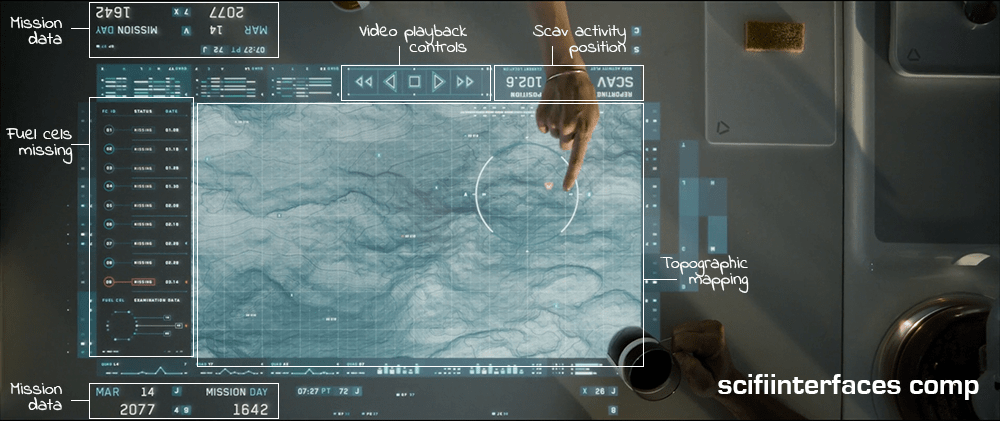
While eating breakfast, Vika views the overnight surveillance via a touchscreen interface that is inset into the top of a white table.
Which touch tech?
Anyone interested in the touch technology should take note: Vika places her coffee cup and breakfast plate directly on the surface, which indicates that it utilizes capacitive touch technology with a glass top. Placing dishes on a resistive touchscreen, which is made of layers of plastic and glass would have interfered with the interactions and would be less durable as a tabletop.
Jack joins her at the table and leans on the surface with his hand and later with his forearm, which supports the idea that the area surrounding the viewport is not touch-enabled. If it were, it would need to incorporate palm-rejection technology in order for his arm to not interfere with Vika’s interactions.
The interface components
The main viewing area is a hybrid of satellite imagery and topographic mapping, surrounded in the interface by surveillance data and video playback controls. A message next to the video playback controls reports the current location of the scav activity.
To the left of the map is a list of fuel cells that have been stolen by the scavs along with the dates they went missing. The last one on the list is flashing red to draw their attention—a new one has gone missing.
Some elements, such as the current date and number of days into the mission face out at the top and the bottom to allow both Vika and Jack to view the data from either side.
The interface is responsive to touch gestures. Vika circles an area on the map and the icon indicating unusual activity turns red. She taps the icon and a video feed begins playing. Jack zooms in on the video feed by using a five-finger multi-touch “spread” gesture.
Why is the vital information facing Jack when Vika is the one using the interface?
It’s interesting to note that the the most vital information such as the list of missing drones, video playback and the topographic shaded relief are seen from Jack’s view. This causes Vika to have to process the information and videos upside-down—even though the playback controls face her.
This can be particularly problematic with the topographic shaded relief. Shaded relief simulates the shadow cast by the sun on the surface. Viewing this relief upside-down can cause a perception illusion that results in confusion on what is a crater and what is a hill.
Better: Lenticular display
A better solution would be to utilize a lenticular interactive display. Lenticular displays are made by placing a transparent film containing tiny ridges over an image that is made up of two or more images sectioned into bands and displayed in alternating lines. The ridges in the film cause the eye to focus on one set of lines in order to come out with a cohesive image.
Then, as in the illustration below, Vika would only see the view illustrated by the white lines and Jack would only see the view illustrated by the black lines.
Utilizing a lenticular display would solve the issue of the shaded relief perception illusion and allow Jack and Vika to each read the information and watch the video from their own perspective at the same time.
The thing that gets a little tricky about utilizing a lenticular display for this solution is the fact that it is a touch screen. The elements that are being interacted with need to be in the same position for both Jack and Vika in order for the computer to know what is being manipulated. This can be solved by flipping the individual elements such as the shaded relief on the topography and the activity icons, words, etc., while keeping them in the same location on the interface.
Smart video recording and playback
So, how did the TET know where to start the video recording and playback? Given that the other interfaces in the film have the capability to detect motion, it is likely that the video recording was automatically triggered by the scavs when they moved in to attack the drone.
Unfortunately, there is no screentime granted to the use of the actual video playback controls, but assuming they are as smart as the rest of the interfaces in the film, it is safe to expect these controls to be more useful than simply sequencing through the scenes. The interface would probably allow Vika to scrub through a grid of thumbnails to quickly find any scenes of interest.
Why circle and tap to play?
The activity alert icon on the map was static white until Vika circled an area surrounding it. Only then did it start flashing red. Other interfaces on Vika’s main desktop provide immediate feedback with an audible alert and a flashing red symbol. Why would this one require the extra effort of circling the area? It would seem simpler to flash red from the beginning and allow Vika to immediately tap on the symbol for video playback.
It is possible that she is circling the area that she wants the TET feed to focus on, but if the TET has the capability to detect the activity to begin with, it should automatically know where to focus.
Another possibility is that she is used to getting multiple alerts every morning and the circle gesture could be for playing all of the surveillance videos at the same time instead of having to tap on each one to play. If that is the case, then she may be using the circle gesture through muscle memory since people tend to use repetitive gestures without thinking about it even if there is a simpler gesture available. If a gesture isn’t used very often, users tend to forget about it.
Overall, this is a nice system that effectively allows Jack and Vika to get a quick overview of the events of the previous night and gives them a heads-up as to what is in store for them that day.
After the ambush on Planet P, Ibanez pilots the shuttle that rescues survivors and…and Diz. We have a shot of the display that appears on the dashboard between the pilot and copilot. Tiny blue columns of text too small to read that spill onto the left. One big column of tiny green text that wipes on and flashes. Seizure-inducing yellow dots spazzing around on red grids. A blue circle on the right is probably Planet P or a radar, but the graphic…spinning about its center so quick you cannot follow. There’s not…I can’t…how is this supposed to…I’m just going to call it: fuigetry.
While on “third watch” on the bridge, Barcalow brings Ibanez a cup of coffee and they hang out a bit. Looking at the screen, he notes that “something’s wrong.” He reaches down and presses a button, and a screen appears with the label PLOTTING COURSE. A small yellow circle zeroes in on their spot in space, labeled in green as CURRENT POSITION (with “galactic” XYZ coordinates listed beneath). Then a yellow circle zeroes in on their destination, labeled in blue as TARGET DESTINATION. (With fuigetry from her earlier interfaces lining the top and bottom.) Each dot becomes two squares that slide into place on a side-by-side comparison screen with an efficiency analysis below.
Ibanez explains that she replotted the course, it being “more efficient this way.” To check it he walks to a different computer, which we’ll discuss in the next post. Even though this little interaction takes place over a few seconds, already there are things that need to be discussed before we move on.
Why wasn’t he notified?
Barcalow only finds out about the change to the course by coming to the bridge and observing something on a screen there. Any system that knows its user (and recall that Ibanez had to log in to her station) should know and respect the authority chain of its users. With only three weeks of experience at the helm, it seems more likely that Ibanez should have had to submit a plan for consideration rather than being able to just grabbing the wheel while everyone else is asleep. Seems like a hijacking waiting to happen. More sensibly, Barcalow should have come onto the bridge with the coffee saying, “I saw you submitted a new course. That’s a pretty bold move, ensign. Want to show it to me over a cup of this here space jo?” Then we’d get the idea that there’s an actual chain of authority in this military.
Even if Ibanez has the authority to alter the course without approval, her superior officer (at least) should be notified of the change immediately, so he could be aware and check up on it if he needed to.
Why is this information on a tiny screen?
Everyone on the bridge should be aware of the same basic bits of information. It’s one of the main reasons you get people clustered together in a bridge or a mission control center in the first place. Shouldn’t this be some of that basic information? If so, why is it only appearing on a tiny screen that Barcalow happens to glance at because he’s trying to woo Ibanez? Do they always have to hire womanizing superior officers? Better is a shared information source like Star Trek’s viewscreens where some glanceable mission information—like progress against course—can be seen by everyone.
Cartesian coordinate system
I do want to credit the interface designer for including 3D coordinates. Sci-fi can fall into the trap of treating spaceships as if they were seagoing vessels floating on a 2 dimensional surface like the sea. Props for acknowledging that the ship is moving through three dimensions. And Cartesian coordinates are nice in that anyone who has completed remedial geometry will be familiar with Descartes’ coordinate system. (Though I doubt that Cartesian Coordinates would be the actal system being used in space. It’s much more likely to be something like the International Celestial Reference System or even sweet-looking Keplerian graphs.) But narratively, showing 3D coordinates is a step in the right direction. But we can do René one better for both the audience and the navigators.
Show don’t tell
Otherinterfaceson the bridge already showed us that the system is capable of displaying 3D information. On this screen, it would be better to show the plotted course and the point at which the ship is along it.
Of course space travel is likely to be incredibly boring with long stretches of straight-line travel through vast swaths of emptiness. But this is sci-fi, so let’s presume that its path includes gravity assist fly-bys of stars. That gives the display useful markers for orientation and something for Barcalow to look at to realize how the course has changed. Then when he needs to compare, he presses the left arrow key and can see the old path overlaid in a new color in the display, letting him (and us the audience) see the change in course rather than be told about it. Numbers can overlay this display to provide exact details, but it would augment the immediate understanding offered by the 3D.
As soon as the Rodger Young clears the dock, the interfaces before Ibanez and Barclow change to…well, this.
I’m pretty good at apologetics, but what this is and how this does anything useful, I just…I’m at a loss. Is this supposed to be the active sweep of a radar dish? Some indication of the flywheel engine? Or the position of that spinning column on the bridge? How are any of these things worth distracting a pilot with a giant yellow spinning pizza?
When students want to know the results of their tests, they do so by a public interface. A large, tiled screen is mounted to a recessed section of wall in a courtyard. The display is divided into a grid of five columns and three rows. Each cell contains one student’s results for one test, as a percentage. One cell displays an ad for military service. Another provides a reminder for the upcoming sports game. Four keyboards are situated below the screens at waist level.
To find her score, Carmen approaches one of the keyboards and enters some identifying data. In response, the column above the screen displays her score and moves the data in the other cells up. There is no way to learn of one’s test scores privately. This hits Johnny particularly hard when he checks his scores to find he has earned 35% on his Math Final, a failing grade.
Worse, his friend Carl is able to walk up to the keyboard and with a few key presses, interrupt every other student looking at the grades, and fill the entire screen with Johnny’s score for all to see, with the failing number blinking red and white, ridiculing him before his peers. After a reprimand from Johnny, Carl returns the display to normal with the press of a button.
Is ANSI the right input?
The keyboard would be a pain to keep clean, and you’d figure that a student ID would be a unique-and-memorable enough token. Does an entire ANSI keyboard need to be there? Wouldn’t a number pad be enough? But why a manual input at all? Nowadays you’d expect some near-field communication, or biometric token, which would obviate the keyboard entirely.
Are publicizing grades OK?
So there are input and interaction improvements to be made, for sure. But there’s more important issues to talk about here. Yes, students can accomplish one task with the interface well enough: Checking grades. But what about the giant, public output?
It’s fullfilling one of the dystopian goals of the fascist society in which the story takes place, which is that might makes right. Carl is a bully (even if Jonny’s friend) and in the culture of Starship Troopers, if he wants to increase Johnny’s public humiliation, why not? Johnny needs to study harder, take it on the chin, or make Carl stop. In this regard, the interface satisfies both the students’ task and the culture’s…um…values.
I originally wanted to counter that with a strong statement that, “But that’s not us.” After all, modern federal privacy laws in the United States forbid this public display as a violation of students’ privacy. (See FERPA laws.) But apparently not everyone believes this. A look on debate.org (at the time of writing) shows that opinion is perfectly split on the topic. I could lay out my thoughts on which side is better for learning, but it’s really beyond the scope of this blog to build a case for either side of Lakoff’s Moral Politics.
You’re Doing More Than You Think You’re Doing
But it’s worth noting the scope of these issues at hand. This seems at first to be an interface just about checking grades, but when you look at the ecosystem in which it operates, it actually illustrates and reinforce a culture’s core virtues. The interface is sometimes not just the interface. Its designers are more than flowchart monkeys.