The Battlestar Galactica’s Combat Information Center, or CIC, is a medical-theater-like room that acts as the military nerve center and brain of the Galactica. It is located near the center of the ship, is heavily armored and protected by armed guards, and has a staff of between 35-50 people.
The two highest ranking officers on the ship, Commander Adama and Colonel Tigh, typically stand at the center of the auditorium around the Command Board. This position lets them hear status reports from around the room, and issue orders to the entire ship.
Various pods of workstations provide seating for the rest of the staff. These stations are grouped by function. We see Navigation crew sitting near other navigation crew, weapons officers near other combat functions, communications near the center, and engineering given a special area up top.
Phone kiosks are placed throughout the CIC, with two high profile kiosks on the Command Board. Large display boards and the central Dradis Console provide information to the entire crew of the CIC.
Organized Chaos
The CIC is dealing with a lot of information from all over the ship and trying to relate it to the lead officers who are making decisions. There is a lot of activity related to this information overload, but the design of the CIC has organized it into a reasonably effective flow.
Teams communicate with each other, then that decision flows forward to lead officers, who relate it to Admiral Adama.
Orders flow in the opposite direction.
Admiral Adama can very quickly shout out an order from the center of the CIC and have his lead officers hear it all around him. It can also act as a failsafe: other officers can also hear the same order and act as a confirmation step. From there, the officers can organize their teams to distribute more detailed orders to the entire ship.
Large screens show information that the entire CIC needs to know, while smaller screens display information for specific crew or groups.
Overall, the stadium-like construction of the CIC works well for the low tech approach that the Galactica takes after. Without introducing automation and intelligent computer networks onto the bridge, there is little that could be done to improve the workflow.
Since Tony disconnected the power transmission lines, Pepper has been monitoring Stark Tower in its new, off-the-power-grid state. To do this she studies a volumetric dashboard display that floats above glowing shelves on a desktop.
Volumetric elements
The display features some volumetric elements, all rendered as wireframes in the familiar Pepper’s Ghost (I know, I know) visual style: translucent, edge-lit planes. A large component to her right shows Stark Tower, with red lines highlighting the power traveling from the large arc reactor in the basement through the core of the building.
The center of the screen has a similarly-rendered close up of the arc reactor. A cutaway shows a pulsing ring of red-tinged energy flowing through its main torus.
This component makes a good deal of sense, showing her the physical thing she’s meant to be monitoring but not in a photographic way, but a way that helps her quickly locate any problems in space. The torus cutaway is a little strange, since if she’s meant to be monitoring it, she should monitor the whole thing, not just a quarter of it that has been cut away.
Flat elements
The remaining elements in the display appear on a flat plane.
To her upper left a spectrum analysis shows bars all near the middle, and the status is confirmed with a label as REACTOR OUTPUT NORMAL. Notably the bars are bright cyan at their top and fade to darker near their bases, drawing attention to the total arc. There few bands that are lower or higher than others are immediately visible from the contrast. That’s good visual design for attention management.
In the top center is a ring chart with three bands of colors: slate gray, cyan, and dark red. A large percentage read out in the center hovers around 90%. To her upper right are three other ring charts with the same color scheme. Above the three rings is a live trend line chart in red with a separate line in white (Target? Trend line?). A tiny side view of Stark Tower stands to the left of the three rings and trend line. The purpose of these are unclear as the labels are too small to read, but it seems strange to have the physical representation here. If the rings or trend lines are related to the physical tower, how they are related is unclear. If they are unrelated, having the rendering present there is misleading.
In a band across the middle are some tiny text blocks spitting out lines of data and auto scrolling. There are more of these, so for ease of reference, let’s call them teletype boxes. They look too small and move too fast to convey much meaning, as such things often do.
The lower left of the screen has a dim white section labeled MAGNETIC CONTAINMENT. It contains a 3D cuboid with a wildly undulating surface. As this shape doesn’t match anything else in the display, nor is it visually connected, its utility is unclear. If she is meant to track some variable other than undulationness, I can’t see how this would help. Also in this panel are some sliders wildly sliding back and forth, and some more teletype boxes.
In the lower center part of the screen is an overhead-view wireframe of the reactor that does not change in this segment, as well as a dim white box that appears to contain a static formula.
This display is not fit to Pepper’s task
Sadly, Gwen Paltrow looks a little wall-eyed here, so it’s hard to tell where exactly where she’s looking to determine as she says that “Levels are holding steady.” Her gaze appears roughly above the large ring chart, so let’s presume she’s looking there. If she is actually meant to be monitoring a set of levels to determine if they’re fluctuating or not, the ring chart and percentage are the wrong display types. These are valuable for showing a state that doesn’t change very often, i.e. where change over time is not of concern.
Sure, she might be able to suss out the steadiness of the variables by focusing on the percentage and the ring chart elements to see if they’re currently wobbling, but that requires her to keep her focus there to observe what’s happening with those pixels. That puts an unnecessary burden on her attention and short term memory. What if she has to glance away for a few seconds, and in those seconds, levels begin to wobble unsteadily? Sure, an alert could sound, but when she looks back she’ll have no idea what has happened while her attention was elsewhere. Humane interfaces remove unnecessary burdens from their users, and this display should do the same.
Use line charts and sparklines to show change over time
For any variable that is meant to be monitored for changes over time—like the scripted steadiness of levels—theline chartorsparkline is much more fit to task. Each plots variables over time, so even if a user glances away for a bit, it’s not a problem, she can look back and quickly suss out what’s been happening. The thing she’s looking at should look more like a ECG than a page out of an annual report.
Each of the dinosaur paddocks in Jurassic Park is surrounded by a large electric fence on a dedicated power circuit that is controlled from the Central Control Room. The fences have regular signage warning of danger…
…and large lamps at the top of many towers with amber and blue lights indicating the status of the fence.
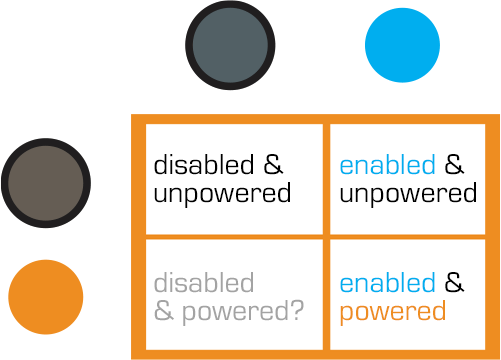
When the power is active, both lights are lit. When Dr. Saddler is rebooting the system, the blue light turns on first, with a loud, deep klaxon, meant to signal a “system active, but power is not feeding to the fence yet” status. Although the transition isn’t shown, presumably the amber light turns on as soon as power flows into the fence.
Even though Dr. Grant and the kids weren’t introduced to the light system when they arrived on the island, they were suitably worried when the klaxon sounded and the blue light began blinking. This had the advantage of warning them that the fence was about to activate, but the disadvantage that it set off such a strong fear response in Timmy that he froze in place while still on the fence. Drama is good for an audience, bad for Timmy.
Fence Activation
We see in Nedry’s escape scene that he shuts off the power because the main gates out of Jurassic Park cannot be opened while the power is active. However, in the intro scene (pictured above) we see that the gate can be opened without shutting off power to the entire fence system. This implies that Jurassic Park has fairly detailed control over various parts of the fence system. This is confirmed when we get a glimpse of labels on a circuit board later in the film:
The good
The major systems are each on dedicated circuits that are individually controlled. That’s useful for managing complex scenarios in the park.
Automated alert systems are quickly understandable. That’s useful for keeping employees and visitors safe.
“Blue” and “Orange” are colors that are easily differentiable even with color-blind users. It’s a good choice for alerts.
There is an unmistakable and unavoidable audio backup to the visual signal.
The deadly
Let’s not forget that this is a system with potentially deadly consequences. It’s worth making sure it does its job of keeping the bad thing controlled, while not frying people.
“Danger” signage on the T-rex pen is too high for good viewing. A person would interact with the fence closer to the concrete barrier, and would almost certainly not look up. Better is to repeat the signage frequently, repeatedly along its length, and at several heights.
The light system is a 4-bit signal. It takes some interpretation. “Wait. What did blinking blue and off orange mean?” That’s pretty poor for emergency situations, where a few seconds of delay can mean the difference between safety and becoming a jurassic kebab.
Better would be an unmistakable binary signal. Light on = power on. Light off = power off. Make it a big, blood-colored red. That’s much simpler and doesn’t require referencing a manual. Color blind folks won’t need to distinguish light colors at all, they can just see the on-or-off.
What about powering up? That blinking is clearly meaningful, but it’s still more ambiguous than it needs to be.
Ideally you’d have some sort of human-detection system so that the fence itself keeps humans safe, but if that’s not doable or reliable, you’d need some other warning signal. I think there are three ways we can convey that shit is getting real…
Visual
I’d recommend a progress bar, like the Eko traffic light concept by Damjan Stanković. Surround the red light with the progress bar, combining with audible and tactile signals, as below. Put these in the pillars that support the cables, and either near or around the hole through which the cables pass, so it’s clear that these lights have something to do with these cables.
Side note: I think this is a problematic as a stop light, but quite brilliant as a general time-bound event signal.
Audible
You need the audible warning to catch attention regardless of whether or not a person is looking in the direction of the light. The klaxon is awesome at getting attention and signalling dangers. But again, it’s an ambiguous as The Robot shouting, “Danger, Will Robinson!” If we modified it so that the sound started low and raised in pitch, it would help convey that something is coming on line. You could just use a “blinking” Shepard Tone.
Tactile
And of course, there’s the power itself. It shouldn’t just come on all at once. We should raise the power level over some span of time, so Timmy starts feeling greater and greater discomfort and he has a building pressure to get off the fence, rather than being thrown back immediately. Even a blind, deaf, or panicked person wouldn’t be able to ignore it and be forced to take action without the risk of blunt force electrocution.
Loki’s wants to take down the Avengers and the S.H.I.E.L.D. helicarrier, to disable the two greatest threats to his invading forces. To accomplish this, he lets himself get captured and the glaive taken away from him, knowing Banner would study it, fall prey to one of its terrible effects, become the ragemonster, and wreck the place.
That effect goes unnamed in the film so I’ll call it the bad mojo radiator. The longer people hang around it, the more discord it sows. In fact just before Loki’s thralls enact a daring rescue of him, we see all of the Avengers fighting in the lab, for no other reason than they stand in the glaive’s presence.
The infighting ends suddenly when Banner unintentionally takes the glaive in hand as he attempts to silence the group. Because the threat of Hulk + glaive is enough to make other fights seem secondary.
We never see Loki triggering this ability of the glaive. Is it just a default, going on at all times? That seems problematic if you needed allies around you to behave, or even take disguise and hide amidst people for any length of time. So maybe that’s not the most useful design.
What if this bad mojo was actually triggered, just passively? What if it starts quietly humming its Song of Discord when it is separated from its appointed wielder for some length of time? This would be an excellent anti-theft device, and even one that would make it hard to keep it hidden long.
[sic]
How might we use this sort of strategy beyond the world-conquering semi-mystical, fictional sort? This strategy is one step beyond the authenticated-users-only constraints of smart weapons, adding a layer of deterrence from possession. Imagine if a gun pulled from its authorized user shocked the holder or occasionally sprayed malodor? Or a car that turned its volume increasingly louder after it was reported stolen? You can be sure the thieves wouldn’t keep it for long.
When his battalion of thralls are up and harvesting Vespene Gas working to stabilize the Tesseract, Loki sits down to check in with his boss’ two-thumbed assistant, an MCU-recurring weirdo who goes unnamed in the movie, but which the Marvel wiki assures me is called The Other.
To get into the teleconference, Loki sits down on the ground with the glaive in his right hand and the blue stone roughly in front of his heart. He closes his eyes, straightens his back, and as the stone glows, the walls around him seem to billow away and he sees the asteroidal meeting room where The Other has been on hold (listening to some annoying Chitauri Muzak no doubt).
The Other does not see the Loki sitting on the ground in MCU-prime (MCU-1°). Instead, he addresses the avatar of Loki (in MCU-2°) which appears with a cyan projection-ray flourish, in Asgardian costume. In addition to the alteration of his appearance, the glaive looks different. It is much taller and thinner, and its blades more pronounced in this projection, i.e. looking more like a real scepter.
Now, that’s a scepter.
From an interface standpoint, there is one thing to note and four questions for this interface.
Nota Bene
Note the modification of appearances. The teleconference could have worked like a video camera, showing Loki cross-legged on the floor. In the Make It So book I argued that advanced communication systems should interpret, not just report, and that’s what the glaive is doing here. The altered appearance is better for Loki since he needs to project an air of authority and command in the situation, and the regal accoutrements helps him do that. If only we knew how he selected the outfit. Was there some system setup? Is it just the default? Is this mystically how he sees himself? Of course The Other knows he’s looking at a representation and isn’t completely buying into it, but how much worse for Loki would this meeting gone if he showed up like a schlub?
Questions that need answering before it can really be evaluated.
One: What do others around MCU-1° Loki see. How do thralls know he’s in teleconference? That’s important so they know not to interrupt him unless it’s really important. My guess is the glowing crystal. Between that and Loki’s closed eyes, any onlooker could suss out that he was in a call. (For comparison/contrast, I noted a similar signal in The Fifth Element headsets.)
Two: What’s the degree of immersion. Can teleconference Loki hear anything in MCU-1°? If so how does he know which universe a given sound comes from? If MCU-1° is softened, what’s the threshold by which it is let through? Can a thrall yell to get his attention? If MCU-1° is completely muted enemies would have a massive advantage over him while in teleconference.
Three: How does he control the avatar? In MCU-1°, he’s seated and unmoving, so let’s presume it’s a control-by-mind interface. Certainly quite a natural control mechanism (with a perfectly mapped interface).
Finally: How does he control the interface? If the system is perfectly immersive, he needs some set of escape codes to tell the interface, “I want to leave this teleconference now,” or “Paused to humiliate a thrall,” or “No bars, let me call you back.” He might be able to do it with thought, of course, but it might be more useful to imagine a gesture or spoken command to do the same.
Sadly, we don’t get to see how we does this, because the Other bullies him out of the conference with a mean gesture: The Other pushes his hand against Loki’s head and *poof* he’s suddenly out of conference. And while Loki’s movements in MCU-2° don’t require his movement in MCU-1°, his MCU-1° head does move after being shoved by the Other’s gesture.
That’s an awesome narrative moment to show the audience that Loki has made a deal with some guys more powerful than him and who show him no respect. As powerful as he is, he might be out of his depths, and the stakes are real.
Several times throughout the movie, Loki uses places the point of the glaive on a victim’s chest near their heart, and a blue fog passes from the stone to infect them: an electric blackness creeps upward along their skin from their chest until it reaches their eyes, which turn fully black for a moment before becoming the same ice blue of the glaive’s stone, and we see that the victim is now enthralled into Loki’s servitude.
You have heart.
The glaive is very, very terribly designed for this purpose.
It freaks the victim out (or should, anyway)
Look at that damned thing. It looks like an elven shiv. A can opener for human flesh. When a victim sees it coming, he will reasonably presume it’s going to split them like a fresh-caught fish, and do whatever he or she can to flail away from it. See how Loki has to grab Hawkeye by the wrist? That’s because short of some sort of hypnosis, Hawkeye would not just stand there like that with Orcrist slicing towards his sternum. We have to backworld some sort of pre-enthrallment mind effect to explain why he’s not jerking in the other direction. As all great propaganda and persuasion masters know, you can’t approach as a threat, or the victim’s fight-or-flight might kick in and slam that window shut for winning their hearts and minds.
It might, in fact, slice the target open
Even if there’s some mystical roofie thing going on to calm the victim, if Loki had too much force behind his approach, or someone bumped either of them, the glaive could go into the victim, causing a shock of pain that might wake them up before the enthrallment could take place. Or worse, it could actually damage the heart and kill the victim, which is counter to Loki’s goal.
It requires precision, control, and time
To avoid the disheartening of an intended victim, then, Loki has to grab them, momentarily hypnotize them into calmness, and carefully ease the thing up to the target, and hold it and them in place for a few. Imagine a button on a keyboard that had to be touched with feather pressure, or it would brick the machine. This would not be a great keyboard. All these are expensive dependencies, and the time it takes is time for onlookers to intervene (or to somehow incapacitate the victim to save them.)
It tips its hand
OK, fine, the glowing-blue eyes might be an unavoidable side effect of the “tech”—and yes, I understand it’s very valuable narrative purpose to signal enthrallment—but if you were designing an enthrallment tech, you’d want to avoid such an obvious “tell,” especially right there in the main location people target when looking at other people.
A redesign
So there are a lot of ways this is less than ideal. Fortunately we don’t have to call iGlaive and tell them to shutter operations. I think we can fix this in one of a few ways.
Soften the industrial design? No.
The glaive needs to stay looking evil, and being sharp and pointy helps with that.
1. Have the glaive pull them in
A cinematic hack might be to visually imply that the glaive helps with these problems. Imagine Loki approaching Hawkeye with the glaive outstretched, and the blue fog appears and pulls Hawkeye towards its point. The point of contact can glow slightly, implying some protection, and the crystal can glow to do its enthralling. Now it’s a feature, not a bug.
2. Go broadside
If for some plot or cinematic reason that wouldn’t work, you could have Loki use the broad side of the glaive against the chest of the person. Slapping it like an oar onto someone would be a fast gesture that wouldn’t need a lot of precision to get the crystal near the heart. It could even enable sneakier attacks from the side. It might prove cinematically problematic when enthralling a female character, but since that doesn’t happen on screen in The Avengers, it’s moot.
3. A new gesture
If Loki isn’t the broadside sort, you could keep the staff the same and redesign the gesture. The mind is the thing enthralled, so it’s tempting to have it located on a forehead or neck, but we can’t have Loki gesturing to the victim’s head, because then we lose the awesome moment near the climax when Loki tries and fails to enthrall Stark on his chest reactor. So let’s keep it cardiac. Maybe we can change the relationship of the glaive to the victim.
Imagine if he lays the glaive across his left forearm, (or better: cuts into his own skin, which would explain why he just doesn’t keep enthralling everyone in sight) which begins to glow with the blue fog, and he uses a pointing index finger to tap the victim’s heart. A finger-to-sternum interaction would telegraph a lot less danger, risk fewer victims’ lives, and enable speed with less apparent precision required. As above, it might be problematic to enthrall a woman without the audience going OMG BOOBS, but again, we’re saved from that problem by the script.
In many ways this is my favorite of the redesigns. It’s a Natural User Interface. With blue fog.
Any of those tweaks might help us believe in the interaction and useful for us to keep in mind: requiring great precision of our users only slows them down and keeps them focused on the interface rather than their goals.
As Jack searches early in the film for Drone 172, he parks his bike next to a sinkhole in the desert and cautiously peers into it. As he does so, he is being observed from afar by a sinister looking Scav through a set of asymmetrical…well, it’s not exactly right to call them binoculars.
They look kind of binocular, but that term technically refers to a machine that displays two slighty-offset images shown independently to each eye such that the user perceives stereopsis, or a single field in 3D. But a quick shot from the Scav’s perspective shows that this is not what is shown at all.
This device’s two lenses take in different spectrums of light and displays them side by side, with a little (albeit inscrutable) augmentation at the periphery. The larger display on the left appears to be visible light and the smaller on the right appears—based on the strong highlight around the bike’s engine and Jack’s body—to be infrared, or heat.
At this point in the story, the audience is meant to believe that the scavs are still the evil alien race, and this interface helps to convey that. It seems foreign, mysterious. All of its typographic elements (letters, numbers, symbols) are squeezed into little more than 4×4 grids of pixels, so we’re not even sure if this is a human language. So, fine, this interface serves its narrative purpose here. “Oh my,” we must think, “…he is being watched. But by what? And why?”
But after we find out [again, spoilers] that the scavs are the Terran survivors after the Tet attack, we can look at this again to understand that this interface is for humans, and with that in mind it does not fare well.
Yes, the periphery is augmented, so that’s good, but the information is unusably small, and forces the user to glance back and forth between the two images to put the disparate information together.
Two views reduce the amount of information
It almost goes without saying, but let’s say it—by dividing the available display into two halves, the amount of visual information provided to the Scav is roughly a quarter of what it would be with a single view. And since the purpose of the device is to magnify, this is a significant loss.
Two views add work
In this scene, which is quite barren, it’s very easy to tell that the objects that are warm in the right are the only two objects on the left, but if you imagine looking at a cityscape, where the bomb (hot) looks very much like every other thing around it, you can see where piecing those two disparate views together in your head can become problematic.
This is made worse when the views aren’t even positionally synchronized. In the gif below you’ll see that when you superimpose them, they drift away from each other, making the comparison between the two even more difficult. There are diegetic reasons why this might have happened, but rather than reverse engineering why, let’s just leave it that it makes using it more difficult.
The blur and low-contrast don’t help
Note that the thermal view is blurrier and lower-contrast. That might be an artifact of the diegetic tech, but it would confound quick mapping in a complex image. Even if it’s just a lower-res image, at least the device should perform some auto-leveling and sharpening functions on the live image to help make it easy to use.
Having one scaled makes it worse
The scaling makes the mapping of items from one screen to the other more difficult. Again, in the Oblivion example, there are two objects on the left and two objects on the right, and the “horizons” on which they walk are roughly aligned, so it’s trivial to track one to the other. But if the image is highly repetitive—say for example, a building—the scaling would make it difficult to map the useful point-of-interest on the right to the best-resolution image on the left. Quick…in which window is the sniper?
A more direct solution
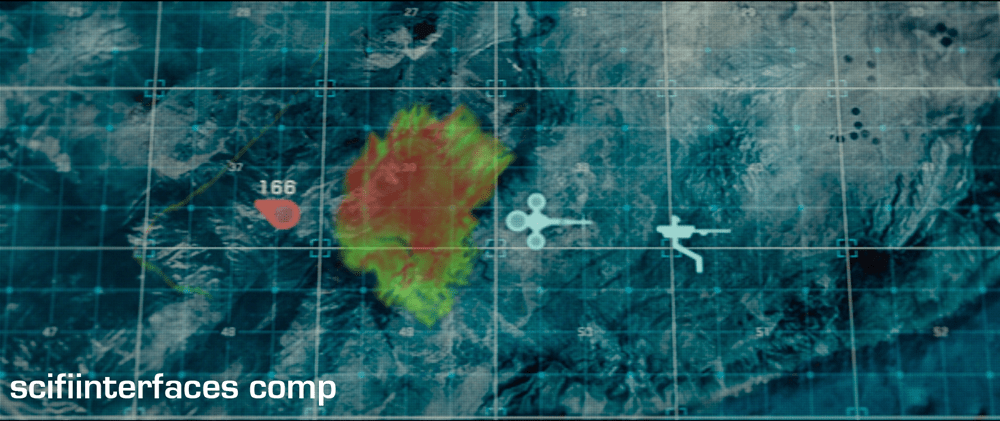
Better would be a live augmentation of a single, visual-light image. The visual light is the best anchor to the real world, with augmentation helping to convey specialness to the objects in the scene. In the comp below, you’ll see a single image where the “hot spots” have been augmented with a soft red and some trend lines in white. That red color is not arbitrary, by the way. It builds on the human experience with black body radiation associations of red == hot. This saves the (quite human) user both the physical work of glancing back and forth and the extra cognitive processing to recall that green/yellow == heat.
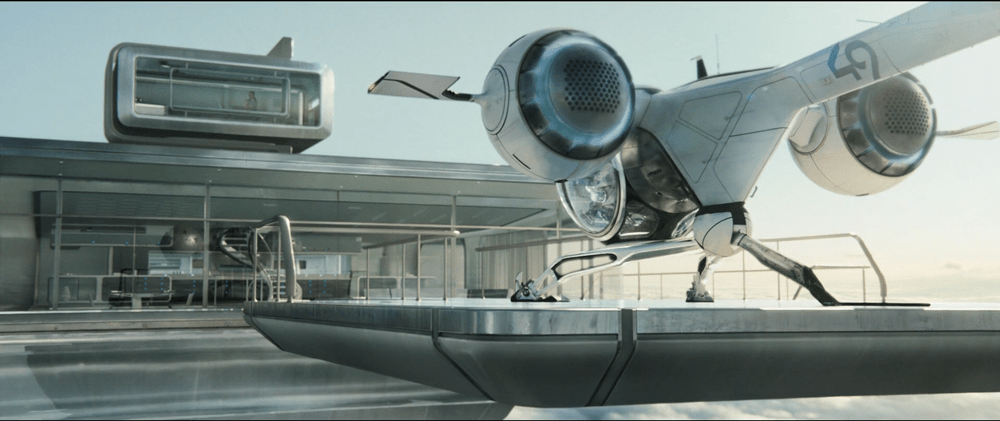
The Odyssey is a large spaceship (larger than the NASA Space Shuttle) that is largely automated and capable of holding its crew in suspended animation. As the Odyssey gets closer to the unknown object (the TET), Jack and Vika wake up to take manual control of the ship.
Jack and Vika—commander and co-pilot, respectively—sit in a standard command deck position close to the front of the ship. They have twin chairs, and mirror-image controls. This is an almost identical functional set up to the Space Shuttle’s command deck.
The cockpit for the Endeavor. Source: NASA
Several glass panels on the dash serve as moving displays of information, but a significant amount of the control space is given over to physical buttons and switches. NASA standard components make up a large number of these physical controls, including the numeric keypad and OMS (Orbital Maneuvering System) thrust stick.
An interesting note here is just how sparse the Odyssey’s command deck is compared to NASA’s Endeavour (the complicated-looking picture above). Since the space shuttle is intended to be flown by human hands if necessary, it has controls for every action possible. (Minimizing modality and allowing the control to be optimized for the task.) In contrast, the Odyssey’s control setup is evidence that most functions on the ship are largely automated.
With most of the controls under automation, the only controls left would be those vital to manual flight operations, such as orbital maneuvers, and controls that activated pre-planned modes in the automated systems.
Even in a critical and unplanned situation, e.g. uncontrolled descent towards the TET without communications back to Earth, Jack and Vika are efficient and confident with their motions. This implies excellent training on the equipment, a solidly laid-out control scheme, and proper differentiation of roles between Commander and Co-pilot.
The Odyssey is not a small feat of design, planning, and engineering.
A special mention should be made here for the ship’s interior airlock doors. The doors have large grab surfaces, easy-shut hinges, and a simple circular sealing mechanism. Jack is able to seal the door and confirm that the door is sealed simply by rotating the main handle. When the handle is in the proper place there is a visual and auditory confirmation of sealing. He is able to do this quickly and without error, just before the Odyssey is swallowed by the TET.
Focus on the workflow
The Odyssey does not reinvent spacecraft controls, it simply makes it easier for a two-person crew to control the ship while far away from any help. By focusing only on what Jack and Vika need in their command interface, and letting proven technology handle the rest, the Odyssey’s designers were able to strip away most of the complexity in the command deck but leave vital controls for the crew.
As we see at the very end of Oblivion, the effective design of the Odyssey’s control deck not only saved most of the Odyssey’s crew, but probably saved Humanity as well.
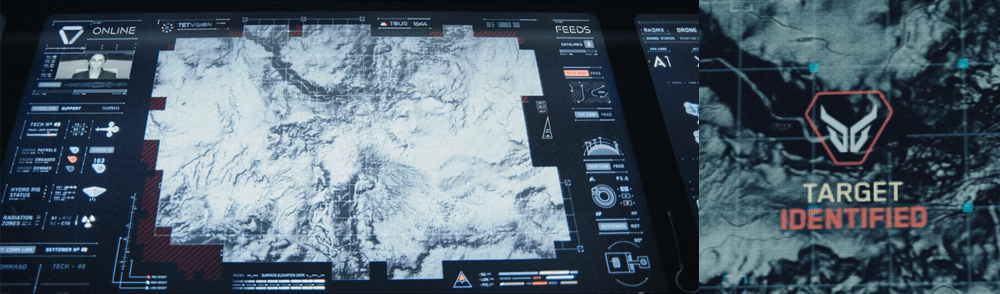
The TETVision display is the only display Vika is shown interacting with directly—using gestures and controls—whereas the other screens on the desktop seem to be informational only. This screen is broken up into three main sections:
The left side panel
The main map area
The right side panel
The left side panel
The communications status is at the top of the left side panel and shows Vika the status of whether the desktop is online or offline with the TET as it orbits the Earth. Directly underneath this is the video communications feed for Sally.
Beneath Sally’s video feed is the map legend section, which serves the dual purposes of providing data transfer to the TET and to the Bubbleship as well as a simple legend for the icons used on the map.
The communications controls, which are at the bottom of the left side panel, allow Vika to toggle the audio communications with Jack and with Sally.
The main map area
The largest section is the viewport where the various live feeds are displayed. The main map, which serves as a radar, as well as the remote video feeds she uses to monitor Jack are both in this section of the display.
The right side panel
The panel on the right side of the map contains the video feed controls, which allow Vika to toggle between live footage from the Bubbleship, the TET, and of course, the main map view.
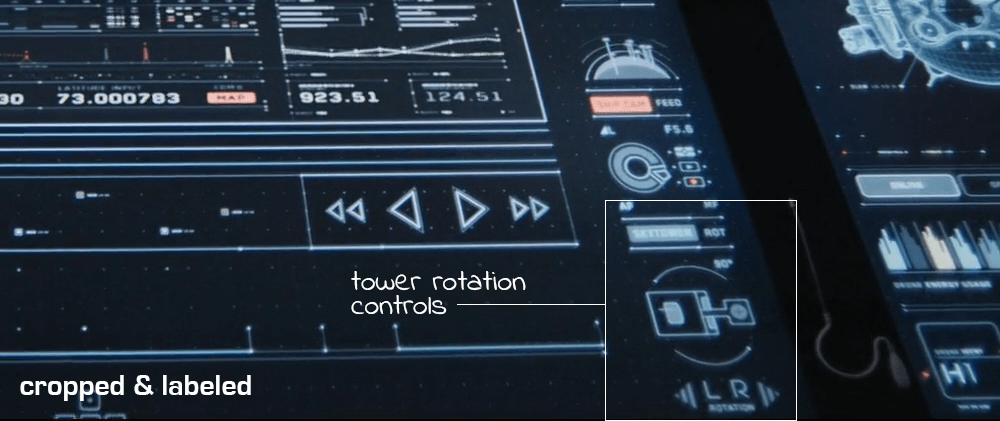
Although never shown in use in the film, the bottom right of the screen houses the tower rotation controls. This unused control is the only indication the capability even exists, so it is unknown whether the tower rotates 360 degrees or whether it’s limited to set points. (More on this below.)
It has robust capabilities
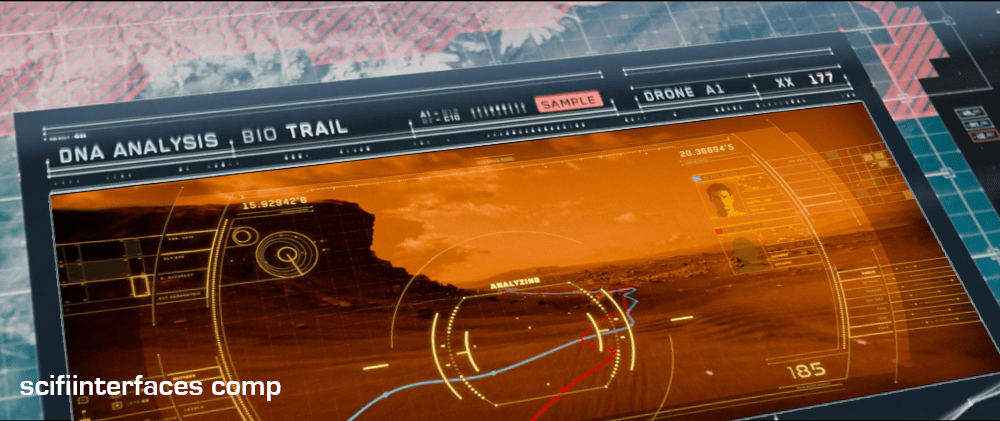
At one point in the movie, Vika is able to use the drones to search for bio trail signatures when Jack is abducted by the scavs.
Vika is also able to detect and decode various types of signals such as the morse code message sent by Jack or the rogue signal sent out by the scavs.
And, probably unbeknownst to Jack and Vika, the TETVision can be controlled remotely from the TET to allow Sally access to the data stored on the desktop—as shown at one point in the movie, when Sally pulls up a past bio trail signature to send drones after Jack and the scavs.
It’s missing a critical layer of data
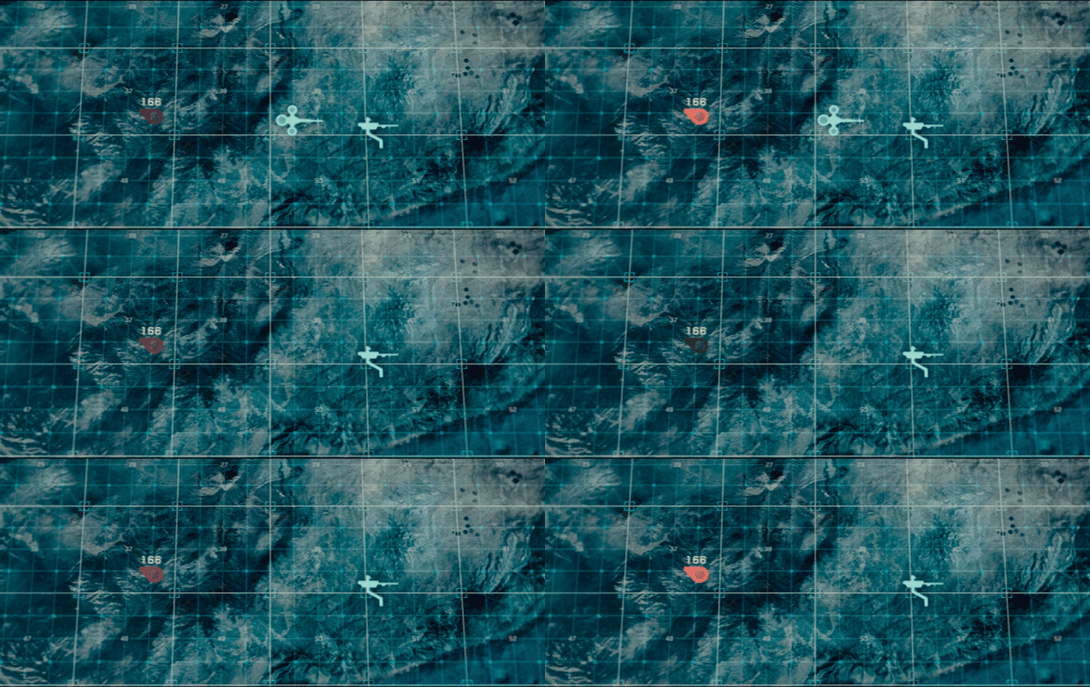
At the beginning of the film, as Jack heads toward the downed drone 166, he suddenly encounters a dangerous lightning storm and nearly plunges to his death when the Bubbleship loses power. His signature disappears from the TETVision map, but from Vika’s perspective there is no indication as to what could have happened — or that there was any danger to begin with.
Since the weather is unstable and constantly changing, it would have been better to include a weather overlay so that Vika could have notified Jack of the storm—allowing him to fly around it instead of straight into it.
It’s got some useless bits
The tower rotation controls are never shown in use in the film, so it’s not clear what benefit rotating the tower would serve. The main purpose of their mission is to ensure the hydro-rigs are secure and functioning properly, not getting an optimal view.
The tower is almost completely surrounded by windows as it is. And since the tower windows already face the hydro-rigs, what would be the benefit of changing vantage points?
It seems that the space could be used for something more beneficial to Vika such as bike, hydro-rig and drone cam feeds. This would provide Vika with more eyes on the ground, allowing her the additional support to keep Jack safe and monitor scav activity.
From an clustering standpoint, it would also fall in line logically with the other feed controls on the right side panel.
And some unnecessary visual feedback
Towards the end of the movie, Sally is trying to find Jack and the scavs. She accesses Vika’s desktop remotely in order to pull up the bio trail records. Although no one is around to see the information, the TETVision displays the process as it happens. Of course, this is necessary for the narrative to progress, but in a real-life situation Sally would only need to see the data on her side—not from the desktop in Tower 49. If they’ve managed interstellar travel, cloning, terraforming, and cognitive reprogramming of alien species, they’re not likely still using VNC. This type of interaction should simply run in the background and not be visible on screen.
Better: Provide useful visuals
When a drone picks up a bio trail signal, a visual of a DNA sequence is displayed. Since the analysis is being conducted by Sally on the TET, it seems that this information isn’t really useful to Vika at all.
From Vika’s point of view it seems like the actual trail would be more important, so why not show a drone cam feed complete with the HUD overlay? She could instantly gain more information by seeing that there are two bio trails—proving that Jack has been captured by the scavs and taken to another location.
The Ghostbusters wear “unlicensed particle accelerators” to shoot a stream of energy from an attached gun. Usefully, this positively-charged stream of energy can bind ghosts. The Pack is the size of a large camper’s backpack and is worn like one. The Proton pack must be turned on and warmed up before use. Its switch, oddly, is on the back, where the user cannot get to it themselves.
This makes for some awesome comedy, but is sorely unusable. If a ghostbuster was alone, he’d have to remove the pack to get at the switch. It also means that a sneaky antagonist could approach from behind and disable the thing mid-busting. Not the wisest design. Better would be to put this switch on the pack on a lower, anterior corner so the ghostbuster can switch it himself.
To prevent accidental activation you’d want to recess the switch in the housing, and maybe even require a button hold or a two-hand trip for extra security.
There is a display that lets an observer know that the pack is working. It’s a column of blue LEDs that continually progresses upward. Similar to the activation switch, this signal should be placed so that the actual wearer can see it in use, and so that the signal isn’t blared to everyone standing behind him, lest it die and the Ghostbuster need to bluff to buy time.