
This appears in the background of the dinner scene, but I cannot tell what it does. Anyone?
This appears in the background of the dinner scene, but I cannot tell what it does. Anyone?

When Marty Jr. gets home, he approaches the large video display in the living room, which is displaying a cropped image of “The Gold of Their Bodies (Et l’or de Leur Corps)” by Paul Gauguin. He speaks to the screen, saying Art off. After a bit of static, the screen goes black. He then says, OK, I want channels 18, 24, 63, 109, 87, and the Weather Channel. As he says each, a sixth of the screen displays the live feed. The number for the channel appears in the upper left corner for a short while before fading. Marty Jr. then sits down to watch the six channels simultaneously.


Voice control. Perfect recognition. No modality. Spot on. It might dynamically update the screen in case he only wanted to watch 2 or 3 channels, but perhaps it is a cheaper system apropos to the McFly household.
 Jennifer is amazed to find a window-sized video display in the future McFly house. When Lorraine arrives at the home, she picks up a remote to change the display. We don’t see it up close, but it looks like she presses a single button to change the scene from a sculpted garden to one of a beach sunset, a city scape, and a windswept mountaintop. It’s a simple interface, though perhaps more work than necessary.


We don’t know how many scenes are available, but having to click one button to cycle through all of them could get very frustrating if there’s more than say, three. Adding a selection ring around the button would allow the display to go from a selected scene to a menu from which the next one might be selected from amongst options.

Following Dr. Brown’s instructions, Marty heads to Café 80s where the waitstaff consists of television screens mounted on articulated arms which are suspended from the ceiling, allowing them to reach anyplace in the café. Each screen has a shelf on which small items can be delivered to a patron. Each screen features a different celebrity from the 1980s, rendered as a computer talking head and done in a jittery Max Headroom style.


Patrons speak directly to the figure on screen as if it was a human server. With perfect speech recognition, the figures engage in dialogue with the customer to answer questions and take orders. When Marty orders a Pepsi, the waiterbot turns away to attend to other customers, and a small cylinder rises from the Pepsi-branded table in front of him containing a Pepsi Perfect. When Marty removes the soda, the delivery cylinder descends quickly back into the table with a whoosh.

Sure. This is functional as a robotic cafe. The limitations of the cafe are apparent when a violent gang intrudes, and the cafe does nothing to help protect its customers or itself, not even call human officers to intervene.
One of Griff Tannan’s gang, named Data, wears a sound board on his vest. When Tannan gets a rise out of Marty by asking if he’s chicken, the gang member underscores the accusation by removing a protective plate over some buttons on his vest and holds one down to play a looping sound clip of a clucking chicken.

That’s pretty awesome, actually. Having all the sounds available at the touch of a button adds a layer of remix culture expressiveness with maximum speed. No modes, no menus, just remembering which sound goes with which button, and his spatial memory is perfect for that. If the buttons were labeled with the sound, or shaped informatively, it might reduce the burden on memory.

You might also reduce the time it takes to respond by removing the protective plate, but Griff is enough of a loose cannon that he might go violent if an accidental sound effect insulted him. So that extra step is probably the safest.
But if we were to really make this it’s most awesome, you’d make it agentive, such that the plate constantly listened to the conversation for keywords or keyphrases and responded with appropriate snarky sound effects. (Smartphone startup founded around this idea in 3…2…1…)
Biff(2015) pays for his taxi ride to the McFly household with his thumbprint. When the ride ends, a synthesized voice gives the price one-seven-four-point-five-zero. The taxi driver presents him with a book-sized device with the price at the top on a red 7-segment LED display. Biff presses his thumb on a reader at the bottom that glows white as it scans. When the payment is verified, the thumbprint reader and the price go dark as a sound plays like a register.

For due diligence, let me restate: multimodal biometric or multifactor authentication is more secure.

Fueling stations are up on a raised platform. Cars can ride or land there and approach a central column. A rotating overhead arm maneuvers a liquid fuel dispensing robot into place near the car while a synthesized voice crudely welcomes the driver, delivers a marketing slogan, and announces its actions, i.e. checking oil, and checking landing gear.


This seems like a pretty good robot solution. It’s efficient, and keeps the pilot informed of status. I presume payment happens as automatically, but we don’t see it.
The biggest improvement I’d make is to the horribly synthesized voice. Sure it conveys that this is a robot, but where movies optimize for the first time user, that crap would get tiring on a frequent use. Pilots could also save time out of their day and do a bit of environmental good if refueling could happen at home using an technology readily available as an off-the-shelf appliance. But where would one find such a thing?

Each of the dinosaur paddocks in Jurassic Park is surrounded by a large electric fence on a dedicated power circuit that is controlled from the Central Control Room. The fences have regular signage warning of danger…

…and large lamps at the top of many towers with amber and blue lights indicating the status of the fence.

When the power is active, both lights are lit. When Dr. Saddler is rebooting the system, the blue light turns on first, with a loud, deep klaxon, meant to signal a “system active, but power is not feeding to the fence yet” status. Although the transition isn’t shown, presumably the amber light turns on as soon as power flows into the fence.
Even though Dr. Grant and the kids weren’t introduced to the light system when they arrived on the island, they were suitably worried when the klaxon sounded and the blue light began blinking. This had the advantage of warning them that the fence was about to activate, but the disadvantage that it set off such a strong fear response in Timmy that he froze in place while still on the fence. Drama is good for an audience, bad for Timmy.

We see in Nedry’s escape scene that he shuts off the power because the main gates out of Jurassic Park cannot be opened while the power is active. However, in the intro scene (pictured above) we see that the gate can be opened without shutting off power to the entire fence system. This implies that Jurassic Park has fairly detailed control over various parts of the fence system. This is confirmed when we get a glimpse of labels on a circuit board later in the film:

Let’s not forget that this is a system with potentially deadly consequences. It’s worth making sure it does its job of keeping the bad thing controlled, while not frying people.
“Danger” signage on the T-rex pen is too high for good viewing. A person would interact with the fence closer to the concrete barrier, and would almost certainly not look up. Better is to repeat the signage frequently, repeatedly along its length, and at several heights.
The light system is a 4-bit signal. It takes some interpretation. “Wait. What did blinking blue and off orange mean?” That’s pretty poor for emergency situations, where a few seconds of delay can mean the difference between safety and becoming a jurassic kebab.
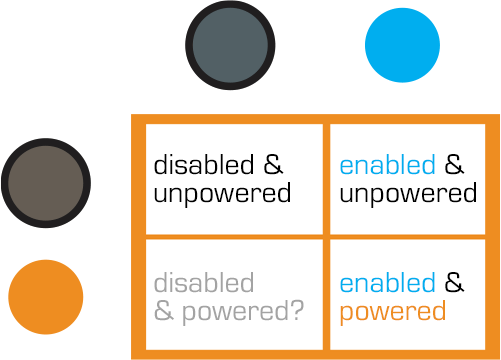
Better would be an unmistakable binary signal. Light on = power on. Light off = power off. Make it a big, blood-colored red. That’s much simpler and doesn’t require referencing a manual. Color blind folks won’t need to distinguish light colors at all, they can just see the on-or-off.
What about powering up? That blinking is clearly meaningful, but it’s still more ambiguous than it needs to be.
Ideally you’d have some sort of human-detection system so that the fence itself keeps humans safe, but if that’s not doable or reliable, you’d need some other warning signal. I think there are three ways we can convey that shit is getting real…
I’d recommend a progress bar, like the Eko traffic light concept by Damjan Stanković. Surround the red light with the progress bar, combining with audible and tactile signals, as below. Put these in the pillars that support the cables, and either near or around the hole through which the cables pass, so it’s clear that these lights have something to do with these cables.

You need the audible warning to catch attention regardless of whether or not a person is looking in the direction of the light. The klaxon is awesome at getting attention and signalling dangers. But again, it’s an ambiguous as The Robot shouting, “Danger, Will Robinson!” If we modified it so that the sound started low and raised in pitch, it would help convey that something is coming on line. You could just use a “blinking” Shepard Tone.
And of course, there’s the power itself. It shouldn’t just come on all at once. We should raise the power level over some span of time, so Timmy starts feeling greater and greater discomfort and he has a building pressure to get off the fence, rather than being thrown back immediately. Even a blind, deaf, or panicked person wouldn’t be able to ignore it and be forced to take action without the risk of blunt force electrocution.
The velociraptor pen is a concrete pit, topped with high-powered electric fences. There are two ways into the pen: a hole at the top of the pen for feeding, and a large armored door at ground level for moving ‘raptors in and out. This armored door has the first interface seen in the film, the velociraptor lock.

Velociraptors are brought from breeding grounds within the park to a secure facility in a large, heavily armored crate. Large, colored-light indicators beside the door indicate whether the armored cages are properly aligned with the door. The light itself goes from red when the cage is being moved, to yellow when the cage is properly aligned and getting close to the door, to green when the cage is properly aligned and snug against the concrete walls of the velociraptor pen. There is also a loud ‘clang’ as the light turns to green. It isn’t clear if this is an audio indicator from the pen itself, the cage hitting the concrete wall, or locks slamming into place; but if that audio cue wasn’t there, you’d want something like it since the price for getting that wrong is quite high.
The complete interface consists of four parts (kind of, read on): The lights, the door, the lock, and the safety. More on each below.
The lights are the most obvious part of the system (aside from the cage and pen). Everyone who is watching the cage also has a clear view of the lights – there is an identical set on the other side of the cage for the other half of the safety/moving crew.

The Velociraptor pen’s door is perfectly shaped to accept the heavily armored cage, and is equipped with a rail system to keep the cage aligned properly with the door. Though it takes eight workers to move the cage, they appear to be able to push the cage reasonably easily. When the light turns green, the workers move back to allow the gate to be manually raised on the cage, letting the caged velociraptor escape into the pen.

Every indication (the lineup of the cage, the green lights, and the heavy metallic ‘clang’) gives the feeling of a secure mating between the cage and the pen. All of the workers relax, as if they’re sure they’re as safe as they can be. But you can be certain, this is a false sense of security.
As soon as the velociraptor decides to test the lock, it is able to push the cage away from the pen wall. The light near the door instantly changes from green back to red.
Narratively, this underscores some of the risks of the park, i.e. that it’s cheaply engineered despite appearances, and extra-diegetically sets the audience on edge since it’s not sure what it can trust. But, for us in the real world, given the many indications that the system was safe, it should have actually been safe.
When the clever velociraptor knocks the cage back, a worker falls in and becomes an unscheduled snack. Attendant workers try to help using…
When the gate master falls and gets snatched by the velociraptor in the cage, workers immediately rush in and start hitting her with cattle prods. There are at least six prods being used, possibly more.
Since this is the first line of backup defense, the cattleprods should have been iterated until they actually deterred the ‘raptors. Clearly, effort went into making the perimeter defenses secure against the larger dinosaurs. The same effort should have gone into making the cattle prods effective against velociraptors.
The Velociraptor pen door seems custom-designed for serious failure: No hard locks to keep the cage in place, horrible sight-lines, and manual controls in places that make it dangerous for workers. Even the solid feedback system only adds to the danger. It lulls the workers into thinking the system is safe.
Most, if not all, of these issues would be solved by a simple physical locking device on the cage. Something to hold the cage in place while the doors are open would maintain a secure pen and keep everyone outside safe. It would also eliminate the need for most of the support crew, who only end up getting in each other’s way.
To add to the safety, the park designers should have paid more attention to where people would be standing during the transfer process. The armed guards (theoretically there to be a second line of defense), are placed in such a way that only a few of them are able to effectively fire. Other guards on scene would have to fire past their fellow guards.
Presumably, this is why the armed guards don’t actually fire at the ‘raptor when Muldoon shouts to “Shoot her! Shooooooot her!!”

The feedback systems of the cage are remarkably successful, for a placebo. The lights, sounds, and placement keep the workers and audience calm right up until things go horribly wrong. With the addition of Muldoon’s organizational skill and animal handling skills, the feedback system is worth taking notes on.
The velociraptor pen was designed to tell the workers what state it was in, but not to actually keep them safe. Muldoon’s precautions try to make up for the system’s failures, but only add to the problems as the workers trip over each other.

Jack communicates with Vika via the HUD in the Bubbleship, and a small earbud that provides two-way audio.
He talks normally to Vika, who responds in kind. There is no visible confirmation of his connection to Vika, and no obvious way for him to send information back other than the sound of his voice.
As shown during the lightning strike sequence, Jack’s earbud is connected directly to the Bubbleship. All of his audio and telemetry requires the Bubbleship to connect with Vika’s control tower. When the Bubbleship’s power goes out, Jack’s communication is cut too.
Vika has complete control over the communications in the Bubbleship. She is able to see Jack’s video, hear his audio, and send him mission updates whenever she so chooses. Jack only has control over his connection to Vika by going places where the direct comms can’t reach.
Given the post apocalyptic wasteland they inhabit and the strength of other systems Jack uses, Jack should always have a communication link back to Vika. Current infrastructure, like the Drones or the TET when it is overhead, should act as a repeater system for Jack’s earbud.
A handful of orbiting drones and a satellite radio phone attached to Jack’s belt could easily provide near 100% uptime in communications and give a backup to systems like the Bubbleship. Judging by Jack’s reaction during the lightning strike, power failures in the Bubbleship happen often enough for him to have a routine for them.
Jack should also have an easy way to pause or mute communications. When he is in a stressful situation, he may not want the distraction of audio. The audio might also leak from the earphone in quiet places, leaving him vulnerable to Scav ambush.
Any two-way communication system should have equal control for equal parties.
Ideally, comm failures should never happen in the first place. Modern aircraft are well shielded against lightning strikes, and do not fall from the sky (a Guardian post indicates that each commercial aircraft is hit, on average, once per year). The Bubbleship should be at least as well shielded as a modern commercial aircraft, and be able to maintain contact with its control tower during routine thunderstorms.

Advances in technology should not forget basic safety techniques from the generation of technology it is replacing.
