Rebel videoscope

Talking to Luke

Hidden behind a bookshelf console is the family’s other comm device. When they first use it in the show, Malla and Itchy have a quick discussion and approach the console and slide two panels aside.

SWHS-rebelcomms-02

The device is small and rectangular, like an oscilloscope, sitting on a shelf about eye level. It has a small, palm sized color cathode ray tube on the left. On the right is an LED display strip and an array of red buttons over an array of yellow buttons. Along the bottom are two dials.

SWHS-rebelcomms-03

Without any other interaction, the screen goes from static to a direct connection to a hangar where Luke Skywalker is working with R2-D2 to repair some mechanical part. He simply looks up to the camera, sees Malla and Itchy, and starts talking. He does nothing to accept the call or end it. Neither do they.

We also see the conversation from Luke’s perspective as well. It’s even more oscillioscopey, with lots of dials, switches, and sliders to either side.

SWHS-rebelcomms-06

So this all might be intriguing (and right in line with agentive design) but before we start to investigate, we need to look at another instance of its use. Just like the Imperial-issie Media Console, this functions differently later in the same show.

Talking to Leia

SWHS-rebelcomms-08

After Itchy’s SFW living room masturbation chair sequence, the camera cuts to Leia and C-3PO in an unspecified office somewhere. The droid works at a console for a moment and finally turns a dial. In the Wookie household, a loud dee-DEEP dee-DEEP sounds until Malla rushes to the console, and slides the panels aside. C-3PO sees Malla’s face, and turns to Leia saying, “Ah. I have made the connection. You may speak now if you wish.

SWHS-rebelcomms-10

They do, and when the conversation is over, the feed just shuts off, with neither party doing anything to make it happen.

So. Yeaaaaah.

Activation

How is it turned on? One possibility is an architectural switch activated by sliding the panels. It would be a good design decision, as it is an action that needs to be undertaken anyway to use it. But that doesn’t explain Luke’s use.

Connection

How does Malla’s device know to call Luke once it’s on? It could be that it’s a fixed connection, like an intercom, that only calls that one other device. But it’s a Rebel garage. That doesn’t make sense. Why would Malla need to only call there? And of course they receive a call from Leia, who isn’t in that same garage, so it’s not exactly fixed.

Security

The device contains incriminating evidence, i.e. the direct connection to the Rebel base, and so it needs some sort of security. Why is that not in evidence?

Secret agent?

One technological concept that would answer a lot of these questions is that of agentive technology, i.e. artificial narrow intelligence that does things on behalf of its users.

It could explain how the device turns on and (some of) the security: the camera has hairy face recognition and persistently watches for authorized users, turning on when it sees one of them. Conceptually that would be far beyond common sci-fi tropes of the time, but in keeping with the New Criticism stance of the blog, should be considered.

It could explain how it knew to call Luke: It understands Shyriiwook and listened to the conversation that Itchy and Malla had before they opened the panel, knew they wanted to call Luke, and found him in the garage.

It could explain how it turns off: It’s smart enough to understand the linguistic, social, and physical cues that the conversation has ended.

The world of Star Wars even has this technology in evidence. The droids all exhibit artificial general intelligence, and it is only a failure of imagination that this intelligence should not be incorporated into important devices, or spaceships, or architecture.

This would also explain why c-3PO is managing the interface on his end but nobody else has to bother: An AI does not need another AI, just an API.

It would even explain why the damned thing rings. Take a moment to appreciate that. This is an illegal device on the Empire-controlled Kazook. We know this because it’s deliberately hidden, and our protagonists really work to avoid the Empire’s finding it. Yet when an unexpected call comes in, it shrilly announces the fact of itself to everyone within screeching range. The only way this is not the most moronic feature possible of an illegal object is if it can scan the surroundings and verify that it’s OK to ring. Because otherwise, it would be the most stupid feature of a stupidly stupid technology made in haste for a stupid show slopped together in haste and without any respect for a logical or consistent diegesis.

Whew.

Thank The Maker for apologetics.

Imperial-issue Media Console

SWHS-mediaconsole-01

When she wonders about Chewbacca’s whereabouts, Malla first turns to the Imperial-issue Media Console. The device sits in the living space, and consists of a personal console and a large wall display. The wall display mirrors the CRT on the console. The console has a QWERTY keyboard, four dials, two gauges, a sliding card reader, a few red and green lights on the side, and a row of randomly-blinking white lights along the front.

SWHS-mediaconsole-02

Public Service Requests

As Malla approaches it, it is displaying an 8-bit kaleidoscope pattern and playing a standard-issue “electronics” sound. Malla presses a handful of buttons—here it’s important to note the difficulty of knowing what is being pressed when the hand we’re watching is covered in a mop—and then moves through a confusing workflow, where…

  1. She presses five buttons
  2. She waits a few seconds
  3. As she is pressing four more buttons…
  4. …the screen displays a 22-character string (a password? A channel designation?) ↑***3-   ↓3&39÷   ↑%63&-:::↓
  5. A screen flashes YOU HAVE REACHED TRAFFIC CONTROL in black letters on a yellow background
  6. She presses a few more buttons, and another 23-character string appears on screen ↑***3-   XOXOO   OXOOX   XOOXO-↑ (Note that the first six characters are identical to the first six characters of the prior code. What’s that mean? And what’s with all the Xs and Os? Kisses and hugs? A binary? I checked. It seems meaningless.)
  7. An op-art psychedelic screen of orange waves on black for a few seconds
  8. A screen flashes NO STARSHIPS IN AREA
  9. Malla punches the air in frustration.

So the first string is, what, a channel? And how do the five buttons she pressed map to that 22 character string? A macro? Why drop to a semi-binary for one command? And are the hugs-and-kisses an instruction? Is that how you write Shyriiwook? Why would it be Latin letters and Unicode characters rather than, say, Aurebesh? Who designed this command language? This orthography? This interface? Maybe it was what this guy was assigned to do after he was relieved of duty.

Video calls

When technology fails to find her sweetheart, Malla turns to her social network. She first uses her Illegal Rebel Comms device to talk to Luke and R2-D2 (next post), and afterwards, returns to the Media Console, which is back to its crappy TSR-80 BASIC-coded screen saver mode.

  1. She taps a few keys (a macro?)
  2. A new code appears: ↑***C-   ↓&&&0-   446B°-   TP%C
  3. The display reads: SUB TERMINAL 4468 (or 446E or maybe 446B. It’s a square font and Malla’s hairy arm is in the way.)
  4. She presses a few more keys
  5. The screen displays STAND BY for a few seconds
  6. Then the word CONNECT flashes a few times
  7. She presses a single button
  8. TRADING POST WOOKIE PLANET C flashes
  9. A live camera feed displays of the trading post

So it’s actually nice to see the first 5 characters of the string be different since this is a different mode: public function (↑***3-) versus video phone (↑***C-). It made me wonder if the codes were some sort of four part IP address, but then I saw the traffic control command is only three lines, so it’s not a consistent enough pattern. So I was hoping to find some secret awesomeness, but no.

Here’s the flow chart as completed by the demoted Stormtrooper designer (translated from the Aurebesh).

Imperial-Workflow
SWHS-mediaconsole-21.jpg

Public Addresses

Not only is the interaction terrible, but it’s not really your device anyway. The Empire can take control of these screens for government business, like paging errant Stormtroopers. In these cases, an alarm sounds in the house, and then the Empire Video Feed comes online. No bizarre character strings. No flashing text. No arbitrary key presses.

SWHS-mediaconsole-21

After all that, an Easy Mode

As if that wasn’t enough, the thing works differently later in the show. After he returns to the tree house, Saun uses the system to call the Imperial Officer to cover Han and Chewie’s murderous tracks with a lie. To make the call, all Saun has to do is insert an identification card, press the same key on the keyboard six times, and with no weird codes or substation identification interstitials, he is connected immediately to the Imperial officer. After the officer terminates their call, Saun presses another button a few times and removes his card. That’s it. It was almost easy.

SWHS-mediaconsole-22

This tells us that the system can work fairly simply. If you’re calling the Empire. Or if you’re high enough social status and have the card to prove it. This technology just sucks. Maybe this is why the rebellion started.

VR Goggles

BttF_118

At the dinner table, both Marty Jr. and Marlene have VR goggles. Marty wears his continuously, but Marlene is more polite and rests hers around her neck when with the family. When she receives a call, red LEDs flash the word “PHONE” on the outside of the goggles as they ring. This would be a useful signal if the volume were turned down or the volume was baffled by ambient sounds.

BttF_120

Marty Jr’’s goggles are on, and he announces to Marty Sr. that the phone is for him and that it’s Needles.

This implies a complete wireless caller ID system (which had only just been released to market in the United States the year before the movie was released) and a single number for the household that is distributed amongst multiple communications devices simultaneously, which was not available at the time (or hey, even now), so it’s quite forward looking. Additionally, it lets the whole social circle help manage communication requests, even if it sacrifices a bit of privacy.

Loki’s glaive: Teleconferencing

Avengers-Glaive-Teleconferencing-01

When his battalion of thralls are up and harvesting Vespene Gas working to stabilize the Tesseract, Loki sits down to check in with his boss’ two-thumbed assistant, an MCU-recurring weirdo who goes unnamed in the movie, but which the Marvel wiki assures me is called The Other.

To get into the teleconference, Loki sits down on the ground with the glaive in his right hand and the blue stone roughly in front of his heart. He closes his eyes, straightens his back, and as the stone glows, the walls around him seem to billow away and he sees the asteroidal meeting room where The Other has been on hold (listening to some annoying Chitauri Muzak no doubt).

Avengers-Glaive-Teleconferencing-09

The Other does not see the Loki sitting on the ground in MCU-prime (MCU-1°). Instead, he addresses the avatar of Loki (in MCU-2°) which appears with a cyan projection-ray flourish, in Asgardian costume. In addition to the alteration of his appearance, the glaive looks different. It is much taller and thinner, and its blades more pronounced in this projection, i.e. looking more like a real scepter.

Avengers-Glaive-Scepter
Now, that’s a scepter.

From an interface standpoint, there is one thing to note and four questions for this interface.

Nota Bene

Note the modification of appearances. The teleconference could have worked like a video camera, showing Loki cross-legged on the floor. In the Make It So book I argued that advanced communication systems should interpret, not just report, and that’s what the glaive is doing here. The altered appearance is better for Loki since he needs to project an air of authority and command in the situation, and the regal accoutrements helps him do that. If only we knew how he selected the outfit. Was there some system setup? Is it just the default? Is this mystically how he sees himself? Of course The Other knows he’s looking at a representation and isn’t completely buying into it, but how much worse for Loki would this meeting gone if he showed up like a schlub?

Questions that need answering before it can really be evaluated.

One: What do others around MCU-1° Loki see. How do thralls know he’s in teleconference? That’s important so they know not to interrupt him unless it’s really important. My guess is the glowing crystal. Between that and Loki’s closed eyes, any onlooker could suss out that he was in a call. (For comparison/contrast, I noted a similar signal in The Fifth Element headsets.)

Two: What’s the degree of immersion. Can teleconference Loki hear anything in MCU-1°? If so how does he know which universe a given sound comes from? If MCU-1° is softened, what’s the threshold by which it is let through? Can a thrall yell to get his attention? If MCU-1° is completely muted enemies would have a massive advantage over him while in teleconference.

Three: How does he control the avatar? In MCU-1°, he’s seated and unmoving, so let’s presume it’s a control-by-mind interface. Certainly quite a natural control mechanism (with a perfectly mapped interface).

Finally: How does he control the interface? If the system is perfectly immersive, he needs some set of escape codes to tell the interface, “I want to leave this teleconference now,” or “Paused to humiliate a thrall,” or “No bars, let me call you back.” He might be able to do it with thought, of course, but it might be more useful to imagine a gesture or spoken command to do the same.

Sadly, we don’t get to see how we does this, because the Other bullies him out of the conference with a mean gesture: The Other pushes his hand against Loki’s head and *poof* he’s suddenly out of conference. And while Loki’s movements in MCU-2° don’t require his movement in MCU-1°, his MCU-1° head does move after being shoved by the Other’s gesture.

Teleconference-push-out

That’s an awesome narrative moment to show the audience that Loki has made a deal with some guys more powerful than him and who show him no respect. As powerful as he is, he might be out of his depths, and the stakes are real.

Odyssey Communications

A close-up of a control panel displaying a video feed of a woman speaking, with NASA logos visible in the background.

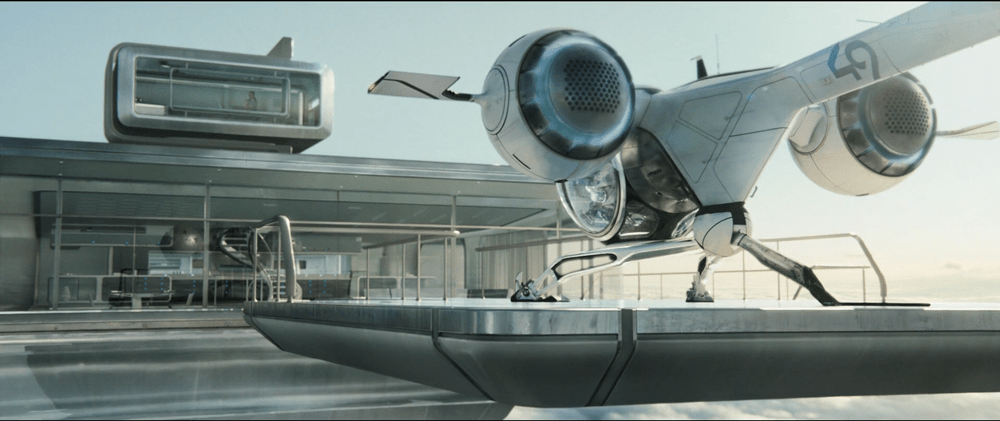
The TET is far enough away from Earth that the crew goes into suspended animation for the initial travel to it. This initial travel is either automated or controlled from Earth. After waking up, the crew speak conversationally with their mission controller Sally.

This conversation between Jack, Vika, and [actual human] Sally happens over a small 2d video communication system. The panel in the middle of the Odyssey’s control panel shows Sally and a small section of Mission Control, presumably back on Earth. Sally confirms with Jack that the readings Earth is getting from the Odyssey remotely are what is actually happening on site.

Interior view of a futuristic spaceship cockpit, featuring numerous control panels, screens, and empty pilot seats.

Soon after, mission control is able to respond immediately to Jack’s initial OMS burn and let him know that he is over-stressing the ship trying to escape the TET. Jack is then able to make adjustments (cut thrust) before the stress damages the Odyssey.

FTL Communication

Communication between Odyssey and the Earth happens in real-time. When you look at the science of it all, this is more than a little surprising.

Vika tells Sally that the Odyssey was traveling for at least 39 days in suspended animation. We see in the same scene that the Odyssey’s engines are thrusting that whole time. Even the low thrust of an ion engine would send the Odyssey a long way out into the Solar System in 39 days.

Current communication technology in space relies on radio communication for voice and video. NASA is testing out laser-based signaling, which would provide higher bandwidth but doesn’t travel faster than the speed of light. Time lag is a constant in both technologies.

In space, real-time communication and measurable distance do not go together at all. There should be a lag, especially at the distances implied by the story.

A woman with closed eyes lying inside a pod, with a control panel displaying data in the background. The pod has a NASA logo and a Russian flag emblem.

How Far?

The engines on the Odyssey look a lot like NASA’s prototype ion engines. This would fit nicely with the compact nuclear reactor on board, which would be the perfect size for generating living power and engine power for low-thrust ion engines.

Ion engines don’t have the same thrust capacity as our current rockets, but have the advantage of constant thrust over long distances that chemical rockets can’t match. NASA’s Dawn probe has an acceleration of about 0.22m/s/s (very, very rough math). A quick run through a calculator at (http://www.cthreepo.com/lab/math1/) says that over 39 days (Odyssey’s travel time), they would go about 8 astronomical units (AUs). That is 8x the distance from the Earth to the Sun just with Dawn’s level of thrust. That is a low end calculation, and doesn’t factor in any thrust from a more traditional rocket on the Earth end, or any slingshot maneuvers to add speed.

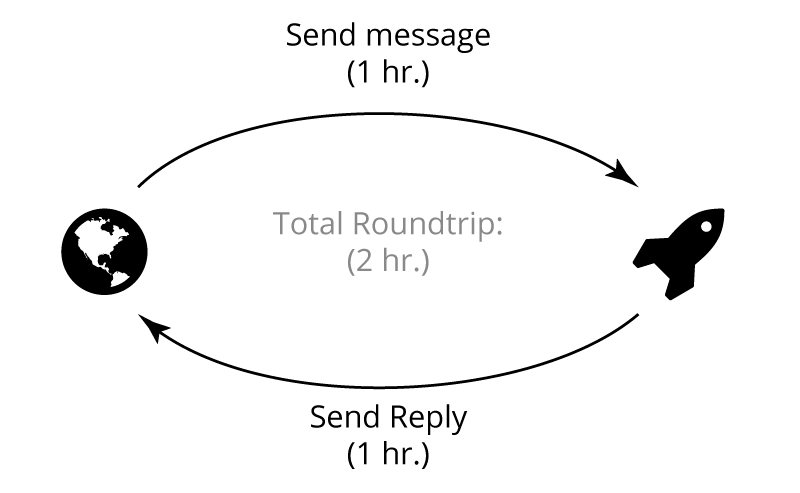
8 AUs would be more than an hour of light speed lag. That means that the Odyssey should take almost two hours to complete a single back-and-forth of a conversation.

Communication-Time

If the compact nuclear reactor was actually able to produce thrust (unlikely, but possible), then in 39 days the Odyssey could have traveled even further.

At any distance beyond the Moon’s orbit, light-speed communication would become increasingly delayed. If the TET was even in a Mars orbit, it could take between 4 and 24 minutes for radio and video signals to go back and forth between Earth and the Odyssey. Further distances increase the lag time significantly.

This means that Humanity has…gasp…developed Faster-than-Light communications technologies by the time Oblivion occurs (and, yes, even before the TET could have provided the advanced alien tech to make it happen).

Close-up of a control panel displaying a distorted screen with horizontal lines and static.

Despite this FTL comm system, as the Odyssey approaches, the TET is able to disrupt the comm signal and cut off Earth from Odyssey. Jack looks concerned by this (as well as Sally’s order to cut his thrust), and stops trying to fight being drawn into the TET.

An unanswerable question here is: what kind of technology from the TET would be able to disrupt an FTL signal? Wouldn’t that require them to be time travelers? Wouldn’t this be a different movie, then?

Don’t Trust New Technology

Neither Jack nor Vika interact with the communication system during the flight that we see besides talking to it. When the signal cuts out, neither of them rushes to check settings or flip switches to try and get the signal back. Instead, they go to a backup plan and focus on what they are able to do without help from Earth. The screen that held Sally’s image cuts over to a secondary information display as soon as it detects that the signal is gone.

Close-up of a digital display panel showing numerical data, indicators, and system information related to a launch control interface.

This implies two things:

  1. The crew were trained to not rely on the communication system
  2. The communications system is a ‘black box’ to Jack and Vika: it either works or it doesn’t.

Given the previous realization that the comm system is built around an FTL link, both of these make sense. It is unlikely that a single person (or even two people) would be able to understand the equipment behind a new FTL system well enough to maintain it or fix it in an emergency. Similarly, the early Astronauts of NASA weren’t expected to maintain the advanced computers (for the time) on their ships.

If the FTL system was recently invented, and rushed through testing for this mission, it also makes sense that Jack and Vika don’t rely on it. NASA now is very careful about testing equipment to make sure that they will always work, or at least work well enough that they can be constantly relied on. (see the Kepler mission http://en.wikipedia.org/wiki/Kepler_(spacecraft) for what happens when a well-tested and critical component fails).

Jack and Vika reveal their training during the emergency situation: They have no time to think, so they fall back on memorized actions. The lack of interaction with the communications system implies that there was no training around trying to make it work.

Have a Backup Plan

Designers planning to introduce new and advanced technology into important situations should always be sure they have a backup plan for when that advanced technology fails. Likewise, if a highly efficient workflow has advanced technology introduced to improve that efficiency, make sure that failures in the new technology won’t make the workflow slower than before.

Technology should assist and improve, never impede users. And if it’s valuable enough to warrant the risk, give users a backup plan.

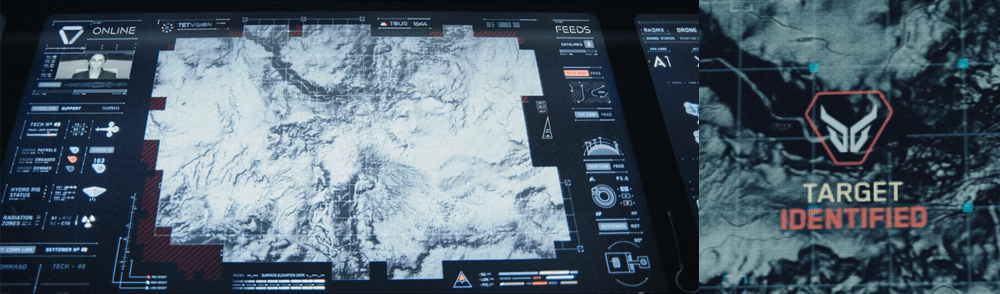
TETVision

image05

The TETVision display is the only display Vika is shown interacting with directly—using gestures and controls—whereas the other screens on the desktop seem to be informational only. This screen is broken up into three main sections:

  1. The left side panel
  2. The main map area
  3. The right side panel

The left side panel

The communications status is at the top of the left side panel and shows Vika the status of whether the desktop is online or offline with the TET as it orbits the Earth. Directly underneath this is the video communications feed for Sally.

Beneath Sally’s video feed is the map legend section, which serves the dual purposes of providing data transfer to the TET and to the Bubbleship as well as a simple legend for the icons used on the map.

The communications controls, which are at the bottom of the left side panel, allow Vika to toggle the audio communications with Jack and with Sally.

The main map area

The largest section is the viewport where the various live feeds are displayed. The main map, which serves as a radar, as well as the remote video feeds she uses to monitor Jack are both in this section of the display.

The right side panel

The panel on the right side of the map contains the video feed controls, which allow Vika to toggle between live footage from the Bubbleship, the TET, and of course, the main map view.

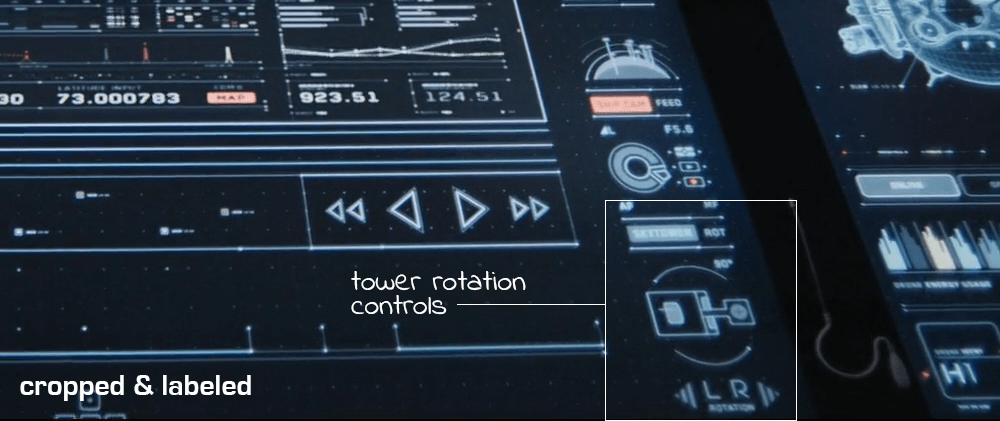
Although never shown in use in the film, the bottom right of the screen houses the tower rotation controls. This unused control is the only indication the capability even exists, so it is unknown whether the tower rotates 360 degrees or whether it’s limited to set points. (More on this below.)

It has robust capabilities

image02

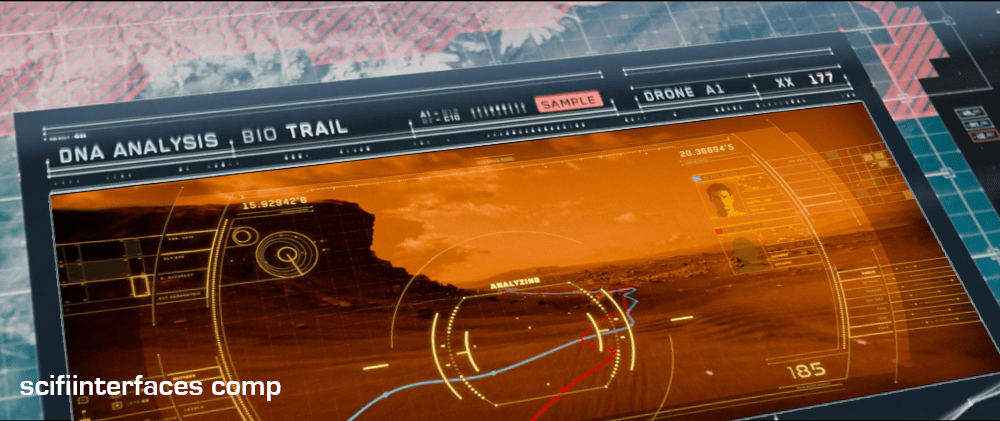
At one point in the movie, Vika is able to use the drones to search for bio trail signatures when Jack is abducted by the scavs.

image06

Vika is also able to detect and decode various types of signals such as the morse code message sent by Jack or the rogue signal sent out by the scavs.

image08

And, probably unbeknownst to Jack and Vika, the TETVision can be controlled remotely from the TET to allow Sally access to the data stored on the desktop—as shown at one point in the movie, when Sally pulls up a past bio trail signature to send drones after Jack and the scavs.

It’s missing a critical layer of data

image03

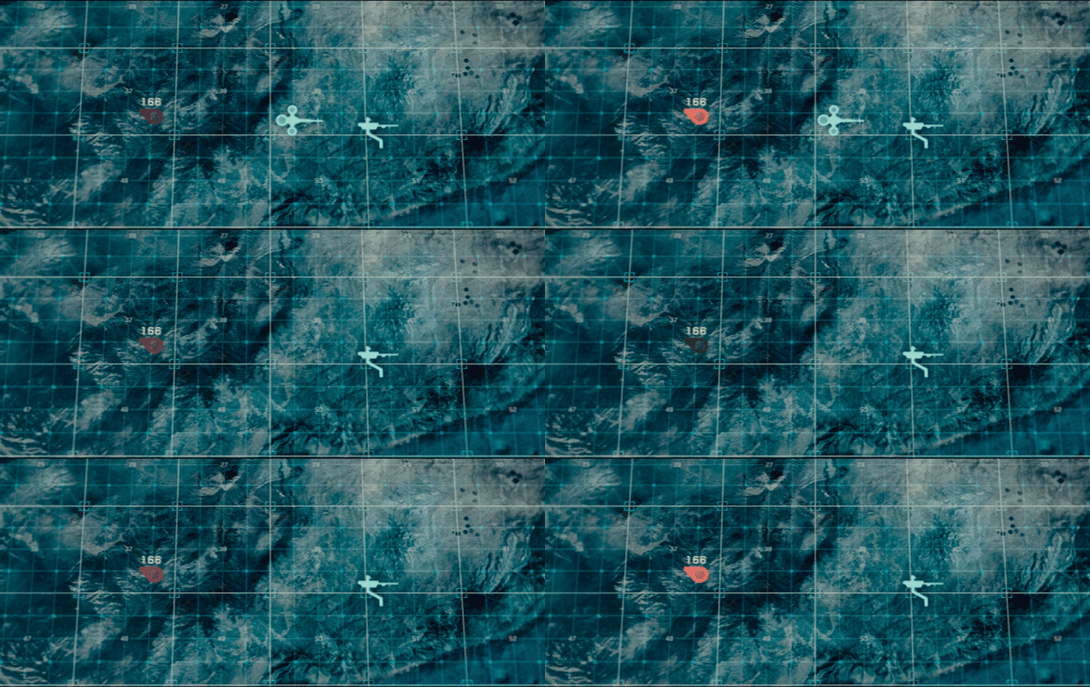
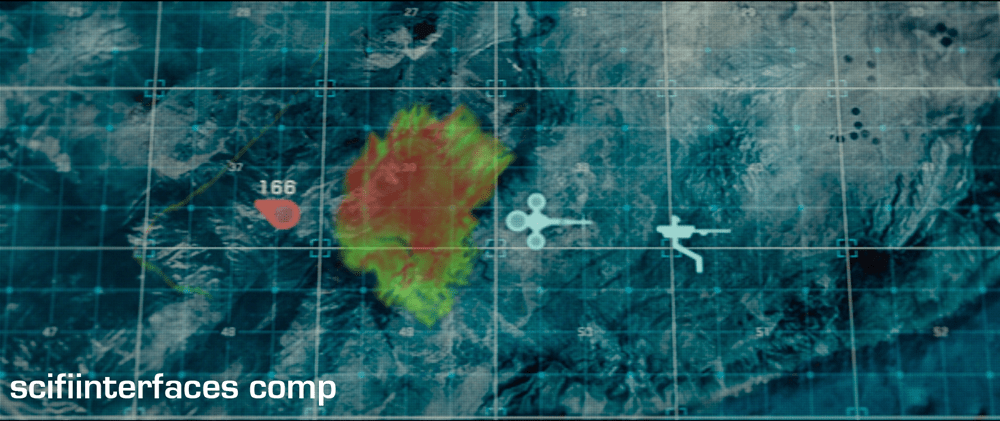
At the beginning of the film, as Jack heads toward the downed drone 166, he suddenly encounters a dangerous lightning storm and nearly plunges to his death when the Bubbleship loses power. His signature disappears from the TETVision map, but from Vika’s perspective there is no indication as to what could have happened — or that there was any danger to begin with.

image01

Since the weather is unstable and constantly changing, it would have been better to include a weather overlay so that Vika could have notified Jack of the storm—allowing him to fly around it instead of straight into it.

It’s got some useless bits

image09

The tower rotation controls are never shown in use in the film, so it’s not clear what benefit rotating the tower would serve. The main purpose of their mission is to ensure the hydro-rigs are secure and functioning properly, not getting an optimal view.

image04

The tower is almost completely surrounded by windows as it is. And since the tower windows already face the hydro-rigs, what would be the benefit of changing vantage points?

It seems that the space could be used for something more beneficial to Vika such as bike, hydro-rig and drone cam feeds. This would provide Vika with more eyes on the ground, allowing her the additional support to keep Jack safe and monitor scav activity.

From an clustering standpoint, it would also fall in line logically with the other feed controls on the right side panel.

And some unnecessary visual feedback

image07

Towards the end of the movie, Sally is trying to find Jack and the scavs. She accesses Vika’s desktop remotely in order to pull up the bio trail records. Although no one is around to see the information, the TETVision displays the process as it happens. Of course, this is necessary for the narrative to progress, but in a real-life situation Sally would only need to see the data on her side—not from the desktop in Tower 49. If they’ve managed interstellar travel, cloning, terraforming, and cognitive reprogramming of alien species, they’re not likely still using VNC. This type of interaction should simply run in the background and not be visible on screen.

Better: Provide useful visuals

When a drone picks up a bio trail signal, a visual of a DNA sequence is displayed. Since the analysis is being conducted by Sally on the TET, it seems that this information isn’t really useful to Vika at all.

image00

From Vika’s point of view it seems like the actual trail would be more important, so why not show a drone cam feed complete with the HUD overlay? She could instantly gain more information by seeing that there are two bio trails—proving that Jack has been captured by the scavs and taken to another location.

Bubbleship Comms

image01

Jack communicates with Vika via the HUD in the Bubbleship, and a small earbud that provides two-way audio.

He talks normally to Vika, who responds in kind. There is no visible confirmation of his connection to Vika, and no obvious way for him to send information back other than the sound of his voice.

As shown during the lightning strike sequence, Jack’s earbud is connected directly to the Bubbleship. All of his audio and telemetry requires the Bubbleship to connect with Vika’s control tower. When the Bubbleship’s power goes out, Jack’s communication is cut too.

Eye in the Sky

Vika has complete control over the communications in the Bubbleship. She is able to see Jack’s video, hear his audio, and send him mission updates whenever she so chooses. Jack only has control over his connection to Vika by going places where the direct comms can’t reach.

Given the post apocalyptic wasteland they inhabit and the strength of other systems Jack uses, Jack should always have a communication link back to Vika. Current infrastructure, like the Drones or the TET when it is overhead, should act as a repeater system for Jack’s earbud.

A handful of orbiting drones and a satellite radio phone attached to Jack’s belt could easily provide near 100% uptime in communications and give a backup to systems like the Bubbleship. Judging by Jack’s reaction during the lightning strike, power failures in the Bubbleship happen often enough for him to have a routine for them.

Jack should also have an easy way to pause or mute communications. When he is in a stressful situation, he may not want the distraction of audio. The audio might also leak from the earphone in quiet places, leaving him vulnerable to Scav ambush.

Any two-way communication system should have equal control for equal parties.

Electronic Shielding

Ideally, comm failures should never happen in the first place. Modern aircraft are well shielded against lightning strikes, and do not fall from the sky (a Guardian post indicates that each commercial aircraft is hit, on average, once per year). The Bubbleship should be at least as well shielded as a modern commercial aircraft, and be able to maintain contact with its control tower during routine thunderstorms.

image00

Advances in technology should not forget basic safety techniques from the generation of technology it is replacing.

Fed Communication Service

StarshipTroopers-FedComm000

When they are in basic training, Carmen and Johnny exchange video messages to stay in touch. Videos are recorded locally to small discs and sent to the other through the Fed post. Carmen has her own computer station in her berth for playing Johnny’’s messages. Johnny uses the single player available on the wall in the barracks. Things are different in the roughnecks than on the Rodger Young.

StarshipTroopers-FedComm003

To play her message, he inserts the small compact disk she sent him into a vertical holder, closes the hinged cover, and presses the rightmost of five similar metal buttons below the screen to play it. After the (sad breakup) message is done, the player displays an “END OF MESSAGE” screen that includes the message ID. Three lights sit in the lower left hand part of the interface. An amber light glows in the lower right near text reading, “P3.” There is a large dial on the left (a frustum of a cone, to be all geometric about it) with some debossed shapes on it that is likely a dial, but we never see these controls in use. In fact, there’s not a lot of interaction there at all for us to evaluate.

StarshipTroopers-FedComm005

Usually you’d expect a dial to operate volume (useful in the noisy narracks), with controls for play, pause, and some controls for either fast forward / reverse, or non-linear access of chapters in the message. The number of controls certainly could accommodate either of those structures, even if it was an old two-button model of play and stop rather than the more modern toggle. Certainly these could use better affordance, as they do not convey their behavior at this distance. Even at Rico’s distance, it’s faster for him to be able to see than to read the controls.

We could also ask what good the message ID is since it’s on screen and not very human-readable or human-memorable, but it does help remind Rico that his messages are being monitored by the fascism that is the Federation. So that’s a helpful reminder, if not useful data.

StarshipTroopers-FedComm001

For the larger interaction, most of the complexities in sending a message—initiating a recording, editing, encoding, specifying a recipient, and sending it—are bypassed offscreen by the physical medium, so it’s not worth speculating on how well this is from a larger standpoint. Of course we could ding them for not thinking that video could be sent faster and cheaper digitally via interstellar transmission than a fragile little disc, but that’s a question for which we just don’t have enough information. (And in which the filmmakers would have had a little trouble explaining how it wasn’t an instant video call.)

Her: interactions (3/8)

If interface is the collection of inputs and outputs, interaction is how a user uses these along with the system’s programming over time to achieve goals. The voice interaction described above, in fact, covers most of the interaction he has with her. But there are a few other back-and-forths worth noting.

socialoranti

The setup

When Theodore starts up OS1, after an installation period, a male voice asks him four questions meant to help customize the interface. It’s a funny sequence. The emotionless male voice even interrupts him as he’s trying to thoughtfully answer the personal questions asked of him. As far as an interaction, it’s pretty bad. Theodore is taken aback by its rudeness. It’s there in the film to help underscore how warm and human Samantha is by comparison, but let’s be clear: We would never want real world software to ask open-ended and personal questions of a user, and then subsequently shut them down when they began to try and answer. Bad pattern! Bad!

Of course you don’t want Theodore bonding with this introductory AI, so it shouldn’t be too charming. But let’s ask some telling closed-ended questions instead so his answers will be short, still telling, and you know, let him actually finish answering. In fact there is some brilliant analysis out there about what those close ended questions should be.

Seamless transition across devices

Samantha talks to Theodore through the earpiece frequently. When she needs to show him something, she can draw his attention to the cameo phone or a desktop screen. Access to these visual displays help her overcome one of the most basic challenges to an all-voice interface, i.e. people have significant challenges processing aurally-presented options. If you’ve ever had to memorize a list of seven items while working your way through an interactive voice response system, you’ll know how painful this can be. Some other user of OS1 who had no visual display might find their OSAI much less useful.

Her-lunchdate

Signaling attention

Theodore isn’t engaging Samantha constantly. Because of this, he needs ways to disengage from interaction. He has lots of them.

  1. Closing the cameo (a partial signal)
  2. Pulling the earpiece out (an unmistakable signal)
  3. Telling her with language that he needs to focus on something else.

He also needs a way to engage, and the reverse of these actions work for that: putting the earpiece in and speaking, or opening the cameo.

In addition to all this, Samantha also needs a way to signal when she needs his attention. She has the illuminated band around the outside of the cameo as well as the audible beeps from the earpiece. Both work well.

Though all these ways, OS1 has signaling attention covered, and it’s not an easy interaction to get right. So the daily interactions with OS1 are pretty good. But we can also evaluate it for its wearableness, which comes up next. (Hint: it’s kind of a mixed bag.)

(Other) wearable communications

The prior posts discussed the Star Trek combadge and the Minority Report forearm-comm. In the same of completeness, there are other wearable communications in the survey.

There are tons of communication headsets, such as those found in Aliens. These are mostly off-the-shelf varieties and don’t bear a deep investigation. (Though readers interested in the biometric display should check out the Medical Chapter in the book.)

Besides these there are three unusual ones in the survey worth noting. (Here we should give a shout out to Star Wars’ Lobot, who might count except given the short scenes where he appears in Empire it appears he cannot remove these implants, so they’re more cybernetic enhancements than wearable technology.)

Gattaca-159

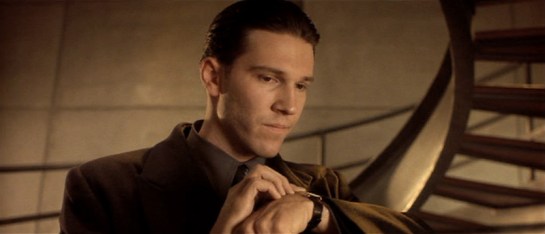
In Gattaca, Vincent and his brother Anton use wrist telephony. These are notable for their push-while-talking activation. Though it’s a pain for long conversations, it’s certainly a clear social signal that a microphone is on, it telegraphs the status of the speaker, and would make it somewhat difficult to accidentally activate.

Firefly_E11_036

In the Firefly episode “Trash”, the one-shot character Durran summons the police by pressing the side of a ring he wears on his finger. Though this exact mechanism is not given screen time, it has some challenging constraints. It’s a panic button and meant to be hidden-in-plain-sight most of the time. This is how it’s social. How does he avoid accidental activation? There could be some complicated tap or gesture, but I’d design it to require contact from the thumb for some duration, say three seconds. This would prevent accidental activation most of the time, and still not draw attention to itself. Adding an increasingly intense haptic feedback after a second of hold would confirm the process in intended activations and signal him to move his thumbs in unintended activations.

BttF_066

In Back to the Future, one member the gang of bullies that Marty encounters wears a plastic soundboard vest. (That’s him on the left, officer. His character name was Data.) To use the vest, he presses buttons to play prerecorded sounds. He emphasizes Future-Biff’s accusation of “chicken” with a quick cluck. Though this fails the sartorial criteria, being hard plastic, as a fashion choice it does fit the punk character type for being arresting and even uncomfortable, per the Handicap Principle.

There are certainly other wearable communications in the deep waters of sci-fi, so any additional examples are welcome.

Next up we’ll take a look at control panels on wearables.