Perimeter Fences

Jurassic_Park_Perimeter_Fences01

Each of the dinosaur paddocks in Jurassic Park is surrounded by a large electric fence on a dedicated power circuit that is controlled from the Central Control Room. The fences have regular signage warning of danger…

Jurassic_Park_Perimeter_Fences04

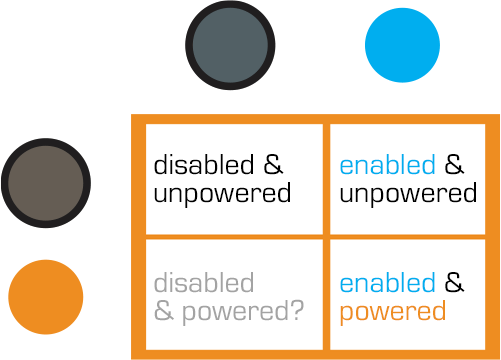
…and large lamps at the top of many towers with amber and blue lights indicating the status of the fence.

Jurassic_Park_Perimeter_Fences02

When the power is active, both lights are lit. When Dr. Saddler is rebooting the system, the blue light turns on first, with a loud, deep klaxon, meant to signal a “system active, but power is not feeding to the fence yet” status. Although the transition isn’t shown, presumably the amber light turns on as soon as power flows into the fence.

Even though Dr. Grant and the kids weren’t introduced to the light system when they arrived on the island, they were suitably worried when the klaxon sounded and the blue light began blinking. This had the advantage of warning them that the fence was about to activate, but the disadvantage that it set off such a strong fear response in Timmy that he froze in place while still on the fence. Drama is good for an audience, bad for Timmy.

Fence Activation

Jurassic_Park_Perimeter_Fences05

We see in Nedry’s escape scene that he shuts off the power because the main gates out of Jurassic Park cannot be opened while the power is active. However, in the intro scene (pictured above) we see that the gate can be opened without shutting off power to the entire fence system. This implies that Jurassic Park has fairly detailed control over various parts of the fence system. This is confirmed when we get a glimpse of labels on a circuit board later in the film:

Jurassic_Park_Perimeter_Fences03

The good

  • The major systems are each on dedicated circuits that are individually controlled. That’s useful for managing complex scenarios in the park.
  • Automated alert systems are quickly understandable. That’s useful for keeping employees and visitors safe.
  • “Blue” and “Orange” are colors that are easily differentiable even with color-blind users. It’s a good choice for alerts.
  • There is an unmistakable and unavoidable audio backup to the visual signal.

The deadly

Let’s not forget that this is a system with potentially deadly consequences. It’s worth making sure it does its job of keeping the bad thing controlled, while not frying people.

“Danger” signage on the T-rex pen is too high for good viewing. A person would interact with the fence closer to the concrete barrier, and would almost certainly not look up. Better is to repeat the signage frequently, repeatedly along its length, and at several heights.

The light system is a 4-bit signal. It takes some interpretation. “Wait. What did blinking blue and off orange mean?” That’s pretty poor for emergency situations, where a few seconds of delay can mean the difference between safety and becoming a jurassic kebab.

lights

Better would be an unmistakable binary signal. Light on = power on. Light off = power off. Make it a big, blood-colored red. That’s much simpler and doesn’t require referencing a manual. Color blind folks won’t need to distinguish light colors at all, they can just see the on-or-off.

What about powering up? That blinking is clearly meaningful, but it’s still more ambiguous than it needs to be.

Ideally you’d have some sort of human-detection system so that the fence itself keeps humans safe, but if that’s not doable or reliable, you’d need some other warning signal. I think there are three ways we can convey that shit is getting real…

Visual

I’d recommend a progress bar, like the Eko traffic light concept by Damjan Stanković. Surround the red light with the progress bar, combining with audible and tactile signals, as below. Put these in the pillars that support the cables, and either near or around the hole through which the cables pass, so it’s clear that these lights have something to do with these cables.

traffic-light-progress-bar-500x371
Side note: I think this is a problematic as a stop light, but quite brilliant as a general time-bound event signal.

Audible

You need the audible warning to catch attention regardless of whether or not a person is looking in the direction of the light. The klaxon is awesome at getting attention and signalling dangers. But again, it’s an ambiguous as The Robot shouting, “Danger, Will Robinson!” If we modified it so that the sound started low and raised in pitch, it would help convey that something is coming on line. You could just use a “blinking” Shepard Tone.

Tactile

And of course, there’s the power itself. It shouldn’t just come on all at once. We should raise the power level over some span of time, so Timmy starts feeling greater and greater discomfort and he has a building pressure to get off the fence, rather than being thrown back immediately. Even a blind, deaf, or panicked person wouldn’t be able to ignore it and be forced to take action without the risk of blunt force electrocution.

Control Room Power Board

image00

Once Dr. Sattler restores power to the park, Arnold needs to reboot the computer systems. To do this, he must switch off the circuits (C1–C3 in the screenshot above), and then switch off-and-on a circuit labeled “Main”.

image01

It’s a good thing Arnold knows what he’s doing, since these switches are only labeled C1-3, and we don’t see any documentation in the camera frame.  As he turns off each circuit, different parts of the computer terminals in the Control Room shut down.  This implies that different computer banks are tied to the same power circuits as the systems they control.

So, since this is a major interface for the park, let’s make this bit explicit: When designing infrequently-used but mission-critical interfaces, take great care to explain use, using clear affordances and constraints so that mistakes are very, very difficult to make. 

It might look like a mistake to have all the little electrical labeling to the sides, since this cover would have to be removed to get the components where this information would be of use. But that’s perfect. A user needing to remove this panel must encounter this reference information to get to those components, and so would know where to find them. This is a brilliant example of the pattern Put the Signal in the Path. Let’s hope there are similar signs on other access panels.

image02

Wait…where are the backups?

These are the central computer terminals that run Jurassic Park, and keep visitors safe from the “attractions.”  And there is no backup power.

When Arnold turns off the main circuit breaker, the computers (and servers behind them) turn off immediately.  The purpose and effect of the power switch deactivates all the systems in Jurassic Park, without any kind of warning or backup system.

For something as dangerous as deadly deadly dinosaurs—raised from the 65 million-year deep grave of extinction—the system deactivation should at least trigger some kind of warning.

Tornado sirens have backup batteries in case the city power goes out.  They are a solid example of a backup system that should exist, at minimum, to warn park-goers to move quickly towards shelter.  A better backup system would be a duplicate server system that automatically activates all the fences in the park.

Redundant Systems

When Arnold cycles the visitor center’s power system, it also trips the breakers for all of the other power systems in the park.  Primary safety systems like that should be on their own circuit.  It’s ok if the fridges turn off and melt the ice cream (though it may be an inconvenience), but that same event shouldn’t also deactivate the velociraptor pen security.  Especially when the ‘raptor pen is right next to the visitor center and is a known, aforementioned, deadly deadly threat.

Velociraptor Lock

The velociraptor pen is a concrete pit, topped with high-powered electric fences.  There are two ways into the pen: a hole at the top of the pen for feeding, and a large armored door at ground level for moving ‘raptors in and out. This armored door has the first interface seen in the film, the velociraptor lock.

JurassicPark_velociraptorlock03

 Velociraptors are brought from breeding grounds within the park to a secure facility in a large, heavily armored crate. Large, colored-light indicators beside the door indicate whether the armored cages are properly aligned with the door.  The light itself goes from red when the cage is being moved, to yellow when the cage is properly aligned and getting close to the door, to green when the cage is properly aligned and snug against the concrete walls of the velociraptor pen.  There is also a loud ‘clang’ as the light turns to green.  It isn’t clear if this is an audio indicator from the pen itself, the cage hitting the concrete wall, or locks slamming into place; but if that audio cue wasn’t there, you’d want something like it since the price for getting that wrong is quite high.

The complete interface consists of four parts (kind of, read on): The lights, the door, the lock, and the safety. More on each below.

1. The Deceiving Lights

The lights are the most obvious part of the system (aside from the cage and pen).  Everyone who is watching the cage also has a clear view of the lights – there is an identical set on the other side of the cage for the other half of the safety/moving crew.

sidelights

2. The Door

The Velociraptor pen’s door is perfectly shaped to accept the heavily armored cage, and is equipped with a rail system to keep the cage aligned properly with the door.  Though it takes eight workers to move the cage, they appear to be able to push the cage reasonably easily. When the light turns green, the workers move back to allow the gate to be manually raised on the cage, letting the caged velociraptor escape into the pen.

3. The “Lock”

JurassicPark_velociraptorlock01
Or, lack thereof…

Every indication (the lineup of the cage, the green lights, and the heavy metallic ‘clang’) gives the feeling of a secure mating between the cage and the pen.  All of the workers relax, as if they’re sure they’re as safe as they can be. But you can be certain, this is a false sense of security.

As soon as the velociraptor decides to test the lock, it is able to push the cage away from the pen wall.  The light near the door instantly changes from green back to red.

Narratively, this underscores some of the risks of the park, i.e. that it’s cheaply engineered despite appearances, and extra-diegetically sets the audience on edge since it’s not sure what it can trust. But, for us in the real world, given the many indications that the system was safe, it should have actually been safe.

4. The Safety

When the clever velociraptor knocks the cage back, a worker falls in and becomes an unscheduled snack. Attendant workers try to help using…

The Cattle Prods

When the gate master falls and gets snatched by the velociraptor in the cage, workers immediately rush in and start hitting her with cattle prods.  There are at least six prods being used, possibly more.

Since this is the first line of backup defense, the cattleprods should have been iterated until they actually deterred the ‘raptors.  Clearly, effort went into making the perimeter defenses secure against the larger dinosaurs. The same effort should have gone into making the cattle prods effective against velociraptors.

Design for Success

The Velociraptor pen door seems custom-designed for serious failure: No hard locks to keep the cage in place, horrible sight-lines, and manual controls in places that make it dangerous for workers. Even the solid feedback system only adds to the danger. It lulls the workers into thinking the system is safe.

Most, if not all, of these issues would be solved by a simple physical locking device on the cage. Something to hold the cage in place while the doors are open would maintain a secure pen and keep everyone outside safe. It would also eliminate the need for most of the support crew, who only end up getting in each other’s way.

To add to the safety, the park designers should have paid more attention to where people would be standing during the transfer process.  The armed guards (theoretically there to be a second line of defense), are placed in such a way that only a few of them are able to effectively fire.  Other guards on scene would have to fire past their fellow guards.

Presumably, this is why the armed guards don’t actually fire at the ‘raptor when Muldoon shouts to “Shoot her! Shooooooot her!!”

JurassicPark_velociraptorlock4

Keep the feedback…

The feedback systems of the cage are remarkably successful, for a placebo. The lights, sounds, and placement keep the workers and audience calm right up until things go horribly wrong.  With the addition of Muldoon’s organizational skill and animal handling skills, the feedback system is worth taking notes on.

…but make it mean something

The velociraptor pen was designed to tell the workers what state it was in, but not to actually keep them safe.  Muldoon’s precautions try to make up for the system’s failures, but only add to the problems as the workers trip over each other.

Ghost trap

Once ghosts are bound by the streams from the Proton Packs, they can be trapped by a special trap. It has two parts: The trap itself, that is roughly the size of a toaster, and the foot pedal activation switch, which connects to the trap box by a long black cord.

Trap02

To open the trap, a ghostbuster simply steps on the foot pedal. For a second the trap sparks with some unknown energy and opens to reveal a supernatural light within. Once open, the bound ghost can be manipulated down towards the trap.

Trap08

When the ghost is close to the trap, the Ghostbuster steps on the foot pedal again. Lots of special effects later, the ghost gets sucked down into the trap and it closes.

With a ghost contained inside, a red indicator light illuminates near the handle to let users know that a dangerous thing is contained within. (Also, it emits smoke, but I suspect that’s a side effect rather than a feature that’s been added in.) The trap can be held by the long handle or (and this is the way the Ghostbusters themselves tend to carry it around) by the cord.

Trap16

The design of the trap has so many great aspects. The separate control keeps the ghostbuster a safe distance from both the proton streams, the trap, and the ghost. And the use of a foot pedal as a switch keeps his hands free to keep a defensive grip the proton gun. I should also make note of the industrial design of the thing: The safety stripes, the handle, and the shape tell of a device handmade by scientists that is dangerous and powerful.

Still, some improvements

If the activation was wireless rather than a foot pedal, the Ghostbuster would be free to move to wherever was most tactically sound, rather than constrained to standing near it. Wireless controls have their own tradeoffs, of course, and those may not be acceptable in the mission-critical scenarios of ghostbusting. If that control was also hands-free (gestural, vocal, ocular, brain) then you’d keep the goodness of the hands-free pedal.

The red light is a little ambiguous. It could just mean “power on,” which doesn’t help. Blinking should be used very judiciously, but here it’s warranted, so I’d make that blink to say “Dangerous thing contained. Release only with caution.” Let’s presume the thing automatically locks when a ghost is trapped and can only be unlocked by the containment unit (the next post). Even better might be several lights blinking, perhaps both around the trap doors and around any controls that might release the ghost, e.g. the foot pedal. You could even make it blink similarly to the “working” light animation of the Proton Packs to tie the equipment together.

One problem that’s familiar to software designers is that’s that the control is a stateless toggle, i.e. it looks and behaves the same whether you’re opening the trap or closing the trap. If the trap doesn’t automatically lock with a ghost in it, that’s a major problem. Imagine if the activator had hid behind a curtain to trap a poltergeist and wasn’t sure if he’d accidentally stepped on it. A UX 101 rule of thumb is that controls should indicate the state of the thing they’re controlling. So the pedal should have a signal to indicate whether the trap is open or closed, even though the trap itself conveys that pretty well. Even better if that signal is something that can be felt with the foot. Maybe it’s a rocker switch? (Like this Linemaster, but more exaggerated.)

Lastly, we can also presume that the trap has a power source, and that there’s a time pressure to get the trap to the containment unit before that power source dies. But where’s that information? So some indication somewhere of how much power and time is left for that would be very useful to avoid all that work (and, you know, property damage) going to waste.

Small improvements, but each would improve it and not take away from the narrative.

Proton Pack

Proton-Pack-02

The Ghostbusters wear “unlicensed particle accelerators” to shoot a stream of energy from an attached gun. Usefully, this positively-charged stream of energy can bind ghosts. The Pack is the size of a large camper’s backpack and is worn like one. The Proton pack must be turned on and warmed up before use. Its switch, oddly, is on the back, where the user cannot get to it themselves.

Proton-Pack-03

This makes for some awesome comedy, but is sorely unusable. If a ghostbuster was alone, he’d have to remove the pack to get at the switch. It also means that a sneaky antagonist could approach from behind and disable the thing mid-busting. Not the wisest design. Better would be to put this switch on the pack on a lower, anterior corner so the ghostbuster can switch it himself.

To prevent accidental activation you’d want to recess the switch in the housing, and maybe even require a button hold or a two-hand trip for extra security.

activelight

There is a display that lets an observer know that the pack is working. It’s a column of blue LEDs that continually progresses upward. Similar to the activation switch, this signal should be placed so that the actual wearer can see it in use, and so that the signal isn’t blared to everyone standing behind him, lest it die and the Ghostbuster need to bluff to buy time.

The Aesculaptor Mark III

LogansRun177

The device with which the cosmetic surgery is conducted is delightfully called the Aesculaptor Mark III. Doc brags that it is “the latest. It’s completely self-contained.

In it, the patient lies flat in a recess on a rounded table, the tilt and orientation of which is computer controlled. Above the table is a metallic sphere with six spidery articulated arms. Some of these house laser scalpels and some of these house healing sprays. The whole mechanism is contained in a cylinder of glass.

To control the system, Doc has a panel made up of unlabeled buttons and dials, a single blue monitor, and another panel displaying a random five-digit number and two levers. One is labeled “ANODYNE” and the other is labeled “KINESIS.”

LogansRun167

When Doc receives a mysterious call (on what may be the earliest wireless telephone in mainstream science fiction,) he receives instructions to murder Logan. To do so he turns off the healing by moving the ANODYNE lever into the lower position.

LogansRun172

So. Yeah. Also just terrible. I mean there’s the plot question. I ordinarily don’t drop into questions of plot, but come on. If Doc wanted to eliminate Logan, wouldn’t he increase the anodyne, so Logan wouldn’t know he was being killed until it was too late? If you wanted to torture him, wouldn’t you put him under a paralytic first, and only then turn off the anodyne? Turning on the KINESIS (moving lasers?) and turning off the anodyne just seem counter to his actual goals. Unless you want to fantheory this so that Doc’s instruction was “make him escape.”

But yes, back to the interface. There’s almost nowhere to start. Undifferentiated controls? Unlabeled controls? No visual hierarchy? Only the device itself and an oscilloscope to monitor the system and the patient’s trending state? Un-safeguarded knife switches for the primary controls? And note that the fail state is in the direction of gravity. If that knife switch gets loose, oops, you’re screwed.

Image of the Therac-25 from http://fauxdurbeyfield.wordpress.com/2011/11/03/therac-25-because-there-isnt-enough-radiation-in-this-world/
Image from http://fauxdurbeyfield.wordpress.com/2011/11/03/therac-25-because-there-isnt-enough-radiation-in-this-world/

Logan’s Run took place long before the lessons of the Therac-25, with its tragic interface and programming problems that resulted in the deaths of several cancer patients, but even audiences in 1976 would not believe that any medical device would have such an easy means of disabling the only aspect of it that keeps it from becoming an abattoir.

Zorg bomb

TheFifthElement-ZorgBomb-001

When Zorg believes he has recovered the sacred stones, he affixes a bomb to the door of Plavalaguna’s suite. The bomb is a little larger than a credit card, with a slot at the top for a key card to be dropped in. The front of the bomb houses all the buttons and lights. The bottom and top edges are rounded back.

The interface for the bomb is quite simple. Zorg presses three large, transparent buttons along the top in order from left to right to activate the bomb. These buttons glow bright red during the countdown. Below these buttons, four red LEDs blink in succession counting off quarter seconds. At the bottom of the display a 4-character, 7-segment timer counts down from the time set: 20 minutes. The device audibly ticks off each second as it passes.

timebomb

Activation

An (adhesive? magnetic?) backing lets Zorg simply place the bomb on the wall to affix it there. Zorg presses the three large buttons in order from left to right to activate it and start the countdown.

Activation analysis

The bomber is after simple activation, but also wants very much to avoid accidental activation. Pressing the buttons in order might happen accidentally, for example from a tire or foot rolling across it. Better would be to have the activation code something much less likely to happen accidentally, like 1-3-2 or 2-3-1.

There’s also a question of whether a bomber would put giant glowing lights, reflective yellow tape, or an audible tick on the bomb (LEDs, if you didn’t know, don’t come with a ticking sound built in.) Each of these draws attention to the bomb, giving helpless victims time to evacuate, alert the authorities, or inform any explosive ordnance disposal personnel that happen to be wandering by. Yes, Zorg wants the bomb to explode, but only after a certain time, so he can get away. He should affix the bomb in some hidden place and design it with a less attention-getting display to suit his fiendish goals.

TheFifthElement-ZorgBomb-003

Deactivation

Once Zorg realizes that the box he stole was empty, he returns to the Fhloston Paradise liner to look for the stones. His first task is to deactivate the bomb. To do this he pulls out a keycard, and gingerly holds it above the bomb. His caution and nervousness implies that it has a jostle-sensitive anti-handling sensors, and that if he bumped it, it would go off. Fortunately for him, he manages to slip the card in without jostling the bomb, and sure enough, it stops with five seconds to go.

TheFifthElement-ZorgBomb-006

Deactivation analysis

The keycard is a mostly-smart deactivation strategy. As we can see, Zorg is quite nervous during the deactivation, and in such high-stress times, it’s better to rely on an object than a stressed villain’s memory for something like a password. The card is thin like a credit card and can fit in a wallet, so it’s easy to carry around. There’s a risk that the card could be misplaced, but the importance of the key will ensure that Zorg will keep track of it. There’s a risk it could be ruined and become useless, but we can presume Zorg made it with tough, ruggedized materials.

The problem with the shape is one of orientation. There are four ways a card can be oriented to a slot, and looking at the card, there is no clear indication of the correct one. The copper circuitry printed on both sides is asymmetrical, so it’s at least possible to tell the current orientation. Perhaps this is the “password” that the system requires, and the random stranger picking it up only has a one in four chance of getting it right.

Fortunately for Zorg, he remembers the correct orientation, and is able to stop the bomb.

TheFifthElement-ZorgBomb-007

Or, this bomb, anyway.

Nucleolab Kill Switch

FifthE-nucleolab-005

General Munro isn’t sure what’s going to come out of the other end of Mactilburgh’s process. He’s never seen a Mondoshawan and doesn’t know if they can be trusted. Fortunately for his sense of panic, there’s a built in kill switch on the control panel facing the nucleolab chamber. To activate the switch, he slips his multipass into a slot. While this card is in the slot, a small red LED lights, and the Big Red Button is active.

FifthE-nucleolab-007

The interface is simple to read, which is nice. The button conveys a bit of its importance through its size and color. The order of operations is well laid out for a Western user: left to right, in the order of reading.

FifthE-nucleolab-008

Three improvements

There are lots of questions about the security strategy, though. Single-factor authentication is too easy to thwart. Couldn’t someone just take his multipass and use it? How does the system know it’s really Munro? Better would be multifactor authentication, requiring both this token and either a knowledge token like a password, or an inheritance factor. Maybe it could require Munro to place his other hand on a handprint reader before the button activates.

Another problem is that the signal that this button is active is too tiny: that little red LED that’s associated with the slot rather than the button. If this is an undoable action, you’d hope that the input would convey the sense of risk. Maybe have the button glow, or surround it with a glowing red ring (think the Krell warning system)?

If it really is a kill switch, i.e. would kill the subject, a nice safeguard against accidental activation would be a press-and-hold button, requiring Munro to hold it down for a few seconds while a warning klaxon sounds. This would give Munro the opportunity to change his mind or move his hand if he’d placed it accidentally. If it triggers something nonlethal, like an incapacitating sticky foam, then no such delay is necessary.

Slideaway bed

slideaway

When Korben stands up, his bed recognizes the change. In response it pulls the messy bed and linens away, where they will be “autowashed,” i.e. automatically sanitized, remade, and sealed in plastic (for bedbug protection?) A fresh bed rises up to replace the messy one as the bedframe slides into the wall.

This automated response might be frustrating if it presumed too much. Say, if Korben got up in the night to use the restroom and came back to find his bed missing, so you’d want it to be as context-aware as possible. And there’s evidence that it’s not too smart a system. Later in the film Cornelius hides in the bed and is nearly suffocated as it tries to autowash the bed with him in it, and wraps him in plastic. I get the comedy in the scene, but really, if it had the sensors to know when Korben was laying down in it, it should have a safety that prevents that very thing when a person is there.

fifthelement-autowash

Korben does have manual controls. There are two panels of pushbuttons at waist height, about a meter apart on a sliver of wall above the bed recess. We don’t get great views of these panels, but we do see Korben using one of the buttons to hide General Munro and his cronies in the hideaway refrigerator. In the glimpses we get we can see that there are six buttons on each panel, each button labeled with a high-contrast icon. The leftmost button on each controls the bed. Pressing it when it’s hidden opens it. Pressing it when it’s open closes it and, as we saw before, starts the murderous autowash.

fifthelement-aptcontrols

All told it’s a pretty awesome system. The agentive part of getting up is handled seamlessly. The alarm has gone off, Korben’s up, and having the bed disappear saves space in the room and removes the temptation of Korben’s slinking back to bed and making himself late for work. And to summon the bed or hide it manually at some unusual time, Korben has understandable, accessible controls. The main down side is the lack of a safety or panic button, and the comparatively minor annoyance that Korben has to tear that plastic off every night even if he just wanted to pass out after a long day of saving the world.

(Other) Morbius technology

Aside from Robbie, we see two other instances of Morbius’’ post-Krell inventions, each of which is lacking in its own way.

A tossed orange demonstrates the very dangerous disposal system.

The first is the disposal, which is housed in a cylindrical nook off of the living room. The smooth walls of this nook are covered in the same metallic, cupric material as a short pedestal seated within. When something is tossed into the nook above the pedestal, it is instantly disintegrated in streaks of green-white energy. There is no indication that the device can distinguish between garbage to be disintegrated and, say, human flesh, but even if it can, the utter irreversibility of the action begs for some additional step of confirmation and safety.

Commander Adams discovers Morbius’’ hidden door.

The second is the secret door from Morbius’’ study to the Krell complex. It is a recessed stretch of wall off of the living room. Adams discovers it accidentally when he approaches and to his amazement, it slides open by dint of his mere proximity. If this is meant to be either secret or secure, it fails on both counts.