Spinning Pizza Interface

As soon as the Rodger Young clears the dock, the interfaces before Ibanez and Barclow change to…well, this.

spinningpizza

I’m pretty good at apologetics, but what this is and how this does anything useful, I just…I’m at a loss. Is this supposed to be the active sweep of a radar dish? Some indication of the flywheel engine? Or the position of that spinning column on the bridge? How are any of these things worth distracting a pilot with a giant yellow spinning pizza?

Little boxes on the interface

StarshipT-undocking01

After recklessly undocking we see Ibanez using an interface of…an indeterminate nature.

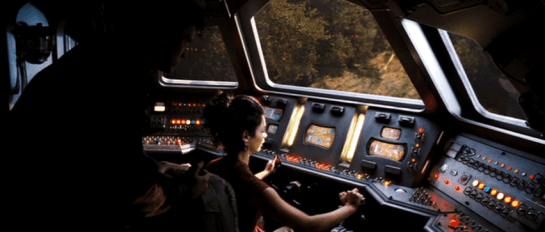
Through the front viewport Ibanez can see the cables and some small portion of the docking station. That’s not enough for her backup maneuver. To help her with that, she uses the display in front of her…or at least I think she does.

Undocking_stabilization

The display is a yellow wireframe box that moves “backwards” as the vessel moves backwards. It’s almost as if the screen displayed a giant wireframe airduct through which they moved. That might be useful for understanding the vessel’s movement when visual data is scarce, such as navigating in empty space with nothing but distant stars for reckoning. But here she has more than enough visual cues to understand the motion of the ship: If the massive space dock was not enough, there’s that giant moon thing just beyond. So I think understanding the vessel’s basic motion in space isn’t priority while undocking. More important is to help her understand the position of collision threats, and I cannot explain how this interface does that in any but the feeblest of ways.

If you watch the motion of the screen, it stays perfectly still even as you can see the vessel moving and turning. (In that animated gif I steadied the camera motion.) So What’s it describing? The ideal maneuver? Why doesn’t it show her a visual signal of how well she’s doing against that goal? (Video games have nailed this. The “driving line” in Gran Turismo 6 comes to mind.)

Gran Turismo driving line

If it’s not helping her avoid collisions, the high-contrast motion of the “airduct” is a great deal of visual distraction for very little payoff. That wouldn’t be interaction so much as a neurological distraction from the task at hand. So I even have to dispense with my usual New Criticism stance of accepting it as if it was perfect. Because if this was the intention of the interface, it would be encouraging disaster.

StarshipT-undocking17

The ship does have some environmental sensors, since when it is 5 meters from the “object,” i.e. the dock, a voiceover states this fact to everyone in the bridge. Note that it’s not panicked, even though that’s relatively like being a peach-skin away from a hull breach of bajillions of credits of damage. No, the voice just says it, like it was remarking about a penny it happened to see on the sidewalk. “Three meters from object,” is said with the same dispassion moments later, even though that’s a loss of 40% of the prior distance. “Clear” is spoken with the same dispassion, even though it should be saying, “Court Martial in process…” Even the tiny little rill of an “alarm” that plays under the scene sounds more like your sister hasn’t responded to her Radio Shack alarm clock in the next room rather than—as it should be—a throbbing alert.

StarshipT-undocking24

Since the interface does not help her, actively distracts her, and underplays the severity of the danger, is there any apology for this?

1. Better: A viewscreen

Starship Troopers happened before the popularization of augmented reality, so we can forgive the film for not adopting that technology, even though it might have been useful. AR might have been a lot for the film to explain to a 1997 audience. But the movie was made long after the popularization of the viewscreen forward display in Star Trek. Of course it’s embracing a unique aesthetic, but focusing on utility: Replace the glass in front of her with a similar viewscreen, and you can even virtually shift her view to the back of the Rodger Young. If she is distracted by the “feeling” of the thrusters, perhaps a second screen behind her will let her swivel around to pilot “backwards.” With this viewscreen she’s got some (virtual) visual information about collision threats coming her way. Plus, you could augment that view with precise proximity warnings, and yes, if you want, air duct animations showing the ideal path (similar to what they did in Alien).

2. VP

The viewscreen solution still puts some burden on her as a pilot to translate 2D information on the viewscreen to 3D reality. Sure, that’s often the job of a pilot, but can we make that part of the job easier? Note that Starship Troopers was also created after the popularization of volumetric projections in Star Wars, so that might have been a candidate, too, with some third person display nearby that showed her the 3D information in an augmented way that is fast and easy for her to interpret.

3. Autopilot or docking tug-drones

Yes, this scene is about her character, but if you were designing for the real world, this is a maneuver that an agentive interface can handle. Let the autopilot handle it, or adorable little “tug-boat” drones.

StarshipT-undocking25

Reckless undocking

After logging in to her station, Ibanez shares a bit of flirty dialog with mushroom-quaffed Zander Barcalow, and Captain Deladier says, “All right, Ibanez. Take her out.” Ibanez grasps the yoke, pulls back, and the ship begins to pull back from the docking station while still attached by two massive cables. Daladier and Barcalow keep silent but watch as the cables grow dangerously taut. At the last minute Ibanez flips a toggle switch on her panel from 0 to 1 and the cables release.

StarshipT-undocking08

StarshipT-undocking16

There’s a lot of wrong in just this sequence. I mean, I get narratively what’s happening here: Check her out, she’s a badass maverick (we’re meant to think). But, come on…

  1. Where is the wisdom of letting a Pilot Trainee take the helm on her first time ever aboard a vessel? OK. Sorry. This is an interface blog. Ignore that one.
  2. The 1 and 0 symbols are International Electrotechnical Commission 60417 standards for on and off, respectively. How is the cable’s detachment caused by something turning on? If it was magnetic, shouldn’t you turn the magnetism off to release the cables?
  3. Why use the symbols for ON and OFF for an infrequent, specific task? Shouldn’t this be reserved for a kill switch or power to the station or something major? Or shouldn’t it bear a label reading “Power Cable Magnets” or something to make it more intelligible?
  4. Why is there no safety mechanism for this switch? A cover? A two-person rule? A timed activation? It’s fairly consequential. The countersink doesn’t feel like it’s enough.
  5. Where is the warning klaxon to alert everyone to this potentially disastrous situation?
  6. Why isn’t she dishonorably discharged the moment she started to maneuver the ship while it was still attached to the dock? Oh, shit. Sorry. Interfaces. Right. Interfaces.

Rodger Young Bridge Doors

StarshipT_safetydoor03

I have a special interest in sci-fi doors, so, for completeness in the database, I’m going to document what’s we see with the security doors of the Rodger Young, which is not much.

StarshipT_safetydoor04

To access the bridge, Carmen walks through a short corridor, with large, plate-metal doors at either end. As she approaches each, they slide up over the course of about a second, making a grinding sound as they rise, and a heavy puff of air when they are safely locked open. (If they’re automatic, why don’t they close behind her?) The lower half-meter of each door is emblazoned with safety stripes.

StarshipT_safetydoor05

Carmen appears to do nothing special to authenticate with the doors. That either means that there is no authentication, or that it’s a sophisticated passive authentication that works as she approaches. I suggested just such a passive authentication for the Prometheus escape pod. The main difference in what I recommended there and what we see here is that both Carmen and the audience could use some sort of feedback that this is happening. A simple glowing point with projection rays towards her eyes or something, and even a soft beep upon confirmation.

StarshipT_safetydoor06

The only other time we see the door in action is after Carmen’s newly plotted course "discovers" the asteroid en route to Earth. It’s a Code Red situation, and the door doesn’t seem to behave any differently, even admitting about half a dozen people in at a time, so we have to presume that this is one those "dumb" doors.

StarshipT_safetydoor_codered

Shuttle Yoke

StarshipTroopers_piloting

Our first scene with Ibanez in training shows her piloting a shuttle to her ship. We don’t see much of the instrument panel or any footpedals, but the interaction with the yoke is pretty clear. She sits in the pilot seat, flicks a couple of switches on an overhead panel, and then gives the yoke a hard yank back to ignite the engines and take off. The reactions from the other characters tell us that she’s meant to be something of an aggressive pilot.

shuttle_yoke

The shuttle exits the flight deck and we get a glimpse of the instrument panel. It has a screen, displaying moving gradients, and a bank of unlabeled buttons. Ibanez never looks at these. She flies visually by the viewport. As she approaches the Rodger Young, we see her holding the yoke close to her, and rolling it to the right as the shuttle arcs near the giant spaceship, and then into a “hallway” within its scaffolded hull. She doesn’t move the yoke very much at all to pitch it 90 degrees up and back out to space again.

StarshipT_shuttleoutput

Problems

There’s not a lot of information in this short scene, but enough to talk about. It’s a simple powered interface, with Ibanez operating a yoke that’s kind-of like a plane’s yoke. She banks the yoke to bank the shuttle. She rolls the yoke to roll the shuttle. There’s a bit of confusion about what the back-and-forth (ventral) controls do. On the flight deck it ignites thrust, but in space it seems to mean pitch (more like what we’d expect.) Yokes are problematic conceptually (for reasons being discussed here) but let’s go with it as a given for now.

First, where’s the safety measures on the flight deck? There is no clearance zone behind the shuttle and that thing is spitting blue fire, right at head level. You’d expect her to check her equivalent of the rear-view mirrors and key some warning klaxxons on the flight deck. Unless that fire is somehow harmless.

While we’re at it, where are the safety measures for the shuttle while in space? She’s clearly freaking the other pilots out with reckless piloting. Sure, they’re new and she’s a “maverick” but you’d expect it to alert her visibly and audibly if she’s undertaking maneuvers that are risky to the shuttle and the giant warship. So fine, the shuttle doesn’t have some gigantic and expensive equipment needed for this. But later in the movie we see that the Rodger Young has a collision alert function. (See below.) Why isn’t she contacted by someone assigned to security aboard the Rodger Young when she first approaches the ship in a reckless way?

This is not aboard the shuttle.

This is not aboard the shuttle.

And finally, there’s the control. It’s risky to use yoke-jerk for initiating thrust if the same motion means something else in flight. If the pilot needs a sudden boost of power, having them strain leaning forward or backward risks their messing with other variables and pointless repositioning for the pilot. Sure, it might be a mode where this only works when docked, but as we all know, modes are problematic at best and to be avoided. And then there’s the fact that the yoke’s sensitivity to pitch is nearly a force gauge, but to roll requires around 45 degrees. Shouldn’t these be at least the same order of magnitude?

It’s so unreal that it breaks the scene. The eyes of the actor and the camera do some work to keep us distracted, but it’s still there, like a bug hiding under the sand of Klendathu.

Nerdsourcing

Here’s an idea. In a recent chat, I was told recently that the bar I’ve set for reviews is prohibitively high (fair enough), and that even folks who loooove and are interested in participating in the blog are a little scared of the Cliffs of Insanity that is reviewing a whole movie at once. (Special Man-in-Black tip of the hat to Clayton Beese for being the only other person to date willing to scale those things solo.)

But today I was thinking of running an experiment in Nerdsourcing. What if I picked a movie, identified the interfaces in it, and then asked for volunteers to pair up to review one or two of those interfaces? I’d provide the screen caps, teams would work in Google Docs initially and then move to Droppages (or some other live web-hosting solution) for the final markup. I’d be the editor, working asynchronously with each team to maintain voice, offer my thoughts, help answer questions, scheduling the final posts, etc.

This way you would not be faced with the monumental task of doing an entire movie. Instead of committing weeks, it might just be a handful of weeknights, depending on how quickly you worked and the complexity of the issues you are your partner uncover. At the end you’d have a good time, a fun post to share with friends and maybe put on a resume, and of course full credit on the post itself. (Stuff on the site is Creative Commons CC BY-SA 3.0) If you want to stretch your creative muscles you could even create a comp of a better solution. We’d have a first nerdsourced scifiinterfaces review. Who of this rag-tag readership is interested? Hands up in the comments.

The follow up question is for which movie could we run this experiment?

Nerdsourceoptions

Piloting Controls

Firefly_piloting

Pilot’s controls (in a spaceship) are one of the categories of “things” that remained on the editing room floor of Make It So when we realized we had about 50% too much material before publishing. I’m about to discuss such pilot’s controls as part of the review of Starship Troopers, and I realized that I’ll first need to to establish the core issues in a way that will be useful for discussions of pilot’s controls from other movies and TV shows. So in this post I’ll describe the key issues independent of any particular movie.

A big shout out to commenters Phil (no last name given) and Clayton Beese for helping point me towards some great resources and doing some great thinking around this topic originally with the Mondoshawan spaceship in The Fifth Element review.

So let’s dive in. What’s at issue when designing controls for piloting a spaceship?

BuckRogers_piloting

First: Spaceships are not (cars|planes|submarines|helicopters|Big Wheels…)

One thing to be careful about is mistaking a spacecraft for similar-but-not-the-same Terran vehicles. Most of us have driven a car, and so have these mental models with us. But a car moves across 2(.1?) dimensions. The well-matured controls for piloting roadcraft have optimized for those dimensions. You basically get a steering wheel for your hands to specify change-of-direction on the driving plane, and controls for speed.

Planes or even helicopters seem like they might be a closer fit, moving as they do more fully across a third dimension, but they’re not right either. For one thing, those vehicles are constantly dealing with air resistance and gravity. They also rely on constant thrust to stay aloft. Those facts alone distinguish them from spacecraft.

These familiar models (cars and planes) are made worse since so many sci-fi piloting interfaces are based on them, putting yokes in the hands of the pilots, and they only fit for plane-like tasks. A spaceship is a different thing, piloted in a different environment with different rules, making it a different task.

2001_piloting

Maneuvering in space

Space is upless and downless, except as a point relates to other things, like other spacecraft, ecliptic planes, or planets. That means that a spacecraft may need to be angled in fully 3-dimensional ways in order to orient it to the needs of the moment. (Note that you can learn more about flight dynamics and attitude control on Wikipedia, but it is sorely lacking in details about the interfaces.)

Orientation

By convention, rotation is broken out along the cartesian coordinates.

  • X: Tipping the nose of the craft up or down is called pitch.
  • Y: Moving the nose left or right around a vertical axis, like turning your head left and right, is called yaw.
  • Z: Tilting the left or right around an axis that runs from the front of the plane to the back is called roll.

Angles_620

In addition to angle, since you’re not relying on thrust to stay aloft, and you’ve already got thrusters everywhere for arbitrary rotation, the ship can move (or translate, to use the language of geometry) in any direction without changing orientation.

Translation

Translation is also broken out along cartesian coordinates.

  • X: Moving to the left or right, like strafing in the FPS sense. In Cartesian systems, this axis is called the abscissa.
  • Y: Moving up or down. This axis is called the ordinate.
  • Z: Moving forward or backward. This axis is less frequently named, but is called the applicate.

Translations_620

Thrust

I’ll make a nod to the fact that thrust also works differently in space when traveling over long distances between planets. Spacecraft don’t need continuous thrust to keep moving along the same vector, so it makes sense that the “gas pedal” would be different in these kinds of situations. But then, looking into it, you run into a theory of constant-thrust or constantacceleration travel, and bam, suddenly you’re into astrodynamics and equations peppered with sigmas, and you’re in way over my head. It’s probably best to presume that the thrust controls are set-point rather than throttle, meaning the pilot is specifying a desired speed rather than the amount of thrust, and some smart algorithm is handling all the rest.

Given these tasks of rotation, translation, and thrust, when evaluating pilot’s controls, we first have to ask how it is the pilot goes about specifying these things. But even that answer isn’t simple. Because you need to determine with what kind of interface agency it is built.

Max was a fully sentient AI who helped David pilot.

Max was a fully sentient AI who helped David pilot.

Interface Agency

If you’re not familiar with my categories of agency in technology, I’ll cover them briefly here. I’ll be publishing them in an upcoming book with Rosenfeld Media, which you can read there if you want to know more. In short, you can think of interfaces as having four categories of agency.

  • Manual: In which the technology shapes the (strictly) physical forces the user applies to it, like a pencil. Such interfaces optimize for good ergonomics.
  • Powered: In which the user is manipulating a powered system to do work, like a typewriter. Such interfaces optimize for good feedback.
  • Assistive: In which the system can offer low-level feedback, like a spell checker. Such interfaces optimize for good flow, in the Csikszentmihalyi sense.
  • Agentive: In which the system can pursue primitive goals on behalf of the user, like software that could help you construct a letter. This would be categorized as “weak” artificial intelligence, and specifically not the sentience of “strong” AI. Such interfaces optimize for good conversation.

So what would these categories mean for piloting controls? Manual controls might not really exist since humans can’t travel in space without powered systems. Powered controls would be much like early real-world spacecraft. Assistive controls would be might provide collision warnings or basic help with plotting a course. Agentive controls would allow a pilot to specify the destination and timing, and it would handle things until it encountered a situation that it couldn’t handle. Of course this being sci-fi, these interfaces can pass beyond the singularity to full, sentient artificial intelligence, like HAL.

Understanding the agency helps contextualize the rest of the interface.

Firefly_piloting03

Inputs

How does the pilot provide input, how does she control the spaceship? With her hands? Partially with her feet? Via a yoke, buttons on a panel, gestural control of a volumetric projection, or talking to a computer?

If manual, we’ll want to look at the ergonomics, affordances, and mappings.

Even agentive controls need to gracefully degrade to assistive and powered interfaces for dire circumstances, so we’d expect to see physical controls of some sorts. But these interfaces would additionally need some way to specify more abstract variables like goals, preferences, and constraints.

Consolidation

Because of the predominance of the yoke interface trope, a major consideration is how consolidated the controls are. Is there a single control that the pilot uses? Or multiple? What variables does each control? If the apparent interface can’t seem to handle all of orientation, translation, and thrust, how does the pilot control those? Are there separate controls for precision maneuvering and speed maneuvering (for, say, evasive maneuvers, dog fights, or dodging asteroids)?

The yoke is popular since it’s familiar to audiences. They see it and instantly know that that’s the pilot’s seat. But as a control for that pilot to do their job, it’s pretty poor. Note that it provides only two variables. In a plane, this means the following: Turn it clockwise or counterclockwise to indicate roll, and push it forward or pull it back for pitch. You’ll also notice that while roll is mapped really well to the input (you roll the yoke), the pitch is less so (you don’t pitch the yoke).

So when we see a yoke for piloting a spaceship, we must acknowledge that a) it’s missing an axis of rotation that spacecraft need, i.e. yaw. b) it’s presuming only one type of translation, which is forward. That leaves us looking about the cockpit for clues about how the pilot might accomplish these other kinds of maneuvers.

StarshipTroopers_pilotingoutput

Output

How does the pilot know that her inputs have registered with the ship? How can she see the effects or the consequences of her choices? How does an assistive interface help her identify problems and opportunities? How does as agentive or even AI interface engage the pilot asking for goals, constraints, and exceptions? I have the sense that Human perception is optimized for a mostly-two-dimensional plane with a predator’s eyes-forward gaze. How does the interface help the pilot expand her perception fully to 360° and three dimensions, to the distances relevant for space, and to see the invisible landscape of gravity, radiation, and interstellar material?

Narrative POV

An additional issue is that of narrative POV. (Readers of the book will recall this concept is came up in the Gestural Interfaces chapter.) All real-world vehicles work from a first-person perspective. That is, the pilot faces the direction of travel and steers the vehicle almost as if it was their own body.

But if you’ve ever played a racing game, you’ll recognize that there’s another possible perspective. It’s called the third-person perspective, and it’s where the camera sits up above the vehicle, slightly back. It’s less immediate than first person, but provides greater context. It’s quite popular with gamers in racing games, being rated twice as popular in one informal poll from escapist magazine. What POV is the pilot’s display? Which one would be of greater use?

MatrixREV_piloting

The consequent criteria

I think these are all the issues. This is new thinking for me, so I’ll leave it up a bit for others to comment or correct. If I’ve nailed them, then for any future piloting controls in the future, these are the lenses through which we’ll look and begin our evaluation:

  • Agency [ manual | powered | assistive | agentive | AI ]
  • Inputs
    • Affordance
    • Ergonomics
    • Mappings
      • orientation
      • translation
      • thrust
    • consolidations
  • Outputs (especially Narrative POV)

This checklist won’t magically give us insight into the piloting interface, but will be a great place to start, and a way to compare apples to apples between these interfaces.

DuoMento, improved

Forgive me, as I am but a humble interaction designer (i.e., neither a professional visual designer nor video editor) but here’s my shot at a redesigned DuoMento, taking into account everything I’d noted in the review.

  • There’s only one click for Carl to initiate this test.
  • To decrease the risk of a false positive, this interface draws from a large category of concrete, visual and visceral concepts to be sent telepathically, and displays them visually.
  • It contrasts Carl’s brainwave frequencies (smooth and controlled) with Johnny’s (spiky and chaotic).
  • It reads both the brain of the sender and the receiver for some crude images from their visual cortex. (It would be better at this stage to have the actors wear some glowing attachment near a crown to show how this information was being read.)

DuoMento_improved

These changes are the sort that even in passing would help tell a more convincing narrative by being more believable, and even illustrating how not-psychic Johnny really is.

DuoMento

Carl, a young psychic, has an application at home to practice and hone his mental powers. It’s not named in the film, so I’m going to call it DuoMento. We see DuoMento in use when Carl uses it to try and help Johnny find if he has any latent psyhic talent. (Spoiler alert: It doesn’t work.)

StarshipT_035

Setup

DuoMento challenges its users with blind matching tests. For it, the “thought projector” (Carl) sits in a chair at a desk with a keyboard and a desktop monitor before him. The “thought receiver” (Johnny) sits in a chair facing the thought projector, unable to see either the desktop monitor or the large, wall-mounted screen behind him, which duplicates the image from the desktop monitor. To the receiver’s right hand is a small elevated panel of around 20 white push buttons.

StarshipT_036StarshipT_037

Blind matching

For the test, two Hoyle playing cards appear on the screen side-by-side, face down. Carl presses a key on his keyboard, and one card flips over to reveal its face. Carl concentrates on the face-up card, attempting to project the identity of the card to Johnny. Johnny tries his best to receive the thought. It’s intense.

intense_520

When Johnny feels he has an answer, he says, “I see…Ace of Spades,” and reaches forward and presses a button on the elevated panel. In response, the hidden card flips over as the ace of spades. An overlay appears on top of the two cards indicating if it was a match. Lacking any psychic abilities, Johnny gets a big label reading “NO MATCH,” accompanied by a buzzer sound. Carl resets it to a new card with three clicks on his keyboard.

StarshipT_033

Not very efficient

Why does it take Carl three clicks to reset the cards? You’d think on such a routine task it would be as simple as pressing [space bar]. Maybe you want to prevent accidental activation, but still that’s a key with a modifer, like shift+[space bar]. Best would be if Carl was also a telekinetic. Then he could just mentally push a switch and get some of that practice in. If that switch offered variable resistance it could increase with each…but I digress since he’s just a telepath.

A semi-questionable display

I get why there’s a side-by-side pair of cards. People are much better at these sorts of comparison tasks when objects are side-by-side. But ultimately, it conveys the wrong thing. Having a face down card that flips over implies that that face-down card is the one that Johnny’s trying to guess. But it’s not. The one that’s already turned over is the one he’s trying to guess. Better would be a graphic that implies he’s filling in the blank.

better_duomento_520

Better still are two separate screens: One for the projector with a single card displayed, and a second for the receiver with this same graphic prompting him to guess. This would require a little different setup when shooting the scene, with over-the-shoulder shots for each showing the different screen. But audiences are sophisticated enough to get that now. Different screens can show different things.

Mismatched inputs?

At first it seems like Johnny’s input panel is insufficient for the task. After all, there are 52 cards in a standard deck of cards and only 20 buttons. But having a set of 13 keys for the card ranks and 4 for the suit is easy enough, reduces the number of keys, and might even let him answer only the part he’s confident in if the image hasn’t quite come through.

StarshipT_039

Does it help test for “sensitivity”?

Psychic powers are real in the world of Starship Troopers, so we’re going not going to question that. Instead the question at hand will be: Is this the best test for psychic sensitivity?

Visual cheating

I do wonder that having a lit screen gives the receiver a reflection in the projector’s eyes to detect, even if unconsciously. An eagle-eyed receiver might be able to spot a color, or the difference between a face card and a number card. Better would be some way for the projector to cover his eyes while reading the subject, and dim that screen afterward.

The risk of false positives

More importantly, such a test would want to eliminate the chance that the receiver guessed correctly by chance. The more constrained and familiar the range of options, the more likely they are to get a false positive, which wouldn’t help anything except confidence, and even that would be false. I get that when designing skills-building interfaces, you want to start easy and get progressively more challenging. But it makes more sense to constrain the concepts being projected to things that are more concrete and progress to greater abstraction or more nuance. Start with “fire,” perhaps, and advance to “flicker” or “warmth.” For such thoughts, a video cue of a word randomly selected from that pool of concepts would make the most sense. And for cinematic directness (Starship Troopers was nothing if not direct) you should overlay the word onto the video cue as well.

fireloop1

Better input

The next design challenge then becomes how does the receiver provide to the system what, if anything, they’re receiving. Since the concepts would be open-ended, you need a language-input mechanism: ANSI keyboard for typing, or voice recognition.

Additionally, I’d add a brain-reading interface that was able to read his brain as he was attempting to receive. Then it could detect for the right state of mind, e.g. an alpha state, as well as areas of the brain that are being activated. Cinematically you could show a brain map, indicating the brain state in a range, the areas of the brain being activated. Having the map on hand for Johnny would let him know to relax and get into a receptive state. If Carl had the same map he could help prompt him.

In a movie you’d probably also want a crude image feed being “read” from Johnny’s thoughts. It might charmingly be some dumb, non-fire things, like scenes from his last jump ball game, Carmen’s face and cleavage, and to Carl’s shame, a recollection of the public humilation suffered recently at his hand.

But if this interface (and telepathy) was real, you wouldn’t want to show that to Johnny, as it might cause distracting feedback loops, and you wouldn’t want to show it to Carl less he betray when Johnny is getting close, and encourage Johnny’s zeroing in on the concept through subtle social cues instead of the desired psychic ones. Since it’s not real, let’s comp it up next more cinematically.