Grabby hologram

After Pepper tosses off the sexy bon mot “Work hard!” and leaves Tony to his Avengers initiative homework, Tony stands before the wall-high translucent displays projected around his room.

Amongst the videos, diagrams, metadata, and charts of the Tesseract panel, one item catches his attention. It’s the 3D depiction of the object, the tesseract itself, one of the Infinity Stones from the MCU. It is a cube rendered in a white wireframe, glowing cyan amidst the flat objects otherwise filling the display. It has an intense, cold-blue glow at its center.  Small facing circles surround the eight corners, from which thin cyan rule lines extend a couple of decimeters and connect to small, facing, inscrutable floating-point numbers and glyphs.

Avengers_PullVP-02.png

Wanting to look closer at it, he reaches up and places fingers along the edge as if it were a material object, and swipes it away from the display. It rests in his hand as if it was a real thing. He studies it for a minute and flicks his thumb forward to quickly switch the orientation 90° around the Y axis.

Then he has an Important Thought and the camera cuts to Agent Coulson and Steve Rogers flying to the helicarrier.

So regular readers of this blog (or you know, fans of blockbuster sci-fi movies in general) may have a Spidey-sense that this feels somehow familiar as an interface. Where else do we see a character grabbing an object from a volumetric projection to study it? That’s right, that seminal insult-to-scientists-and-audiences alike, Prometheus. When David encounters the Alien Astrometrics VP, he grabs the wee earth from that display to nuzzle it for a little bit. Follow the link if you want that full backstory. Or you can just look and imagine it, because the interaction is largely the same: See display, grab glowing component of the VP and manipulate it.

Prometheus-229 Two anecdotes are not yet a pattern, but I’m glad to see this particular interaction again. I’m going to call it grabby holograms (capitulating a bit on adherence to the more academic term volumetric projection.) We grow up having bodies and moving about in a 3D world, so the desire to grab and turn objects to understand them is quite natural. It does require that we stop thinking of displays as untouchable, uninterruptable movies and more like toy boxes, and it seems like more and more writers are catching on to this idea.

More graphics or more information?

Additionally,  the fact that this object is the one 3D object in its display is a nice affordance that it can be grabbed. I’m not sure whether he can pull the frame containing the JOINT DARK ENERGY MISSION video to study it on the couch, but I’m fairly certain I knew that the tesseract was grabbable before Tony reached out.

On the other hand, I do wonder what Tony could have learned by looking at the VP cube so intently. There’s no information there. It’s just a pattern on the sides. The glow doesn’t change. The little glyph sticks attached to the edges are fuigets. He might be remembering something he once saw or read, but he didn’t need to flick it like he did for any new information. Maybe he has flicked a VP tesseract in the past?

Augmented “reality”

Rather, I would have liked to have seen those glyph sticks display some useful information, perhaps acting as leaders that connected the VP to related data in the main display. One corner’s line could lead to the Zero Point Extraction chart. Another to the lovely orange waveform display. This way Tony could hold the cube and glance at its related information. These are all augmented reality additions.

Augmented VP

Or, even better, could he do some things that are possible with VPs that aren’t possible with AR. He should be able to scale it to be quite large or small. Create arbitrary sections, or plan views. Maybe fan out depictions of all objects in the SHIELD database that are similarly glowy, stone-like, or that remind him of infinity. Maybe…there’s…a…connection…there! Or better yet, have a copy of JARVIS study the data to find correlations and likely connections to consider. We’ve seen these genuine VP interactions plenty of places (including Tony’s own workshop), so they’re part of the diegesis.

Avengers_PullVP-05.pngIn any case, this simple setup works nicely, in which interaction with a cool media helps underscore the gravity of the situation, the height of the stakes. Note to selves: The imperturbable Tony Stark is perturbed. Shit is going to get real.


Avengers, assembly!

Avengers-lookatthis.png

When Coulson hands Tony a case file, it turns out to be an exciting kind of file. For carrying, it’s a large black slab. After Tony grabs it, he grabs the long edges and pulls in opposite directions. One part is a thin translucent screen that fits into an angled slot in the other part, in a laptop-like configuration, right down to a built-in keyboard.

The grip edge

The grip edge of the screen is thicker than the display, so it has a clear, physical affordance as to what part is meant to be gripped and how to pull it free from its casing, and simultaneously what end goes into the base. It’s simple and obvious. The ribbing on the grip unfortunately runs parallel to the direction of pull. It would make for a better grip and a better affordance if the grip was perpendicular to the direction of pull. Minor quibble.

I’d be worried about the ergonomics of an unadjustable display. I’d be worried about the display being easily unseated or dislodged. I’d also be worried about the strength of the join. Since there’s no give, enough force on the display might snap it clean off. But then again this is a world where “vibrium steel” exists, so material critiques may not be diegetically meaningful.

Login

Once he pulls the display from the base, the screen boops and animated amber arcs spin around the screen, signalling him to login via a rectangular panel on the right hand side of the screen. Tony puts his four fingers in the spot and drags down. A small white graphic confirms his biometrics. As a result, a WIMP display appears in grays and amber colors.

Avengers-asset-browser05

Briefing materials

One window on the left hand side shows a keypad, and he enters 1-8-5-4. The keypad disappears and a series of thumbnail images—portraits of members of the Avengers initiative—appear in its place. Pepper asks Tony, “What is all this?” Tony replies, saying, “This is, uh…” and in a quick gesture, places his ten fingertips on the screen at the portraits, and then throws his hands outward, off the display.

The portraits slide offscreen to become ceiling-height volumetric windows filled with rich media dossiers on Thor, Steve Rogers, and David Banner. There are videos, portraits, schematics, tables of data, cellular graphics, and maps. There’s a smaller display near the desktop where the “file” rests about the tesseract. (More on this bit in the next post.)

Briefing.gif

Insert standard complaint here about the eye strain that a translucent display causes, and the apology that yes, I understand it’s an effective and seemingly high-tech way to show actors and screens simultaneously. But I’d be remiss if I didn’t mention it.

The two-part login shows an understanding of multifactor authentication—a first in the survey, so props for that. Tony must provide something he “is”, i.e. his fingerprints, and something he knows, i.e. the passcode. Only then does the top secret information become available.

I have another standard grouse about the screen providing no affordances that content has an alternate view available, and that a secret gesture summons that view. I’d also ordinarily critique the displays for having nearly no visual hierarchy, i.e. no way for your eyes to begin making sense of it, and a lot of pointless-motion noise that pulls your attention in every which way.

But, this beat is about the wonder of the technology, the breadth of information SHIELD in its arsenal, and the surprise of familiar tech becoming epic, so I’m giving it a narrative pass.

Also, OK, Tony’s a universe-class hacker, so maybe he’s just knowledgeable/cocky enough to not need the affordances and turned them off. All that said, in my due diligence: Affordances still matter, people.

Genetics Program

image01

According to Hammond, the geneticists in the lab and the software they’re using is “The Real Deal”.

It is a piece of software intended to view and manipulate dino DNA into a format that (presumably) can be turned into viable dinosaur embryos.  The screen is tilted away from us during viewing, and we aren’t able to see the extensive menu and labeling system on the left hand side of the desktop.

Behind it are more traditional microscopes, lab machines, and centrifugal separators.

Visible on the screen is a large pane with a 2D rendering of a 3d object that is the DNA that is being manipulated.  It is a roughly helical shape, with the green stripes corresponding to the protein structure, and various colored dots representing the information proteins in between.

JurassicPark_Genetics02

A technician manipulates the orientation of the protein strand.  We only see him holding his hands to move the object around, we see no gestures that correlate to actual changes to the protein structure. It seems like direct manipulation, but reorienting isolated DNA in space is not really the work of a genetics lab. How do they connect the dinosaur DNA that they find with Amphibian DNA that is needed to fill the holes? Can’t we see that?

image00

Incomplete

Maybe it’s asking too much for the movie to show an in-depth interface for actual genetic modification, considering the complexity of such a feat. Even if we did ask it, we don’t see any evidence of a useful interface here. I don’t even want to go into the analysis of this, except to say that there isn’t any representation to analyze for either how appropriate or how abysmal this interface is. It’s just a disposable gee-whiz won’t-the-future be cool moment.

Sci-fi University Episode 2: Synecdoche & The Ghost in the Shell

How can direct manipulation work on objects that are too large to be directly manipulated?

Sci-fi University critically examines interfaces in sci-fi that illustrate core design concepts. In this 3:30 minute episode, Christopher discusses how the interfaces of Ghost in the Shell introduces synecdoche to our gestural language.

If you know someone who likes anime, and is interested in natural user interfaces—especially gesture—please share this video with them.

Special ありがとう to Tom Parker for his editing.

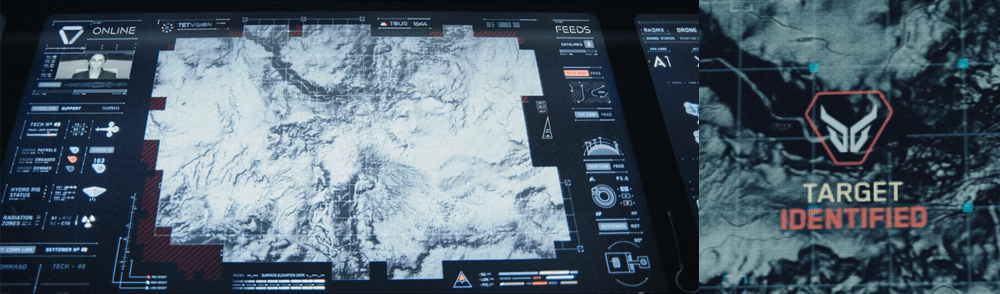
TETVision

image05

The TETVision display is the only display Vika is shown interacting with directly—using gestures and controls—whereas the other screens on the desktop seem to be informational only. This screen is broken up into three main sections:

  1. The left side panel
  2. The main map area
  3. The right side panel

The left side panel

The communications status is at the top of the left side panel and shows Vika the status of whether the desktop is online or offline with the TET as it orbits the Earth. Directly underneath this is the video communications feed for Sally.

Beneath Sally’s video feed is the map legend section, which serves the dual purposes of providing data transfer to the TET and to the Bubbleship as well as a simple legend for the icons used on the map.

The communications controls, which are at the bottom of the left side panel, allow Vika to toggle the audio communications with Jack and with Sally.

The main map area

The largest section is the viewport where the various live feeds are displayed. The main map, which serves as a radar, as well as the remote video feeds she uses to monitor Jack are both in this section of the display.

The right side panel

The panel on the right side of the map contains the video feed controls, which allow Vika to toggle between live footage from the Bubbleship, the TET, and of course, the main map view.

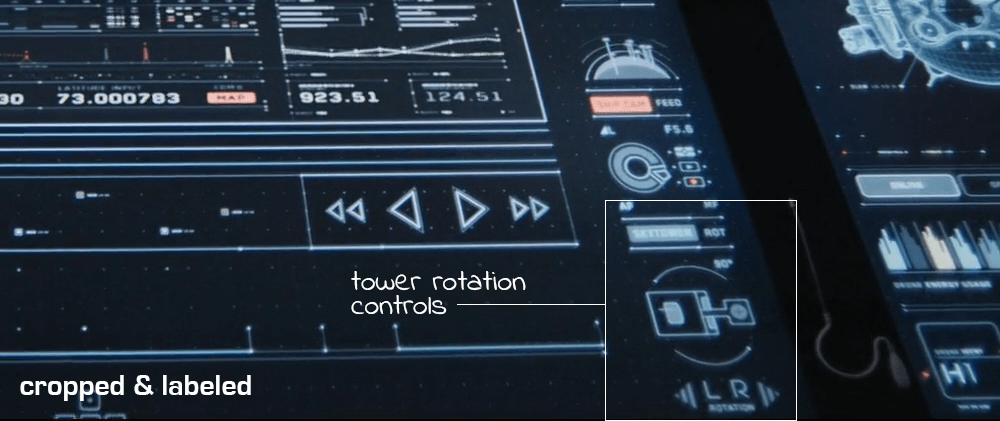
Although never shown in use in the film, the bottom right of the screen houses the tower rotation controls. This unused control is the only indication the capability even exists, so it is unknown whether the tower rotates 360 degrees or whether it’s limited to set points. (More on this below.)

It has robust capabilities

image02

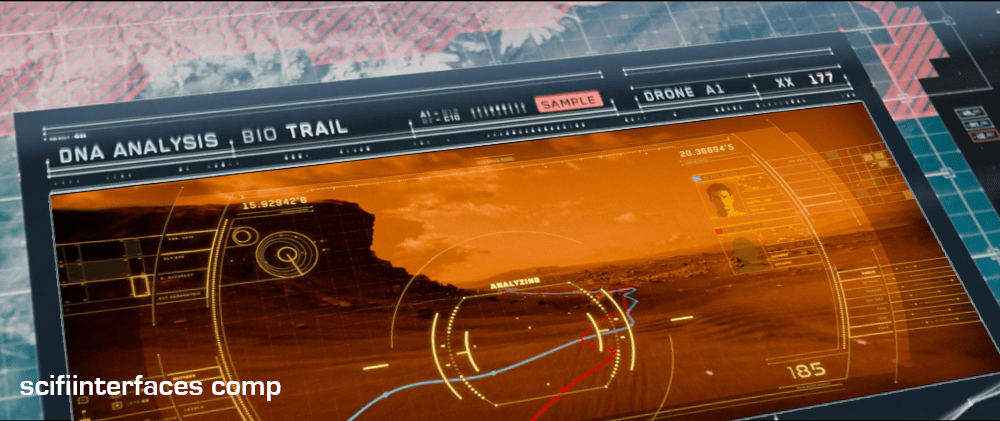
At one point in the movie, Vika is able to use the drones to search for bio trail signatures when Jack is abducted by the scavs.

image06

Vika is also able to detect and decode various types of signals such as the morse code message sent by Jack or the rogue signal sent out by the scavs.

image08

And, probably unbeknownst to Jack and Vika, the TETVision can be controlled remotely from the TET to allow Sally access to the data stored on the desktop—as shown at one point in the movie, when Sally pulls up a past bio trail signature to send drones after Jack and the scavs.

It’s missing a critical layer of data

image03

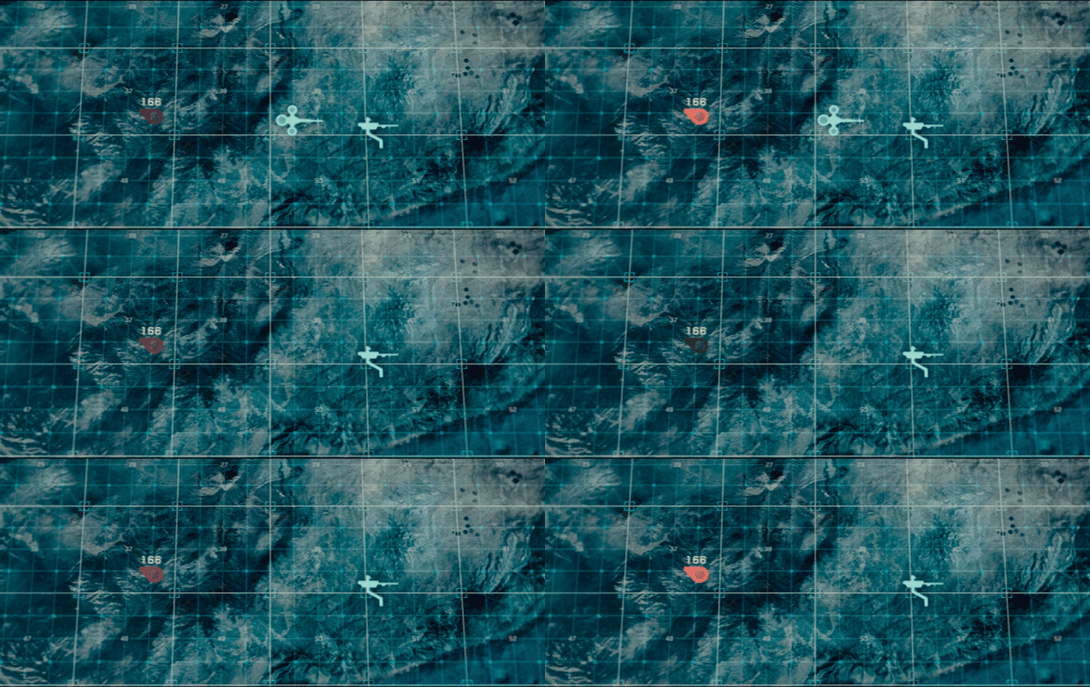
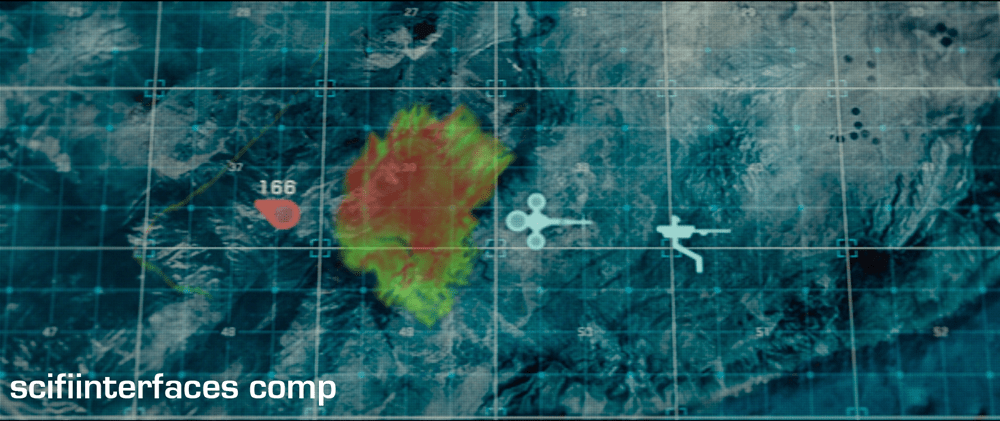
At the beginning of the film, as Jack heads toward the downed drone 166, he suddenly encounters a dangerous lightning storm and nearly plunges to his death when the Bubbleship loses power. His signature disappears from the TETVision map, but from Vika’s perspective there is no indication as to what could have happened — or that there was any danger to begin with.

image01

Since the weather is unstable and constantly changing, it would have been better to include a weather overlay so that Vika could have notified Jack of the storm—allowing him to fly around it instead of straight into it.

It’s got some useless bits

image09

The tower rotation controls are never shown in use in the film, so it’s not clear what benefit rotating the tower would serve. The main purpose of their mission is to ensure the hydro-rigs are secure and functioning properly, not getting an optimal view.

image04

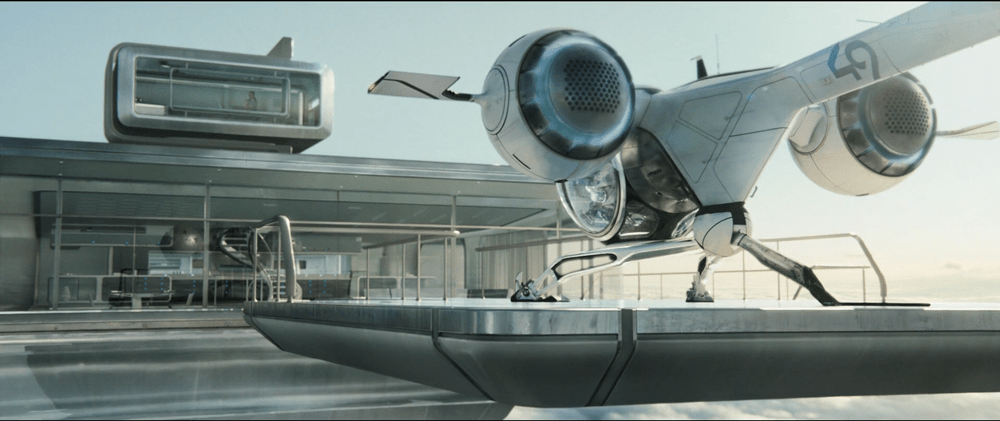
The tower is almost completely surrounded by windows as it is. And since the tower windows already face the hydro-rigs, what would be the benefit of changing vantage points?

It seems that the space could be used for something more beneficial to Vika such as bike, hydro-rig and drone cam feeds. This would provide Vika with more eyes on the ground, allowing her the additional support to keep Jack safe and monitor scav activity.

From an clustering standpoint, it would also fall in line logically with the other feed controls on the right side panel.

And some unnecessary visual feedback

image07

Towards the end of the movie, Sally is trying to find Jack and the scavs. She accesses Vika’s desktop remotely in order to pull up the bio trail records. Although no one is around to see the information, the TETVision displays the process as it happens. Of course, this is necessary for the narrative to progress, but in a real-life situation Sally would only need to see the data on her side—not from the desktop in Tower 49. If they’ve managed interstellar travel, cloning, terraforming, and cognitive reprogramming of alien species, they’re not likely still using VNC. This type of interaction should simply run in the background and not be visible on screen.

Better: Provide useful visuals

When a drone picks up a bio trail signal, a visual of a DNA sequence is displayed. Since the analysis is being conducted by Sally on the TET, it seems that this information isn’t really useful to Vika at all.

image00

From Vika’s point of view it seems like the actual trail would be more important, so why not show a drone cam feed complete with the HUD overlay? She could instantly gain more information by seeing that there are two bio trails—proving that Jack has been captured by the scavs and taken to another location.

Klaatunian interior

DtESS-034

When the camera first follows Klaatu into the interior of his spaceship, we witness the first gestural interface seen in the survey. To turn on the lights, Klaatu places his hands in the air before a double column of small lights imbedded in the wall to the right of the door. He holds his hand up for a moment, and then smoothly brings it down before these lights. In response the lights on the wall extinguish and an overhead light illuminates. He repeats this gesture on a similar double column of lights to the left of the door.

The nice thing to note about this gesture is that it is simple and easy to execute. The mapping also has a nice physical referent: When the hand goes down like the sun, the lights dim. When the hand goes up like the sun, the lights illuminate.

He then approaches an instrument panel with an array of translucent controls; like a small keyboard with extended, plastic keys. As before, he holds his hand a moment at the top of the controls before swiping his hand in the air toward the bottom of the controls. In response, the panels illuminate. He repeats this on a similar panel nearby.

Having activated all of these elements, he begins to speak in his alien tongue to a circular, strangely lit panel on the wall. (The film gives no indication as to the purpose of his speech, so no conclusions about its interface can be drawn.)

DtESS-049

Gort also operates the translucent panels with a wave of his hand. To her credit, perhaps, Helen does not try to control the panels, but we can presume that, like the spaceship, some security mechanism prevents unauthorized control.

Missing affordances

Who knows how Klaatu perceives this panel. He’s an alien, after all. But for us mere humans, the interface is confounding. There are no labels to help us understand what controls what. The physical affordances of different parts of the panels imply sliding along the surface, touch, or turning, not gesture. Gestural affordances are tricky at best, but these translucent shapes actually signal something different altogether.

Overcomplicated workflow

And you have to wonder why he has to go through this rigmarole at all. Why must he turn on each section of the interface, one by one? Can’t they make just one “on” button? And isn’t he just doing one thing: Transmitting? He doesn’t even seem to select a recipient, so it’s tied to HQ. Seriously, can’t he just turn it on?

Why is this UI even here?

Or better yet, can’t the microphone just detect when he’s nearby, illuminate to let him know it’s ready, and subtly confirm when it’s “hearing” him? That would be the agentive solution.

Maybe it needs some lockdown: Power

OK. Fine. If this transmission consumes a significant amount of power, then an even more deliberate activation is warranted, perhaps the turning of a key. And once on, you would expect to see some indication of the rate of power depletion and remaining power reserves, which we don’t see, so this is pretty doubtful.

Maybe it needs some lockdown: Security

This is the one concern that might warrant all the craziness. That the interface has no affordance means that Joe Human Schmo can’t just walk in and turn it on. (In fact the misleading bits help with a plausible diversion.) The “workflow” then is actually a gestural combination that unlocks the interface and starts it recording. Even if Helen accidentally discovered the gestural aspect, there’s little to no way she could figure out those particular gestures and start intergalactic calls for help. And remembering that Klaatu is, essentially, a space ethics reconn cop, this level of security might make sense.

Gene Sequence Comparison

Genetic tester

Prometheus-178

Shaw sits at this device speaking instructions aloud as she peers through a microscope. We do not see if the instructions are being manually handled by Ford, or whether the system is responding to her voice input. Ford issues the command “compare it to the gene sample,” the nearby screen displays DNA gel electrophoresis results for the exploding alien sample and a human sample. When Ford says, “overlay,” the results slide on top of each other. A few beats after some screen text and a computerized voice informs them that the system is PROCESSING, (repeated twice) it confirms a DNA MATCH with other screen text read by the same computerized voice.


Prometheus-181

Playback box

When Halloway visits Shaw in her quarters, she uses a small, translucent glass cuboid to show him the comparison. To activate it, she drags a finger quickly across the long, wide surface. That surface illuminates with the data from the genetic tester, including the animation. The emerald green colors of the original have been replaced by cyan, the red has been replaced by magenta, and some of the contextualizing GUI has been omitted, but it is otherwise the same graphic. Other than this activation gesture, no other interactivity is seen with this device.

Prometheus-197

There’s a bit of a mismatch between the gesture she uses for input and the output on the screen. She swipes, but the information fades up. It would be a tighter mapping for Shaw if a swipe on its surface resulted in the information’s sliding in at the same speed, or at least faded up as if she was operating a brightness control. If the fade up was the best transition narratively, another gesture such as a tap might be a better fit for input. Still, the iOS standard for unlocking is to swipe right, so this decision might have been made on the basis of the audience’s familiarity with that interaction.

MedPod

Early in the film, when Shaw sees the MedPod for the first time, she comments to Vickers that, “They only made a dozen of these.” As she caresses its interface in awe, a panel extends as the pod instructs her to “Please verbally state the nature of your injury.”

Prometheus-087

The MedPod is a device for automated, generalized surgical procedures, operable by the patient him- (or her-, kinda, see below) self.

When in the film Shaw realizes that she’s carrying an alien organism in her womb, she breaks free from crewmembers who want to contain her, and makes a staggering beeline for the MedPod.

Once there, she reaches for the extended touchscreen and presses the red EMERGENCY button. Audio output from the pod confirms her selection, “Emergency procedure initiated. Please verbally state the nature of your injury.” Shaw shouts, “I need cesarean!” The machine informs her verbally that, “Error. This MedPod is calibrated for male patients only. It does not offer the procedure you have requested. Please seek medical assistance else–”

Prometheus-237

I’ll pause the action here to address this. What sensors and actuators are this gender-specific? Why can’t it offer gender-neutral alternatives? Sure, some procedures might need anatomical knowledge of particularly gendered organs (say…emergency circumcision?), but given…

  • the massive amounts of biological similarity between the sexes
  • the needs for any medical device to deal with a high degree of biological variability in its subjects anyway
  • most procedures are gender neutral

…this is a ridiculous interface plot device. If Dr. Shaw can issue a few simple system commands that work around this limitation (as she does in this very scene), then the machine could have just done without the stupid error message. (Yes, we get that it’s a mystery why Vickers would have her MedPod calibrated to a man, but really, that’s a throwaway clue.) Gender-specific procedures can’t take up so much room in memory that it was simpler to cut the potential lives it could save in half. You know, rather than outfit it with another hard drive.

Aside from the pointless “tension-building” wrong-gender plot point, there are still interface issues with this step. Why does she need to press the emergency button in the first place? The pod has a voice interface. Why can’t she just shout “Emergency!” or even better, “Help me!” Isn’t that more suited to an emergency situation? Why is a menu of procedures the default main screen? Shouldn’t it be a prompt to speak, and have the menu there for mute people or if silence is called for? And shouldn’t it provide a type-ahead control rather than a multi-facet selection list? OK, back to the action.

Desperate, Shaw presses a button that grants her manual control. She states “Surgery abdominal, penetrating injuries. Foreign body. Initiate.” The screen confirms these selections amongst options on screen. (They read “DIAGNOS, THERAP, SURGICAL, MED REC, SYS/MECH, and EMERGENCY”)

The pod then swings open saying, “Surgical procedure begins,” and tilting itself for easy access. Shaw injects herself with anesthetic and steps into the pod, which seals around her and returns to a horizontal position.

Why does Shaw need to speak in this stilted speech? In a panicked or medical emergency situation, proper computer syntax should be the last thing on a user’s mind. Let the patient shout the information however they need to, like “I’ve got an alien in my abdomen! I need it to be surgically removed now!” We know from the Sonic chapter that the use of natural language triggers an anthropomorphic sense in the user, which imposes some other design constraints to convey the system’s limitations, but in this case, the emergency trumps the needs of affordance subtleties.

Once inside the pod, a transparent display on the inside states that, “EMERGENCY PROC INITIATED.” Shaw makes some touch selections, which runs a diagnostic scan along the length of her body. The terrifying results display for her to see, with the alien body differentiated in magenta to contrast her own tissue, displayed in cyan.

Prometheus-254

Prometheus-260

Shaw shouts, “Get it out!!” It says, “Initiating anesthetics” before spraying her abdomen with a bile-yellow local anesthetic. It then says, “Commence surgical procedure.” (A note for the grammar nerds here: Wouldn’t you expect a machine to maintain a single part of speech for consistency? The first, “Initiating…” is a gerund, while the second, “Commence,” is an imperative.) Then, using lasers, the MedPod cuts through tissue until it reaches the foreign body. Given that the lasers can cut organic matter, and that the xenomorph has acid for blood, you have to hand it to the precision of this device. One slip could have burned a hole right through her spine. Fortunately it has a feather-light touch. Reaching in with a speculum-like device, it removes the squid-like alien in its amniotic sac.

OK. Here I have to return to the whole “ManPod” thing. Wouldn’t a scan have shown that this was, in fact, a woman? Why wouldn’t it stop the procedure if it really couldn’t handle working on the fairer sex? Should it have paused to have her sign away insurance rights? Could it really mistake her womb for a stomach? Wouldn’t it, believing her to be a man, presume the whole womb to be a foreign body and try to perform a hysterectomy rather than a delicate caesarian? ManPod, indeed.

Prometheus-265

After removing the alien, it waits around 10 seconds, showing it to her and letting her yank its umbilical cord, before she presses a few controls. The MedPod seals her up again with staples and opens the cover to let her sit up.

She gets off the table, rushes to the side of the MedPod, and places all five fingertips of her right hand on it, quickly twisting her hand clockwise. The interface changes to a red warning screen labeled “DECONTAMINATE.” She taps this to confirm and shouts, “Come on!” (Her vocal instruction does not feel like a formal part of the procedure and the machine does not respond differently.) To decontaminate, the pod seals up and a white mist fills the space.

OK. Since this is a MedPod, and it has something called a decontamination procedure, shouldn’t it actually test to see whether the decontamination worked? The user here has enacted emergency decontamination procedures, so it’s safe to say that this is a plague-level contagion. That’s doesn’t say to me: Spray it with a can of Raid and hope for the best. It says, “Kill it with fire.” We just saw, 10 seconds ago, that the MedPod can do a detailed, alien-detecting scan of its contents, so why on LV-223 would it not check to see if the kill-it-now-for-God’s-sake procedure had actually worked, and warn everyone within earshot that it hadn’t? Because someone needs to take additional measures to protect the ship, and take them, stat. But no, MedPod tucks the contamination under a white misty blanket, smiles, waves, and says, “OK, that’s taken care of! Thank you! Good day! Move along!”

For all of the goofiness that is this device, I’ll commend it for two things. The first is for pushing the notion forward of automated medicine. Yes, in this day and age, it’s kind of terrifying to imagine devices handling something as vital as life-saving surgery, but people in the future will likely find it terrifying that today we’d rather trust an error prone, bull-in-a-china-shop human to the task. And, after all, the characters have entrusted their lives to an android while they were in hypersleep for two years, so clearly that’s a thing they do.

Second, the gestural control to access the decontamination is well considered. It is a large gesture, requiring no great finesse on the part of the operator to find and press a sequence of keys, and one that is easy to execute quickly and in a panic. I’m absolutely not sure what percentage of procedures need the back-up safety of a kill-everything-inside mode, but presuming one is ever needed, this is a fine gesture to initiate that procedure. In fact, it could have been used in other interfaces around the ship, as we’ll see later with the escape pod interface.

I have the sense that in the original script, Shaw had to do what only a few very bad-ass people have been willing to do: perform life-saving surgery on themselves in the direst circumstances. Yes, it’s a bit of a stretch since she’s primarily an anthropologist and astronomer in the story, but give a girl a scalpel, hardcore anesthetics, and an alien embryo, and I’m sure she’ll figure out what to do. But pushing this bad-assery off to an automated device, loaded with constraints, ruins the moment and changes the scene from potentially awesome to just awful.

Given the inexplicable man-only settings, requiring a desperate patient to recall FORTRAN-esque syntax for spoken instructions, and the failure to provide any feedback about the destruction of an extinction-level pathogen, we must admit that the MedPod belongs squarely in the realm of goofy narrative technology and nowhere near the real world as a model of good interaction design.