What powers the modified DeLorean is a device called Mr. Fusion, which has the aesthetics and form factor of a household appliance. It is mounted to the back window of the DeLorean. At the beginning of the movie, Doc roots through a nearby garbage can to grab a banana peel and some beer. He rocks the top backwards on its hinge and dumps the items into its cylindrical reservoir, and closes it.
The device has the easy affordances of a consumer device. Doc flips it up, drops some beer and banana peels into a hollow, and snaps it shut. That’s it. There is no lock, no activation, no authorization. The device is hacked by Doc Brown, but you would expect anything outputting 1.21 Gigawatts to have some safety features in the off-the-shelf version.
Presuming it’s meant to power a house or even a car, I do wonder why it’s this size. You might want to have a bigger container to contain as much compost as possible to minimize the times it needs refilling. Of course we know this was a joke about the “Mr. Coffee” appliance available at the time, but if Tesla is eyeballing this as a model, it should take this into consideration.
Time traveling in the DeLorean is accomplished in three steps. In the first, he traveler turns on the “time circuits” using a rocking switch in the central console. Its use is detailed in the original Back to the Future, as below.
In the second, the traveler sets the target month, day, year, hour, and minute using a telephone keypad mounted vertically on the dashboard to the left, and pressing a button below stoplight-colored LEDs on the left, and then with an extra white status indicator below that before some kind of commit button at the bottom.
In the third, you get the DeLorean up to 88 miles per hour and flood the flux capacitor with 1.21 gigawatts of power.
Seems simple.
It’s not…
Rocker switch?
Note that the rocker switch angles down to a nearly 45 degree angle in the on position. One of the worst thing that could happen is for that thing to get accidentally turned off at the wrong time, I imagine. (Back to the Future 4: Lost in Somewhen?) The 45 degree angle makes an accidental activation unlikely, but the T-shaped handle means it could catch on a sleeve or bag handle or something. There are more secure safety switches, but I also wonder if it would be smarter to use the Fake Off mode that most electronics run in today, where they’re never really off, but look off, just waiting for user interaction to spring to life. With a Mr. Fusion on board, I presume powering it isn’t that much of a problem.
Good disambiguation
Note that the pad only has numbers. But Doc uses the military and European standard date format
[day of month] [month] [year]
which might confuse another user, i.e. Marty, entering the stupid USA standard
[month] [day of month] [year]
Though preventing errors is preferable, at least Doc helps Marty recognize errors by displaying the month in 3-character text format, which would help Marty realize if he’d accidentally put in 10 September instead of 09 October.
Bad disambiguation
Note that doc is traveling to 4:29 in the afternoon, and the display has a tiny LED A.M./P.M. indicator. Better is the less ambiguous military time. Sure, audiences might have been confused, but using a 24-hour clock would have been less ambiguous for diegetic users, you could eliminate the AM/PM indicator, and Doc could use the existing number pad for entry without having to either add an “AM” and “PM” button (missing from the console), or doing some annoying “press 1 for AM or 2 for PM now” IVR thing.
While we’re on time disambiguation, what, uh, time zone is this? Did doc only ever plan to fly in and around Hill Valley? It might have been keyed to the Prime Meridian, or to Pacific Time, but if so it would have been very useful to have it marked as such. If not, it should display the current time zone and provide a means to change it. Somehow. With that number pad. (Or more controls.)
Bad input constraint and recovery
It’s wholly possible to enter a day-of-month or month of “99,” which is nonsensical given the Gregorian calendar that we use today. How does the system handle this? A mod function? There’s no clue, but the unconstrained inputs would allow it.
Farther travel?
As the Long Now Foundation reminds us, a four-digit date is really short-sighted. So Doc didn’t want to travel to 10,000 C.E. and see if Zager & Evans were right? And what if he wanted to go meet Amenhotep? How does he specify 1526 B.C.E.? It seems unduly constrained.
Misleading mapping
I don’t know what those LEDs to the left of the input panel do, but I can tell they’re poorly mapped. The colors go, from top to bottom: red, yellow, and green, like a stoplight. Then there’s the extra white LED below that maps to nothing. But the LED colors on the display go from top to bottom red for destination, green for present, yellow for last time departed. Better mapping would have these two agree, or distinct color schemes.
Missing controls
In 1985 dialing a telephone number worked much like the dial-a-date seen here. Punch a sequence of numbers and the system runs with the input. But instant-input systems need a way to correct errors; either the ability to review and correct the input, or to abort the input altogether and start over.
Phone users from back then will recall it was entirely possible to mistype a digit and dial a wrong number. You’d be connected to a stranger who had no idea who this “Marty” you wanted was. This is more serious in the DeLorean than on a phone, as it drops the user into circumstances potentially much more dire, from which there might be no recovery. What would happen if they had accidentally wound up in 21 October 1015? Wholly different story. Is Biff distantly related to Cnut the Great?
Doc might be able to review the input on the display before getting up to speed, but there’s no obvious control for aborting input so far and starting over. (What if he has skipped a digit instead of mistyping one?) A simple delete button would help him correct mistyped digits. Even if he mistyped the first one and only realized it at the end, it wouldn’t be too burdensome to press delete the handful of times.
Rich preview
How does the system confirm for Doc that he’s entered the right date he intended to? On one level, sure, the 7-segment LED output is clear and unambiguous. It’s a nice discrete number. But of course 7-segment 1989 isn’t that easy to distinguish from 1898 when you’re distracted. Better would be to give a preview of the meaning of the choices entered (but not yet enacted) by the user. If there was a video screen in the car, then maybe it could show scenes from old Westerns with the label “Headed to 1898: The Old West.” You could even do it with the cars’ speakers and an audio soundscape if a screen wouldn’t work for space or distraction reasons.
Security
As noted in the overview, Biff(2015) gets into the car to make off for 1955 early in the film. I can’t quite figure out how he was able to figure out turning on the time circuit and that the 88MPH was a target speed, but he did. (Seriously, looking for fan theories here.) Of course Doc might have designed everything to be perfectly understandable for Marty, but that’s no excuse to avoid authenticating the user, since Doc is so panicked about the consequences of the time travel that he’s doing all the times. [sic]
The DeLorean car plays a significant role in all three films since it is the time travel machine. At the end of the first film, we’re shown a brief scene (that is repeated at the beginning of the second film) that reveals that the vehicle has been modified so that it flies. Even its modified form it is largely like a car from the period. The driver or pilot manually drives the vehicle with no software assistance or heads-up-display.
I might have strong opinions about the controls of a car being poorly mapped to manage flight, but since this is a hacked-together prototype from materials at hand, it’s less a design problem than a matter of circumstance.
The ongoing reviews are on pause for a very special review of a favorite and formative film, the future scenes of which occur on today’s date.
Release Date: 22 November 1989 (USA)
26 OCT 1985
Doc Brown travels in his flying DeLorean time machine from the future date of 21 SEP 2015 to fetch Marty McFly and his girlfriend Jennifer. When they return to that impossibly far date, Doc puts Jennifer to sleep and enjoins Marty to prevent his son from becoming an accomplice to a crime that ultimately destroys the whole family.
21 SEP 2015
After taking his son’s place and thwarting the bully Griff, Marty seizes an opportunity in the future to purchase an “antique” sports almanac, but Doc throws it away. Griff’s grandfather Biff overhears their conversation and fetches the almanac from the trash.
Before Marty and Doc can get the still-sleeping Jennifer to return to the past, she is apprehended by police and returned to her home where she hides from her future self in a closet. When they leave the time machine to rescue Jennifer, Biff steals the time machine, travels back to 1955 when he was a boy, and uses the almanac to make himself rich.
Back to the Past (1985)
When Doc, Marty, and Jennifer exit the house and return to their own time, the world has changed. Biff is the town’s evil crime and gambling Mogul, married to Marty’s mom, the town is a rough and lawless, and his dad murdered (by Biff).
12 NOV 1955
Together Doc and Marty travel to 1955, where Marty follows Biff to the Enchantment Under the Sea dance, trying to retrieve the almanac while trying to avoid contact with people who might recognize them and keep events meant to happen then on course.
Finally they use the time machine and a hoverboard from 2015 to take the almanac from Biff(1955) and burn the almanac, but lightning strikes the Delorean, sending it away in time. Moments later a mysterious figure delivers a letter from 1885, letting Marty know that Doc was transported there and (as of the writing of the letter) is fine.
Marty rushes to talk to Doc(1955), and the plot pauses until Back to the Future 3.
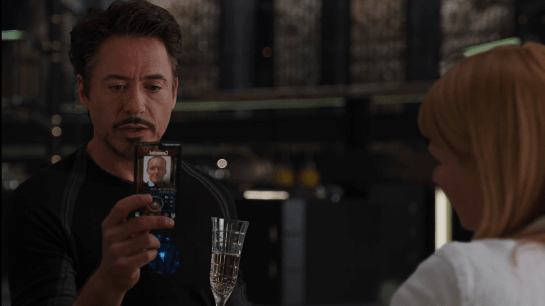
JARVIS interrupts his banter with Pepper, explaining, “Sir, the telephone. I’m afraid my protocols are being overridden.” We can hear Coulson’s voice saying, “Mr. Stark, we need to talk.” Perturbed, Tony grabs his custom phone from where it sits on a nearby table. It is made up of a glass plane within a rounded-rectangle black band. On its little screen we can see a white label reading, “Connected.” Remarkably, this label is presented in mixed case. Nearly all sci-fi interface typography is rendered in all caps, so I have some curiosity how this ended up in majuscule and miniscule. But it feels right. Perhaps that’s because it’s kind-of a consumer device?
Anyway, beneath the label is a static photo of the caller, Agent Coulson, and below that a large circle with a central bump, and some other tiny controls.
Tony positions the phone before him, looks into the glass, and says, “You have reached the life model decoy of Tony Stark. Please leave a message.” Coulson doesn’t fall for it, saying, “This is urgent.” Tony tries to admonish him, “Then leave it urgently,” but it’s too late. Coulson himself walks out of the elevator in the room, his phone to his ear.
Aside from the trope screens are cameras, and the bad-but-understandable translucent screen, I have another question about the interaction: What is Tony doing looking at the phone for the duration of the short conversation? Since Coulson isn’t looking at his phone, it’s just an audio connection between them. The phone should convey that status to Tony, and in fact the static image of Coulson seems to imply just that. So, why does he bother looking at it?
So try as I may, I can’t apologetics-my-way to get around this odd behavior in the scene. Perhaps Downey believed that the interface would be rendered with a video image of Coulson on the other end, and that turned out not to jive with Gregg’s holding it to his ear. I hate to leave it at “misinformed actor” but I can’t think of a diegetic explanation. Anyone have a plausible one?
Since Tony disconnected the power transmission lines, Pepper has been monitoring Stark Tower in its new, off-the-power-grid state. To do this she studies a volumetric dashboard display that floats above glowing shelves on a desktop.
Volumetric elements
The display features some volumetric elements, all rendered as wireframes in the familiar Pepper’s Ghost (I know, I know) visual style: translucent, edge-lit planes. A large component to her right shows Stark Tower, with red lines highlighting the power traveling from the large arc reactor in the basement through the core of the building.
The center of the screen has a similarly-rendered close up of the arc reactor. A cutaway shows a pulsing ring of red-tinged energy flowing through its main torus.
This component makes a good deal of sense, showing her the physical thing she’s meant to be monitoring but not in a photographic way, but a way that helps her quickly locate any problems in space. The torus cutaway is a little strange, since if she’s meant to be monitoring it, she should monitor the whole thing, not just a quarter of it that has been cut away.
Flat elements
The remaining elements in the display appear on a flat plane.
To her upper left a spectrum analysis shows bars all near the middle, and the status is confirmed with a label as REACTOR OUTPUT NORMAL. Notably the bars are bright cyan at their top and fade to darker near their bases, drawing attention to the total arc. There few bands that are lower or higher than others are immediately visible from the contrast. That’s good visual design for attention management.
In the top center is a ring chart with three bands of colors: slate gray, cyan, and dark red. A large percentage read out in the center hovers around 90%. To her upper right are three other ring charts with the same color scheme. Above the three rings is a live trend line chart in red with a separate line in white (Target? Trend line?). A tiny side view of Stark Tower stands to the left of the three rings and trend line. The purpose of these are unclear as the labels are too small to read, but it seems strange to have the physical representation here. If the rings or trend lines are related to the physical tower, how they are related is unclear. If they are unrelated, having the rendering present there is misleading.
In a band across the middle are some tiny text blocks spitting out lines of data and auto scrolling. There are more of these, so for ease of reference, let’s call them teletype boxes. They look too small and move too fast to convey much meaning, as such things often do.
The lower left of the screen has a dim white section labeled MAGNETIC CONTAINMENT. It contains a 3D cuboid with a wildly undulating surface. As this shape doesn’t match anything else in the display, nor is it visually connected, its utility is unclear. If she is meant to track some variable other than undulationness, I can’t see how this would help. Also in this panel are some sliders wildly sliding back and forth, and some more teletype boxes.
In the lower center part of the screen is an overhead-view wireframe of the reactor that does not change in this segment, as well as a dim white box that appears to contain a static formula.
This display is not fit to Pepper’s task
Sadly, Gwen Paltrow looks a little wall-eyed here, so it’s hard to tell where exactly where she’s looking to determine as she says that “Levels are holding steady.” Her gaze appears roughly above the large ring chart, so let’s presume she’s looking there. If she is actually meant to be monitoring a set of levels to determine if they’re fluctuating or not, the ring chart and percentage are the wrong display types. These are valuable for showing a state that doesn’t change very often, i.e. where change over time is not of concern.
Sure, she might be able to suss out the steadiness of the variables by focusing on the percentage and the ring chart elements to see if they’re currently wobbling, but that requires her to keep her focus there to observe what’s happening with those pixels. That puts an unnecessary burden on her attention and short term memory. What if she has to glance away for a few seconds, and in those seconds, levels begin to wobble unsteadily? Sure, an alert could sound, but when she looks back she’ll have no idea what has happened while her attention was elsewhere. Humane interfaces remove unnecessary burdens from their users, and this display should do the same.
Use line charts and sparklines to show change over time
For any variable that is meant to be monitored for changes over time—like the scripted steadiness of levels—theline chartorsparkline is much more fit to task. Each plots variables over time, so even if a user glances away for a bit, it’s not a problem, she can look back and quickly suss out what’s been happening. The thing she’s looking at should look more like a ECG than a page out of an annual report.