Vika’s Desktop

Oblivion-Desktop-Overview

As Jack begins his preflight check in the Bubbleship, Vika touches the center of the glass surface to power up the desktop that keeps her in contact with Sally on the TET and allows her to assist and monitor Jack as he repairs the drones on the ground.

The interface components

Oblivion-Desktop-Overview-000

The desktop is broken up into five main screens. The central screen is the TETVision map, which is a radar map used for communications, and monitors the Bubbleship, drones, and scav activity.

To the left of the TETVision map is a Hydro-rig status feed that keeps Vika informed of the water collection progress. Then on the right of the map is the drone status feed, which provides drone vital statistics, deployment and fuel status.

Oblivion-Desktop-Overview-000b

The upright section of the desktop contains two screens. The top screen is the TET system status feed, which monitors the TET’s orbit, and communications status. The second screen monitors the weather systems and wind velocity vectors, which would have an affect on the Bubbleship and drone flight safety.

Quick power-up

Powering on the desktop is virtually instantaneous and is as simple as touching the center of the table. One possible explanation for the speed is that the desktop goes into sleep mode and is in an always-on state. There are a couple of scenes in the film when the TET is able to access the desktop remotely that would support this assumption.

A possible method of power-down would be to tap and hold for a determined period of time. Sadly, there is no film footage that shows Vika shutting down the system.

Multiple versus single user

Oblivion-Desktop-Overview-003

The scale of this desktop is a bit large for a single user who needs to access life-saving information quickly. The display size and setup in the film is generally used for collaborative space so that multiple people can comfortably view and manipulate the data at the same time.

This large scale causes Vika to constantly lean over the table to see information for various reasons including glare, reach and angle of the displays. This could be stressful on the body when interacting with the desktop over long periods of time each day.

A better solution

Vika is only shown interacting with the TETVision map and not with any of the other feeds. If the map is the only screen that is interactive, a more ergonomic setup could be utilized to minimize glare and reach. This would allow Vika to see the vital information at a glance and still enable her to comfortably interact with the TETVision map.

Oblivion-Desktop-Overview-Ergonomics

Don’t forget the user’s needs

Overall, Vika’s desktop is a beautiful piece of technology that performs its function very well. However, in a real-world situation, it is important to remember that Vika will be using this equipment for possibly long periods of time and needs quick access to vital information. Having to roll back and forth between screens during an emergency situation could mean the difference between life and death for Jack while out in the field.

Breakfast Sand Table

A woman in a modern kitchen holding a piece of food while looking at a countertop, with a man in a black shirt leaning on the counter beside her, both engaged in conversation.

While eating breakfast, Vika views the overnight surveillance via a touchscreen interface that is inset into the top of a white table.

Which touch tech?

Anyone interested in the touch technology should take note: Vika places her coffee cup and breakfast plate directly on the surface, which indicates that it utilizes capacitive touch technology with a glass top. Placing dishes on a resistive touchscreen, which is made of layers of plastic and glass would have interfered with the interactions and would be less durable as a tabletop.

Jack joins her at the table and leans on the surface with his hand and later with his forearm, which supports the idea that the area surrounding the viewport is not touch-enabled. If it were, it would need to incorporate palm-rejection technology in order for his arm to not interfere with Vika’s interactions.

The interface components

Oblivion-Desktop-Sandtable-001

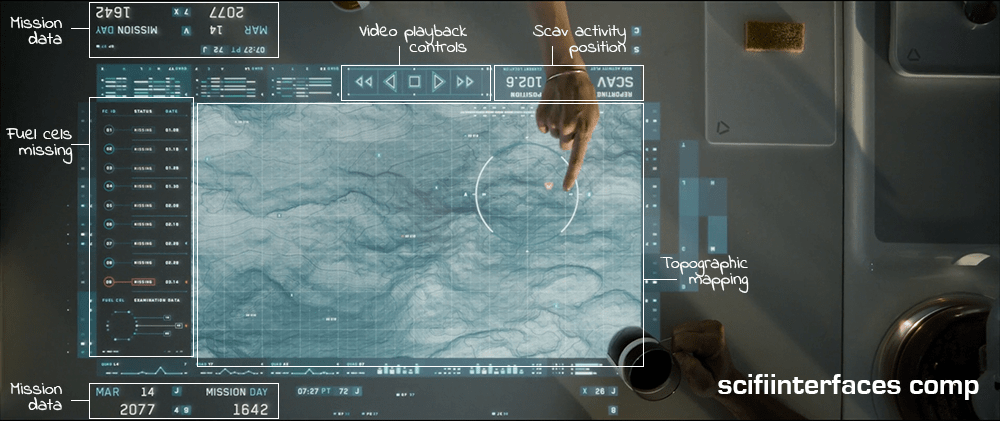
The main viewing area is a hybrid of satellite imagery and topographic mapping, surrounded in the interface by surveillance data and video playback controls. A message next to the video playback controls reports the current location of the scav activity.

To the left of the map is a list of fuel cells that have been stolen by the scavs along with the dates they went missing. The last one on the list is flashing red to draw their attention—a new one has gone missing.

Some elements, such as the current date and number of days into the mission face out at the top and the bottom to allow both Vika and Jack to view the data from either side.

A hand points at a futuristic digital map displayed on a transparent screen, showing a detailed terrain with lines and contours, alongside various mission data indicators and a date label.

The interface is responsive to touch gestures. Vika circles an area on the map and the icon indicating unusual activity turns red. She taps the icon and a video feed begins playing. Jack zooms in on the video feed by using a five-finger multi-touch “spread” gesture.

Why is the vital information facing Jack when Vika is the one using the interface?

It’s interesting to note that the the most vital information such as the list of missing drones, video playback and the topographic shaded relief are seen from Jack’s view. This causes Vika to have to process the information and videos upside-down—even though the playback controls face her.

This can be particularly problematic with the topographic shaded relief. Shaded relief simulates the shadow cast by the sun on the surface. Viewing this relief upside-down can cause a perception illusion that results in confusion on what is a crater and what is a hill.

Better: Lenticular display

A better solution would be to utilize a lenticular interactive display. Lenticular displays are made by placing a transparent film containing tiny ridges over an image that is made up of two or more images sectioned into bands and displayed in alternating lines. The ridges in the film cause the eye to focus on one set of lines in order to come out with a cohesive image.

Then, as in the illustration below, Vika would only see the view illustrated by the white lines and Jack would only see the view illustrated by the black lines.

Diagram illustrating the concept of lenticular film and interlaced images with labeled sections showcasing different views.

Utilizing a lenticular display would solve the issue of the shaded relief perception illusion and allow Jack and Vika to each read the information and watch the video from their own perspective at the same time.

The thing that gets a little tricky about utilizing a lenticular display for this solution is the fact that it is a touch screen. The elements that are being interacted with need to be in the same position for both Jack and Vika in order for the computer to know what is being manipulated. This can be solved by flipping the individual elements such as the shaded relief on the topography and the activity icons, words, etc., while keeping them in the same location on the interface.

Smart video recording and playback

So, how did the TET know where to start the video recording and playback? Given that the other interfaces in the film have the capability to detect motion, it is likely that the video recording was automatically triggered by the scavs when they moved in to attack the drone.

Unfortunately, there is no screentime granted to the use of the actual video playback controls, but assuming they are as smart as the rest of the interfaces in the film, it is safe to expect these controls to be more useful than simply sequencing through the scenes. The interface would probably allow Vika to scrub through a grid of thumbnails to quickly find any scenes of interest.

Why circle and tap to play?

The activity alert icon on the map was static white until Vika circled an area surrounding it. Only then did it start flashing red. Other interfaces on Vika’s main desktop provide immediate feedback with an audible alert and a flashing red symbol. Why would this one require the extra effort of circling the area? It would seem simpler to flash red from the beginning and allow Vika to immediately tap on the symbol for video playback.

It is possible that she is circling the area that she wants the TET feed to focus on, but if the TET has the capability to detect the activity to begin with, it should automatically know where to focus.

Another possibility is that she is used to getting multiple alerts every morning and the circle gesture could be for playing all of the surveillance videos at the same time instead of having to tap on each one to play. If that is the case, then she may be using the circle gesture through muscle memory since people tend to use repetitive gestures without thinking about it even if there is a simpler gesture available. If a gesture isn’t used very often, users tend to forget about it.

Overall, this is a nice system that effectively allows Jack and Vika to get a quick overview of the events of the previous night and gives them a heads-up as to what is in store for them that day.

Alien head stem line

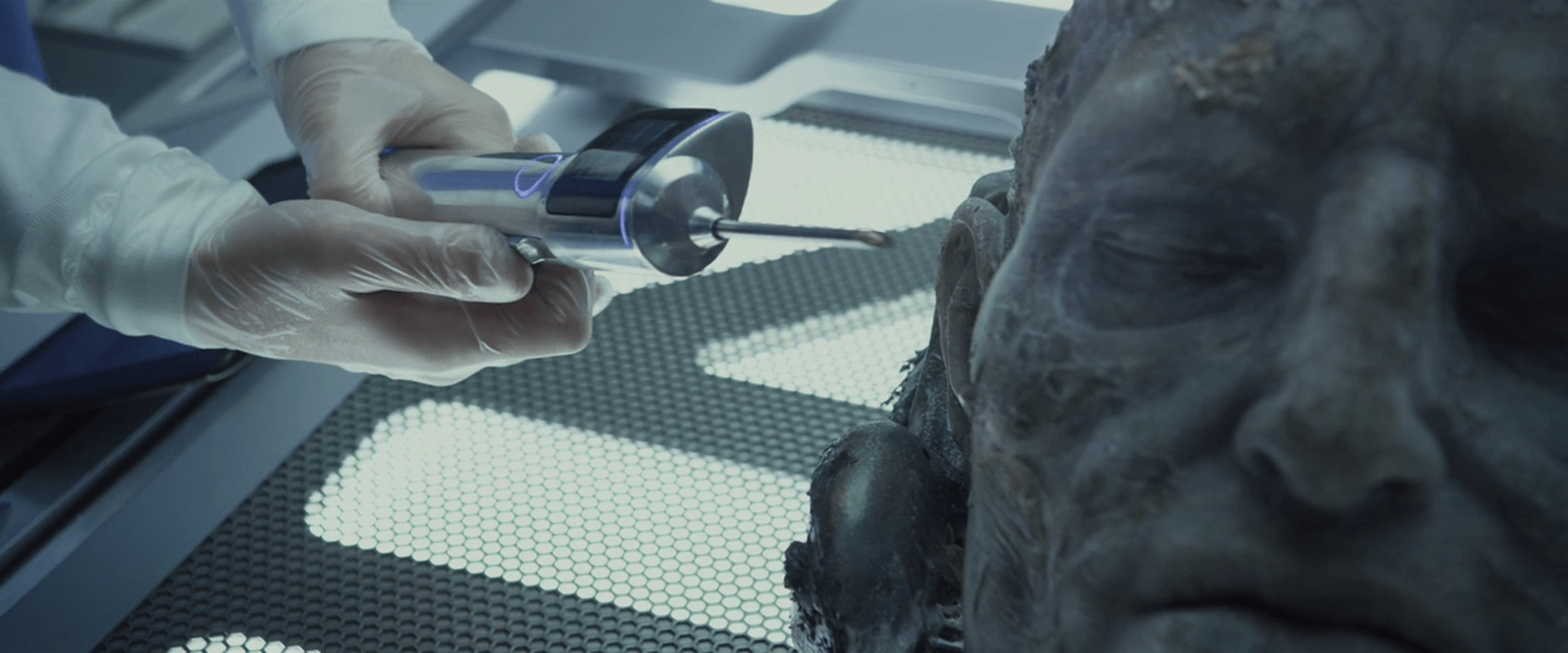
Using a tool that looks suspiciously identical to the Injection Carbon Reader, the stem line provides electrical current to nerve endings. It is inserted directly into the alien head and then controlled wirelessly via unseen controls on a nearby touch-sensitive slate pad.

Prometheus-168

The output on the stem line device animates with changes, but it seems the numbers appear near the middle and then slide to fixed positions on the top and bottom. If the point of the display was output, and it is meant to be seen from a distance, wouldn’t a simpler large-number display make more sense? If motion is meant to convey the meaning, like a digital gauge on a multimeter, then the text should be fixed on the graduated background and slide with it.

stemline

By stimulating the locus coeruleus of the alien, the Prometheus scientists seek to “trick it into thinking it’s still alive,” even though they have not confirmed the physiology of this 2000 year old alien specimen, or even that (in a quick Googling, the author learned that) this is the panic area of the nervous system. Were the results really that surprising?

HYP.SL

The android David tends to the ship and the hypersleping crew during the two-year journey.

The first part of the interface for checking in on the crew is a cyan-blue touch screen labeled “HYP.SL” in the upper left hand corner. The bulk of this screen is taken up with three bands of waveforms. A “pulse” of magnification flows across the moving waveforms from left to right every second or so, but its meaning is unclear. Each waveform appears to show a great deal of data, being two dozen or so similar waveforms overlaid onto a single graph. (Careful observers will note that these bear a striking resemblance to the green plasma-arc alien interface seen later in the film, and so their appearance may have been driven stylistically.)

HYP.SL

To the right of each waveform is a medium-sized number (in Eurostile) indicating the current state of the index. They are color-coded for easy differentiation. In contrast, the lines making up the waveform are undifferentiated, so it’s hard to tell if the graph shows multiple data points plotted to a single graph, or a single datapoint across multiple times. Whatever the case, the more complex graph would make identifying a recent trend more complicated. If it’s useful to summarize the information with a single number on the right, it would be good to show what’s happening to that single number across the length of the graph. Otherwise, you’re pushing that trendspotting off to the user’s short term memory and risking missing opportunities for preventative measures.

Another, small diagram in the lower left is a force-directed, circular edge bundling diagram, but as this and the other controls on the screen are inscrutable, we cannot evaluate their usefulness in context.

After observing the screen for a few seconds, David touches the middle of the screen, a wave of distortion spreads from his finger for a half a second, and we hear a “fuzz” sound. The purpose of the touch is unclear. Since it makes no discernable change in the interface, it could be what I’ve called one free interaction, but this seems unlikely since such cinematic attention was given to it. My only other guess is to register David’s presence there like a guard tour patrol system or watchclock that ensures he’s doing his rounds.