Genetics Program

image01

According to Hammond, the geneticists in the lab and the software they’re using is “The Real Deal”.

It is a piece of software intended to view and manipulate dino DNA into a format that (presumably) can be turned into viable dinosaur embryos.  The screen is tilted away from us during viewing, and we aren’t able to see the extensive menu and labeling system on the left hand side of the desktop.

Behind it are more traditional microscopes, lab machines, and centrifugal separators.

Visible on the screen is a large pane with a 2D rendering of a 3d object that is the DNA that is being manipulated.  It is a roughly helical shape, with the green stripes corresponding to the protein structure, and various colored dots representing the information proteins in between.

JurassicPark_Genetics02

A technician manipulates the orientation of the protein strand.  We only see him holding his hands to move the object around, we see no gestures that correlate to actual changes to the protein structure. It seems like direct manipulation, but reorienting isolated DNA in space is not really the work of a genetics lab. How do they connect the dinosaur DNA that they find with Amphibian DNA that is needed to fill the holes? Can’t we see that?

image00

Incomplete

Maybe it’s asking too much for the movie to show an in-depth interface for actual genetic modification, considering the complexity of such a feat. Even if we did ask it, we don’t see any evidence of a useful interface here. I don’t even want to go into the analysis of this, except to say that there isn’t any representation to analyze for either how appropriate or how abysmal this interface is. It’s just a disposable gee-whiz won’t-the-future be cool moment.

Explorer Surveillance

The Control Room of Jurassic Park has a basic video/audio feed to the Tour Explorers that a controller (or, in this case, John Hammond) can use to talk to the tour participants.  He is able to switch to different cameras using the number keys on the keyboard attached to the monitor. The cameras themselves appear to be fixed in place.

JurassicPark_FordSurveillance01

We never see the cameras themselves in the Explorers, but we do see Malcolm tap on one of the cameras during the tour while Hammond is watching it’s feed, so they are visible to the riders.

Hammond occasionally speaks through his audio link, and can hear a constant audio feed from the Explorers. He has some kind of mute button (he says a couple disparaging comments that the other characters don’t appear to hear), but the feed from the Explorers is real-time. It isn’t obvious how he switches between the different Explorers’ audio feeds, or whether he hears both Explorers simultaneously.

Deadly-stupid limitations

Each Explorer can hold a limited number of passengers, but it’s clear that Hammond wanted larger groups of people on a single tour together. Whether this was because of monetary concerns and wanting to pack more tours on the same rail, or because he didn’t want large families to be left out is less clear. Jurassic Park doesn’t have any trouble handling two Explorers.

What it does struggle with is the clear delineation between who is in Explorer 1, and who is in Explorer 2. Despite the audio and video feeds going back and forth between the Explorers and the control center, the passengers have no way to talk to someone in the other Explorers.

This leads directly to Malcolm’s injury and Gennaro’s death at the T-Rex pen.

On a good tour, these same systems would allow one Explorers to talk to the other. If someone saw a dinosaur, but the other Explorers didn’t, the first group could point it out.

Give the tour guide context

It isn’t clear either what the day-to-day job of the tour guide would be. Hammond clearly enjoys talking about his park, but the pre-recorded voice seems to be giving most of the “tour” information to the passengers.

JurassicPark_FordSurveillance02

What might be more useful is giving the tour guide access to the monitoring maps and exterior cameras so that he/she can answer questions that can’t be easily answered by pre-recorded systems: “Hey, what’s that triceratops doing to that other triceratops?”

If the tour guide sees a dinosaur that the passengers don’t, or if the dinosaur is doing something odd that the passengers are wondering about, it would be a great point for the tour guide to jump in and add more context. More exterior camera views would improve their ability to do that job.

Privacy

Theme parks are notorious for their lack of privacy. Hammond has a chance to challenge that expectation here with his focus on high-end tours. Although it doesn’t look possible now, the cameras don’t need to be on constantly, and could at least have a clear indication of when someone was watching. Maybe a ringlight around the lens?

Additionally, the Explorers could give the passengers a way to turn off the video and audio feeds. This imposes a security risk, but would give the tours a more primeval and isolated feel. It might not be as bluntly educational, but the improvement in atmosphere might make up for it.

Expectations

Overall, this system acts exactly like someone would expect a basic security and surveillance system to act.  It has basic controls, always-on CCTV, and the ability for the control room to control what’s happening. The improvements mentioned above could upgrade this system from a basic monitor into a valuable addition to the Jurassic Park experience.

Night Vision Goggles

Genarro: “Are they heavy?”
Excited Kid: “Yeah!”
Genarro: “Then they’re expensive, put them back”
Excited Kid: [nope]

Screenshot-(248)

The Night Vision Goggles are large binoculars that are sized to fit on an adult head.  They are stored in a padded case in the Tour Jeep’s trunk.  When activated, a single red light illuminated in the “forehead” of the device, and four green lights appear on the rim of each lens. The green lights rotate around the lens as the user zooms the binoculars in and out. On a styling point, the goggles are painted in a very traditional and very adorable green and yellow striped dinosaur pattern.

Tim holds the goggles up as he plays with them, and it looks like they are too large for his head (although we don’t see him adjust the head support at all, so he might not have known they were adjustable).  He adjusts the zoom using two hidden controls—one on each side.  It isn’t obvious how these work. It could be that…

  • There are no controls, and it automatically focuses on the thing in the center of the view or on the thing moving.
  • One side zooms in, and the other zooms out.
  • Both controls have a zoom in/zoom out ability.
  • Each side control powers its own lens.
  • Admittedly, the last option is the least likely.

Unfortunately the movie just doesn’t give us enough information, leaving it as an exercise for us to consider.

Screenshot (241)

Dr. Grant, Timmy is hogging the tech

Note that there aren’t enough goggles in the Jeep for everyone.  During a tour this might set up a competition for the goggles.  Considering how much a ticket to the island is implied to cost, the passengers in the Jeep would likely be unhappy at this constraint.

Better here would be some kind of HUD for the entire Jeep, with a thermal overlay or night-vision projection of what’s around the Jeep.

Alternatively, if cost is indeed an issue to Hammond, the TV screen could be used to show camera feeds of the pen and dinosaurs inside.

Hopefully A Prototype

The lights on the front show what’s happening internally, and give feedback that the goggles are doing something to people watching.  As we learn soon after this scene, dinosaurs are also very sensitive to light and motion.  Especially the T-Rex.

These night vision goggles would work best in darkness, where it would add to the tour to see a dinosaur behaving (relatively) naturally.  If the dinosaurs on the tour are very sensitive to light, then the motion on the front of the goggles would actually be counter to the goals person using the goggles.

So let’s presume these were a prototype, and why they were in the trunk and not mentioned by Hammond at the start of the tour.

Overall

The goggles look easy to use, but appear to need refinement from field experience.  A key point will be how the passengers react to having enough of them, and whether they serve the tourists in experiencing the park as intended.

Ford Explorer Status

image00

One computer in the control room is dedicated to showing the status of the Jeeps out on tour, and where they currently are on the island.

Next to the vehicle outline, we see the words “Vehicle Type: Ford Explorer” (thank you, product placement) along with “EXP” 4–7.  EXP 4 & 5 look unselected, but have green dots next to them, while EXP 6 & 7 look selected with red dots next to them.  No characters interact with this screen. Mr. Arnold does tap on it with a pen (to make a point though, not to interact with it).

On the right hand side of the screen also see a top-down view of the car with the electric track shown underneath, and little red arrows pointing forward.  Below the graphic are the words “13 mph”.  The most visible and obvious indicator on the screen is the headlights.  A large “Headlights On” indicator is at the top of the screen, with highlighted cones coming out of the Jeep where the headlights are on the car.

Jumbled Hierarchy

It is very difficult to tell from this page what the most important systems on the tour are.  The most space and visual weight is given to the car itself and its headlights, but we never see any data on the actual car itself. Did Hammond’s deal with Ford include constant advertising to his handful of tour monitors?

When Drs. Grant and Sattler leave the jeep to walk out into the park, we only see two doors open; but all four doors show as open on the main projector status display in the control room.

Probably an editing error, but with Nedry programming things, who can say?
They can remote control the steering wheel and pedals, but not the locks?Probably an editing error, but with Nedry programming things, who can say?
image01
Probably an editing error, but with Nedry programming things, who can say?

At best, the system is attempting to display a binary indicator (doors open/doors closed) based on limited data.  At worst, the system is unreliable and can’t be trusted to deliver even basic status information correctly.

We also see several buttons that are labeled like they should be active, such as “Hold”, “Quit”, “New”, and “Next”.  What could this mean?

  • Erroneous labels indicating action where there is none
  • Disabled buttons because they aren’t appropriate for where the Jeeps are right now
  • Something that could be active in the future when more coding is done.

Ideally, these are indicating normal actions that aren’t available right now.  The control team would still need to be trained on why they’re disabled and when they’re active, which puts an unnecessary burden on their memory. That information should be apparent in any interface on which lives depend.

Missing Information

Many systems appear to be missing from this display, or are indicated in a way that is too cryptic to easily identify:

  • Self driving features?
  • Basic diagnostic info, like oil temp and tire pressure?
  • What event is playing in the Jeep?

It could also be improved with information that the system can surely collect.  Trend information would be the most useful:

  • How efficiently is the Jeep moving?
  • Is it breaking down?
  • What kind of baseline is the tour establishing?
  • Has it been accelerating or decelerating? At what rate?

While you’re an unethical capitalist, there is even information that could be used to track the effectiveness of the park, by tracking the affective states of the passengers in the car:

  • Heartrate
  • Motion within the car (direction, proximity to windows)
  • Breath rate
  • Skin temperature
  • Conversation (and valence): words, pace, and pitch

At their least offensive, this data would be anonymously aggregated and analyzed by location to understand where the experience can be improved. Where is the tour the most boring? Most exciting? Where are the passengers most likely to view dinosaurs (and should have their attentions keyed)? You could also use the information in real time to know when there is likely a problem that needs the attentions of a remote operator.

Finally, if you have cameras on the vehicles, you have another data collection channel such that the system could compare views of the road and paddocks, compare to prior images, and know when there are plants that need trimming away from the rail, or when deformations appear in the walls and need attention from maintenance teams. Heck, you could turn those sensors into an upsell opportunity. Charge a few extra bucks, and friends and family back home can go on the live tour with you, or you could sell a 360° video back to the riders as a souvenir. Dinobucks to be made, here, people.

The Map

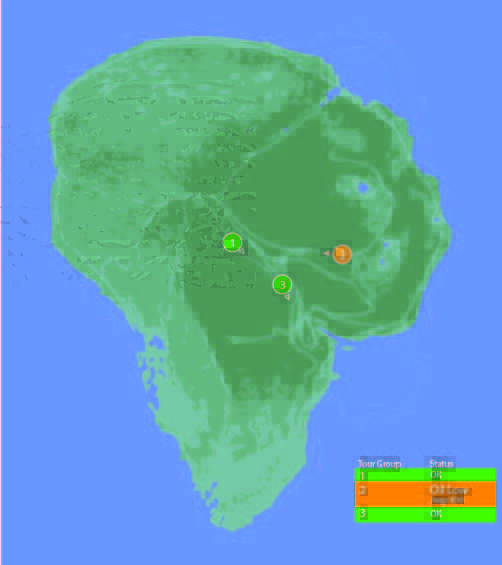
One of the few pieces that is straight-forward here is the map.  We see a dot for where the tour is, the number and type of vehicles on the tour, and location information.  For a single tour, this would probably work well.

It would be a nightmare with more than one tour out in the field at a time.

With more than a handful of vehicles out on the island with the current information density, the display would quickly be overwhelmed with numbers overlapping each other and changing constantly making it impossible to read.  The large vehicles too might overlap more important information, like the terrain or possible problem areas on the tracks.

Color contrast is an issue here too: green on green would be very difficult to see for anyone without perfect color vision.  If the color was the only thing to change on a change in status from good to bad, the color green is also an issue because of how many other colors it conflicts with.  Accessibility would be improved by choosing a color like blue, or adding an outline to the dot.

_Map
scifiinterfaces comp.

Better would be to have a basic icon for each tour on the map, and a basic color/label combination next to the icon to show a “nominal” status.  The icon could also be an indicator of how many vehicles were in the tour.

If something happened, the icon status could change to a different color, and the label would change to the new status. Icons would make that information more glanceable. Additional info would flow onto the screen for just that tour.

This would provide a clear indicator of which tour on the map to pay attention to, and what was broken about it.

Overall

I would hope that this wasn’t a screen that I would have to look at day-in, day out.  The entire future control crew of Jurassic Park was lucky they weren’t forced to deal with this. But, with a few tweaks to the map and a complete reorganization of the information on the Jeep Status screen, it might become usable.

Ford Explorers

image01

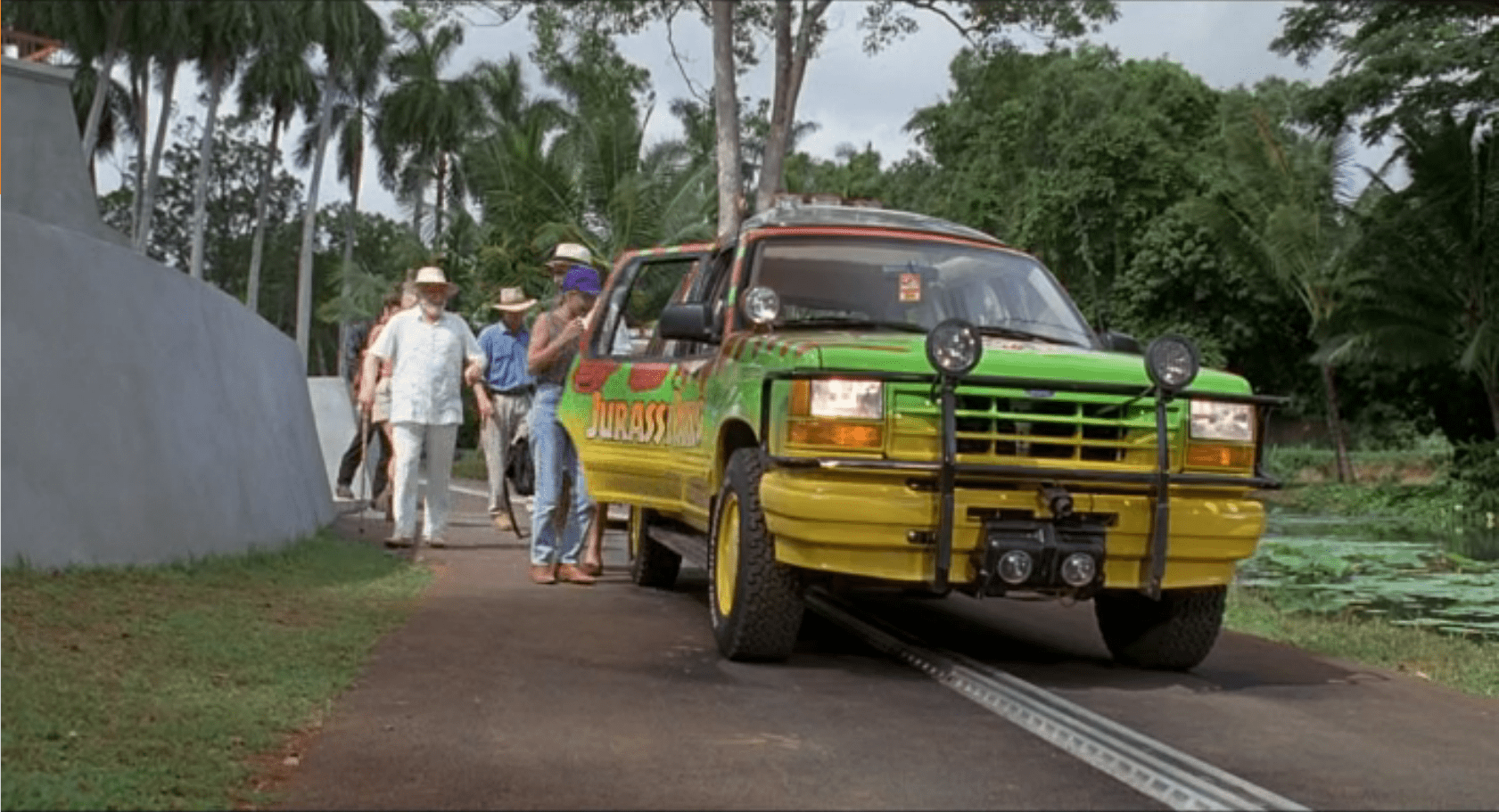
The Ford Explorer is an automated vehicle driven on an electrified track through a set route in the park.  It has protective covers over its steering wheel, and a set of cameras throughout the car:

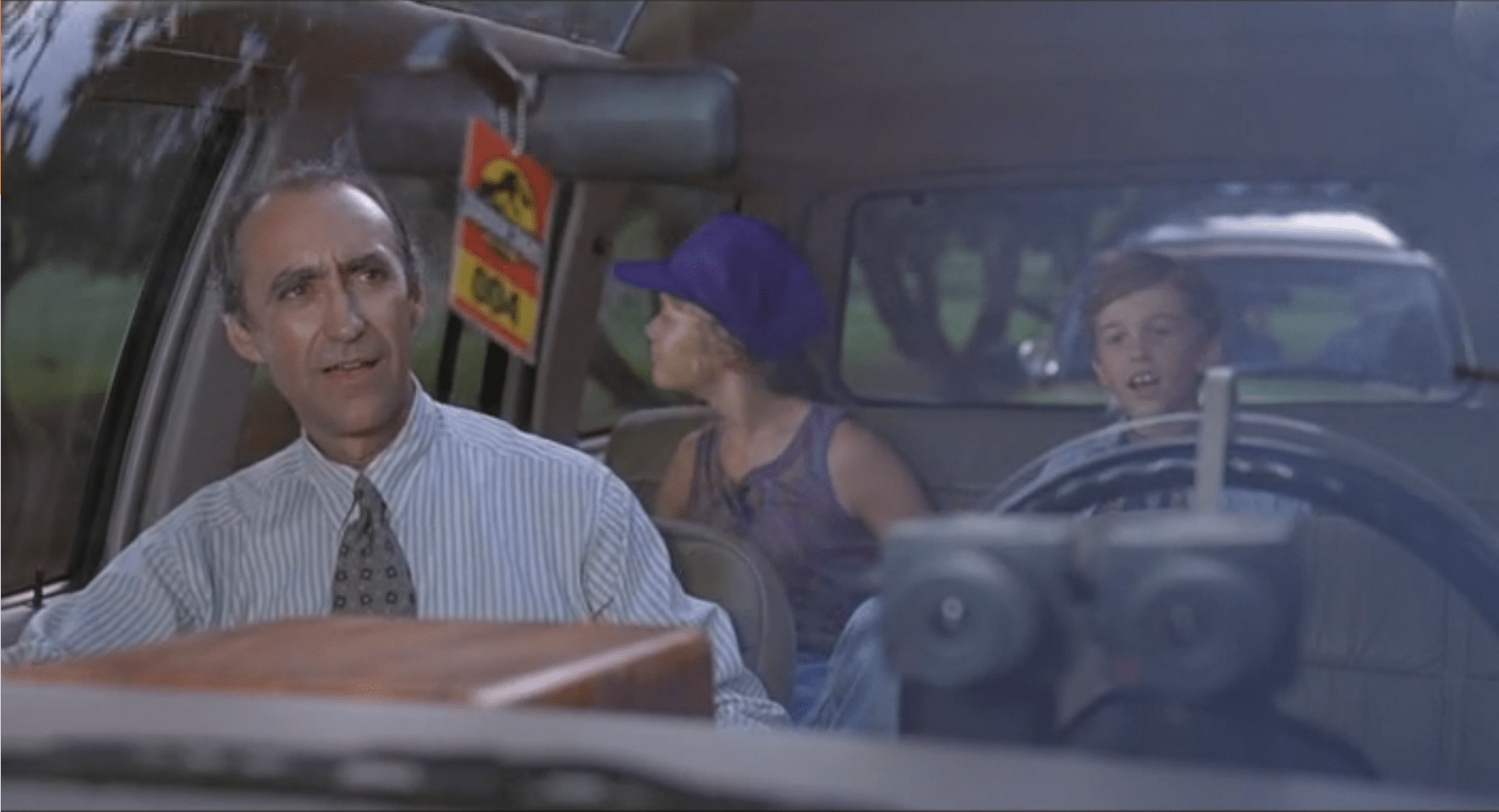
  • Twin cameras at the steering wheel looking out the windshield to give a remote chauffeur or computer system stereoscopic vision
  • A small camera on the front bumper looking down at the track right in front of the vehicle
  • Several cameras facing into the cab, giving park operators an opportunity to observe and interact with visitors. (See the subsequent SUV Surveillance post.)

Presumably, there are protective covers over the gas/brake pedal as well, but we never see that area of the interior; evidence comes from when Dr. Grant and Dr. Saddler want to stop and look at the triceratops they don’t even bother to try and reach for the brake pedal, but merely hop out of the SUV.

image02

The SUVs also have an interactive CD-ROM player in the center console with a touchscreen.  The CD-ROM has narrated, basic information about the park and exhibits, and has set points during the tour that it plays information about specific areas or dinosaurs.

image00

The Single, Central Screen

For what should be a focal point and value add for everyone in the car is poorly placed and in-optimally set up.  This would be the perfect situation for a second screen in the second console, at least.  If we look to more modern technology, we could start to include HUD overlays on all the windows of the Ford Explorer to track dinosaurs (so passengers would know where to look).  This could integrate with the need for better Night Vision Goggles.

A second concern is the hand-controlled interface.  Suddenly, everyone in the SUV is subservient to the two people who are within touch distance of the screen. Jurassic Park has enough location data and content in the presentation to be able to customize the play order to the tour.  This would keep an overactive kid from taking control of the screen and ruining the tour for everyone else in the car.

Steering Controls

The Ford Explorers maintain the steering wheel and gear selectors from their off-the-shelf compatriots.  This has two detriments on the passengers:

  • Cramps the person in the driver’s seat
  • Gives a false impression of control

The space is the most detrimental to the tour experience.  While the passenger has legroom, arm room, and plenty of space to turn around; the driver is forced to deal with the space hogging controls that are unusable.

By keeping the steering wheel, the SUV also implies that the driver could take control of the car.  We see no evidence of that, and Dr. Grant even climbs into the back of the Explorer instead of staying in the driver’s position.

The SUV drives itself, and shouldn’t give a false affordance that people are used to.

Comfort

image03
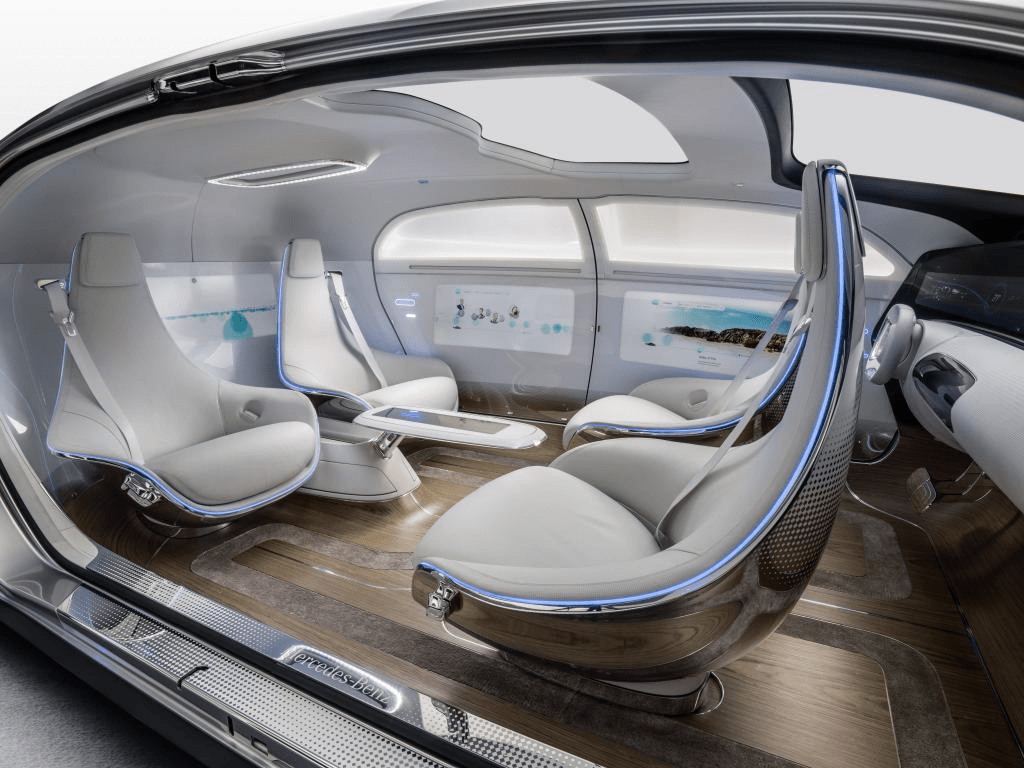
The Mercedes F015 Self Driving Concept Car

A more radical concept would be completely custom vehicles.  Mercedes recently revealed a concept car focused around a lounge feel.  Other carmakers have done the same (Ford, Chevy, ect…).  It’s advantages are the increased social focus of the interior, and the easier access to all the windows.

Would this be more expensive? Yes, but as Hammond mentions frequently, they “spared no expense” to improve the experience for the guests.

The original article referenced these as Jeep Grand Cherokees… which they definitely are not.  As pointed out by Cary (http://smokeythejeep.wordpress.com/), the only Jeeps on the island are the gas powered models that the park rangers and staff use to get around the island.  These, as the article now states, are Ford Explorers ca. 1992.

Weather Monitor

Jurassic Park’s weather prediction software sits on a dedicated computer. It pulls updates from some large government weather forecast (likely NOAA).  The screen is split into three sections (clockwise from top left):

  1. 3D representation of the island and surrounding ocean with cloud layers shown
  2. plan view of the island showing cloud cover
  3. A standard climate metrics along the bottom with data like wind direction (labeled Horizontal Direction), barometric pressure, etc.

We also see a section labeled “Sectors”, with “Island 1” currently selected (other options include “USA” and “Island 2”…which is suitably mysterious).

JurassicPark_weather01

Using the software, they are able to pan the views to the area of ocean with an incoming tropical storm.  The map does not show rainfall, wind direction, wind speed, or distance; but the control room seems to have another source of information for that.  They discuss the projected path of the storm while looking at the map.

JurassicPark_weather03

Missing Information

The park staff relies on the data from weather services of America and Costa Rica, but doesn’t trust their conclusions (Muldoon asks if this storm will swing out of the way at the last second despite projections, “like the last one”).  But the team at Jurassic Park doesn’t have any information on what’s actually happening with the storm.

Unlike local weather stations here in the U.S., or sites like NOAA weather maps, there is in this interface a lack of basic forecasting information like, say, precipitation amount, precipitation type, individual wind speeds inside the storm, direction, etc… Given the deadly, deadly risks inherent in the park, this seems like a significant oversight.

The software has spent a great deal of time rendering a realistic-ish cloud (which, we should note looks foreshadowingly like a human skull), but neglects to give information that is taken for granted by common weather information systems.

Prediction

When the park meteorologist isn’t on duty, or isn’t awake, or has his attention on the Utahraptor trying to smash its way into the control room, the software should provide some basic information to everyone on staff:

  • What does the weather forecast look like over the next few hours and days?

When the weather is likely to be severe, there’s more information, and it needs to urgently get the attention of the park staff.

  • What’s the prediction?
  • Which parts of the park will be hit hardest?
  • Which tours and staff are in the most dangerous areas?
  • How long will the storm be over the island?

If this information tied into mobile apps or Jurassic Park’s wider systems, it could provide alerts to individual staff, tourists, and tours about where they could take shelter.

JurassicPark_weather02

Make the Information Usable

Reorienting information that is stuck on the bottom bar and shifting it into the 3d visual would lower the cognitive load required to understand everything that’s going on.  Adding in visuals for other weather data (taken for granted in weather systems now) would bring it at least up to standard.

Finally, putting it up on the big monitor either on demand or when it is urgent would make it available to everyone in the control room, instead of just whoever happened to be at the weather monitor. Modern systems would push the information information out to staff and visitors on their mobile devices as well.

With those changes, everyone could see weather in real time to adjust their behavior appropriately (like, say, delaying the tour when there’s a tropical storm an hour south), the programmer could check the systems and paddocks that are going to get hit, and the inactive consoles could do whatever they needed to do.

Ground Penetrating Radar Gun

The ground penetrating radar gun is a cutting edge piece of technology used by Dr. Grant and Dr. Sattler for their field paleontology work. After firing a blank round into the ground, a second piece of equipment picks up the returning sound waves.

JurassicPark_RadarGun02

Those results are then displayed on a small CRT TV, to which they have taped a makeshift glare. A technician sits at the equipment stack with a keyboard, but no recognizable computer screen. Several buttons, dials, and a waveform monitor complement the setup.

JurassicPark_RadarGun01

After twiddling some dials, and punching a few keys, the technician makes the sonogram appear on the monitor, revealing a utahraptor velociraptor skeleton. Dr. Grant then tries to point out to eager onlookers some of the interesting features of the fossil on the screen. When he touches it, the screen fuzzes for a moment. It appears to be a very delicate piece of equipment in a very harsh part of the desert.

After Grant explains how the gun shows the fossils still in the ground, Sattler comments—foreshadowingly—that “Soon enough, we won’t even have to dig any more…” Enter Hammond and the ironic fulfillment narrative.

Iterate through the Prototype Phase

It looks like this is a very early version of the device, and still very much a prototype. This means it has a lot of issues: very delicate, obfuscated controls, and requires a small team dedicated to just making it work. It doesn’t look fully ready for the field yet…

…And that’s awesome.

This is the perfect example of a usability test: we now know that crotchety archeologists (the primary customer for this product) are going to want to poke it, prod it, and see a lot of detail.  Those are things that, at this stage, can probably still be fixed and improved.

The controls, if that’s what they really are, still have time to be iterated into a usable format.  We know they aren’t usable because even the archeology team struggles with it.

All vital information for getting back to the next iteration for making it better for actual field paleontologists. Until they’re rendered extinct, anyway.

Barbasol Can

JurassicPark_Barbasol02

The Barbasol can is a camouflaged container that Nedry uses to smuggle genetic information, i.e. dinosaur embryos, off the island to an unnamed group that is willing to pay him a lot of money for this act of industrial espionage.

JurassicPark_Barbasol03

The exterior case looks identical to an off-the-shelf can of Barbasol shaving cream, and hides a metal cradle for the DNA vials. With a twist, the cradle pops up.  When twisted back, the cradle locks into place.  Dennis uses this under tight time constraints to steal the DNA samples and carry them.

JurassicPark_Barbasol01
Wait. The movie never mentioned Proceratosaurus.

Near the end of the movie, he falls and loses the can.  It rolls away into a pile of silting mud where it will be impossible to find (though Nedry doesn’t live long enough to look for it). Greed gets its comeuppance.

Would you want one of these today?

This device would prove really problematic today.  First, it would never make it past modern security at an airport. It’s too big. Given the acceptable travel-sized can, that’s like five crummy embryos at the most. That eliminates a big backup plan for Nedry and the MysteryCo if the getaway plan involves anything other than privately chartered transportation. Which, given the need for secrecy, we can presume.

Barbasol travel size

Second, the large, round shape is too big to comfortably grip and its cylindrical shape basically guarantees that it’s going to get lost if it gets dropped. You know, which is exactly what ends up happening. What was the original plan, a moistened bar of soap?

Third, anyone can open the can. There is no key. Given that Barbasol cans are actually a commonly-available diversion safe, you might want to lock that thing down with a magnetic key that’s still undetectable, but won’t let the baggage handler walk off with your millions.

Barbasol Can Diversion Safe
Admittedly, this might be a real world thing because of the movie. It’s hard to say.

Finally, since to the casual observer it has to look and function identically to a Barbasol can, it runs the grave risk of being swapped for one, accidentally or in some gritty-reboot Spy Vs. Spy fan fiction. Including a passive RFID call-and-response API would enable identification, status indication, and triangulation for, say, if the thing ever gets lost in the silt of a tropical island in the Caribbean Sea.

So, if there’s going to be any dinosaur embryo smuggling in the future, and I’m looking at you, Dodgson, it should pass modern security. So maybe a travel sized can of Barbasol and I don’t know, mousse? Does anyone still use mousse? This size will be easier to zip into a pocket. Make sure Nedry has zipping pockets. Give the can a hidden lock to deter casual unscrewers, and be able to wirelessly query for identification or loss. And maybe someone as bumbling as Nedry can fetch you the goods without getting himself turned into raptor chow.

JurassicPark_Barbasol04
Ha HA…raptor chow…classic.

Velociraptor Lock

The velociraptor pen is a concrete pit, topped with high-powered electric fences.  There are two ways into the pen: a hole at the top of the pen for feeding, and a large armored door at ground level for moving ‘raptors in and out. This armored door has the first interface seen in the film, the velociraptor lock.

JurassicPark_velociraptorlock03

 Velociraptors are brought from breeding grounds within the park to a secure facility in a large, heavily armored crate. Large, colored-light indicators beside the door indicate whether the armored cages are properly aligned with the door.  The light itself goes from red when the cage is being moved, to yellow when the cage is properly aligned and getting close to the door, to green when the cage is properly aligned and snug against the concrete walls of the velociraptor pen.  There is also a loud ‘clang’ as the light turns to green.  It isn’t clear if this is an audio indicator from the pen itself, the cage hitting the concrete wall, or locks slamming into place; but if that audio cue wasn’t there, you’d want something like it since the price for getting that wrong is quite high.

The complete interface consists of four parts (kind of, read on): The lights, the door, the lock, and the safety. More on each below.

1. The Deceiving Lights

The lights are the most obvious part of the system (aside from the cage and pen).  Everyone who is watching the cage also has a clear view of the lights – there is an identical set on the other side of the cage for the other half of the safety/moving crew.

sidelights

2. The Door

The Velociraptor pen’s door is perfectly shaped to accept the heavily armored cage, and is equipped with a rail system to keep the cage aligned properly with the door.  Though it takes eight workers to move the cage, they appear to be able to push the cage reasonably easily. When the light turns green, the workers move back to allow the gate to be manually raised on the cage, letting the caged velociraptor escape into the pen.

3. The “Lock”

JurassicPark_velociraptorlock01
Or, lack thereof…

Every indication (the lineup of the cage, the green lights, and the heavy metallic ‘clang’) gives the feeling of a secure mating between the cage and the pen.  All of the workers relax, as if they’re sure they’re as safe as they can be. But you can be certain, this is a false sense of security.

As soon as the velociraptor decides to test the lock, it is able to push the cage away from the pen wall.  The light near the door instantly changes from green back to red.

Narratively, this underscores some of the risks of the park, i.e. that it’s cheaply engineered despite appearances, and extra-diegetically sets the audience on edge since it’s not sure what it can trust. But, for us in the real world, given the many indications that the system was safe, it should have actually been safe.

4. The Safety

When the clever velociraptor knocks the cage back, a worker falls in and becomes an unscheduled snack. Attendant workers try to help using…

The Cattle Prods

When the gate master falls and gets snatched by the velociraptor in the cage, workers immediately rush in and start hitting her with cattle prods.  There are at least six prods being used, possibly more.

Since this is the first line of backup defense, the cattleprods should have been iterated until they actually deterred the ‘raptors.  Clearly, effort went into making the perimeter defenses secure against the larger dinosaurs. The same effort should have gone into making the cattle prods effective against velociraptors.

Design for Success

The Velociraptor pen door seems custom-designed for serious failure: No hard locks to keep the cage in place, horrible sight-lines, and manual controls in places that make it dangerous for workers. Even the solid feedback system only adds to the danger. It lulls the workers into thinking the system is safe.

Most, if not all, of these issues would be solved by a simple physical locking device on the cage. Something to hold the cage in place while the doors are open would maintain a secure pen and keep everyone outside safe. It would also eliminate the need for most of the support crew, who only end up getting in each other’s way.

To add to the safety, the park designers should have paid more attention to where people would be standing during the transfer process.  The armed guards (theoretically there to be a second line of defense), are placed in such a way that only a few of them are able to effectively fire.  Other guards on scene would have to fire past their fellow guards.

Presumably, this is why the armed guards don’t actually fire at the ‘raptor when Muldoon shouts to “Shoot her! Shooooooot her!!”

JurassicPark_velociraptorlock4

Keep the feedback…

The feedback systems of the cage are remarkably successful, for a placebo. The lights, sounds, and placement keep the workers and audience calm right up until things go horribly wrong.  With the addition of Muldoon’s organizational skill and animal handling skills, the feedback system is worth taking notes on.

…but make it mean something

The velociraptor pen was designed to tell the workers what state it was in, but not to actually keep them safe.  Muldoon’s precautions try to make up for the system’s failures, but only add to the problems as the workers trip over each other.

Odyssey Navigation

image07

When the Odyssey needs to reverse thrust to try and counter a descent towards the TET, Jack calls for a full OMS (Orbital Maneuvering System) burn. We do not see what information he looks at to determine how fast he is approaching the TET, or how he knows that the OMS system will provide enough thrust.

We do see 4 motor systems on board the Odyssey

  1. The Main Engines (which appear to be Ion Engines)
  2. The OMS system (4 large chemical thrusters up front)
  3. A secondary set of thrusters (similar and larger than the OMS system) on the sleep module
  4. Tiny chemical thrusters like those used to change current spacecraft yaw/pitch/roll (the shuttle’s RCS).

image05

After Jack calls out for an OMS burn, Vika punches in a series of numbers on her keypad, and jack flips two switches under the keypad. After flipping the switches ‘up’, Jack calls out “Gimbals Set” and Vika says “System Active”.

Finally, Jack pulls back on a silver thrust lever to activate the OMS.

OMS

Why A Reverse Lever?

Typically, throttles are pushed forward to increase thrust. Why is this reversed? On current NASA spacecraft, the flight stick is set up like an airplane’s control, i.e., back pitches up, forward pitches down, left/right rolls the same. Note that the pilot moves the stick in the direction he wants the craft to move. In this case, the OMS control works the same way: Jack wants the ship to thrust backwards, so he moves the control backwards. This is a semi-direct mapping of control to actuator. (It might be improved if it moved not in an arc but in a straight forward-and-backward motion like the THC control, below. But you also want controls to feel different for instant differentiation, so it’s not a clear cut case.)

image03

Source: NASA

What is interesting is that, in NASA craft, the control that would work the main thrusters forward is the same control used for lateral, longitudinal, and vertical controls:

image00

Source: NASA

Why are those controls different in the Odyssey? My guess is that, because the OMS thrusters are so much more powerful than the smaller RCS thrusters, the RCS thrusters are on a separate controller much like the Space Shuttle’s (shown above).

And, look! We see evidence of just such a control, here:

image06

Separating the massive OMS thrusters from the more delicate RCS controls makes sense here because the control would have such different effects—and have different fuel costs—in one direction than in any other. Jack knows that by grabbing the RCS knob he is making small tweaks to the Odyssey’s flight path, while the OMS handle will make large changes in only one direction.

The “Targets” Screen

image02

When Jack is about to make the final burn to slow the Odyssey down and hold position 50km away from the TET, he briefly looks at this screen and says that the “targets look good”.

It is not immediately obvious what he is looking at here.

Typically, NASA uses oval patterns like this to detail orbits. The top of the pattern would be the closest distance to an object, while the further line would indicate the furthest point. If that still holds true here, we see that Jack is at the closest he is going to get to the TET, and in another orbit he would be on a path to travel away from the TET at an escape velocity.

Alternatively, this plot shows the Odyssey’s entire voyage. In that case, the red dotted line shows the Odyssey’s previous positions. It would have entered range of the TET, made a deceleration burn, then dropped in close.

Either way, this is a far less useful or obvious interface than others we see in the Odyssey.

The bars on the right-hand panel do not change, and might indicate fuel or power reserves for various thruster banks aboard the Odyssey.

Why is Jack the only person operating the ship during the burn?

This is the final burn, and if Jack makes a mistake then the Odyssey won’t be on target and will require much more complicated math and piloting to fix its position relative to the TET. These burns would have been calculated back on Earth, double-checked by supercomputers, and monitored all the way out.

A second observer would be needed to confirm that Jack is following procedure and gets his timing right. NASA missions have one person (typically the co-pilot) reading from the checklist, and the Commander carrying out the procedure. This two-person check confirms that both people are on the same page and following procedure. It isn’t perfect, but it is far more effective than having a single person completing a task from memory.

Likely, this falls under the same situation as the Odyssey’s controls: there is a powerful computer on board checking Jack’s progress and procedure. If so, then only one person would be required on the command deck during the burn, and he or she would merely be making sure that the computer was honest.

This argument is strengthened by the lack of specificity in Jack’s motions. He doesn’t take time to confirm the length of the burn required, or double-check his burn’s start time.

image01

If the computer was doing all that for him, and he was merely pushing the right button at the indicated time, the system could be very robust.

This also allows Vika to focus on making sure that the rest of the crew is still alive and healthy in suspended animation. It lowers the active flight crew requirement on the Odyssey, and frees up berths and sleep pods for more scientific-minded crew members.

Help your users

Detail-oriented tasks, like a deceleration burn, are important but let’s face it, boring. These kinds of tasks require a lot of memory on the part of users, and pinpoint precision in timing. Neither of those are things humans are good at.

If you can have your software take care of these tasks for your users, you can save on the cost of labor (one user instead of two or three), increase reliability, and decrease mistakes.

Just make sure that your computer works, and that your users have a backup method in case it fails.