Captain’s Board

image06

The Captain’s Board is a double hexagon table at the very center of the CIC.  This board serves as a combination of podium and status dashboard for the ship’s Captain.  Often, the ship’s XO or other senior officers will move forward and use a grease pen or replacement transparency sheet to update information on the board.

image05For example, after jumping from their initial position to the fleet supply base in the nebula, Colonel Tigh replaces the map on the ‘left’ side of the board with a new map of the location that the Galactica had just jumped to.  This implies that the Galactica has a cache of maps in the CIC of various parts of the galaxy, or can quickly print them on the fly.

After getting hit by a Cylon fighter’s nuclear missile, Tigh focuses on a central section of the board with a grease pen to mark the parts of the Galactica suffering damage or decompression. The center section of the board has a schematic, top-down view of the Galactica.

During the initial fighting, Lt. Gaeda is called forward to plot the location of Galactica’s combat squadrons on the board.  This hand-drawn method is explicitly used, even when the Dradis system is shown to be functioning.

image07

The transparency sheets are labeled with both a region and a sector: in this case, “Caprica Region, SECT OEL”.  More text fills the bottom of the label: “Battlestar Galactica Starchart…”

Several panels of physical keys and low-resolution displays ring the board, but we never see any characters interacting with them.  They do not appear to change during major events or during shifts in the ship status.

The best use of these small displays would be to access reference data with a quick search or wikipedia-style database.  Given what we see in the show, it is likely that it was just intended as fuigetry.


Old School

Charts and maps are an old interface that has been well developed over the course of human history.  Modern ships still use paper charts and maps to track their current location as a backup to GPS.

Given the Galactica’s mission to stay active even in the face of complete technological superiority of the opponent, a map-based backup to the Dradis makes sense in spite of the lack of detailed information it might need to provide.  It is best as, and should be, a worst-case backup.  

Here, the issue becomes the 3-dimensional space that the Galactica inhabits.  The maps do an excellent job of showing relationships in a two dimensional plane, but don’t represent the ‘above’ and ‘below’ at all.  

In those situations, perhaps something like a large fish tank metaphor might work better, but wouldn’t allow for quick plotting of distance and measurements by hand.  Instead, perhaps something more like the Pin Table from the 2000 X-Men movie that could be operated by hand:

image01

It would provide a shake-resistant, physical, no-electricity needed 3-D map of the surrounding area.  Markups could be easily accomplished with a sticky-note-like flag that could attach to the pins.

FTL – Engine Analysis

Desktop_2014_06_20_17_25_34_414

The FTL Jump process on the Galactica has several safeguards, all appropriate for a ship of that size and an action of that danger (late in the series, we see that an inappropriate jump can cause major damage to nearby objects).  Only senior officers can start the process, multiple teams all sign off on the calculations, and dedicated computers are used for potentially damaging computations.

Even the actual ‘jump’ requires a two stage process with an extremely secure key and button combination.  It is doubtful that Lt. Gaeta’s key could be used on any other ship aside from the Galactica.

The process is so effective, and the crew is so well trained at it, that even after two decades of never actually using the FTL system, the Galactica is able to make a pinpoint jump under extreme duress (the beginning of human extinction).

Difficult Confirmation

image02

The one apparent failure in this system is the confirmation process after the FTL jump.  Lt. Gaeta has to run all the way across the CIC and personally check a small screen with less than obvious information.

Of the many problems with the nav’s confirmation screen, three stand out:

  • It is a 2d representation of 3d space, without any clear references to how information has been compacted
  • There are no ‘local zero’ showing the system’s plane or relative inclination of orbits
  • No labels on data

Even the most basic orbital navigation system has a bit more information about Apogee, Perigee, relative orbit, and a gimbal reading. Compare to this chart from the Kerbal Space Program:

image03

(from http://blog.asgaard.co.uk/t/gaming and Kerbal Space Program)

The Galactica would need at least this much information to effectively confirm their location.  For Lt. Gaeta, this isn’t a problem because of his extensive training and knowledge of the Galactica.  

But the Galactica is a warship and would be expected to experience casualties during combat.  Other navigation officers and crew may not be as experienced or have the same training as Lt. Gaeta.  In a situation where he is incapacitated and it falls to a less experienced member of the crew, an effective visual display of location and vector is vital.

Simplicity isn’t always perfect

This is an example of where a bit more information in the right places can make an interface more legible and understandable.  Some information here looks useless, but may be necessary for the Galactica’s navigation crew.  With the extra information, this display could become useful for crew other than Lt. Gaeta.

FTL – Activation

The Battlestar Galactica has at least two Faster-than-Light engines (which might be easier to think of as teleportation engines), activated during a complex sequence. The sequence involves:

  1. An explicit, direct command from Commander Adama
  2. Complex calculations on dedicated computers
  3. Double-checking by a large portion of the CIC staff
  4. and finally, a dedicated key and button to initiate the actual jump

Making an FTL jump is not a standard procedure for the Galactica, and it is implied that it has been decades since the ship carried out an actual jump.  This is because of the danger in landing off-course, the difficulty in the calculations, and wear on what is likely a very expensive component.  We see that many civilian ships do not have FTL capability.

image09

The FTL engine allows the Galactica to instantly travel between one point in the star system, and another point in the star system.  Dense books of pre-made calculations are kept in the Galactica’s CIC to enter into the ship’s FTL computers.

Multiple teams each begin separate calculations, using the Galactica’s FTL computers as giant calculators for their hand-written/typed equations.  The teams then cross-check their answers against each other, using a senior officer (in this case, Lt. Gaeta) as the final confirmation.

image06

Once all teams agree on an FTL jump coordinate, the information is plugged into a separate system to “spool up” the FTL drive.

Lt. Gaeta then pulls out a special key that fits into a dedicated slot in the FTL system in the CIC.  The key has two cylindrical pins that each glow a distinct blue, and are each different lengths.  The handle of the key has a matching shape on the console as well, so that the key can only fit in one way.

Once the key is inserted, Lt. Gaeta turns the key and announces that the FTL drive is active.  Commander Adama then gives the order to jump, and Lt. Gaeta pushes a separate button (which has until now been inactive) that jumps the Galactica to the coordinates entered.

After the Galactica finishes its FTL Jump, Commander Adama asks for confirmation that they have arrived successfully at their destination.  Lt. Gaeta runs across the CIC to a navigation console and checks the screen there for the ship’s location.  From the information on that screen, Lt. Gaeta confirms that the Galactica has re-entered real space at exactly the place they were intended to be. (Or might report an error, but we never see this.)

The entire CIC lets out a breath of relief and begins clapping in celebration.  Lt. Gaeta congratulates his navigation team for their work, and the CIC slowly resumes their task of running the ship.  The CIC crew is clearly unnerved by the jump, and everyone is thankful when they arrive safely at their destination.

The Current Position Screen

image05

image07

image08

This is the screen that Lt. Gaeta uses to confirm that they have successfully landed at their current target: geosynchronous orbit above their target body of mass.  He does not visibly use any of the controls on the console.  The screen autonomously zooms in on the ‘X’ marker, then displays a large, red, blinking triangle with “BSG 75” written above it (The Battlestar Galactica’s registry code).  The red ‘X’ is written inside a large sphere, which appears to be the object the Galactica was attempting to jump to.

All of the lines on this graph describe arcs, and appear to be orbital paths.  The Galactica is marked as being directly on one of these arcs.  Dotted arcs connect many other objects on the screen to each other.  These have no clear purpose or legend.

At the bottom center of the screen are the words “Waypoint Time”, “Waypoint Distance”, and “T.O.T.”  Above those words is a small label: “Synthetic Gravity Field 74.56”.  To the left of those words is an area of data that has been boxed off with the label “Optic Nav System Control.”

More text to the top left lists out information in a table format, but is unreadable to the viewer due to the resolution of the screens in the CIC.  The two rows of data beside the labels do not have column headers or unit indicators.

FTL – A Quick Overview


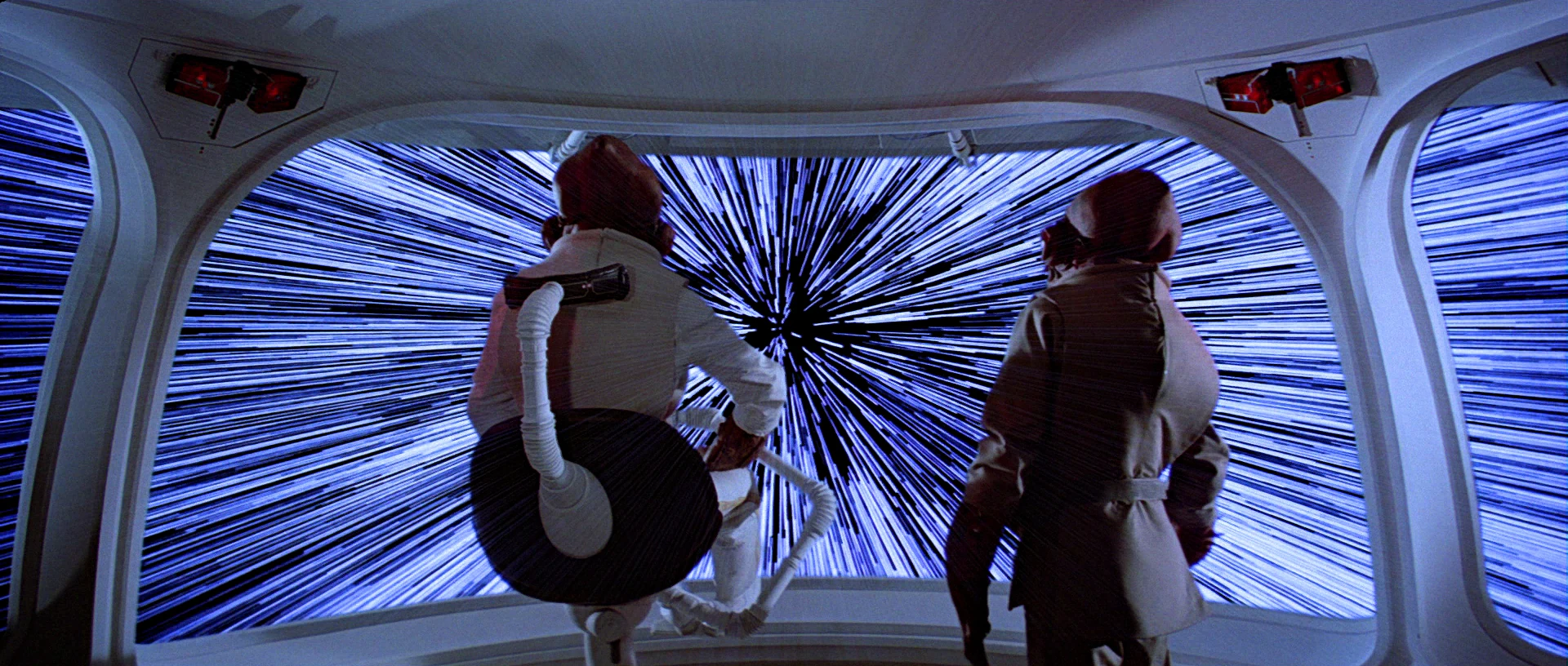
Faster than light travel (FTL) is a(n as-yet) fictional trope that is used to allow stories to happen on scales larger than a single solar system.  Nothing we’ve found so far indicates that faster than light travel is possible, let alone practical, but it makes things like Star Wars, Star Trek, and Battlestar Galactica possible as stories.

As noted on TV Tropes, there are three broad ‘favorites’ when it comes to FTL:

  • “Warp” Drives: the ship distorts space around it to go really fast, so it stays in this universe but breaks the laws of physics in ways we haven’t figured out how to yet. Star Trek has made this a household word.
  • “Jump” Drives: the ship finds itself in a special point in space, does some math, pushes a button, and appears instantly at its destination.  This is the kind that the Galactica uses.
  • “Hyperdrives”: the ship somehow breaks out of our current universe into a place where the ‘speed of light’ is faster.  Star Wars and Hitchhikers Guide to the Galaxy prefer this type of FTL.

Overall, the actual mechanics don’t effect the story, but it’s an interesting topic in and of itself.  For as much information as you could possibly want, the fantastic website Atomic Rockets has a large page on it: http://www.projectrho.com/public_html/rocket/fasterlight.php

CIC

image06

The Battlestar Galactica’s Combat Information Center, or CIC, is a medical-theater-like room that acts as the military nerve center and brain of the Galactica.  It is located near the center of the ship, is heavily armored and protected by armed guards, and has a staff of between 35-50 people.

The two highest ranking officers on the ship, Commander Adama and Colonel Tigh, typically stand at the center of the auditorium around the Command Board.  This position lets them hear status reports from around the room, and issue orders to the entire ship.

image05

Various pods of workstations provide seating for the rest of the staff.  These stations are grouped by function.  We see Navigation crew sitting near other navigation crew, weapons officers near other combat functions, communications near the center, and engineering given a special area up top.

image07

Phone kiosks are placed throughout the CIC, with two high profile kiosks on the Command Board.  Large display boards and the central Dradis Console provide information to the entire crew of the CIC.


Organized Chaos

The CIC is dealing with a lot of information from all over the ship and trying to relate it to the lead officers who are making decisions.  There is a lot of activity related to this information overload, but the design of the CIC has organized it into a reasonably effective flow.

Teams communicate with each other, then that decision flows forward to lead officers, who relate it to Admiral Adama.
image03

Orders flow in the opposite direction.

Admiral Adama can very quickly shout out an order from the center of the CIC and have his lead officers hear it all around him.  It can also act as a failsafe: other officers can also hear the same order and act as a confirmation step.  From there, the officers can organize their teams to distribute more detailed orders to the entire ship.

Large screens show information that the entire CIC needs to know, while smaller screens display information for specific crew or groups.

Overall, the stadium-like construction of the CIC works well for the low tech approach that the Galactica takes after.  Without introducing automation and intelligent computer networks onto the bridge, there is little that could be done to improve the workflow.

Battlestar Galactica Overview

battlestar-galactica.jpg

Battlestar Galactica (here meaning the mini series that launched the show, not the 4-season show itself) is based around an extremely large battleship/carrier spaceship and the crew that serves on her.  The Galactica is a vessel more than 50 years old, and was built during a time when humanity was in a life or death struggle with the Cylons—a species of sentient AI and robots.

And, as usual with these reviews:

BSGspoiler.png

The Cylons haven’t been seen since the end of that war, and the Galactica is one of the few ships from that time still operating.  It’s seemingly backwards and simple technology was dictated by the enemy.  Cylons were able to hack into and take over any networked device, which meant that only the simplest weapons could be used to fight them.

m3it2ywzteicfojkcyni

We catch the Galactica just at the end of its life, as it’s about to be decommissioned and turned into a museum.  It is at that moment that the Cylons strike humanity again by firing nuclear weapons at every major city in the 12 Human Colonies.

The entirety of Humanity’s army is quickly scrambled to fight the Cylons, but they have infiltrated the networks that run all of the current weapons and ships that Humanity has available.  By the end of the first episode, only the Galactica (that survived due to it’s old design) and a small flotilla of civilian ships has survived.

The Galactica and its crew then spend the rest of the miniseries attempting to fight their way out of the Cylon ambush to safety.

Perimeter Fences

Jurassic_Park_Perimeter_Fences01

Each of the dinosaur paddocks in Jurassic Park is surrounded by a large electric fence on a dedicated power circuit that is controlled from the Central Control Room. The fences have regular signage warning of danger…

Jurassic_Park_Perimeter_Fences04

…and large lamps at the top of many towers with amber and blue lights indicating the status of the fence.

Jurassic_Park_Perimeter_Fences02

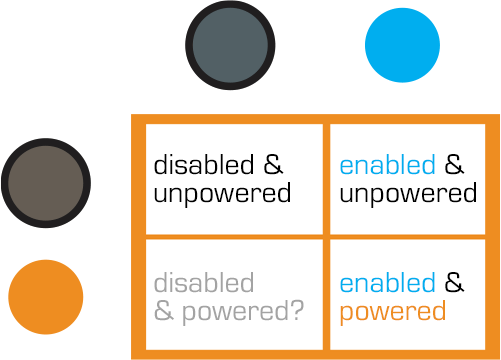
When the power is active, both lights are lit. When Dr. Saddler is rebooting the system, the blue light turns on first, with a loud, deep klaxon, meant to signal a “system active, but power is not feeding to the fence yet” status. Although the transition isn’t shown, presumably the amber light turns on as soon as power flows into the fence.

Even though Dr. Grant and the kids weren’t introduced to the light system when they arrived on the island, they were suitably worried when the klaxon sounded and the blue light began blinking. This had the advantage of warning them that the fence was about to activate, but the disadvantage that it set off such a strong fear response in Timmy that he froze in place while still on the fence. Drama is good for an audience, bad for Timmy.

Fence Activation

Jurassic_Park_Perimeter_Fences05

We see in Nedry’s escape scene that he shuts off the power because the main gates out of Jurassic Park cannot be opened while the power is active. However, in the intro scene (pictured above) we see that the gate can be opened without shutting off power to the entire fence system. This implies that Jurassic Park has fairly detailed control over various parts of the fence system. This is confirmed when we get a glimpse of labels on a circuit board later in the film:

Jurassic_Park_Perimeter_Fences03

The good

  • The major systems are each on dedicated circuits that are individually controlled. That’s useful for managing complex scenarios in the park.
  • Automated alert systems are quickly understandable. That’s useful for keeping employees and visitors safe.
  • “Blue” and “Orange” are colors that are easily differentiable even with color-blind users. It’s a good choice for alerts.
  • There is an unmistakable and unavoidable audio backup to the visual signal.

The deadly

Let’s not forget that this is a system with potentially deadly consequences. It’s worth making sure it does its job of keeping the bad thing controlled, while not frying people.

“Danger” signage on the T-rex pen is too high for good viewing. A person would interact with the fence closer to the concrete barrier, and would almost certainly not look up. Better is to repeat the signage frequently, repeatedly along its length, and at several heights.

The light system is a 4-bit signal. It takes some interpretation. “Wait. What did blinking blue and off orange mean?” That’s pretty poor for emergency situations, where a few seconds of delay can mean the difference between safety and becoming a jurassic kebab.

lights

Better would be an unmistakable binary signal. Light on = power on. Light off = power off. Make it a big, blood-colored red. That’s much simpler and doesn’t require referencing a manual. Color blind folks won’t need to distinguish light colors at all, they can just see the on-or-off.

What about powering up? That blinking is clearly meaningful, but it’s still more ambiguous than it needs to be.

Ideally you’d have some sort of human-detection system so that the fence itself keeps humans safe, but if that’s not doable or reliable, you’d need some other warning signal. I think there are three ways we can convey that shit is getting real…

Visual

I’d recommend a progress bar, like the Eko traffic light concept by Damjan Stanković. Surround the red light with the progress bar, combining with audible and tactile signals, as below. Put these in the pillars that support the cables, and either near or around the hole through which the cables pass, so it’s clear that these lights have something to do with these cables.

traffic-light-progress-bar-500x371
Side note: I think this is a problematic as a stop light, but quite brilliant as a general time-bound event signal.

Audible

You need the audible warning to catch attention regardless of whether or not a person is looking in the direction of the light. The klaxon is awesome at getting attention and signalling dangers. But again, it’s an ambiguous as The Robot shouting, “Danger, Will Robinson!” If we modified it so that the sound started low and raised in pitch, it would help convey that something is coming on line. You could just use a “blinking” Shepard Tone.

Tactile

And of course, there’s the power itself. It shouldn’t just come on all at once. We should raise the power level over some span of time, so Timmy starts feeling greater and greater discomfort and he has a building pressure to get off the fence, rather than being thrown back immediately. Even a blind, deaf, or panicked person wouldn’t be able to ignore it and be forced to take action without the risk of blunt force electrocution.

Main Power Board

To restore the power that Nedry foolishly shut down (and thereby regain a technological advantage over the dinosaurs), Dr. Sattler must head into  the utility bunker that routes power to different parts of the park.

image02

Once she is there Hammond, back in the Visitors Center, communicates to her via two-way radio that operating it is a two part process: Manually providing a charge to the main panel, and then closing each of the breakers.

The Main Panel

image00

To restore a charge to the main panel, she  manually cranks a paddle (like a kinetic-powered watch, radio, or flashlight), then firmly pushes a green button labeled “Push to Close”.  We hear a heavy click inside the panel as the switch flips something, and then the lights on the Breaker Panel list light up green.

Now that she has built up a charge in the circuit, she has to turn on each of the breakers one by one.

The Breakers

image01

Each individual circuit has a dedicated button to open/close it.  Each is  switched with a simple illuminated button protected by a heavy, clear pushbutton cover that has to be opened manually.

Green indicates that the circuit has tripped, and power is not flowing to that part of the park.  Red means that the circuit is closed and live.  Slowly, one by one, Dr. Sattler flips the cover and presses the red button for each part of the breaker panel.  These switches are clearly labeled as HERBIVORE FEEDING COMPOUND, or VISITORS CNTR.

As she flips each circuit on, red lights behind the label turn on.

The Circuit Breakers

The pushbutton covers do a good job of protecting against inadvertent flips, but could be made better by having hinges that close them automatically.  It is unlikely that someone would accidentally push one of the buttons, but the high-risk nature of the panel begs for more protection.  Spring hinges would also make closing the panel up after service quicker.

A second consideration is an emergency scenario: there is no obvious way to flip all the circuits off at once, or turn them all back on quickly.  Here, all that extra time is super dramatic since it happens to save Dr. Grant and the kids, hanging at this same moment as they are from the unpowered electrified fence. But if someone was trying to reactivate the park quickly, to say, save the visitors from being eaten, this circuit-by-circuit method takes a surprising amount of time.

Labeling & Color

The labeling here is good, but could still be better.  The lights are the first thing to draw attention, but it’s actually the charging panel that needs to be tended to first.  A good flowchart of how a person is supposed to use the panel would be an effective addition; as would a map showing which labeled breaker leads to which area of the park.

At first the red-and-green colors are backwards, but it turns out a longstanding standard within electrical engineering uses red to indicate “shock hazard” rather than “operating normally”, so this color coding is actually OK. But it might be more effective to only light up the breakers’ labels when power is actually flowing to them. For someone not experienced with the interface or electrical engineering conventions, having a few of the breakers active and a few flipped could be extremely confusing. Are the lit ones active? Inactive? Is power flowing to the panels with lights?

This panel would be a solid candidate for usability testing.

Control Room Power Board

image00

Once Dr. Sattler restores power to the park, Arnold needs to reboot the computer systems. To do this, he must switch off the circuits (C1–C3 in the screenshot above), and then switch off-and-on a circuit labeled “Main”.

image01

It’s a good thing Arnold knows what he’s doing, since these switches are only labeled C1-3, and we don’t see any documentation in the camera frame.  As he turns off each circuit, different parts of the computer terminals in the Control Room shut down.  This implies that different computer banks are tied to the same power circuits as the systems they control.

So, since this is a major interface for the park, let’s make this bit explicit: When designing infrequently-used but mission-critical interfaces, take great care to explain use, using clear affordances and constraints so that mistakes are very, very difficult to make. 

It might look like a mistake to have all the little electrical labeling to the sides, since this cover would have to be removed to get the components where this information would be of use. But that’s perfect. A user needing to remove this panel must encounter this reference information to get to those components, and so would know where to find them. This is a brilliant example of the pattern Put the Signal in the Path. Let’s hope there are similar signs on other access panels.

image02

Wait…where are the backups?

These are the central computer terminals that run Jurassic Park, and keep visitors safe from the “attractions.”  And there is no backup power.

When Arnold turns off the main circuit breaker, the computers (and servers behind them) turn off immediately.  The purpose and effect of the power switch deactivates all the systems in Jurassic Park, without any kind of warning or backup system.

For something as dangerous as deadly deadly dinosaurs—raised from the 65 million-year deep grave of extinction—the system deactivation should at least trigger some kind of warning.

Tornado sirens have backup batteries in case the city power goes out.  They are a solid example of a backup system that should exist, at minimum, to warn park-goers to move quickly towards shelter.  A better backup system would be a duplicate server system that automatically activates all the fences in the park.

Redundant Systems

When Arnold cycles the visitor center’s power system, it also trips the breakers for all of the other power systems in the park.  Primary safety systems like that should be on their own circuit.  It’s ok if the fridges turn off and melt the ice cream (though it may be an inconvenience), but that same event shouldn’t also deactivate the velociraptor pen security.  Especially when the ‘raptor pen is right next to the visitor center and is a known, aforementioned, deadly deadly threat.

Security Alert

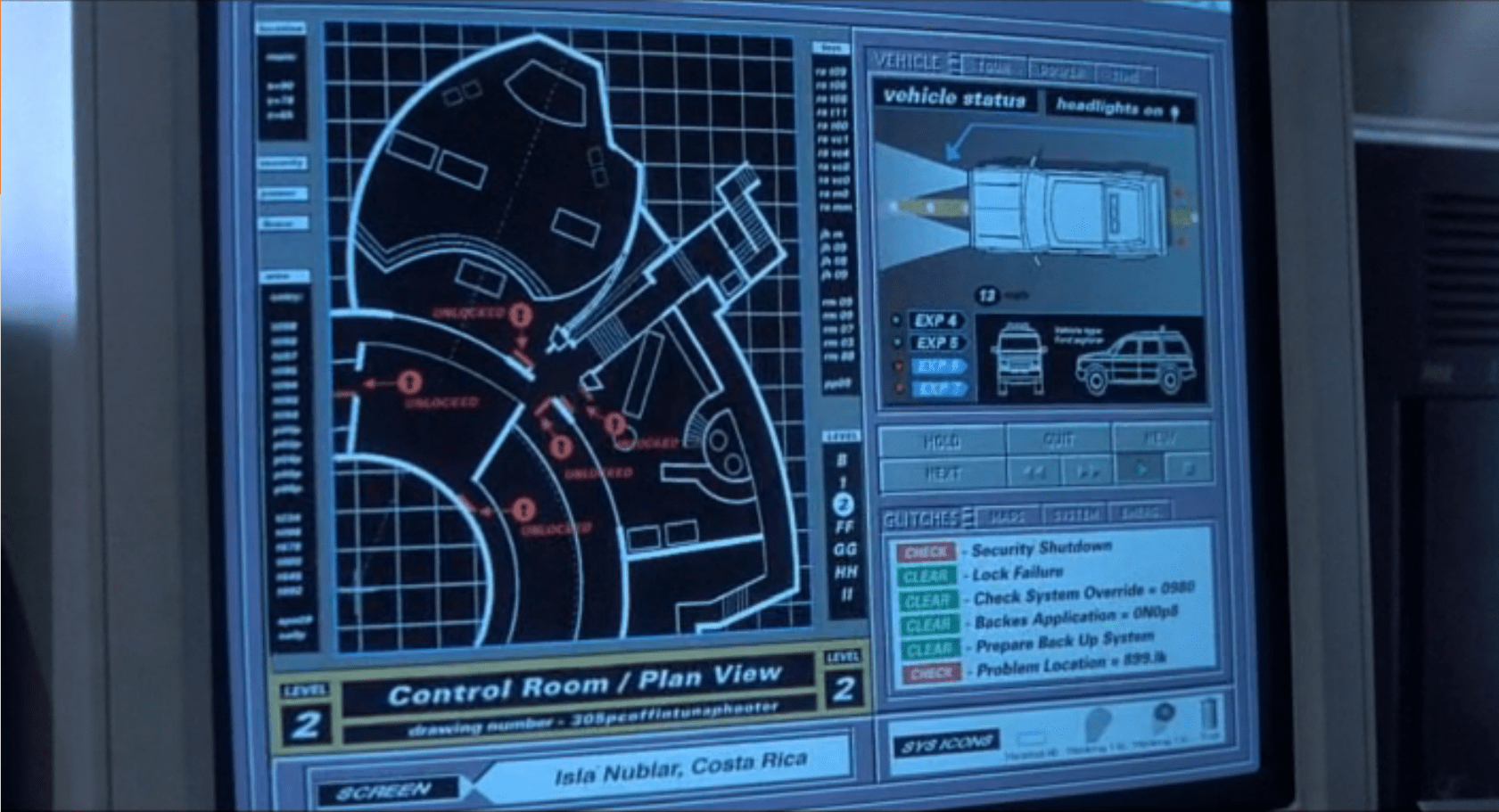
The security alert occurs in two parts. The first is a paddock alert that starts on a single terminal but gets copied to the big shared screen. The second is a security monitor for the visitor center in which the control room sits.  Both of these live as part of the larger Jurassic Park.exe, alongside the Explorer Status panel, and take the place of the tour map on the screen automatically.

Paddock Monitor

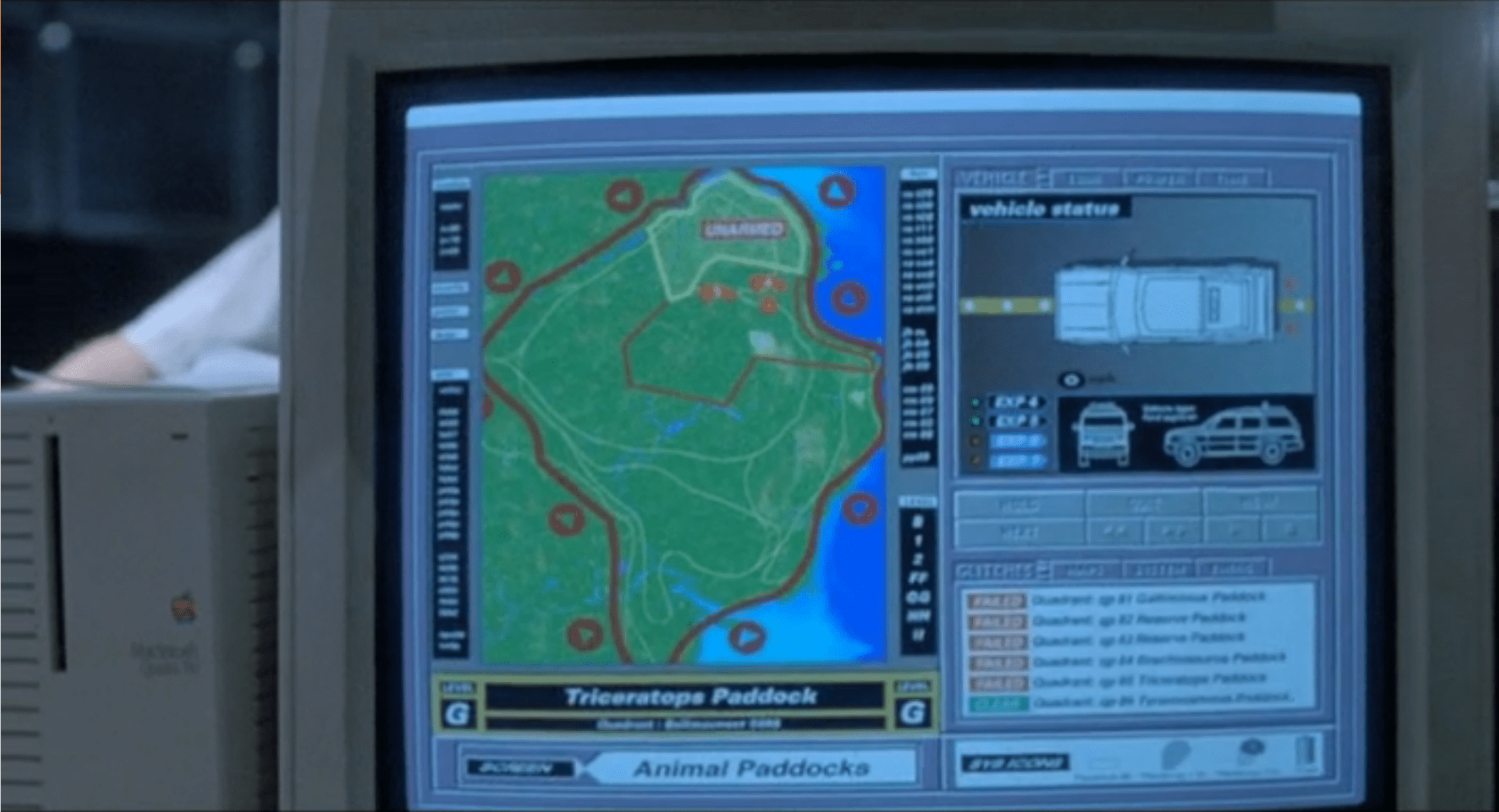
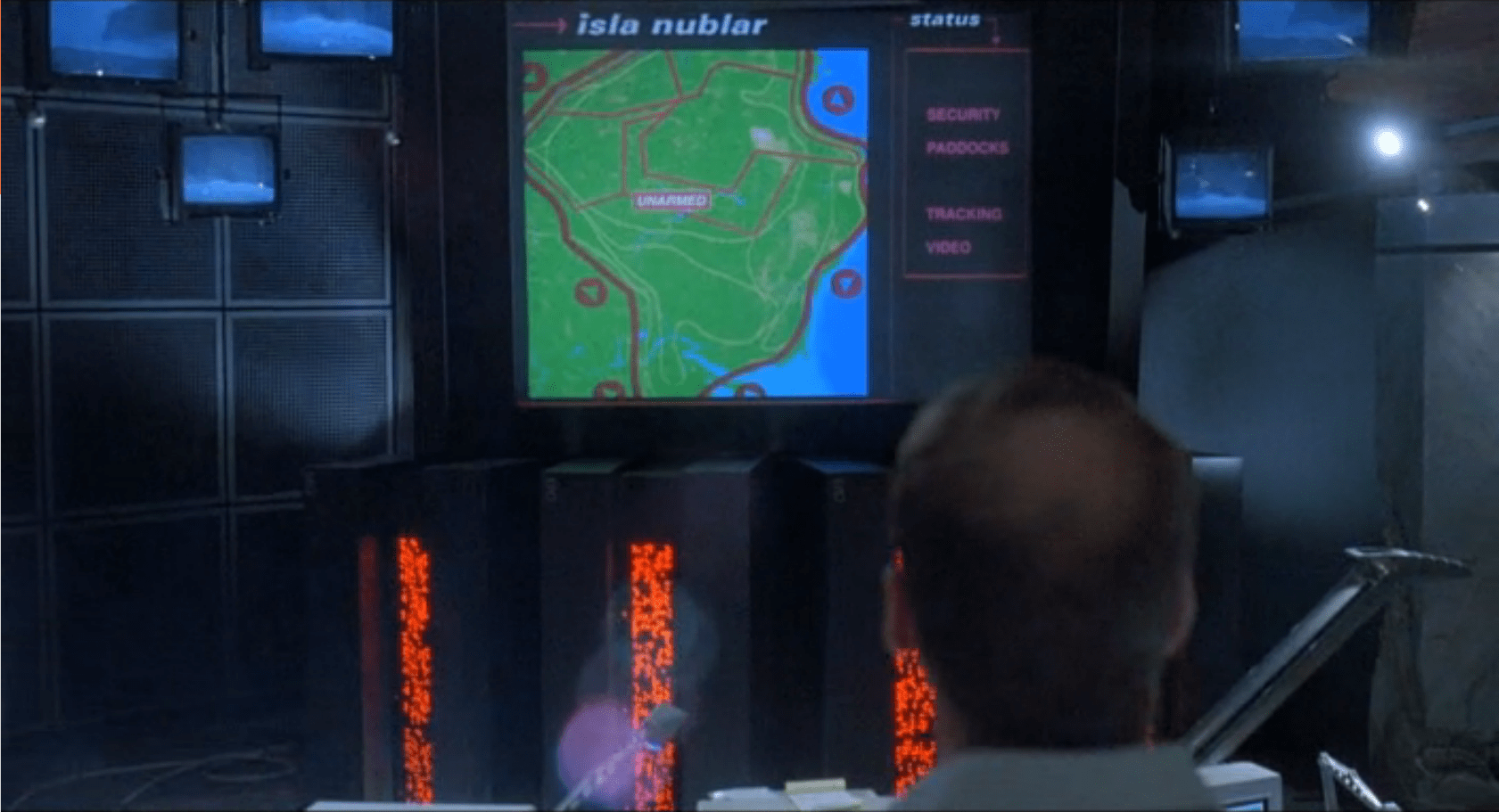
After Nedry disables security, the central system fires an alert as each of the perimeter fence systems go down.  Each section of the fence blinks red, with a large “UNARMED” on top of the section.  After blinking, the fence line disappears. To the right is the screen for monitoring vehicles.

image01
image03

As soon as the system starts detecting the disabled fences, it starts projecting the fence security diagram onto the main screen at the front of the Control Room for everyone to see, but with a status bar on the right reading “SECURITY, PADDOCKS, TRACKING, and VIDEO.”

image00

Visitor Center

The system has a second screen showing security measures in the visitor center itself.  It focuses on the security doors between public and private areas (dining, halls, the genetics lab, and the cryostorage).

image02

In both cases, these security screens appear on the same computer showing the vehicle status.  It replaces the island map.  This isn’t a separate program, but is instead a replacement window, as shown by the identical data in the columns to the left and right of the map view.

Don’t Break Existing Mental Models

Throughout the security panels, there isn’t any consistency in color labeling.  On the fences, red is good.  On visitor center map, red is bad.  On the glitches panel, red means that it should be looked at, but might not be bad.

First, accessibility standards say that color shouldn’t be the only indicator of status.  Thankfully for this interface and its inconsistency, it at least has labeling. But that means that an operator needs to either memorize the entire panel before they can be proficient at it, or read each label every time.

Second, color standardization could be done with a little more creative background colors.  Picking more neutral backgrounds—for example, the island on the fence map doesn’t need to be bright green, and could either be desaturated or a basic light grey—would allow the status colors to show up better and have more readable text.

Third, while the status indicators are labeled, the labels are written in system language instead of user language.  “Clear” and “Check” can be understood with some work, but aren’t natural status labels in day-to-day society.

Keep Indicators

When the fences deactivate, they disappear off the screen.  While this does show that they’re disabled, it removes the control room crew’s ability to quickly see what they can fix and where it is.  Unless a room full of experts is looking at the screen, they won’t know where the T-Rex fence is and where to send work crews.  Keeping the fences on the screen in a ‘disabled’ or ‘broken’ state would indicate the same information, while still providing direction.

The visitor center screen almost gets this right by changing the color, changing the label, and showing the door as open on the panel.  Practically, this is what’s happening (the ‘Raptors can get through any door they want), but realistically some of those doors are actually closed.

In the case of the doors, it would make more sense to have the status change, but only have the door open if the system actually detects a door opening in the building.

Show the ’Raptors

This is the most critical screen in the park during an emergency, but it isn’t showing a critical status: The Velociraptor Pen.

Arnold has to roll over to the command console computer and type in a manual status request to learn that the raptor pen fences are still active.  Given how important this status is to everyone in the park, it should be on the main map in some form or another.

Additionally, the system could show the status of secondary systems in a side pane:

  • Tour status
  • Camera feeds
  • Where dinosaurs are
  • What secondary equipment status is

When things start to go wrong on the island, this interface should provide guidance to the control room crew on what they need to do and what they need to fix (even if, in this case, the answer is “Everything”).

Organizing information, mapping status across screens, and providing lists of what needs to be fixed would give an understandable checklist to the park staff on what they should be doing.