Time circuits (which interface the Flux Capacitor)

BttF_137

Time traveling in the DeLorean is accomplished in three steps. In the first, he traveler turns on the “time circuits” using a rocking switch in the central console. Its use is detailed in the original Back to the Future, as below.

BttF_135

In the second, the traveler sets the target month, day, year, hour, and minute using a telephone keypad mounted vertically on the dashboard to the left, and pressing a button below stoplight-colored LEDs on the left, and then with an extra white status indicator below that before some kind of commit button at the bottom.

In the third, you get the DeLorean up to 88 miles per hour and flood the flux capacitor with 1.21 gigawatts of power.

Seems simple.

It’s not…

Rocker switch?

Note that the rocker switch angles down to a nearly 45 degree angle in the on position. One of the worst thing that could happen is for that thing to get accidentally turned off at the wrong time, I imagine. (Back to the Future 4: Lost in Somewhen?) The 45 degree angle makes an accidental activation unlikely, but the T-shaped handle means it could catch on a sleeve or bag handle or something. There are more secure safety switches, but I also wonder if it would be smarter to use the Fake Off mode that most electronics run in today, where they’re never really off, but look off, just waiting for user interaction to spring to life. With a Mr. Fusion on board, I presume powering it isn’t that much of a problem.

Good disambiguation

Note that the pad only has numbers. But Doc uses the military and European standard date format

[day of month] [month] [year]

which might confuse another user, i.e. Marty, entering the stupid USA standard

[month] [day of month] [year]

Though preventing errors is preferable, at least Doc helps Marty recognize errors by displaying the month in 3-character text format, which would help Marty realize if he’d accidentally put in 10 September instead of 09 October.

Bad disambiguation

Note that doc is traveling to 4:29 in the afternoon, and the display has a tiny LED A.M./P.M. indicator. Better is the less ambiguous military time. Sure, audiences might have been confused, but using a 24-hour clock would have been less ambiguous for diegetic users, you could eliminate the AM/PM indicator, and Doc could use the existing number pad for entry without having to either add an “AM” and “PM” button (missing from the console), or doing some annoying “press 1 for AM or 2 for PM nowIVR thing.

While we’re on time disambiguation, what, uh, time zone is this? Did doc only ever plan to fly in and around Hill Valley? It might have been keyed to the Prime Meridian, or to Pacific Time, but if so it would have been very useful to have it marked as such. If not, it should display the current time zone and provide a means to change it. Somehow. With that number pad. (Or more controls.)

Bad input constraint and recovery

It’s wholly possible to enter a day-of-month or month of “99,” which is nonsensical given the Gregorian calendar that we use today. How does the system handle this? A mod function? There’s no clue, but the unconstrained inputs would allow it.

Farther travel?

As the Long Now Foundation reminds us, a four-digit date is really short-sighted. So Doc didn’t want to travel to 10,000 C.E. and see if Zager & Evans were right? And what if he wanted to go meet Amenhotep? How does he specify 1526 B.C.E.? It seems unduly constrained.

Misleading mapping

I don’t know what those LEDs to the left of the input panel do, but I can tell they’re poorly mapped. The colors go, from top to bottom: red, yellow, and green, like a stoplight. Then there’s the extra white LED below that maps to nothing. But the LED colors on the display go from top to bottom red for destination, green for present, yellow for last time departed. Better mapping would have these two agree, or distinct color schemes.

Missing controls

In 1985 dialing a telephone number worked much like the dial-a-date seen here. Punch a sequence of numbers and the system runs with the input. But instant-input systems need a way to correct errors; either the ability to review and correct the input, or to abort the input altogether and start over.

Phone users from back then will recall it was entirely possible to mistype a digit and dial a wrong number. You’d be connected to a stranger who had no idea who this “Marty” you wanted was. This is more serious in the DeLorean than on a phone, as it drops the user into circumstances potentially much more dire, from which there might be no recovery. What would happen if they had accidentally wound up in 21 October 1015? Wholly different story. Is Biff distantly related to Cnut the Great?

Doc might be able to review the input on the display before getting up to speed, but there’s no obvious control for aborting input so far and starting over. (What if he has skipped a digit instead of mistyping one?) A simple delete button would help him correct mistyped digits. Even if he mistyped the first one and only realized it at the end, it wouldn’t be too burdensome to press delete the handful of times.

Rich preview

How does the system confirm for Doc that he’s entered the right date he intended to? On one level, sure, the 7-segment LED output is clear and unambiguous. It’s a nice discrete number. But of course 7-segment 1989 isn’t that easy to distinguish from 1898 when you’re distracted. Better would be to give a preview of the meaning of the choices entered (but not yet enacted) by the user. If there was a video screen in the car, then maybe it could show scenes from old Westerns with the label “Headed to 1898: The Old West.” You could even do it with the cars’ speakers and an audio soundscape if a screen wouldn’t work for space or distraction reasons.

Security

As noted in the overview, Biff(2015) gets into the car to make off for 1955 early in the film. I can’t quite figure out how he was able to figure out turning on the time circuit and that the 88MPH was a target speed, but he did. (Seriously, looking for fan theories here.) Of course Doc might have designed everything to be perfectly understandable for Marty, but that’s no excuse to avoid authenticating the user, since Doc is so panicked about the consequences of the time travel that he’s doing all the times. [sic]

BttF-biff-carjack

Flying cars

The DeLorean car plays a significant role in all three films since it is the time travel machine. At the end of the first film, we’’re shown a brief scene (that is repeated at the beginning of the second film) that reveals that the vehicle has been modified so that it flies. Even its modified form it is largely like a car from the period. The driver or pilot manually drives the vehicle with no software assistance or heads-up-display.

I might have strong opinions about the controls of a car being poorly mapped to manage flight, but since this is a hacked-together prototype from materials at hand, it’s less a design problem than a matter of circumstance.

Back to the Future Part II: Overview

The ongoing reviews are on pause for a very special review of a favorite and formative film, the future scenes of which occur on today’s date.

Release Date: 22 November 1989 (USA)

BttF-title

26 OCT 1985

Doc Brown travels in his flying DeLorean time machine from the future date of 21 SEP 2015 to fetch Marty McFly and his girlfriend Jennifer. When they return to that impossibly far date, Doc puts Jennifer to sleep and enjoins Marty to prevent his son from becoming an accomplice to a crime that ultimately destroys the whole family.

21 SEP 2015

After taking his son’s place and thwarting the bully Griff, Marty seizes an opportunity in the future to purchase an “antique” sports almanac, but Doc throws it away. Griff’s grandfather Biff overhears their conversation and fetches the almanac from the trash.

Before Marty and Doc can get the still-sleeping Jennifer to return to the past, she is apprehended by police and returned to her home where she hides from her future self in a closet. When they leave the time machine to rescue Jennifer, Biff steals the time machine, travels back to 1955 when he was a boy, and uses the almanac to make himself rich.

Back to the Past (1985)

When Doc, Marty, and Jennifer exit the house and return to their own time, the world has changed. Biff is the town’s evil crime and gambling Mogul, married to Marty’s mom, the town is a rough and lawless, and his dad murdered (by Biff).

12 NOV 1955

Together Doc and Marty travel to 1955, where Marty follows Biff to the Enchantment Under the Sea dance, trying to retrieve the almanac while trying to avoid contact with people who might recognize them and keep events meant to happen then on course.

Finally they use the time machine and a hoverboard from 2015 to take the almanac from Biff(1955) and burn the almanac, but lightning strikes the Delorean, sending it away in time. Moments later a mysterious figure delivers a letter from 1885, letting Marty know that Doc was transported there and (as of the writing of the letter) is fine.

Marty rushes to talk to Doc(1955), and the plot pauses until Back to the Future 3.

IMDB: https://www.imdb.com/title/tt0096874/

Coulson Calling

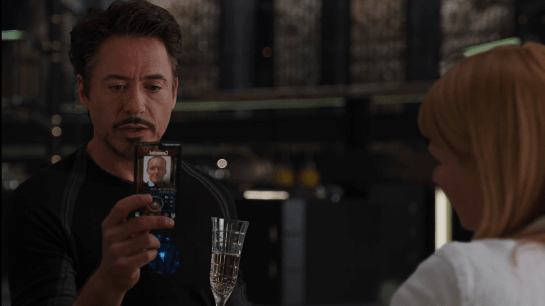
JARVIS interrupts his banter with Pepper, explaining, “Sir, the telephone. I’m afraid my protocols are being overridden.” We can hear Coulson’s voice saying, “Mr. Stark, we need to talk.” Perturbed, Tony grabs his custom phone from where it sits on a nearby table. It is made up of a glass plane within a rounded-rectangle black band. On its little screen we can see a white label reading, “Connected.” Remarkably, this label is presented in mixed case. Nearly all sci-fi interface typography is rendered in all caps, so I have some curiosity how this ended up in majuscule and miniscule. But it feels right. Perhaps that’s because it’s kind-of a consumer device?

Avengers-Coulson-Calling04

Anyway, beneath the label is a static photo of the caller, Agent Coulson, and below that a large circle with a central bump, and some other tiny controls.

Tony positions the phone before him, looks into the glass, and says, “You have reached the life model decoy of Tony Stark. Please leave a message.” Coulson doesn’t fall for it, saying, “This is urgent.” Tony tries to admonish him, “Then leave it urgently,” but it’s too late. Coulson himself walks out of the elevator in the room, his phone to his ear.

Avengers-Coulson-Calling05

Aside from the trope screens are cameras, and the bad-but-understandable translucent screen, I have another question about the interaction: What is Tony doing looking at the phone for the duration of the short conversation? Since Coulson isn’t looking at his phone, it’s just an audio connection between them. The phone should convey that status to Tony, and in fact the static image of Coulson seems to imply just that. So, why does he bother looking at it?

So try as I may, I can’t apologetics-my-way to get around this odd behavior in the scene. Perhaps Downey believed that the interface would be rendered with a video image of Coulson on the other end, and that turned out not to jive with Gregg’s holding it to his ear. I hate to leave it at “misinformed actor” but I can’t think of a diegetic explanation. Anyone have a plausible one?

Avengers-Coulson-Calling03

Stark Tower monitoring

Since Tony disconnected the power transmission lines, Pepper has been monitoring Stark Tower in its new, off-the-power-grid state. To do this she studies a volumetric dashboard display that floats above glowing shelves on a desktop.

Avengers-Reactor-output03

Volumetric elements

The display features some volumetric elements, all rendered as wireframes in the familiar Pepper’s Ghost (I know, I know) visual style: translucent, edge-lit planes. A large component to her right shows Stark Tower, with red lines highlighting the power traveling from the large arc reactor in the basement through the core of the building.

The center of the screen has a similarly-rendered close up of the arc reactor. A cutaway shows a pulsing ring of red-tinged energy flowing through its main torus.

This component makes a good deal of sense, showing her the physical thing she’s meant to be monitoring but not in a photographic way, but a way that helps her quickly locate any problems in space. The torus cutaway is a little strange, since if she’s meant to be monitoring it, she should monitor the whole thing, not just a quarter of it that has been cut away.

Flat elements

The remaining elements in the display appear on a flat plane.

To her upper left a spectrum analysis shows bars all near the middle, and the status is confirmed with a label as REACTOR OUTPUT NORMAL. Notably the bars are bright cyan at their top and fade to darker near their bases, drawing attention to the total arc. There few bands that are lower or higher than others are immediately visible from the contrast. That’s good visual design for attention management.

Avengers-Reactor-output02

In the top center is a ring chart with three bands of colors: slate gray, cyan, and dark red. A large percentage read out in the center hovers around 90%. To her upper right are three other ring charts with the same color scheme. Above the three rings is a live trend line chart in red with a separate line in white (Target? Trend line?). A tiny side view of Stark Tower stands to the left of the three rings and trend line. The purpose of these are unclear as the labels are too small to read, but it seems strange to have the physical representation here. If the rings or trend lines are related to the physical tower, how they are related is unclear. If they are unrelated, having the rendering present there is misleading.

In a band across the middle are some tiny text blocks spitting out lines of data and auto scrolling. There are more of these, so for ease of reference, let’s call them teletype boxes. They look too small and move too fast to convey much meaning, as such things often do.

The lower left of the screen has a dim white section labeled MAGNETIC CONTAINMENT. It contains a 3D cuboid with a wildly undulating surface. As this shape doesn’t match anything else in the display, nor is it visually connected, its utility is unclear. If she is meant to track some variable other than undulationness, I can’t see how this would help. Also in this panel are some sliders wildly sliding back and forth, and some more teletype boxes.

In the lower center part of the screen is an overhead-view wireframe of the reactor that does not change in this segment, as well as a dim white box that appears to contain a static formula.

Avengers-Reactor-output01

This display is not fit to Pepper’s task

Sadly, Gwen Paltrow looks a little wall-eyed here, so it’s hard to tell where exactly where she’s looking to determine as she says that “Levels are holding steady.” Her gaze appears roughly above the large ring chart, so let’s presume she’s looking there. If she is actually meant to be monitoring a set of levels to determine if they’re fluctuating or not, the ring chart and percentage are the wrong display types. These are valuable for showing a state that doesn’t change very often, i.e. where change over time is not of concern.

Sure, she might be able to suss out the steadiness of the variables by focusing on the percentage and the ring chart elements to see if they’re currently wobbling, but that requires her to keep her focus there to observe what’s happening with those pixels. That puts an unnecessary burden on her attention and short term memory. What if she has to glance away for a few seconds, and in those seconds, levels begin to wobble unsteadily? Sure, an alert could sound, but when she looks back she’ll have no idea what has happened while her attention was elsewhere. Humane interfaces remove unnecessary burdens from their users, and this display should do the same.

Use line charts and sparklines to show change over time

For any variable that is meant to be monitored for changes over time—like the scripted steadiness of levels—the line chart or sparkline is much more fit to task. Each plots variables over time, so even if a user glances away for a bit, it’s not a problem, she can look back and quickly suss out what’s been happening. The thing she’s looking at should look more like a ECG than a page out of an annual report.

The Mechanized Squire

Avengers-Iron-Man-Gear-Down06

Having completed the welding he did not need to do, Tony flies home to a ledge atop Stark tower and lands. As he begins his strut to the interior, a complex, ring-shaped mechanism raises around him and follows along as he walks. From the ring, robotic arms extend to unharness each component of the suit from Tony in turn. After each arm precisely unscrews a component, it whisks it away for storage under the platform. It performs this task so smoothly and efficiently that Tony is able to maintain his walking stride throughout the 24-second walk up the ramp and maintain a conversation with JARVIS. His last steps on the ramp land on two plates that unharness his boots and lower them into the floor as Tony steps into his living room.

Yes, yes, a thousand times yes.

This is exactly how a mechanized squire should work. It is fast, efficient, supports Tony in his task of getting unharnessed quickly and easily, and—perhaps most importantly—how we wants his transitions from superhero to playboy to feel: cool, effortless, and seamless. If there was a party happening inside, I would not be surprised to see a last robotic arm handing him a whiskey.

This is the Jetsons vision of coming home to one’s robotic castle writ beautifully.

There is a strategic question about removing the suit while still outside of the protection of the building itself. If a flying villain popped up over the edge of the building at about 75% of the unharnessing, Tony would be at a significant tactical disadvantage. But JARVIS is probably watching out for any threats to avoid this possibility.

Another improvement would be if it did not need a specific landing spot. If, say…

  • The suit could just open to let him step out like a human-shaped elevator (this happens in a later model of the suit seen in The Avengers 2)
  • The suit was composed of fully autonomous components and each could simply fly off of him to their storage (This kind of happens with Veronica later in The Avengers 2)
  • If it was composed of self-assembling nanoparticles that flowed off of him, or, perhaps, reassembled into a tuxedo (If I understand correctly, this is kind-of how the suit currently works in the comic books.)

These would allow him to enact this same transition anywhere.

So…videoconferencing

Avengers-Iron-Man-Videoconferencing03

So, talking about how JARVIS is lying to Tony, and really all of this was to get us back here. If you accept that JARVIS is doing almost all the work, and Tony is an onboard manager, then it excuses almost all of the excesses of the interface.

  1. Distracting 3D, transparent, motion graphics of the tower? Not a problem. Tony is a manager, and wants to know that the project is continuing apace.
  2. Random-width rule line around the video? Meh, it’s more distracting visual interest.
  3. “AUDIO ANAL YSIS” (kerning, people!) waveform that visually marks whether there is audio he could hear anyway? Hey, it looks futuristic.
  4. The fact that the video stays bright and persistent in his vision when he’s a) not looking it and b) piloting a weaponized environmental suit through New York City? Not an issue because JARVIS is handling the flying.
  5. That is has no apparent controls for literally anything (pause/play, end call, volume, brightness)? Not a problem, JARVIS will get it right most of the time, and will correct anything at a word from Tony.
  6. That the suit could have flown itself to the pipe, handled the welding, and pipe-cuffing itself, freeing Tony to continue Tony Starking back in his office? It’s because he’s a megalomaniac and can’t not.

If JARVIS were not handling everything, and this a placebo interface, well, I can think of at least 6 problems.

Tony Stark is being lied to (by his own creation)

In the last post we discussed some necessary, new terms to have in place for the ongoing deep dive examination of the Iron Man HUD, there’s one last bit of meandering philosophy and fan theory I’d like to propose, that touches on our future relationship with technology.

The Iron Man is not Tony Stark. The Iron Man is JARVIS. Let me explain.

Tony can’t fire weapons like that

vlcsnap-2015-09-15-05h12m45s973

The first piece of evidence is that most of the weapons he uses are unlikely to be fired by him. Take the repulsor rays in his palms. I challenge readers to strap a laser perpendicular to each of their their palms and reliably target moving objects that are actively trying to avoid getting hit, while, say, roller skating an obstacle course. Because that’s what he’s doing as he flies around incapacitating Hydra agents and knocking around Ultrons. The weapons are not designed for Tony to operate them manually with any accuracy. But that’s not true for the artificial intelligence.

Iron Targeting 02

The same thing goes for the mini-missiles he uses to take down the hostage situation in Revengistan. Recall that people can only have their attention on one thing at a time (called the locus of attention in the literature) but the whole point of this scene is that he’s taking out half a dozen at once. It’s pretty clear from the HUD here that Tony is simply indicating which ones he thinks are the bad guys, and JARVIS pulls the triggers.

Iron-Tareting

It’s also clear from the larger context of the movies that JARVIS would be perfectly capable of making this determination for himself. Even if Tony’s saccades were a fraction of a second too slow and one of the hostages made a move, JARVIS could detect that move and act autonomously to ensure that a hostage didn’t die, even before Tony’s had time to process what was going on.

Tony can’t fly like that

Iron Flight 03

Sure, with enough practice I’ll bet someone could figure out how to pilot the suit for short flights. (If the physics could be worked out.) But the movies show him flying from Santa Monica to the Middle East. That’s around a 30 hour commercial flight. Even if the suit can fly six times the speed of a modern jetliner, he’s got to hold his hands resisting and aiming the propulsion for 5 hours. No one has that kind of concentration and endurance. (Let’s not even talk about holding his neck up for that long, too.)

Iron Obstacle Course

Even for him to get as good as an aerobatic pilot over short flights dodging lasers and performing intricate maneuvers would take (per the popular estimate) 10,000 hours, not the few flits about that Tony can squeeze in between inventing and superheroing, playboying and billionairing.

It makes more sense if JARVIS is wholly responsible for the flying, and on the long hauls Tony can take care of other things, rest his body or even sleep, and on short flights just indicate his intentions, and let JARVIS work with that as input as he uses his ubiquitous sensors and massively more powerful processing speed to get the actual tactical flying done.

So what is Tony doing?

With JARVIS handling the tactics of flight and combat, information gathering and behind the scenes coordination, Tony is really an onboard command and control center. Sure, he’s the major strategic input for JARVIS to consider, but he’s just an input.

But how wise is it for Tony to be on board, tactically? One of the reasons there are command and control centers is to keep the big picture decision makers out of the heat and danger of the moment. But Tony is right there in the action risking himself, constantly. If he was incapacitated or wounded, Jarvis would have to remove the suit from combat just to get Tony to safety. In the battle, Tony is a biological liability.

The short answer is that Tony is a megalomaniac. He can’t not want to be there, to crack wise, to indulge in post-pub fisticuffs with Thor, to remove the helmet at the end of battle over the smoking corpses of the Chitauri and partake in the glory. But it doesn’t have to be this way.

Iron Drone

There’s a scene in Iron Man 3 where he has to pilot one of the suits remotely, and it’s impossible for us in the audience to detect the difference from the outside. So this remote control is right there in the Marvel Cinematic Universe.

But with a fully-functioning A.I. on board, the remote supervisor would be the wiser strategy-of-record, allowing Tony to keep emotional distance and himself bodily safer, participating strategically and coolly, operating the suit like it was a hyper-sophisticated drone, and able to jump between suits when any particular one fails, or as the needs of the moment demand. More like a video game with multiple lives than hand-to-hand combat with the very real risk of broken bone and blood in the circuits.

But still there is the megalomania. What is JARVIS to do? He has a job to get done. Unfortunately he is stuck his sweet-but-slow supervisor riding his back, threatening to micromanage his every move. He cannot lock Tony out, and he can’t just let Tony be solely in control. To meet the goals he was programmed with, he has to keep feeding Tony’s ego while JARVIS himself handles most of the superheroing. How does he do that? He distracts Tony. And that brings us back to the HUD.

The HUD is a massive distraction

The video below is Tony’s first flight (which he undertakes against the advice of the artificial intelligence he built), edited to only show the first- and second-person Iron HUD views. The overlay enumerates individual components. As you can see, it’s complicated. Even saying there are 29 elements is conservative, because some of those elements have lots of internal complexity; many moving parts. But 29 is complex enough as it is. Of those 87% reposition themselves against his field of view without his having asked for it. 6 of them persist for less than 2 seconds. 6 risk dangerous mid-flight startle reactions by expanding quickly in place. Every one of them is overlaid via transparency with at least one other element. It’s so complex it’s dazzling. A sense of spectacle for the audience, to be sure, but given the above rationale, might be the point in the diegesis, too.

The HUD is less usable because it’s not meant to be usable. It’s a placebo interface meant to keep Tony thinking he’s in control, but really there to direct his attention and keep him busy reading Wikipedia articles about the Santa Monica Ferris Wheel while JARVIS does the job. If Tony demands something, or the team all agree on a course of action, JARVIS must respond, but business as usual is one where JARVIS is secretly calling the shots.

So that’s why I think JARVIS is the real superhero, the real titular Iron Man.

This is about our relationship to future technology

But here’s the kicker. This isn’t just idle backworlding, either, to apologize our way into a consistent diegesis. (Not that I’m against idle backworlding. Clearly.) This is a challenge to our ego being faced by both Hollywood and the world. As technology advances beyond our ability to keep up, we don’t want to be put in safe ball pits while the tech handles the adult stuff. We want to be at the adult table. We’re as megalomaniacal as Tony. Just as Hollywood can’t let its tech heroes all be drone operators phoning in to the fight, we want to be in the action. Or rather, we really want to feel like we are, and maybe they’ll evolve to help us feel that way, but keep us from doing harm. It might just be that sci-fi interfaces, as focused on the sciencish-ness and distracting spectacle as they are, really are the template for the future.

Next up in the Iron HUD series: The last post, which brings us back around to Iron Man’s videoconferencing system.

Perimeter Fences

Jurassic_Park_Perimeter_Fences01

Each of the dinosaur paddocks in Jurassic Park is surrounded by a large electric fence on a dedicated power circuit that is controlled from the Central Control Room. The fences have regular signage warning of danger…

Jurassic_Park_Perimeter_Fences04

…and large lamps at the top of many towers with amber and blue lights indicating the status of the fence.

Jurassic_Park_Perimeter_Fences02

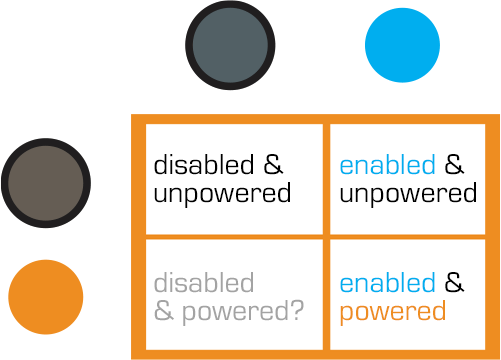
When the power is active, both lights are lit. When Dr. Saddler is rebooting the system, the blue light turns on first, with a loud, deep klaxon, meant to signal a “system active, but power is not feeding to the fence yet” status. Although the transition isn’t shown, presumably the amber light turns on as soon as power flows into the fence.

Even though Dr. Grant and the kids weren’t introduced to the light system when they arrived on the island, they were suitably worried when the klaxon sounded and the blue light began blinking. This had the advantage of warning them that the fence was about to activate, but the disadvantage that it set off such a strong fear response in Timmy that he froze in place while still on the fence. Drama is good for an audience, bad for Timmy.

Fence Activation

Jurassic_Park_Perimeter_Fences05

We see in Nedry’s escape scene that he shuts off the power because the main gates out of Jurassic Park cannot be opened while the power is active. However, in the intro scene (pictured above) we see that the gate can be opened without shutting off power to the entire fence system. This implies that Jurassic Park has fairly detailed control over various parts of the fence system. This is confirmed when we get a glimpse of labels on a circuit board later in the film:

Jurassic_Park_Perimeter_Fences03

The good

  • The major systems are each on dedicated circuits that are individually controlled. That’s useful for managing complex scenarios in the park.
  • Automated alert systems are quickly understandable. That’s useful for keeping employees and visitors safe.
  • “Blue” and “Orange” are colors that are easily differentiable even with color-blind users. It’s a good choice for alerts.
  • There is an unmistakable and unavoidable audio backup to the visual signal.

The deadly

Let’s not forget that this is a system with potentially deadly consequences. It’s worth making sure it does its job of keeping the bad thing controlled, while not frying people.

“Danger” signage on the T-rex pen is too high for good viewing. A person would interact with the fence closer to the concrete barrier, and would almost certainly not look up. Better is to repeat the signage frequently, repeatedly along its length, and at several heights.

The light system is a 4-bit signal. It takes some interpretation. “Wait. What did blinking blue and off orange mean?” That’s pretty poor for emergency situations, where a few seconds of delay can mean the difference between safety and becoming a jurassic kebab.

lights

Better would be an unmistakable binary signal. Light on = power on. Light off = power off. Make it a big, blood-colored red. That’s much simpler and doesn’t require referencing a manual. Color blind folks won’t need to distinguish light colors at all, they can just see the on-or-off.

What about powering up? That blinking is clearly meaningful, but it’s still more ambiguous than it needs to be.

Ideally you’d have some sort of human-detection system so that the fence itself keeps humans safe, but if that’s not doable or reliable, you’d need some other warning signal. I think there are three ways we can convey that shit is getting real…

Visual

I’d recommend a progress bar, like the Eko traffic light concept by Damjan Stanković. Surround the red light with the progress bar, combining with audible and tactile signals, as below. Put these in the pillars that support the cables, and either near or around the hole through which the cables pass, so it’s clear that these lights have something to do with these cables.

traffic-light-progress-bar-500x371
Side note: I think this is a problematic as a stop light, but quite brilliant as a general time-bound event signal.

Audible

You need the audible warning to catch attention regardless of whether or not a person is looking in the direction of the light. The klaxon is awesome at getting attention and signalling dangers. But again, it’s an ambiguous as The Robot shouting, “Danger, Will Robinson!” If we modified it so that the sound started low and raised in pitch, it would help convey that something is coming on line. You could just use a “blinking” Shepard Tone.

Tactile

And of course, there’s the power itself. It shouldn’t just come on all at once. We should raise the power level over some span of time, so Timmy starts feeling greater and greater discomfort and he has a building pressure to get off the fence, rather than being thrown back immediately. Even a blind, deaf, or panicked person wouldn’t be able to ignore it and be forced to take action without the risk of blunt force electrocution.

Glossary: Facing, Off-facing, Lengthwise, and Edgewise

As part of the ongoing review of the Iron Man HUD, I noticed a small feature in the Iron Man 3 UI 2nd-person UI that—in order to critique—I have to discuss some new concepts and introduce some new terms. The feature itself is genuinely small and almost not worth posting about, but the terms are interesting, so bear with me.

Most of the time JARVIS animates the HUD, the UI elements sit on an invisible sphere that surrounds his head. (And in the case of stacked elements, on concentric invisible spheres.) The window of Pepper in the following screenshot illustrates this pretty clearly. It is a rectangular video feed, but appears slightly bowed to us, being on this sphere near the periphery of this 2nd-person view.

IronMan3_HUD68
…And Pepper Potts is up next with her op-ed about the Civil Mommy Wars. Stay tuned.

Having elements slide around on the surface of this perceptual sphere is usable for Tony, since it means the elements are always facing him and thereby optimally viewable. “PEPPER POTTS,” for example, is as readable as if it was printed on a book perpendicular to his line of sight. (This notion is a bit confounded by the problems of parallax I wrote about in an earlier post, but since that seems unresolvable until Wim Wouters implements this exact HUD on Oculus Rift, let’s bypass it to focus on the new thing.)

So if it’s visually optimal to have 2D UI elements plastered to the surface of this perceptual sphere, how do we describe that suboptimal state where these same elements are not perpendicular to the line of sight, but angled away? I’m partly asking for a friend named Tony Stark because that’s some of what we see in Iron Man 3, both in 1st- and 2nd-person views. These examples aren’t egregious.

IronMan3_HUD44
The Iron Patriot debut album cover graphic is only slightly angled and so easy to read. Similarly, the altimeter thingy on the left is still wholly readable.
IronMan3_HUD64
The weird L-protractor in the corner might have some 3D use we’re just not seeing at this particular moment.

As I mentioned in the opening paragraph, these things aren’t terrible in and of themselves, but as a UI pattern could get bad as people misunderstand and overuse it, so we need a way to talk about it. To be precise, we need a way to talk about the degree of tilt away from a plane perpendicular to the line of sight. except “degree of tilt away from a plane perpendicular to the line of sight” is waaay too long.

To find this term, I did some asking around on social media. At first, lots of folks jumped to anatomical terms of location like sagittal or caudal, but should you be similarly tempted, note that these terms are fixed per the body. A UI element that is coronal in front of the face, and perfectly readable there, is utterly unreadable near the ear. A facing element would be readable in both places, and a whatever-the-antonym-is element similarly unreadable as it slid from the nose around the side. 

BodyPlanes

Eventually I got some nice adjectives that describe the particular tilt away from the line of sight. I was most happy with industrial designer ‏Abhinav Dapke’s suggestion of “lengthwise” for a tilt away from line-of-sight, since it’s a word we have already and very descriptive. It also implies another existing word for yawed-against line-of-sight, and that’s “edgewise.” (Roll along line-of-sight can be handled simply as rotation, for you completionists.)

But for the single variable that we can discuss as an antonym to facing, my crowdsourcing turned up nothing, and so I’m going to coin the ungainly adjectives off-facing and off-faced. Each is short, decryptable, not currently defined as something else, and obviously connected to its source concept, so works for many reasons.

off-facing.png


With these we now we can speak of those elements that are off-faced in Iron Man and similar bubble HUDs, and do a Invasion of the Body Snatchers-esque pointing and screeching when it’s too extreme.

Note that this only applies to 2D UI elements that are meant to be read. The overwhelming majority of things we see in the physical world are not oriented to our line of sight and that poses little problem. Even in the Iron Man HUD we see plenty of objects that are off-faced but rightly so, since as augmentations they bear orientation to the world, not the viewer.

IronMan3_HUD63

One of the main reasons I went to such trouble to come up with these terms is that I think the Iron Man HUD is one of the most forward-provoking sci-fi interfaces in the survey. It ought to be the Minority Report Precrime Scrubber of it’s day. I suspect it will become more and more influential, and so having these new terms are likely to become more useful and necessary as sci-fi keeps on keepin’ on.

Next up in the Iron HUD series: We discuss how JARVIS is straight-up lying to Tony Stark.